JavaScript Performance Optimization for the Web
JavaScript execution is the dominant source of main-thread blocking in modern web applications, and the main thread is the only thread that can paint, run input handlers, or run layout. Every long task therefore translates directly into Interaction to Next Paint (INP) — the Core Web Vital that since March 12, 2024 replaces First Input Delay and is “good” at ≤200 ms at the 75th percentile.
This article covers four levers a senior engineer can pull to keep the main thread responsive: the script-loading pipeline, task scheduling primitives, bundle shape (code splitting and tree shaking), and Web Workers. It is part of a web-performance series — measurement and infrastructure are covered in sibling entries.
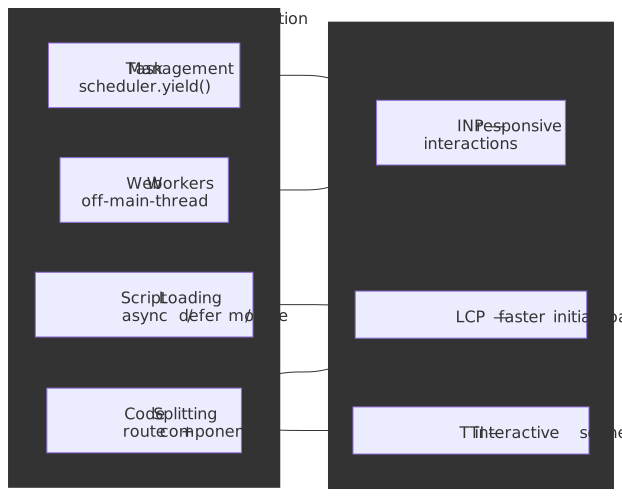
Mental model: three sources of main-thread blocking
JavaScript performance optimization addresses three distinct bottlenecks. Each lever in this article maps onto exactly one of them.
- Parse-time blocking — Scripts block DOM construction during fetch and execution. The
async,defer, andtype="module"attributes control when scripts execute relative to parsing:deferguarantees document order after parsing completes,asyncexecutes on arrival (no order guarantee), and modules are deferred by default with dependency-graph resolution. - Run-time blocking — Tasks exceeding 50 ms (the W3C Long Tasks API threshold) block input handling and inflate INP.
scheduler.yield()(Chromium 129+, Firefox 142+) yields to the browser while preserving the originating task’s priority through a continuation queue — unlikesetTimeout(0), which appends to the back of the macrotask queue. - Bundle-size blocking — Large initial bundles delay Time to Interactive (TTI). Code splitting via dynamic
import()defers non-critical code; tree shaking eliminates dead exports statically. Both rely on ES modules — CommonJS is runtime-resolved and cannot be statically analyzed.
Web Workers cut transversely across all three: they move computation entirely off the main thread. Transferable objects keep that off-loading cheap by handing ownership of large buffers to the worker without copying.
Note
Where a claim is version- or browser-sensitive, we date-stamp it. Browser-API status changes quickly; check MDN’s compatibility tables before shipping a fallback strategy.
Script Loading: Parser Interaction and Execution Order
The choice of script loading strategy determines when the browser’s HTML parser yields control to JavaScript execution.
Why Parser Blocking Matters
The HTML parser cannot construct DOM nodes while JavaScript executes — a classic script may call document.write() or mutate the DOM being built, so the parser is forced to suspend. This is the fundamental tension: scripts need DOM access, but parsing must complete for the DOM to exist. The WHATWG HTML scripting model formalises three resolutions: blocking (the legacy default), async (parallel fetch, execute on arrival), and defer (parallel fetch, execute after parsing in document order).
Execution Order Guarantees by Attribute
| Attribute | Fetch | Execute | Order | Use Case |
|---|---|---|---|---|
| (none) | Blocking | Immediate | Document | Legacy scripts requiring document.write() |
async |
Parallel | On arrival | None | Independent analytics, ads |
defer |
Parallel | After parsing | Document | Application code with DOM dependencies |
type="module" |
Parallel | After parsing | Dependency graph | Modern ESM applications |
Why defer Executes After Parsing
The defer attribute was introduced in Internet Explorer 4 (1997) and standardized in HTML 4 (Mozilla Hacks history). The design rationale: the author asserts the script does not call document.write(), so the parser can keep building the DOM while the script downloads and execute it once parsing is done. Before defer, every classic script blocked parsing during both download and execution — a major perceived-performance problem on slow networks.
Internally, the HTML spec defines a list of scripts that will execute when the document has finished parsing. Deferred scripts append to this list and execute sequentially before DOMContentLoaded, preserving document order.
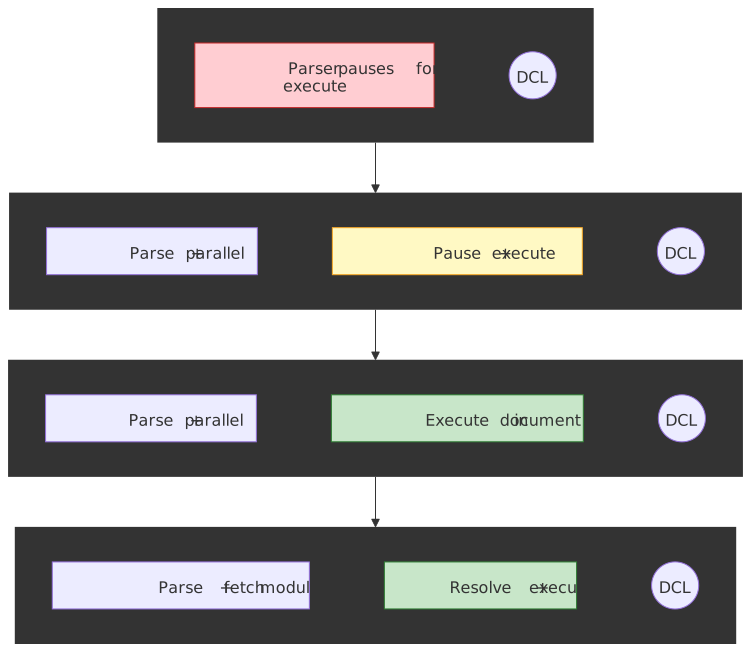
Parser-Script Timing
The four loading modes produce four distinct interleavings of HTML parsing and script execution.
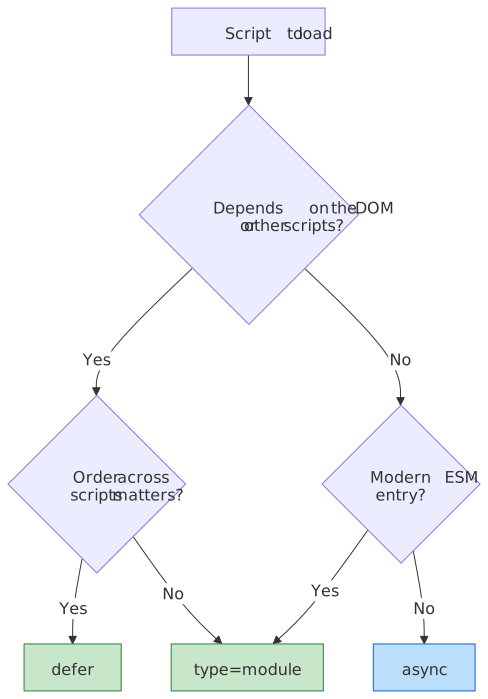
async vs defer Decision Matrix
Module Scripts: Deferred by Default
ES modules (type="module") are deferred by default with additional semantics:
- Strict mode: Always enabled;
thisisundefinedat top level. - Dependency resolution: The whole module graph is fetched before any module body runs.
- Top-level
await: Supported; blocks dependent modules, not the parser (TC39 spec).
<!-- Analytics: independent, no DOM dependency --><script src="analytics.js" async></script><!-- Polyfills → Framework → App: order-dependent --><script src="polyfills.js" defer></script><script src="framework.js" defer></script><script src="app.js" defer></script><!-- Modern entry: ESM with automatic deferral --><script type="module" src="main.js"></script>Tip
The nomodule fallback was load-bearing through ~2020 (IE11, older Safari). With IE11 fully retired and Safari 14+ shipping ESM since 2020, in 2026 most production apps can drop nomodule and the parallel ES5 bundle entirely — saving 30-50% of build time and roughly half the bytes for legacy users who would have downloaded both.
Long Task Management: The 50ms Threshold
Tasks exceeding 50 ms are classified as long tasks by the W3C Long Tasks API and directly inflate Interaction to Next Paint.
Why 50ms?
The threshold comes from the RAIL performance model and is reused as the requestIdleCallback deadline cap. The arithmetic:
- Users perceive responses under 100 ms as instantaneous (Nielsen, 1993).
- A 50 ms task budget leaves 50 ms for the browser to coalesce input, run hit-testing, run layout/paint, and present a frame.
- 50 + 50 = 100 ms keeps the interaction inside the perceptual “instant” envelope.
INP itself uses a more generous 200 ms p75 budget — the gap between 50 ms (per task) and 200 ms (per interaction) absorbs multiple tasks plus the browser’s own rendering work.
scheduler.yield(): Priority-Preserving Yielding
scheduler.yield() shipped in Chromium 129 (September 2024) and Firefox 142 (August 2025). Safari has not yet implemented it as of April 2026, so the Scheduler API is not Baseline — design code paths to fall back gracefully.
async function processLargeDataset(items) { const results = [] const BATCH_SIZE = 50 for (let i = 0; i < items.length; i++) { results.push(await computeExpensiveOperation(items[i])) // Yield every 50 items, maintaining task priority if (i % BATCH_SIZE === 0 && i > 0) { await scheduler.yield() } } return results}Why Not setTimeout(0)?
setTimeout(0) has four limitations that scheduler.yield() addresses:
| Aspect | setTimeout(0) |
scheduler.yield() |
|---|---|---|
| Queue position | Back of task queue | Continuation queue (higher priority) |
| Minimum delay | ≥4 ms after 5 nested calls per HTML spec §timers | None |
| Background throttling | Heavily throttled in background tabs (Chrome budgets to ≈1 Hz after 5 min) | Respects priority |
| Priority awareness | None | Inherits from parent task |
The WICG Scheduling explainer defines a continuation queue per priority that runs before the regular task queue at the same priority. Concretely: a user-visible continuation runs before user-visible regular tasks but after any user-blocking task. This is what lets a long task voluntarily yield to user input without losing its place in the system priority order.
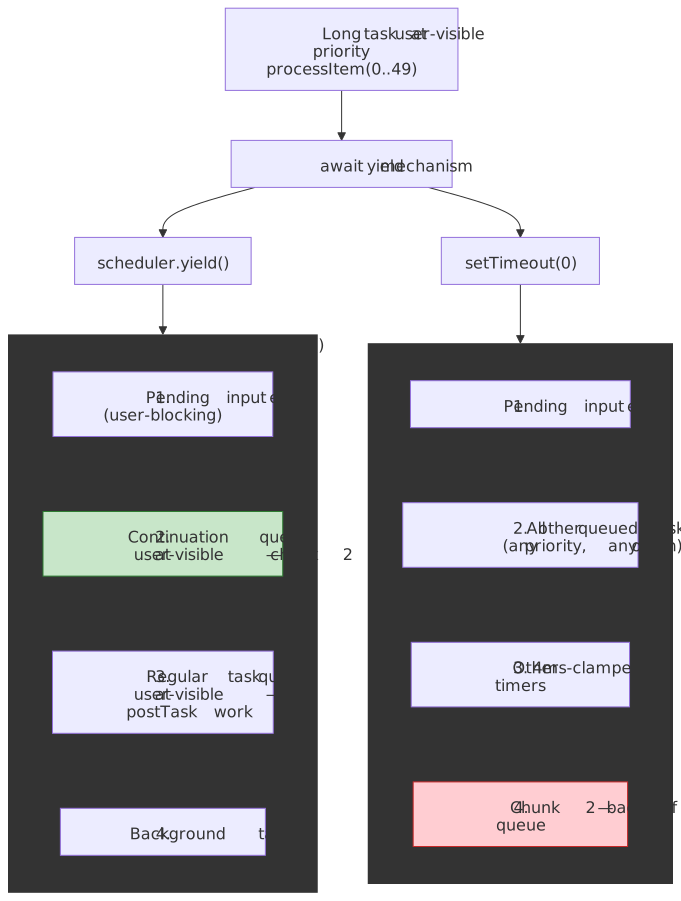
// Priority inheritance demonstrationscheduler.postTask( async () => { // This runs at background priority await heavyComputation() // After yield, still at background priority // But ahead of OTHER background tasks await scheduler.yield() await moreComputation() }, { priority: "background" },)Adaptive Time-Slice Yielding
For variable-cost work items, yield based on elapsed time rather than iteration count:
async function adaptiveProcessing(workQueue) { const TIME_SLICE_MS = 5 while (workQueue.length > 0) { const sliceStart = performance.now() // Process until time slice exhausted while (workQueue.length > 0 && performance.now() - sliceStart < TIME_SLICE_MS) { processWorkItem(workQueue.shift()) } if (workQueue.length > 0) { await scheduler.yield() } }}Browser Support and Fallback
| API | Chrome | Firefox | Safari (April 2026) |
|---|---|---|---|
scheduler.postTask() |
94 (Sept 2021) | 142 (Aug 2025) | Not supported |
scheduler.yield() |
129 (Sept 2024) | 142 (Aug 2025) | Not supported |
For browsers without support, fall back to setTimeout(0) and accept that priority information is lost:
const yieldToMain = () => { if ("scheduler" in globalThis && "yield" in scheduler) { return scheduler.yield() } return new Promise((resolve) => setTimeout(resolve, 0))}Code Splitting: Reducing Initial Bundle Size
Code splitting defers loading non-critical code until needed, reducing Time to Interactive (TTI).
Route-Based Splitting
Route-based splitting is the highest-impact strategy—each route loads only its required code:
import { lazy, Suspense } from "react"import { Routes, Route } from "react-router-dom"const Home = lazy(() => import("./pages/Home"))const Dashboard = lazy(() => import("./pages/Dashboard"))const Settings = lazy(() => import("./pages/Settings"))function App() { return ( <Suspense fallback={<LoadingSpinner />}> <Routes> <Route path="/" element={<Home />} /> <Route path="/dashboard" element={<Dashboard />} /> <Route path="/settings" element={<Settings />} /> </Routes> </Suspense> )}The Chunk Loading Waterfall Problem
Sequential chunk loading creates waterfalls:
- Download and parse
entry.js - Router determines current route
- Download route chunk
- Parse and hydrate
Solution: Inject a preload script that runs before the main bundle:
<script> const routeChunks = { "/": "home.js", "/dashboard": "dashboard.js" } const chunk = routeChunks[location.pathname] if (chunk) { const link = document.createElement("link") link.rel = "preload" link.as = "script" link.href = `/chunks/${chunk}` document.head.appendChild(link) }</script>webpackPrefetch vs webpackPreload
| Directive | Timing | Priority | Use Case |
|---|---|---|---|
webpackPreload |
Parallel with parent | Medium | Needed for current navigation |
webpackPrefetch |
During browser idle | Low | Likely needed for future navigation |
// Preload: needed NOW, loads in parallelimport(/* webpackPreload: true */ "ChartingLibrary")// Prefetch: needed LATER, loads during idleimport(/* webpackPrefetch: true */ "./SettingsPage")Trade-off: Overusing preload competes for bandwidth with critical resources. Prefetch is safer—it uses idle time but may not complete before needed.
Component-Level Splitting
Split individual heavy components (>30KB) that aren’t needed immediately:
import { lazy, Suspense, useState, startTransition } from "react"const HeavyChart = lazy(() => import("./HeavyChart"))function Dashboard() { const [showChart, setShowChart] = useState(false) const loadChart = () => { // Use transition to avoid blocking UI startTransition(() => setShowChart(true)) } return ( <div> <button onClick={loadChart}>Show Analytics</button> {showChart && ( <Suspense fallback={<ChartSkeleton />}> <HeavyChart /> </Suspense> )} </div> )}Tree Shaking: Dead Code Elimination
Tree shaking removes unused exports from the bundle at build time.
Why ES Modules Enable Tree Shaking
ES modules are statically analyzable—imports and exports can be determined at compile time without executing code.
ECMA-262 design: Import/export declarations can only appear at module top level, and specifiers must be string literals.
// ✅ Static - bundler knows exactly what's usedimport { add, multiply } from "./math.js"// ❌ Dynamic - cannot analyze at build timeconst fn = condition ? "add" : "multiply"import("./math.js").then((mod) => mod[fn]())CommonJS cannot be tree-shaken because require() is a runtime function that can be called conditionally with computed paths.
When Tree Shaking Fails
- Side effects present: Code that runs on import (polyfills, CSS, prototype modifications)
- Dynamic property access:
utils[methodName] - Dynamic imports: The entire module is included
- Missing
sideEffectsfield: Bundler assumes all files have side effects
// package.json - declare no side effects for aggressive tree shaking{ "sideEffects": false}// Or whitelist files with side effects{ "sideEffects": ["*.css", "./src/polyfills.js"]}Critical pitfall: sideEffects: false without whitelisting CSS files will remove all CSS imports.
Bundler Differences
| Bundler | Analysis Level | Trade-off |
|---|---|---|
| Rollup | AST node level | Best optimization, slower |
| webpack | Module/export level | Relies on Terser for final DCE |
| esbuild | Top-level statement | Fastest, more conservative |
esbuild interprets sideEffects: false narrowly—it removes entire unused modules but doesn’t tree-shake individual statements within modules.
Web Workers: Off-Main-Thread Computation
Web Workers run JavaScript in background threads, preventing long computations from blocking the main thread.
When to Use Workers
Workers have non-trivial overhead — message serialization (or transfer), thread creation, no DOM access, no synchronous main-thread interaction. Use them for:
- CPU-intensive computation: Image processing, encryption, compression.
- Large data processing: Sorting, filtering, aggregation.
- Background sync: Data transformation while UI remains responsive.
The WHATWG Workers spec is explicit that “workers are relatively heavy-weight, and are not intended to be used in large numbers” — so reach for a pool, not a worker per task.
Basic Worker Pattern
const worker = new Worker("worker.js")worker.postMessage({ type: "PROCESS", data: largeDataset })worker.onmessage = (event) => { if (event.data.type === "COMPLETE") { updateUI(event.data.result) }}worker.onerror = (error) => { console.error("Worker error:", error.message)}self.onmessage = (event) => { const { type, data } = event.data if (type === "PROCESS") { try { const result = expensiveComputation(data) self.postMessage({ type: "COMPLETE", result }) } catch (error) { self.postMessage({ type: "ERROR", message: error.message }) } }}Transferable Objects: Zero-Copy Transfer
By default, postMessage uses the structured clone algorithm — deep copying data. For large ArrayBuffers, use transfer instead:
const buffer = new ArrayBuffer(1024 * 1024 * 100) // 100MBconsole.log(buffer.byteLength) // 104857600// Transfer ownership - zero copyworker.postMessage({ buffer }, [buffer])console.log(buffer.byteLength) // 0 (detached)Per the HTML spec, transferring is irreversible: once transferred, an object cannot be used or re-transferred from the original context.
Transferable types (MDN): ArrayBuffer, MessagePort, ImageBitmap, OffscreenCanvas, ReadableStream, WritableStream, TransformStream, VideoFrame, AudioData, RTCDataChannel (Chromium-only).
Caution
TypedArrays (e.g. Uint8Array, Float32Array) are not transferable. Only the underlying ArrayBuffer is. Pass view.buffer in the transfer list and reconstruct the view on the other side.
Error Handling Edge Cases
Synchronous exceptions propagate to the parent via worker.onerror:
worker.onerror = (event) => { console.error(`Worker error: ${event.message} at ${event.filename}:${event.lineno}`) event.preventDefault() // Prevents default error logging}Unhandled promise rejections do NOT propagate to the parent—they only log to the worker’s console. Implement explicit error messaging:
self.addEventListener("unhandledrejection", (event) => { self.postMessage({ type: "ERROR", message: event.reason?.message || "Unhandled rejection", })})Worker Pool for Parallel Processing
class WorkerPool { constructor(workerScript, poolSize = navigator.hardwareConcurrency) { this.workers = [] this.queue = [] this.available = [] for (let i = 0; i < poolSize; i++) { const worker = new Worker(workerScript) worker.onmessage = (e) => this.handleMessage(worker, e) worker.onerror = (e) => this.handleError(worker, e) this.workers.push(worker) this.available.push(worker) } } execute(task) { return new Promise((resolve, reject) => { const wrapper = { task, resolve, reject } if (this.available.length > 0) { this.dispatch(this.available.pop(), wrapper) } else { this.queue.push(wrapper) } }) } dispatch(worker, wrapper) { worker.currentTask = wrapper worker.postMessage(wrapper.task) } handleMessage(worker, event) { const { resolve, reject } = worker.currentTask if (event.data.error) { reject(new Error(event.data.error)) } else { resolve(event.data.result) } // Return to pool or process queue if (this.queue.length > 0) { this.dispatch(worker, this.queue.shift()) } else { this.available.push(worker) } } handleError(worker, event) { worker.currentTask?.reject(new Error(event.message)) // Worker may be unusable - consider recreating } terminate() { this.workers.forEach((w) => w.terminate()) }}Third-Party Scripts: Partytown
Hand-written workers cover code you control. Third-party tags — analytics, A/B testing, tag managers — typically assume they own the main thread (synchronous DOM access, document.write, top-level window mutations). Partytown by the Qwik team hoists those scripts into a Web Worker and proxies the DOM/window calls back to the main thread synchronously: when cross-origin isolated it uses Atomics.wait over a SharedArrayBuffer (the fast path, ~10× faster); otherwise a service worker intercepts a synchronous XMLHttpRequest from the worker. Reach for it when you cannot control or remove a third-party script that measurably hurts INP — it preserves the script’s synchronous API surface at the cost of either the cross-origin isolation rollout (see next section) or the service-worker round-trip per call.
SharedArrayBuffer and Cross-Origin Isolation
SharedArrayBuffer enables shared memory between the main thread and workers, but is gated on cross-origin isolation as a Spectre mitigation. The page must be served with both:
Cross-Origin-Opener-Policy: same-originCross-Origin-Embedder-Policy: require-corpThe reason: a writer in one thread plus a reader in another thread can be used to build a high-resolution timer by busy-counting an incrementing counter. That timer is precise enough to mount cache-timing attacks that extract cross-origin secrets via Spectre. Cross-origin isolation guarantees the page cannot embed cross-origin secrets in the first place, neutralising the attack.
// Verify cross-origin isolationif (crossOriginIsolated) { const shared = new SharedArrayBuffer(1024) // Can use Atomics for synchronization} else { console.warn("SharedArrayBuffer unavailable - not cross-origin isolated")}Warning
Safari does not support COEP: credentialless (a more permissive variant available in Chromium and Firefox). On a Safari-supporting site you are forced to require-corp, which means every cross-origin subresource — fonts, images, ads, third-party scripts — must explicitly opt in via CORS or CORP. Audit your CDN headers before flipping isolation on; a single missing CORP header tanks the page.
React Optimization Patterns
React applications have framework-specific optimization opportunities.
React.memo: Preventing Unnecessary Re-renders
React.memo creates a higher-order component that skips re-rendering when props are shallowly equal:
const ExpensiveList = React.memo(function ExpensiveList({ items, onSelect }) { return ( <ul> {items.map((item) => ( <li key={item.id} onClick={() => onSelect(item.id)}> {item.name} </li> ))} </ul> )})// Custom comparison for complex propsconst MemoizedChart = React.memo( function Chart({ data, config }) { return <ChartImpl data={data} config={config} /> }, (prev, next) => { return prev.data.length === next.data.length && prev.config.type === next.config.type },)When to use: Components that receive the same props frequently, expensive render logic, components deep in the tree that re-render due to parent updates.
When NOT to use: Components that always receive new props (breaks memoization), simple components (memo overhead exceeds render cost).
React Compiler: Auto-Memoization
React Compiler 1.0 shipped stable in October 2025 (RC since April 2025) as babel-plugin-react-compiler. It performs static analysis of components and hook bodies, then inserts the equivalent of useMemo / useCallback / React.memo automatically wherever it is provably safe — guided by the Rules of React. Two practical implications:
- Most
useMemo,useCallback, andReact.memoboilerplate becomes redundant once the compiler is enabled. The Rules of React (pure render functions, no mutation of props/state during render, hooks called unconditionally) become hard requirements rather than guidelines. - Manual memoization still wins where the compiler bails out — components that violate the rules (mutate during render, call hooks conditionally, depend on external mutable state) are skipped. Run with the ESLint plugin (
eslint-plugin-react-hooksv6+ in Compiler mode) to catch the bail-outs.
Adopt the compiler before adding new manual memos; remove existing memos only after confirming the compiler is optimising the same components.
useMemo and useCallback: Stabilizing References
function DataGrid({ data, filters, onRowClick }) { const [sortConfig, setSortConfig] = useState({ key: "id", direction: "asc" }) // Memoize expensive computation const filteredData = useMemo(() => { return data.filter((item) => matchesFilters(item, filters)).sort((a, b) => compareBy(a, b, sortConfig)) }, [data, filters, sortConfig]) // Stabilize callback reference for memoized children const handleRowClick = useCallback( (rowId) => { onRowClick(rowId) }, [onRowClick], ) return <MemoizedTable data={filteredData} onRowClick={handleRowClick} />}React Server Components
React Server Components became stable with React 19 (December 2024) and ship today via Next.js App Router (production-mature) and React Router v7 (in development). They run on the server with zero client bundle impact:
// No 'use client' - runs on server onlyimport { db } from "./database" // Server-only moduleimport ClientChart from "./ClientChart"export default async function Dashboard({ userId }) { // Direct database access - no API needed const metrics = await db.query("SELECT * FROM metrics WHERE user_id = ?", [userId]) return ( <div> <h1>Dashboard</h1> {/* ClientChart creates a split point */} <ClientChart data={metrics} /> </div> )}"use client"import { useState } from "react"export default function ClientChart({ data }) { const [zoom, setZoom] = useState(1) return <canvas data-zoom={zoom} />}Key insight: The 'use client' directive creates an automatic code split point. Server-side dependencies (database clients, large processing libraries) never ship to the client.
Virtualization for Large Lists
For lists with thousands of items, render only visible items:
import { useVirtualizer } from "@tanstack/react-virtual"function VirtualList({ items }) { const parentRef = useRef(null) const virtualizer = useVirtualizer({ count: items.length, getScrollElement: () => parentRef.current, estimateSize: () => 50, // Estimated row height overscan: 5, // Render 5 extra items above/below viewport }) return ( <div ref={parentRef} style={{ height: "400px", overflow: "auto" }}> <div style={{ height: virtualizer.getTotalSize() }}> {virtualizer.getVirtualItems().map((virtualRow) => ( <div key={virtualRow.key} style={{ position: "absolute", top: virtualRow.start, height: virtualRow.size, }} > {items[virtualRow.index].name} </div> ))} </div> </div> )}Performance Measurement
Effective optimization requires continuous measurement.
Core Web Vitals Monitoring
class PerformanceMonitor { constructor() { this.metrics = {} this.setupObservers() } setupObservers() { // Largest Contentful Paint new PerformanceObserver((list) => { const entries = list.getEntries() this.metrics.lcp = entries[entries.length - 1].startTime }).observe({ type: "largest-contentful-paint" }) // Interaction to Next Paint (replaced FID March 2024) new PerformanceObserver((list) => { for (const entry of list.getEntries()) { if (!this.metrics.inp || entry.duration > this.metrics.inp) { this.metrics.inp = entry.duration } } }).observe({ type: "event", buffered: true, durationThreshold: 16 }) // Cumulative Layout Shift let clsValue = 0 new PerformanceObserver((list) => { for (const entry of list.getEntries()) { if (!entry.hadRecentInput) { clsValue += entry.value this.metrics.cls = clsValue } } }).observe({ type: "layout-shift" }) } report() { navigator.sendBeacon("/api/metrics", JSON.stringify(this.metrics)) }}Long Task Detection
const longTaskObserver = new PerformanceObserver((list) => { for (const entry of list.getEntries()) { if (entry.duration > 100) { console.warn(`Long task: ${entry.duration.toFixed(0)}ms`, { attribution: entry.attribution, }) } }})longTaskObserver.observe({ type: "longtask" })Practical takeaways
- Default to
deferfor application code,asyncfor truly independent scripts (analytics, error reporters), andtype="module"for any new bundle entry. Drop thenomoduleES5 fallback bundle unless RUM data still shows IE11/legacy Safari traffic. - Reach for
scheduler.yield()when you have work that legitimately exceeds 50 ms and cannot be moved to a worker. Wrap it behind a feature-detected fallback tosetTimeout(0)for Safari. - Code-split by route first, by interaction second, by component third. Pair every dynamic
import()of a likely-needed chunk with a<link rel="preload">orwebpackPreloadhint to avoid the request waterfall. - Tree-shake aggressively with
"sideEffects": falseplus an explicit allow-list for CSS and polyfills. Verify withimport-costorbundle-analyzer— Terser’s DCE is opaque otherwise. - Hoist CPU-heavy work into a Worker pool sized to
navigator.hardwareConcurrency - 1. Use transferables for any buffer over a few hundred kilobytes;SharedArrayBufferonly when read/write traffic is high enough to amortise the cross-origin-isolation rollout cost. - Measure before and after every change with
PerformanceObserverand field-data RUM. Synthetic Lighthouse runs miss the device + network distribution that determines real INP.
Related reading in this series
- Web Performance Overview — series index, Core Web Vitals refresher, JS-vs-rest budget breakdown.
- Web Performance Infrastructure Stack — DNS, HTTP/3, edge, BFF, and caching levers.
- CSS & Typography Performance — render-blocking CSS, containment, font-loading strategies.
- Image Optimization — formats, responsive
srcset, lazy-loading, LCP image rules. - Bundle Splitting Strategies — deeper dive on splitting heuristics and resource hints.
- Browser Event Loop — model behind the scheduler primitives in this article.
Appendix
Prerequisites
- Familiarity with JavaScript event loop and task queue model
- Understanding of browser rendering pipeline (parse, style, layout, paint)
- Basic React knowledge for framework-specific sections
Summary
- Script loading:
defer= order-preserved after parsing;async= executes on arrival (no order);module= deferred with dependency resolution. - 50ms threshold: RAIL model target — 100 ms perceived instant, 50 ms task budget leaves room for input handling.
scheduler.yield(): Chromium 129+ and Firefox 142+; not yet in Safari. Preserves task priority via continuation queues; falls back tosetTimeout(0)elsewhere.- Tree shaking: Requires ES modules (static structure); fails on side effects, dynamic property access, dynamic imports, or a missing
sideEffectsfield. - Web Workers: Off-thread computation; use transferables for large
ArrayBuffers; promise rejections inside the worker do not propagate to the main thread. - React Server Components: Stable in React 19 (Dec 2024); zero client bundle for server-only components.
- INP: Replaced FID on 12 March 2024; “good” at ≤200 ms p75.
References
Specifications
- WHATWG HTML - Scripting - Script loading attributes and execution order
- W3C Long Tasks API - 50ms threshold definition
- WICG Prioritized Task Scheduling - scheduler.yield() and scheduler.postTask()
- W3C requestIdleCallback - 50ms deadline rationale
- WHATWG HTML - Web Workers - Worker lifecycle and messaging
- WHATWG - Structured Clone - Serialization algorithm and transferables
- ECMA-262 - ES module static structure
Official Documentation
- MDN - Script Element - async, defer, module
- MDN - scheduler.yield() - API reference and browser support
- MDN - Web Workers API - Worker patterns
- MDN - Transferable Objects - Zero-copy transfer
- webpack - Code Splitting - Dynamic imports and chunk configuration
- webpack - Tree Shaking - sideEffects field
- React - lazy - Component-level code splitting
- React - Server Components - Server/client boundary
- React Compiler v1.0 - Auto-memoization stable release
- Partytown - How Partytown Works - Sync DOM proxy via SAB / service worker
Core Maintainer Content
- WICG Yield Explainer - Priority inheritance mechanism
- Chrome Developers - scheduler.yield() - setTimeout limitations
- V8 Blog - Spectre - SharedArrayBuffer security restrictions
- React 18 Suspense SSR Architecture - Streaming and selective hydration
Industry Expert Content
- web.dev - Optimize Long Tasks - Task scheduling strategies
- web.dev - INP - Interaction to Next Paint metric
- web.dev - CommonJS Bundles - Why CommonJS prevents tree shaking