Web Components: Custom Elements, Shadow DOM, and practical boundaries
Web Components are not a single API. They are a composition of browser standards — primarily Custom Elements, Shadow DOM, and HTML <template> with <slot> — that let you define reusable, encapsulated elements that work without a specific framework runtime. That portability is the headline benefit; the engineering cost is learning where the encapsulation boundary sits and how consumers (including frameworks) are supposed to cross it safely.
This article stays practical: mental model first, then lifecycle and styling APIs, then accessibility and forms, then interoperability and adoption heuristics. For a broader platform overview, the MDN guide Web Components remains the best consolidated entry point.
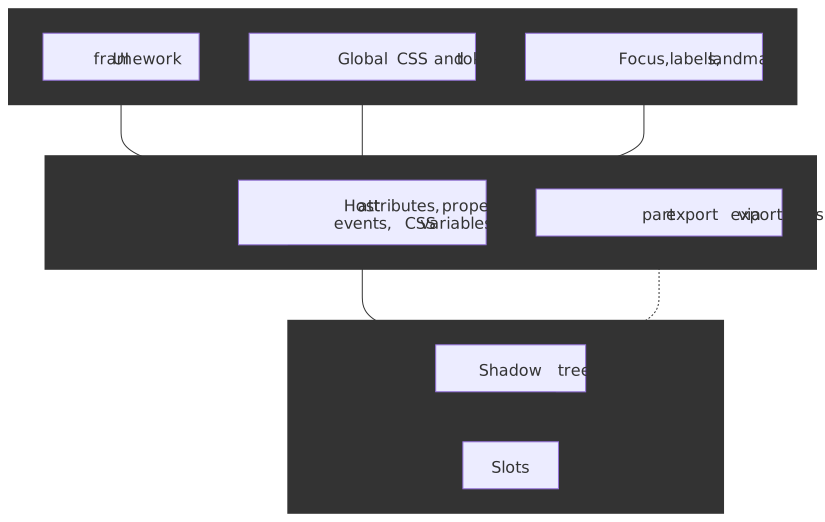
The three pillars (and the boundary they create)
- Custom Elements — JavaScript classes registered with
customElements.define(), instantiated by the parser ordocument.createElement(). - Shadow DOM — an attached shadow tree with its own style and DOM encapsulation rules (with deliberate escape hatches).
- Templates and slots — inert markup in
<template>and composed tree projection via<slot>.
Together, they create a hard boundary between what you promise as a public surface (attributes, properties, events, CSS custom properties, and opt-in styling hooks) and what you treat as private implementation (nodes and selectors inside the shadow tree).
Custom Elements: registration, attributes, and properties
You register a tag with a hyphen in the name (a requirement of the valid custom element name algorithm):
class MyCard extends HTMLElement { connectedCallback() { this.textContent = this.getAttribute("title") ?? ""; }}customElements.define("my-card", MyCard);Two details trip up even experienced teams:
- Attributes versus properties — HTML attributes are strings; element state often is not. Frameworks and DOM APIs frequently set properties; your element should usually implement reflection patterns (or explicit setters) rather than assuming
attributeChangedCallbackalone will fire. The HTML spec’s notes on reflecting IDL attributes are the authoritative background. observedAttributesis a filter —attributeChangedCallbackonly runs for attributes listed bystatic observedAttributes. Everything else is ignored for performance.
Autonomous vs customized built-ins
Most examples use autonomous custom elements (extends HTMLElement). The platform also supports customized built-ins (extends HTMLButtonElement, etc.), which use customElements.define(..., { extends: "button" }) and the is="" attribute. Cross-engine support is uneven and unlikely to converge soon: Chromium and Firefox implement them, but WebKit has declined to implement them and is instead exploring an alternative (platform-provided behaviors) — there is no signal that Safari will ship is="". The pragmatic guidance is unchanged: design systems default to autonomous custom elements because Safari users would otherwise be excluded, and scoped registries (below) refuse extends entirely.
Shadow DOM: open, closed, and what “encapsulation” means
attachShadow({ mode: "open" | "closed" }) creates a shadow root. mode: "open" allows element.shadowRoot for debugging, testing, and tooling; closed hides that handle — which is not a security boundary (callers with script access can still wrap or proxy your element), but it does communicate “hands off” to well-behaved code.
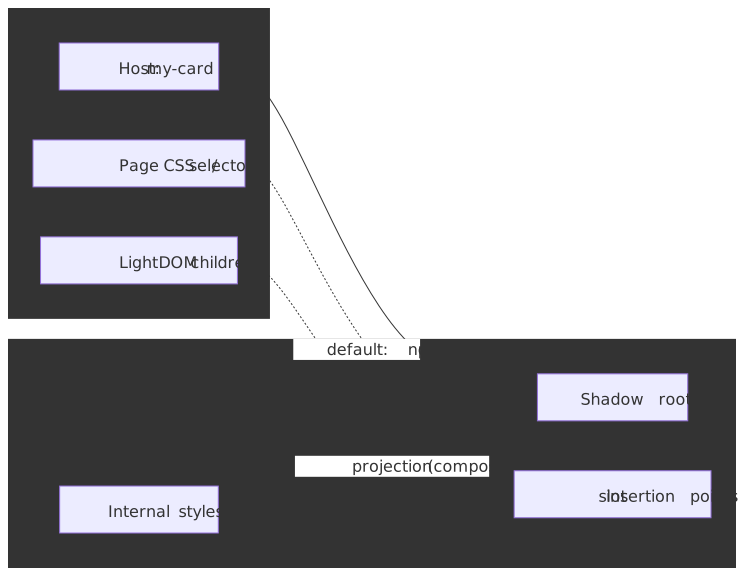
Declarative Shadow DOM (HTML template element with shadowrootmode) matters for SSR and static HTML. As of 2024 it is Baseline newly available across Chrome 111+, Safari 16.4+, and Firefox 123+, so server-rendered shadow roots are a realistic option for component libraries that need first paint without a runtime. You still need a coherent story for hydration and progressive enhancement — see Declarative Shadow DOM on MDN. Watch out for the legacy shadowroot attribute; the standardized name is shadowrootmode and older renderers may emit the deprecated form.
Slots and composition
Named and default slots let consumers pass light DOM children that render as if they lived inside your component, while still participating in the composed tree for events and hit testing. Listen for slotchange when you need to react to what actually got assigned (especially for lazy or conditional slotted content).
Two slot assignment modes exist: the default named mode (children with a matching slot="" attribute project automatically) and manual mode, opted into via attachShadow({ slotAssignment: "manual" }), which makes you call HTMLSlotElement.assign() explicitly. Manual mode is useful when the child element shouldn’t carry a slot attribute or when you assemble the DOM in a non-template language (slot assignment in DOM). Most libraries start with the declarative form.
Lifecycle: constructor discipline and document moves
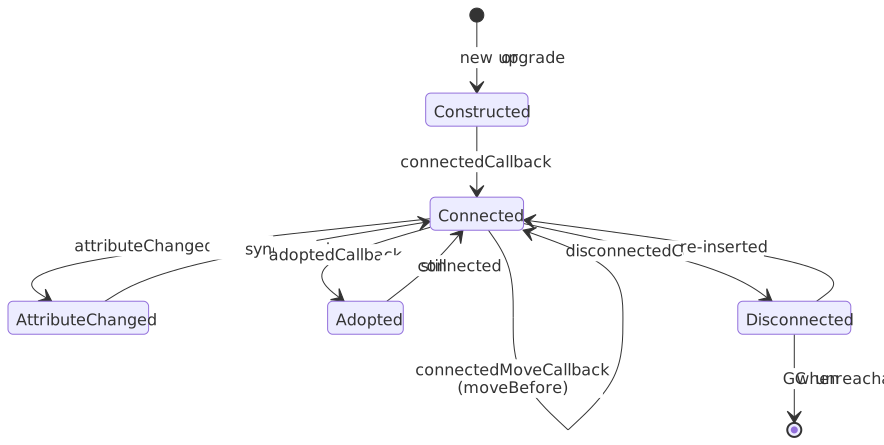
The custom element reactions you reach for most often are:
| Callback | Spec hook | Typical use |
|---|---|---|
constructor |
create an element | Call super(); avoid DOM reads/writes, attribute work, or child assumptions — the element may not be fully upgraded or connected. |
connectedCallback |
inserted into a document | Wire observers, start timers, render into shadow DOM. |
disconnectedCallback |
removed from a document | Tear down listeners and timers; undo side effects. |
attributeChangedCallback |
attribute changed | Sync observed attributes into shadow state. |
adoptedCallback |
adopted into a new document | Reset document-scoped handles (document reference changes) when moving nodes across windows or templates. |
connectedMoveCallback |
connected move callback reaction | Preserve state across Element.moveBefore() — when defined, the browser fires this in place of the disconnect/connect pair, keeping focus, animations, and <iframe> loads intact. Chromium 133+ ships it; other engines pending. |
Tip
If you need one-time setup that depends on layout, combine connectedCallback with requestAnimationFrame or ResizeObserver rather than doing heavy measurement in the constructor.
There is no built-in “render scheduling” like a framework’s batching. If attributeChangedCallback can fire in bursts, debounce or microtask-coalesce updates to avoid redundant layout work.
Styling across the boundary: shadow-safe defaults and opt-in escape hatches
Shadow DOM scopes selectors by default: outside CSS does not match inside, and inside CSS does not leak out (shadow tree style scoping). Cross-boundary styling is intentional and versioned:
| Mechanism | Role | Notes |
|---|---|---|
| CSS custom properties | Theming tokens | Inherit through the boundary; prefer this for colors, spacing, and typography contracts. |
:host / :host(...) |
Style the custom element itself | Primary surface for layout (display, sizing) on the host. |
::slotted(...) |
Style light DOM nodes assigned to slots | Limited selector syntax; you are still styling consumer-owned nodes — treat it as a compatibility surface, not a private implementation detail. |
::part(...) + part / exportparts |
Opt-in styling of internal shadow nodes | Stable only if you treat part names as semver API. |
Important
:host-context(...) is not reliably available across engines — Firefox declined to implement it and the CSS Working Group has signalled the selector is being dropped. Prefer theming via custom properties on ancestors or explicit host attributes instead of host-context for production systems.
Constructible stylesheets and shared rules
Inlining the same <style> into every shadow root is fine for one or two elements, but it scales badly: each instance pays a parse and a memory cost. Constructible stylesheets fix this by letting you build a CSSStyleSheet once and adopt it into many shadow roots:
const sheet = new CSSStyleSheet();sheet.replaceSync(` :host { display: block; } .body { padding: var(--card-padding, 12px); }`);class MyCard extends HTMLElement { constructor() { super(); const root = this.attachShadow({ mode: "open" }); root.adoptedStyleSheets = [sheet]; root.innerHTML = `<div class="body"><slot></slot></div>`; }}customElements.define("my-card", MyCard);The same CSSStyleSheet instance can be assigned to document.adoptedStyleSheets and to any number of ShadowRoot.adoptedStyleSheets arrays; mutations via replaceSync()/replace() propagate to every adopter (MDN: Document.adoptedStyleSheets). Browser support is broad: Chrome 73+, Firefox 101+, Safari 16.4+. Pair this with CSS Module Scripts (import styles from "./card.css" with { type: "css" }) when your toolchain supports them so the sheet object is the same across every importer.
Accessibility: own the host contract
Assistive technologies generally interact with the flattened tree and focus navigation across shadow roots, but ARIA semantics you care about usually need a clear owner. Patterns that work well:
- Put roles, names, and states on the host when the host is the control (
button-like widgets, switches, tabs) — see Using ARIA: practical guide and ARIA in HTML for what is valid on which HTML elements. - For rich content inside shadow DOM, ensure focusable elements have labels and that keyboard order matches visual order;
tabindexgymnastics on slotted content are a smell that the component contract is unclear. - Remember
aria-*reflects string semantics — mirror boolean state toaria-checked,aria-expanded, etc., when you expose toggles or disclosure regions.
Where you previously had to set those aria-* attributes on the host imperatively (and risked clobbering page-author overrides), ElementInternals exposes the ARIAMixin accessibility properties (role, ariaLabel, ariaChecked, …) that act as default semantics. The browser uses them unless the page author sets the matching attribute on the host:
class MySwitch extends HTMLElement { static observedAttributes = ["checked"]; constructor() { super(); this._internals = this.attachInternals(); this._internals.role = "switch"; this._internals.ariaChecked = "false"; } attributeChangedCallback(name, _old, value) { if (name === "checked") { this._internals.ariaChecked = value !== null ? "true" : "false"; } }}customElements.define("my-switch", MySwitch);This pattern works in Chromium-based engines, Firefox 119+, and Safari 16.4+ (WebKit: ElementInternals and Form-Associated Custom Elements) and is the right starting point for any control-shaped component.
Web Components do not remove the need for accessibility testing; they move complexity to your public API surface (host attributes/properties/events) instead of framework component props.
Form-associated custom elements
To participate in <form> submission, constraint validation, and the FormData lifecycle, autonomous custom elements can opt in via ElementInternals:
class MyField extends HTMLElement { static formAssociated = true; constructor() { super(); this._internals = this.attachInternals(); this.attachShadow({ mode: "open" }).innerHTML = `<input aria-label="Value" />`; this._input = this.shadowRoot.querySelector("input"); this._input.addEventListener("input", () => { this._internals.setFormValue(this._input.value); this._internals.setValidity({}); }); }}customElements.define("my-field", MyField);The WHATWG HTML specification’s “Faces of custom elements” section walks through the same concepts: form owner, submission value, and reset/restore hooks via formAssociated and attachInternals().
Framework interoperability: properties, events, and SSR
Frameworks do not “special case” Web Components uniformly. The stable integration contract is boring on purpose:
- Pass complex data via properties, not only string attributes — many frameworks need custom property descriptors or thin wrappers.
- Communicate outward with DOM events (
CustomEventwithcomposed: truewhen you intend the event to escape shadow DOM — seeEvent.composed). - Avoid breaking SSR — mismatched HTML, forgotten declarative shadow roots, or client-only constructors that assume
windoware common failure modes.
React historically treated unknown tag names as strings for children; React 19 added first-class custom-element support — props are assigned as element properties when one exists on the instance (otherwise as attributes), and listeners use the on<EventName> JSX syntax for CustomEvents. SSR rendering follows narrower rules: only primitive props serialize as attributes, and false, objects, and functions are dropped. Vue provides defineCustomElement for publishing Vue SFCs as standards elements. Regardless of stack, treat your Web Component like a mini-library with semver, docs, and explicit supported usage.
Scoped custom element registries
The original customElements.define() writes into a single page-wide registry, which makes name collisions a hard error: two libraries that both claim <dropdown> cannot coexist on the same page. Scoped custom element registries fix this by letting you instantiate new CustomElementRegistry() and bind it to a shadow root, a document, or a single created element. Inside that subtree, the same tag name can resolve to a different definition.
const local = new CustomElementRegistry();local.define("dropdown", AppDropdown);const root = host.attachShadow({ mode: "open", customElementRegistry: local });root.innerHTML = `<dropdown>...</dropdown>`;Status as of 2026-Q1:
- Safari shipped scoped registries first (Safari 26.0); Chromium followed in 146 (Chrome and Edge), per Chrome’s announcement post. Other engines are tracking it as an Interop 2026 focus area.
- The
extendsoption is not supported on scoped registries — if you rely on customized built-ins, stay on the globalcustomElements. - Declarative shadow DOM has a matching
shadowrootcustomelementregistryattribute on<template>for SSR-built scoped trees (MDN:CustomElementRegistry).
For now, treat scoped registries as the answer to “what if two design systems land on the same page”, but do not depend on them as the only mechanism for embedding — keep your library installable into the global registry as a fallback while support spreads.
When Web Components are a strong fit — and when they are not
Strong fit
- Design systems and embeddable widgets consumed across multiple stacks (micro-frontends, CMS themes, partner pages).
- Long-lived leaf components where shadow style encapsulation removes accidental global CSS coupling.
- Progressive enhancement paths where a small surface area upgrades static HTML.
Weaker fit
- Application-wide orchestration where you already depend on a framework’s reactivity, data loaders, and router — duplicating that inside shadow roots rarely pays off.
- Frequent cross-cutting visual changes without a disciplined
::part/ token story — you will fight your own boundary. - Teams without test discipline for accessibility and focus — the platform gives primitives, not guarantees.
Further reading
- WHATWG HTML — Custom elements
- WHATWG DOM — Shadow trees
- MDN — Web Components
- Chrome Developers — Custom elements v1 (still useful for mental models and performance notes)
If you adopt Web Components, adopt them as versioned platform APIs: document the host contract, test across engines, and treat every ::part name like an exported symbol — because to your consumers, it is.