CSS and Typography Performance Optimization
CSS and typography sit on the critical rendering path: until the browser builds the CSSOM and resolves the font stack, it cannot paint a single pixel of meaningful content. This article is the CSS-and-fonts chapter of the Web Performance Optimization series, sitting between JavaScript optimization and image optimization. It covers what render-blocking actually means, how to reduce it, how containment scopes layout work, and how to make font loading invisible to Cumulative Layout Shift (CLS).
Abstract
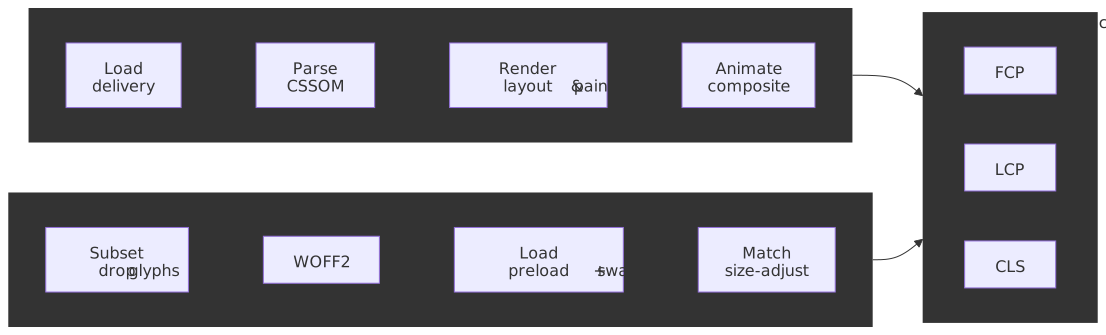
CSS and typography performance follows a layered optimization model:
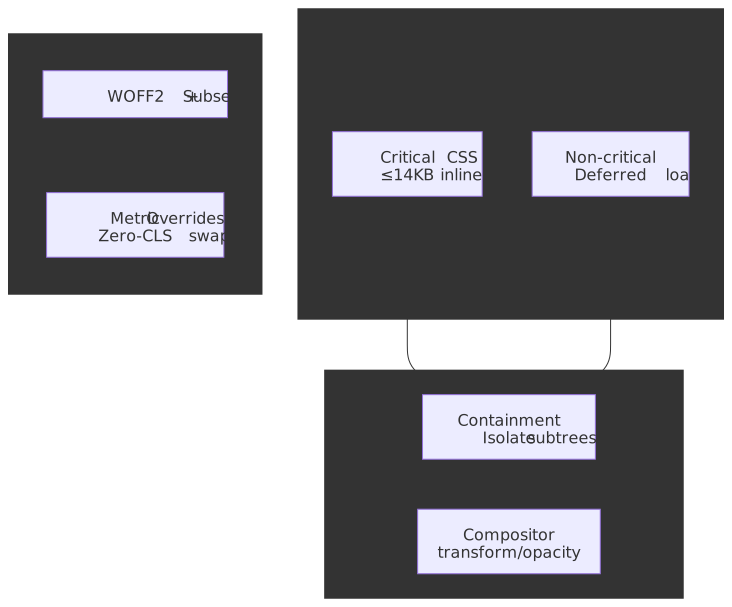
Core mental model: CSS is render-blocking by design — the browser must build the CSSOM before the first paint, otherwise it would risk a flash of unstyled content (MDN: render-blocking CSS). Every optimization either reduces blocking time (critical CSS, compression), narrows the layout scope (containment), or prevents reflows (compositor animations, font metric overrides).
The 14KB threshold persists across HTTP/2 and HTTP/3 because TCP slow-start’s initial congestion window is fixed at 10 segments × ~1460 bytes ≈ 14,600 bytes by RFC 6928, independent of the application protocol. Critical CSS that fits this budget renders in the first round-trip.
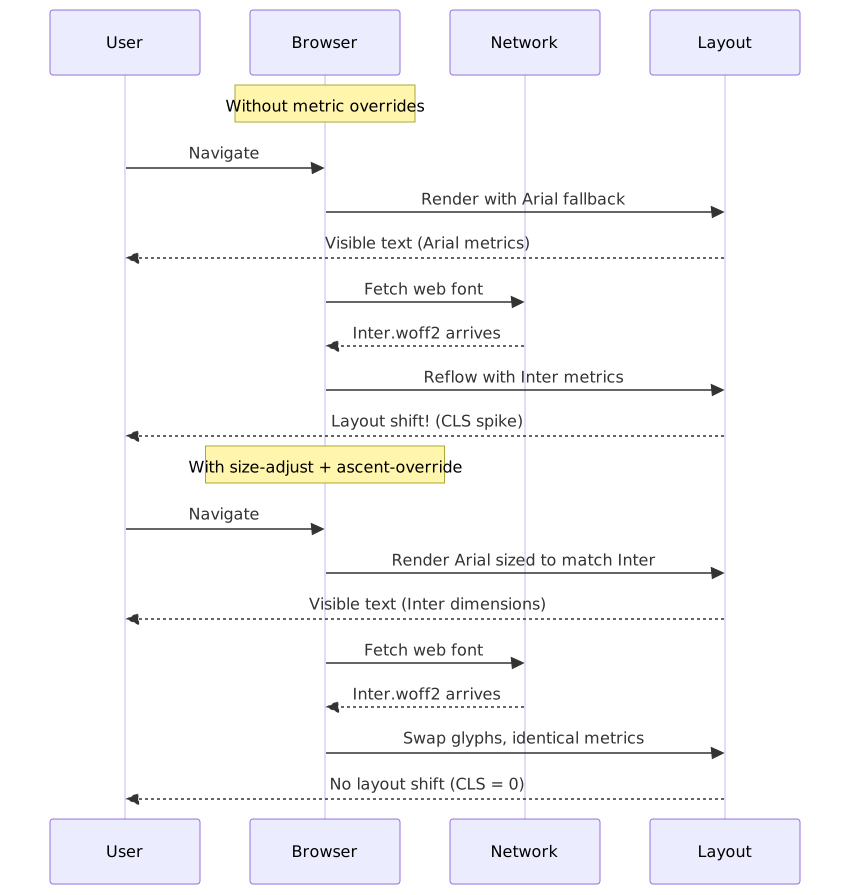
Font-induced CLS occurs because fallback and custom fonts have different metrics. The fix is not avoiding font-display: swap; it’s making the swap dimensionally identical through metric overrides (size-adjust, ascent-override).
Browser support context (as of April 2026):
content-visibilityis Baseline Newly available since September 15, 2025 (Chrome 85+, Firefox 125+, Safari 18+).- Font metric overrides
ascent-override,descent-override, andline-gap-overrideare not Baseline — Safari (through 26.x) still has no support per caniuse. Onlysize-adjustworks in Safari 17+. - The CSS Paint API (Houdini) remains experimental — neither Firefox nor Safari ship native support.
Part 1: CSS Delivery Optimization
1.1 Render-Blocking Fundamentals
Browsers block painting until all stylesheets that match the current media query are fetched, parsed, and folded into the CSS Object Model (CSSOM). The render tree cannot be assembled without it, so layout and paint cannot start.
Design rationale: showing partial styling is worse UX than a brief delay, so the platform errs on the side of waiting. This is also why CSS delivery optimization matters more than for scripts: unlike async/defer, there is no first-class “deferred stylesheet” — only attribute hacks like the media="print" swap. See the CRP series for a step-by-step tour of CSSOM construction.
| Technique | Core Idea | Typical Win | Gotchas |
|---|---|---|---|
| Concatenate & Minify | Merge files, strip whitespace | Fewer requests, ~20-40% byte cut | Cache-busting needed |
| Gzip/Brotli Compression | Transfer-level reduction | 70-95% smaller payloads | Requires correct Content-Encoding |
| HTTP/2 Preload | Supply CSS early | Shorter first byte on slow RTT | Risk of duplicate pushes |
<link rel="preload" href="/static/app.css" as="style" onload="this.onload=null;this.rel='stylesheet'" /><noscript><link rel="stylesheet" href="/static/app.css" /></noscript>1.2 Bundling Strategy
Bundling every style into one mega-file simplifies caching but couples cache busting for unrelated views. A hybrid approach balances cache hit rate and payload:
- global.css: Shared styles (layout, typography, components)
- route-[name].css: Route-specific styles loaded on demand
1.3 Critical CSS Extraction
Inlining just the above-the-fold rules eliminates a full round-trip, shrinking First Contentful Paint (FCP) by hundreds of milliseconds on slow connections — see web.dev: Extract and inline critical CSS.
Target: ≤14KB compressed critical CSS, fitting in the first round-trip:
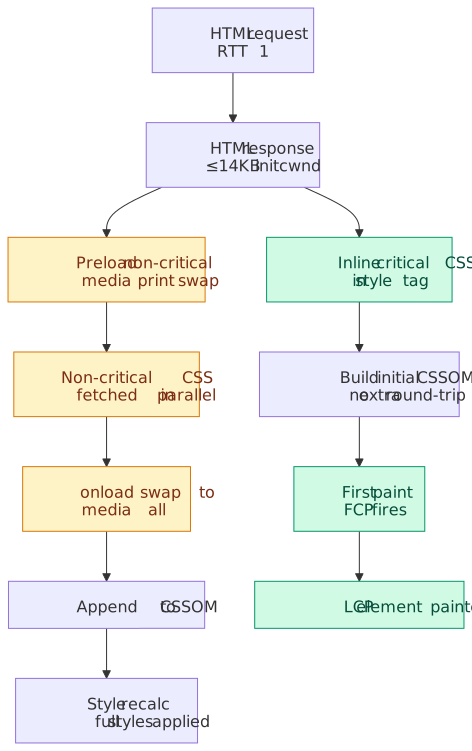
Why 14KB persists with HTTP/2 and HTTP/3: RFC 6928 sets the initial congestion window (initcwnd) to min(10*MSS, max(2*MSS, 14600)) bytes. HTTP/2 and HTTP/3 add multiplexing on top but do not change TCP’s (or QUIC’s) congestion control: the first round-trip can only carry ~14,600 bytes regardless of application protocol. Tim Kadlec’s Tune The Web review covers the nuances — ACKs during the TLS handshake can grow the window before the HTML response, so this is a useful budget rather than a hard ceiling.
Tooling Workflow:
- Crawl HTML at target viewports (
critical,Penthouse, or Chrome Coverage) - Inline output into
<style>in the document<head> - Defer the full sheet with
media="print"swap pattern
npx critical index.html \ --width 360 --height 640 \ --inline --minify \ --extractGenerated output:
<style id="critical"> /* minified critical rules */ header { display: flex; align-items: center; } /* ... */</style><link rel="stylesheet" href="/static/app.css" media="print" onload="this.media='all'" />Trade-offs:
- Pros: Faster FCP/LCP, Lighthouse “Eliminate render-blocking” pass
- Cons: Inline styles increase HTML size and disable CSS caching for those bytes; multi-route apps need per-page extraction
Part 2: CSS Runtime Optimization
2.1 CSS Containment
The contain property instructs the engine to scope layout, paint, style, and size computations to a subtree.
.card { contain: layout paint style;}- layout — descendant layout never escapes the box; ancestors do not reflow when children change.
- paint — descendants are clipped to the padding box; off-screen subtrees are skipped entirely.
- style — counters and quotes do not leak across the boundary.
- size — the box reports an intrinsic size of zero until
contain-intrinsic-sizeis given; pair carefully.
The shorthand contain: content (= layout paint style) is the safe default for most independent components (MDN: Using CSS containment).
Where it pays off: independent widgets that change frequently — large feeds, ad slots, dashboard cards — because a contained subtree’s mutations no longer invalidate sibling or ancestor layout. The actual savings depend on DOM size and how often the subtree changes; treat double-digit-percent figures from vendor blog posts as illustrative, not as a benchmark for your page.
Limitations: contain: paint clips overflow, so dropdowns, tooltips, and position: fixed children that need to escape the box will be clipped. contain: size collapses the box to zero unless you supply contain-intrinsic-size.
2.2 content-visibility
content-visibility: auto extends containment with lazy rendering — the browser skips layout and paint for the subtree until it approaches the viewport.
.section { content-visibility: auto; contain-intrinsic-size: auto 1000px; /* placeholder + remembered size */}- The original web.dev demo measured rendering time dropping from 232 ms to 30 ms (≈7×) on a long travel-blog page when chunked sections were marked
content-visibility: auto(Una Kravets, web.dev). contain-intrinsic-sizeis mandatory in practice: without it, every offscreen section reports a height of zero and the scrollbar collapses.- Baseline Newly available since September 15, 2025 — Chrome 85+, Firefox 125+, Safari 18+.
The auto keyword in contain-intrinsic-size: auto 1000px tells the browser to use the last-rendered size once it has been observed, falling back to 1000px initially. This avoids the “scrollbar twitch” you get with a fixed placeholder when sections turn out to be different sizes.
Why this is more than loading="lazy" for sections: the browser skips not only paint but also layout, style recalc, and IntersectionObserver-style bookkeeping for off-screen elements. When the user scrolls near the element, rendering happens just-in-time. The trade-off is scroll-time compute for faster initial paint.
Note
Before September 2025, Firefox shipped content-visibility disabled-by-default (versions 109–124) and Safari had no support. If you need to support browsers older than that window, treat the property as a progressive enhancement — unsupported browsers simply ignore the rule and render normally.
2.3 will-change
A hint for upcoming property transitions, letting the engine pre-promote a layer or set up the right paint context.
.modal { will-change: transform, opacity;}MDN explicitly calls will-change a “last resort” for elements with measured performance problems, not a preventive optimization. Over-use is actively counter-productive:
- Each promoted layer consumes GPU memory; on memory-constrained devices this can starve the rest of the compositor.
- Maintaining many layers adds composition overhead that frequently outweighs the savings.
- Browsers may ignore the hint when it judges the cost is too high.
Recommended pattern: Toggle via JavaScript, not static CSS:
const modal = document.querySelector(".modal")modal.addEventListener("mouseenter", () => { modal.style.willChange = "transform, opacity"})modal.addEventListener("animationend", () => { modal.style.willChange = "auto"})When static CSS is acceptable: Predictable, frequent animations like slide decks or page-flip interfaces where the element will definitely animate on interaction.
2.4 Compositor-Friendly Animations
Animate only opacity and transform to keep the work on the compositor thread, avoiding main-thread layout and paint (web.dev: animations guide). Layout-affecting properties (top, left, width, height, margin) force a full-frame pipeline; large or frequent ones will drop frames on mid-tier devices.
/* Good: Compositor-only */.modal-enter { transform: translateY(100%); opacity: 0;}.modal-enter-active { transform: translateY(0); opacity: 1; transition: transform 300ms ease, opacity 300ms ease;}/* Bad: Triggers layout */.modal-enter-bad { top: 100%;}.modal-enter-active-bad { top: 0; transition: top 300ms ease;}2.5 CSS Houdini Paint Worklet
Paint Worklets allow JavaScript-generated backgrounds executed off-main-thread. The CSS Paint API enables custom rendering without DOM overhead.
registerPaint( "checker", class { paint(ctx, geom) { const s = 16 for (let y = 0; y < geom.height; y += s) { for (let x = 0; x < geom.width; x += s) { ctx.fillRect(x, y, s, s) } } } },)<script> CSS.paintWorklet.addModule("/checkerboard.js")</script>.widget { background: paint(checker);}Browser Support (NOT Baseline):
| Browser | Status | Notes |
|---|---|---|
| Chrome | Full support | 65+ (April 2018) |
| Edge | Full support | 79+ |
| Firefox | Not supported | Under consideration (Bug #1302328) |
| Safari | Partial | Development stage, experimental |
Recommendation: Treat CSS Paint API as experimental. Use the CSS Paint Polyfill by Chrome DevRel for cross-browser support, but consider it progressive enhancement rather than core functionality. The polyfill leverages -webkit-canvas() and -moz-element() for optimized rendering in non-supporting browsers.
2.6 CSS Size & Selector Efficiency
| Optimization | How it helps | Caveats |
|---|---|---|
| Tree-shaking (PurgeCSS, Tailwind JIT, UnoCSS) | Removes dead selectors; large utility frameworks routinely shrink 60-90% | Dynamic class names need an explicit safelist |
| Selector simplicity | Short selectors reduce match time | Almost never measurable until DOMs exceed ~10k nodes |
Registered (@property) custom properties |
Inheritance and animatability declared once; recalc avoids re-parsing values | @property is Baseline only since 2024; older browsers fall back to plain custom properties |
/* Efficient: simple, non-chained */.card-title {}/* Inefficient: deeply nested */.container > .content > .card > .header > .title {}For most production sites, selector simplicity is a code-quality concern, not a performance one — DevTools’ Selector Stats panel will tell you the moment that stops being true.
Part 3: Font Asset Optimization
3.1 The Modern Font Format: WOFF2
The W3C WOFF2 specification replaces WOFF 1.0’s zlib/Flate compression with Brotli plus content-aware preprocessing of the glyf and loca tables. The combination yields ~30% smaller files than WOFF and 60–70% smaller than uncompressed TTF.
| Format | Compression | Size vs TTF | Browser support | Recommendation |
|---|---|---|---|---|
| WOFF2 | Brotli + table transforms | 60–70% smaller | >97% globally | Primary choice |
| WOFF | zlib/Flate | ~40% smaller | Universal legacy | Drop for new sites |
| TTF/OTF | None | Baseline | Legacy desktop | Avoid for web |
Modern declaration:
@font-face { font-family: "MyOptimizedFont"; font-style: normal; font-weight: 400; font-display: swap; src: url("/fonts/my-optimized-font.woff2") format("woff2");}3.2 Font Subsetting
Subsetting removes glyphs your site never uses. Real-world reductions of 60–90% are routine; the Google Fonts case study using unicode-range reported >40% download savings even without aggressive subsetting.
Strategies:
Language-based subsetting:
@font-face { font-family: "MyMultilingualFont"; src: url("/fonts/my-font-latin.woff2") format("woff2"); unicode-range: U+0000-00FF, U+0131, U+0152-0153, U+02BB-02BC, U+02C6, U+02DA, U+02DC, U+2000-206F, U+2074, U+20AC, U+2122;}@font-face { font-family: "MyMultilingualFont"; src: url("/fonts/my-font-cyrillic.woff2") format("woff2"); unicode-range: U+0400-045F, U+0490-0491, U+04B0-04B1, U+2116;}Using pyftsubset:
pyftsubset SourceSansPro.ttf \ --output-file="SourceSansPro-subset.woff2" \ --flavor=woff2 \ --layout-features='*' \ --unicodes="U+0020-007E,U+2018,U+2019,U+201C,U+201D,U+2026"Critical considerations:
- Check font EULA permits subsetting (modification)
- Dynamic content may introduce missing glyphs (tofu boxes)
- Use
glyphhangerfor automated analysis
3.3 Variable Fonts
Variable fonts pack every weight, width, slant, and optical-size axis into one OpenType 1.8+ file (MDN: Variable fonts guide). Fewer requests, often fewer bytes overall.
Size comparison (Source Sans Pro) — figures from Mandy Michael’s benchmark:
- All static weights (OTF): ~1,170 KB
- Variable font (OTF): ~405 KB
- Variable font (WOFF2): ~112 KB
A single static WOFF2 weight is comparable in size to a full variable WOFF2; the win shows up the moment you ship two or more weights.
Declaration (modern syntax):
@font-face { font-family: "MyVariableFont"; src: url("MyVariableFont.woff2") format("woff2"); font-weight: 100 900; font-stretch: 75% 125%; font-style: normal;}Format syntax evolution (CSS Fonts Module Level 4):
| Syntax | Status |
|---|---|
format("woff2") |
Recommended in practice — modern browsers auto-detect variation tables |
format("woff2") tech("variations") |
Current spec, the future-proof form |
format("woff2-variations") |
Deprecated but still parsed by all major engines |
format("woff2 supports variations") |
Removed from the spec, will not parse |
Why bare format("woff2") is enough today: variable fonts are still WOFF2 binaries; the variation tables sit inside the font file and are detected by every shipping browser engine. The tech() function exists for future formats (e.g. COLRv1, incremental fonts) where the wrapper format alone does not imply support.
Usage:
h1 { font-family: "MyVariableFont", sans-serif; font-weight: 785; /* Any value in range */}.condensed { font-stretch: 85%;}Browser fallback:
/* Static fonts for legacy browsers */@font-face { font-family: "MyStaticFallback"; src: url("MyStatic-Regular.woff2") format("woff2"); font-weight: 400;}@font-face { font-family: "MyStaticFallback"; src: url("MyStatic-Bold.woff2") format("woff2"); font-weight: 700;}body { font-family: "MyStaticFallback", sans-serif;}/* Variable font for modern browsers */@supports (font-variation-settings: normal) { @font-face { font-family: "MyVariableFont"; src: url("MyVariableFont.woff2") format("woff2-variations"); font-weight: 100 900; } body { font-family: "MyVariableFont", sans-serif; }}Part 4: Font Loading Strategies
4.1 Self-Hosting vs Third-Party
The shared-cache myth is dead. Every modern browser now partitions the HTTP cache by top-level site — Chrome 86 (Oct 2020), Firefox 85 (Jan 2021), and Safari since 2013. A font downloaded by site-a.com cannot be reused by site-b.com, so the historical “everyone uses Google Fonts so it’s already cached” argument no longer holds. Addy Osmani’s double-keyed caching write-up covers the security rationale and the measurable impact on cache-hit rate.
Benefits of self-hosting:
- Eliminates third-party connection overhead (DNS + TCP + TLS)
- Full control over caching headers
- GDPR/privacy compliance (no third-party requests)
- Ability to subset exactly as needed
4.2 Strategic Preloading
Preload critical fonts to discover them early:
<head> <link rel="preload" href="/fonts/critical-heading-font.woff2" as="font" type="font/woff2" crossorigin="anonymous" /></head>Critical attributes:
as="font": Correct prioritization and cachingtype="font/woff2": Skip preload if format unsupportedcrossorigin: Required even for same-origin fonts (CORS mode)
Warning: Only preload critical fonts. Preloading too many creates contention.
4.3 font-display Strategies
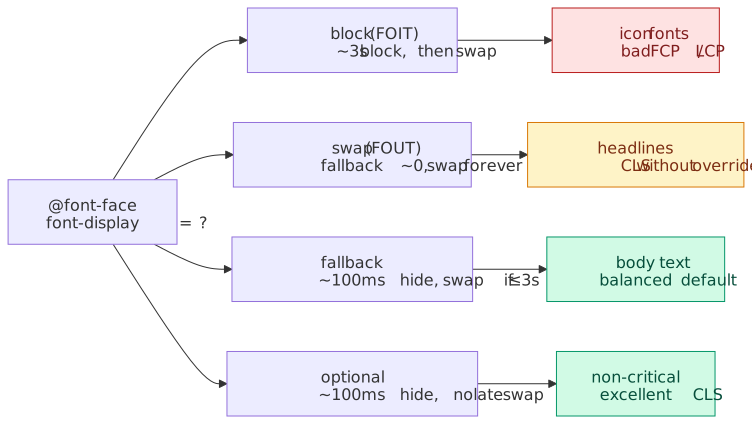
The font-display descriptor splits font loading into a block period (invisible text), a swap period (fallback shown, swap when font arrives), and a failure period (give up, keep fallback).
| Value | Block period | Swap period | Behavior | CWV impact | Use case |
|---|---|---|---|---|---|
block |
Short (~3s recommended) | Infinite | FOIT | Bad FCP/LCP | Icon fonts only |
swap |
Extremely small (≤100ms) | Infinite | FOUT | Good FCP, risk CLS | Headlines with metric overrides |
fallback |
Extremely small (≤100ms) | ~3s | Compromise | Balanced | Body text |
optional |
Extremely small (≤100ms) | None | Performance-first | Excellent CLS | Non-critical text |
The exact timings are recommendations, not normative. CSS Fonts Module Level 4 defines relative concepts (“extremely small”, “short”) rather than exact milliseconds. Implementations vary — Firefox exposes the threshold as gfx.downloadable_fonts.fallback_delay, and Chrome’s optional may skip the network request entirely on slow connections.
Strategy alignment:
- Preloaded fonts →
font-display: swap(with CLS mitigation) - Non-preloaded fonts →
font-display: optional
/* Critical heading font - preloaded */@font-face { font-family: "HeadingFont"; font-display: swap; src: url("/fonts/heading.woff2") format("woff2");}/* Body font - not preloaded */@font-face { font-family: "BodyFont"; font-display: optional; src: url("/fonts/body.woff2") format("woff2");}4.4 Preconnect for Third-Party
If using Google Fonts or other CDNs:
<head> <link rel="preconnect" href="https://fonts.googleapis.com" /> <link rel="preconnect" href="https://fonts.gstatic.com" crossorigin /></head>Part 5: Eliminating Font-Induced CLS
5.1 The Root Cause
CLS occurs when fallback and custom fonts have different x-heights, ascents, descents, or character widths. When font-display: swap triggers, text reflows and surrounding content shifts.
5.2 Font Metric Overrides
Use CSS descriptors to force fallback fonts to match custom font dimensions:
- size-adjust: Scale overall glyph size
- ascent-override: Space above baseline
- descent-override: Space below baseline
- line-gap-override: Extra space between lines
Browser support (NOT Baseline) — per caniuse as of April 2026:
| Property | Chrome | Firefox | Safari |
|---|---|---|---|
size-adjust |
92+ | 92+ | 17+ |
ascent-override |
87+ | 89+ | No (through 26.x) |
descent-override |
87+ | 89+ | No (through 26.x) |
line-gap-override |
87+ | 89+ | No (through 26.x) |
Safari limitation: Safari supports only size-adjust. Applying it alone — without the matching ascent/descent corrections — can scale text into a different vertical box than the web font expects, sometimes increasing layout shift instead of reducing it. The pragmatic workaround is to scope the full override block to engines that support it.
Workaround for Safari: Consider using @supports to exclude Safari from full metric overrides:
@supports (ascent-override: 1%) { /* Chrome, Edge, Firefox only */ @font-face { font-family: "Inter-Fallback"; src: local("Arial"); ascent-override: 90.2%; descent-override: 22.48%; size-adjust: 107.4%; }}5.3 Implementation
Step 1: Define the web font:
@font-face { font-family: "Inter"; font-style: normal; font-weight: 400; font-display: swap; src: url("/fonts/inter-regular.woff2") format("woff2");}Step 2: Create metrics-adjusted fallback:
@font-face { font-family: "Inter-Fallback"; src: local("Arial"); ascent-override: 90.2%; descent-override: 22.48%; line-gap-override: 0%; size-adjust: 107.4%;}Step 3: Use both in font stack:
body { font-family: "Inter", "Inter-Fallback", sans-serif;}Result: Arial renders with Inter’s dimensions. When Inter loads, no layout shift occurs.
5.4 Automated Solutions
Tools for calculating overrides:
- Fallback Font Generator
- Capsize
- Fontaine — Node.js library
Framework integration:
- Next.js 13.2+:
next/fontautomatically calculates and injects fallback fonts withsize-adjust. It self-hosts Google Fonts at build time for GDPR compliance and eliminates runtime network requests. - Nuxt:
@nuxtjs/fontaineprovides automatic fallback generation.
Note
The @next/font package was renamed to the built-in next/font in Next.js 13.2 and completely removed in Next.js 14 (October 2023). Use import { Inter } from 'next/font/google' or import localFont from 'next/font/local'. The codemod npx @next/codemod built-in-next-font . migrates legacy imports.
Part 6: Build-Time Processing
6.1 Pre- vs Post-Processing
- Preprocessors (Sass, Less): Add variables/mixins but increase build complexity
- PostCSS: Autoprefixing, minification (
cssnano), media query packing with negligible runtime cost
6.2 CSS-in-JS Considerations
Runtime CSS-in-JS libraries like styled-components and Emotion serialize and inject styles inside the React render path. The cost shows up as additional scripting work — typically tens to hundreds of milliseconds per route on mid-tier hardware (Aggelos Arvanitakis on perfplanet). It comes from three places:
- JS parsing — CSS strings embedded in JS bundles increase parse time.
- Style injection — runtime
<style>creation and CSSOM mutation on every render that produces a new style. - Server/client mismatch risk — server-rendered CSS must match the client-generated CSS exactly, and runtime CSS-in-JS breaks streaming SSR because the server must wait for the React render to flush all styles.
Design trade-off: runtime CSS-in-JS buys you colocation and prop-driven styles at the cost of runtime work and a more complex SSR story. If you don’t need styles to depend on runtime values (user prefs, API responses), a build-time extractor wins on every axis.
Static extraction alternatives:
| Library | Approach | Trade-off |
|---|---|---|
| Linaria | Zero-runtime, extracts to CSS | No dynamic styles |
| vanilla-extract | TypeScript-first, type-safe tokens | Build-time only |
| Panda CSS | Atomic CSS generation | Learning curve for atomic approach |
These compile to static CSS at build time, achieving the same performance as hand-written CSS while retaining component-scoped authoring. Use runtime CSS-in-JS only when you need styles that depend on runtime values (user preferences, API responses).
Part 7: Measurement & Diagnostics
7.1 DevTools Analysis
- Performance > Selector Stats: Match attempts vs hits for slow selectors
- Coverage tab: Unused CSS per route for pruning
- Network panel: Font loading waterfall and timing
7.2 Lighthouse Audits
- Render-blocking resources
- Unused CSS
- Font display strategy
- CLS attribution (font-related shifts)
7.3 Custom Metrics
// Monitor font loading with PerformanceObserverconst fontObserver = new PerformanceObserver((list) => { list.getEntries().forEach((entry) => { if (entry.initiatorType === "css" && entry.name.includes("font")) { console.log(`Font loaded: ${entry.name}`) console.log(`Load time: ${entry.responseEnd - entry.startTime}ms`) } })})fontObserver.observe({ type: "resource" })// Monitor layout shifts for font-induced CLSconst clsObserver = new PerformanceObserver((list) => { list.getEntries().forEach((entry) => { if (!entry.hadRecentInput) { console.log(`Layout shift: ${entry.value}`) entry.sources?.forEach((source) => { // Text elements are likely font-related if (source.node?.tagName === "P" || source.node?.tagName === "H1") { console.log("Possible font-induced CLS") } }) } })})clsObserver.observe({ type: "layout-shift" })Implementation Checklist
CSS Delivery
- Extract and inline critical CSS (≤14KB compressed)
- Defer non-critical CSS with media=“print” swap
- Configure Gzip/Brotli compression
- Implement route-based CSS splitting
CSS Runtime
- Apply
contain: layout paint styleto independent components - Use
content-visibility: autofor off-screen sections - Animate only
transformandopacity - Use
will-changesparingly and remove after animation
Font Assets
- Convert to WOFF2 format
- Subset fonts for target languages
- Evaluate variable fonts for 3+ weight variants
- Target ≤100KB total font payload
Font Loading
- Self-host fonts for control and privacy
- Preload critical fonts with crossorigin attribute
- Use appropriate font-display values
- Implement font metric overrides for zero-CLS
Monitoring
- Track CSS coverage and remove unused rules
- Monitor font-related CLS in production
- Set up alerts for font loading regressions
Performance Budget
| Resource | Target | Notes |
|---|---|---|
| Critical CSS | ≤14KB | Fits in first TCP packet |
| Total CSS | ≤50KB | After compression |
| Total fonts | ≤100KB | Critical fonts only |
| Max font families | 2-3 | Variable fonts preferred |
Conclusion
CSS and typography performance reduces to a small number of physical truths.
CSS is render-blocking by design. The browser must build the complete CSSOM before painting, so delivery optimization (critical CSS inline, deferral via media="print", compression) is fundamentally different from JavaScript optimization where async/defer exist as first-class primitives.
Font loading is a CLS problem before it is a download problem. The fix is not picking between font-display: swap and block; it’s making the swap dimensionally identical with size-adjust and friends. Safari’s missing ascent-override / descent-override support means zero-CLS font swaps remain aspirational on Apple devices — there is no clean workaround until Safari ships these descriptors.
Containment moves layout from global to local scope. contain and content-visibility don’t reduce the browser’s total work; they scope it to subtrees so a single change doesn’t cascade across the document. This is where complex interfaces — dashboards, infinite lists, content-heavy pages — get their wins.
The 14KB critical-CSS target is TCP physics, not HTTP fashion. HTTP/2 and HTTP/3 improve multiplexing but neither changes RFC 6928’s initial congestion window. Fitting critical CSS in the first round-trip remains the fastest path to first paint, regardless of protocol.
For the rest of the performance picture, see the sibling articles in this series: infrastructure & networking, JavaScript optimization, and image optimization. The overview article ties them together.
Appendix
Prerequisites
- Understanding of the browser rendering pipeline (DOM → CSSOM → Render Tree → Layout → Paint → Composite)
- Familiarity with Core Web Vitals (LCP, CLS, INP)
- Basic knowledge of HTTP caching and compression
Terminology
- CSSOM: CSS Object Model—the browser’s parsed representation of stylesheets
- FOUC: Flash of Unstyled Content—visible unstyled HTML before CSS loads
- FOIT: Flash of Invisible Text—invisible text while fonts load (with
font-display: block) - FOUT: Flash of Unstyled Text—fallback font visible before custom font loads (with
font-display: swap) - Compositor: Browser thread that handles GPU-accelerated rendering of layers
- initcwnd: Initial congestion window—TCP’s starting packet count (~10 packets ≈ 14KB)
Summary
- Load fast: Minify, compress, split, and inline critical CSS ≤14KB (fits initial congestion window)
- Render smart: Apply
contain/content-visibilityto isolate subtrees from global layout - Animate on compositor: Stick to
opacity/transform; usewill-changesparingly and toggle via JS - Optimize fonts: WOFF2 + subsetting + variable fonts; target ≤100KB total
- Eliminate CLS: Font metric overrides for dimensionally identical fallbacks (Safari lacks
ascent-override) - Ship less CSS: Tree-shake frameworks, keep selectors flat, measure with Coverage tab
References
Specifications:
- W3C WOFF2 Specification — Web Open Font Format 2.0
- CSS Containment Module Level 2 — Containment and
content-visibility - CSS Fonts Module Level 4 —
font-display, font metric descriptors,tech()function - RFC 6928 — Increasing TCP’s Initial Window (the 14KB rule)
Official Documentation:
- CSS Containment - MDN - Containment and content-visibility
- will-change - MDN - Animation optimization hints
- Variable Fonts - MDN - Variable fonts guide
- font-display - MDN - Font loading behavior control
- ascent-override - MDN - Font metric descriptors
- Chrome DevTools Coverage - Finding unused CSS
- Next.js Font Optimization - next/font API reference
Industry Expert Content:
- Critical CSS - web.dev - Extracting and inlining critical CSS
- content-visibility - web.dev - Lazy rendering for better performance
- CSS content-visibility Baseline - web.dev - September 2025 baseline announcement
- Font Metric Overrides - web.dev - Preventing CLS with size-adjust
- Why 14KB - Tune The Web - TCP slow start and critical resources
- Variable Fonts - Evil Martians - Format syntax evolution
- Double-keyed caching - Addy Osmani - How browser cache partitioning changed the web
- The performance benefits of Variable Fonts - Mandy Michael - Source of the Source Sans Pro size benchmark
Tools:
- pyftsubset - Font subsetting tool
- Fallback Font Generator - Calculate font metric overrides
- Capsize - Font metrics calculation
- CSS Paint Polyfill - Cross-browser Houdini support