Client Performance Monitoring
Frontend performance only matters in production. Lab tools like Lighthouse measure performance under one synthetic device and one synthetic network; users hit your app from a mid-tier Android on a flaky 4G with a third-party tag manager loaded into the same main thread. Real User Monitoring (RUM) closes that gap by capturing per-session performance signals from the browsers of actual users, then aggregating them into the percentile-based metrics that engineering and SEO actually pay attention to. This article is a working reference for building or evaluating that pipeline: which metrics, captured how, transmitted with what guarantees, and attributed in a way that makes them actionable.
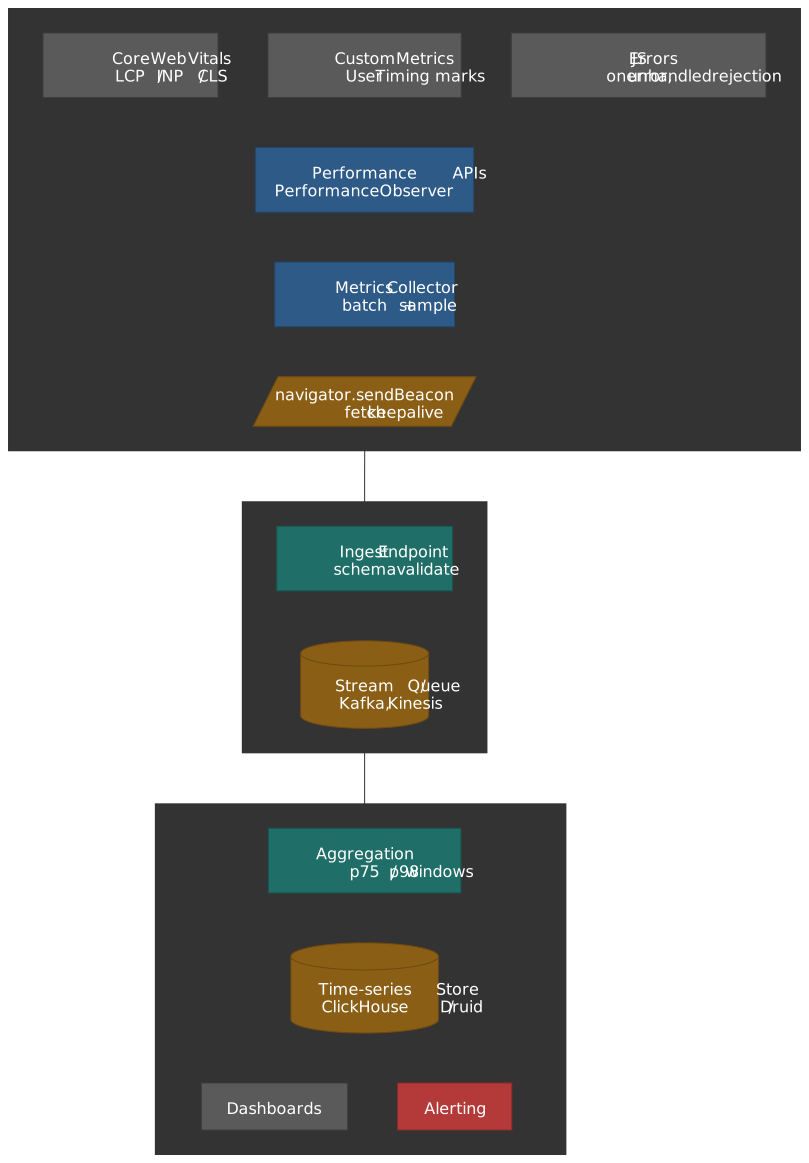
Mental model
Three layers, four hard problems.
Layers
- Browser Performance APIs —
PerformanceObserver, Navigation Timing, Resource Timing, Event Timing, Element Timing, Long Animation Frames, and User Timing — expose timing data with sub-millisecond resolution. Theweb-vitalslibrary wraps these and patches the well-known edge cases. - Transport —
navigator.sendBeacon()andfetchwithkeepalivesurvive page unload, so terminal-state metrics like CLS and INP actually reach the server. The right hook isvisibilitychange, withpagehideas the bfcache-safe fallback. - Backend rollup — sampled per-session events stream through ingest, get aggregated per route at p75 / p98, and feed dashboards and alerts.
Hard problems
- Sampling — RUM is high-cardinality. Capturing 100% is rarely worth the bill; sample stable per-session so you can still slice by route or release.
- Attribution —
LCP = 3.2sis unactionable. Capture the element selector, resource URL, and the long animation frames around it. - Lifecycle — INP and CLS only finalize when the page is hidden or torn down. Anything that prevents bfcache (
unload,beforeunload) silently drops both your data and the user’s back-button latency. - Lab vs field divergence — synthetic and field always disagree, and field is the source of truth for Core Web Vitals scoring.
Core Web Vitals
Core Web Vitals are Google’s three load / interactivity / stability metrics. All three are evaluated at the 75th percentile of page visits — a page is “Good” only when at least 75% of visits clear the Good threshold1.
LCP (Largest Contentful Paint)
LCP measures perceived load speed by tracking when the largest visible content element renders. Per the LCP spec, qualifying elements are:
<img>and<image>inside<svg>(first frame for animated images)<video>(poster image, or first painted frame)- elements with a CSS
background-imageset viaurl() - block-level elements containing text nodes
Sizing rules:
- Only the visible portion within the viewport counts.
- For resized images, the smaller of intrinsic and rendered size wins (so blowing up a small image doesn’t game LCP).
- Margins, padding, and borders are excluded.
- Low-entropy placeholders and fully transparent elements are filtered out.
When LCP stops reporting. The browser stops dispatching new LCP candidates as soon as the user interacts (tap, scroll, keypress), because user interaction usually changes what’s onscreen. LCP therefore captures the initial loading experience only; ongoing rendering is INP’s job2.
new PerformanceObserver((entryList) => { const entries = entryList.getEntries() const lastEntry = entries[entries.length - 1] as LargestContentfulPaint console.log("LCP:", lastEntry.startTime) console.log("Element:", lastEntry.element) console.log("Size:", lastEntry.size) console.log("URL:", lastEntry.url) // populated for image LCPs}).observe({ type: "largest-contentful-paint", buffered: true })Thresholds3:
| Rating | Value |
|---|---|
| Good | ≤ 2.5s |
| Needs Improvement | 2.5s – 4s |
| Poor | > 4s |
INP (Interaction to Next Paint)
INP replaced FID as the responsiveness Core Web Vital on March 12, 20244. FID measured only the input delay of the first interaction; INP measures the worst end-to-end interaction latency across the whole page lifecycle. Chrome usage data shows roughly 90% of a user’s time on a page is spent after it loads, so first-input-only metrics miss most of the responsiveness story5.
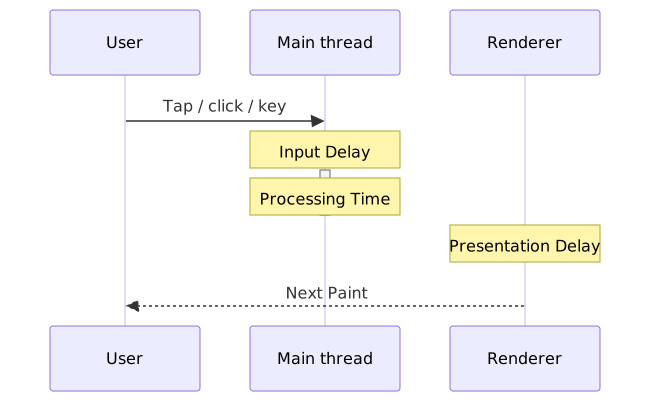
Three phases of an interaction:
- Input Delay — time from the input event until your event handlers actually start (main thread blocked by something else).
- Processing Time — total time spent in your handlers for that interaction.
- Presentation Delay — time from the last handler returning until the next frame is painted (recalc style, layout, paint, compositor).
Tracked interactions: mouse clicks, touchscreen taps, and keyboard presses (physical and on-screen keyboards both). Scroll, hover, and zoom are excluded — they don’t run synchronous handlers in the same way6.
Final value calculation. INP reports a single number per page lifecycle:
- Pages with fewer than 50 interactions report the worst single interaction latency.
- Pages with ≥ 50 interactions ignore the highest interaction for every additional 50 interactions, which is effectively the 98th percentile of interaction latencies7. This stops a single anomalous interaction from skewing the metric on a long-lived SPA.
import { onINP } from "web-vitals/attribution"onINP((metric) => { console.log("INP:", metric.value) console.log("Rating:", metric.rating) const { interactionTarget, interactionType, loadState } = metric.attribution console.log("Target selector:", interactionTarget) // CSS-selector string, "" if element was removed console.log("Interaction type:", interactionType) // 'pointer' | 'keyboard' console.log("Load state:", loadState) // 'loading' | 'dom-interactive' | 'dom-content-loaded' | 'complete'})Note
As of web-vitals v4, the INP attribution shape uses interactionTarget (selector string) and interactionType ('pointer' | 'keyboard'); the legacy eventTarget / eventType fields were renamed8. Earlier v3 collectors that destructure eventTarget will silently get undefined.
Thresholds9:
| Rating | Value |
|---|---|
| Good | ≤ 200ms |
| Needs Improvement | 200ms – 500ms |
| Poor | > 500ms |
CLS (Cumulative Layout Shift)
CLS measures visual stability — how much visible content unexpectedly shifts during the page lifecycle. Unexpected shifts misalign tap targets, lose reading position, and corrupt clicks.
Layout shift score per shift:
- Impact fraction — combined visible area of shifted elements (union of before and after positions) as a fraction of viewport area.
- Distance fraction — greatest distance any single element moved, divided by the viewport’s larger dimension.
Session windowing. CLS does not sum every shift across the page lifetime. Shifts are bucketed into session windows with a maximum 1-second gap between consecutive shifts and a hard 5-second cap on window duration. The reported CLS value is the maximum of all session-window scores, not their sum10. This is the change introduced in 2021 to stop long-lived SPAs from accumulating artificially large CLS values11.
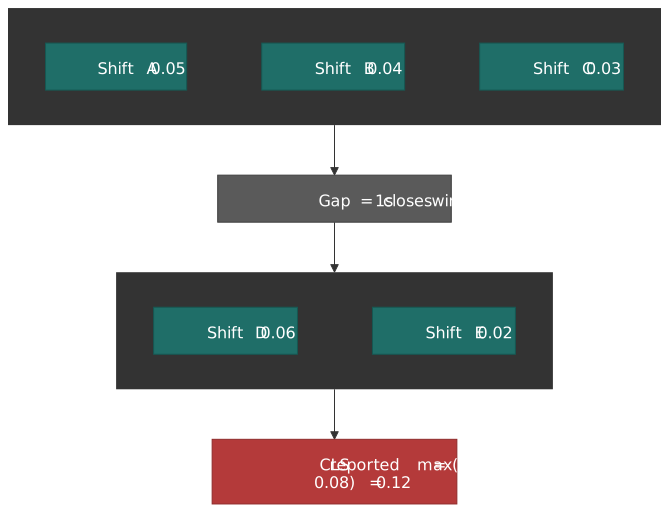
Expected vs unexpected. Shifts that occur within 500ms of user interaction (click, tap, keypress) carry the hadRecentInput flag and are excluded from CLS. Animations done with transform: translate() or transform: scale() don’t count either, because transforms don’t change element box geometry10.
let clsValue = 0const clsEntries: LayoutShift[] = []new PerformanceObserver((entryList) => { for (const entry of entryList.getEntries() as LayoutShift[]) { if (!entry.hadRecentInput) { clsValue += entry.value clsEntries.push(entry) } }}).observe({ type: "layout-shift", buffered: true })Warning
The snippet above naively sums every shift — it does not implement the 1s-gap / 5s-cap session windowing. Always use the web-vitals library in production; the raw API is for understanding and debugging only.
Common causes:
- Images or
<video>withoutwidth/heightattributes (oraspect-ratioCSS). - Ads, embeds, or iframes that resize after load.
- Dynamically injected content above existing content.
- Web fonts causing FOIT / FOUT (use
font-display: optionalorsize-adjust).
Thresholds12:
| Rating | Value |
|---|---|
| Good | ≤ 0.1 |
| Needs Improvement | 0.1 – 0.25 |
| Poor | > 0.25 |
The 75th-percentile standard
All three metrics are evaluated at the 75th percentile of page loads in the field. A page passes if at least 75% of visits clear the Good threshold. Google chose p75 deliberately — the median is too lenient (half the users still get a poor experience), p95 is too sensitive to genuine outliers (one extreme device shifts the score), and p75 is a defensible balance across devices, networks, and locales1.
Performance APIs
The metrics above are only the framing. To capture them — and to measure things web-vitals doesn’t measure for you — go straight to the underlying APIs.
PerformanceObserver
PerformanceObserver is the supported way to read the Performance Timeline. Unlike performance.getEntries(), it delivers entries asynchronously as they’re recorded.
interface PerformanceMetricCallback { (entries: PerformanceEntryList): void}function observePerformance( entryType: string, callback: PerformanceMetricCallback, options: { buffered?: boolean } = {},): () => void { if (!PerformanceObserver.supportedEntryTypes.includes(entryType)) { console.warn(`Entry type "${entryType}" not supported`) return () => {} } const observer = new PerformanceObserver((list) => { callback(list.getEntries()) }) observer.observe({ type: entryType, buffered: options.buffered ?? true, }) return () => observer.disconnect()}const disconnect = observePerformance("largest-contentful-paint", (entries) => { const lcp = entries[entries.length - 1] console.log("LCP:", lcp.startTime)})The buffered flag. With buffered: true, the observer receives entries that were recorded before observe() was called — essential for metrics like LCP, FCP, and TTFB that often fire before your monitoring code is parsed and executed13. Each entry type has its own buffer cap; once exceeded, new entries fall off the buffer.
Supported entry types (2026):
| Entry type | Interface | Purpose |
|---|---|---|
navigation |
PerformanceNavigationTiming |
Page load timing |
resource |
PerformanceResourceTiming |
Resource fetch timing |
paint |
PerformancePaintTiming |
FP, FCP |
largest-contentful-paint |
LargestContentfulPaint |
LCP |
layout-shift |
LayoutShift |
CLS |
event |
PerformanceEventTiming |
Per-interaction timing (INP) |
first-input |
PerformanceEventTiming |
First input delay (legacy FID) |
longtask |
PerformanceLongTaskTiming |
Tasks > 50ms (no script attrib.) |
long-animation-frame |
PerformanceLongAnimationFrameTiming |
LoAF (script-level attribution) |
mark |
PerformanceMark |
Custom marks |
measure |
PerformanceMeasure |
Custom measures |
element |
PerformanceElementTiming |
Specific element render timing |
Note
Long Animation Frames does not replace Long Tasks. They coexist; LoAF adds script-level attribution and frame-level lifecycle data that Long Tasks lacks. The Chrome team has stated there are no plans to deprecate the Long Tasks API14.
Navigation Timing
Navigation Timing Level 2 exposes the document-load pipeline as a single PerformanceNavigationTiming entry.
function getNavigationMetrics(): Record<string, number> { const [nav] = performance.getEntriesByType("navigation") as PerformanceNavigationTiming[] if (!nav) return {} return { dnsLookup: nav.domainLookupEnd - nav.domainLookupStart, tcpConnect: nav.connectEnd - nav.connectStart, tlsHandshake: nav.secureConnectionStart > 0 ? nav.connectEnd - nav.secureConnectionStart : 0, ttfb: nav.responseStart - nav.requestStart, downloadTime: nav.responseEnd - nav.responseStart, domInteractive: nav.domInteractive - nav.responseEnd, domComplete: nav.domComplete - nav.responseEnd, pageLoad: nav.loadEventEnd - nav.startTime, transferSize: nav.transferSize, encodedBodySize: nav.encodedBodySize, decodedBodySize: nav.decodedBodySize, }}Key timing points:
startTime (= 0) → redirectStart / redirectEnd → fetchStart → domainLookupStart / domainLookupEnd (DNS) → connectStart / connectEnd (TCP) → secureConnectionStart (TLS) → requestStart → responseStart (TTFB) → responseEnd → domInteractive → domContentLoadedEventStart / End → domComplete → loadEventStart / loadEventEndNote
The legacy PerformanceTiming.navigationStart is gone in PerformanceNavigationTiming — use startTime (always 0 for the navigation entry) or fetchStart as your origin, depending on whether you want to include redirect time.
Resource Timing
Resource Timing Level 2 exposes per-resource network timing for everything the document fetches (scripts, stylesheets, images, fonts, XHR/fetch requests).
interface ResourceMetrics { name: string initiatorType: string duration: number transferSize: number cached: boolean}function getSlowResources(threshold = 1000): ResourceMetrics[] { const resources = performance.getEntriesByType("resource") as PerformanceResourceTiming[] return resources .filter((r) => r.duration > threshold) .map((r) => ({ name: r.name, initiatorType: r.initiatorType, duration: r.duration, transferSize: r.transferSize, cached: r.transferSize === 0 && r.decodedBodySize > 0, })) .sort((a, b) => b.duration - a.duration)}new PerformanceObserver((list) => { for (const entry of list.getEntries() as PerformanceResourceTiming[]) { if (entry.duration > 2000) { console.warn("Slow resource:", entry.name, entry.duration) } }}).observe({ type: "resource", buffered: true })Cross-origin timing. By default, cross-origin resources expose only startTime, duration, and responseEnd; everything else is zeroed for privacy reasons. The origin serving the resource opts in by sending the Timing-Allow-Origin response header:
Timing-Allow-Origin: *Timing-Allow-Origin: https://example.comThis single header is the most common reason third-party metrics show up as a featureless black box in your dashboards.
Long Animation Frames (LoAF)
Long Animation Frames (Chromium 123+) reports any animation frame whose total work — script, style, layout, paint — exceeds 50ms, the threshold that breaks smooth ~60fps rendering15. Same threshold as Long Tasks, but with full per-script attribution and frame-level lifecycle data.
new PerformanceObserver((list) => { for (const entry of list.getEntries() as PerformanceLongAnimationFrameTiming[]) { console.log("Long frame:", entry.duration, "ms") for (const script of entry.scripts) { console.log(" Script:", script.sourceURL) console.log(" Function:", script.sourceFunctionName) console.log(" Duration:", script.duration, "ms") console.log(" Invoker:", script.invoker) // 'user-callback' | 'event-listener' | … } }}).observe({ type: "long-animation-frame", buffered: true })Why pair LoAF with INP. Long Tasks tells you a 200ms task happened — it doesn’t tell you which script or which event. LoAF gives you scripts[] with source URL, function name, duration, and invoker, so you can correlate a poor INP attribution against the actual code that ran in the same frame14.
User Timing (custom metrics)
User Timing Level 3 lets you mark and measure application-specific points and intervals.
performance.mark("feature-start")// ... feature code executes ...performance.mark("feature-end")performance.measure("feature-duration", "feature-start", "feature-end")performance.measure("time-to-feature", { start: 0, end: "feature-start",})const measures = performance.getEntriesByType("measure")for (const measure of measures) { console.log(`${measure.name}: ${measure.duration}ms`)}performance.mark("api-call-complete", { detail: { endpoint: "/api/users", status: 200, cached: false, },})The detail payload (User Timing Level 3) is the cleanest way to enrich a custom mark without smuggling data through the name string.
Real-world custom metrics:
| Metric | What it measures |
|---|---|
| Time to Interactive Feature | When a specific feature becomes usable |
| Search Results Render | Time from query to results display |
| Checkout Flow Duration | Time through purchase funnel |
| API Response Time | Backend latency as experienced by client |
Data collection architecture
Capturing metrics is the easy half. The hard half is getting them off the page reliably and aggregating them without going broke.
Beacon transmission
navigator.sendBeacon() was designed for exactly this — analytics payloads that need to survive page unload. The browser queues the request and sends it even if the page navigates or closes, without blocking the next page load.
interface PerformancePayload { url: string sessionId: string timestamp: number metrics: Record<string, number> attribution?: Record<string, unknown>}class MetricsCollector { private buffer: PerformancePayload[] = [] private endpoint: string private maxBufferSize = 10 constructor(endpoint: string) { this.endpoint = endpoint this.setupUnloadHandler() } record(metrics: Record<string, number>, attribution?: Record<string, unknown>): void { this.buffer.push({ url: location.href, sessionId: this.getSessionId(), timestamp: Date.now(), metrics, attribution, }) if (this.buffer.length >= this.maxBufferSize) { this.flush() } } private flush(): void { if (this.buffer.length === 0) return const payload = JSON.stringify(this.buffer) this.buffer = [] const sent = navigator.sendBeacon(this.endpoint, payload) if (!sent) { fetch(this.endpoint, { method: "POST", body: payload, keepalive: true, headers: { "Content-Type": "application/json" }, }).catch(() => { // analytics shouldn't break the page }) } } private setupUnloadHandler(): void { document.addEventListener("visibilitychange", () => { if (document.visibilityState === "hidden") { this.flush() } }) window.addEventListener("pagehide", () => this.flush()) } private getSessionId(): string { let id = sessionStorage.getItem("perf_session_id") if (!id) { id = crypto.randomUUID() sessionStorage.setItem("perf_session_id", id) } return id }}Why visibilitychange over unload.
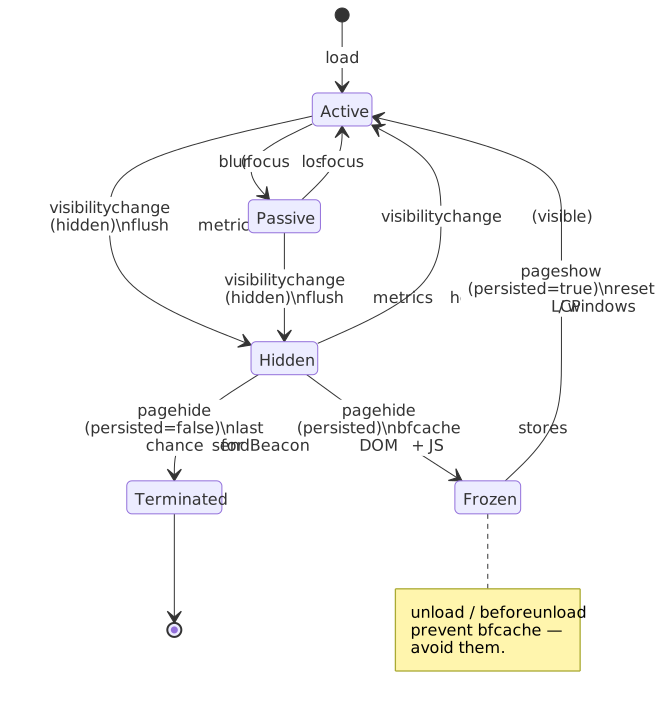
unloaddoesn’t fire reliably on mobile when the OS background-kills the tab.unloadandbeforeunloaddisqualify the page from bfcache in every modern engine, costing instant back-navigation and dropping your back-button UX16. Chromium is actively deprecatingunload17.visibilitychangefires consistently when the tab is hidden, backgrounded, or navigated away — that is the actual moment the user “left”.
The full lifecycle (and the analytics hook for each transition) looks like this:
Important
When a page is restored from bfcache, the pageshow event fires with event.persisted === true without a fresh load. Reset your per-page metric state on that branch (or web-vitals will silently mis-attribute the next interaction to the previous page view)18.
Payload size limits. The Beacon API spec deliberately doesn’t pin a number, but the underlying Fetch spec caps the sum of all in-flight keepalive request bodies for an origin at 64 KiB. Chromium and WebKit enforce this strictly; Firefox historically did not but is converging. Once the budget is exhausted, sendBeacon() returns false and a fetch({ keepalive: true }) request resolves to a network error1920. Always check the return value and have a fallback.
Tip
Chromium 135+ ships fetchLater() — an API designed to schedule a request to be sent during page unload, with a longer in-flight window than keepalive. Treat it as an optional future-proofing layer behind a feature detect, not a sendBeacon replacement.
Sampling strategies
RUM produces one event stream per session, plus per-resource and per-interaction streams on top. Capturing 100% of that on a high-traffic site is rarely worth the storage and ingestion cost. Sample stably so each session is either fully captured or fully dropped — random per-event sampling shreds your ability to do session-level joins later.
type SamplingDecision = "always" | "sampled" | "never"interface SamplingConfig { performanceRate: number // 0-1, e.g., 0.1 = 10% errorRate: number // Usually 1.0 (100%) sessionBased: boolean // Decide once per session}class Sampler { private config: SamplingConfig private sessionDecision: boolean | null = null constructor(config: SamplingConfig) { this.config = config if (config.sessionBased) { this.sessionDecision = this.makeDecision(config.performanceRate) } } shouldSample(type: "performance" | "error"): boolean { if (type === "error") { return this.makeDecision(this.config.errorRate) } if (this.config.sessionBased && this.sessionDecision !== null) { return this.sessionDecision } return this.makeDecision(this.config.performanceRate) } private makeDecision(rate: number): boolean { return Math.random() < rate }}const sampler = new Sampler({ performanceRate: 0.1, // 10% of sessions errorRate: 1.0, // 100% of errors sessionBased: true,})if (sampler.shouldSample("performance")) { collector.record(metrics)}Sampling considerations:
| Approach | Pros | Cons |
|---|---|---|
| Head-based (session start) | Stable per session, simple analysis | May miss rare interactions |
| Tail-based (after event) | Can prioritize errors / slow requests | More complex, higher initial capture |
| Rate-based (per event) | Predictable volume | Splits sessions, blocks joins |
| Adaptive (dynamic rate) | Handles traffic spikes | Hard to implement correctly |
Typical rates:
- Errors — 100% (always capture)
- Performance metrics — 1–10% session-sampled, depending on traffic
- Session replay — 0.1–1% (heaviest payloads)
Note
For consistent slicing across releases or experiments, derive the sampling decision from a stable hash of the session ID rather than a fresh Math.random() call per page. That way the same user lands in the same bucket across multiple navigations.
Attribution for debugging
LCP = 3.2s is an alert, not a fix. Attribution data identifies the element, resource, and timing breakdown that produced the value, so the dashboard line you’re staring at is actionable.
import { onLCP, onINP, onCLS } from "web-vitals/attribution"function collectWithAttribution(): void { onLCP((metric) => { const { target, url, timeToFirstByte, resourceLoadDelay, resourceLoadDuration, elementRenderDelay } = metric.attribution sendMetric({ name: "LCP", value: metric.value, attribution: { target, // CSS selector string for the LCP element url, // resource URL when the LCP is an image, undefined for text LCPs ttfb: timeToFirstByte, resourceLoadDelay, resourceLoadDuration, elementRenderDelay, }, }) }) onINP((metric) => { const { interactionTarget, interactionType, loadState, longAnimationFrameEntries } = metric.attribution sendMetric({ name: "INP", value: metric.value, attribution: { interactionTarget, interactionType, loadState, longFrames: longAnimationFrameEntries.length, }, }) }) onCLS((metric) => { const { largestShiftTarget, largestShiftTime, largestShiftValue, loadState } = metric.attribution sendMetric({ name: "CLS", value: metric.value, attribution: { shiftTarget: largestShiftTarget, // selector string for the first shifted element shiftTime: largestShiftTime, shiftValue: largestShiftValue, loadState, }, }) })}Bundle size. The standard web-vitals build is ~2 KB brotli; the attribution build adds ~1.5 KB on top. The 1.5 KB pays for itself the first time you have to chase down a regression — without attribution, you’re guessing21.
Error tracking
Capturing JavaScript errors
Comprehensive error tracking needs three handlers — synchronous errors, unhandled rejections, and resource-load failures — because no single event covers all of them.
interface ErrorReport { type: "runtime" | "resource" | "promise" | "network" message: string stack?: string source?: string line?: number column?: number timestamp: number url: string userAgent: string}class ErrorTracker { private endpoint: string private buffer: ErrorReport[] = [] constructor(endpoint: string) { this.endpoint = endpoint this.setupHandlers() } private setupHandlers(): void { window.onerror = (message, source, line, column, error) => { this.report({ type: "runtime", message: String(message), stack: error?.stack, source, line: line ?? undefined, column: column ?? undefined, }) return false // don't suppress default handling } window.addEventListener("unhandledrejection", (event) => { this.report({ type: "promise", message: event.reason?.message || String(event.reason), stack: event.reason?.stack, }) }) window.addEventListener( "error", (event) => { if (event.target !== window && event.target instanceof HTMLElement) { const target = event.target as HTMLImageElement | HTMLScriptElement | HTMLLinkElement this.report({ type: "resource", message: `Failed to load ${target.tagName.toLowerCase()}`, source: (target as HTMLImageElement).src || (target as HTMLLinkElement).href, }) } }, true, // capture phase — resource errors don't bubble ) } private report(error: Omit<ErrorReport, "timestamp" | "url" | "userAgent">): void { const fullError: ErrorReport = { ...error, timestamp: Date.now(), url: location.href, userAgent: navigator.userAgent, } this.buffer.push(fullError) this.flush() } private flush(): void { if (this.buffer.length === 0) return const payload = JSON.stringify(this.buffer) this.buffer = [] navigator.sendBeacon(this.endpoint, payload) }}Stack-trace parsing
Production JavaScript is minified, so raw stack traces are useless on their own. Source maps restore original file/line information server-side.
interface ParsedFrame { function: string file: string line: number column: number}function parseStackTrace(stack: string): ParsedFrame[] { if (!stack) return [] const lines = stack.split("\n") const frames: ParsedFrame[] = [] const chromeRegex = /at\s+(.+?)\s+\((.+?):(\d+):(\d+)\)/ const firefoxRegex = /(.*)@(.+?):(\d+):(\d+)/ for (const line of lines) { const match = chromeRegex.exec(line) || firefoxRegex.exec(line) if (match) { frames.push({ function: match[1] || "<anonymous>", file: match[2], line: parseInt(match[3], 10), column: parseInt(match[4], 10), }) } } return frames}Server-side, use the source-map library (or any vendor SDK — Sentry, Datadog, Bugsnag all do this for you) to resolve bundle.min.js:1:32417 to src/feature/x.tsx:42:12.
Error grouping
Without grouping, every error instance creates a separate alert. Fingerprinting consolidates identical errors into a single issue.
function generateErrorFingerprint(error: ErrorReport): string { const parts = [error.type, normalizeMessage(error.message), error.stack ? getTopFrame(error.stack) : "no-stack"] return hashString(parts.join("|"))}function normalizeMessage(message: string): string { return message .replace(/\d+/g, "<N>") // numbers .replace(/'[^']+'/g, "'<S>'") // single-quoted strings .replace(/"[^"]+"/g, '"<S>"') // double-quoted strings .replace(/\b[a-f0-9]{8,}\b/gi, "<ID>") // hex IDs}function getTopFrame(stack: string): string { const frames = parseStackTrace(stack) if (frames.length === 0) return "unknown" const top = frames[0] return `${top.file}:${top.line}` // exclude column — varies with minification}function hashString(str: string): string { let hash = 0 for (let i = 0; i < str.length; i++) { hash = (hash << 5) - hash + str.charCodeAt(i) hash |= 0 } return hash.toString(16)}Lab vs field data
Fundamental differences
| Aspect | Lab (synthetic) | Field (RUM) |
|---|---|---|
| Environment | Controlled (specific device, network) | Variable (real user conditions) |
| Reproducibility | High | Low |
| Metrics | All measurable | User-experienced only |
| Use case | Development, CI/CD gates | Production monitoring |
| Data volume | One measurement | Aggregated across many sessions |
| Attribution | Full stack traces, traces | Limited (privacy, performance) |
When to use each
Lab data (Lighthouse, WebPageTest, DebugBear):
- Pre-deployment validation.
- Regression testing in CI (assert on specific Lighthouse scores or budget files).
- Debugging specific issues against a stable baseline.
- Comparing configurations (CDN settings, image formats, hydration strategies).
Field data (your RUM, plus CrUX for industry context):
- Understanding real user experience.
- Identifying issues lab doesn’t catch (third-party scripts, real device variability, browser engine quirks).
- Monitoring production performance per-route, per-release.
- Correlating performance with business metrics (conversion, bounce, retention).
The gap
Lab and field measurements regularly disagree by significant margins because:
- Device diversity — lab uses one consistent device profile; users span a 10× CPU range.
- Network conditions — lab throttles to a stable profile; real networks burst, drop, and reconnect.
- User behavior — lab follows a scripted path; users interact unpredictably and trigger latent code paths.
- Third-party content — ads, widgets, and embeds load and behave differently in production traffic patterns.
- Cache state — lab usually tests cold; users often arrive warm.
As web.dev puts it: “lab measurement is not a substitute for field measurement.” Both tools answer different questions; ship both into your workflow.
The web-vitals library
Google’s web-vitals library is the de-facto reference implementation for Core Web Vitals in the browser. It wraps the raw APIs and patches the long tail of edge cases that homegrown collectors typically get wrong.
Why use it over raw APIs
The library handles:
- Background-tab detection — metrics shouldn’t include time the page was hidden.
- bfcache restoration — resets per-page metric state on
pageshowwithpersisted: true. - Iframe and prerender considerations.
- Mobile-specific timing quirks — particularly around input timing.
- Final-value semantics — INP and CLS only finalize on the right lifecycle event.
Basic usage
import { onCLS, onINP, onLCP, onFCP, onTTFB } from "web-vitals"function sendToAnalytics(metric: { name: string; value: number; delta: number; id: string; rating: string }): void { const body = JSON.stringify({ name: metric.name, value: metric.value, delta: metric.delta, id: metric.id, rating: metric.rating, page: location.pathname, }) navigator.sendBeacon("/api/analytics", body)}onCLS(sendToAnalytics)onINP(sendToAnalytics)onLCP(sendToAnalytics)onFCP(sendToAnalytics)onTTFB(sendToAnalytics)Attribution build
import { onLCP, onINP, onCLS } from "web-vitals/attribution"onLCP((metric) => { console.log("LCP value:", metric.value) console.log("LCP target selector:", metric.attribution.target) console.log("Resource URL:", metric.attribution.url) console.log("TTFB:", metric.attribution.timeToFirstByte) console.log("Resource load delay:", metric.attribution.resourceLoadDelay) console.log("Element render delay:", metric.attribution.elementRenderDelay)})onINP((metric) => { console.log("INP value:", metric.value) console.log("Interaction type:", metric.attribution.interactionType) // 'pointer' | 'keyboard' console.log("Interaction target:", metric.attribution.interactionTarget) // selector string console.log("Load state:", metric.attribution.loadState) console.log("Long frames:", metric.attribution.longAnimationFrameEntries)})onCLS((metric) => { console.log("CLS value:", metric.value) console.log("Largest shift target:", metric.attribution.largestShiftTarget) console.log("Largest shift value:", metric.attribution.largestShiftValue) console.log("Largest shift time:", metric.attribution.largestShiftTime)})Key API details
The delta property. Metrics like CLS update multiple times as new shifts are observed. delta is the change since the last report; for analytics platforms that don’t support metric updates, sum the deltas client-side or server-side.
The id property. Stable identifier for this metric instance — use it to deduplicate or aggregate multiple reports for the same page view (CLS in particular).
Single call per page. Call each metric function exactly once per page load. Multiple calls create multiple PerformanceObserver instances and produce duplicate, conflicting reports.
Real-world implementations
Sentry Performance
- JavaScript SDK instruments
fetch, XHR, framework components. - Distributed tracing connects browser spans to backend spans via
traceparent. - Web Vitals captured automatically via the
web-vitalslibrary. - Release tracking flags performance regressions across deploys.
- Heavy on per-error attribution (source maps, breadcrumbs).
Datadog RUM
- Lightweight SDK loaded asynchronously.
- Session-based collection with configurable sampling.
- Automatic Core Web Vitals, resource timing, long tasks.
- Session Replay overlay for debugging individual sessions.
- Joins to Datadog APM traces by
trace_id.
Vercel Speed Insights
- Minimal script injection in Next.js builds.
- Sends to Vercel’s analytics backend.
- Core Web Vitals with Next.js-specific route attribution.
- Per-route breakdown and per-deploy comparison.
Self-hosted (SpeedCurve, Calibre, Grafana Faro, OSS stack)
- Time-series storage for high-cardinality metrics (ClickHouse, TimescaleDB, M3, Druid).
- Aggregation pipelines for percentile rollups (Flink, Materialize, in-DB rollups).
- Visualization via Grafana, Superset, or vendor-specific dashboards.
- The honest reason teams build this themselves is data-residency, billing predictability, or wanting unfettered access to raw events.
Operational takeaways
- Use the
web-vitalslibrary for the three Core Web Vitals. The raw APIs are for understanding and for custom metrics; for CWVs, the edge-case surface is too large to reimplement. - Beacon on
visibilitychange, fall back topagehide. Never useunloadorbeforeunload— they break bfcache and drop your data. - Sample stably per session. Random per-event sampling shreds your ability to do session-level joins; hash the session ID.
- Always capture attribution. A 1.5 KB bundle delta pays for itself the first time you have to debug a regression.
- Treat lab and field as different tools. Lab gates regressions in CI; field tells you what users experience. Both are necessary.
Appendix
Prerequisites
- Browser Performance APIs (
PerformanceObserver, timing interfaces). - HTTP basics (request/response timing, headers).
- JavaScript event handling and the page lifecycle.
Terminology
| Term | Definition |
|---|---|
| RUM | Real User Monitoring — collecting performance data from actual user sessions |
| CrUX | Chrome User Experience Report — Google’s public dataset of field performance |
| TTFB | Time to First Byte — time until first byte of response received |
| FCP | First Contentful Paint — time until first content renders |
| LCP | Largest Contentful Paint — time until largest visible content renders |
| INP | Interaction to Next Paint — worst interaction latency (replaced FID) |
| CLS | Cumulative Layout Shift — measure of visual stability |
| LoAF | Long Animation Frame — frame taking >50ms, blocking smooth rendering |
| bfcache | Back/forward cache — instant restore of a previous page from memory |
Quick reference
| Want to capture | Use |
|---|---|
| LCP, INP, CLS, FCP, TTFB | web-vitals library (attribution build for production) |
| Page-load timing breakdown | PerformanceNavigationTiming |
| Per-resource fetch timing | PerformanceResourceTiming (+ Timing-Allow-Origin header) |
| Custom feature timing | performance.mark / performance.measure |
| Long-running scripts blocking a frame | PerformanceLongAnimationFrameTiming |
| Specific element render timing | PerformanceElementTiming |
| JS errors | window.onerror + unhandledrejection + capture-phase error |
References and footnotes
Footnotes
-
How the Core Web Vitals metrics thresholds were defined — web.dev. ↩ ↩2
-
LCP — When LCP stops — web.dev. ↩
-
Largest Contentful Paint (LCP) — web.dev. Spec: W3C Largest Contentful Paint. ↩
-
Interaction to Next Paint becomes a Core Web Vital on March 12 — web.dev. ↩
-
“Chrome usage data shows that 90% of a user’s time on a page is spent after it loads.” — web.dev. ↩
-
INP — What’s not measured by INP? — web.dev. ↩
-
INP — How is INP calculated? — web.dev. ↩
-
GoogleChrome/web-vitals—INPAttributiontype definition — current source for theinteractionTarget/interactionType/inputDelay/processingDuration/presentationDelayfield set. ↩ -
Interaction to Next Paint (INP) — web.dev. ↩
-
CLS — What is a session window? — web.dev. ↩ ↩2
-
Evolving the CLS metric — web.dev. Background on the move from cumulative-sum to max-session-window. ↩
-
Cumulative Layout Shift (CLS) — web.dev. ↩
-
Long Animation Frames API — Chrome for Developers (covers the LoAF / Long Tasks coexistence). ↩ ↩2
-
Navigator.sendBeacon()— Sending analytics at the end of a session — MDN. ↩ -
Deprecating the
unloadevent — Chrome for Developers. ↩ -
Back/forward cache — web.dev. ↩
-
Fetch standard —
keepaliveand the 64 KiB in-flight ceiling — WHATWG. ↩ -
The 64 KiB limitation of
navigator.sendBeaconand its implementation — engineering deep dive cross-validating browser source. ↩