React Hooks Advanced Patterns: Specialized Hooks and Composition
Advanced hook APIs, performance patterns, and composition techniques for concurrent React applications. Covers useId, use, useLayoutEffect, useSyncExternalStore, useInsertionEffect, useDeferredValue, and useTransition — hooks that solve specific problems the core hooks cannot.
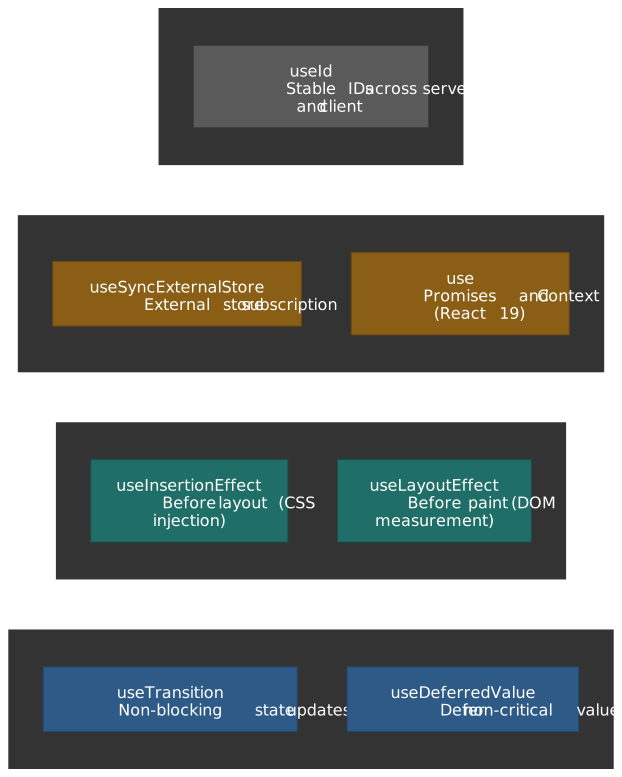
Abstract
These hooks exist because the core hooks (useState, useEffect, useRef) can’t solve every problem. Each addresses a specific gap:
- Concurrent rendering (
useTransition,useDeferredValue): React 18’s concurrent features need APIs to mark updates as interruptible. Without them, expensive renders block user input. - Effect timing (
useLayoutEffect,useInsertionEffect):useEffectruns after paint. Some code—DOM measurements, style injection—must run before paint to avoid visual flicker. - External state (
useSyncExternalStore): Subscribing to external stores withuseEffect/useStatecauses “tearing” in concurrent mode—different components see different store versions. - Async data (
use): React 19’susehook reads promises during render, integrating with Suspense without custom wrapper components. - Stable IDs (
useId): Server and client can generate IDs independently, causing hydration mismatches.useIduses component tree position to guarantee consistency.
The mental model: core hooks are general-purpose; specialized hooks solve specific problems that arise from React’s architecture (concurrent rendering, SSR, browser paint timing).
Concurrent Rendering Hooks
React 18 introduced concurrent rendering, where renders can be interrupted and resumed. Two hooks let you leverage this: useTransition marks state updates as non-blocking; useDeferredValue defers a value so expensive renders don’t block urgent updates.
useTransition: Non-Blocking State Updates
Problem it solves: Expensive state updates (tab switches, large list filtering) block user input. The UI becomes unresponsive while React renders.
Design rationale: Mark updates as “transitions”—low-priority work that can be interrupted if higher-priority updates (like typing) arrive. React keeps showing the old UI until the new one is ready.
import { useState, useTransition } from "react"function TabContainer() { const [tab, setTab] = useState("about") const [isPending, startTransition] = useTransition() function selectTab(nextTab: string) { startTransition(() => { setTab(nextTab) // Low-priority update }) } return ( <div style={{ opacity: isPending ? 0.7 : 1 }}> <button onClick={() => selectTab("posts")}>Posts</button> <button onClick={() => selectTab("contact")}>Contact</button> {tab === "posts" && <SlowPostsTab />} {tab === "contact" && <ContactTab />} </div> )}How it works:
startTransition(() => setState(...))marks the update as non-blocking- React starts rendering with the new state in the background
- If the user clicks elsewhere, React abandons the old render and starts fresh
isPendingistrueuntil all transition work completes
React 19 async support: startTransition accepts an async function (a React 19 Action); isPending stays true for the entire async run instead of resetting at the first await.1
// React 19+: async transitionsfunction SubmitButton({ onSubmit }: { onSubmit: () => Promise<void> }) { const [isPending, startTransition] = useTransition() return ( <button disabled={isPending} onClick={() => { startTransition(async () => { await onSubmit() // State updates after await currently need another startTransition // to be marked as a transition (React loses the transition context // across the await boundary). See react.dev/reference/react/startTransition. }) }} > {isPending ? "Submitting..." : "Submit"} </button> )}Edge cases and caveats:
| Scenario | Behavior |
|---|---|
| Multiple rapid transitions | Batched together (may change in future React versions) |
| Text input in transition | ❌ Breaks responsiveness—input value should update synchronously |
setTimeout inside startTransition |
❌ Doesn’t work—the setState inside timeout isn’t marked as transition |
| Error in transition | Triggers nearest Error Boundary |
startTransition identity |
Stable—safe to omit from useEffect dependencies |
When to use vs. not use:
| Use For | Don’t Use For |
|---|---|
| Tab switches, route navigation | Controlled text inputs |
| Large list filtering | Updates that must be immediate |
| Form submission with async | When you need exact timing control |
| Any update where stale UI is acceptable | Outside React components (use standalone startTransition) |
useDeferredValue: Defer Non-Critical Values
Problem it solves: A value changes rapidly (typing), but rendering with the new value is expensive (filtering thousands of items). You want the input to stay responsive while the expensive render happens in the background.
Design rationale: “Lag” behind the actual value. React first renders with the old deferred value (fast), then re-renders in the background with the new value (can be interrupted).
import { useState, useDeferredValue, useMemo } from "react"function SearchPage({ items }: { items: Item[] }) { const [query, setQuery] = useState("") const deferredQuery = useDeferredValue(query) const isStale = query !== deferredQuery const filteredItems = useMemo(() => items.filter((item) => item.name.includes(deferredQuery)), [items, deferredQuery]) return ( <> <input value={query} onChange={(e) => setQuery(e.target.value)} /> <div style={{ opacity: isStale ? 0.5 : 1 }}> <ItemList items={filteredItems} /> </div> </> )}How the two-phase render works:
- User types “ab” (query = “ab”, but deferredQuery = “a” from before)
- React renders with deferredQuery = “a” (fast, uses cached filter result)
- React starts background render with deferredQuery = “ab”
- If user types “abc” before background completes, React abandons that render and starts fresh
- When background render commits, both values match —
isStalebecomesfalse
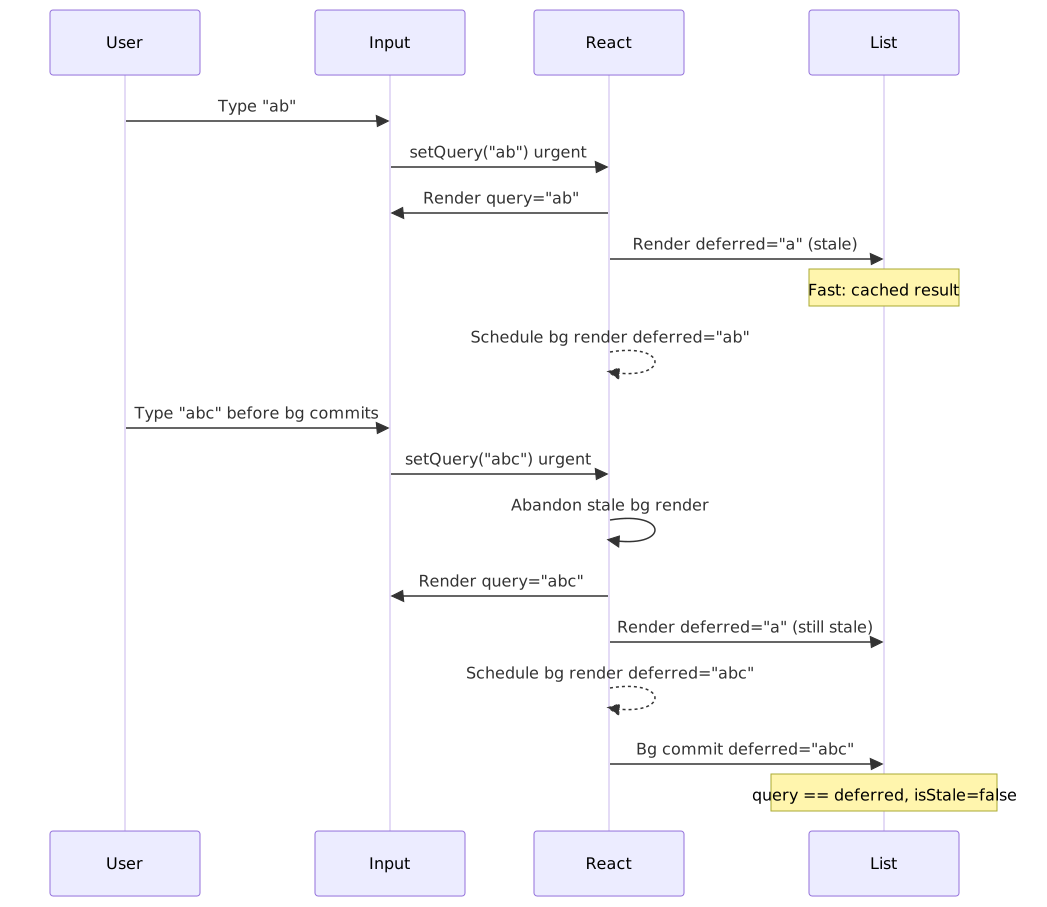
React 19 initialValue parameter: a second argument lets you set the value for the first render so the initial frame can render with the cheap “stale” value too.2
// React 19: provide initial value for first renderconst deferredQuery = useDeferredValue(query, "") // "" on initial renderWithout initialValue, the first render uses the actual value (no deferral possible—there’s no “previous” value).
Comparison with debouncing/throttling:
| Aspect | useDeferredValue | Debouncing |
|---|---|---|
| Fixed delay | No—adapts to device speed | Yes |
| Interruptible | Yes—abandons stale renders | No |
| Integration with React | Deep (concurrent features) | Manual |
| Use case | Rendering bottlenecks | Network requests |
Edge cases and caveats:
- Pass primitives or memoized objects:
useDeferredValue({ x: 1 })creates a new object each render, causing unnecessary background work - Inside
startTransition: Deferred value always equals actual value (update is already deferred) - No network request prevention: Still fetches on every change—combine with caching/debouncing for network calls
- Effects deferred:
useEffectin background render only runs after commit
When to use vs. useTransition:
| useDeferredValue | useTransition |
|---|---|
| Value comes from props (no access to setter) | You control the state update |
| Automatic deferral | Explicit startTransition call |
No isPending (compute from value comparison) |
Provides isPending flag |
| Defers a value | Defers a state update |
Effect Timing Hooks
The three effect hooks run at distinct points in the commit phase. useInsertionEffect is intended to fire before any layout effects so that style sheets are in the DOM before measurement; useLayoutEffect runs synchronously after DOM mutation but before the browser paints; useEffect runs after paint.
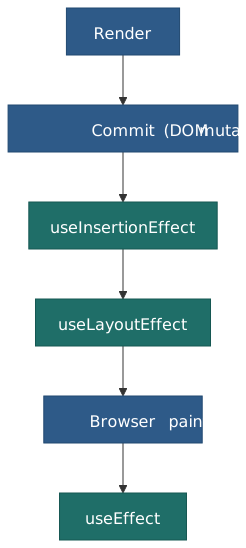
Note
useEffect is usually deferred until after paint, but the React scheduler will flush effects synchronously before paint when a useLayoutEffect-driven state update sits in front of them, to keep frames consistent.3 Treat the diagram above as the steady-state contract, not an absolute guarantee.
useLayoutEffect: Synchronous DOM Measurement
Problem it solves: You need to measure a DOM element (its position, size) and use that measurement to position something else. With useEffect, the element renders in the wrong position first, then jumps—visual flicker.
Design rationale: Run after DOM updates but before browser paint. Measure and re-render; the user only sees the final result.
import { useLayoutEffect, useRef, useState } from "react"function Tooltip({ children, targetRect }: { children: React.ReactNode; targetRect: DOMRect }) { const ref = useRef<HTMLDivElement>(null) const [position, setPosition] = useState({ x: 0, y: 0 }) useLayoutEffect(() => { const tooltip = ref.current if (!tooltip) return const { width, height } = tooltip.getBoundingClientRect() // Position above target, centered setPosition({ x: targetRect.left + targetRect.width / 2 - width / 2, y: targetRect.top - height - 8, }) }, [targetRect]) return ( <div ref={ref} style={{ position: "fixed", left: position.x, top: position.y }}> {children} </div> )}Flow for tooltip positioning:
- Initial render: tooltip at (0, 0)
- DOM updated (tooltip element exists but wrong position)
useLayoutEffectruns: measures tooltip dimensions, callssetPosition- Re-render with correct position
- Browser paints—user sees tooltip in correct position (no flicker)
Edge cases and caveats:
| Scenario | Impact |
|---|---|
Expensive calculation in useLayoutEffect |
Blocks paint—causes jank |
| SSR | Does nothing on server; logs warning in development |
| Strict Mode | Runs setup+cleanup twice (like all effects) |
SSR workarounds:
// Option 1: Client-only rendering with Suspense;<Suspense fallback={<Spinner />}> <TooltipComponent /> {/* Only renders on client */}</Suspense>// Option 2: Check for browser environmentconst [mounted, setMounted] = useState(false)useEffect(() => setMounted(true), [])if (!mounted) return <Fallback />When to use vs. useEffect:
| useLayoutEffect | useEffect |
|---|---|
| DOM measurements before paint | Data fetching, subscriptions |
| Synchronous repositioning | Non-visual side effects |
| Avoiding visual flicker | Everything else |
useInsertionEffect: CSS-in-JS Style Injection
Problem it solves: CSS-in-JS libraries need to inject <style> tags before useLayoutEffect runs, so layout measurements read the correct styles.
Design rationale: Run before all other effects—even useLayoutEffect. This is the earliest point to inject styles.
import { useInsertionEffect } from "react"function useCSS(rule: string) { useInsertionEffect(() => { const style = document.createElement("style") style.textContent = rule document.head.appendChild(style) return () => style.remove() }, [rule])}Critical limitations (unlike other effects):
| Limitation | Reason |
|---|---|
| Cannot update state | Would cause render during render |
| Refs not attached yet | DOM elements not connected to refs |
| DOM may not be updated | Timing is uncertain—only styles are safe |
| Client-only | No-op on server |
This hook is for library authors only. Application code should never use useInsertionEffect directly—use a CSS-in-JS library that handles this internally.
External State Integration
useSyncExternalStore: Subscribe to External Stores
Problem it solves: Subscribing to external stores (Redux, Zustand, browser APIs) with useEffect + useState causes “tearing” in concurrent mode—different parts of the UI render with different store versions.
Design rationale: Provide React with a subscribe function and a getSnapshot function. React guarantees all components see the same snapshot within a single render.
import { useSyncExternalStore } from "react"function useOnlineStatus() { return useSyncExternalStore(subscribe, getSnapshot, getServerSnapshot)}function subscribe(callback: () => void) { window.addEventListener("online", callback) window.addEventListener("offline", callback) return () => { window.removeEventListener("online", callback) window.removeEventListener("offline", callback) }}function getSnapshot() { return navigator.onLine}function getServerSnapshot() { return true // Assume online during SSR}The tearing problem: In concurrent mode, a render can pause. If an external store changes while paused, some components see the old value, others see the new value. useSyncExternalStore runs a pre-commit consistency check by re-reading getSnapshot; if the snapshot moved during the render, React restarts that work synchronously so every component commits against the same version.4
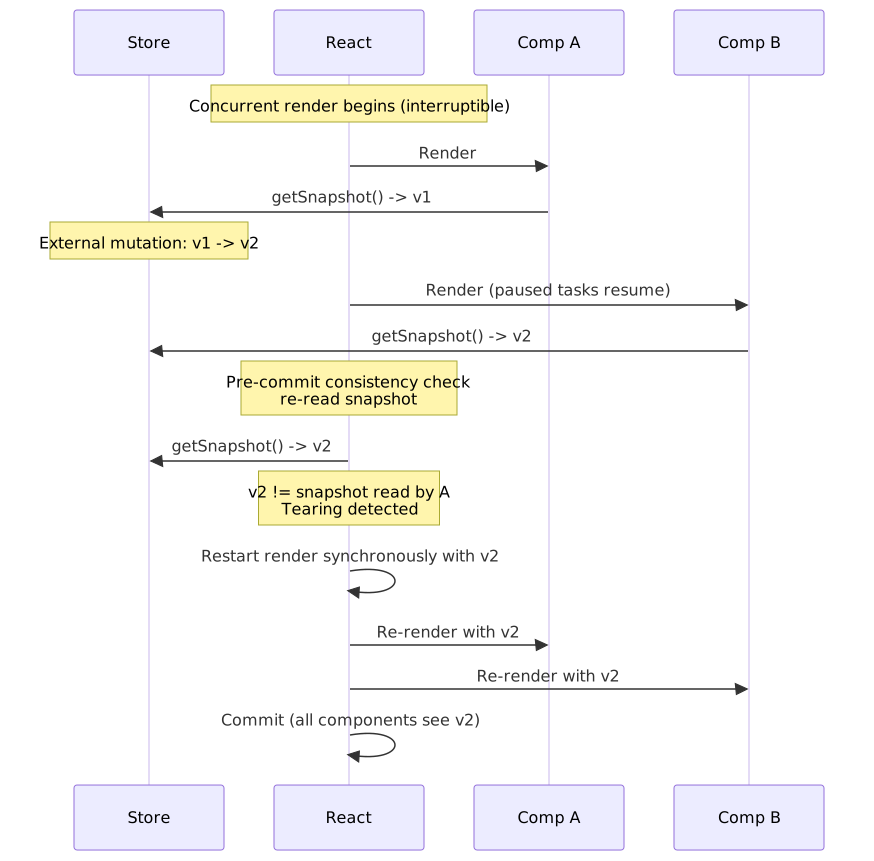
API contract:
| Function | Requirement |
|---|---|
subscribe(callback) |
Must return unsubscribe function; call callback when store changes |
getSnapshot() |
Must return immutable data; same reference if unchanged |
getServerSnapshot() |
Optional; provides initial value for SSR/hydration |
Common mistake—mutable snapshots:
// ❌ Creates new object each call → infinite re-rendersfunction getSnapshot() { return { count: store.count } // New object every time}// ✅ Return the same reference if data unchangedfunction getSnapshot() { return store.state // Immutable; same reference when unchanged}Memoization requirements:
// ❌ subscribe recreated each render → resubscribes constantlyfunction Component({ userId }) { const data = useSyncExternalStore( (callback) => store.subscribe(userId, callback), // New function each render! () => store.get(userId), )}// ✅ Memoize or move outside componentconst subscribe = (callback) => store.subscribe(callback)function Component() { const data = useSyncExternalStore(subscribe, getSnapshot)}// ✅ Or use useCallback for dynamic subscriptionsfunction Component({ userId }) { const subscribe = useCallback((callback) => store.subscribe(userId, callback), [userId]) const data = useSyncExternalStore(subscribe, () => store.get(userId))}Edge cases and caveats:
| Scenario | Behavior |
|---|---|
| Store changes during transition | React may restart render as blocking to prevent tearing |
Missing getServerSnapshot |
SSR throws; use Suspense boundary to defer to client |
| Suspending on store values | ❌ Discouraged—external mutations can’t be marked as non-blocking |
When to use: State management libraries (Redux, Zustand), browser APIs (localStorage, navigator.onLine), any external data source.
When not to use: React-managed state. Prefer useState/useReducer when possible.
use: Read Promises and Context
Problem it solves: Consuming promises required custom hooks or libraries that integrate with Suspense. Reading context conditionally was impossible with useContext.
Design rationale (React 19): A single API that reads resources during render. Unlike other hooks, use can be called inside if statements and loops — the official reference is explicit that this is the only hook exempt from the top-level rule.5
import { use, Suspense } from "react"function UserProfile({ userPromise }: { userPromise: Promise<User> }) { const user = use(userPromise) // Suspends if promise pending return <h1>{user.name}</h1>}function App() { const userPromise = fetchUser(123) // Create promise once return ( <Suspense fallback={<Loading />}> <UserProfile userPromise={userPromise} /> </Suspense> )}Promise consumption flow:
- Component calls
use(promise) - If promise pending: component suspends, Suspense fallback shows
- If promise resolved: returns resolved value
- If promise rejected: throws to nearest Error Boundary
Context consumption (alternative to useContext):
// use() can be called conditionally—useContext cannotfunction HorizontalRule({ show }: { show: boolean }) { if (show) { const theme = use(ThemeContext) // Conditional read is allowed return <hr className={theme} /> } return null}Critical caveat—promise recreation:
// ❌ Client Component: promise recreated every render → infinite suspensefunction BadComponent({ userId }) { const user = use(fetchUser(userId)) // New promise each render!}// ✅ Pass promise from Server Component (stable across renders)// Server Componentexport default function Page({ userId }) { const userPromise = fetchUser(userId) // Created once return <UserProfile userPromise={userPromise} />}Error handling:
// Option 1: Error Boundary;<ErrorBoundary fallback={<Error />}> <Suspense fallback={<Loading />}> <UserProfile userPromise={userPromise} /> </Suspense></ErrorBoundary>// Option 2: Handle before passing to use()const safePromise = fetchUser(userId).catch(() => ({ name: "Unknown" }))const user = use(safePromise) // Never rejectsConstraints:
| Constraint | Workaround |
|---|---|
| Can’t use in try-catch | Use Error Boundary or .catch() |
| Resolved value must be serializable (Server → Client) | Only pass JSON-compatible data |
| Promise in Client Component recreates on render | Pass from Server Component or use caching library |
SSR and Accessibility
useId: Stable Unique IDs Across Server and Client
Problem it solves: Generating IDs with Math.random() or incrementing counters produces different values on server vs. client, causing hydration mismatches.
Design rationale: React derives the ID from the component’s position in the React tree (in practice, a “parent path” walked through the Fiber that React maintains).6 Same tree position on server and client → same ID, so the markup hydrates without mismatch.
import { useId } from "react"function PasswordField() { const hintId = useId() return ( <> <input type="password" aria-describedby={hintId} /> <p id={hintId}>Password must be 12+ characters</p> </> )}Multiple related IDs (single useId call):
function Form() { const id = useId() return ( <form> <label htmlFor={`${id}-email`}>Email</label> <input id={`${id}-email`} type="email" /> <label htmlFor={`${id}-password`}>Password</label> <input id={`${id}-password`} type="password" /> </form> )}Multiple React roots (microfrontends):
// Prevent ID collisions between appsconst root1 = createRoot(container1, { identifierPrefix: "app1-" })const root2 = createRoot(container2, { identifierPrefix: "app2-" })Critical constraints:
| Constraint | Reason |
|---|---|
| Don’t use for list keys | Keys should derive from data, not component position |
Don’t use for use() cache keys |
ID may change during render; use data-derived keys |
| Top-level only | Like all hooks (except use) |
| No async Server Components | Can’t use in async function ServerComponent() |
Advanced Composition Patterns
Combining Deferred Value with Transition
When both the input and the derived computation are expensive:
import { useState, useDeferredValue, useTransition, useMemo } from "react"function DataExplorer({ largeDataset }: { largeDataset: Item[] }) { const [filter, setFilter] = useState("") const [sortOrder, setSortOrder] = useState<"asc" | "desc">("asc") const [isPending, startTransition] = useTransition() // Defer filter so typing stays responsive const deferredFilter = useDeferredValue(filter) // Expensive computation uses deferred value const processedData = useMemo(() => { const filtered = largeDataset.filter((item) => item.name.includes(deferredFilter)) return filtered.sort((a, b) => (sortOrder === "asc" ? a.value - b.value : b.value - a.value)) }, [largeDataset, deferredFilter, sortOrder]) // Sort change is a transition (can show stale sorted data briefly) const handleSortChange = (order: "asc" | "desc") => { startTransition(() => { setSortOrder(order) }) } return ( <div style={{ opacity: isPending || filter !== deferredFilter ? 0.7 : 1 }}> <input value={filter} onChange={(e) => setFilter(e.target.value)} /> <button onClick={() => handleSortChange("asc")}>Sort Asc</button> <button onClick={() => handleSortChange("desc")}>Sort Desc</button> <DataTable data={processedData} /> </div> )}External Store with Selector (Avoiding Unnecessary Renders)
import { useSyncExternalStore, useCallback } from "react"// Only re-render when selected slice changesfunction useStoreSelector<T, S>(store: Store<T>, selector: (state: T) => S): S { const subscribe = useCallback((callback: () => void) => store.subscribe(callback), [store]) const getSnapshot = useCallback(() => selector(store.getState()), [store, selector]) return useSyncExternalStore(subscribe, getSnapshot)}// Usage: component only re-renders when `user.name` changesfunction UserName() { const name = useStoreSelector(userStore, (state) => state.user.name) return <span>{name}</span>}Caution: The selector must be stable (memoized or defined outside component). A new selector each render defeats the optimization.
Conclusion
Specialized hooks solve problems that core hooks cannot address due to React’s architecture:
- Concurrent features require marking updates as interruptible (
useTransition) or deferring values (useDeferredValue) - Browser paint timing requires effects that run before paint (
useLayoutEffect) or before layout effects (useInsertionEffect) - External state requires tearing prevention (
useSyncExternalStore) - Async data requires Suspense integration (
use) - SSR requires deterministic ID generation (
useId)
The decision tree: use core hooks by default. Reach for specialized hooks when you encounter their specific problem—concurrent rendering blocking input, visual flicker from late measurements, hydration mismatches, or external store inconsistencies.
Appendix
Prerequisites
- React Hooks Fundamentals - Core hooks and rules
- Understanding of React’s render cycle
- Familiarity with SSR (Server-Side Rendering) concepts
Terminology
| Term | Definition |
|---|---|
| Concurrent rendering | React 18+ feature where renders can be interrupted and resumed |
| Transition | A non-blocking state update that can be abandoned if higher-priority work arrives |
| Tearing | Visual inconsistency where different components show different versions of the same data |
| Hydration | Attaching event handlers to server-rendered HTML on the client |
| Suspense | React feature that shows fallback UI while async content loads |
Summary
useTransitionmarks state updates as non-blocking; use for expensive renders that shouldn’t block inputuseDeferredValuelags behind a value; use when you don’t control the state updateuseLayoutEffectruns before paint; use for DOM measurements to avoid flickeruseInsertionEffectruns before all effects; use only in CSS-in-JS librariesuseSyncExternalStoresubscribes to external stores safely; prevents tearing in concurrent modeusereads promises/context during render; can be called conditionally (React 19)useIdgenerates stable IDs from tree position; prevents SSR hydration mismatches
References
- React Documentation: useTransition - Official API reference and examples
- React Documentation: useDeferredValue - Deferred value patterns
- React Documentation: useLayoutEffect - Effect timing and SSR caveats
- React Documentation: useInsertionEffect - CSS-in-JS use case
- React Documentation: useSyncExternalStore - External store subscription
- React Documentation: use - Promise and context consumption (React 19)
- React Documentation: useId - Stable ID generation
- React Documentation: startTransition - Standalone transition API and async caveats
- React 18 Release: Concurrent Features - Concurrent rendering introduction
- React 19 Release - Actions, async transitions, and the
usehook
Footnotes
-
React team, “React v19” release notes (December 2024) — the Actions section documents async
startTransitionand the new lifetime ofisPending. ↩ -
React docs,
useDeferredValuereference — see the “Indicating that the content is stale” andinitialValueparameter sections. ↩ -
Yang, “When do
useEffect()callbacks get run? Before paint or after paint?” — jser.dev, 2023. The post traces React fiber’s commit phase and shows the cases whereuseEffectis flushed before paint. ↩ -
React WG, “useMutableSource → useSyncExternalStore”. The original RFC discussion that introduced the consistency check semantics now used by
useSyncExternalStore. ↩ -
React docs,
usereference — “Unlike all other React Hooks,usecan be called within loops and conditional statements likeif.” ↩ -
Yang, “How does useId() work internally in React?” — walkthrough of the Fiber
mountIdfunction showing that the generated identifier is built from the component’s path through the tree. The official reference (tier-2) only guarantees stability across server and client, so treat the “tree position” framing as an implementation detail rather than a public contract. ↩