DRM Fundamentals for Streaming Media
Digital Rights Management (DRM) for streaming media combines encryption, license management, and platform-specific security to control content playback. This article covers the encryption architecture (CENC, AES modes), the three dominant DRM systems (Widevine, FairPlay, PlayReady), license server design, client integration via EME (Encrypted Media Extensions), and operational considerations including key rotation, security levels, and the threat model that DRM addresses.
Abstract
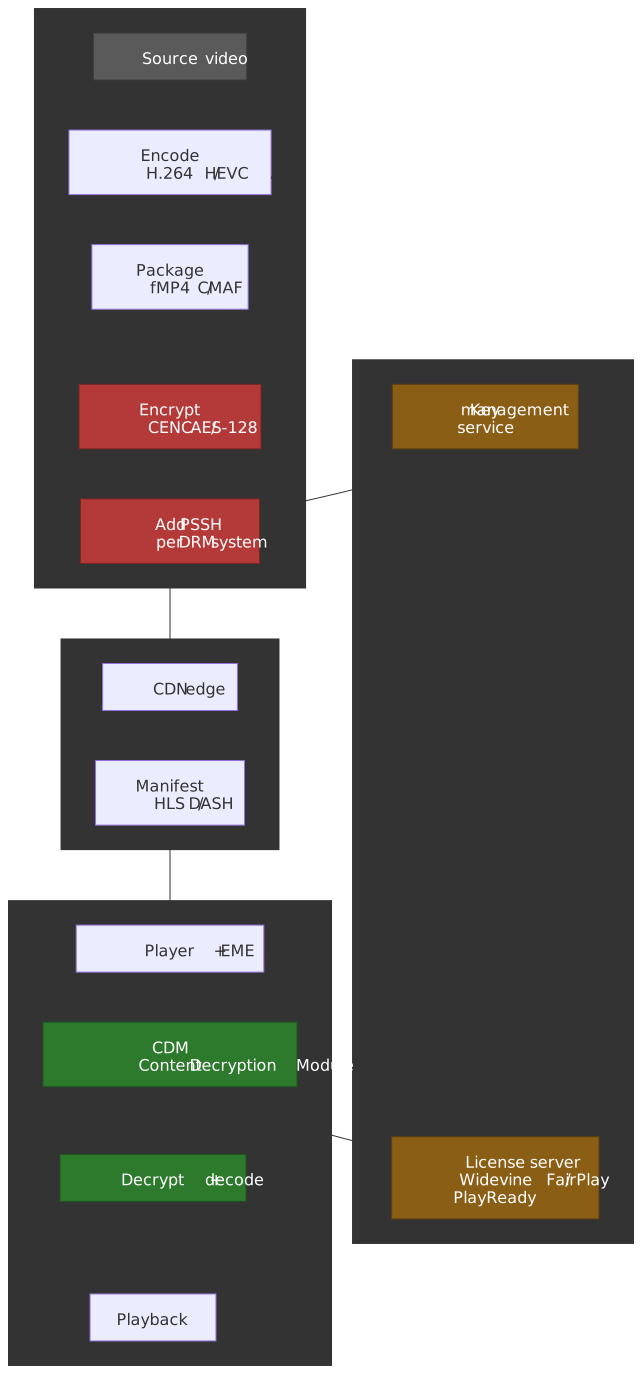
DRM protects streaming content by combining two mechanisms: encryption (scrambling content so it’s unplayable without keys) and license enforcement (controlling who gets keys and under what conditions). The challenge is that this must work across a fragmented device ecosystem where each platform (Apple, Google, Microsoft) controls its own security hardware.
The core mental model:
-
CENC separates encryption from DRM. Common Encryption (ISO/IEC 23001-7:2023) standardizes how content is encrypted using AES-128. The same encrypted file works with any DRM system — Widevine, FairPlay, or PlayReady. What differs is how keys are delivered.
-
Three DRM systems, one reason: hardware trust. Each platform vendor controls the Trusted Execution Environment (TEE) on their devices. DRM requires keys to be protected by hardware — no vendor trusts another vendor’s implementation. Hence: Widevine for Android/Chrome, FairPlay for Apple, PlayReady for Windows/Xbox.
-
Security levels determine content quality. DRM systems define tiers: Widevine L1 and PlayReady SL3000 (hardware TEE) unlock 4K/HDR; L3/SL2000 (software-only) are typically capped at SD. Premium services enforce hardware DRM for premium content.
-
License servers are the policy engine. The server doesn’t just deliver keys — it enforces business rules: rental expiration, device limits, offline playback duration, output restrictions. Keys are wrapped in licenses containing these policies.
-
EME bridges JavaScript to the CDM. Encrypted Media Extensions (a W3C Recommendation since 2017) provides a standardized browser API. The actual decryption happens in the platform’s Content Decryption Module (CDM), which is a black box to JavaScript — the app never sees the content key.
-
DRM prevents casual copying, not determined piracy. Hardware DRM (L1) prevents screen recording on supported devices. Software DRM (L3) has been bypassed publicly since 2019. The “analog hole” (camera pointing at screen) is addressed by forensic watermarking, not DRM.
DRM system coverage:
| DRM | Ecosystem | Hardware Security | Software Fallback |
|---|---|---|---|
| Widevine | Chrome, Android, Android TV, Chromecast | L1 (TEE) | L3 (browser CDM) |
| FairPlay | Safari, iOS, macOS, Apple TV | Secure Enclave | — |
| PlayReady | Edge, Windows, Xbox, Smart TVs | SL3000 (TEE) | SL2000 (software) |
Common Encryption (CENC)
CENC (ISO/IEC 23001-7:2023, fourth edition) is the foundation that makes multi-DRM practical. It standardizes the encryption format so content can be encrypted once and decrypted by any supported DRM system.
Why CENC Exists
Before CENC, each DRM system required its own encrypted file. Supporting Widevine and FairPlay meant storing two complete copies of every video — doubling storage costs and halving CDN cache efficiency.
CENC defines:
- Encryption algorithm: AES-128 (same algorithm, same encrypted bytes for all DRM systems).
- Key mapping: How content keys are identified and applied to media samples.
- Subsample encryption: Which parts of video NAL units are encrypted (preserving headers for codec parsing).
What CENC does not define: license acquisition, key delivery protocols, or security requirements. Each DRM system handles these independently.
CENC Protection Schemes
CENC defines four widely deployed encryption schemes (the 2023 edition also registers an optional sve1 scheme — AES-CTR “sensitive video encryption” applied so the encrypted bitstream remains a valid decodable bitstream; see the MP4RA registry). The choice affects compatibility:
| Scheme | Algorithm | Pattern | Primary Use |
|---|---|---|---|
cenc |
AES-CTR | Full sample | Widevine, PlayReady (DASH) |
cbc1 |
AES-CBC | Full sample | Rare |
cens |
AES-CTR | Partial (pattern) | Rare |
cbcs |
AES-CBC | Partial (1:9 pattern) | FairPlay, HLS, CMAF |
Design trade-off — CTR vs. CBC:
-
AES-CTR (
cenc): Counter mode. Parallelizable — hardware decoders can decrypt multiple blocks simultaneously. No padding required. Historically the default for DASH/Widevine/PlayReady. -
AES-CBC (
cbcs): Cipher Block Chaining with pattern encryption. Each block depends on the previous, limiting parallelization. FairPlay requires CBC mode; Apple never supported CTR.
The CMAF convergence: When CMAF unified HLS and DASH containers, the industry needed a common encryption mode. Apple’s FairPlay only supports cbcs. PlayReady 4.0 added cbcs in October 2017; Widevine followed shortly after. By 2019–2020, cbcs had become the de facto standard for CMAF content, and as of the mid-2020s it is the recommended choice for new deployments targeting both Apple and non-Apple devices.
Note
Prior to CMAF, providers maintained separate encrypted packages — DASH with cenc for Widevine/PlayReady, and HLS with cbcs for FairPlay. CMAF with cbcs enables a single-file multi-DRM workflow.
Pattern Encryption
cbcs uses pattern encryption: encrypt some 16-byte blocks, skip others. The default pattern is 1:9 — one encrypted block (16 bytes), nine clear blocks (144 bytes), repeat — defined by the crypt_byte_block and skip_byte_block fields in the CENC sample group description.
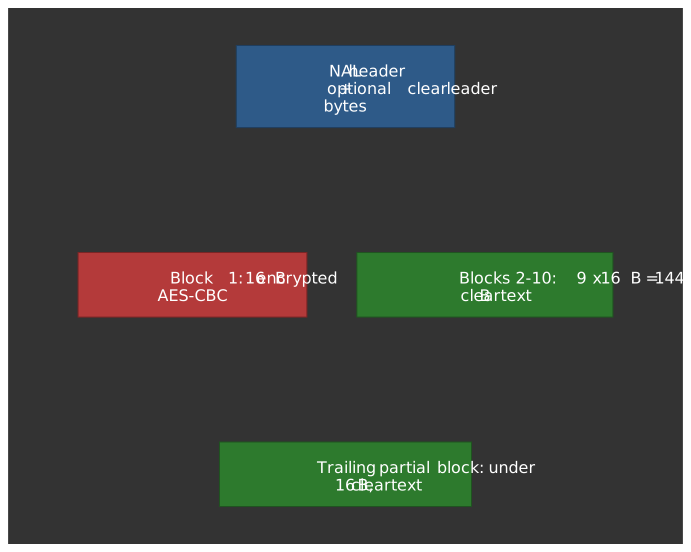
Why pattern encryption? Video codecs (H.264, HEVC) have NAL unit structures where headers must remain readable for the decoder to parse frame boundaries without decryption. Pattern encryption leaves sufficient plaintext for parsing while protecting the actual coded video data.
FairPlay-specific behavior: FairPlay implementations have historically reserved a fixed clear leader of about 32 bytes at the start of each VCL (Video Coding Layer) NAL unit before applying the 1:9 pattern, exceeding the CENC minimum (NAL type + slice header) so packagers can avoid slice-header parsing. The exact leader size is a packager/CDM convention layered on top of cbcs; treat any specific byte count as implementation detail to verify against your packager and FPS framework versions.
Subsample Encryption
For NAL-structured video (H.264, HEVC, AV1), CENC specifies subsample encryption: only the coded slice data is encrypted, leaving NAL headers in plaintext.
Structure of an encrypted sample:
NAL Unit:┌────────────┬───────────────────────────────┐│ NAL Header │ Coded Slice Data ││ (clear) │ (encrypted, pattern applied) │└────────────┴───────────────────────────────┘The senc (Sample Encryption) box in fMP4 contains auxiliary information describing which byte ranges are clear vs. encrypted for each sample. This enables:
- Decoder inspection of frame types without decryption
- Seeking to keyframes without license acquisition
- Partial decryption for trick play modes
The DRM Ecosystem
Three DRM systems dominate streaming: Google Widevine, Apple FairPlay, and Microsoft PlayReady. Understanding each system’s architecture is essential for multi-DRM deployment.
Widevine
Widevine is Google’s DRM, integrated into Chrome, Android, Chromecast, and Android TV. It’s the most widely deployed DRM for non-Apple streaming.
Security Levels (per the Widevine specification, summarized in Bitmovin’s reference):
| Level | Implementation | Typical Content Cap | Use Case |
|---|---|---|---|
| L1 | Decryption + decode in TEE; keys never exposed to main CPU | 4K, HDR, Dolby Vision | Premium streaming on Android/CTV |
| L2 | Crypto in TEE, video processing outside | Limited (rarely shipped) | Transitional devices |
| L3 | Software CDM; no hardware protection | SD (≤480p), some services raise to 720p | Desktop browsers, dev testing |
L1 requirement: Premium services like Netflix, Amazon Prime Video, and Disney+ typically gate HD and above on L1. A Chrome browser on macOS — despite running on capable hardware — gets L3 because there’s no TEE integration, which is why Netflix caps desktop Chrome at 720p instead of 4K.
Android implementation: Widevine on Android uses a Hardware Abstraction Layer (HAL) module. For L1, the liboemcrypto.so library communicates with a Widevine trustlet running in the TEE (e.g., Qualcomm QSEE, ARM TrustZone). The trustlet handles key decryption and content decryption without exposing keys to the Android OS.
Known vulnerabilities: L3 has been broken publicly multiple times — David Buchanan’s 2019 differential-fault attack on the white-box AES implementation recovered content keys directly, and the tomer8007/widevine-l3-decryptor Chrome extension demonstrated extracting the device RSA key from widevinecdm.dll. L1 keybox extractions have also been demonstrated but require physical access or privileged software. These attacks pushed Google toward improved keybox protection and server-side device attestation.
FairPlay Streaming (FPS)
FairPlay is Apple’s DRM, required for encrypted HLS on Safari, iOS, macOS, and Apple TV. There is no software-only fallback — on modern Apple silicon the content key is bound to the Secure Enclave, on older hardware it lives in a comparable trustlet, but in both cases the JavaScript layer never sees it.
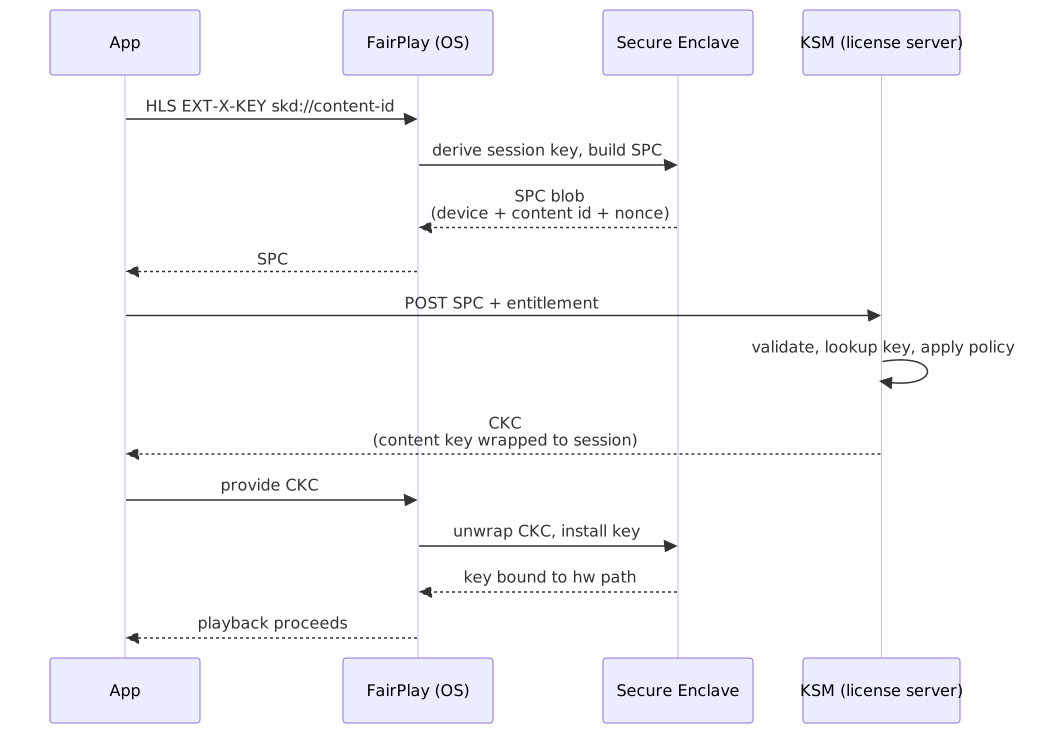
Key exchange flow (per the Apple FairPlay Streaming Overview):
- Player detects an
EXT-X-KEYtag in the HLS manifest withKEYFORMAT="com.apple.streamingkeydelivery"and askd://URI. - The application asks the FairPlay framework for a Server Playback Context (SPC).
- The SPC — an encrypted blob containing device identity, a session key, and the content key request — is POSTed to the license server.
- The license server’s Key Security Module (KSM) validates the SPC, looks up the content key, and returns a Content Key Context (CKC).
- The application hands the CKC to the FairPlay framework, which unwraps the content key inside the secure boundary.
- Playback proceeds with hardware-protected decryption.
Deployment requirements: FairPlay requires enrollment in Apple’s program. Content providers must implement a KSM or use a managed DRM service. Apple provides the “D Function” (a cryptographic component used to compute the integrity tag in CKCs) after approval.
Offline playback: Since iOS 10, FairPlay supports persistent licenses for offline viewing. The license includes expiration metadata; the secure boundary enforces playback duration limits without network access.
PlayReady
PlayReady is Microsoft’s DRM, integrated into Edge, Windows, Xbox, and many smart TVs. It’s particularly strong in the set-top box and smart TV market.
Security Levels (per Microsoft’s PlayReady security level reference):
| Level | Implementation | Content Quality |
|---|---|---|
| SL3000 | Core PlayReady stack runs inside a TEE; introduced with PlayReady 3.0 (2015) | 4K, HDR |
| SL2000 | Hardened software with some hardware crypto | HD and below |
| SL150 | No protection (development/test only) | — |
License flexibility: PlayReady licenses support granular policies:
- Output restrictions (HDCP version requirements, analog output disable).
- License expiration (rental periods, subscription windows).
- Domain binding (sharing across registered devices).
- Secure stop (server confirmation when playback ends).
SL3000 audio behaviour: PlayReady commonly pairs SL3000 video with SL2000 (or unencrypted) audio. The reasoning is pragmatic: audio TEE processing adds latency without meaningful security uplift, since audio is trivially recorded from a speaker or analog tap regardless of the DRM path.
Azure Media Services note: Azure Media Services retired on 30 June 2024; it had previously offered integrated PlayReady, Widevine, and FairPlay licensing. Post-retirement, providers typically use BuyDRM, EZDRM, Axinom, PallyCon, or self-hosted PlayReady servers built on the PlayReady Server SDK.
Multi-DRM Strategy
Supporting all major platforms requires all three DRM systems. CENC makes the media files common; only license acquisition differs.
Typical multi-DRM architecture: package once with CMAF + cbcs, embed per-DRM signaling, fan out license acquisition to each provider’s server. The media bytes on the CDN are identical for every device; only the license path differs.
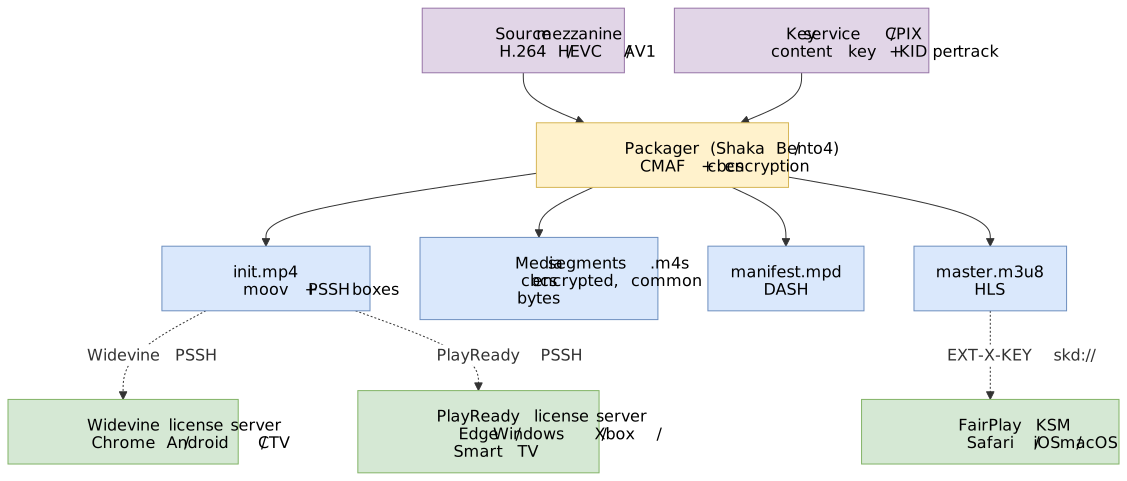
Managed vs. self-hosted: Multi-DRM service providers (BuyDRM, EZDRM, Axinom, PallyCon) handle license server operation, key management, and DRM system certifications. Self-hosting requires separate agreements with Google, Apple, and Microsoft, plus TEE hardware for L1/SL3000.
PSSH and DRM Signaling
The Protection System Specific Header (PSSH) box contains metadata that the CDM needs to acquire a license. Each DRM system has its own PSSH box; multiple PSSH boxes can coexist in the same file.
PSSH Box Structure
PSSH Box (ISO 23001-7):┌────────────────────────────────────────┐│ Box Header (size, type='pssh') │├────────────────────────────────────────┤│ Version (0 or 1) ││ Flags ││ SystemID (16 bytes, identifies DRM) ││ KID Count (v1 only) ││ KID List (v1 only, key IDs) ││ Data Size ││ Data (DRM-specific payload) │└────────────────────────────────────────┘SystemID values (from the DASH-IF identifiers registry):
| DRM | SystemID (UUID) |
|---|---|
| Widevine | edef8ba9-79d6-4ace-a3c8-27dcd51d21ed |
| FairPlay | 94ce86fb-07ff-4f43-adb8-93d2fa968ca2 |
| PlayReady | 9a04f079-9840-4286-ab92-e65be0885f95 |
PSSH data contents vary by DRM:
- Widevine: Content ID, key IDs, optional provider/policy info.
- PlayReady: PlayReady Object (PRO) containing license acquisition URL and key IDs.
- FairPlay: Apple’s HLS guidance explicitly states that PSSH boxes are not used in HLS — key acquisition information lives in the
EXT-X-KEYtag. The FairPlay UUID above only matters when shipping FairPlay over DASH.
Signaling in DASH
DASH uses ContentProtection elements in the MPD to signal DRM:
<AdaptationSet> <!-- Signal encryption scheme --> <ContentProtection schemeIdUri="urn:mpeg:dash:mp4protection:2011" value="cenc" /> <!-- Widevine-specific --> <ContentProtection schemeIdUri="urn:uuid:edef8ba9-79d6-4ace-a3c8-27dcd51d21ed"> <cenc:pssh>AAAANHBzc2gBAAAA7e+LqXnW...</cenc:pssh> </ContentProtection> <!-- PlayReady-specific --> <ContentProtection schemeIdUri="urn:uuid:9a04f079-9840-4286-ab92-e65be0885f95"> <cenc:pssh>AAADfnBzc2gAAAAAmgTweZh...</cenc:pssh> <mspr:pro>...</mspr:pro> </ContentProtection></AdaptationSet>PSSH placement — MPD vs. init segment:
The PSSH can appear in the MPD (as base64-encoded cenc:pssh element) or in the initialization segment’s moov/pssh box. The DASH-IF interoperability guidelines recommend embedding PSSH in the MPD: license acquisition can start before any media segment is fetched, reducing startup latency, and the MPD is far easier to regenerate than init segments when keys rotate or new DRM systems are added.
Signaling in HLS
HLS uses the EXT-X-KEY tag in media playlists:
#EXTM3U#EXT-X-VERSION:5#EXT-X-KEY:METHOD=SAMPLE-AES,URI="skd://content-id-here",KEYFORMAT="com.apple.streamingkeydelivery",KEYFORMATVERSIONS="1"#EXTINF:6.0,segment001.m4sKey parameters:
METHOD=SAMPLE-AES: IndicatescbcsencryptionURI: FairPlay usesskd://scheme; the value is passed to the license serverKEYFORMAT: Identifies FairPlay (com.apple.streamingkeydelivery)
For Widevine/PlayReady with HLS (fMP4/CMAF), the PSSH is embedded in the init segment’s moov box. Some players also support EXT-X-SESSION-KEY in master playlists for early license acquisition.
License Server Architecture
The license server is the policy engine of DRM. It doesn’t just deliver keys—it wraps them in licenses that encode business rules.
Core Components
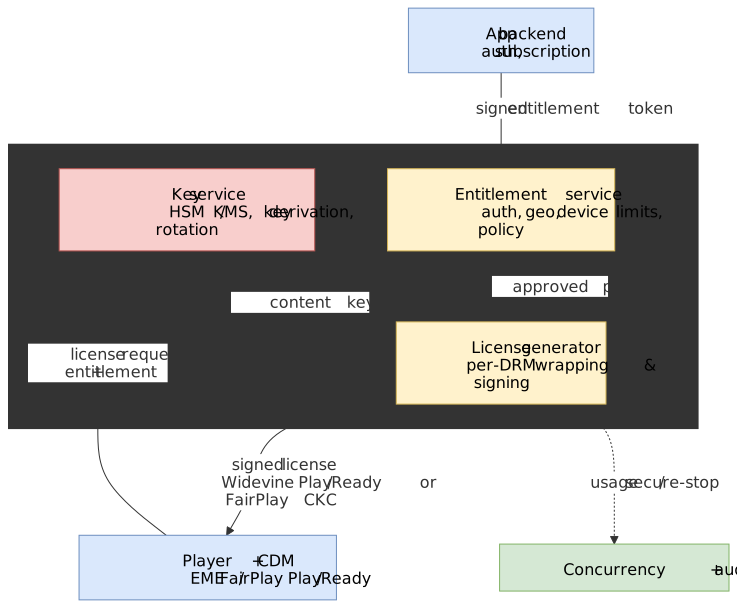
Entitlement Service: Authorizes the license request. Checks user authentication, subscription status, device limits, geo-restrictions. Returns an entitlement token (often JWT) that the license generator trusts.
Key Service: Stores and retrieves content encryption keys. For large catalogs, keys may be derived from a master key using the content ID (hierarchical key derivation). Must be highly secure—compromise here means all content is compromised.
License Generator: Takes the entitlement token and content key, generates a DRM-specific license. Each DRM has its own license format and signing requirements.
Key Hierarchy
DRM uses a layered key hierarchy so the only secret that ever travels in the open is wrapped to a specific device, and the cleartext content key only exists inside the CDM’s secure boundary.
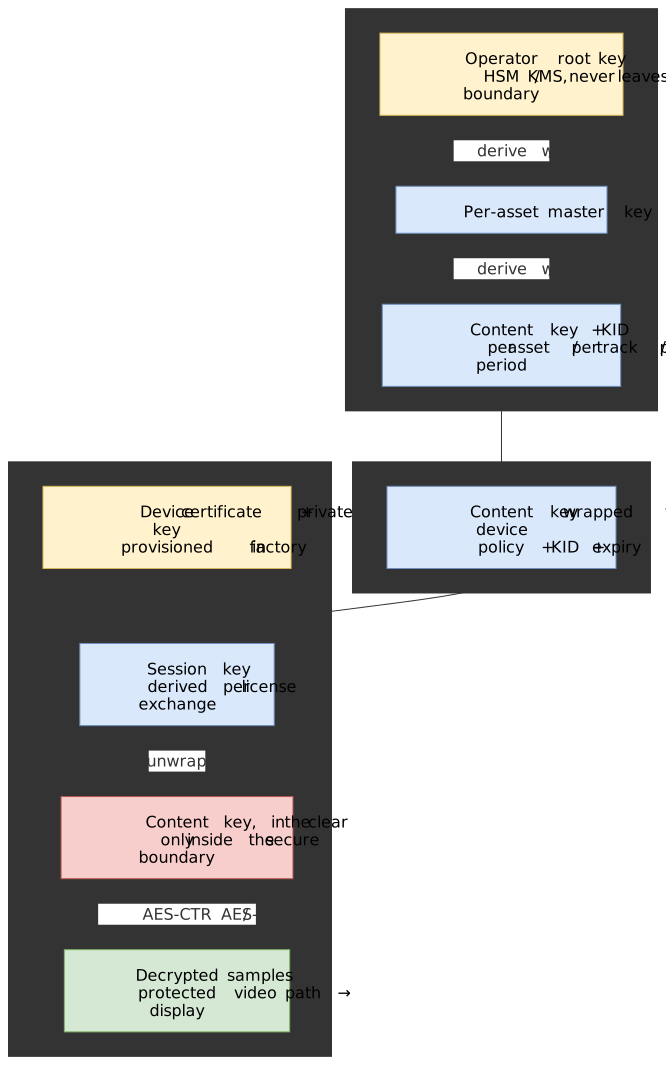
The implications:
- Root and master keys never leave the operator’s HSM / KMS. Compromise of a license server process must not expose them.
- Content keys are wrapped to a per-session key derived from the device’s provisioned certificate (Widevine keybox, FairPlay device key, PlayReady model certificate). Stealing a license off the wire gets you nothing without that device’s private key.
- The unwrapped content key only exists inside the TEE / Secure Enclave for L1 / SL3000. On L3 / SL2000 it lives in process memory, which is the structural reason software DRM is bypassable.
License Policies
Licenses contain policies that the CDM enforces locally:
| Policy | Description | Example |
|---|---|---|
| License duration | How long the license is valid | 48 hours (rental) |
| Playback duration | How long playback can continue after first play | 24 hours |
| Persistence | Whether license survives app restart | Offline viewing |
| Output restrictions | Required HDCP version, analog output control | HDCP 2.2 for 4K |
| Security level | Minimum client security level | L1 for HD+ |
| Device binding | License tied to specific device | Non-transferable |
Rental example: A 48-hour rental might have:
- License duration: 30 days (time to start watching)
- Playback duration: 48 hours (once playback begins)
- Persistence: Enabled (for offline viewing)
Key Rotation
For live streaming, key rotation changes encryption keys periodically, limiting the exposure window if a key is compromised.
Implementation:
- Encoder generates new key at rotation interval (e.g., every hour)
- Key Service stores new key with associated time period
- MPD/playlist signals upcoming key change via PSSH update
- Player acquires new license before key change takes effect
- CDM seamlessly transitions to new key
Timing is critical: The new key must be signaled 2-3 segment periods before activation. If the player doesn’t acquire the new license in time, playback stalls.
CPIX for key exchange: The Content Protection Information Exchange (CPIX) format, standardized by DASH-IF, provides a vendor-neutral way to exchange key information between encoders, packagers, and DRM servers. CPIX supports key periods for rotation and filtering by track type (video, audio, SD, HD).
Entitlement Tokens
Rather than embedding business logic in the license server, the common pattern is token-based entitlement:
- User’s app authenticates with backend
- Backend validates subscription, generates signed entitlement token
- Token includes: user ID, content ID, allowed policies, expiration
- Player includes token in license request
- License server validates token signature, applies policies
Token format example (JWT-style):
{ "sub": "user-12345", "content_id": "movie-abc", "policies": { "license_duration": 172800, "playback_duration": 86400, "min_security_level": "L1" }, "exp": 1704067200, "iss": "streaming-service.com"}This separates concerns: the backend handles business logic, the license server handles DRM cryptography.
Client Integration: EME
Encrypted Media Extensions (EME) is the W3C API that connects web applications to Content Decryption Modules. EME 1 has been a W3C Recommendation since 18 September 2017; the encrypted-media-2 revision (HDCP detection, encryption-scheme capability detection, mixed encrypted/clear streams) is currently a Working Draft under the Media WG charter and has not yet returned to Recommendation. EME standardizes the interface; the security properties depend entirely on the underlying CDM.
EME Flow
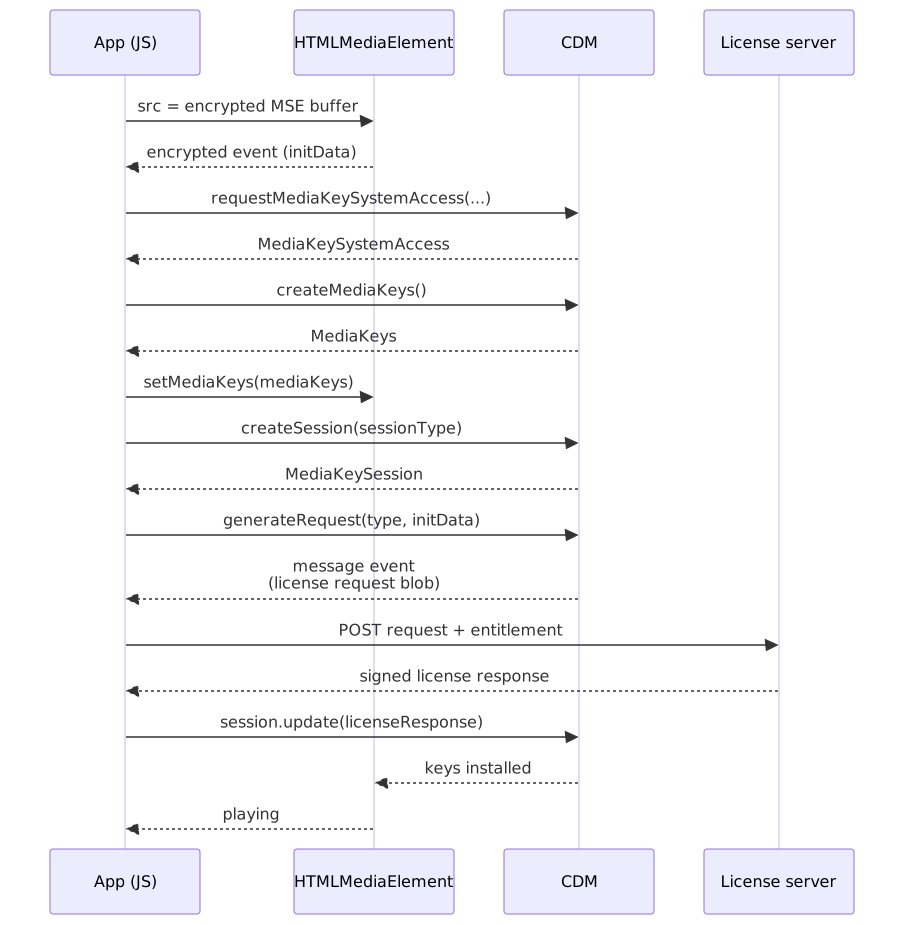
Key API Components
navigator.requestMediaKeySystemAccess(keySystem, config)
Checks if a DRM system is available and supports the requested configuration.
const config = [ { initDataTypes: ["cenc"], videoCapabilities: [ { contentType: 'video/mp4; codecs="avc1.640028"', robustness: "HW_SECURE_ALL", // Request L1 }, ], audioCapabilities: [ { contentType: 'audio/mp4; codecs="mp4a.40.2"', }, ], persistentState: "required", // For offline sessionTypes: ["persistent-license"], },]const access = await navigator.requestMediaKeySystemAccess("com.widevine.alpha", config)Robustness levels (Widevine, per Bitmovin’s reference):
| Robustness string | Crypto | Decode | Maps to |
|---|---|---|---|
HW_SECURE_ALL |
HW | HW | L1 |
HW_SECURE_DECODE |
HW | HW | L1 (decode-only path) |
HW_SECURE_CRYPTO |
HW | SW | L2 |
SW_SECURE_DECODE |
SW | SW | L3 |
SW_SECURE_CRYPTO |
SW | SW | L3 |
The empty string is the lowest level and imposes no constraint. If a requested robustness is not supported, the requestMediaKeySystemAccess Promise rejects with NotSupportedError. Best practice is to query each level from highest to lowest and degrade quality accordingly.
MediaKeys and MediaKeySession
MediaKeys represents the keying material for a media element. MediaKeySession handles the license exchange for a specific set of keys.
const mediaKeys = await access.createMediaKeys()await videoElement.setMediaKeys(mediaKeys)// When encrypted event firesvideoElement.addEventListener("encrypted", async (event) => { const session = mediaKeys.createSession("temporary") session.addEventListener("message", async (messageEvent) => { // messageEvent.message contains the license request const response = await fetch("/license", { method: "POST", body: messageEvent.message, }) const license = await response.arrayBuffer() await session.update(license) }) await session.generateRequest(event.initDataType, event.initData)})Session Types
The EME MediaKeySessionType enumeration defines three values; only temporary is required, the other two are optional:
| Type | Persistence | Use Case |
|---|---|---|
temporary |
Memory only; lost on page close | Streaming |
persistent-license |
License + keys persisted; survives restart | Offline viewing |
persistent-usage-record |
Keys not persisted, but key-usage record is kept | Concurrent-stream and secure-stop tracking |
Persistent license flow: For offline playback, the app stores the session ID. On reconnect, it calls mediaKeys.createSession('persistent-license') followed by session.load(storedSessionId) to restore the license without network access.
Common Failure Modes
| Error | Symptom | Cause |
|---|---|---|
NotSupportedError |
requestMediaKeySystemAccess rejects |
DRM system unavailable or config unsupported |
QuotaExceededError |
createSession fails |
Too many concurrent sessions |
InvalidStateError |
update fails |
License response malformed or session closed |
SecurityError |
Playback fails after license | Security level mismatch or HDCP missing |
Debugging tip: Open chrome://media-internals in Chrome to see detailed EME events, license requests, and CDM status.
Content Packaging
Packaging transforms encoded video into DRM-protected segments ready for delivery. Tools like Shaka Packager and Bento4 handle encryption and PSSH generation.
Shaka Packager Multi-DRM Example
#!/bin/bash# Package content for Widevine, PlayReady, and FairPlay# using CMAF with cbcs encryptionpackager \ 'in=video.mp4,stream=video,output=video.mp4,drm_label=HD' \ 'in=video.mp4,stream=audio,output=audio.mp4,drm_label=AUDIO' \ --protection_scheme cbcs \ --enable_raw_key_encryption \ --keys label=HD:key_id=<key-id>:key=<key>,label=AUDIO:key_id=<key-id>:key=<key> \ --protection_systems Widevine,PlayReady,FairPlay \ --hls_master_playlist_output master.m3u8 \ --mpd_output manifest.mpd# Output:# - video.mp4, audio.mp4 (CMAF, cbcs encrypted)# - master.m3u8 (HLS)# - manifest.mpd (DASH)# - init segments with PSSH boxes for all three DRM systemsKey parameters:
| Parameter | Purpose |
|---|---|
--protection_scheme cbcs |
Use cbcs encryption for Apple compatibility |
--protection_systems |
Generate PSSH for specified DRM systems |
--enable_raw_key_encryption |
Use provided keys (vs. Widevine server) |
--drm_label |
Associate different keys with different tracks |
CPIX Integration
For production workflows, keys come from a DRM service via CPIX (DASH-IF Content Protection Information Exchange) rather than command-line arguments:
packager \ 'in=video.mp4,stream=video,output=video.mp4' \ 'in=video.mp4,stream=audio,output=audio.mp4' \ --protection_scheme cbcs \ --enable_raw_key_encryption \ --keys_file keys.cpixThe CPIX document contains keys, key IDs, PSSH data, and any track-specific filtering rules.
Output Structure
A packaged CMAF asset typically contains:
output/├── master.m3u8 # HLS master playlist├── manifest.mpd # DASH manifest├── video/│ ├── init.mp4 # Init segment (moov + PSSH boxes)│ └── segment_*.m4s # Media segments (encrypted)├── audio/│ ├── init.mp4│ └── segment_*.m4s└── subtitles/ └── en.vttThe init segment’s moov box contains PSSH boxes for each DRM system. Players extract the appropriate PSSH based on the detected DRM.
Threat Model and Limitations
DRM addresses specific threats in the content distribution chain. Understanding what it protects against—and what it doesn’t—is essential for setting realistic expectations.
What DRM Protects Against
| Threat | DRM Mitigation |
|---|---|
| Casual sharing | Content requires license; can’t just copy files |
| Network capture | Encrypted stream is useless without keys |
| Screen recording (L1/SL3000) | Hardware path prevents capture APIs |
| Playback manipulation | License policies (expiration, device binding) |
| Credential sharing | Concurrent stream limits enforced server-side |
What DRM Doesn’t Protect Against
Software DRM bypass (L3): Widevine L3 has been reverse-engineered; keys can be extracted from the software CDM. Services limit L3 to SD quality for this reason.
Hardware attacks: With physical access and resources, attackers can extract L1 keyboxes (device certificates). Revocation lists address known compromises, but the attacker has typically already extracted content.
The analog hole: A camera recording a screen cannot be prevented by any technology. This is where forensic watermarking becomes relevant — it doesn’t prevent the recording but enables identification of the source.
Re-streaming: Once decrypted for playback, content can be captured and re-distributed. HDCP protects the link from player to display, but HDCP has been compromised multiple times — most notably the HDCP 1.x master key release in September 2010.
Forensic Watermarking
Watermarking complements DRM by enabling leak tracing. Unlike DRM (prevention), watermarking enables identification after a leak.
Types:
| Type | Application | Visibility |
|---|---|---|
| Visible | Applied at encode time | User sees overlay |
| Server-side forensic | Applied during packaging/delivery | Invisible; per-user ID embedded |
| Client-side forensic | Applied by player at render | Invisible; session-specific |
Session-based watermarking: Each playback session embeds unique identifiers (user ID, session ID, timestamp) into the video signal. If leaked content is discovered, extraction tools can recover the session information and identify the source account.
Limitations:
- Watermarks must survive re-encoding attacks (quality degradation, cropping, scaling)
- Robust watermarks may introduce visible artifacts
- Extraction from low-quality re-recordings is unreliable
- Processing pirated content at scale to extract watermarks is resource-intensive
HDCP
High-bandwidth Digital Content Protection (HDCP) encrypts the link between a player device and display, preventing HDMI capture.
Versions:
- HDCP 1.x: Broken — the master key was released in September 2010, and Intel confirmed the leak shortly after.
- HDCP 2.2: Required for 4K UHD content on the major streaming services. No public master-key break as of 2026.
- HDCP 2.3: Latest version, with additional robustness around locality checks.
Output restriction policies: DRM licenses can require specific HDCP versions. PlayReady and Widevine L1 can enforce “HDCP 2.2 or fail playback,” blocking output to non-compliant displays.
Caution
HDCP compliance is device-path specific. A 4K TV may support HDCP 2.2, but if connected through an older HDMI switch, AVR, or capture card, the path fails the handshake and the player drops to a lower resolution or refuses to play.
Operational Considerations
Monitoring and Alerting
Key metrics:
| Metric | Target | Alert Threshold |
|---|---|---|
| License acquisition success rate | > 99.5% | < 99% |
| License acquisition p95 latency | < 500ms | > 1s |
| CDM initialization failures | < 0.1% | > 0.5% |
| Key rotation success rate | 100% | < 100% |
| Entitlement validation latency | < 100ms | > 250ms |
Error categorization:
| Error Category | Examples | Action |
|---|---|---|
| Client error | Unsupported DRM, invalid request | Log, don’t alert |
| Auth error | Expired subscription, geo-block | Expected; monitor rate |
| Server error | License server down, key service unavailable | Page immediately |
| Timeout | Network issues, overloaded server | Scale or investigate |
High Availability
License servers are critical path—playback fails without them. Design considerations:
- Multi-region deployment: License acquisition should complete within 500ms; deploy near users
- Caching entitlements: Cache entitlement decisions (not keys!) with appropriate TTL
- Graceful degradation: Return cached license if key service is temporarily unavailable (for previously authorized content)
- Rate limiting: Protect against license acquisition storms (reconnect thundering herd)
Key Management Security
Content keys are crown jewels. Compromise means permanent content exposure.
Best practices:
- Keys stored in HSMs (Hardware Security Modules) or cloud KMS
- Separate key service from license service (different security domains)
- Audit logging for all key access
- Key derivation from master keys (limits exposure if individual keys leak)
- Regular key rotation for live content
Device Management
Device limits: Most services cap concurrent streams (e.g., 4 simultaneous). Implemented via:
- License server tracks active sessions per account
- Heartbeat from players confirms continued playback
- Secure stop signals when playback ends
Device registration: Premium features (offline viewing, 4K) may require device registration. The license server tracks device certificates (keybox IDs) and enforces limits.
Revocation: Compromised device certificates can be revoked. The CDM checks a revocation list; revoked devices cannot acquire new licenses. This is reactive—content already cached remains accessible until license expires.
Conclusion
DRM for streaming is a pragmatic compromise: it raises the bar for content piracy without providing absolute protection. The system works because it makes casual copying inconvenient while acknowledging that determined attackers will always find workarounds.
Key architectural insights:
-
CENC enables multi-DRM efficiency. Encrypt once, deliver everywhere. The shift to
cbcsunified Apple and non-Apple workflows under CMAF. -
Hardware DRM (L1/SL3000) is the real protection. Software DRM deters casual users; hardware DRM prevents screen recording on compliant devices. Premium services gate quality on security level.
-
License servers are the policy engine. Business rules (rentals, subscriptions, device limits) are encoded in licenses. The CDM is a cryptographic agent enforcing those policies locally.
-
EME standardizes the client interface. JavaScript applications interact with DRM through a common API. The actual security comes from the platform’s CDM, which varies dramatically (Chrome L3 vs. Android L1).
-
DRM + watermarking is the complete strategy. DRM prevents; watermarking traces. Neither alone addresses all threats. The combination provides both deterrence and accountability.
The operational complexity is significant: supporting three DRM systems, managing keys securely, handling license acquisition at scale, and monitoring for failures across a fragmented device ecosystem. Managed multi-DRM services exist precisely because this operational burden is substantial.
For new deployments: CMAF with cbcs encryption, all three DRM systems (Widevine, FairPlay, PlayReady), and a managed DRM provider unless scale justifies self-hosting. The goal is seamless playback across devices—users should never know DRM exists until they try to screenshot a movie.
Appendix
Prerequisites
- Familiarity with video streaming concepts (HLS, DASH, manifests, segments)
- Understanding of symmetric encryption (AES modes)
- Basic knowledge of browser APIs (especially Promises, ArrayBuffer)
- Familiarity with HTTP-based media delivery and CDN caching
Terminology
| Term | Definition |
|---|---|
| AES-128 | Advanced Encryption Standard with 128-bit keys—the encryption algorithm used by all DRM systems |
| cbcs | CENC protection scheme using AES-CBC with pattern encryption—required for FairPlay and CMAF |
| CDM | Content Decryption Module—platform component that handles DRM decryption (Widevine, FairPlay, PlayReady implementations) |
| CENC | Common Encryption (ISO/IEC 23001-7)—standard for multi-DRM compatible encryption |
| CKC | Content Key Context—FairPlay’s license response containing the encrypted content key |
| CMAF | Common Media Application Format—unified fMP4 container for HLS and DASH |
| CPIX | Content Protection Information Exchange—DASH-IF standard for key exchange between services |
| EME | Encrypted Media Extensions—W3C API connecting JavaScript to CDMs |
| HDCP | High-bandwidth Digital Content Protection—encryption for HDMI/DisplayPort links |
| HSM | Hardware Security Module—tamper-resistant device for cryptographic key storage |
| KSM | Key Security Module—Apple’s term for the FairPlay license server component |
| L1/L3 | Widevine security levels—L1 is hardware TEE, L3 is software-only |
| NAL | Network Abstraction Layer—framing structure in H.264/HEVC bitstreams |
| PSSH | Protection System Specific Header—DRM metadata box in fMP4 containing key IDs and system-specific data |
| SL2000/SL3000 | PlayReady security levels—SL3000 is hardware TEE, SL2000 is software |
| SPC | Server Playback Context—FairPlay’s license request blob |
| SPEKE | Secure Packager and Encoder Key Exchange—AWS protocol built on CPIX |
| TEE | Trusted Execution Environment—hardware-isolated secure processing area |
Summary
- CENC standardizes encryption for multi-DRM. Single encrypted file works with Widevine, FairPlay, and PlayReady. Use
cbcsmode for CMAF compatibility. - Three DRM systems exist because of hardware trust. Each platform vendor controls their TEE. Widevine (Google), FairPlay (Apple), PlayReady (Microsoft) cannot be consolidated.
- Security levels determine content quality. L1/SL3000 (hardware) unlocks 4K; L3/SL2000 (software) is typically capped at SD, with some services raising it to 720p. Premium services enforce hardware DRM.
- License servers enforce policy, not just keys. Rental expiration, device limits, output restrictions—all encoded in licenses that CDMs enforce locally.
- EME is the browser API, not the security. EME provides a standard interface; actual protection comes from the CDM, which varies by platform.
- DRM prevents casual copying; watermarking traces leaks. No DRM stops determined attackers. The practical goal is making piracy inconvenient and traceable.
References
Specifications:
- ISO/IEC 23001-7:2023 — Common Encryption — CENC specification defining
cenc,cbc1,cens,cbcs, andsve1encryption schemes plus subsample encryption. - W3C Encrypted Media Extensions — EME API specification (Recommendation, 2017).
- W3C “cenc” Initialization Data Format — PSSH format for EME.
- DASH-IF Content Protection Identifiers — canonical PSSH SystemID UUIDs.
- DASH-IF Guidelines (CPIX) — Content Protection Information Exchange format.
Official Documentation:
- Apple FairPlay Streaming — FairPlay implementation guide and requirements.
- Apple FairPlay Streaming Overview (PDF) — technical overview of SPC/CKC flow.
- Apple — Using content protection systems with HLS —
EXT-X-KEYsemantics and the explicit “no PSSH in HLS” rule. - Microsoft PlayReady Security Level — SL150/SL2000/SL3000 definitions.
- Microsoft PlayReady Product Versions — version timeline including PlayReady 4.0
cbcssupport. - Azure Media Services retirement notice — confirms 30 June 2024 retirement date.
- MDN —
Navigator.requestMediaKeySystemAccess()— robustness configuration.
Tools:
- Shaka Packager — open-source packager with multi-DRM support.
- Shaka Packager DRM Documentation — encryption flags,
cbcsdefaults, and PSSH generation. - Bento4 — alternative MP4/CMAF toolkit with CENC support.
Technical Resources:
- Bitmovin Widevine Security Levels — L1/L2/L3 detail and EME robustness mapping.
- Bitmovin FairPlay Overview — FairPlay key exchange flow.
- Axinom — PSSH boxes and DRM signalling — detailed PSSH format documentation.
- Unified Streaming — Common Encryption — practical CENC implementation guidance.
- Princeton CITP — Understanding the HDCP Master Key Leak — analysis of the 2010 HDCP 1.x compromise.
- Hacker News — Security researcher cracks Widevine L3 (2019) — David Buchanan’s DFA attack on the white-box AES implementation.
tomer8007/widevine-l3-decryptorwriteup — extracting the device RSA key fromwidevinecdm.dll.