Browser Architecture: Processes, Caching, and Extensions
Modern browsers are multi-process systems with sophisticated isolation boundaries, layered caching hierarchies, and extension architectures that modify page behavior at precise lifecycle points. This article maps Chromium’s process model (browser, renderer, GPU, network, utility processes), the threading architecture within renderers (main thread, compositor, raster workers), caching layers from DNS through HTTP disk cache, speculative loading mechanisms, and extension content script injection timing.
Abstract
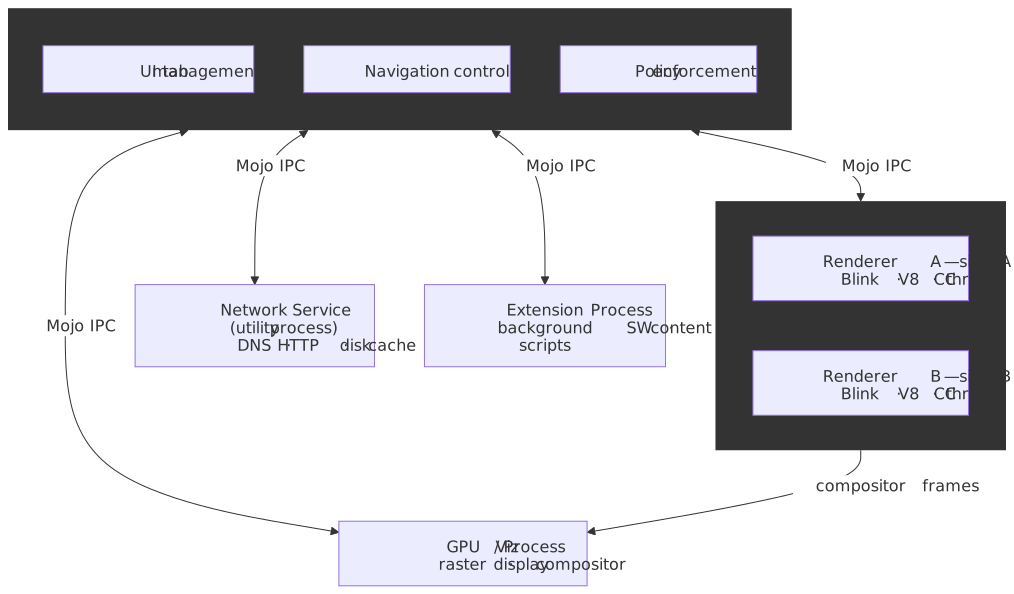
A browser is a privilege-separated, multi-process operating system for the web. The architecture solves three fundamental problems:
-
Security isolation: Untrusted web content runs in sandboxed renderer processes with minimal OS privileges. The browser process acts as a privileged kernel, mediating all system access.
-
Stability: A crashed renderer takes down only its tabs, not the entire browser. The GPU process can restart independently. The network service recovers from failures.
-
Performance isolation: Heavy JavaScript on one site doesn’t block rendering on another. The compositor thread enables smooth scrolling even when the main thread is blocked.
The process hierarchy:
| Process | Privileges | Responsibility |
|---|---|---|
| Browser | Full OS access | UI, navigation, policy enforcement, IPC coordination |
| Renderer | Sandboxed, site-locked | DOM, CSS, JavaScript, layout (one per site-instance) |
| GPU | Limited graphics access | Rasterization, compositing, display |
| Network | Network stack only | DNS, HTTP, caching, TLS |
| Utility | Task-specific | Audio, video decoding, data decoding |
| Extension | Semi-privileged | Background workers, content scripts |
The caching hierarchy:
DNS cache (network service) → Socket pool (keep-alive) → Memory cache (renderer) → HTTP cache (disk)Extension injection timing: Content scripts inject at three points—document_start (after CSS, before DOM), document_end (DOM complete, before subresources), or document_idle (browser-optimized timing between document_end and load). Each script runs in an isolated world—a separate JavaScript execution context that shares DOM access but not variables with the page.
The Multi-Process Model
Chromium’s multi-process architecture emerged from a fundamental insight: browsers execute untrusted code (JavaScript from any website), so the rendering engine must be treated as a hostile environment.
Why Multi-Process?
Single-process browsers (pre-Chrome era) suffered from cascading failures. A bug in Flash crashed the entire browser. A malicious page could access cookies from other tabs. Memory leaks accumulated across all sites.
The Chrome design (2008) applied OS security principles: each site runs in a sandbox with minimal privileges, communicating with the privileged browser process through validated IPC channels.
Trade-offs:
- Memory overhead: Each renderer process has its own V8 heap, Blink data structures, and system libraries. Chrome consumes more memory than single-process browsers.
- IPC latency: Cross-process communication adds microseconds of overhead. For most operations this is negligible, but it affects architectures requiring tight coupling.
- Complexity: The codebase must handle process crashes, IPC message validation, and distributed state.
The trade-offs are worth it. A compromised renderer cannot access the filesystem, network stack, or other tabs without exploiting additional vulnerabilities in the browser process.
Process Types and Responsibilities
Browser Process (privileged kernel)
The browser process has full OS privileges and runs no untrusted content. It manages:
- Window and tab lifecycle
- Navigation decisions (URL bar, bookmarks, history)
- Permission prompts (geolocation, camera, notifications)
- Cookie and storage management
- IPC routing between all other processes
- Policy enforcement (blocking malicious sites, enforcing CSP)
For each renderer, the browser maintains a RenderProcessHost object that handles communication. For each document (including iframes), it maintains a RenderFrameHost tracking security state and capabilities.
Renderer Process (sandboxed, site-locked)
Renderers execute web content: HTML parsing, CSS cascade, JavaScript execution, layout, and painting. Each renderer is:
- Sandboxed: per the Chromium sandbox design doc, on Linux the renderer runs under seccomp-bpf; on Windows, with a restricted token +
JOB_OBJECTquota; on macOS, behind anApp Sandboxprofile andseatbelt-style policies. The renderer cannot open arbitrary files, bind sockets, orexecother binaries. - Site-locked (with Site Isolation): A renderer can only access content from its assigned site (scheme + eTLD+1). The browser’s
ChildProcessSecurityPolicyrejects IPC messages that would violate the lock — see the process-model design doc. Cross-site iframes run in separate renderer processes (OOPIFs, below).
A single renderer may host multiple frames from the same site (in-process frames) or serve as a dedicated process for a single tab.
GPU Process
The GPU process handles all graphics operations:
- Rasterization (converting paint commands to pixels)
- Compositing (combining layers from multiple renderers)
- Video decode (hardware acceleration)
- WebGL/WebGPU execution
Separating GPU operations isolates graphics driver bugs. A driver crash restarts the GPU process, not the browser.
Network Service (utility process)
The network service handles all network I/O:
- DNS resolution and caching
- HTTP/HTTPS connections
- TLS handshakes
- Disk cache management
- Cookie storage (at the request of the browser process)
On desktop platforms, the network service runs in a dedicated utility process. On Android, for memory reasons, it runs in-process with the browser. The service exposes NetworkContext and URLLoader Mojo interfaces to the browser process — these interfaces are never exposed directly to renderers; renderers see only a URLLoaderFactory proxy that the browser hands them, scoped to their site lock.
Utility Processes
Specialized processes handle untrusted data parsing:
- Audio/video decoding
- PDF rendering
- Data URL parsing
- Archive extraction
Each utility process is spawned for a specific task and terminated when complete, minimizing attack surface.
Site Isolation: The Security Boundary
Site Isolation ensures pages from different sites run in different processes. This is the primary defense against compromised renderers and side-channel attacks (Spectre).
Site vs. Origin:
- Origin:
https://sub.example.com:443(scheme + host + port) - Site:
https://example.com(scheme + eTLD+1)
Site Isolation uses sites rather than origins because, historically, same-site cross-origin pages could synchronize via document.domain. Two pages that both set document.domain = 'example.com' gained synchronous DOM access, which forced them to share a process.
Note
Modern Chromium ships origin-keyed agent clusters by default, and the document.domain setter has been progressively neutered since Chrome 115. Pages opt back in only by sending Origin-Agent-Cluster: ?0. New code should not rely on the legacy “site” boundary; treat the origin as the security boundary and reach for postMessage() or the Channel Messaging API for cross-origin coordination. Site Isolation still uses the site key for process allocation because of the long tail of legacy traffic that has not migrated.
Process allocation:
https://a.example.com/page → Renderer Ahttps://b.example.com/page → Renderer A (same site)https://other.com/page → Renderer B (different site)https://a.example.com/ → Renderer A (even in different tab) └── <iframe src="https://other.com/embed"> → Renderer B (OOPIF)Out-of-Process Iframes (OOPIFs): Cross-site iframes run in separate renderer processes. The browser process coordinates rendering, and the GPU/Viz process stitches each renderer’s compositor frame into the final on-screen image.
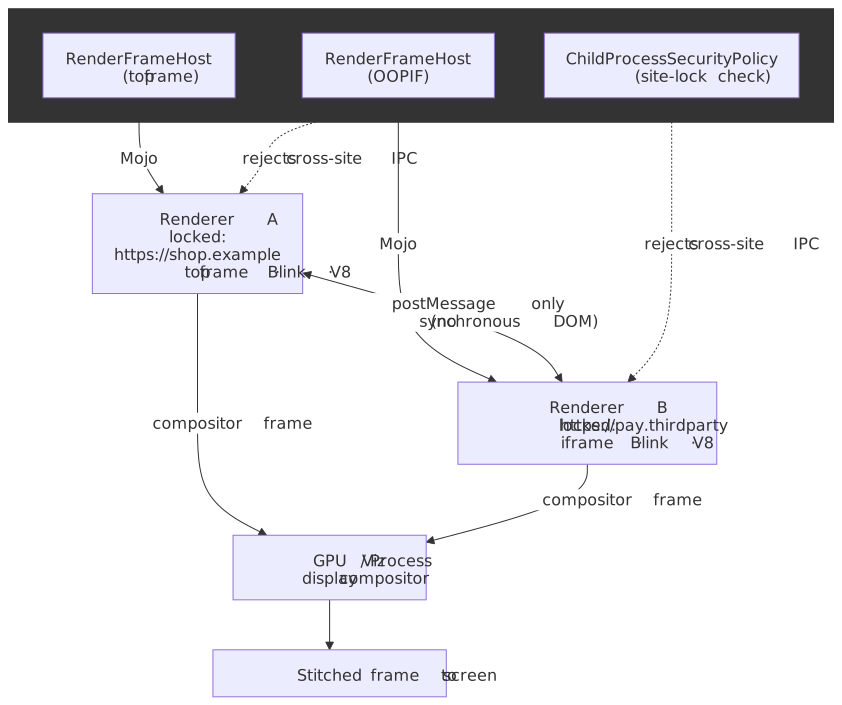
Process locking: Once a renderer is assigned a site, it’s locked to that site for its lifetime. A renderer locked to https://example.com cannot load content from https://other.com. The browser process enforces this, rejecting IPC messages that would violate the lock.
Security benefits:
- Renderer exploits contained: An attacker who gains code execution in a renderer can only access data for that renderer’s site
- UXSS mitigated: Universal XSS bugs cannot cross process boundaries
- Spectre defense: Side-channel attacks cannot read memory from other processes
Mojo IPC: The Communication Layer
Chromium’s Inter-Process Communication (IPC) uses Mojo, a capability-based system with strongly-typed interfaces.
Why Mojo over legacy IPC?
- Faster, with fewer context switches: per the Mojo
README.md, Mojo is “approximately 1/3 faster” than the legacy IPC system and uses “approximately 1/3 fewer context switches per message” on representative microbenchmarks. (The widely-circulated “3× faster” figure is a paraphrase, not what the Chromium docs claim.) - Type-safe: Interfaces defined in
.mojomIDL files generate C++, JavaScript, and Java bindings. - Capability-based: Processes receive interface endpoints, not raw process handles. Holding an endpoint is the permission to call it.
Core primitives:
- Message pipes: Bidirectional channels for structured messages
- Data pipes: Unidirectional byte streams for bulk data (network responses)
- Shared buffers: Memory shared between processes (compositor surfaces)
Example: Renderer requesting a network fetch
Renderer Process Browser Process | | |-- CreateLoaderAndStart() -------->| | (URLLoaderFactory interface) | | | |<---- OnReceiveResponse() ---------| | (URLLoaderClient interface) | | | |<---- OnReceiveBody() -------------| | (Data pipe for body bytes) |The renderer never directly accesses the network. It holds a URLLoaderFactory endpoint provided by the browser, which validates requests against the renderer’s site lock before forwarding to the network service.
Threading Architecture in the Renderer
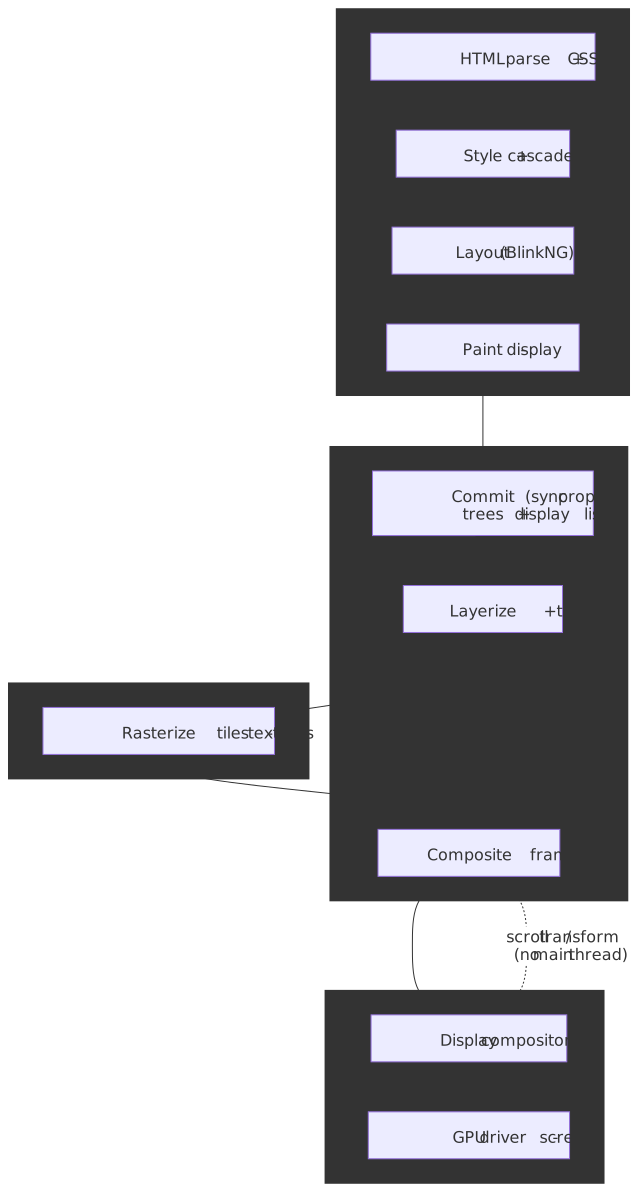
Within each renderer process, work is distributed across specialized threads to maintain responsiveness. The current pipeline is documented as RenderingNG; the structure below maps to that doc.
Main Thread: The JavaScript Bottleneck
The main thread runs:
- JavaScript execution (V8)
- DOM construction and manipulation
- CSS cascade and style resolution
- Layout calculation
- Hit testing for input events
- HTML parsing
The problem: JavaScript blocks the main thread. A 100ms computation prevents scrolling, animations, and input handling.
Design rationale: JavaScript has synchronous DOM access by design. Moving DOM operations off the main thread would require fundamental API changes that break the web platform.
Compositor Thread: Smooth Scrolling and Animations
The compositor thread runs in parallel with the main thread, handling:
- Scroll event processing (for non-JS scrolls)
- CSS animations and transitions (when not JavaScript-driven)
- Layer compositing decisions
- Coordination with the GPU process
The key insight: Most scrolls and animations don’t require JavaScript. By intercepting these events on the compositor thread, the browser delivers 60fps even when the main thread is blocked.
Example: Scroll performance
User scrolls Compositor Thread Main Thread | | | |-- scroll input ----------------->| | | |-- transform layers --->| (async) |<-- updated frame ----------------| | | | | | (continues at 60fps) | (can be blocked) |If the page has a scroll event listener with passive: false, the compositor must wait for JavaScript—breaking this optimization.
Raster Threads and GPU Process Coordination
Paint operations generate display lists (Skia commands). The main thread hands them to the compositor at a synchronization point called the commit — at commit time, property trees and display lists are copied from Blink’s main-thread tree to the compositor’s cc/impl tree, after which both sides can proceed independently. The compositor then dispatches raster work:
Main Thread Compositor Thread Raster Workers GPU Process | | | | |-- paint --------->| | | |---- commit ------>| | | | |-- raster tasks --->| | | | |-- GPU cmds --->| | |<-- tiles done -----| | | |-- composite frame ------------------>| | | | |Multiple raster worker threads parallelize tile rasterization. The Viz display compositor in the GPU process then assembles the renderer’s compositor frame (alongside frames from sibling renderers — see Site Isolation above) into the final on-screen image. Compositor-only properties (transform, opacity, scroll position) can update entirely on the compositor thread without re-running layout or paint, which is how the browser keeps animating at 60 fps while the main thread is blocked.
The Blink-V8 Relationship
Blink (the rendering engine) and V8 (JavaScript engine) are tightly integrated:
- 1:1 isolate-to-thread: Each thread with JavaScript has exactly one V8 isolate
- Binding layer:
platform/bindingsconnects DOM objects to JavaScript wrappers - Microtask integration: V8 microtasks (Promise reactions) integrate with Blink’s event loop
When JavaScript accesses document.body, V8 calls through the binding layer to Blink’s DOM implementation. When Blink dispatches a DOM event, it invokes V8 to run the handler.
Caching Hierarchy
Browsers implement multiple cache layers, each optimized for different access patterns.
DNS Caching
The problem: DNS resolution adds 20-120ms to every new origin connection. Caching eliminates this latency for repeat visits.
Chromium’s DNS architecture — per the net/dns/README.md, a single HostResolverManager is owned by network::NetworkService (i.e. it lives in the network service process on desktop, in-process with the browser on Android):
HostResolverManager (network service) | |-- Check per-context HostCache (one per URLRequestContext) | | | └── Cache hit → return immediately | |-- System resolver (getaddrinfo) | └── OS DNS cache, /etc/hosts, upstream DNS | └-- Built-in resolver (DnsClient) └── DoH/DoT, bypasses OSDesign decisions:
- Per-context cache: each
ContextHostResolverowns its ownHostCache, scoped to aURLRequestContext; this gives profile and incognito isolation for free. - Request merging: multiple in-flight requests for the same hostname coalesce onto a single
HostResolverManager::Job. - TTL-based expiration: cache entries expire based on the DNS record’s TTL.
- Stale-while-revalidate: a
StaleHostResolver(used by Cronet) can return stale results past the configured timeout while fresh resolution continues in the background.
Limits: The host cache typically holds several thousand entries. Entries are evicted by LRU when space is needed.
Visibility: chrome://net-internals/#dns shows the current cache state and allows manual clearing.
Connection Pooling and Keep-Alive
The problem: TCP+TLS handshake adds 100-300ms per new connection. Connection reuse eliminates this overhead.
Chromium’s socket pool:
- Maintains persistent connections per origin
- HTTP/1.1: Multiple sockets per host (typically 6)
- HTTP/2: Single socket per origin, multiplexed streams
- HTTP/3: Single QUIC connection per origin
Keep-alive behavior:
- Idle connections remain open until the server (or a client-side socket-pool timeout) closes them. There is no fixed “60 second” universal default — common server defaults sit between 5 s (nginx) and 75 s (default Apache
KeepAliveTimeout), and Chrome’s socket pool keeps idle sockets open for a few minutes by default before garbage-collecting them. - Connections are reused for subsequent requests to the same origin (and, for HTTP/2, for additional origins via connection coalescing when the cert and IP allow it).
- The socket pool tracks which connections are available for reuse and surfaces them at
chrome://net-internals/#sockets.
HTTP Cache: Memory and Disk
The HTTP cache stores responses for future use, avoiding network roundtrips entirely.
Architecture:
Network request → HttpCache::Transaction | |-- Check in-memory index |-- Check disk cache (if not in memory) |-- Validate freshness (Cache-Control, ETag) |-- Return cached response or fetch from networkThe disk cache backend: Chromium ships two implementations and picks one per platform.
- Block-file backend (Windows, macOS desktop) — described in the HTTP / Disk Cache design doc:
- Memory-mapped index file mapping URL hashes to cache addresses.
- Block-files for fixed-size records: 256 B, 1 KB, and 4 KB blocks. A record can span up to four contiguous blocks; anything larger than
kMaxBlockSize = 16 KBspills into its ownf_xxxxfile. - LRU-with-segments eviction (not-reused / low-reuse / high-reuse lists).
- Simple Cache backend (Android, Linux, ChromeOS, Fuchsia) — one file per cache entry, plus an index. Trades the block-file’s compactness for resilience to power loss and a much simpler crash-recovery story; the index is periodically flushed and atomically swapped, so a system crash typically yields a stale cache rather than a corrupted one.
Cache locking: Single-writer, multiple-reader. Only one network request per resource in flight at a time, preventing redundant fetches.
Sparse entries: Large media files use sparse storage—only fetched ranges are cached. Enables resumable downloads and efficient video seeking.
Renderer memory cache (distinct from HTTP cache): Blink maintains an in-memory cache for recently used resources within a renderer. This cache lives in the renderer process and provides sub-millisecond access for repeated resource requests within a page.
Cache Lookup Priority
When the renderer requests a resource, the network and renderer stacks consult a strict ordering of caches before touching the network. Each layer is several orders of magnitude faster than the next.
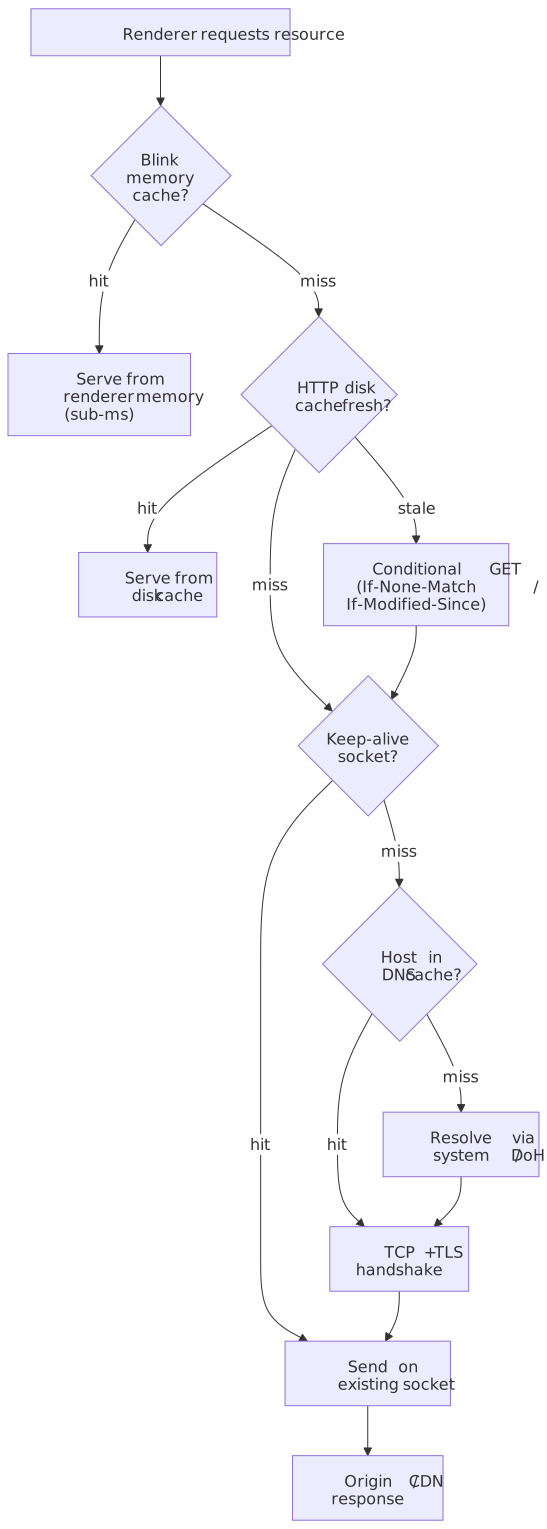
- Renderer memory cache: Check Blink’s in-memory cache (same-process, sub-millisecond).
- HTTP cache (disk): Check the network service’s disk cache; if the entry is stale, send a conditional
GET. - Socket reuse: If a network request is unavoidable, check the socket pool for an idle keep-alive connection (HTTP/2 and HTTP/3 reuse a single multiplexed connection).
- DNS cache: If a fresh connection is required, check
HostCachebefore resolving. - Network: Fetch from the origin (or the upstream CDN edge).
Speculative Loading Mechanisms
Browsers speculatively fetch resources before they’re needed, hiding latency from users.
The Preload Scanner
The problem: HTML parsing blocks on synchronous scripts. While waiting for script execution, the parser cannot discover subsequent resources.
The solution: A secondary, lightweight HTML parser (the preload scanner) runs ahead of the main parser, discovering resources in the markup.
Main Parser Preload Scanner | | |-- blocked on <script> --------->| continues scanning | |-- discovers <img> | |-- discovers <link> | |-- initiates fetches |<-- script executed | |-- continues parsing |What the preload scanner finds:
<img src>andsrcset<link rel="stylesheet"><script src>(includingasync/defer)<link rel="preload">
What it cannot find:
- JavaScript-injected elements
- CSS
background-image - Dynamically added scripts
- Resources in
data-attributes (lazy loading patterns)
Resource Hints
Developers can hint future resource needs:
dns-prefetch: Resolve DNS only
<link rel="dns-prefetch" href="https://api.example.com" />Cost: trivial — one DNS lookup and a host-cache entry. Useful for third-party origins you will connect to but where preconnect would be wasteful (e.g. dozens of analytics origins).
preconnect: DNS + TCP + TLS handshake
<link rel="preconnect" href="https://cdn.example.com" />Cost: Socket and memory overhead. Use sparingly (2-4 origins max).
prefetch: Fetch resource with low priority for future navigation
<link rel="prefetch" href="/next-page.html" />Cost: Network bandwidth, disk cache space. Use for likely next pages.
preload: Fetch resource with high priority for current page
<link rel="preload" href="/critical.css" as="style" />Cost: Network bandwidth, competes with other critical resources. Use for late-discovered critical resources.
Prerendering and Speculation Rules
Prerendering renders an entire page in a hidden tab before navigation. When the user clicks, the page activates instantly.
Speculation Rules API (Chrome 109+):
<script type="speculationrules"> { "prerender": [{ "urls": ["/next-page", "/product/123"] }] }</script>Eagerness levels (per the Chrome team’s improvements post):
| Level | Trigger | Notes |
|---|---|---|
immediate |
As soon as the rules are observed | For very high-confidence links; use sparingly. |
eager |
Currently identical to immediate |
Reserved name for a future, less aggressive heuristic. |
moderate |
After ~200 ms of hover (or pointerdown on touch) |
Sweet spot for most static-site link predictions. |
conservative |
On pointerdown or touchstart |
Just-in-time; cheapest and most likely to actually be navigated. |
Concurrency limits are bucketed by eagerness and managed FIFO — when you exceed the bucket, the oldest speculation is dropped:
| Bucket | Max prefetches | Max prerenders |
|---|---|---|
immediate / eager |
50 | 10 |
moderate / conservative |
2 | 2 |
Speculation is also suppressed in Data Saver mode, low-power mode, and under memory pressure, and prerendered pages are paused when not the active tab. Cross-origin iframes are not rendered until activation.
Cost: Significant memory and CPU. Only prerender pages with high navigation probability — a 30 % “wasted prerender” rate is a reasonable upper bound to budget against.
Workers and Thread Isolation
Web Workers enable background JavaScript execution without blocking the main thread.
Dedicated Workers
A dedicated worker runs in a separate thread, with its own V8 isolate:
// main.jsconst worker = new Worker("worker.js")worker.postMessage({ data: largeArray })worker.onmessage = (e) => console.log(e.data)// worker.jsself.onmessage = (e) => { const result = heavyComputation(e.data) self.postMessage(result)}Isolation model:
- Separate thread (not just async)
- No DOM access
- Communication via structured clone (serialization) or transferable objects
- Own global scope (
self, notwindow)
Process placement: Workers typically run in the same renderer process as their parent document but on a separate thread.
Shared Workers
Shared workers are accessible from multiple browsing contexts (tabs, iframes) on the same origin:
// tab1.js and tab2.jsconst shared = new SharedWorker("shared.js")shared.port.postMessage("hello")// shared.jsself.onconnect = (e) => { const port = e.ports[0] port.onmessage = (e) => { /* handle */ }}Use case: Coordinating state across tabs without the main thread overhead of BroadcastChannel.
Limit: One instance per origin. If multiple pages connect, they share the same worker instance.
Service Workers
Service Workers intercept network requests, enabling offline functionality and caching control:
// sw.jsself.addEventListener("fetch", (event) => { event.respondWith(caches.match(event.request).then((cached) => cached || fetch(event.request)))})Architecture in Chromium:
- Browser process:
ServiceWorkerContextCoremanages registration and lifecycle - Renderer process: Worker thread executes the service worker code
- Activation: Browser dispatches
fetchevents through Mojo to the worker thread
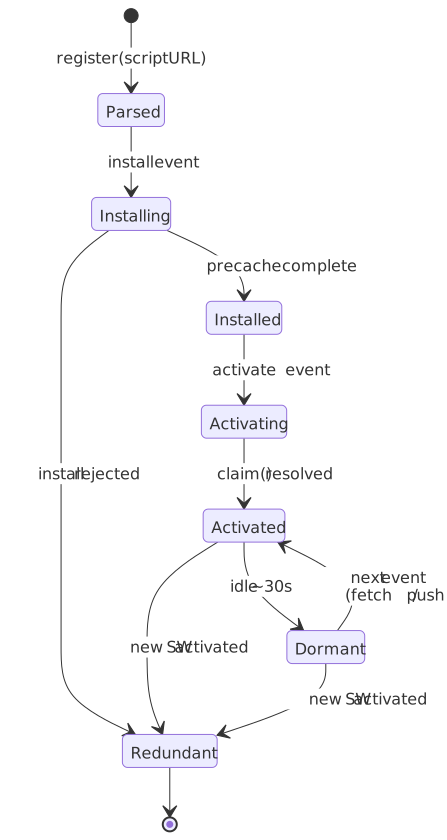
Lifecycle (per the Service Worker spec):
- Registration: Browser downloads and parses the script.
- Installation:
installevent fires; precache resources. - Activation:
activateevent fires; claim clients. - Idle termination: Browser shuts the worker down when there are no pending events. Chromium uses an implementation-specific idle timer (~30 s for both extension and page service workers, with a hard cap of ~5 minutes per long-running event) — see the extension service-worker lifecycle docs for the extension flavor.
- Restart: Browser restarts the worker the next time an event needs to be dispatched. Any in-memory state is gone; persistent state belongs in
IndexedDB,caches, orchrome.storage.session.
Important
Treat the service worker as ephemeral. The single most common service-worker bug is keeping state in module-level variables and being surprised when it disappears between events.
Scope: A registration’s scope is a URL prefix. Clients (top-level pages and dedicated workers) whose URL falls under the scope become controlled by the worker; their network requests then dispatch the worker’s fetch event, which can choose to call event.respondWith(...) or fall through to the network. The script itself must be served from a path equal to or above the scope unless the response carries a Service-Worker-Allowed header.
Extension Architecture and Injection
Browser extensions modify and extend browser behavior through a privileged API surface.
Extension Components
Background service worker (Manifest V3):
- Runs in the extension process.
- Has access to the privileged Chrome APIs (
chrome.tabs,chrome.storage,chrome.declarativeNetRequest, etc.). - Event-driven and ephemeral: loaded when an event fires, terminated after ~30 s of idle, with a hard ~5 min cap per event.
- No DOM access. State must live in
chrome.storage/IndexedDB.
Content scripts:
- Injected into web pages, but execute in their own isolated world inside the page’s renderer process.
- Full DOM access.
- Restricted Chrome API surface — primarily
chrome.runtimeandchrome.storagefor talking back to the extension service worker. - Default CSP for the isolated world:
script-src 'self' 'wasm-unsafe-eval' 'inline-speculation-rules' chrome-extension://<id>/; object-src 'self';—eval,new Function, and remotely-hosted code are blocked unless overridden viacontent_security_policy.isolated_world.
Popup, options, side-panel pages:
- Extension-owned HTML pages. Same privilege level as the background service worker — they can call privileged Chrome APIs but cannot reach into arbitrary host pages without injecting a content script.
Content Script Injection Timing
Content scripts inject at one of three lifecycle points, controlled by the manifest’s run_at field. Per the content_scripts manifest reference, the default is document_idle.
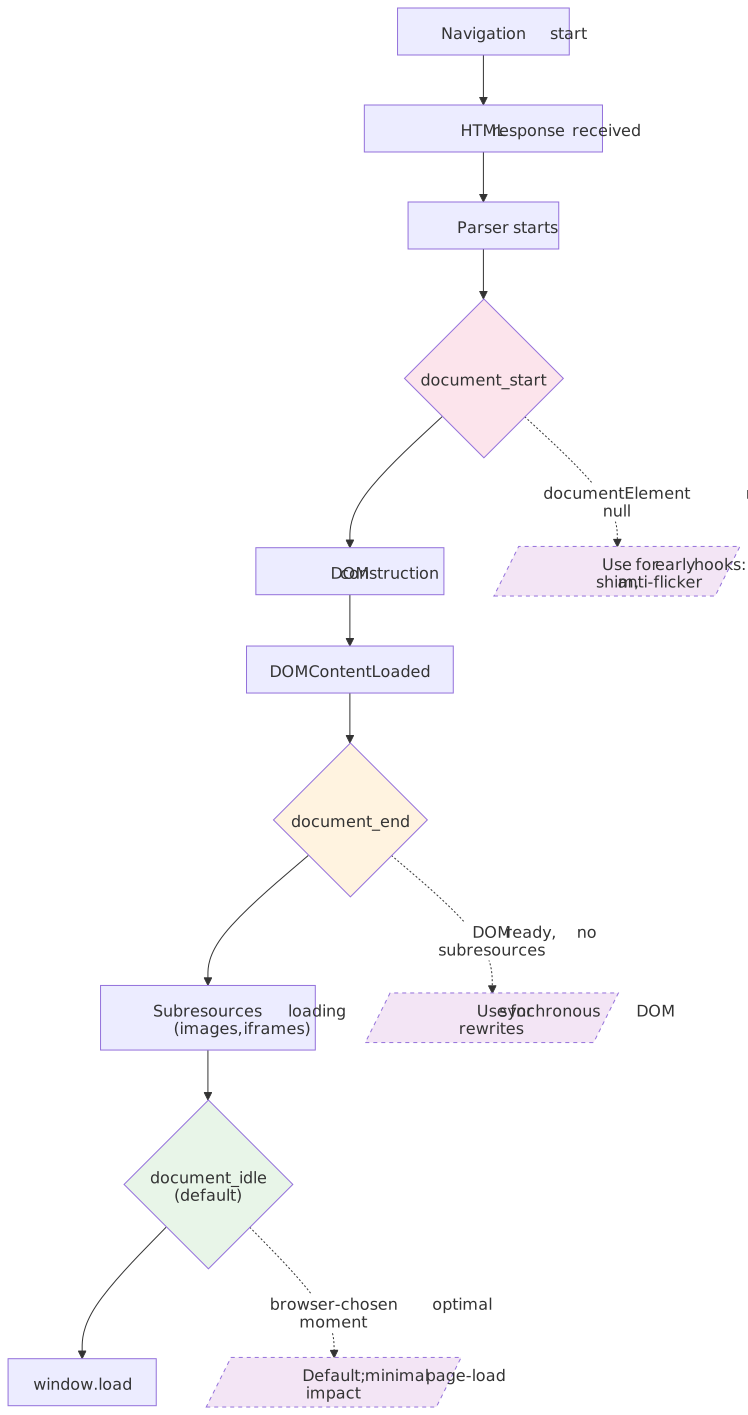
document_start:
- Injected after CSS files begin loading but before any DOM is constructed.
document.documentElementmay benullwhen your script first runs.- Use case: feature flags, anti-flicker shims, instrumenting
fetch/XMLHttpRequestbefore page scripts grab them.
console.log(document.documentElement) // may be nulldocument.addEventListener("DOMContentLoaded", () => { // DOM ready; safe to query})document_end:
- Injected immediately after the DOM is complete, but before subresources (images, frames) finish loading.
- Roughly equivalent to listening for
DOMContentLoaded. - Use case: synchronous DOM manipulation that must happen before the user sees the first paint.
document.body.classList.add("extension-modified")document_idle (default):
- The browser picks an optimal moment between
DOMContentLoadedandload. - Best for non-critical modifications — strongly preferred for performance.
Injection order:
- Manifest-declared content scripts inject in the order they appear in
content_scripts[]. - Programmatically registered scripts (via
chrome.scripting.registerContentScripts) inject in registration order.
Isolated Worlds
Content scripts run in an isolated world—a separate JavaScript execution context with its own global object.
What is shared:
- DOM tree (same
document.body) - DOM events (both worlds see
clickevents)
What is isolated:
- Global variables (
window.fooin page !==window.fooin content script) - Prototypes (
Array.prototypemodifications don’t cross) - JavaScript APIs (page can’t call content script functions)
Security implications:
- Page JavaScript cannot detect or tamper with content scripts
- Content scripts cannot accidentally pollute page globals
- XSS in a content script is contained (attacker can’t access extension APIs)
Communication between worlds:
// Content scriptwindow.postMessage({ source: "extension", data: "hello" }, "*")// Page scriptwindow.addEventListener("message", (e) => { if (e.data.source === "extension") { /* handle */ }})How Extensions Affect Page Load
Performance impact:
document_startscripts: Block DOM construction until script completesdocument_endscripts: Run after DOM, may delay renderingdocument_idlescripts: Minimal impact (browser-optimized timing)
Best practices:
- Use
document_idleunless early injection is required - Keep content script code minimal
- Defer heavy processing with
requestIdleCallbackorsetTimeout - Use
run_atmanifest field to specify timing
Content Security Policy: Extensions have their own CSP, restricting eval() and external script loading. Content scripts cannot bypass the page’s CSP for injected elements.
Conclusion
Browser architecture reflects decades of security and performance optimization:
- Multi-process isolation contains compromised renderers, limiting attack scope
- Site Isolation prevents cross-site data leakage, even via Spectre-class attacks
- Threading separation (main, compositor, raster) enables smooth animations despite main thread work
- Layered caching (DNS, sockets, disk, memory) eliminates redundant network operations
- Speculative loading (preload scanner, prefetch, prerender) hides latency before users notice
- Extension isolation (separate worlds) enables powerful DOM modification without security compromise
The architecture trades memory for security and responsiveness. A Chrome instance with many tabs consumes gigabytes of memory—but each tab’s crash is isolated, each site’s JavaScript is contained, and each scroll remains smooth even under load.
Appendix
Prerequisites
- Basic understanding of process and thread concepts
- Familiarity with HTTP caching headers (Cache-Control, ETag)
- Understanding of JavaScript execution model (event loop, async)
Terminology
- OOPIF (Out-of-Process Iframe): A cross-site iframe that runs in a separate renderer process from its parent frame
- Site: Scheme plus eTLD+1 (e.g.,
https://example.com). Used for Site Isolation process boundaries - Origin: Scheme plus host plus port (e.g.,
https://sub.example.com:443). The security boundary for same-origin policy - eTLD+1: Effective top-level domain plus one label (e.g.,
example.com,example.co.uk) - Mojo: Chromium’s IPC framework using strongly-typed interfaces defined in
.mojomfiles - Isolated World: A separate JavaScript execution context that shares DOM access but not global variables with other contexts
- Content Script: Extension code injected into web pages, running in an isolated world
- Preload Scanner: A secondary HTML parser that discovers resources while the main parser is blocked
- Site Isolation: The security feature ensuring different sites run in different processes
- Service Worker: A programmable network proxy running in a worker thread, enabling offline functionality
- Renderer Process: A sandboxed process executing web content (Blink, V8, compositor)
Summary
- Chromium uses a multi-process model: browser (privileged), renderers (sandboxed, site-locked), GPU/Viz, network service, and per-task utility processes.
- Site Isolation runs cross-site content in separate processes, defending against compromised renderers and Spectre-class side channels. The legacy
document.domainsetter that motivated the “site” boundary is now disabled by default; pages opt back in viaOrigin-Agent-Cluster: ?0. - Renderers have three key thread classes: main (JavaScript/DOM/layout), compositor (scrolling/animations/commit), and raster workers (paint-list → bitmap/texture).
- The DNS layer is a per-context
HostCachewith TTL eviction and request coalescing. - The HTTP disk cache ships in two flavours: a block-file backend (Windows/macOS) with 256 B/1 KB/4 KB blocks, and a Simple Cache backend (Android/Linux/ChromeOS) with one file per entry.
- The preload scanner discovers resources directly tokenised in HTML, but does not see JavaScript-injected, CSS-discovered, or
data--attribute-hidden resources. - The Speculation Rules API replaces
<link rel="prerender">. Eagernessimmediate/eagerallows up to 50 prefetches and 10 prerenders per page;moderate/conservativeallow 2 each. - Service workers (page and extension flavor alike) are ephemeral: ~30 s idle timeout, ~5 min event cap. State must persist outside module scope.
- Extension content scripts inject at
document_start,document_end, ordocument_idle(default), each running in an isolated world that shares the DOM but not JavaScript globals or prototypes.
References
Specifications and Standards
- HTML Living Standard - Workers - Web Worker specification
- Service Workers W3C Spec - Service Worker lifecycle and API
- Speculation Rules - Prerendering and prefetch specification
Chromium Design Documents
- Multi-process Architecture - Process model overview
- Site Isolation - Security isolation design
- Inter-process Communication - Mojo IPC framework
- HTTP Cache - Cache architecture
- Disk Cache - Disk cache backend design
- Process Model and Site Isolation - Detailed process allocation
- Service Worker README - Service worker implementation
- DNS README - DNS resolution architecture
Chrome Developer Documentation
- RenderingNG Architecture - Thread and process model
- BlinkNG Deep-Dive - Rendering engine architecture
- Content Scripts - Extension injection and isolation
- Extension Service Workers - Manifest V3 background scripts
- Prerender Pages - Speculation Rules API
- Speculation Rules API improvements - Eagerness levels and concurrency limits
document.domaindeprecation - Origin-keyed agent clusters as the default
Web Performance Resources
- Don’t Fight the Preload Scanner - Preload scanner mechanics and optimization
- HTTP Cache - HTTP caching strategies
- Resource Hints - dns-prefetch and preconnect usage
MDN Web Docs
- Web Workers API - Worker types and usage
- Service Worker API - Service worker lifecycle
- Speculative Loading - Prefetch and prerender overview