DOM API Essentials: Structure, Events, Observers, Cancellation
The DOM is one large API surface arranged around a small set of design choices: a layered interface hierarchy that separates universal element operations from markup-specific ones; two collection types whose liveness rules decide whether your iteration is correct; a quiet split of mutation methods between the ParentNode and ChildNode mixins; an event model whose three-phase dispatch and shadow-boundary retargeting are spec-defined, not implementation detail; observer APIs whose delivery timing is part of the spec; and an AbortSignal primitive that is now the standard way to cancel everything from a fetch to an addEventListener. This article is the mental model and reference for those layers, written for senior engineers who want to know why the surface looks the way it does, not just which method to call.
The normative source is the WHATWG DOM Living Standard, with HTML-element specifics in the WHATWG HTML Living Standard. Everything below traces back to those two specs unless noted.
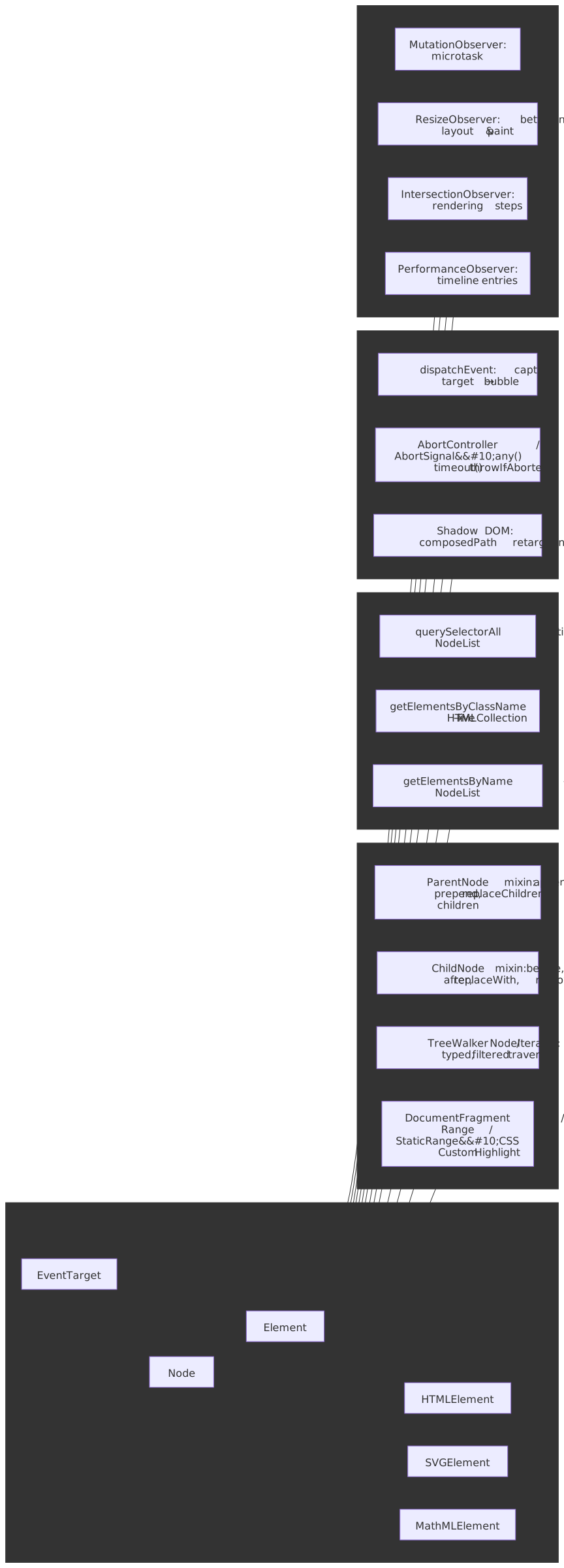
Mental model in seven rules
Elementis the markup-neutral base.querySelector,getAttribute, andclassListlive onElementso they work for HTML, SVG, and MathML alike. Markup-specific behavior (text content semantics, editability, accessibility hooks) lives onHTMLElement.- A small set of HTML-ish properties are shared with SVG.
dataset,tabIndex,autofocus,nonce,focus(), andblur()come from theHTMLOrSVGElementinterface mixin, not fromHTMLElement— they are valid on both<div>and<svg>.1 - Collections are live by default. The DOM Standard states that “a collection can be either live or static. Unless otherwise stated, a collection must be live.”2 Only
querySelectorAll(andStaticRange) opt out. - Mutation methods come in two flavors. Old DOM-1 methods (
appendChild,removeChild,insertBefore) operate from the parent’s perspective. Modern methods on theParentNodeandChildNodemixins (append,prepend,replaceChildren,before,after,replaceWith,remove) accept variadicNode | stringarguments and are how you should be writing new code. - Every event has three phases — but the target sees both. Dispatch is a fixed sequence of capture (root → target), target, then bubble (target → root). The “capture” / “bubble” choice for a listener decides which traversal it sees; listeners on the actual target run regardless of that flag.3
- Observers do not run synchronously.
MutationObserveris a microtask;ResizeObserverruns in a defined slot between layout and paint;IntersectionObserverandPerformanceObserverare driven by the rendering steps. Each timing slot has consequences for what you can safely do inside the callback. AbortSignalis the unified cancellation primitive.addEventListener,fetch,ReadableStream,setTimeout(where supported),WebSocketStream, and any well-designed async API now accept asignal. Onecontroller.abort()tears down everything attached to that signal — andAbortSignal.any([…])lets you compose them.4
The interface hierarchy
Each interface is a thin layer that adds capabilities to its ancestor. Cross-markup compatibility is the reason Element and HTMLElement exist as separate types: an SVG <circle> is a perfectly real Element but is not an HTMLElement.
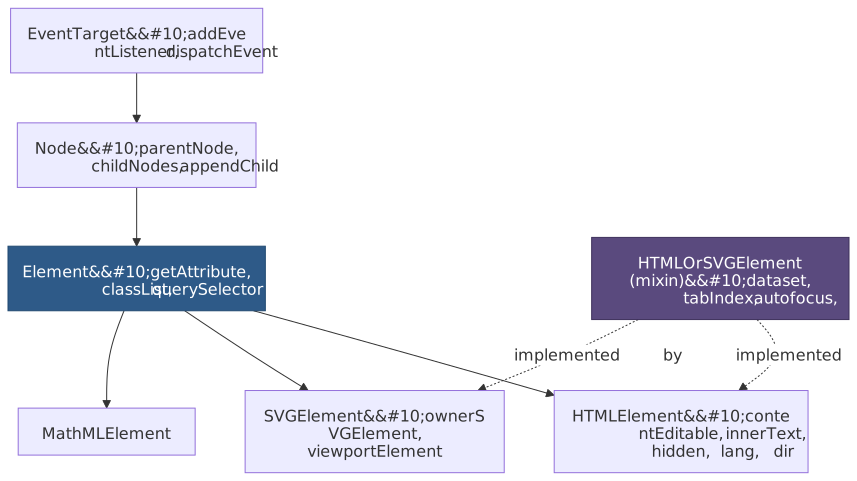
What each layer adds
EventTarget—addEventListener,removeEventListener,dispatchEvent. Anything that can receive events is one, includingWindow,XMLHttpRequest,AbortSignal, message ports, and offscreen workers — not just elements. The interface even has a public constructor (new EventTarget()), which makes it a useful building block for in-process pub/sub.Node— tree participation:parentNode,childNodes,firstChild,lastChild,appendChild,removeChild,insertBefore,nodeType,nodeName,cloneNode. Text nodes, comments, document fragments, and the document itself are allNodes.Element— the cross-markup element surface:getAttribute/setAttribute,classList,id,tagName, namespace-aware variants (getAttributeNS), CSS selectors (querySelector,querySelectorAll,matches,closest), and box geometry (getBoundingClientRect,getClientRects, scroll APIs). All work on HTML, SVG, and MathML elements.HTMLElement— HTML-specific semantics:innerText,outerText,contentEditable,isContentEditable,accessKey,lang,dir,translate,hidden,inputMode,enterKeyHint,popover, the inline-stylestylesetter, theclick()activation behavior, and (on supporting browsers)editContextfor custom editable surfaces.5SVGElement— SVG-specific surface:ownerSVGElement,viewportElement, and SVG-specific style and class plumbing.HTMLOrSVGElement— a Web IDL interface mixin (not a class) shared byHTMLElementandSVGElement. It contributesdataset,nonce,autofocus,tabIndex,focus(), andblur(). This is the reason you can writecircle.dataset.userIdon an SVG element.1
Why the split matters in practice
Typing a utility as Element instead of HTMLElement is the difference between “works on icons too” and “throws on the SVG sprite”:
function setActive(el: Element, active: boolean): void { el.classList.toggle("active", active) el.setAttribute("aria-selected", String(active))}function setLabel(el: HTMLElement, text: string): void { el.innerText = text}const tab: Element = document.querySelector('[role="tab"]')!const icon: Element = document.querySelector("svg.icon")!setActive(tab, true)setActive(icon, true)innerText is HTML-only, so setLabel correctly demands HTMLElement. TypeScript’s lib types reflect the spec — and the instanceof check is also a real runtime narrowing, not just a typing trick.
Note
The historical “dataset is HTML-only” line is wrong. dataset and tabIndex are on HTMLOrSVGElement and have been since the mixin was introduced; both work on SVG. contentEditable, innerText, accessKey, lang, dir, translate, hidden, and inputMode are the genuinely HTML-only members.1
Selection and collection liveness
Five DOM methods give you a collection. They differ along two axes — type (HTMLCollection vs NodeList) and liveness (live vs static) — and the combination decides what loop patterns are safe.
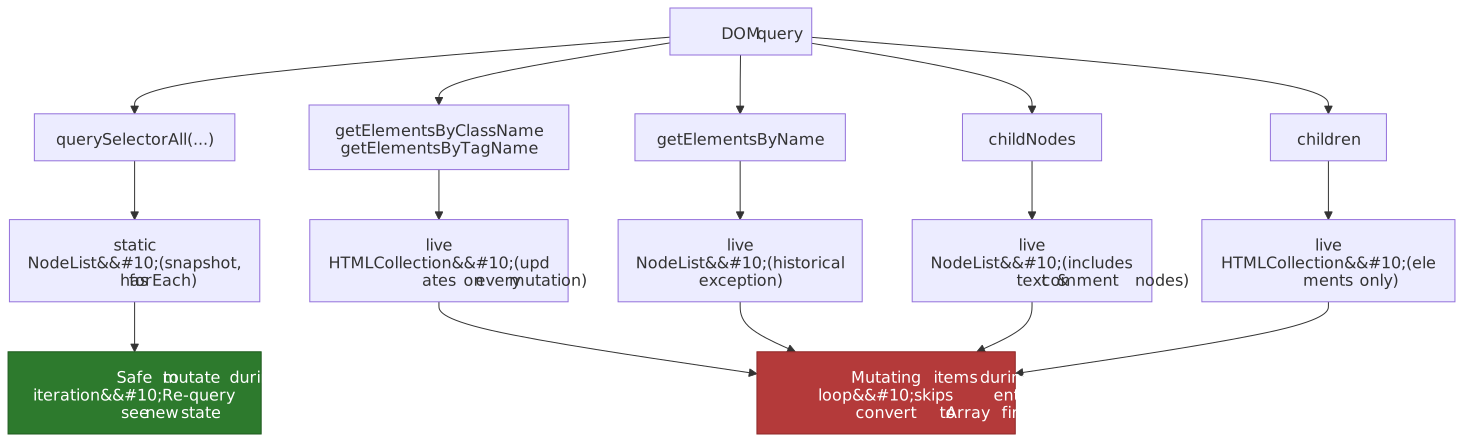
The matrix
| Method | Return type | Live? | Includes non-element nodes? |
|---|---|---|---|
querySelectorAll(selectors) |
NodeList |
static | no |
getElementsByClassName(classNames) |
HTMLCollection |
live | no |
getElementsByTagName(qualifiedName) |
HTMLCollection |
live | no |
getElementsByName(name) |
NodeList |
live | no |
children |
HTMLCollection |
live | no |
childNodes |
NodeList |
live | yes (text, comment) |
querySelectorAll is the odd one out: the spec defines it as returning the static result of running scope-match against the selectors string, and that snapshot is captured once.6 Everything else either explicitly returns a live HTMLCollection or — in the cases of childNodes and the spec quirk that is getElementsByName — a live NodeList.7
The for-i mutation footgun
Live collections re-evaluate as the DOM mutates. A naive for (let i = 0; i < items.length; i++) that removes the matched class from each element will skip every other one because the collection shrinks under the iterator:
const items = document.getElementsByClassName("item")for (let i = 0; i < items.length; i++) { items[i].classList.remove("item")}for (const item of [...document.getElementsByClassName("item")]) { item.classList.remove("item")}The same trap appears with for...of on a live collection if the body adds or removes matching elements. The fix is to materialize a snapshot first — Array.from(...), the spread operator, or just call querySelectorAll instead.
NodeList versus HTMLCollection capabilities
NodeListhas a nativeforEach.HTMLCollectiondoes not.HTMLCollectionhasnamedItem(name), which returns the first element whoseidornamematches.NodeListhas onlyitem(index)and indexed access.- Both are iterable with
for...of, both support indexed access, and neither is anArray—map,filter,reduce, and the rest live onArray.prototype. Spread orArray.fromto use them. - Never use
for...inon either — you will enumeratelengthanditemalong with the indices.
Tip
Default to querySelectorAll for one-shot processing and getElementsByClassName/children only when you actually want a live view. The live collections amortize their cost over many mutations, but the overhead of maintaining them is real and the mental model they impose on code is heavier than the snapshot.
getElementById vs querySelector('#id')
Both work; their cost models differ. Every Document maintains an internal map from id attribute values to elements, kept in sync as the tree mutates — getElementById is a hash lookup against that map and is the spec-defined fast path for “find the element with this id”.8 querySelector walks a parsed selector against the scope’s tree using the standard scope-match algorithm; in modern engines, simple #id selectors are pattern-matched into the same id-map lookup, but anything more complex ('#id .child', 'main #id') drops out of that fast path and traverses normally.9
Practically: prefer getElementById when you actually have an id and you want the cheapest possible lookup; reach for querySelector when the predicate is anything richer than “this exact id”. The difference is usually invisible at single-call scale but compounds inside hot loops or framework reconciliation paths that resolve thousands of nodes per render.
Traversal and structural mutation
The DOM gives you four traversal surfaces. They overlap in capability but differ in what they include and how programmable they are.
Sibling and parent navigation
Every Node exposes parentNode, firstChild, lastChild, previousSibling, and nextSibling. Every Node that participates as an element also exposes the element-only variants on the NonDocumentTypeChildNode mixin: previousElementSibling and nextElementSibling. The element variants skip text nodes and comments — you almost always want them when walking siblings.
parentNode returns a Node; parentElement returns an Element or null (the document itself has no parent element). closest(selectors) walks up the ancestor chain (including the starting element) and returns the first ancestor that matches a CSS selector — the right tool for “find the enclosing form” or “find the nearest section”.
ParentNode and ChildNode mixins
Two interface mixins define the modern manipulation surface:
ParentNodeis implemented byDocument,DocumentFragment, andElement. It contributeschildren,firstElementChild,lastElementChild,childElementCount,querySelector,querySelectorAll, and the variadic mutation methodsappend(...nodes),prepend(...nodes),replaceChildren(...nodes), and (newer)moveBefore(node, child).ChildNodeis implemented byElement,CharacterData(text/comment), andDocumentType. It contributesbefore(...nodes),after(...nodes),replaceWith(...nodes), andremove().
All variadic methods accept (Node | string).... Strings become Text nodes automatically, which removes a whole class of document.createTextNode boilerplate. They also accept zero arguments — replaceChildren() with no arguments empties the parent, and remove() is the modern replacement for parent.removeChild(child) from child’s perspective.
list.append(item, " · ", footer)list.replaceChildren()list.replaceChildren(...newItems)stale.remove()stale.replaceWith(replacement)target.before("Section: ", heading)Compared to the DOM-1 methods these are not just shorter; they are also unambiguous. parent.appendChild(node) returns the appended node and throws if node is not a Node. parent.append(node, " ", other) returns undefined and accepts any number of nodes and strings. The asymmetric return type is one of the small reasons DOM-1 code reads strangely today.
Fragments, ranges, and selections
For larger structural moves and editor-style operations, four interfaces become relevant:
DocumentFragmentis a parent-less container. Append a fragment to a real parent and the spec moves the fragment’s children to the parent and empties the fragment in one tree-mutating step.10 That coalesces what would otherwise be N separate insertions into one mutation observation and one layout invalidation.Rangeis a live boundary pair(startContainer, startOffset)to(endContainer, endOffset). The spec calls these “live ranges” because tree mutations move the boundary points as the underlying content shifts.range.deleteContents(),range.extractContents()(returns aDocumentFragment), andrange.insertNode(node)let you operate on arbitrary slices of a tree, including across element boundaries.StaticRangeis the snapshot equivalent: cheaper because it does not maintain itself across mutations. Used byInputEvent.getTargetRanges()and similar APIs that just need to describe a region without owning it.Selectionis the user-visible selection — the highlighted text in a document. It is a single live range per document (multi-range selections were spec’d but never implemented in WebKit/Blink).window.getSelection()returns it;selection.getRangeAt(0)lifts it into aRangeyou can manipulate.
Tip
Reach for replaceChildren(...batch) first; reach for DocumentFragment only when you need to build the subtree elsewhere (e.g., a <template> clone or an off-thread parsed document) before attaching it. Both produce a single mutation; the fragment is just the bring-your-own-container variant.
CSS Custom Highlight API: ranges without DOM mutation
Until 2025 the only way to render a “highlight” in the document was either to wrap the highlighted text in a <span> (mutating the DOM, which can disturb live ranges, observers, and editor state) or to lean on the user-controlled Selection. The CSS Custom Highlight API is the third option: register Ranges in the document’s Highlight registry and style them via the ::highlight() pseudo-element, with no DOM mutation at all.11
function highlightMatches(article: HTMLElement, query: string) { CSS.highlights.delete("search-results") if (!query) return const walker = document.createTreeWalker(article, NodeFilter.SHOW_TEXT) const ranges: Range[] = [] for (let node = walker.nextNode(); node; node = walker.nextNode()) { const text = node.nodeValue ?? "" const lower = text.toLowerCase() let from = 0 for (let i; (i = lower.indexOf(query.toLowerCase(), from)) !== -1; ) { const r = new Range() r.setStart(node, i) r.setEnd(node, i + query.length) ranges.push(r) from = i + query.length } } CSS.highlights.set("search-results", new Highlight(...ranges))}::highlight(search-results) { background: #ff0; color: #000; }Compared to Selection, ::highlight() lets you maintain multiple independent highlight layers (search results, spelling errors, collaborator cursors), it does not steal user focus from the actual selection, and it leaves the DOM unchanged — which means MutationObserver, IntersectionObserver sentinels, and live Ranges outside the registry are not perturbed. Use the API when the highlight is decorative or informational; reach for Selection only when you are actually setting the user’s selection.
TreeWalker and NodeIterator
CSS selectors only see elements. When you need to visit text nodes, comments, processing instructions, or to express a programmatic filter that no selector can capture, the DOM gives you the traversal API:
const walker = document.createTreeWalker( article, NodeFilter.SHOW_TEXT, { acceptNode(node) { return /\d{4}-\d{2}-\d{2}/.test(node.nodeValue ?? "") ? NodeFilter.FILTER_ACCEPT : NodeFilter.FILTER_REJECT }, },)for (let n = walker.nextNode(); n !== null; n = walker.nextNode()) { highlightDate(n)}Two callable types live here:
NodeIteratoris a flat, in-order cursor withnextNode()/previousNode().TreeWalkermaintains acurrentNodeand exposes hierarchical navigation (parentNode,firstChild,nextSibling, …) so you can walk by structure instead of in linear order.
NodeFilter.SHOW_* is a bitmask (SHOW_ELEMENT, SHOW_TEXT, SHOW_COMMENT, SHOW_ALL, …) that pre-filters by node type before the acceptNode callback runs. acceptNode returns FILTER_ACCEPT, FILTER_SKIP (skip this node, descend into its children), or FILTER_REJECT (skip this node and its subtree). For NodeIterator, FILTER_REJECT is treated identically to FILTER_SKIP — there is no concept of “subtree” in a flat iterator.12
Note
Use querySelectorAll whenever a CSS selector covers your filter. Reach for TreeWalker/NodeIterator when you need text/comment nodes, when the filter is too dynamic to express in CSS, or when pruning whole subtrees with FILTER_REJECT is materially cheaper than walking them.
Events: dispatch, composition, cancellation
Every Event traverses the tree in three spec-defined phases and every addEventListener chooses which phase it sees. The dispatch algorithm in DOM §2.9 is what makes the model predictable across HTML, SVG, custom elements, and shadow DOM.3
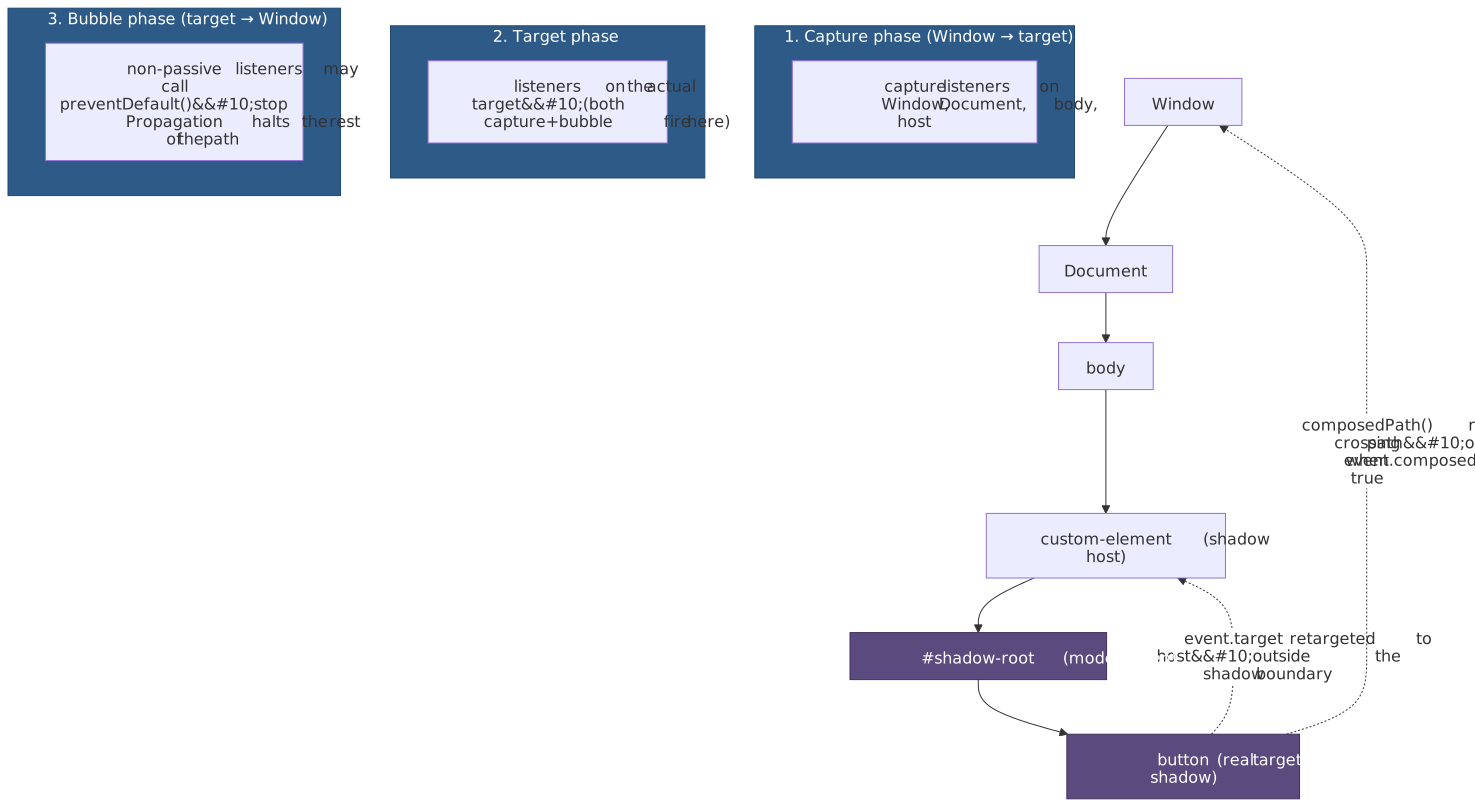
Capture, target, bubble
event.eventPhase reports CAPTURING_PHASE, AT_TARGET, or BUBBLING_PHASE while a listener runs. The third argument to addEventListener chooses which traversal a listener participates in — true (or { capture: true }) for capture, default false for bubble. The target itself fires both kinds, in the order they were added.13 stopPropagation() halts the rest of the path; stopImmediatePropagation() also skips remaining listeners on the current target.
A handful of events are non-bubbling by default: focus, blur, mouseenter, mouseleave, loadstart, progress, scroll (on most elements), and the media-element events. Use the bubbling counterparts (focusin/focusout, mouseover/mouseout) or capture-phase listeners on an ancestor when you need delegation.
Listener options that change behavior
addEventListener(type, listener, options) takes an options dictionary that controls more than capture vs bubble:
| Option | Effect |
|---|---|
capture |
Run during the capture phase (default false). |
once |
Auto-remove the listener after the first invocation. Cheaper than a manual removeEventListener dance. |
passive |
Promise not to call preventDefault(); lets the browser keep scrolling on the compositor thread. |
signal |
An AbortSignal; calling controller.abort() removes the listener.13 |
Two of these are quietly load-bearing for performance and lifetime management:
passive: trueis the difference between butter-smooth and janky scrolling. Chromium and WebKit treatwheel,touchstart, andtouchmovelisteners onWindow,Document, and<body>as passive by default — the spec calls these the passive default targets.14 If you genuinely need to callpreventDefault()on these, setpassive: falseexplicitly.signalis the modern way to clean up listeners. One controller can tear down dozens of subscriptions, includingMutationObservers andfetches, with a singleabort().
EventInit, CustomEvent, and EventTarget as a base class
Event is constructible: new Event(type, { bubbles, cancelable, composed }). The composed flag controls whether the event crosses shadow boundaries. For carrying a payload, use CustomEvent:
class Cart extends EventTarget { add(item: Item) { this.#items.push(item) this.dispatchEvent(new CustomEvent<Item>("itemadded", { detail: item, bubbles: false, })) } #items: Item[] = []}const cart = new Cart()cart.addEventListener("itemadded", (e: CustomEventMap["itemadded"]) => { console.log(e.detail.sku)})EventTarget’s public constructor makes it the right base for any in-process pub/sub bus — you get capture/bubble (vacuously), once, signal, and the rest of the listener machinery without inventing your own. Don’t import an event-emitter library when the platform ships one.
Shadow DOM and event retargeting
When an event is dispatched inside an open shadow tree, the algorithm composes a path that crosses the boundary. As the event propagates outside the shadow root, event.target is retargeted to the shadow host so that consumers of the host element never see internal nodes they were not given access to. Inside the shadow tree, event.target still points at the real target. event.composedPath() returns the full crossing path only if the event’s composed flag is true (UI events like click, keydown, input are composed; many synthetic events default to composed: false).15
host.addEventListener("click", (e) => { console.log(e.target) // the host (retargeted) console.log(e.composedPath()) // [button, …shadowRoot, host, body, html, document, window]}){ mode: "closed" } shadow roots elide their internals from composedPath() entirely — the path stops at the host. This is a privacy boundary, not a security boundary; treat it accordingly.
Cancellation as a first-class primitive
AbortController and AbortSignal (DOM §3) are the unified cancellation primitive across the web platform.16 Beyond fetch, every modern API that takes time accepts a signal — addEventListener, EventSource, ReadableStream.pipeTo, WritableStream.close, WebSocketStream, the streams cancel() family, and many newer APIs (scheduler.postTask, Web Locks, the View Transitions API). Two static helpers make composition cheap:
AbortSignal.timeout(ms)returns a signal that aborts with aTimeoutErrorDOMExceptionaftermsmilliseconds.AbortSignal.any([sig1, sig2, …])returns a signal that aborts when any input aborts; the resultingsignal.reasonis the first input’s reason.4
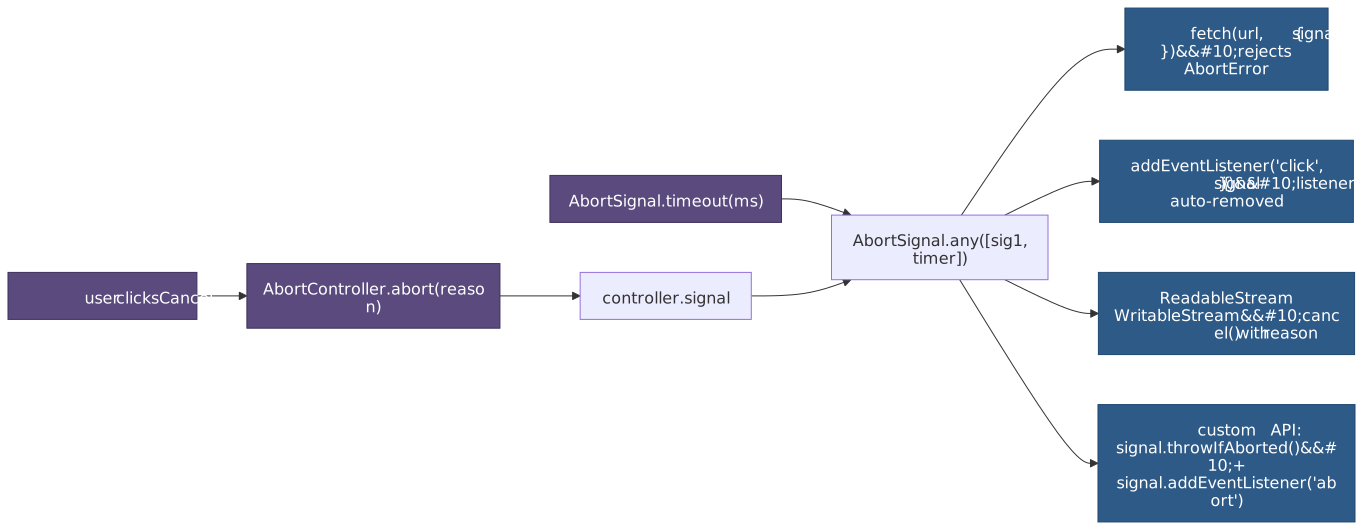
The pattern that replaces nearly every “manual cleanup” idiom you used to write:
function mount(host: HTMLElement) { const controller = new AbortController() const { signal } = controller host.addEventListener("click", onClick, { signal }) window.addEventListener("resize", onResize, { signal, passive: true }) const observer = new MutationObserver(onMutate) observer.observe(host, { childList: true, subtree: true }) signal.addEventListener("abort", () => observer.disconnect(), { once: true }) fetch("/state", { signal }).then(applyState).catch(reportIfNotAbort) return () => controller.abort()}One controller.abort() removes both listeners, disconnects the MutationObserver, and cancels the in-flight fetch. This is now the canonical lifecycle pattern — for components, for routes, for anything with a teardown.
Important
Authoring an async API today? Take a { signal } parameter. Call signal.throwIfAborted() early, and attach an 'abort' listener with { once: true } so the listener is collectable after firing. The MDN implementing an abortable API recipe is the template.
Observer APIs
Four observers cover most of the DOM change surface: MutationObserver for tree changes, ResizeObserver for box-size changes, IntersectionObserver for visibility against a root rectangle, and PerformanceObserver for entries on the performance timeline. They share a tiny shape — new Observer(callback); observer.observe(target, options); observer.unobserve(target); observer.disconnect() — but each is timed differently, and the timing is the part of the spec you have to internalize.
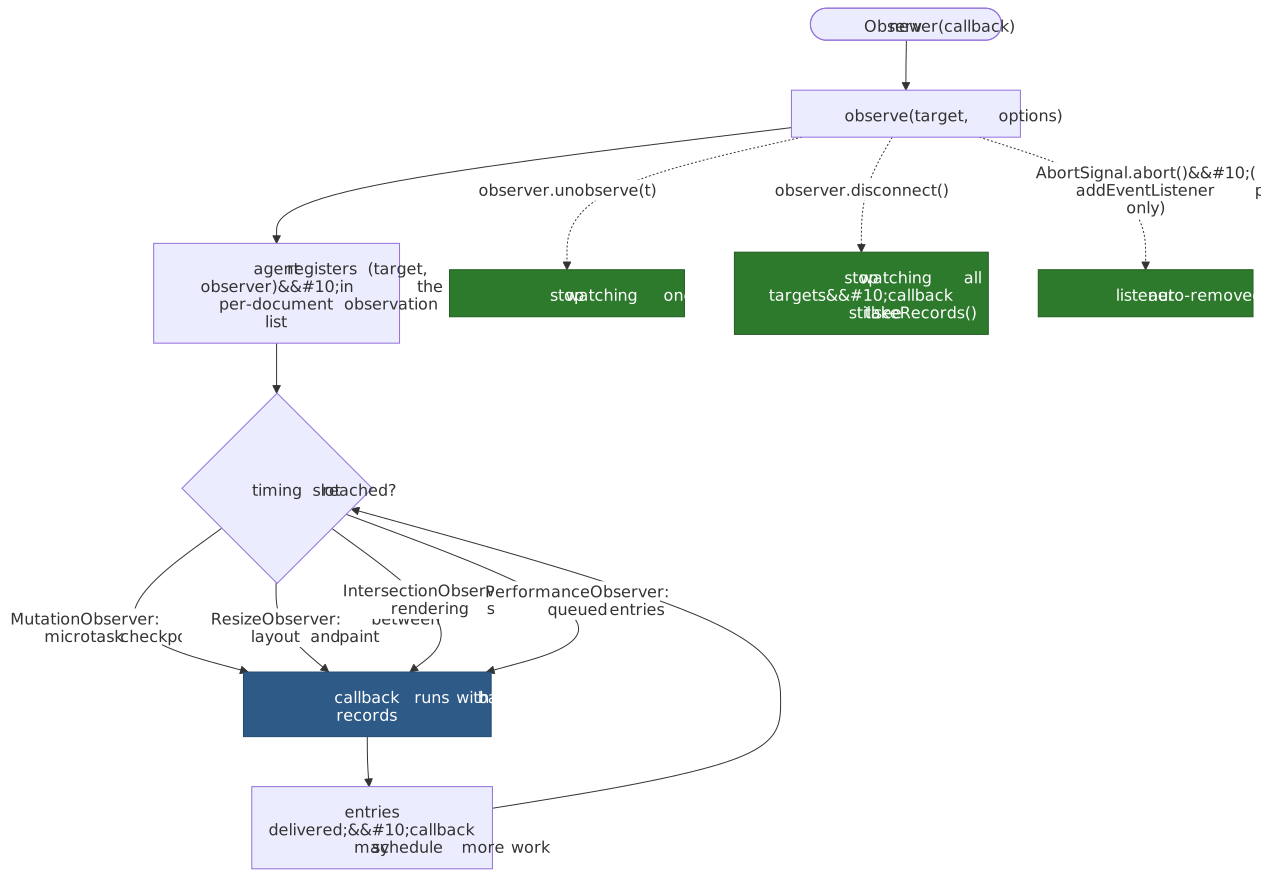
Cleanup is your responsibility
None of the observer constructors take a signal directly. Wire them into the AbortSignal lifecycle by attaching a one-shot listener:
function watch(host: Element, signal: AbortSignal) { const mo = new MutationObserver(handle) const ro = new ResizeObserver(handle) const io = new IntersectionObserver(handle, { threshold: [0, 1] }) mo.observe(host, { childList: true, subtree: true }) ro.observe(host) io.observe(host) signal.addEventListener("abort", () => { mo.disconnect() ro.disconnect() io.disconnect() }, { once: true })}Forgetting disconnect() is one of the most common leaks in long-lived SPAs: each observer keeps strong references to its targets and to the closure of its callback.
MutationObserver — microtask-timed
The DOM Standard schedules MutationObserver delivery via “queue a mutation observer microtask”, which sets a per-agent flag, queues a microtask to “notify mutation observers”, and clears the flag when the microtask runs.17 All mutations from a synchronous task therefore arrive in one callback invocation, scheduled on the microtask queue alongside resolved promises.
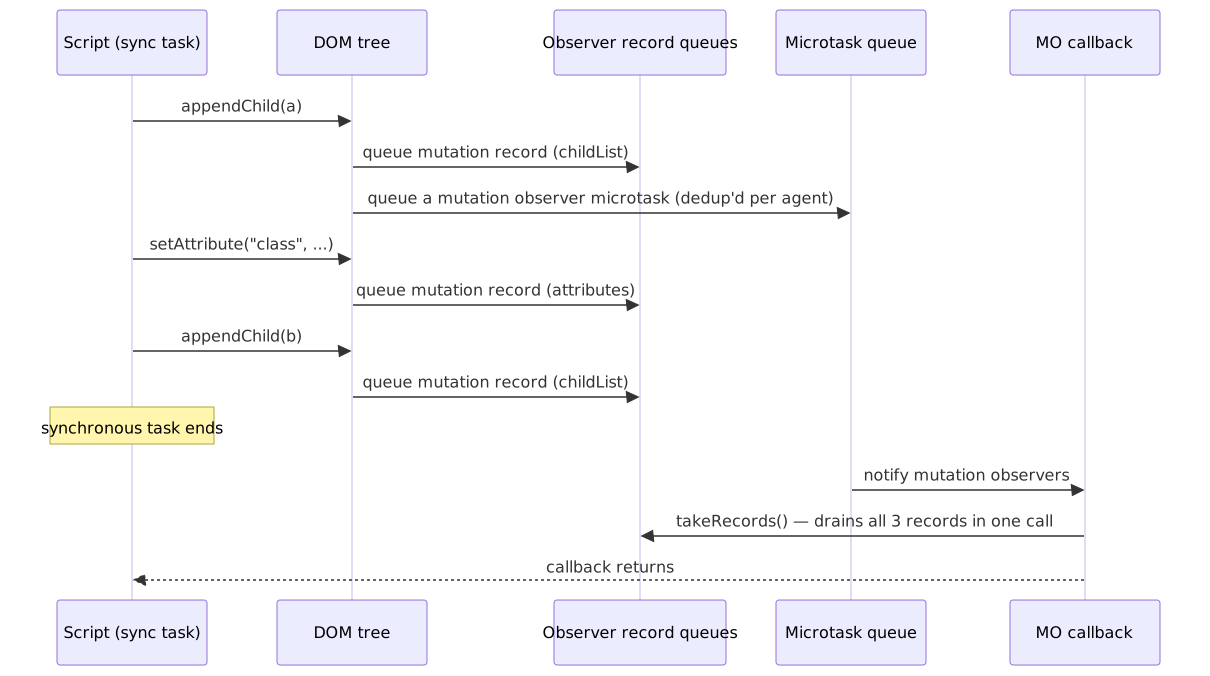
Practical consequences:
- Batching is automatic and inescapable. You cannot get a synchronous notification per mutation. If you need the synchronous behavior of the deprecated
MutationEventAPI, the answer is “you do not”.18 - Microtask, not task. Because delivery happens in the microtask checkpoint at the end of the current synchronous task, your callback runs before any subsequent rendering and before the next event loop task. Heavy work in the callback delays paint just like heavy work in a
Promise.then. - Records survive disconnection.
observer.takeRecords()drains anything still queued when youdisconnect(), useful when you want to flush before tearing down.
The options object must specify at least one of childList, attributes, characterData. Add subtree: true to watch the entire descendant tree, attributeFilter: ["class", "data-state"] to limit attribute watching, and attributeOldValue / characterDataOldValue to capture the prior value:
function watchInvalid(form: HTMLFormElement, signal: AbortSignal) { const observer = new MutationObserver((records) => { for (const r of records) { if (r.type !== "attributes") continue const field = r.target as HTMLElement const errorId = field.getAttribute("aria-describedby") const errorEl = errorId ? document.getElementById(errorId) : null if (errorEl) { errorEl.hidden = field.getAttribute("aria-invalid") !== "true" } } }) for (const field of form.querySelectorAll("input, textarea, select")) { observer.observe(field, { attributes: true, attributeFilter: ["aria-invalid"], attributeOldValue: true, }) } signal.addEventListener("abort", () => observer.disconnect(), { once: true })}ResizeObserver — between layout and paint
The Resize Observer specification defines a deterministic slot in the rendering steps: after layout is up to date, the user agent gathers active observations, broadcasts them to your callback, and only then proceeds to paint.19 If your callback dirties layout for an element deeper in the tree than the deepest one whose observation it just delivered, the loop runs again at the new depth. If something stays dirty after the loop terminates, the user agent fires an ErrorEvent on Window with the message “ResizeObserver loop completed with undelivered notifications” and defers the leftovers to the next opportunity.20
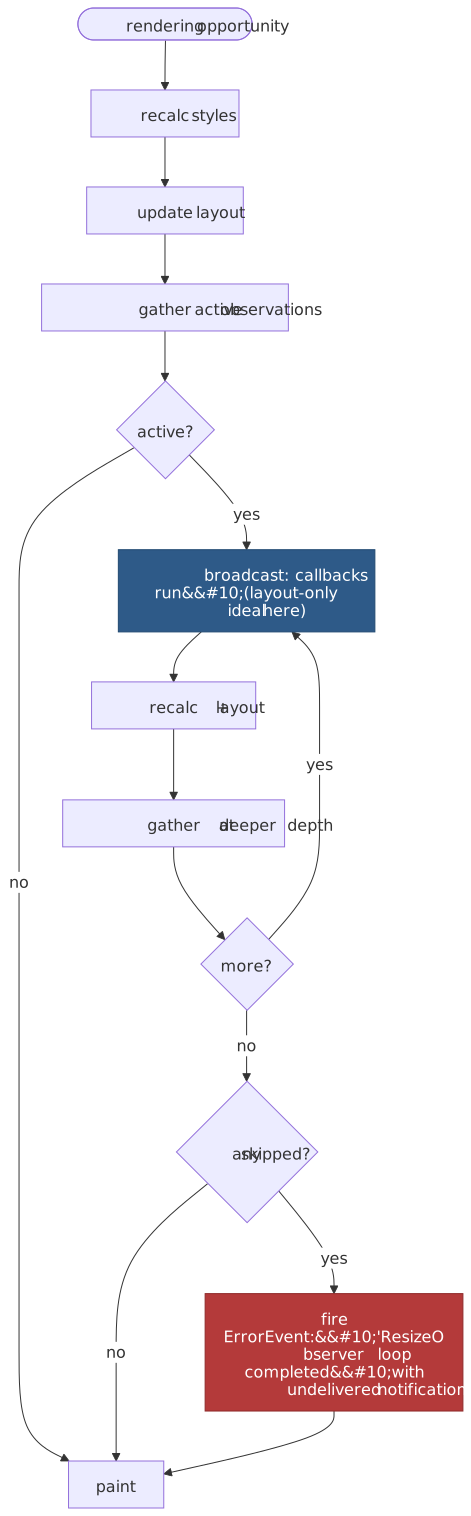
This timing is what makes ResizeObserver safe for layout-modifying callbacks: the changes you make invalidate layout but the user agent has not yet painted, so they coalesce into the same paint instead of triggering an extra one. It also explains the cardinal rule:
Caution
Modifying the observed element’s box from inside its own callback risks the loop error. Either modify a child whose layout depth is greater (the loop will pick it up at the next depth), or defer the change with requestAnimationFrame so it happens in the next frame instead of inside this one.
Other edge cases worth knowing:
- Three box options.
box: "content-box"(the default),"border-box", or"device-pixel-content-box". Read the corresponding entry array —entry.contentBoxSize,entry.borderBoxSize, orentry.devicePixelContentBoxSize— instead of the legacyentry.contentRect, which only describes content-box CSS pixels. inlineSizeandblockSize. The size entries are writing-mode aware;inlineSizeis width in horizontal writing modes and height in vertical ones.- CSS transforms do not fire. Transforms move pixels, not boxes — the spec explicitly excludes them.21
- Non-replaced inline elements report zero. They have no box of their own; observe a containing block-level element instead.
- Insertion and removal fire. A first observation arrives once after
observe()if the element has any box; settingdisplay: nonereports zero dimensions in a fresh entry.
IntersectionObserver — driven by the rendering steps
IntersectionObserver watches whether a target is visible against a root (the viewport by default) inflated or shrunk by rootMargin, and fires when the visible ratio crosses any of the configured threshold values. The detailed mechanics (root, rootMargin, threshold semantics, sentinel patterns, batching, and when to prefer scroll listeners) are covered in the dedicated Intersection Observer API article. The two cross-cutting facts worth keeping in this article:
- Cross-origin privacy. When the target is in a cross-origin-domain document,
entry.rootBoundsisnulland anyrootMarginorscrollMarginoffsets are ignored. The W3C spec says this prevents a cross-origin frame from “probing for global viewport geometry information that could deduce user hardware configuration”.22 - Asynchronous batched delivery. Like the other observers,
IntersectionObservercallbacks are batched and delivered as part of the rendering steps, so a single callback can carry intersection changes for many targets.
PerformanceObserver — the timeline subscription
PerformanceObserver subscribes to the Performance Timeline and is how you observe Core Web Vitals (largest-contentful-paint, layout-shift, event and first-input for INP), long animation frames (long-animation-frame), navigation, resource, and paint entries.23 Two patterns dominate:
new PerformanceObserver((list) => { for (const entry of list.getEntries()) { sendBeacon("lcp", entry.startTime, entry as PerformanceEntry) }}).observe({ type: "largest-contentful-paint", buffered: true })new PerformanceObserver((list) => { for (const e of list.getEntries() as PerformanceEventTiming[]) { if (e.duration > 40) reportSlowInteraction(e) }}).observe({ type: "event", durationThreshold: 40, buffered: true })buffered: true replays entries that arrived before the observer was constructed — essential for early-page metrics like LCP. Use the type/buffered form (not the older entryTypes array) when you need that replay or durationThreshold.
Custom editable surfaces: EditContext
The newest piece of the editor stack is the EditContext API (Chromium 121+, behind a flag in WebKit, Firefox not yet shipping). element.editContext = new EditContext() makes any element — including a <canvas> — focusable and connected to the OS text input service, with IME composition, dead keys, and language switching delegated to the platform. Combined with Selection, Range, and the CSS Custom Highlight API, this is the modern foundation for building a real editor in the browser without the contenteditable-and-pray approach that has failed every previous generation of editors.5
Compared to scroll/resize event listeners
| Concern | scroll / resize listener |
Observer |
|---|---|---|
| Runs on | Every event the page emits | Only when the watched property changes |
| Forced sync layout | Common — getBoundingClientRect reads |
Browser computes geometry once, off the listener hot path |
| Batching | Manual (requestAnimationFrame, debounce) |
Spec-defined timing slot |
| Cleanup | Per listener, easy to forget | One disconnect() clears every observed target |
| Visibility for many | Single listener, N getBoundingClientRect |
One observer, N targets, no per-target geometry calls |
The takeaway is not “always use observers” — pointermove and keydown will never be observers — but rather: any time you find yourself reaching for scroll/resize to derive geometry or structure, the observer API is the version that the platform optimized for that job.
Decision matrix: which API for which problem
| Problem | Reach for | Avoid |
|---|---|---|
| Find one or many elements once | querySelector / querySelectorAll |
getElementsBy* (live, harder to reason about) |
| Continuously reflect a count of children | children (live HTMLCollection) |
querySelectorAll in a loop |
| Append/replace a batch of children | replaceChildren(...batch) |
N×appendChild (N mutation observations, N layout invalidations) |
| Build a subtree off-tree before attaching | DocumentFragment (or <template>.content.cloneNode(true)) |
Hand-rolled detached parents |
| Operate on text crossing element boundaries | Range + extractContents / insertNode |
Manual node splitting |
| Highlight matches, errors, collaborator cursors | CSS Custom Highlight API + ::highlight() |
Wrapping text in <span> (DOM mutation, observer churn) |
| Walk text or comment nodes | TreeWalker / NodeIterator |
Recursive childNodes walks |
| Watch tree changes | MutationObserver |
The deprecated MutationEvent family |
| Watch box-size changes | ResizeObserver |
window.resize + getBoundingClientRect |
| Watch visibility / lazy-load / infinite-scroll sentinels | IntersectionObserver |
scroll + getBoundingClientRect |
| Observe Core Web Vitals / long tasks / paint timing | PerformanceObserver |
Manual performance.getEntries() polling |
| Cancel listeners, fetches, observers together | AbortController + { signal } everywhere |
Per-handle removeEventListener / per-fetch ad-hoc cancel flags |
| Compose user-cancel + timeout | AbortSignal.any([ctrl.signal, AbortSignal.timeout(ms)]) |
Hand-coded setTimeout + cleanup |
| Encapsulate component internals | Shadow DOM + composedPath() for boundary-aware listeners |
CSS-only “BEM” containment, runtime Object.freeze games |
| Build a custom editor surface | EditContext (where supported), Selection, Range, ::highlight() |
contenteditable + execCommand + DOM rewriting |
Performance pitfalls
A short list of the patterns that consistently show up in profiles:
- Reading layout inside a write loop triggers forced synchronous layout.
getBoundingClientRect,offsetTop,clientWidth,getComputedStyleall read live geometry. Either batch all reads before all writes, or do the geometric work inside aResizeObserver/IntersectionObservercallback that runs after layout. - Holding live collections across mutations keeps the document’s name/class indices warm. Convert to a snapshot (
[...coll]) when you only need it once. - Heavy
MutationObservercallbacks delay paint because they run in the microtask checkpoint. Move expensive work torequestIdleCallbackorscheduler.postTask({ priority: 'background' }). - Non-passive
wheel/touchmovelisteners force scrolling onto the main thread. Always setpassive: trueunless you actually callpreventDefault(). - One listener per child element for delegated events. Use a single capture-phase listener on the container and dispatch by
event.target.closest(...). - Unbounded
ResizeObserverloops that mutate the observed element’s own box will eventually fire the loop error and skip a frame. Mutate a deeper element or defer torequestAnimationFrame. - Forgotten observers and listeners in long-lived SPAs leak both DOM nodes and the closures their callbacks capture. Wire every subscription to an
AbortSignal.
Practical defaults
- Type cross-markup utilities as
Element. Reach forHTMLElementonly when you actually need an HTML-only member. - Default to
querySelectorAllplusfor...of. Keep live collections for the cases where you genuinely want auto-updating views. - Prefer
append/prepend/replaceChildren/before/after/replaceWith/removeover the DOM-1 methods. UsereplaceChildren(...batch)to swap a subtree atomically; reach forDocumentFragmentwhen you need to build the batch off-tree first. - Use
closest(selector)instead of hand-rolledparentNodewalks, andpreviousElementSibling/nextElementSiblinginstead of the all-node sibling pointers. - Default to
MutationObserverover polling and over the deprecatedMutationEventAPI. Trust the microtask delivery; don’t wrap callbacks insetTimeout(..., 0)chasing some “more synchronous” behavior. - Inside a
ResizeObservercallback, avoid mutating the observed element’s own box. Modify a deeper element or defer torequestAnimationFrame. - For visibility, reach for
IntersectionObserver. For geometry-derived behavior on scroll, ask whether an observer can do it before reaching for a scroll handler. - Pass
{ passive: true, signal }to everyaddEventListeneryou don’t need topreventDefaulton. OneAbortControllerper component teardown. - For decorative or informational text highlights, reach for the CSS Custom Highlight API. Reserve
Selectionfor actually setting the user’s selection.
Appendix
Prerequisites
- JavaScript fundamentals (classes and prototypal inheritance, microtasks, promises).
- Basic HTML/CSS.
- DevTools “Elements” and “Performance” panel familiarity.
Summary
Elementis the cross-markup base.HTMLElementadds HTML-only semantics;HTMLOrSVGElementis the mixin that givesdataset,tabIndex,autofocus,nonce,focus(), andblur()to both HTML and SVG.- Collections are live by default.
querySelectorAllis the only spec-static collection method;getElementsByNameis the spec-quirk liveNodeList. - The modern manipulation API is the variadic
ParentNode/ChildNodemixin methods.DocumentFragment,Range, and the CSS Custom Highlight API cover the rest of the structural-edit surface. TreeWalker/NodeIteratorexist for traversals selectors cannot express (text/comment nodes, programmatic filters, subtree pruning).- Events propagate capture → target → bubble; the target sees both phases.
passivematters for scroll performance;signalmatters for cleanup. Shadow DOM retargetsevent.targetoutside the boundary;composedPath()reveals the full path only forcomposedevents. - Observers have spec-defined timing.
MutationObserveris microtask-timed.ResizeObserverruns between layout and paint with a depth-monotone loop and a defined error path.IntersectionObserveris driven by the rendering steps and suppresses geometry across origin boundaries.PerformanceObserveris the subscription model for the performance timeline. AbortController/AbortSignalis the unified cancellation primitive.AbortSignal.anyandAbortSignal.timeoutcompose. Use one signal per unit of work and attach it to every cancellable thing the unit owns.
References
Specifications
- DOM Standard — WHATWG Living Standard.
- HTML Standard — DOM section —
HTMLElement,HTMLOrSVGElementmixin,getElementsByName. - Resize Observer — W3C Working Draft.
- Intersection Observer — W3C Working Draft.
- Performance Timeline Level 2 —
PerformanceObserver,bufferedflag. - CSS Custom Highlight API Module Level 1.
- Selection API — W3C.
- EditContext API — W3C.
- SVG 2 — Basic Data Types and Interfaces.
MDN reference
- Element, HTMLElement, SVGElement
- NodeList, HTMLCollection
- ParentNode, ChildNode
- TreeWalker, NodeIterator, NodeFilter
- DocumentFragment, Range, StaticRange, Selection
- EventTarget, addEventListener, Event.composedPath, CustomEvent
- AbortController, AbortSignal, AbortSignal.any, AbortSignal.timeout
- Using shadow DOM
- MutationObserver, ResizeObserver, IntersectionObserver, PerformanceObserver
- CSS Custom Highlight API, EditContext API
Footnotes
-
WHATWG HTML Standard, HTMLOrSVGElement interface mixin — declares
dataset,nonce,autofocus,tabIndex,focus(),blur()and is implemented by bothHTMLElementandSVGElement. ↩ ↩2 ↩3 -
WHATWG DOM Standard §4.2.10, Old-style collections: NodeList and HTMLCollection: “A collection can be either live or static. Unless otherwise stated, a collection must be live.” ↩
-
WHATWG DOM Standard §2.9, Dispatching events and the dispatch algorithm. ↩ ↩2
-
MDN,
AbortSignal.any()andAbortSignal.timeout()— Baseline 2024. ↩ ↩2 -
W3C, EditContext API; MDN, EditContext API — currently experimental, behind flags in non-Chromium engines. ↩ ↩2
-
WHATWG DOM Standard,
querySelectorAll(selectors)method steps: “to return the static result of running scope-match a selectors string …”. ↩ -
WHATWG HTML Standard,
document.getElementsByName(name): “must return a liveNodeListcontaining all the HTML elements in that document that have a name attribute whose value is equal to the name argument”. ↩ -
WHATWG DOM Standard,
Document.getElementById()(on theNonElementParentNodemixin) — returns the first element in tree order whose ID iselementId, using the document’s id-to-element map. ↩ -
Chromium documentation, Selector matching and the simple-selector fast path; WebKit, CSS Selector JIT compiler — engines pattern-match trivial selectors (a single
#id,.class, ortag) into direct map / sibling-bucket lookups; anything richer falls back to the general selector matcher. ↩ -
WHATWG DOM Standard, the insert algorithm moves a
DocumentFragment’s children to the parent and leaves the fragment empty; seeDocumentFragmentand the insert steps. ↩ -
W3C, CSS Custom Highlight API Module Level 1; MDN, CSS Custom Highlight API — Baseline June 2025. ↩
-
WHATWG DOM Standard §6, Traversal;
NodeFilter.FILTER_REJECTforNodeIteratoris treated identically toFILTER_SKIP. ↩ -
MDN, EventTarget.addEventListener —
optionsparameter —capture,once,passive,signal. ↩ ↩2 -
WHATWG DOM Standard, event listener options — passive; the spec specifies the passive default targets for which
wheel,touchstart, andtouchmoveare passive unless explicitly overridden. ↩ -
MDN, Event.composedPath — closed shadow roots elide their internals; WHATWG DOM Standard,
composedand retargeting. ↩ -
WHATWG DOM Standard §3,
AbortControllerandAbortSignal. ↩ -
WHATWG DOM Standard §4.3,
queue a mutation observer microtaskandnotify mutation observers. ↩ -
Chrome for Developers, Mutation Events deprecation and removal. ↩
-
W3C Resize Observer §3, Algorithms: the rendering steps gather active observations, broadcast them, recalc styles and layout, gather at the new depth, and only then update the rendering. ↩
-
W3C Resize Observer §3.5, Deliver Resize Loop Error notification; MDN, ResizeObserver for the exact
ErrorEventmessage. ↩ -
W3C Resize Observer, “Observations will not be triggered by CSS transforms” — transforms do not change box dimensions. ↩
-
W3C Intersection Observer, §2 Intersection Observer Concepts — for cross-origin-domain targets,
rootBoundsisnullandrootMargin/scrollMarginoffsets are ignored. ↩ -
W3C, Performance Timeline; MDN, PerformanceObserver. ↩