SSG Performance on AWS: Atomic Deploys, Edge Functions, and Pre-Compression
Static site generation (SSG) only looks like “compile, upload, done” until the second time you have to roll back at 02:00 with traffic on top of half-cached assets. This article is the production playbook for serving an SSG build through Amazon S3 and CloudFront: how to lay out atomic versioned deploys, when to choose CloudFront Functions over Lambda@Edge, how to pre-compress with Brotli without breaking content negotiation, how to use the native CloudFront Continuous Deployment feature for blue/green releases, and what an SSG site can actually do about Cumulative Layout Shift.
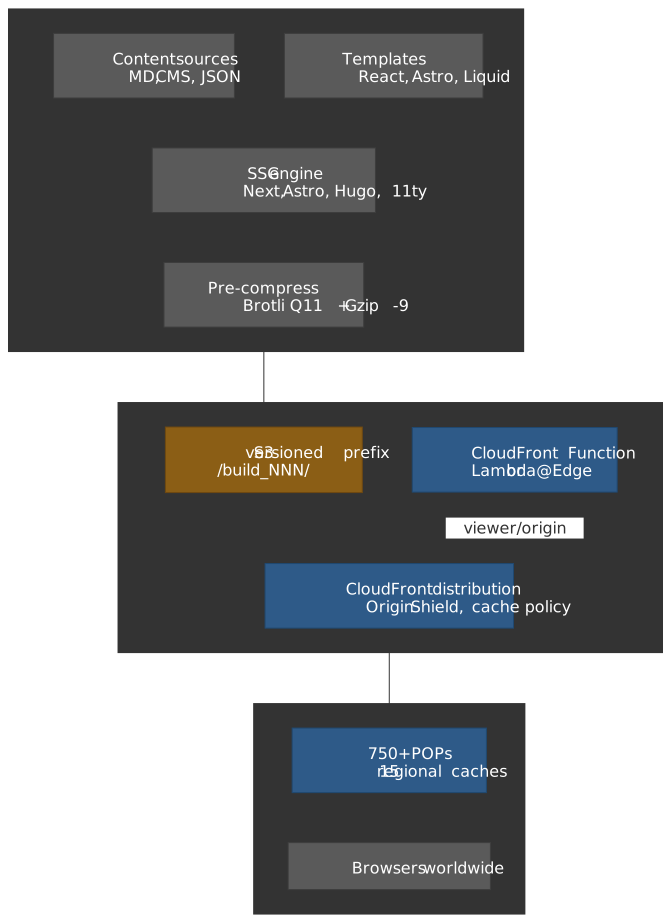
Thesis
Three architectural decisions compound to determine an SSG site’s TTFB, blast radius, and cost:
- Where the work happens. Build-time rendering moves database queries, template expansion, and asset minification out of the request path. Origin servers shrink to file delivery and the CDN does the rest.
- How releases are structured. Versioned, immutable build prefixes in S3 make rollback a configuration change instead of a redeploy. Object-level S3 Versioning is the wrong tool for application rollback.
- Where logic lives at the edge. CloudFront Functions at
0.60 per 1M handles anything that needs the network or response body. Picking the wrong one wastes money or boxes you out of capabilities you’ll need.
| Decision | Optimizes for | You give up |
|---|---|---|
| Pre-compress at build (Brotli Q11) | 14–20% smaller bytes than Gzip -9 for JS/HTML1 | Build CPU (seconds per file at Q11) and content-negotiation complexity |
| Lambda@Edge over CloudFront Functions | Network access, body manipulation, longer compute (5 s viewer / 30 s origin) | 6× per-invocation cost and a us-east-1-only deployment surface2 |
| Versioned-prefix atomic deploys | Instant rollback, no partial state | Storage for retained versions and a tiny CloudFront config-change loop |
| CloudFront Continuous Deployment | Native blue/green and canary, observable in CloudWatch | Single-distribution constraint and limited traffic-split granularity3 |
| Origin Shield | Higher cache hit ratio, request collapsing | Per-request surcharge and a second hop on cache misses |
Core Web Vitals thresholds at the 75th percentile, as of 2026: LCP ≤ 2.5 s, CLS ≤ 0.1, INP ≤ 200 ms (INP replaced FID on 2024-03-124). These are the floor an SSG architecture should aim past, not the ceiling.
Mental model: SSG vs SSR vs ISR vs CSR
A senior team rarely picks one rendering mode for a whole product — modern frameworks (Next.js 15, Astro 5, SvelteKit) let you mix per route. Pick mode by data freshness and personalization cost, not by ideology.
| Property | SSG | SSR | ISR (revalidate) | CSR |
|---|---|---|---|---|
| Where HTML is built | CI build | Per request on origin | First request after revalidate window |
Browser, after JS executes |
| TTFB at edge cache hit | Tens of ms | n/a (always origin round-trip) | Same as SSG between revalidations | Fast HTML, slow meaningful content |
| Personalization | None at HTML layer | Full | Limited (per-page, not per-user) | Full (after hydration) |
| SEO | Strong — full HTML | Strong — full HTML | Strong — usually fresh enough | Weak unless paired with prerender or SSR shell |
| Cost shape | Bandwidth-only | Bandwidth + per-request compute | Bandwidth + occasional regeneration | Bandwidth + API backend |
| Failure surface during traffic | CDN only | Origin + framework runtime | Origin during regeneration windows | API backend |
Next.js 15’s per-route ISR is the revalidate route segment config (or the cacheLife({ revalidate, expire, stale }) function under the new Cache Components model)5. Astro 5 layers Server Islands on top of static islands so a marketing page can stream a personalized header without hydrating the whole tree6.
The article from here on assumes pure SSG output served from S3 + CloudFront with optional edge functions. Hybrid frameworks plug in cleanly because the deployment substrate is the same.
Atomic, versioned deployments
Important
S3 Object Versioning tracks per-object history. It is not deployment versioning. Restoring a deploy that touched 500 files via S3 Versioning means 500 individual CopyObject calls — operationally infeasible during an incident.
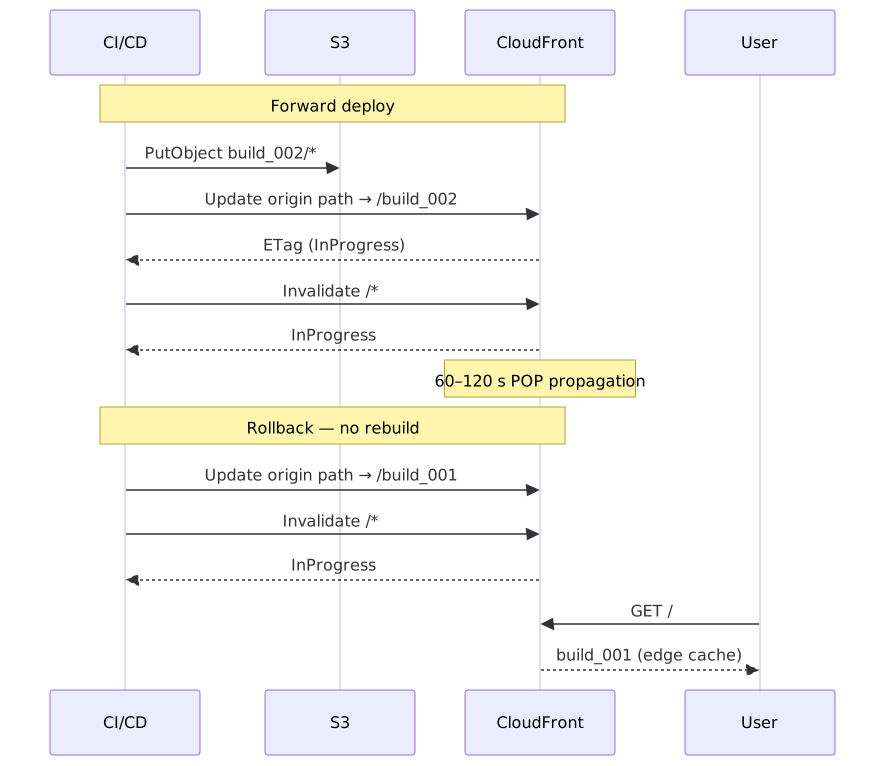
The pattern that actually works in production: every CI build uploads to a unique prefix in the bucket, and CloudFront points at that prefix.
s3://my-site/├── build_001/│ ├── index.html│ └── assets/...├── build_002/│ ├── index.html│ └── assets/...└── build_003/ ├── index.html └── assets/...You can index by semver, by release tag, or by the short Git SHA — the only requirement is uniqueness and immutability. Once build_002/ is closed, you never overwrite an object inside it. Rollback is a change to which prefix CloudFront resolves.
There are two ways to wire CloudFront to a prefix:
- Origin path. Set the distribution’s origin path to
/build_002. Update viaUpdateDistribution. This is the simplest pattern and works on a single distribution. - Custom origin header + edge function. Send a header like
x-build-version: build_002from the origin configuration; an edge function rewrites the request URI to/${header}/${path}. This indirection makes A/B testing and gradual rollouts possible without a CloudFront config change per release.
The second pattern is more flexible but adds a function and the failure modes that come with it. For most SSG sites the origin path is enough; reach for the header indirection when you actually need cookie- or weight-based routing.
Cache invalidation cost mechanics
CloudFront prices invalidation by paths submitted per month, not by objects matched. The first 1,000 paths per month are free; beyond that each path is $0.005, and a wildcard like /* counts as one path regardless of how many objects it expands to7. A team deploying three times a day with a single /* invalidation per release submits 90 paths/month — comfortably inside the free tier.
The trap is doing fine-grained invalidations because “wildcard feels too broad”. Submitting 500 explicit paths per deploy puts you over the free tier on day 7.
Warning
Invalidations are eventually consistent across CloudFront’s POPs (60–120 s typical, longer at the tail). Plan your release window for that gap; do not rely on invalidation completing before declaring success.
Lifecycle and storage cost
Retain the last N versions you might roll back to (5–10 is normal), then expire the rest with an S3 lifecycle rule. A two-week trailing window covers nearly all “we need to revert that release” cases. For compliance-driven retention, ship the long tail to Glacier — never leave it in STANDARD.
Edge logic: CloudFront Functions vs Lambda@Edge
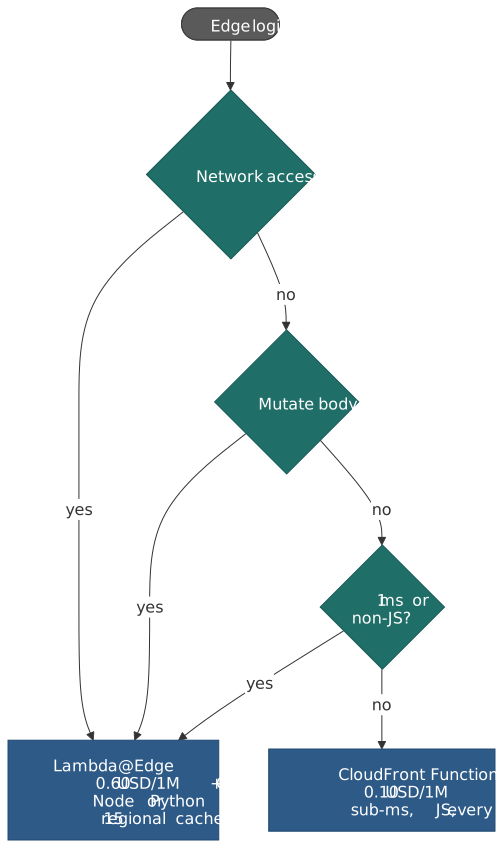
The two AWS edge compute primitives look interchangeable on a slide. They are not — one runs on every POP for sub-millisecond rewrites, the other ferries arbitrary Node/Python code to a smaller pool of regional caches8.
| Capability | CloudFront Functions | Lambda@Edge |
|---|---|---|
| Execution location | Every CloudFront POP (750+ globally) | 15 regional edge caches9 |
| Trigger points | Viewer request and viewer response | All four (viewer + origin, request + response) |
| Max execution time | < 1 ms | 5 s viewer / 30 s origin |
| Per-request peak scale | Millions/sec | Thousands/sec/region |
| Memory | 2 MB | 128 MB viewer / 128 MB – 10,240 MB origin10 |
| Code package | 10 KB | 1 MB viewer / 50 MB origin10 |
| Languages | JavaScript (cloudfront-js-2.0: ES 5.1 + selected ES6–ES12; 1.0: ES 5.1)11 |
Node.js, Python |
| Network access | No | Yes |
| Body manipulation | No | Yes |
| Pricing | $0.10 / 1M invocations | |
| Free tier | 2M invocations/month | None |
A 6× cost gap may be invisible at 10M req/month (
Operational footguns
Caution
Lambda@Edge functions deploy only to us-east-1 and replicate from there to the regional caches. CloudFront associations must reference a numbered version, not $LATEST or a Lambda alias2. Plan IaC and access control around that fact: a development account in eu-west-1 cannot host the function.
Other watchouts:
- CloudWatch logs land in the executing region, not in
us-east-1. Centralize log aggregation up front or you’ll hunt logs across 15 regions during incident triage. - Cold starts are real for Lambda@Edge but bounded — replicas warm quickly under steady traffic. Build the cold-start latency into your p99 budget, not just p50.
- CloudFront Functions runs a restricted JavaScript runtime.
cloudfront-js-2.0addslet,const, arrow functions, template literals,async/await(insideasyncfunctions),Object.assign,globalThis,atob/btoa, and theBuffermodule on top of ES 5.1;cloudfront-js-1.0is ES 5.1 plus a small ES6–ES9 sliver and lacks all of the above. Pin the runtime in your function metadata and lint against the documented feature list — there is no network access, no file system, and nosetTimeout/setIntervalin either version11.
Build-version routing example
// Lambda@Edge — origin-request trigger.// Reads the x-build-version header injected by CloudFront's origin// configuration and rewrites the URI into the corresponding S3 prefix.exports.handler = (event, _context, callback) => { const request = event.Records[0].cf.request const headers = request.headers const version = headers["x-build-version"]?.[0]?.value || "build_004" request.uri = request.uri === "/" ? `/${version}/index.html` : `/${version}${request.uri}` callback(null, request)}Pair this with a deploy script that updates the custom origin header on the distribution config:
#!/usr/bin/env bash# Usage: ./set-build-version.sh build_003 E1234567890ABCDset -euo pipefailversion="$1"distribution_id="$2"etag=$(aws cloudfront get-distribution-config --id "$distribution_id" --query 'ETag' --output text)aws cloudfront update-distribution \ --id "$distribution_id" \ --distribution-config "file://dist-config-${version}.json" \ --if-match "$etag"aws cloudfront create-invalidation --distribution-id "$distribution_id" --paths "/*"The same shape underpins blue/green and canary patterns later — a single header drives the routing.
Origin Shield: when the second hop pays for itself
Origin Shield inserts a centralized regional cache between the regional edge caches and your origin. When ten POPs miss the same uncached object simultaneously, Origin Shield collapses them into a single origin fetch, then fans the response back out.
Enable when:
- Your traffic is global enough that simultaneous-miss thundering herds reach S3.
- Your origin sees enough request volume that S3 GET costs are noticeable.
- Cache hit ratio is < 90% and you’ve already exhausted cache-policy and TTL tuning.
Skip when traffic is regional or origin cost is dominated by data transfer (Origin Shield doesn’t change egress).
Pre-compression: serving Brotli without breaking caches
CloudFront will compress on the fly. The catch list is long enough that pre-compressing at build time is the durable answer for any non-trivial SSG site.
CloudFront automatic compression — the catch list
CloudFront’s edge compression is governed by enough rules that it silently fails for plenty of real assets:
- Object size: only 1 KB to 10 MB is compressed. Outside that range CloudFront serves identity, full stop.
- Origin headers: if your origin already sets
Content-Encoding, CloudFront assumes the object is pre-compressed and never re-compresses. - HTTPS-only Brotli: browsers send
Accept-Encoding: bronly over HTTPS. Plain HTTP gets gzip at best12. - HTTP/1.0: CloudFront strips
Accept-Encodingfor HTTP/1.0 viewer requests, disabling compression entirely. - Status codes: only
200,403, and404responses are eligible. - Cache key: you must use a cache policy with
EnableAcceptEncodingGzipandEnableAcceptEncodingBrotliset totrue; legacy cache settings cannot select Brotli. - TTL > 0: disabled cache means no compression.
- Best effort under load: CloudFront documents that it may skip compression when stressed.
- No retroactive compression: objects already in the cache are not compressed when you flip the toggle. You must invalidate them.
Brotli vs Gzip in real numbers, based on Cloudflare’s published benchmarks: Brotli Q11 yields roughly 14–20% smaller JS and HTML and 17–30% smaller CSS than Gzip -9, with comparable decompression speed13. Over 96% of browsers accept br14, and the long tail still falls back to gzip.
Build-time pipeline
Compress in CI to the maximum quality your build budget allows. Q11 on a 1.6 MB JS bundle is on the order of 1–2 seconds; that’s a one-time cost amortized across every viewer.
# Run after the bundler emits final assets; produces sibling .br and .gz files.find dist -type f \( -name "*.js" -o -name "*.css" -o -name "*.html" -o -name "*.svg" \) -print0 | while IFS= read -r -d '' f; do brotli -q 11 -k -o "${f}.br" "$f" gzip -9 -k "$f" doneUpload each variant with the right Content-Encoding so CloudFront does not re-encode:
aws s3 cp dist/main.js s3://bucket/build_007/main.js --content-type application/javascriptaws s3 cp dist/main.js.br s3://bucket/build_007/main.js.br --content-type application/javascript --content-encoding braws s3 cp dist/main.js.gz s3://bucket/build_007/main.js.gz --content-type application/javascript --content-encoding gzipNote
A naïve aws s3 sync will set Content-Type from the file extension, leaving .br and .gz files with application/x-brotli or application/gzip — the browser will then download instead of executing. Always set Content-Type to the underlying media type and Content-Encoding to the wire format.
Edge content negotiation
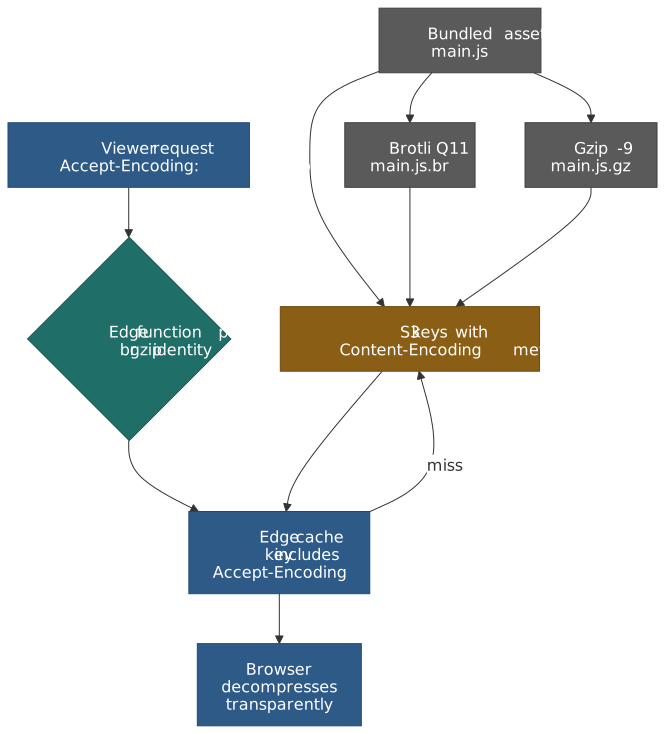
A small CloudFront Function on the viewer-request trigger picks the variant. CloudFront Functions handles this in microseconds at every POP for $0.10/1M; Lambda@Edge would also work but is overkill.
// CloudFront Function — viewer-request trigger.// Picks the best precomputed variant available based on the viewer's// Accept-Encoding. Cache key must include Accept-Encoding to keep variants// segregated.function handler(event) { var req = event.request var ae = (req.headers["accept-encoding"] && req.headers["accept-encoding"].value) || "" if (!/\.(?:js|css|html|svg|json)$/.test(req.uri)) return req if (ae.indexOf("br") !== -1) { req.uri = req.uri + ".br" } else if (ae.indexOf("gzip") !== -1) { req.uri = req.uri + ".gz" } return req}CloudFront cache-policy configuration that pairs with this:
- Include
Accept-Encodingin the cache key (one entry per encoding). - Disable “Compress Objects Automatically” (you’ve taken over).
- Forward
Accept-Encodingin the origin request policy.
Indicative impact
Real numbers vary with content but the directional pattern holds: an SSG bundle that ships at ~3.5 MB uncompressed typically lands around ~250 KB Brotli Q11 (≈14:1) and ~460 KB Gzip -9 (≈8:1). Over a fast 4G link that translates to roughly half the load time at the same cache layer.
CloudFront Continuous Deployment for blue/green
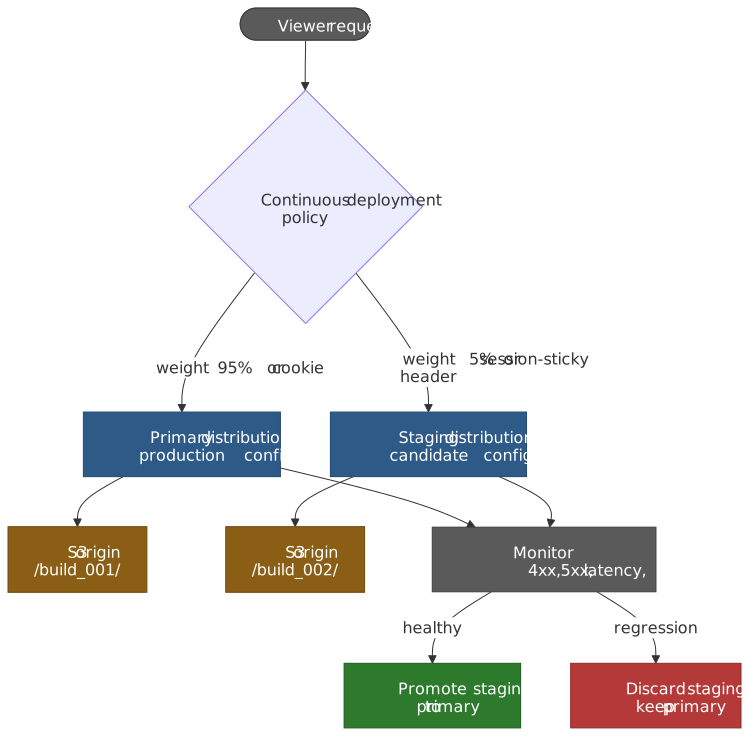
For most blue/green rollouts on CloudFront, the right answer is no longer custom Lambda@Edge cookie routing. AWS shipped CloudFront Continuous Deployment in late 2022: a managed staging distribution paired with the primary distribution via a continuous deployment policy, with weight-based or session-stickiness traffic splits3. That removes a piece of custom code that was famously easy to break.
Use it when:
- You want to test a CloudFront configuration change (cache policy, origin, function association) on a slice of real traffic before promoting.
- You want session-sticky canaries so the same viewer keeps hitting the same distribution.
- You want native CloudWatch metrics on both distributions during the canary.
Don’t use it for:
- Permanent multi-distribution traffic split (it’s designed for promotion, not steady-state routing).
- Geographic or per-user routing — those still belong in Lambda@Edge or in DNS-level routing (Route 53 weighted records, Global Accelerator).
Lambda@Edge cookie routing — when you actually need it
The Lambda@Edge pattern is still the right call when:
- You need cookie- or header-driven routing across more than two backends (Continuous Deployment is two distributions only).
- You need cohort logic (geo, IP hash, account ID) that isn’t expressible as a weight or sticky header.
- You’re running a multi-tenant CDN where the routing logic is data-driven from a database.
// Lambda@Edge — origin-request trigger.// Routes between blue and green S3 origins based on a routing cookie.const blue = "site-blue.s3.amazonaws.com"const green = "site-green.s3.amazonaws.com"exports.handler = async (event) => { const request = event.Records[0].cf.request const cookies = request.headers.cookie || [] const wantsGreen = cookies.some(c => c.value.includes("routing=green")) const target = wantsGreen ? green : blue request.origin.s3.domainName = target request.headers.host = [{ key: "Host", value: target }] return request}The cookie is set elsewhere — typically a CloudFront Function on the viewer-response of a “join the green canary” page, or a logged-in user setting via your application.
Canary by IP hash
For percentage-based canaries with session stickiness, hash a stable identifier (the client IP from x-forwarded-for, an account ID from a JWT) modulo 100 and route based on the bucket:
// Lambda@Edge — origin-request trigger.// 10% canary by IP hash; same IP always lands on the same origin within// the deployment window.const PROD = "prod-bucket.s3.amazonaws.com"const CANARY = "canary-bucket.s3.amazonaws.com"const CANARY_PCT = 10exports.handler = async (event) => { const request = event.Records[0].cf.request const ip = request.headers["x-forwarded-for"]?.[0]?.value || "0.0.0.0" const bucket = ip.split(".").reduce((a, b) => a + parseInt(b, 10), 0) % 100 request.origin.s3.domainName = bucket < CANARY_PCT ? CANARY : PROD return request}Tie automatic rollback to a CloudWatch alarm on canary error rate or LCP regression — the human in the loop should be the exception, not the path.
CLS budget on a static site
Raw delivery speed is a prerequisite, not the goal. Visual stability is what users perceive. CLS aggregates unexpected shifts during the page lifecycle; a fast page that pops and reflows is worse than a slightly slower page that doesn’t.
What actually shifts on a static page
Most CLS regressions on SSG sites trace to four sources:
- Images without intrinsic dimensions. The browser reserves zero space until decode; everything below moves when the image arrives.
- Late-injected embeds. Ads, social cards, YouTube iframes, cookie banners arrive after the first paint and push content down.
- Web font swap. The fallback metric and the loaded font have different x-heights and advance widths, causing line-break reflows.
- Client hydration that mounts components only on the client. Anything rendered with
client:only(Astro) ordynamic(... { ssr: false })(Next) starts as a hole.
For attribution at runtime, the Layout Instability API exposes LayoutShift.sources — an array of up to five LayoutShiftAttribution objects sorted by impact area; if more than five elements participated in a shift, the largest five are kept15. sources[0] is your worst offender.
Mitigations
<img src="/assets/hero-1280.jpg" width="1280" height="720" alt="A close-up of a sleeping cat." style="width: 100%; height: auto;"/>The intrinsic width and height give the browser an aspect ratio it can reserve before the bytes land. style="width: 100%; height: auto" keeps it responsive without surrendering the reservation.
For variable-size embeds, reserve the most-common dimension with min-height:
<div style="min-height: 250px;"> <!-- Display ad mounts here after script loads --></div>Fonts: preload the critical face and pick a fallback with similar metrics (size-adjust, ascent-override, descent-override, line-gap-override in @font-face):
<link rel="preload" href="/fonts/inter-var.woff2" as="font" type="font/woff2" crossorigin><style> @font-face { font-family: "Inter"; src: url("/fonts/inter-var.woff2") format("woff2"); font-display: swap; size-adjust: 100.5%; ascent-override: 90%; descent-override: 22%; line-gap-override: 0%; }</style>font-display: swap keeps text visible during font load (better LCP) at the cost of a swap-time shift; optional removes the shift but accepts that some viewers never see your font on the first visit. Pick based on the metric mismatch and how visible the typography is.
Dual-build for divergent mobile/desktop layouts
When mobile and desktop layouts produce different above-the-fold heights for the same components, a single SSG build forces one of them to shift on hydration. Two builds — separate routes for /mobile/* and /desktop/* — let each viewer get the right pre-rendered HTML.
The routing belongs in an edge function and the cache key needs to include the device dimension:
// Lambda@Edge — origin-request trigger.// Routes /mobile/* or /desktop/* based on CloudFront's device header.exports.handler = async (event) => { const req = event.Records[0].cf.request const isMobile = req.headers["cloudfront-is-mobile-viewer"]?.[0]?.value === "true" const prefix = isMobile ? "/mobile" : "/desktop" req.uri = req.uri === "/" ? `${prefix}/index.html` : `${prefix}${req.uri}` return req}The corresponding cache policy must include CloudFront-Is-Mobile-Viewer (and any other dimensions you route on) in the cache key, otherwise mobile and desktop variants collide. CloudFront’s CloudFront-Is-*-Viewer headers normalize User-Agent into a small set of booleans precisely so device-aware caching doesn’t shred your hit ratio16.
Tip
Skip the dual-build cost (2× CI time, 2× S3 storage) until you have measured CLS difference between mobile and desktop layouts in real RUM data. The mitigation here is more expensive than most teams realize.
URL redirects at the edge
Three options, each with a sharp constraint:
| Option | Where it executes | When to reach for it |
|---|---|---|
| Meta refresh | Browser, after HTML download | Almost never — full HTML download before redirect, weak SEO signal |
| S3 routing rules | Origin (S3 website endpoint) | Tiny static sites that already use the public website endpoint |
| CloudFront Function / Lambda@Edge | CloudFront edge | Default for anything serious — works with private S3 + OAC |
S3’s RoutingRules come with two structural limits that disqualify them for production SSG sites: 50 rules per bucket17, and they only work with the public S3 website endpoint — the moment you adopt Origin Access Control (OAC) to lock the bucket down, you lose both routing rules and automatic index.html resolution18.
For a small, static map of /old → /new redirects, a CloudFront Function is plenty:
// CloudFront Function — viewer-request trigger.// Issues a 301 from a static lookup table; falls through to the cache otherwise.var REDIRECTS = { "/old-product": { to: "/new-product", code: 301 }, "/promo": { to: "/current-sale", code: 302 }, "/legacy-docs": { to: "https://docs.example.com", code: 301 },}function handler(event) { var req = event.request var rule = REDIRECTS[req.uri] if (!rule) return req return { statusCode: rule.code, statusDescription: rule.code === 301 ? "Moved Permanently" : "Found", headers: { "location": { value: rule.to }, "cache-control": { value: "max-age=3600" }, }, }}Move to Lambda@Edge only when you need a redirect map larger than a single function deployment can hold (a DynamoDB lookup), or when the redirect target depends on geo or auth state.
Operational defaults
Decisions worth making once and revisiting only on signal:
- Versioned S3 prefix per build, lifecycle out at 14 days, retain last 5–10 explicitly. Don’t run application rollback through S3 Object Versioning.
- Single CloudFront distribution for the main site. Use Continuous Deployment for canaries; reach for a second distribution only when the routing genuinely doesn’t fit a single config.
- Pre-compress at build (Brotli Q11 + Gzip -9), serve via edge content negotiation. CloudFront’s automatic compression has too many silent skips for assets that matter.
- Cache policy with
Accept-Encodingin the cache key, Origin Request Policy forwarding only what you actually use. Every extra cache-key dimension is a hit-ratio loss. - Lambda@Edge replicas live in
us-east-1; centralize CloudWatch logs early. Do not discover this during an incident. - Reserve dimensions for everything that loads asynchronously. Images get
width/height; ad slots getmin-height; fonts getsize-adjustoverrides. - Wire automatic rollback to CloudWatch alarms on Lambda@Edge errors, CloudFront 5xx rate, and synthetic CWV regressions. Manual rollback is the failure mode, not the goal.
Appendix
Glossary
- TTFB (Time to First Byte) — interval from request initiation to the first response byte.
- LCP (Largest Contentful Paint) — render time of the largest image or text block in the viewport. Good ≤ 2.5 s at p75.
- CLS (Cumulative Layout Shift) — sum of unexpected layout shifts across the page lifecycle. Good ≤ 0.1 at p75.
- INP (Interaction to Next Paint) — latency of the worst (or near-worst) user interaction. Replaced FID on 2024-03-12. Good ≤ 200 ms at p75.
- ISR (Incremental Static Regeneration) — regenerating a static page on demand after a
revalidateinterval. Next.js native; emulated by other frameworks via cron or webhooks. - OAC (Origin Access Control) — CloudFront mechanism that signs origin requests so an S3 bucket can refuse public access.
- POP (Point of Presence) — physical location where CloudFront accepts viewer connections. Distinct from regional edge caches.
- Regional Edge Cache (REC) — second-tier CloudFront cache; Lambda@Edge runs here.
- Origin Shield — optional centralized regional cache between RECs and origin; collapses simultaneous misses.
Footnotes
-
Cloudflare — All the way up to 11: Serve Brotli from origin and Paul Calvano — Choosing between gzip, Brotli and zStandard. Both report Brotli Q11 vs Gzip -9 in the 14–25% smaller range across JS, HTML, and CSS. ↩
-
AWS docs — Restrictions on Lambda@Edge. Functions deploy to
us-east-1and replicate; CloudFront associations must reference a numbered version. ↩ ↩2 -
AWS docs — Use CloudFront continuous deployment to safely test CDN configuration changes and AWS Networking & Content Delivery Blog — Achieving zero-downtime deployments with Amazon CloudFront using blue/green continuous deployments. ↩ ↩2
-
web.dev — Interaction to Next Paint becomes a Core Web Vital on March 12. ↩
-
Next.js docs — How to implement Incremental Static Regeneration and
cacheLife. Configure ISR with therevalidateroute segment export, or withcacheLife({ revalidate, expire, stale })under the Cache Components model new in Next.js 15. ↩ -
AWS docs — Pay for file invalidation. First 1,000 paths/month free, $0.005 per path beyond, wildcards count as one path. ↩
-
AWS docs — Differences between CloudFront Functions and Lambda@Edge. Capability matrix and pricing. ↩
-
AWS — Amazon CloudFront features. Current global footprint of POPs and 15 regional edge caches. ↩
-
AWS docs — Quotas on Lambda@Edge. Viewer-triggered functions are capped at 128 MB memory and a 1 MB compressed package; origin-triggered functions allow standard Lambda memory (128 MB – 10,240 MB) and a 50 MB compressed package. ↩ ↩2
-
AWS docs — JavaScript runtime 2.0 features for CloudFront Functions and JavaScript runtime 1.0 features. The
cloudfront-js-2.0runtime is ES 5.1-compliant with selected ES6–ES12 features (notablylet/const, arrow functions, template literals,async/await,Object.assign, numeric separators,Buffer); the1.0runtime is ES 5.1 with only a narrow ES6–ES9 sliver. Neither runtime exposes the network, file system, environment variables, orsetTimeout/setInterval. ↩ ↩2 -
AWS docs — Serve compressed files. Browsers send
Accept-Encoding: bronly over HTTPS; HTTP/1.0 disables compression entirely; only 200/403/404 responses are eligible. ↩ -
Cloudflare — Results of experimenting with Brotli for dynamic web content for the original benchmark methodology. ↩
-
Can I use — Brotli Accept-Encoding/Content-Encoding reports ≈96% global support as of March 2026. ↩
-
web.dev — Debug layout shifts explicitly documents the five-element cap and the ranking by impact area; the underlying interface is described in MDN —
LayoutShiftAttribution. ↩ -
AWS docs — Cache content based on request headers. Use
CloudFront-Is-*-Viewerheaders in the cache policy; never the rawUser-Agent(it shreds the hit ratio). ↩ -
AWS docs — Configuring a webpage redirect. 50 routing rules per bucket; beyond that you need per-object
x-amz-website-redirect-locationmetadata. ↩ -
Stack Overflow — Missing functionality of AWS OAC when hosting a static website from S3 cross-references the AWS docs on OAC and confirms loss of S3 website features (default index resolution, routing rules) when switching from the website endpoint to the REST endpoint with OAC. ↩