React Performance Patterns: Rendering, Memoization, and Scheduling
React performance is mostly a question of which components React calls and how often. Once you can answer that for any frame, the rest of the work — memoization, transitions, virtualization, profiling — falls into place. This article is the model and the toolkit, written against React 18.x and React 19.x with explicit notes where 19-only features (use(), useDeferredValue initial value, the React Compiler 1.0 release) change the answer.
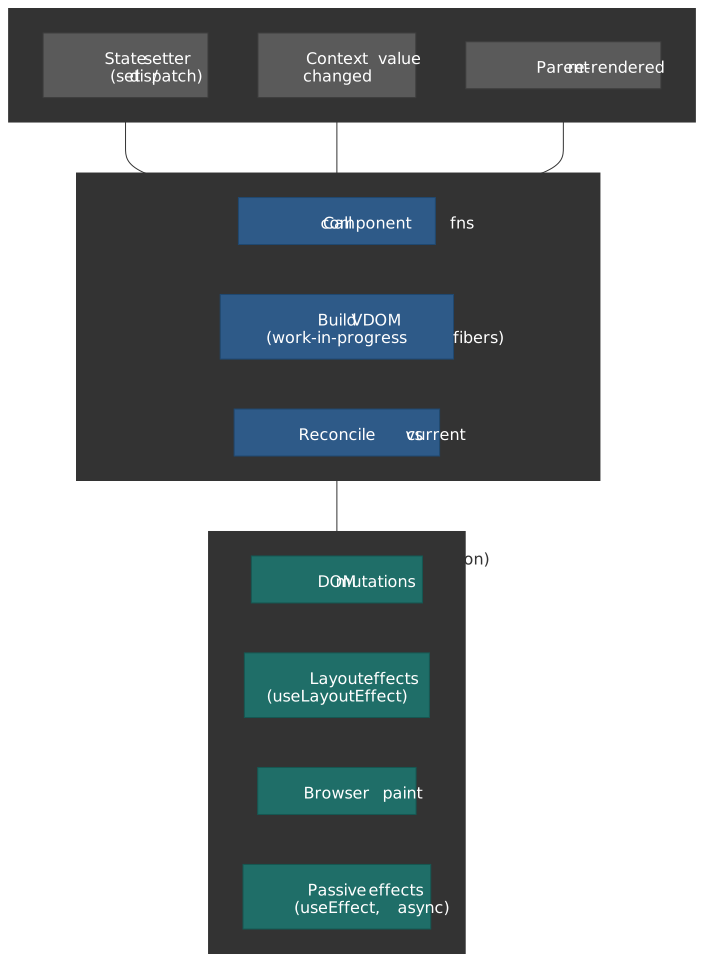
Mental model
Three ideas carry the rest of the article:
- Render is not paint. A render is React calling your component function and producing a virtual DOM tree. The DOM only changes if reconciliation produces a diff. Rendering can be cheap or catastrophic; profiling tells you which.
- Reference equality drives memoization.
React.memo,useMemo, anduseCallbackall useObject.ison each prop or dependency (memo, useMemo). A new object literal in render breaks the comparison the same way a deep change would. - Concurrent rendering reorders work, it doesn’t make work cheaper.
useTransitionanduseDeferredValuemark updates as interruptible so the scheduler can keep urgent work (typing, clicks) on time, but the total CPU cost is the same. They trade latency on one update for responsiveness on another.
Everything below is an application of those three ideas.
The render pipeline
When a component renders
A component re-renders when:
- Its own state changes via a
set-style updater. - A parent renders and the child is not bailed out by
memowith referentially stable props. - A context value it subscribes to via
useContextchanges.
That’s the entire trigger surface. Hooks like useEffect run as a side effect of a render; they don’t cause the render. A React render is just Component(props) being called — pure computation that produces a tree, with the work split across two phases.
Render vs. commit
| Phase | What runs | Interruptible (concurrent mode) |
|---|---|---|
| Render | Component functions, useMemo, useReducer reducers, key matching, reconciliation |
Yes |
| Commit | DOM mutations, useLayoutEffect, refs, useEffect (scheduled afterward) |
No |
The render phase is a pure computation that React may run, pause, restart, or discard. The commit phase applies the chosen result to the DOM in a single synchronous pass and then yields to the browser for paint. This split is what makes interruption safe: nothing observable has happened to the DOM until commit.
Important
Render must be pure. React may call your component twice in development (Strict Mode) and may discard a render mid-way in concurrent mode. Side effects belong in event handlers or effects, never in the render body.
Reconciliation: the O(n) diff
A general tree diff is O(n³). React reaches O(n) with two assumptions documented in the official reconciliation algorithm spec:
- Different element types produce different trees. Swapping
<div>for<span>(or<Article>for<Comment>) tears down the entire subtree, including all DOM nodes and component state, and rebuilds it. - Stable keys identify children across renders. Without keys, React matches list children by position. With keys, it matches by identity, which lets it move, insert, or delete with minimal DOM work.
<ul> {items.map((item) => ( <li>{item.name}</li> ))}</ul><ul> {items.map((item) => ( <li key={item.id}>{item.name}</li> ))}</ul>Warning
Using array index as a key reuses the same DOM node and component state for whatever data lands at that position. Reorder the list and the state moves with the index, not with the row. Always key by a stable identity from the data itself.
Fiber and double buffering
React 16 replaced the recursive stack reconciler with Fiber: a linked list of nodes, each one a unit of work that the scheduler can pause and resume. Every fiber holds the component type, props, the corresponding DOM node, and pointers to its parent, child, and sibling. The architecture is documented in Andrew Clark’s react-fiber-architecture note.
Fiber renders against a work-in-progress (WIP) tree that mirrors the current tree on screen. Each fiber points at its counterpart through the alternate field. When commit happens, React swaps the pointer — the WIP tree becomes current, and the previous current is reused as the next WIP. That is the double-buffering:
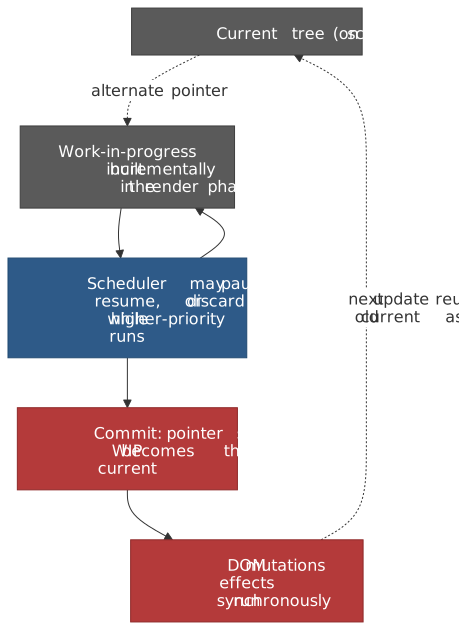
Pre-Fiber (React ≤ 15): the stack reconciler walked the tree recursively and ran to completion once started. Long subtrees blocked the main thread for one or many frames; there was no scheduler to yield to higher-priority work.
Memoization patterns
When memoization helps (and when it costs)
Memoization caches the result of a computation by remembering the inputs. Caching has a price: storing the cached value, comparing the new inputs against the old. Skip it unless one of these is true:
- A component re-renders frequently with props that are mostly stable.
- The render or computation is measurably expensive (≥ ~1 ms in the profiler under realistic data).
- You’re passing callbacks or objects to a memoized child and need referential stability for the child’s
memoto bail out.
If none of those hold, manual memoization usually slows the app down more than it saves.
React.memo: skip identical re-renders
memo wraps a component so that React compares each prop with Object.is and skips the render when every prop matches (react.dev: memo).
import { memo } from "react"interface ChartProps { data: number[] color: string}const Chart = memo(function Chart({ data, color }: ChartProps) { return <canvas>{/* expensive draw */}</canvas>})For primitives this is free. For objects and functions you need referential stability — a fresh {} or () => {} literal in the parent breaks the comparison every render.
A second argument lets you supply a custom comparator:
const Chart = memo( function Chart({ dataPoints }: { dataPoints: Point[] }) { /* ... */ }, (prev, next) => prev.dataPoints.length === next.dataPoints.length && prev.dataPoints.every((p, i) => p.x === next.dataPoints[i].x && p.y === next.dataPoints[i].y),)Caution
A custom comparator must consider every prop, including callbacks. Comparing only dataPoints and ignoring an onClick prop bakes in the closure from the first render — the chart will keep calling stale state for the rest of its life.
useMemo: cache a value
useMemo caches a computed value and recomputes it only when one of its dependencies fails an Object.is check (react.dev: useMemo).
function TodoList({ todos, filter }: { todos: Todo[]; filter: string }) { const visibleTodos = useMemo(() => filterTodos(todos, filter), [todos, filter]) return <List items={visibleTodos} />}The most common bug is creating a fresh object inside the component body and listing it as a dependency:
function Search({ items }: { items: Item[] }) { const [query, setQuery] = useState("") // ❌ new object every render → useMemo always recomputes const options = { caseSensitive: false, query } const results = useMemo( () => searchItems(items, options), [items, options], )}The fix is to lift only the primitives into the dependency list and reconstruct the object inside the callback:
function Search({ items }: { items: Item[] }) { const [query, setQuery] = useState("") const results = useMemo(() => { const options = { caseSensitive: false, query } return searchItems(items, options) }, [items, query])}useCallback: stable function references
useCallback returns the same function reference across renders as long as its dependencies are equal. It is exactly useMemo(() => fn, deps), specialized for functions.
const MemoizedChild = memo(function Child({ onClick }: { onClick: () => void }) { return <button onClick={onClick}>Click</button>})function Parent() { const [count, setCount] = useState(0) const handleClick = useCallback(() => { console.log("count:", count) }, [count]) return <MemoizedChild onClick={handleClick} />}A frequent footgun: capturing the wrong closure with an empty dependency array.
function Counter() { const [count, setCount] = useState(0) // ❌ count is captured at mount and never updates const increment = useCallback(() => { setCount(count + 1) }, []) // ✅ functional update sidesteps the closure entirely const increment2 = useCallback(() => { setCount((c) => c + 1) }, [])}React Compiler: automatic memoization
The React Compiler 1.0 release on 2025-10-07 marked the compiler stable and production-ready. It analyzes your components at build time and inserts memoization equivalent to manually-placed memo, useMemo, and useCallback, while avoiding the dependency-array footguns by tracking real data flow.
function TodoList({ todos, filter }) { const visibleTodos = filterTodos(todos, filter) return <List items={visibleTodos} />}Two practical notes for adoption:
- The compiler requires components to follow the rules of React (pure renders, hooks called unconditionally). Codebases with mutating renders or conditional hooks will see the compiler silently bail out on those files rather than break the build.
- Compiler-aware lint rules are now part of
eslint-plugin-react-hooks; the standaloneeslint-plugin-react-compileris deprecated as of 1.0.
Once the compiler is on, treat manual memo/useMemo/useCallback as legacy: keep them where they exist, prefer compiler output for new code, and remove the manual ones when you can confirm via the profiler that the compiler covers them.
Concurrent rendering
What React 18 actually changed
Three things, all opt-in via createRoot:
- Interruptible render phase. The scheduler can pause an in-progress render to handle a higher-priority update and resume afterward.
- Update priorities. Updates from event handlers, mouse moves, and typing are urgent; updates wrapped in
startTransitionor read throughuseDeferredValueare not. Urgent updates pre-empt non-urgent ones. - Automatic batching everywhere. In React 17, batching only applied to React-managed event handlers. React 18 batches updates inside promises,
setTimeout, native event handlers, and any other async source, reducing the number of renders triggered by async code.flushSyncfromreact-domopts an individual update out.
| React 17 | React 18+ (with createRoot) |
|---|---|
| Synchronous render — once started, runs to completion | Interruptible render — the scheduler can pause for urgent updates |
| Updates processed in arrival order | Updates have priority; urgent updates pre-empt transitions |
| Batching only inside React event handlers | Automatic batching inside promises, timers, and native handlers |
Transitions: marking work as non-urgent
useTransition returns an isPending flag and a startTransition function. Updates dispatched inside startTransition are scheduled at transition priority — React keeps urgent work on time and resumes the transition when it’s idle.
function TabContainer() { const [tab, setTab] = useState("home") const [isPending, startTransition] = useTransition() function selectTab(nextTab: string) { startTransition(() => { setTab(nextTab) }) } return ( <div> <TabButtons onSelect={selectTab} isPending={isPending} /> <div style={{ opacity: isPending ? 0.7 : 1 }}> <TabContent tab={tab} /> </div> </div> )}The flow:
- Click →
startTransitionschedules the new tab at low priority.isPendingflips totruesynchronously. - React renders the new tab in the background, yielding to the browser between chunks.
- Any urgent update (typing, hover, click) interrupts the in-flight transition and runs first.
- When the transition completes, React commits and
isPendingflips back tofalse.
Warning
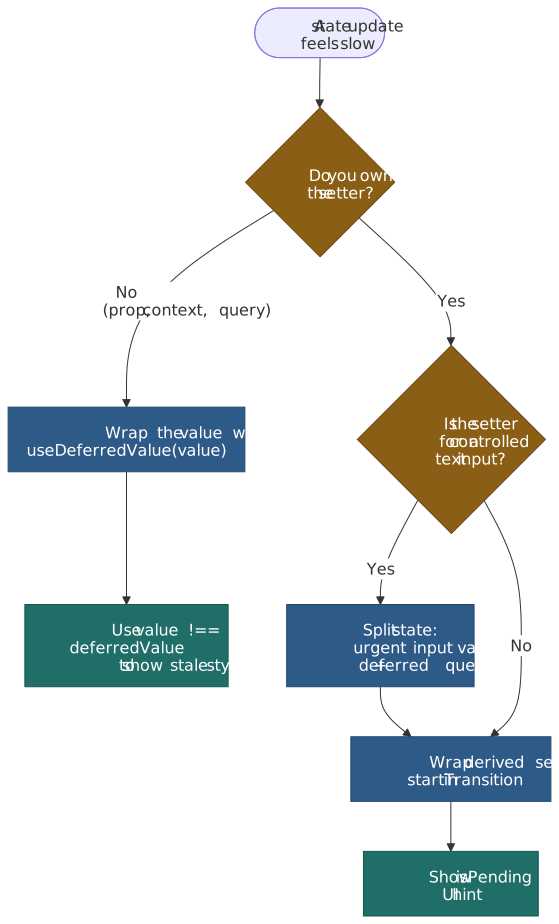
The official react.dev docs are explicit: transition updates can’t be used to control text inputs. The input value must update at urgent priority, otherwise typing feels laggy. Split into two state variables — synchronous for the input, deferred for the derived work — or use useDeferredValue.
function SearchForm() { const [inputValue, setInputValue] = useState("") const [searchQuery, setSearchQuery] = useState("") const [isPending, startTransition] = useTransition() function handleChange(e) { setInputValue(e.target.value) startTransition(() => setSearchQuery(e.target.value)) } return <input value={inputValue} onChange={handleChange} />}useDeferredValue: deferring values you don’t own
useDeferredValue defers updating a value, returning the previous one until React has time to render the new one in the background. Use it when you receive a prop or read a hook value you can’t wrap in startTransition (react.dev: useDeferredValue).
function SearchPage() { const [query, setQuery] = useState("") const deferredQuery = useDeferredValue(query) const isStale = query !== deferredQuery return ( <> <input value={query} onChange={(e) => setQuery(e.target.value)} /> <div style={{ opacity: isStale ? 0.5 : 1 }}> <Suspense fallback={<Spinner />}> <SearchResults query={deferredQuery} /> </Suspense> </div> </> )}React 19 added an optional second argument, useDeferredValue(value, initialValue), which controls what the hook returns on the initial render — useful for SSR’d pages where you want the deferred branch to render server-side without flashing the urgent value first.
Debouncing (setTimeout) |
useDeferredValue |
|---|---|
| Fixed delay (e.g. 300 ms) regardless of device speed | No fixed delay; defers only as long as React is busy |
| Blocks until the timer fires | Background render is itself interruptible |
| Same on a high-end laptop and a budget phone | Fast devices commit faster than slow ones |
Suspense for data
Suspense lets a component “wait” for an async resource and render a fallback meanwhile. The unit of suspension is whatever the data layer throws — historically a thrown promise from a route loader or a Suspense-aware client (Relay, TanStack Query with useSuspenseQuery). React 19 added the use() hook as a first-party way to unwrap a promise during render.
import { Suspense, use } from "react"function ProfilePage({ userPromise, postsPromise }) { return ( <Suspense fallback={<ProfileSkeleton />}> <ProfileDetails promise={userPromise} /> <Suspense fallback={<PostsSkeleton />}> <ProfilePosts promise={postsPromise} /> </Suspense> </Suspense> )}function ProfileDetails({ promise }) { const user = use(promise) return <h1>{user.name}</h1>}Important
Don’t construct the promise inline in a client component. use(fetch(url)) recreates a fresh promise on every render and either suspends forever or thrashes the cache. Promises must be created by something with stable identity — a server component, a router loader, or a query library that caches by key.
Nested boundaries reveal content top-down: the outer fallback shows until ProfileDetails resolves, then the inner fallback shows until ProfilePosts resolves. Without a transition, suspending hides whatever was on screen and shows the fallback. With a transition wrapping the navigation, React keeps the current page visible until the new page is ready:
function Router() { const [page, setPage] = useState("/") const [isPending, startTransition] = useTransition() function navigate(url: string) { startTransition(() => setPage(url)) }}List virtualization
The cost model
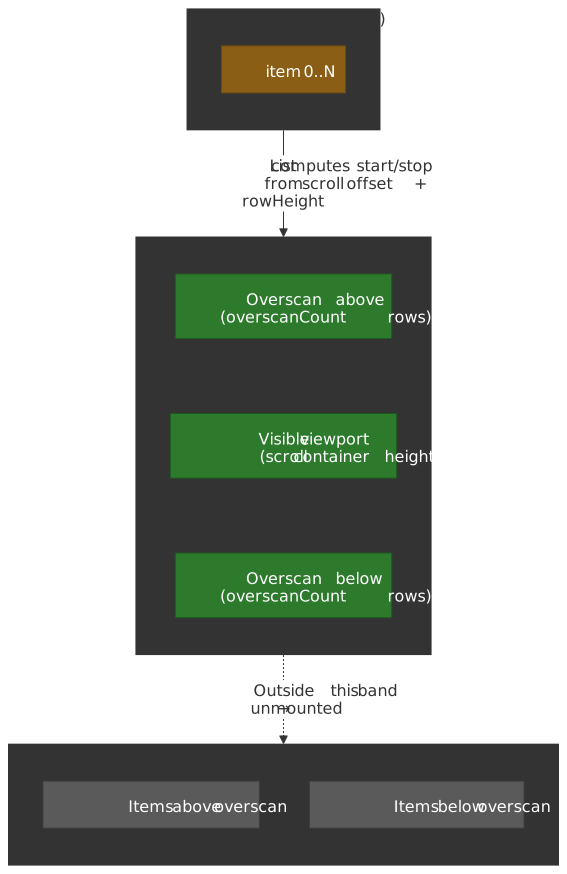
Rendering 10,000 list items mounts 10,000 DOM nodes. Each one consumes memory, takes part in style recalc, and contributes to the next paint. Scroll, resize, or theme changes amplify the cost. Virtualization keeps the DOM size constant by mounting only the items that intersect the viewport (plus a small overscan band) and computing the absolute positions of the rest from rowHeight and the scroll offset.
react-window v2
The react-window v2 release in 2025 reshaped the API. The previous FixedSizeList / VariableSizeList / FixedSizeGrid / VariableSizeGrid quartet collapsed into two components — List and Grid — that take the row component as a prop instead of as children. The library now ships native TypeScript types and handles automatic sizing without an external AutoSizer. The current API surface is documented at react-window.vercel.app/list/props.
import { List, type RowComponentProps } from "react-window"interface RowProps { items: string[]}function Row({ index, style, items }: RowComponentProps<RowProps>) { return <div style={style}>{items[index]}</div>}function VirtualizedList({ items }: { items: string[] }) { return ( <List rowComponent={Row} rowCount={items.length} rowHeight={50} rowProps={{ items }} overscanCount={5} style={{ height: 400 }} /> )}Variable-height rows pass a function for rowHeight, taking the same index and rowProps the row component sees:
<List rowComponent={Row} rowCount={items.length} rowHeight={(index, { items }) => (items[index].isExpanded ? 200 : 50)} rowProps={{ items }}/>For genuinely dynamic content (rows that resize after mount), v2 exposes a useDynamicRowHeight hook that measures and caches heights so the layout stays stable as content settles.
Note
v1 (FixedSizeList, VariableSizeList, itemSize, itemData) is no longer the active API. Existing v1 code keeps working until you upgrade, but new code and migrations should target v2; the v1 quartet was removed from the v2 export surface.
Overscan
overscanCount (default 3 in v2) renders extra rows on either side of the viewport so a fast scroll doesn’t flash an unmounted gap. Increasing it trades render cost for smoothness. Start at the default and bump to 5–10 only if you actually see flicker on representative hardware.
What virtualization breaks
- Browser find (
Ctrl+F) only matches mounted DOM. If text-search across the whole list matters, build it in user space and scroll the matching row into view. - Screen readers traverse the same DOM the browser does. Items outside the mounted band are invisible to assistive tech. Keep the list semantics correct (
role="list"/role="listitem",aria-setsize,aria-posinset— all four of which v2 wires up by default) and test with VoiceOver / NVDA. - Anchor links and intra-page focus jumps can land on unmounted rows. Resolve target rows to scroll offsets and call the imperative
scrollToRowon the list ref.
Profiling
React DevTools Profiler
The DevTools Profiler records every commit during a session and shows them as flame graphs and ranked charts. Workflow:
- Open React DevTools → Profiler tab.
- Click Record, drive the interaction you care about, click stop.
- Step through commits; the flame graph color encodes per-commit render time, and the ranked chart sorts components by self-time so the worst single offender surfaces immediately.
Enabling “Record why each component rendered while profiling” in DevTools settings adds a per-component reason — Props changed (with the prop names), Hook 1 changed, Context changed, or Parent rendered — which is usually the fastest path to “why is this thing re-rendering at all?”.
The <Profiler> component
For programmatic measurement (RUM, regression suites, dashboards), wrap a subtree in <Profiler>. The onRender callback signature on react.dev is six arguments — the legacy interactions parameter that older tutorials reference was removed when the Interaction Tracking API was retired:
import { Profiler, type ProfilerOnRenderCallback } from "react"const onRender: ProfilerOnRenderCallback = ( id, phase, actualDuration, baseDuration, startTime, commitTime,) => { reportToTelemetry({ id, phase, // "mount" | "update" | "nested-update" actualDuration, // time spent rendering this commit (with memoization) baseDuration, // time it would have taken without any memoization startTime, commitTime, })}function App() { return ( <Profiler id="App" onRender={onRender}> <MainContent /> </Profiler> )}The actualDuration vs. baseDuration ratio is the cleanest signal for “is memoization actually saving work here?”. When they converge, the memoization isn’t paying off and you can usually remove it.
Profiling in production
Development builds carry checks (extra Object.freeze, dev warnings, dispatcher swaps) that make rendering noticeably slower than production. Always confirm wins against a production build before declaring victory.
To run the React DevTools Profiler against a production-flavored build, swap react-dom for the react-dom/profiling entry point at bundle time. The classic recipe — alias react-dom to react-dom/profiling and scheduler/tracing to scheduler/tracing-profiling — still applies.
Caution
React 19 changed the react-dom package exports map; a naive bundler alias of just react-dom → react-dom/profiling can fail at runtime (facebook/react#32992). Match the new sub-path exports (react-dom/client, react-dom/server, etc.) and verify the profiler attaches before relying on the numbers.
Also: profile on hardware your real users own. A flame graph captured on an M-series MacBook is a misleading proxy for a mid-range Android.
Performance checklist
Rendering
- Key list children by stable identity, not array index.
- Keep state as local as possible — colocate it with the component that reads it.
- Split components so that frequent state changes only re-render small subtrees.
Memoization
- Apply
memoto components that re-render often with the same props and receive referentially stable inputs (or are wrapped by the React Compiler). - Reach for
useMemoonly when the calculation is measurably expensive. - Reach for
useCallbackonly when the callback is consumed by a memoized child or by an effect dependency array. - Use the React Compiler for new codebases; remove manual memoization once profiling confirms the compiler covers it.
Concurrent features
- Wrap non-urgent updates in
startTransition; show anisPendingcue. - Use
useDeferredValuefor values you don’t own (props, query results); never wrap a controlled input setter. - Pair Suspense with transitions for navigation so the previous view stays visible during the load.
Large lists
- Virtualize lists once item counts exceed a few hundred; use
react-windowv2’sList/Gridcomponents. - Set
overscanCountto taste (default 3 is usually right; raise only if you see flicker). - Provide an explicit search affordance —
Ctrl+Fwon’t find unmounted items.
Profiling
- Profile a production build before optimizing; dev numbers lie.
- Use the why did this render option to find unintended renders fast.
- Watch
actualDurationvs.baseDurationto verify memoization is actually paying for itself.
Heuristics
React performance work has a hierarchy. Apply it top-down — each rung makes the next cheaper:
- Reduce render frequency. Local state, narrow context providers, stable keys.
- Skip unnecessary renders. Memoization (manual or compiler-driven) where profiling shows benefit.
- Make remaining work interruptible. Transitions and deferred values for non-urgent updates.
- Reduce DOM size. Virtualize anything large; trim deeply nested wrappers.
Most React apps don’t need aggressive optimization — the framework is fast by default and the compiler is closing the gap on what manual memoization used to buy you. When you do need to optimize, profile first, change one thing at a time, and confirm against a production build on real hardware.
Appendix
Prerequisites
- React component model (props, state, hooks, effects).
- JavaScript reference equality (
===,Object.is).
Terminology
- VDOM (Virtual DOM): in-memory representation of the UI that React diffs against the previous version to compute minimal DOM updates.
- Reconciliation: the diff/match step inside the render phase that turns the new VDOM into a list of DOM mutations.
- Fiber: React’s unit of work — one node per component instance — linked together to form the WIP and current trees.
- Commit: the synchronous phase that applies the chosen WIP tree to the DOM and runs effects.
- Transition: a state update marked as non-urgent so the scheduler can pre-empt it for higher-priority work.
Summary
- Render frequency is the primary lever — reduce unnecessary component calls.
- Memoization (
memo,useMemo,useCallback) only works with referentially stable inputs; the React Compiler now does most of this for you. - Concurrent features keep the UI responsive by reordering work, not by making work cheaper.
- Virtualization keeps the DOM size constant; react-window v2 is the current API surface.
- Profile a production build first — React DevTools tells you where time is actually spent.
References
- React: Render and Commit — official docs on the render pipeline.
- Reconciliation (legacy docs) — O(n) diffing algorithm and key heuristic.
memo— component memoization API.useMemo— value memoization hook.useCallback— callback memoization hook.useTransition— transitions and the controlled-input caveat.useDeferredValue— deferred values and the React 19initialValueargument.Suspense— boundary semantics, fallback reveal order.use— React 19 promise/context unwrap hook.<Profiler>— programmatic profiling component andonRendersignature.- React 18 release notes — automatic batching and concurrent features.
- React Compiler 1.0 — the stable compiler announcement.
- react-fiber-architecture — Andrew Clark’s primary-source design note.
- react-window — the virtualization library; see also the v2 List props reference.
- Virtualize long lists with react-window (web.dev) — note: still documents the v1 API.
- facebook/react#32992 —
<Profiler>in React 19 production builds — current status of the production-profiling alias caveat.