Critical Rendering Path: CSSOM Construction
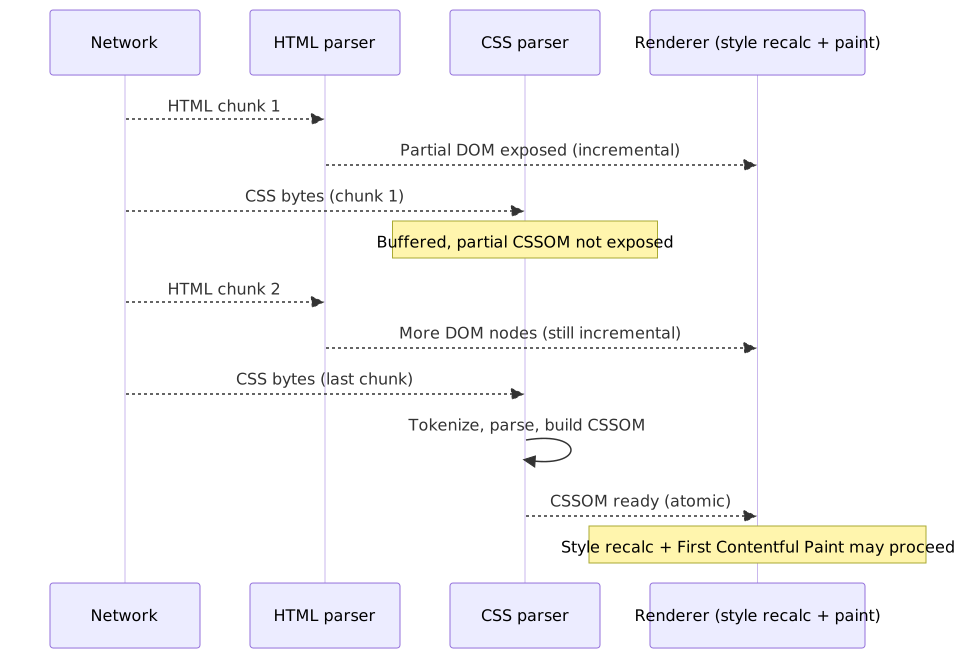
The CSS Object Model (CSSOM) is the browser engine’s internal representation of every active stylesheet — a tree of CSSStyleSheet → CSSRule → CSSStyleDeclaration objects defined by the W3C CSSOM-1 Working Draft. Unlike DOM construction, which exposes nodes incrementally, CSSOM construction is atomic and render-blocking by default: the cascade sort order requires the full rule set before a winning declaration can be chosen for any property. This article is the parallel CSS construction stage of the Critical Rendering Path series; the next stage — joining DOM × CSSOM into computed styles via Blink’s StyleEngine — is covered in CRP: Style Recalc.

Abstract
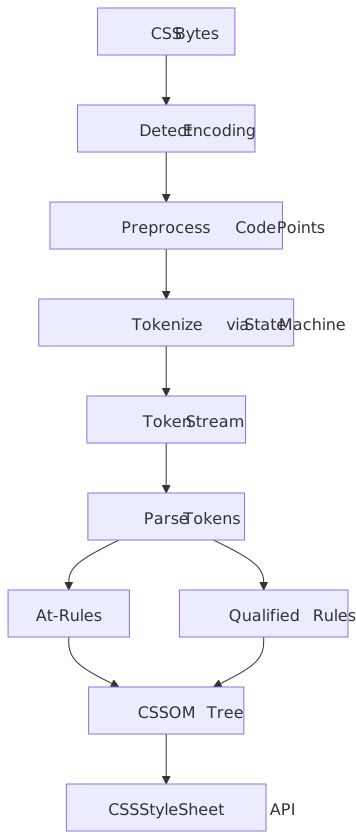
CSSOM construction transforms CSS bytes into a queryable object model through a two-stage pipeline:
- Tokenization — CSS bytes become tokens (identifiers, numbers, strings, delimiters) via a state machine defined in CSS Syntax Level 3
- Parsing — Tokens become a tree of
CSSStyleSheet→CSSRule→ declaration objects
Why render-blocking? The cascade algorithm requires all rules to determine the winning declaration for each property. Rendering with partial CSS would cause Flash of Unstyled Content (FOUC) as later rules override earlier ones.
Key interactions:
| Resource | Blocks Parsing? | Blocks Rendering? | Blocks JS Execution? |
|---|---|---|---|
| CSS (default) | No | Yes | Yes (if script follows) |
CSS (media="print") |
No | No | No |
CSS (@import) |
No | Yes (waterfall) | Yes |
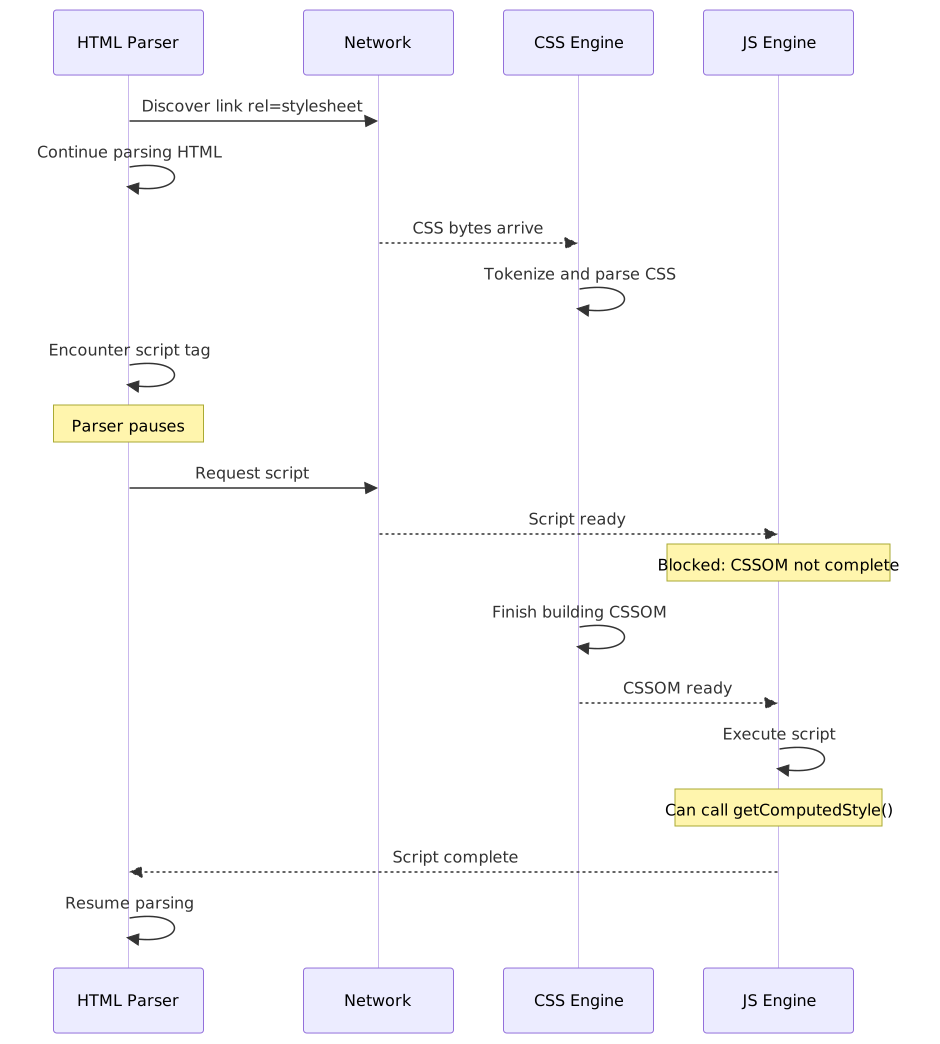
The critical constraint: Scripts can query styles via getComputedStyle(), so the browser blocks script execution until pending stylesheets complete. This creates a dependency chain where CSS indirectly blocks DOM construction when scripts are involved.
The CSS Parsing Pipeline
Stage 1: Tokenization
The CSS tokenizer converts a stream of code points into tokens. The W3C CSS Syntax Module Level 3 defines this process:
“CSS syntax describes how to correctly transform a stream of Unicode code points into a sequence of CSS tokens (tokenization).”
Preprocessing (before tokenization):
- CR, FF, and CR+LF sequences normalize to single LF
- NULL characters and surrogate code points become U+FFFD (replacement character)
- Encoding detected from: HTTP header → BOM →
@charset→ referrer encoding → UTF-8 default
Token types:
| Token | Example | Purpose |
|---|---|---|
<ident-token> |
color, background-image |
Property names, keywords |
<function-token> |
rgb(, calc(, var( |
Function calls |
<at-keyword-token> |
@media, @import, @layer |
At-rules |
<hash-token> |
#header, #fff |
IDs and hex colors |
<string-token> |
"Open Sans", 'icon.png' |
Quoted values |
<number-token> |
42, 3.14, -1 |
Numeric values |
<dimension-token> |
16px, 2em, 100vh |
Numbers with units |
<percentage-token> |
50%, 100% |
Percentage values |
Stage 2: Parsing
The parser transforms tokens into CSS structures following the grammar:
- At-rules:
@+ name + prelude + optional block (e.g.,@media screen { ... }) - Qualified rules: prelude (selector) + declaration block (e.g.,
.nav { color: blue; }) - Declarations: property +
:+ value + optional!important
Error recovery is a defining characteristic:
“When errors occur in CSS, the parser attempts to recover gracefully, throwing away only the minimum amount of content before returning to parsing as normal.”
This design choice ensures forward compatibility—new CSS features are invalid syntax to older parsers, but the stylesheet continues functioning:
/* Modern browser: uses container query *//* Older browser: ignores @container, uses .card default */@container (min-width: 400px) { .card { grid-template-columns: 1fr 2fr; }}.card { display: grid; gap: 1rem;}The Resulting CSSOM Structure
The parser produces a tree of JavaScript-accessible objects defined in the W3C CSSOM specification:
document.styleSheets (StyleSheetList) └── CSSStyleSheet ├── cssRules (CSSRuleList) │ ├── CSSStyleRule (selector + declarations) │ ├── CSSMediaRule (condition + nested rules) │ ├── CSSImportRule (href + optional media) │ └── CSSLayerBlockRule (@layer + nested rules) ├── media (MediaList) └── disabled (boolean)Key interfaces:
CSSStyleSheet.cssRules— live collection of rules; modifications update the CSSOM immediatelyCSSStyleSheet.insertRule(rule, index)— insert rule at positionCSSStyleSheet.deleteRule(index)— remove rule at positionCSSStyleRule.selectorText— the selector stringCSSStyleRule.style—CSSStyleDeclarationwith property access
Why CSSOM Must Be Complete Before Rendering
The design choice to make CSS render-blocking trades initial latency for visual stability. The cascade algorithm cannot produce correct results with partial input.
The Cascade Requires All Rules
Consider this scenario:
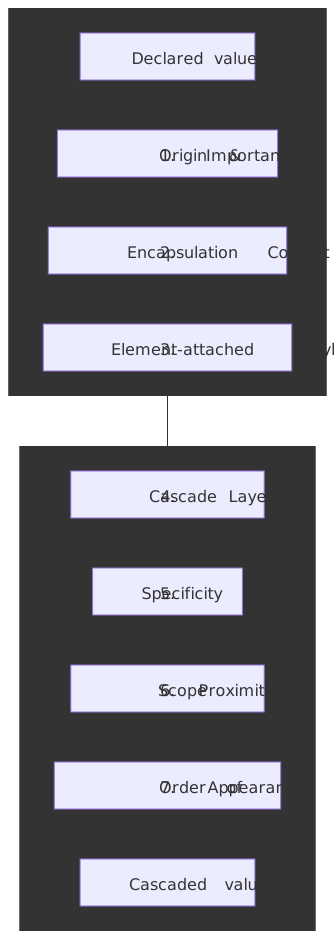
/* Rule 1: loaded first */.button { background: red;}/* ... hundreds of rules ... *//* Rule 2: loaded later */.button { background: blue;}If the browser rendered with only Rule 1 present, the button would flash red before turning blue when Rule 2 arrives. The full cascade sort order is normative in CSS Cascade Level 5 § 6.1, with one new step (Scope Proximity) added by CSS Cascade Level 6 § 3.1:
- Origin and Importance — Transition → important UA → important user → important author → animations → normal author → normal user → normal UA.
!importantinverts the normal-rule order, which is why important author rules can override important user rules’ counterparts only when they belong to a higher-precedence origin. - Encapsulation Context — Across shadow trees: for normal rules the outer context wins; for important rules the inner context wins. This is what lets a host page restyle a custom element while still letting that element enforce hard requirements.
- Element-attached styles —
style="..."declarations beat selector-mapped declarations of the same importance. - Cascade Layers —
@layerordering (Cascade L5 § 6.4.3). For normal rules the last declared layer wins; for important rules the first layer wins. Unlayered rules sit in an implicit final layer that beats every explicit layer for normal declarations. - Specificity —
(a, b, c)per Selectors Level 4 § 16; ID > class/attribute/pseudo-class > type/pseudo-element. - Scope Proximity — Cascade L6 only: among declarations from
@scoperules, the one whose scoping root is fewer DOM hops from the subject wins. Style rules with no scoping root are treated as infinitely far. This was added to make scoped components win against equally-specific globals without resorting to specificity hacks. - Order of Appearance — Last in document order wins.
@imported sheets are ordered as if substituted in place;styleattributes sort after every stylesheet.
Without the complete rule set, none of steps 1–7 can be evaluated correctly — which is why CSSOM construction must complete before style recalc.
Layout Stability Concerns
CSS properties like display, position, and float fundamentally change element geometry. Rendering with partial CSS would cause:
- Content reflow — Text wrapping changes as
widthconstraints arrive - Layout shifts — Elements repositioning as positioning rules load
- Visual jank — Accumulated shifts creating a poor user experience
The browser’s choice: delay First Contentful Paint (FCP) until CSSOM completes rather than present an unstable initial frame.
Layers, Scope, and Style-Recalc Cost
The CSSOM does not just store rules — it stores enough metadata for the style engine to evaluate the cascade efficiently against every DOM node. Three modern features (@layer, @scope, @container) and one selector (:has()) materially change how much work that engine does on each invalidation. Authoring with their semantics in mind is the difference between sub-millisecond style recalc and visible jank.
Cascade Layers (@layer)
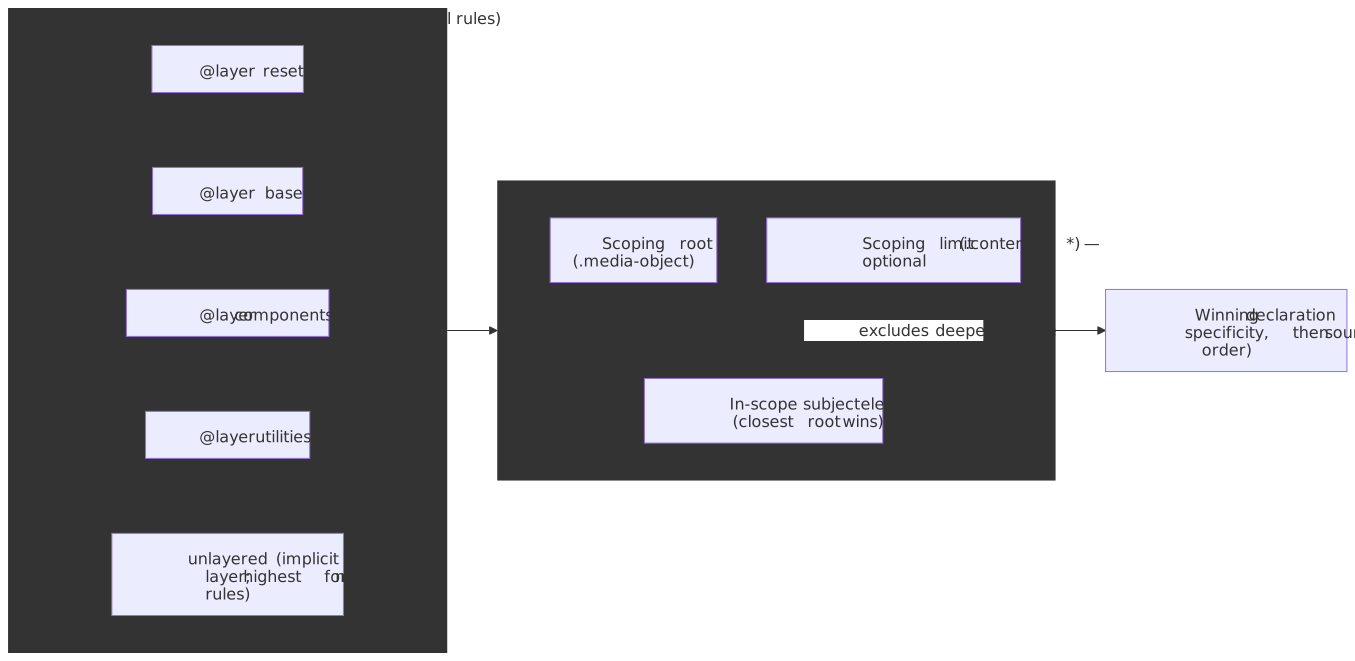
Cascade L5 § 6.4 introduces explicit layer ordering so authors can reorder framework, theme, and component styles without selector or !important warfare. The non-obvious rules:
- Layer order is fixed by first appearance. A leading
@layer reset, base, components, utilities;statement at-rule pins the order; later@layer base { ... }blocks slot rules into the existing layer without changing precedence. - Unlayered styles win. Unlayered author declarations sit in an implicit final layer that beats every explicit layer for normal rules — a frequent source of “why is my reset losing?” bugs after a partial migration.
!importantreverses layer order. An important declaration in@layer resetbeats an important declaration in@layer utilities. This preserves the override semantics of!importantacross the layer dimension.@importcan place a sheet directly into a layer:@import "vendor.css" layer(framework) supports(display: grid);— see Cascade L5 § 5. The sheet is still subject to the@importwaterfall (below); the layer name is recorded even if the fetch fails.revert-layerrolls a property back to whatever the previous layer (or origin, if there is none) would have set, without disturbing the rest of the declaration block.
@scope and Scope Proximity
Cascade L6 § 3.5 defines @scope <root> to <limit> (the optional to <limit> enables “donut scoping”). Inside a scope, the :scope pseudo-class matches the scoping root with zero specificity contribution, and the engine uses scope proximity (fewer hops from root to subject) as a cascade tie-breaker that runs before specificity tie-breaks. Two practical consequences:
- A scoped
.card img { … }beats a globally-scoped.card img { … }of equal specificity — by proximity, not specificity, so you don’t need to invent extra selector weight. @scopeselectors do not inherit the prelude’s specificity (unlike CSS Nesting), so deeply-nested scopes stay cheap to author.
@container Queries
Container queries (CSS Containment L3 § 4) require the queried ancestor to declare a containment context with container-type: inline-size | size | normal. Two cost considerations the spec is explicit about:
- Establishing
container-type: size(orinline-size) imposes layout containment on the element, which forces it to be a formatting-context root and disables percentages-resolved-against-content for some properties. The browser then has license to skip layout work outside the container when its size changes — which is the entire performance argument for the feature. - A
@containerrule re-evaluates only when the nearest matching ancestor container changes its queried axis. This is much cheaper than a viewport media query that invalidates style for the whole document, but every additionalcontainer-typeadds an isolation point the layout pass must respect. Use it on actual reusable components, not on every<div>.
:has() and Style Invalidation
:has() lets a selector subject depend on its descendants (“the subject changes when something inside changes”), which would naively require ancestor-walks on every DOM mutation. Blink avoids this with invalidation sets plus per-element bits. Per the Blink style-invalidation design doc and Igalia’s implementation write-up:
- When a stylesheet contains
.card:has(.is-active), Blink marks the.cardelement with anAffectedBySubjectHasbit and marks its descendants withAncestorsAffectedBySubjectHasduring initial style resolution. - On a DOM mutation, Blink consults the invalidation set keyed by the classes/attributes/tags inside the
:has()argument. Mutations that touch nothing in that set are skipped without any ancestor walk. - Mutations that match still avoid a full traversal: only ancestors whose
AncestorsAffectedBySubjectHasbit is set get re-checked.
Important
The cost of :has() is proportional to how often the elements inside its argument actually mutate, not to how many :has() rules you author. Putting :has(:focus-within) on a low-traffic component is usually cheap; putting it on a body-level selector that watches a high-frequency widget is not. Use Chrome DevTools’ Performance → Recalculate Style → Selector Stats to measure (Chrome for Developers reference).
Interaction with JavaScript
CSSOM construction creates a synchronization point between stylesheets and scripts. This happens because JavaScript can read computed styles.
Why Scripts Wait for CSSOM
Scripts frequently query style information:
// These all require resolved stylesconst element = document.querySelector(".sidebar")const width = element.offsetWidth // Layout propertyconst color = getComputedStyle(element).color // Computed styleconst rect = element.getBoundingClientRect() // Geometry// If CSSOM isn't complete, these return wrong valuesThe browser enforces a rule: script execution is blocked while there are pending stylesheets in the document.
This creates the blocking chain:
HTML Parser → <link rel="stylesheet"> → CSS download starts → continues parsing... → <script src="app.js"> → Parser pauses → Script downloads → CSS still loading? Wait. → CSS complete → CSSOM built → Script executes → Parser resumesProperties That Force Style Resolution
From Paul Irish’s comprehensive list, these JavaScript operations require the CSSOM:
Layout-dependent properties (also force layout):
offsetLeft,offsetTop,offsetWidth,offsetHeight,offsetParentclientLeft,clientTop,clientWidth,clientHeightscrollWidth,scrollHeight,scrollTop,scrollLeftgetClientRects(),getBoundingClientRect()
getComputedStyle() always requires a complete CSSOM — it returns resolved values (per CSSOM-1 § 6.1), and resolved values can only be computed after the cascade has chosen a winner for every property. When the queried property is layout-dependent (width, height, top, anything resolving against percentages, transforms, etc.), the call additionally forces a synchronous layout pass — Paul Irish’s What Forces Layout/Reflow catalogues the full surface.
Recommendation: Minimize style queries in critical-path JavaScript. Batch reads before writes within a frame to avoid layout thrashing — the engine can only coalesce a recalc/layout pass if you don’t repeatedly invalidate it between reads.
Media Queries and Render-Blocking Behavior
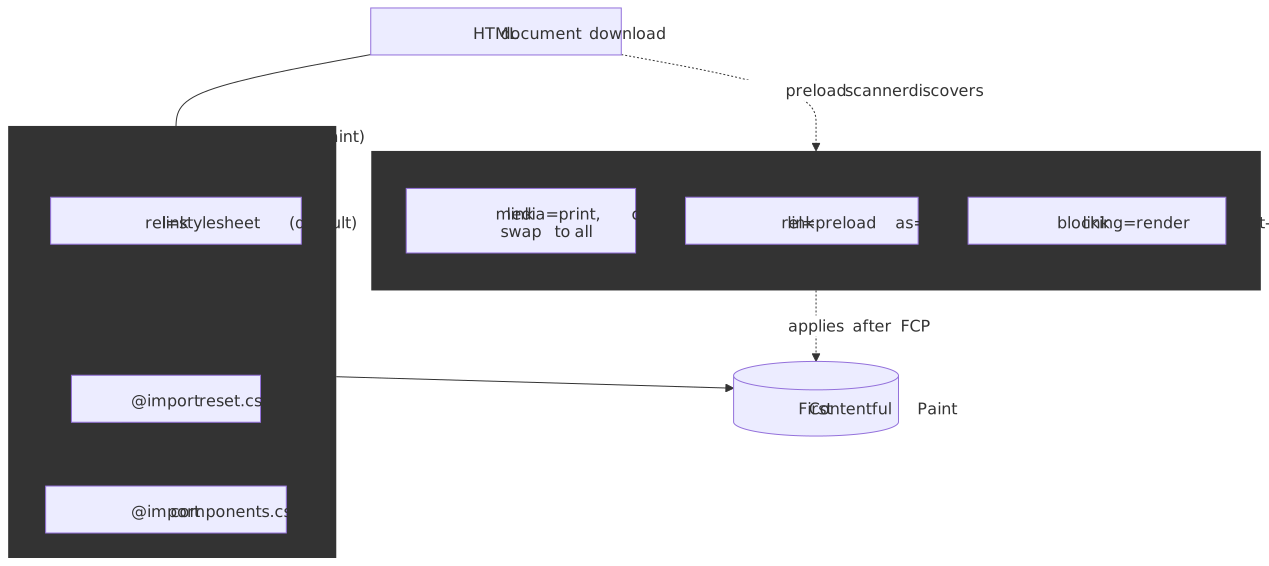
Not all stylesheets block rendering. The browser evaluates media queries at parse time and only blocks on stylesheets that could affect the current viewport. The combined picture — what blocks, what is discovered early, and how the blocking="render" opt-in fits in — is summarized below; web.dev’s Render-blocking CSS and Avoid render-blocking resources are the canonical secondary references.
Conditional Render-Blocking
| Stylesheet | Blocks Rendering? | Explanation |
|---|---|---|
<link rel="stylesheet" href="main.css"> |
Yes | No media condition = applies everywhere |
<link rel="stylesheet" href="print.css" media="print"> |
No | Print media doesn’t match screen |
<link rel="stylesheet" href="desktop.css" media="(min-width: 1024px)"> |
Only if viewport ≥ 1024px | Evaluated against current viewport |
<link rel="stylesheet" href="style.css" disabled> |
No | Disabled stylesheets are ignored |
The browser still downloads non-blocking stylesheets but at lower priority. They’re available for media query changes (e.g., window resize, print dialog).
Non-Blocking CSS Loading Pattern
A common optimization loads non-critical CSS without blocking rendering:
<head> <!-- Critical CSS inlined for immediate rendering --> <style> .header { height: 60px; background: #fff; } .hero { min-height: 400px; } </style> <!-- Non-critical CSS: print media initially, switch on load --> <link rel="stylesheet" href="full.css" media="print" onload="this.media='all'" /> <noscript><link rel="stylesheet" href="full.css" /></noscript></head>How it works:
media="print"makes the stylesheet non-render-blocking for screen- Browser downloads it with lower priority
onloadfires when download completes, settingmedia="all"- Styles apply after initial paint (may cause FOUC for below-fold content)
The blocking="render" Attribute
The WHATWG HTML Standard added explicit control over render-blocking:
<!-- Script-inserted stylesheet that should block rendering --><link rel="stylesheet" href="critical.css" blocking="render" /><!-- Script that should block rendering (even if async) --><script src="hydration.js" blocking="render"></script>Use case: When a script dynamically inserts stylesheets, the browser doesn’t block rendering by default. Adding blocking="render" to the inserted stylesheet prevents FOUC.
The @import Problem
@import rules create a request waterfall that defeats browser optimizations.
Why @import Hurts Performance
/* main.css - browser must download this first */@import url("reset.css");@import url("components.css");/* ... other rules ... */The browser cannot discover reset.css and components.css until main.css downloads and parses. This creates a sequential waterfall:
[========= main.css =========] [======= reset.css =======] [=== components.css ===]With <link> elements, the preload scanner discovers all stylesheets immediately:
[========= main.css =========][======= reset.css =======] (parallel)[=== components.css ===] (parallel)Real-World Impact
HTTP Archive analysis (Erwin Hofman & Paul Calvano, Nov 2024) of 16.27 million mobile sites:
- 18.86% of sites use
@import(3.06 million); 15.16% via third-party stylesheets, 5.50% via first-party - A WooCommerce case study saw a 37.1% improvement in mobile P75
firstByteToFCP(excluding Safari) after removing a single@importthat loaded a Google Font - Removing render-blocking
@importfrom Vipio.com improved cold-load mobile P80 FCP from 2782 ms → 1872 ms (32.7%)
Recommendation: Replace @import with <link rel="stylesheet"> elements. The only valid use case is dynamically loading stylesheets based on conditions the HTML cannot express.
@import Evaluation Timing
Cascade L5 § 5 requires @import rules to precede every other rule in a stylesheet, ignoring @charset and empty @layer statements. The browser then:
- Parses the parent stylesheet up to the
@importrule. - Initiates the fetch for the imported stylesheet (only at this point — the preload scanner cannot see it).
- Blocks CSSOM completion until that imported sheet has been fetched, parsed, and itself recursively resolved any further
@importrules it contains. - Continues with the remaining parent rules.
Because the fetch for the child sheet is gated on the parent’s bytes arriving, every nesting level adds at least one full round-trip to the critical path — and bypasses HTTP/2 / HTTP/3 multiplexing benefits the preload scanner would otherwise unlock for <link> siblings. @import with layer() and supports() is still subject to this same waterfall — the layer assignment is recorded synchronously, but the rule fetch is not.
Developer Optimizations
Critical CSS Inlining
Extract CSS required for above-the-fold content and inline it in the HTML:
<!DOCTYPE html><html> <head> <style> /* Critical CSS: above-the-fold only */ body { margin: 0; font-family: system-ui; } .header { height: 60px; display: flex; align-items: center; } .hero { min-height: 50vh; background: #f5f5f5; } </style> <!-- Load full CSS asynchronously --> <link rel="preload" href="full.css" as="style" onload="this.onload=null;this.rel='stylesheet'" /> <noscript><link rel="stylesheet" href="full.css" /></noscript> </head></html>Target: Keep critical CSS (and the rest of the first HTML packet) under ~14 KB on the wire. That is the payload of TCP’s initial congestion window — 10 segments × 1460-byte MSS — standardized in RFC 6928 and the basis of Google’s “first 14 KB” rule. Anything over that costs an extra round-trip before First Contentful Paint.
Trade-off: Inlined CSS cannot be cached separately. For repeat visits, external stylesheets (cached) may perform better.
Preload for CSS
<link rel="preload"> elevates resource priority and enables early discovery:
<head> <!-- Preload: discovered immediately, highest priority --> <link rel="preload" href="critical.css" as="style" /> <!-- Fonts referenced in CSS: hidden from preload scanner --> <link rel="preload" href="/fonts/main.woff2" as="font" type="font/woff2" crossorigin /> <link rel="stylesheet" href="critical.css" /></head>When to use preload for CSS:
- Stylesheets in
@importchains (defeats waterfall) - Stylesheets added dynamically by JavaScript
- Stylesheets in Shadow DOM (not discoverable by parser)
When NOT to use preload:
- Stylesheets already in
<head>as<link rel="stylesheet">— already discovered by preload scanner
Constructable Stylesheets
Modern browsers support creating stylesheets programmatically without DOM manipulation:
// Create and populate stylesheetconst sheet = new CSSStyleSheet()sheet.replaceSync(` .component { padding: 1rem; } .component--active { background: #e0e0e0; }`)// Apply to documentdocument.adoptedStyleSheets = [...document.adoptedStyleSheets, sheet]// Apply to Shadow DOMconst shadow = element.attachShadow({ mode: "open" })shadow.adoptedStyleSheets = [sheet]Benefits:
- Shared styles: One stylesheet instance across multiple shadow roots
- No FOUC: Styles apply synchronously after
replaceSync() - No DOM nodes: No
<style>elements to manage - Efficient updates:
replace()for async,replaceSync()for sync
Browser support: Chrome 73+, Edge 79+, Firefox 101+, Safari 16.4+
Conclusion
CSSOM construction is the synchronization gate in the Critical Rendering Path. The render-blocking behavior ensures visual stability by requiring the complete cascade input before style resolution.
Key optimization strategies:
- Minimize render-blocking CSS — Inline critical styles, defer non-critical
- Avoid
@import— Use<link>elements for parallel discovery - Use media queries — Non-matching stylesheets don’t block rendering
- Preload hidden CSS — Fonts and
@imported stylesheets benefit from preload hints - Batch script style queries — Minimize forced synchronous style resolution
The CSSOM’s render-blocking nature is a deliberate design trade-off: the browser delays the first frame to guarantee visual consistency. Understanding this constraint helps engineers minimize CSS in the critical path while ensuring users never see Flash of Unstyled Content.
Appendix
Prerequisites
- Understanding of the Critical Rendering Path and its stages
- Familiarity with DOM construction
- Basic knowledge of CSS cascade, specificity, and inheritance
Terminology
| Term | Definition |
|---|---|
| CSSOM | CSS Object Model — the tree of stylesheet objects, rules, and declarations |
| CSSStyleSheet | JavaScript interface representing a single stylesheet |
| CSSRule | Base interface for all CSS rule types (style rules, at-rules) |
| Render-Blocking | Resource that prevents First Contentful Paint until loaded |
| FOUC | Flash of Unstyled Content — visual artifact when content renders before CSS |
| Cascade | Algorithm determining which CSS declaration wins when multiple rules match |
| Preload Scanner | Secondary parser discovering resources while main parser is blocked |
| Critical CSS | Minimum CSS required to render above-the-fold content |
| Cascade Layer | Named precedence band (@layer) — last layer wins for normal rules, first layer wins for !important |
@scope |
At-rule defining a scoping root and optional limit; introduces Scope Proximity as a cascade tie-break |
| Scope Proximity | Cascade L6 tie-break: fewer DOM hops between scoping root and subject wins |
| Container Context | Element with container-type: size | inline-size; required for @container queries against it |
| Invalidation Set | Blink data structure mapping DOM mutations to the elements whose style needs recalc |
Summary
- CSS is render-blocking because the cascade — formalized in CSS Cascade L5 § 6.1 and extended by L6’s Scope Proximity step — requires every rule to be present before a winning declaration can be chosen
- The CSS parser uses a two-stage pipeline: tokenization (bytes → tokens) then parsing (tokens → CSSOM tree)
- The style engine joins DOM × CSSOM into immutable
ComputedStyleobjects per Blink’s BlinkNG document lifecycle - Scripts are blocked on pending stylesheets because
getComputedStyle()returns resolved values that depend on a complete cascade - Media queries control render-blocking;
media="print"plus anonloadswap is the canonical async-CSS pattern, withblocking="render"as the explicit opt-in @importcreates request waterfalls that defeat the preload scanner — use<link>(or@import "..." layer(...)only when layer ordering is the actual constraint)@layerrewrites the cascade in defined precedence bands; unlayered styles still beat every explicit layer for normal rules@scopeadds proximity as a cascade tie-break before specificity;@containertrades a containment cost for invalidation isolation;:has()is cheap when the elements inside its argument rarely mutate- Critical CSS inlining trades cacheability for faster First Contentful Paint
- Constructable Stylesheets provide a modern API for programmatic CSSOM manipulation
References
- W3C CSS Object Model (CSSOM) Working Draft —
CSSStyleSheet,CSSRule, resolved values - W3C CSS Syntax Module Level 3 — Tokenization and parsing grammar
- W3C CSS Cascading and Inheritance Level 5 — Cascade sort order, layers,
@importsyntax - W3C CSS Cascading and Inheritance Level 6 —
@scopeand Scope Proximity step - W3C CSS Selectors Level 4 § 16 Specificity — Authoritative specificity rules
- W3C CSS Containment Module Level 3 —
container-type,@containersemantics - W3C CSS Values & Units Level 4 — Value computation surface (used by resolved values)
- WHATWG HTML Standard: Blocking attributes —
blocking="render"opt-in - web.dev: Render-Blocking CSS — Practical render-blocking guidance
- web.dev: Avoid Render-Blocking Resources — Preload scanner and discovery
- web.dev: Defer Non-Critical CSS — Preload + media-swap async pattern
- web.dev: Extract Critical CSS — Above-the-fold inlining
- web.dev: Reduce the Scope and Complexity of Style Calculations — Selector cost profiling
- web.dev: Constructable Stylesheets — Modern stylesheet API
- Chrome for Developers: BlinkNG and the rendering pipeline —
StyleEngine, immutableComputedStyle, document lifecycle - Chromium source: CSS Style Invalidation in Blink — Invalidation sets and pending invalidations
- Igalia: How Blink invalidates styles when
:has()is in use —AffectedBySubjectHasflags and ancestor walks - Chrome DevTools: Selector Stats — Measuring style recalc cost
- Paul Irish: What Forces Layout/Reflow — Forced synchronous layout catalogue
- Web Performance Calendar: The Curious Case of CSS @import — Production
@importimpact data - RFC 6928: Increasing TCP’s Initial Window —
initcwnd = 10underpinning the 14 KB rule - MDN: Critical Rendering Path — CRP overview and CSSOM role