Critical Rendering Path: Compositing
How the compositor thread assembles rasterized layers into compositor frames and coordinates with the Viz process to display the final pixels on screen.
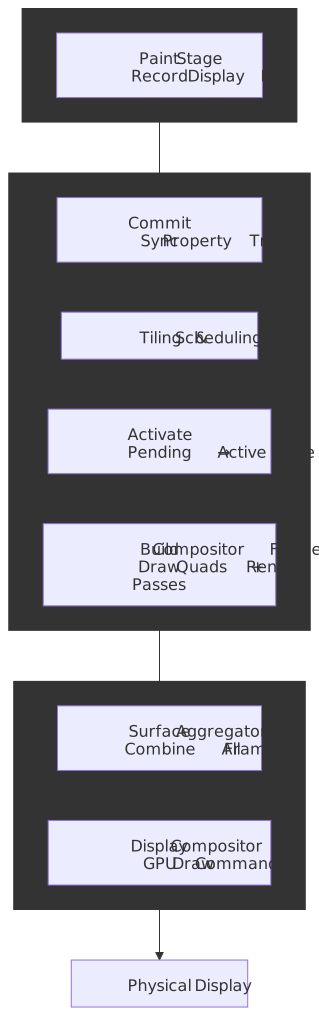
Abstract
Compositing solves a fundamental constraint: the main thread cannot simultaneously execute JavaScript and produce visual updates. Chromium’s solution is a multi-threaded architecture where the compositor thread (cc) operates independently, enabling smooth scrolling and animations even when JavaScript blocks the main thread.
Core mental model:
Main Thread Tree (authoritative) → Commit → Pending Tree → Activate → Active Tree → Compositor Frame → Viz ↑ ↑ rasterization ↑ drawing │ │ must complete │ always responsive └── Writes only ──────────────────────── └── Never blocks ────────┘The key architectural decisions:
| Decision | Why It Exists | What It Enables |
|---|---|---|
| Three-tree architecture | Main thread edits shouldn’t affect in-progress rendering | Main thread can prepare frame N+1 while compositor draws frame N |
| Property trees (4 types) | Flattened structure for O(1) lookups | Fast transform, clip, effect, scroll calculations without tree traversal |
| Compositor-driven animations | transform/opacity don’t require layout |
60fps animations independent of main thread load |
| Async input routing | Scroll events handled before reaching main thread | Responsive scrolling during JavaScript execution |
The compositor thread never makes blocking calls to the main thread—this one-directional dependency is what guarantees responsiveness.
The Chrome Compositor (cc)
The cc component (Chrome Compositor, source under //cc) is Chromium’s multi-threaded compositing library. It runs in both the renderer process — where Blink is the client — and the browser process for UI compositing1.
Architecture Overview
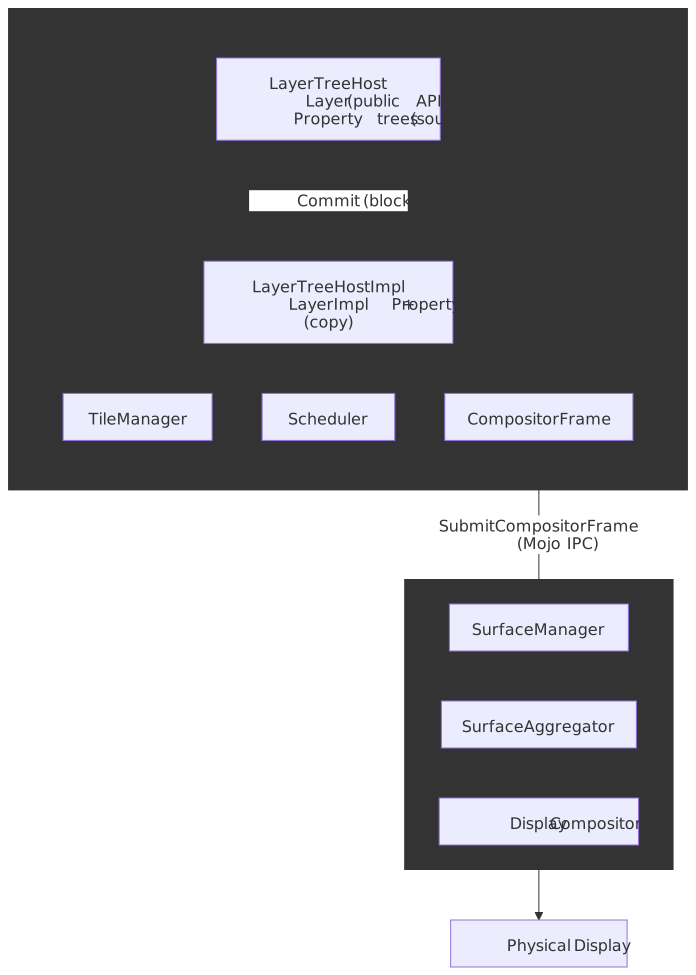
The public API (LayerTreeHost, Layer) lives on the main thread. Embedders create layers, set properties, and request commits. The internal implementation (LayerTreeHostImpl, LayerImpl) lives on the compositor thread and owns the impl-side trees, input handling, animation ticking, and frame submission1.
The Three-Tree System
Chromium maintains three layer trees to decouple content updates from display:
| Tree | Location | Type | Purpose |
|---|---|---|---|
| Main Thread Tree | Main thread | cc::Layer |
Authoritative source; updated by JavaScript, style, layout |
| Pending Tree | Compositor thread | cc::LayerImpl |
Staging area for new commits; tiles rasterize here |
| Active Tree | Compositor thread | cc::LayerImpl |
Currently being displayed; source for compositor frames |
| Recycle Tree | Compositor thread | cc::LayerImpl |
Caches the previous pending tree to avoid re-allocation; mutually exclusive with the pending tree |
The recycle tree is an allocation optimization, not an extra rendering target — only one of recycle_tree() or pending_tree() is non-null at a time2.
Why three trees? Without this separation:
- Commits would block until rasterization completes (frames would drop)
- Partially-rasterized content would be visible (checkerboard artifacts)
- Main thread couldn’t prepare the next frame while the current one renders
The Commit Operation
The Commit synchronizes the main thread tree to the pending tree. This is a blocking operation: the main thread pauses while the compositor copies:
- Property trees (transform, clip, effect, scroll)
- Layer metadata (bounds, property tree node IDs)
- Display lists (paint records for rasterization)
Once commit completes, the main thread resumes and can immediately begin preparing the next frame.
Activation
When tiles in the pending tree are sufficiently rasterized, activation occurs: the pending tree becomes the new active tree. The TileManager gates this — activation only proceeds when NOW priority tiles (visible in the viewport) are ready2.
Note
Activation is the safety valve preventing checkerboard. If rasterization falls behind, activation delays rather than showing incomplete content. A second commit cannot start until activation completes — this back-pressure mechanism bounds pipeline depth (see Commit).
Property Trees
Property trees are the modern replacement for hierarchical layer transforms. Instead of walking the entire layer tree to compute a node’s final transform, each layer stores node IDs pointing into separate trees.
The Four Trees
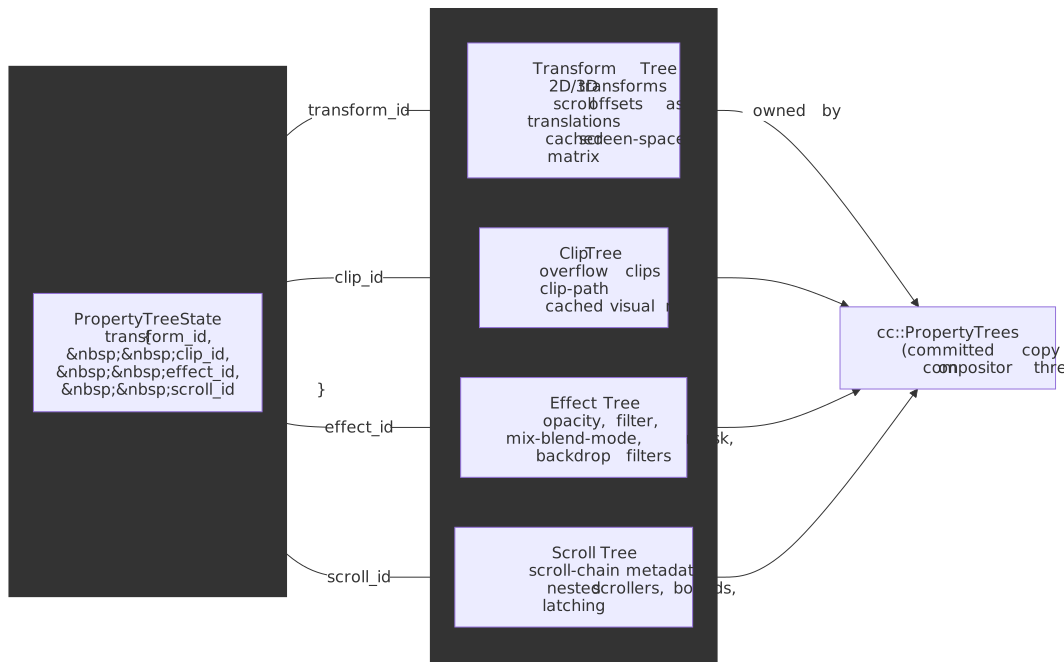
Every DOM element has a PropertyTreeState — a 4-tuple of node IDs into these four trees — that fully describes how it is composited3.
| Tree | Contents | Example Properties |
|---|---|---|
| Transform | 2D/3D transforms, scroll offsets stored as 2D matrices | transform, translate3d(), scroll position |
| Clip | Overflow clips, clip-path | overflow: hidden, clip-path |
| Effect | Visual effects (compositing-relevant only) | opacity, filter, mix-blend-mode, mask, backdrop filters |
| Scroll | Scroll-chain metadata | Nested scrollers, scroll bounds, latching behavior |
Note
Scroll offsets live in the transform tree (as 2D translations) so the compositor can apply them with one matrix lookup. The scroll tree only carries metadata about the scroll relationships themselves — what scrolls inside what — not the live offset3.
Why Property Trees?
Consider computing the screen-space transform for a deeply nested element:
Legacy approach (layer tree traversal):
transform = identityfor each ancestor from root to element: transform = transform × ancestor.localTransform// O(depth) per element, O(depth × layers) totalProperty trees approach:
transformNode = propertyTrees.transform[element.transformNodeId]transform = transformNode.cachedScreenSpaceTransform// O(1) lookupProperty trees cache computed values at each node. When a transform changes, only affected nodes recompute—not the entire tree. This makes updates O(interesting nodes) instead of O(total layers).
Real-World Impact
A complex page with 1000+ layers (data visualization, infinite scroll) would see catastrophic commit times with layer tree traversal. Property trees keep commit times bounded regardless of layer count—critical for maintaining 60fps.
Compositor Frames
The compositor thread produces CompositorFrames, the data structure that travels to Viz for display. A frame is not a bitmap—it’s a structured description of what to draw.
Frame Structure
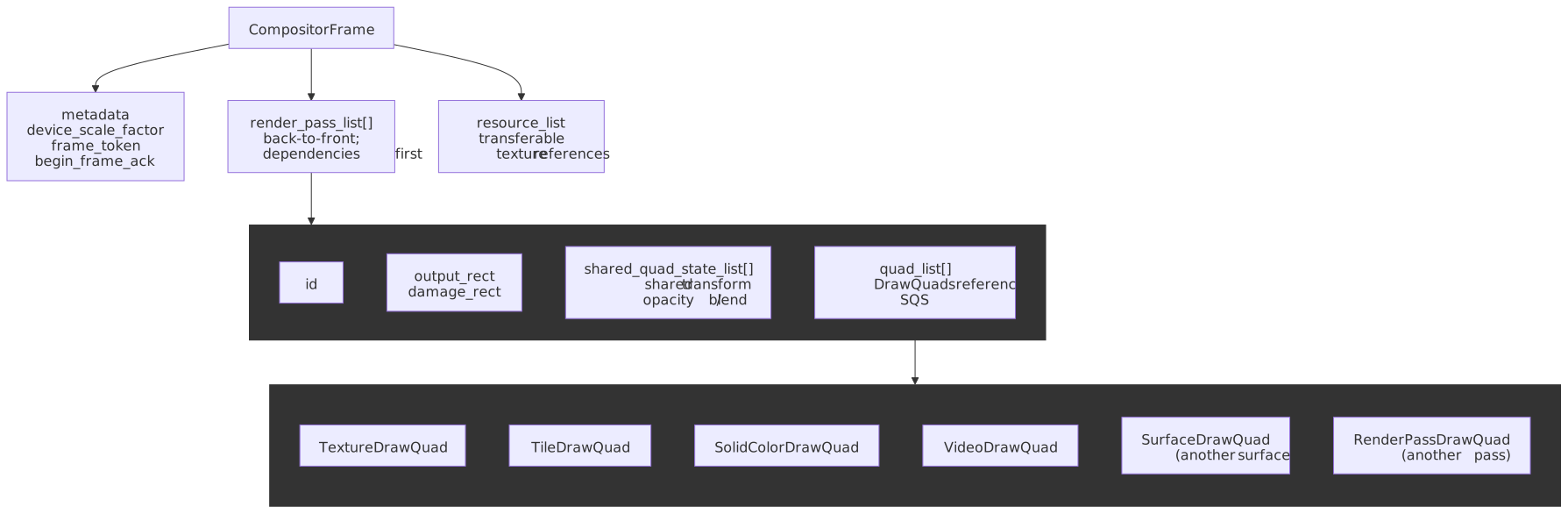
CompositorFrame├── metadata { device_scale_factor, frame_token, begin_frame_ack }├── render_pass_list[] # back to front; dependencies appear earlier│ └── RenderPass│ ├── id, output_rect, damage_rect│ ├── shared_quad_state_list[] # transform/clip/opacity/blend batches│ └── quad_list[] # DrawQuads referencing an SQS index└── resource_list # transferable texture referencesThe render_pass_list is a flattened dependency tree: when one pass references another via RenderPassDrawQuad, the dependency is positioned earlier in the list1. Quads inside a pass share SharedQuadState blocks for transform, clip, opacity and blend mode so that a thousand tiles in a uniformly-transformed layer don’t carry a thousand redundant matrices4.
Draw Quads
Draw quads are the atomic drawing primitives:
| Quad Type | Purpose | Example |
|---|---|---|
TextureDrawQuad |
Rasterized tile | Layer content |
SolidColorDrawQuad |
Color fill | Backgrounds, fallbacks |
SurfaceDrawQuad |
Reference to another surface | Cross-origin iframe |
TileDrawQuad |
Single tile of tiled layer | Large scrolling content |
VideoDrawQuad |
Video frame | <video> element |
RenderPassDrawQuad |
Output of another render pass | CSS filter result |
Each quad carries geometry (transform, destination rect, clip), material properties (texture ID, blend mode), and layer information for z-ordering.
Render Passes
When content requires intermediate textures, multiple render passes are used:
| Effect | Why Intermediate Pass Required |
|---|---|
filter: blur() |
Must render content to texture, then apply blur kernel |
opacity on group |
Children blend with each other first, then group blends with background |
mix-blend-mode |
Requires reading pixels from underlying content |
Each additional render pass adds GPU overhead (texture allocation, state changes, draw calls). This is why filter and mix-blend-mode are more expensive than transform and opacity.
Compositor Thread Responsibilities
The compositor thread (LayerTreeHostImpl) handles four critical functions that must remain responsive regardless of main thread state:
1. Input Routing
Scroll and touch events are intercepted before reaching the main thread. The compositor implements InputHandler, allowing it to:
- Apply scroll offsets immediately to the active tree’s property trees
- Handle pinch-zoom by modifying viewport scale
- Route events to the main thread only when necessary (event listeners, non-composited scrollers)
Design rationale: If scroll events went to the main thread first, a blocked main thread would freeze scrolling. By routing input through the compositor, scrolling remains responsive during heavy JavaScript execution.
2. Compositor-Driven Animations
Animations targeting transform and opacity run entirely on the compositor thread; some filter animations qualify too, but most non-trivial filters require a per-frame intermediate render pass and lose the “no main thread, no re-raster” guarantee5:
/* Compositor-driven: runs on compositor thread */.smooth { transition: transform 0.3s, opacity 0.3s;}/* Main-thread required: triggers layout */.janky { transition: left 0.3s, width 0.3s;}The animation system works by:
- Main thread creates animation, marks element for promotion
- Animation metadata copies to compositor during commit
- Compositor thread ticks animation each frame, updating property tree values
- GPU re-composites existing textures with new transform/opacity
No re-layout, no re-paint, no re-raster—the textures already exist.
3. Tile Management
A cc::PictureLayer is decomposed into Tiles and the TileManager orchestrates their rasterization across worker threads. Tile size is heuristic-driven: software raster uses ~256×256 tiles; GPU raster uses tiles roughly viewport-width × ¼ viewport-height to amortise GL state changes2.
Tiles are binned by spatial and temporal priority:
| Priority Bin | Criteria | Treatment |
|---|---|---|
NOW |
Visible in viewport | Must complete before activation |
SOON |
Within ~1 viewport distance | Prevents checkerboard on scroll |
EVENTUALLY |
Further from viewport | Rasterized when idle |
Scroll velocity expands the SOON radius along the scroll direction so the compositor pre-rasterizes content the user is about to see2.
4. Frame Scheduling
The Scheduler coordinates the rendering pipeline, managing:
- BeginFrame signals from Viz (VSync-aligned)
- BeginMainFrame requests to the main thread
- Activation timing based on tile readiness
- Frame submission deadlines
Tile Upload to the GPU
Compositing is cheap because the textures already live on the GPU by the time the compositor builds a frame — the compositor mostly publishes references, not bytes. Two design choices make that possible:
- GPU raster (OOPR): with the SkiaRenderer / out-of-process raster path, raster workers in the renderer record a Skia display list and replay it directly into a GPU-backed texture on the GPU process side, so the rasterized tile never leaves GPU memory6.
- SharedImage /
GpuMemoryBuffer: tiles are allocated as cross-process GPU memory handles (mailboxes). ATextureDrawQuadreferences a tile by mailbox; transferring it to Viz transfers ownership of the handle, not pixel data7.
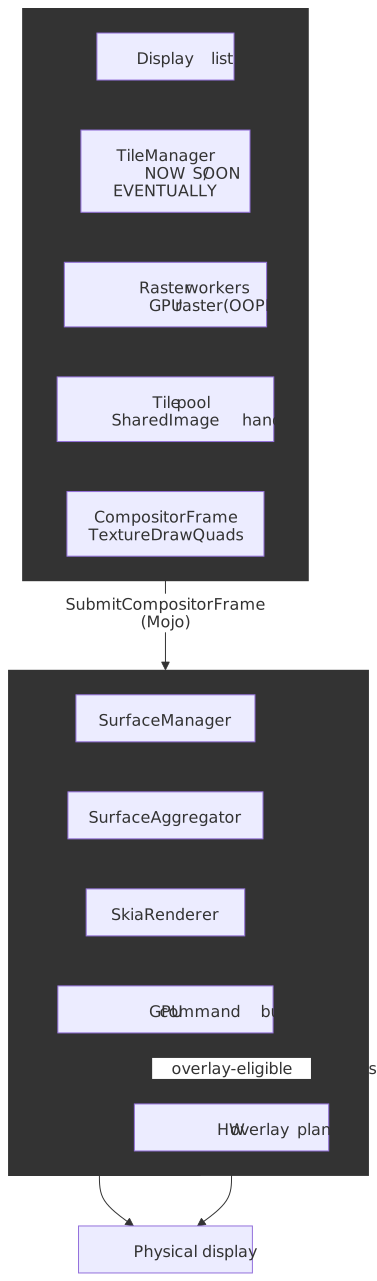
The remaining bandwidth costs are real but bounded:
- Software raster fallback (low-end Android, blocklisted GPUs): rasterized bitmaps are uploaded per-tile from the renderer to the GPU process each frame they change.
- Resize / page-zoom / DPR change: scale changes invalidate cached textures and force re-rasterization at the new resolution; promoting a layer with a transform of e.g.
scale(2)does not re-raster on its own (the GPU resamples at draw time)8. - Overlay promotion: video and some canvas quads can bypass the GPU compositing step entirely, going straight to a hardware scanout plane on supported platforms.
What Stays Responsive During Main Thread Blocks
The compositor thread handles these operations independently, meaning they continue during heavy JavaScript execution:
// Example: 3-second main thread blockbutton.addEventListener("click", () => { const start = Date.now() while (Date.now() - start < 3000) {} // Busy loop console.log("Done!")})Compositor-handled (still works):
| Behavior | Why It Works | Caveat |
|---|---|---|
| Page scrolling | Compositor handles scroll position | Scroll event listeners won’t fire until unblocked |
| Pinch-to-zoom | Compositor modifies viewport transform | — |
transform animations |
Compositor updates transform node values | Only for promoted layers |
opacity animations |
Compositor updates effect node values | Only for promoted layers |
| Video playback | Decoded in separate process | Seeking may need main thread |
| OffscreenCanvas | Rendering on worker thread | Requires explicit setup |
Main-thread-dependent (blocked):
| Behavior | Why It’s Blocked |
|---|---|
| Click/touch handlers | Event dispatch runs on main thread |
| Hover state changes | Requires style recalculation |
| Layout-triggering animations | left, top, width, margin need layout |
| Text selection | Main thread hit testing |
| Form input | Main thread event handling |
requestAnimationFrame |
Callbacks run on main thread |
Compositor-Only vs Main-Thread Animations
/* ✅ Compositor-only: runs during JS execution */.smooth-spinner { animation: spin 1s linear infinite;}@keyframes spin { to { transform: rotate(360deg); }}/* ❌ Main-thread required: freezes during JS execution */.janky-spinner { animation: slide 1s linear infinite;}@keyframes slide { to { margin-left: 100px; } /* Layout property */}The transform animation updates a property tree node value—the compositor applies it to cached GPU textures. The margin-left animation requires layout recalculation, which only the main thread can perform.
Compositor-to-Viz Communication
The compositor thread doesn’t draw pixels directly—it produces CompositorFrame objects that travel to the Viz process (GPU process) for display.
The Frame Sink Interface
Each compositor has a CompositorFrameSink connection to Viz, brokered via Mojo IPC. Frame production is pull-based — Viz sends BeginFrame signals aligned to VSync, and the compositor responds with at most one SubmitCompositorFrame per signal.
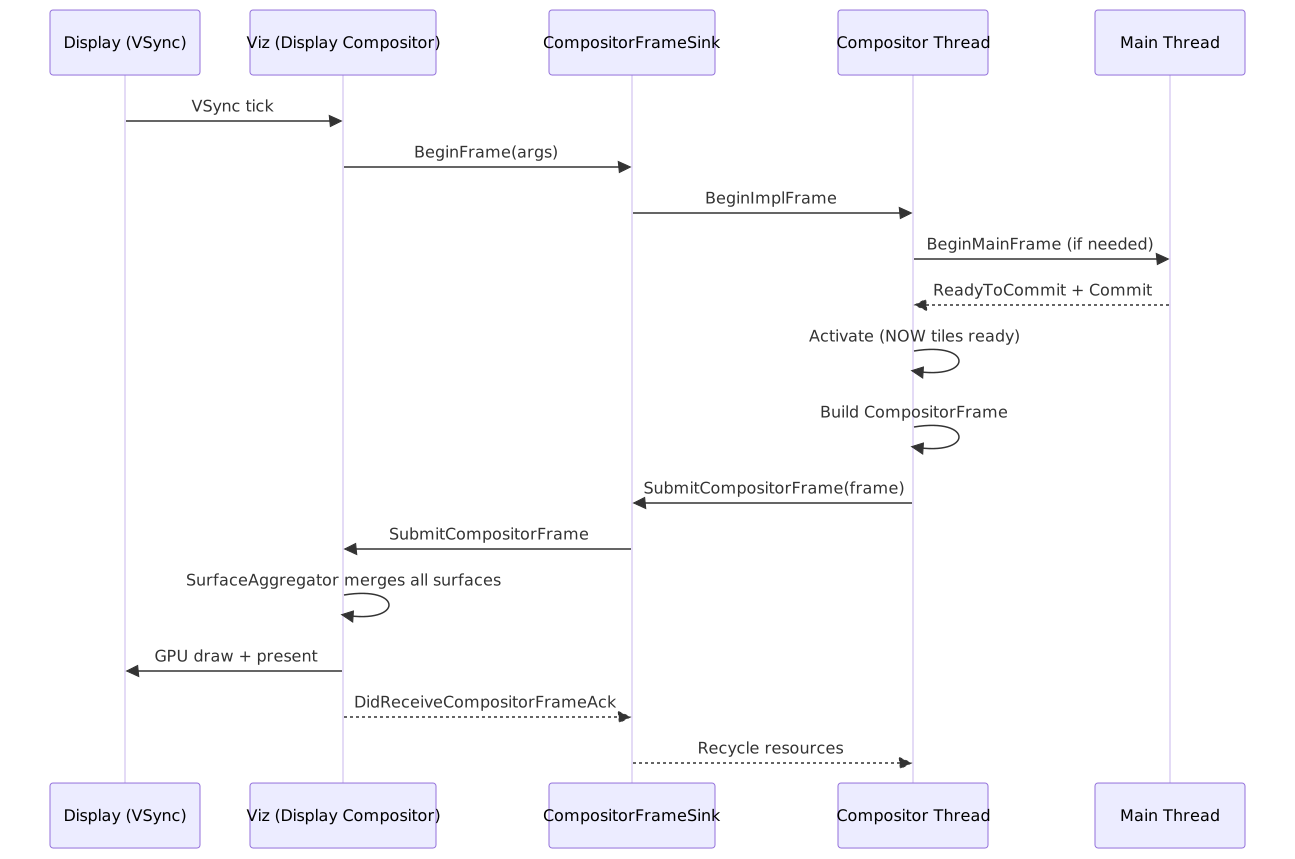
The BeginFrameAck returned with each submitted frame tells Viz whether new content was produced; an “empty” ack causes Viz to fall back to the previous surface for that client without stalling the rest of the page2.
Surface Aggregation
A web page often involves multiple renderer processes — site-isolated cross-origin iframes each render in their own renderer — plus the browser UI. Viz aggregates all of them into one frame for the physical display:
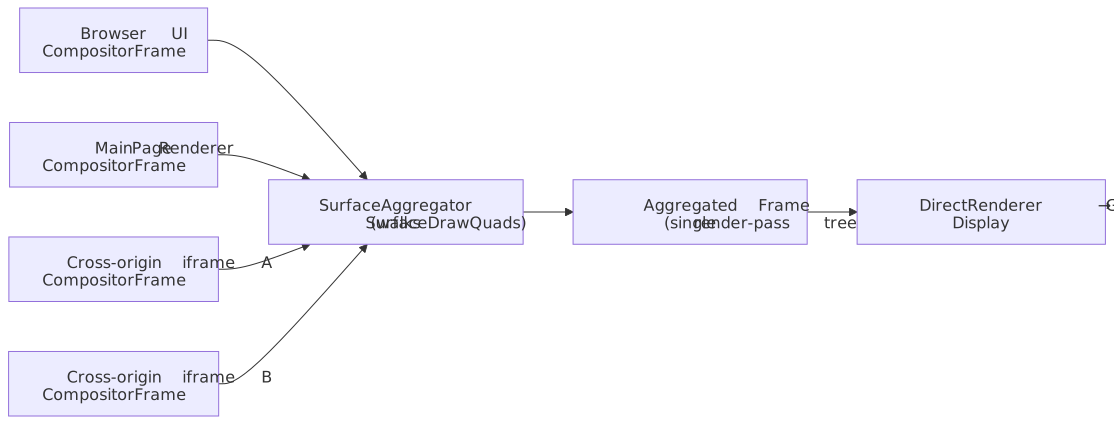
The SurfaceAggregator walks SurfaceDrawQuad references recursively, replaces each one with the latest CompositorFrame from the referenced surface, and emits a single render-pass tree to the DirectRenderer9. If an iframe’s frame hasn’t arrived, Viz reuses the previous surface — one slow renderer cannot stall the rest of the page.
Why Viz Lives in a Separate Process
Security: Renderer processes are sandboxed and cannot access GPU APIs directly. All GPU commands go through Viz.
Stability: GPU driver crashes terminate only the Viz process; renderers survive and reconnect. Users see a brief flash rather than losing their tabs.
Resource management: Viz controls GPU memory allocation across all tabs, preventing any single page from consuming all VRAM (Video Random Access Memory).
Performance Optimization Patterns
Promote Wisely
Layer promotion enables compositor-driven animations but costs memory. The full enumeration of triggers — what cc::Layerize calls direct compositing reasons — is covered in the Layerize stage; from the compositor’s point of view, the relevant inputs look like this:
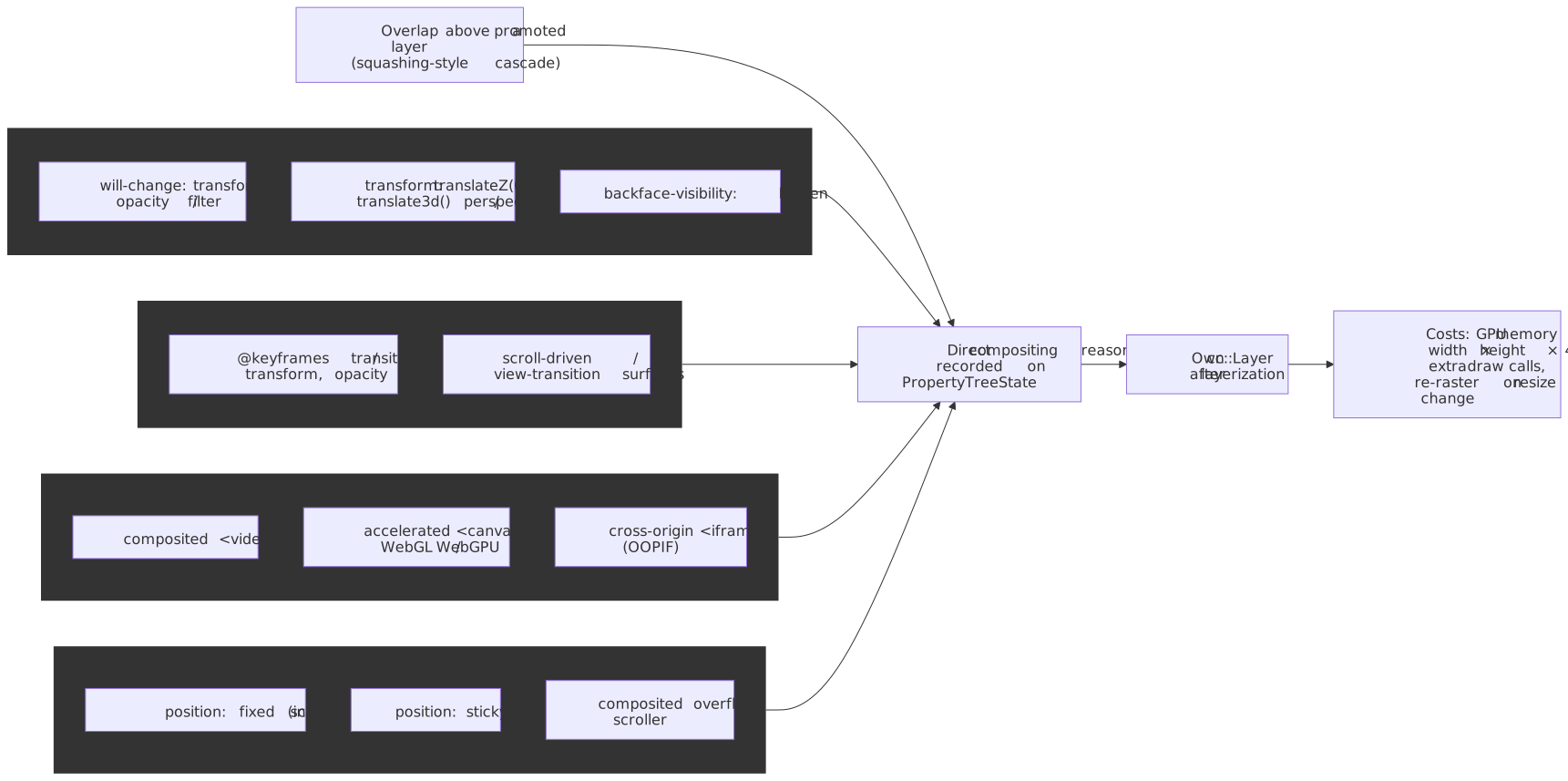
/* Explicit promotion hint */.will-animate { will-change: transform;}/* Implicit promotion (has side effects) */.promoted { transform: translateZ(0); /* Forces own layer */}Memory cost: a fully-rasterized layer occupies up to width × height × 4 bytes (RGBA8) of GPU memory — a 1920×1080 layer ≈ 8 MB at 1× DPR, ~32 MB at 2× DPR. Actual allocation is tile-granular and depends on which tiles fall into NOW/SOON bins, but the area cost is the right back-of-envelope for “is this safe to promote on mobile?”. Shared-GPU-memory devices exhaust the pool quickly when many large layers are promoted at once.
When to promote:
- Elements with
transform/opacityanimations - Fixed/sticky positioned elements (scroll independently)
- Content with hardware video or WebGL
When NOT to promote:
- Static content (wastes memory)
- Thousands of small elements (layer explosion)
- Content that changes frequently (re-rasterization costs)
Compositor-Only Animations
For 60fps animations, stick to properties the compositor can handle without main thread involvement:
| Property | Compositor-Only? | Notes |
|---|---|---|
transform |
✅ Yes | All transform functions |
opacity |
✅ Yes | — |
filter |
⚠️ Partial | Compositor can apply, but may need render pass |
left, top |
❌ No | Triggers layout |
width, height |
❌ No | Triggers layout |
background-color |
❌ No | Triggers paint/raster |
Avoid Forced Synchronous Layout
Reading layout properties after writes forces the browser to synchronously recalculate:
// ❌ Forces layout thrashingelements.forEach((el) => { el.style.width = `${el.offsetWidth + 10}px` // Read triggers sync layout})// ✅ Batch reads, then writesconst widths = elements.map((el) => el.offsetWidth) // All readselements.forEach((el, i) => { el.style.width = `${widths[i] + 10}px` // All writes})Layout thrashing on the main thread delays commits, which delays frame production.
Failure Modes and Debugging
Checkerboarding
When scrolling reveals tiles that haven’t been rasterized, users see placeholder rectangles (historically a checkerboard pattern, now typically solid colors).
Causes:
- Scroll velocity exceeds rasterization throughput
- Memory pressure evicts pre-rasterized tiles
- Complex content (heavy SVG, many layers) slows rasterization
Debugging: Chrome DevTools → Performance → check for “Rasterize Paint” entries extending beyond frame budgets. The “Layers” panel shows which elements are promoted and their memory consumption.
Layer Explosion
When too many elements are promoted, memory exhausts and performance degrades.
Symptoms:
- High GPU memory usage in Task Manager
- Compositor falls back to software raster
- Animations stutter despite being
transform/opacityonly
Debugging: DevTools → Layers panel → sort by memory. Look for unexpected promotions from overlap (elements stacking above promoted content force-promote).
Commit Jank
Long commit times steal from the frame budget.
Causes:
- Thousands of layers (each must sync metadata)
- Complex property trees (deep nesting)
- Large display lists (many paint operations)
Debugging: DevTools → Performance → look for long “Commit” entries. The “Summary” tab shows time breakdown.
Conclusion
Compositing is Chromium’s architectural answer to a fundamental constraint: the main thread cannot execute JavaScript and produce visual updates simultaneously. By delegating frame assembly to a dedicated compositor thread with its own layer trees and property trees, the browser maintains responsive scrolling and animations regardless of main thread load.
The key insights for optimization:
- Promote judiciously: Layer promotion enables compositor-driven animations but costs GPU memory
- Animate compositor-only properties:
transformandopacityskip the entire main-thread pipeline - Understand the boundaries: Knowing what the compositor can and cannot do prevents performance surprises
- Respect the frame budget: Commit, rasterization, and Viz aggregation all compete for the 16ms window
The three-tree architecture (main → pending → active), property tree design, and one-directional dependency (main → compositor, never reverse) are the foundations enabling 60fps+ rendering on complex, multi-process web applications.
Appendix
Prerequisites
- Rendering Pipeline Overview: The end-to-end journey from HTML to pixels
- Paint Stage: How display lists are recorded
- Rasterization: How display lists become GPU textures
- Commit Stage: The synchronization point between threads
Terminology
| Term | Definition |
|---|---|
| cc (Chrome Compositor) | The multi-threaded compositing system in Chromium |
| LayerTreeHost | Main thread public API for layer management |
| LayerTreeHostImpl | Compositor thread implementation; handles input, animations, frame production |
| Property Trees | Four separate trees (transform, clip, effect, scroll) for O(1) property lookups |
| CompositorFrame | Data structure containing draw quads and render passes, sent to Viz |
| Draw Quad | Atomic drawing primitive (texture, solid color, surface reference) |
| Render Pass | Set of quads drawn to a target (screen or intermediate texture) |
| Viz (Visuals) | Chromium’s GPU process; aggregates frames and produces final display |
| Surface | Compositable unit in Viz that receives compositor frames |
| Activation | Transition from pending tree to active tree after rasterization completes |
| Checkerboarding | Visual artifact when tiles aren’t rasterized before becoming visible |
Summary
- cc (Chrome Compositor) runs on a dedicated thread, enabling responsive scrolling and animations during main thread blocks
- Three-tree architecture (main → pending → active) decouples content updates from display
- Property trees (transform, clip, effect, scroll) provide O(1) lookups instead of O(depth) traversals
- Compositor frames contain draw quads and render passes—abstract descriptions, not bitmaps
- Viz process aggregates frames from all renderer processes and browser UI into a single display output
- Compositor-only properties (
transform,opacity) animate without main thread involvement - One-directional dependency: main thread can block on compositor, but compositor never blocks on main thread
References
- Chromium Design Docs — How cc Works
- Chromium —
cc/README - Chromium Design Docs — Compositor Thread Architecture
- Chrome for Developers — RenderingNG Architecture
- Chrome for Developers — Key data structures in RenderingNG
- Chromium — Life of a Frame
- Chromium —
components/viz/README - Chromium — Surfaces design doc
- W3C — CSS Compositing and Blending Level 1
- web.dev — Stick to compositor-only properties and manage layer count
- Chrome for Developers — Re-rastering composited layers on scale change
- Chromium — GPU Accelerated Compositing in Chrome
- Chromium Graphics — design docs index
Footnotes
-
Chromium,
cc/README.md. DefinesLayerTreeHost,LayerTreeHostImpl,CompositorFrame,RenderPass,DrawQuad,SharedQuadState. ↩ ↩2 ↩3 -
Chromium, How cc Works. Source for the three impl trees + recycle, tile size heuristics, NOW/SOON/EVENTUALLY priority binning, BeginFrame pacing, and activation gating. ↩ ↩2 ↩3 ↩4 ↩5
-
Chrome for Developers, Key data structures in RenderingNG. Source for the four property trees and the per-element
PropertyTreeState4-tuple; also describes scroll offsets being stored as 2D translations in the transform tree. ↩ ↩2 -
Chromium source,
components/viz/common/quads/shared_quad_state.h. Per-pass batching of transform, clip, opacity and blend state shared by many quads. ↩ -
web.dev, Stick to compositor-only properties and manage layer count. Confirms
transformandopacityare the universally compositor-only animatable properties;filteris conditional on engine and may require an intermediate render pass per frame. ↩ -
Chrome for Developers, RenderingNG architecture. Source for the SkiaRenderer / out-of-process raster path and the GPU-process / Viz process split. ↩
-
Chromium, GPU Accelerated Compositing in Chrome and GPU Architecture Roadmap. Source for SharedImage /
GpuMemoryBufferownership transfer and texture mailboxes. ↩ -
Chrome for Developers, Re-rastering composited layers on scale change. Source for transform-only scale not forcing re-raster, while page zoom and DPR changes do. ↩
-
Chromium,
components/viz/README.md. Source for Surface aggregation,SurfaceDrawQuadresolution, and Viz process isolation. ↩