React Hooks Fundamentals: Rules, Core Hooks, and Custom Hooks
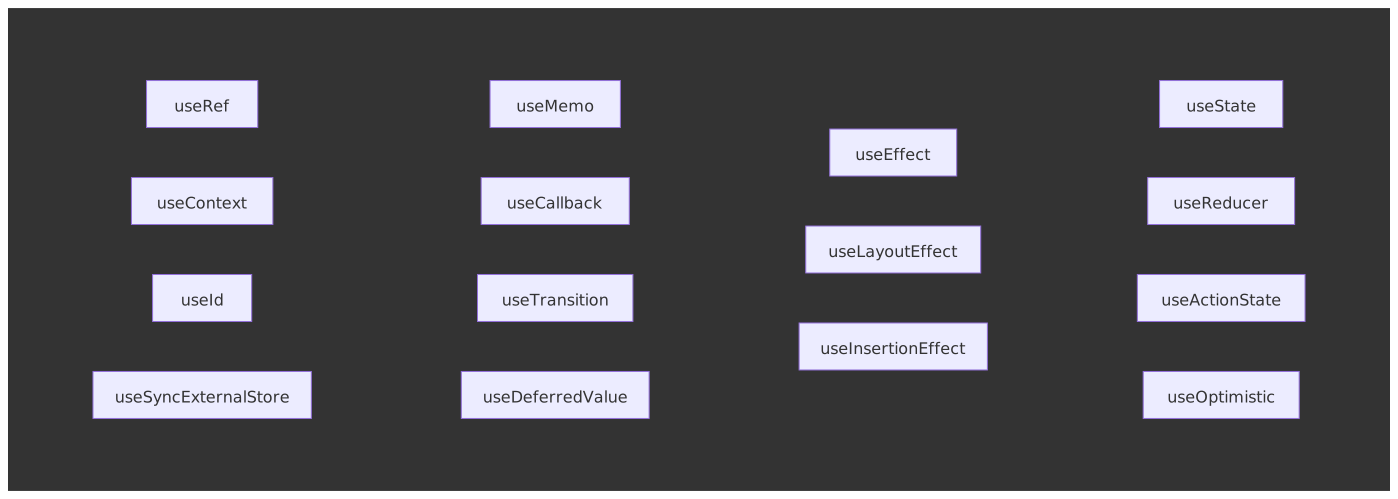
React Hooks let functional components own state and side effects without classes. Introduced in React 16.8 in February 2019, hooks are now the default API for components. This is part one of a two-article series; specialized concurrent hooks (useTransition, useDeferredValue, useLayoutEffect, useSyncExternalStore, useId, use) live in React Hooks Advanced Patterns. This article covers the architectural principles, core hooks, and patterns you reach for daily.
Abstract
Hooks solve three problems that plagued class components: logic fragmentation across lifecycle methods, wrapper hell from HOCs (Higher-Order Components) and render props, and the cognitive overhead of JavaScript’s this binding.
The core mental model:
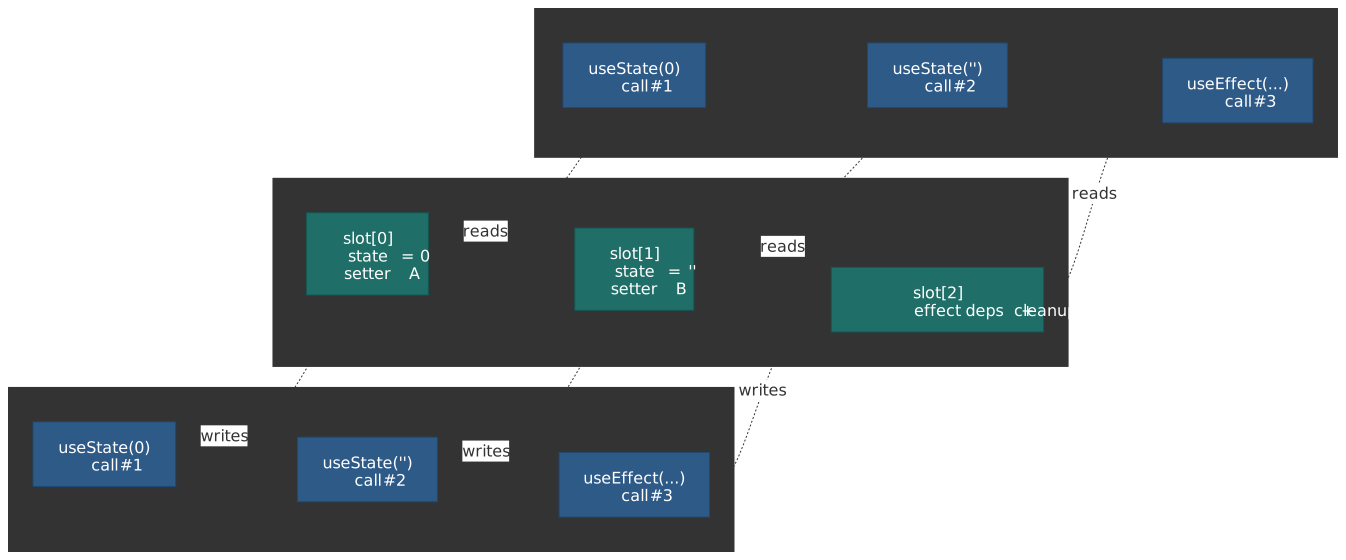
- Hooks are call-order dependent: React stores hook state in a linked list, using call position (not names) to associate state with hooks. This enables custom hooks to have independent state without key collisions.
- Effects are synchronization, not lifecycle:
useEffectkeeps external systems in sync with React state. Think “synchronize chat connection withroomId” not “run code on mount.” - Memoization breaks render cascades:
useMemoanduseCallbackpreserve referential equality to prevent unnecessary re-renders of memoized children—not to optimize individual calculations. - Custom hooks compose without collision: Because each hook call gets its own slot in the linked list, two hooks using the same internal hook don’t conflict.
As of React 19 (released 2024-12-05), new hooks like useActionState, useOptimistic, and the use API extend hooks to handle async data and form actions natively.
Why Hooks Exist: The Class Component Problems
Before React 16.8, class components had three architectural problems that hooks were designed to solve:
1. Logic Fragmentation: A single concern (like a data subscription) was scattered across componentDidMount (setup), componentDidUpdate (sync on prop change), and componentWillUnmount (cleanup). Hooks co-locate related logic in a single useEffect call.
2. Wrapper Hell: HOCs and render props solved reuse but created deeply nested hierarchies (the “pyramid of doom”) that were hard to debug. Custom hooks extract logic without adding wrapper components.
3. this Binding: Class methods required explicit binding or arrow function class properties. Hooks eliminate this entirely—components are just functions.
Design rationale: The React team considered alternatives like mixins (rejected due to the “diamond problem” of conflicting method names) and render props (rejected because they still add nesting). Hooks’ call-order design naturally avoids these issues. The full proposal lives in React RFC #68: React Hooks; Dan Abramov’s “Why Do Hooks Rely on Call Order?” is the longer-form companion.
The Rules of Hooks: Why Call Order Matters
Hooks have two rules that stem from a single implementation decision: React tracks hook state in a linked list of slots indexed by call order, not by name. Each slot is owned by the fiber for the current component instance, so the same component rendered in two places gets two independent lists.
Rule 1: Only Call Hooks at the Top Level
React associates useState(0) with “the first hook call” and useState("") with “the second hook call.” If the order changes between renders, state gets misassigned.
// ❌ Conditional hook call: order changes when `condition` flipsfunction BadComponent({ condition }) { const [count, setCount] = useState(0) // Always slot 0 if (condition) { useEffect(() => console.log("effect")) // Sometimes slot 1 } const [name, setName] = useState("") // Slot 1 or 2 depending on condition}When condition changes from true to false, React expects slot 1 to be useEffect but finds useState—state corruption occurs.
// ✅ Condition inside the hook, not around itfunction GoodComponent({ condition }) { const [count, setCount] = useState(0) // Always slot 0 const [name, setName] = useState("") // Always slot 1 useEffect(() => { if (condition) console.log("effect") // Always slot 2 }, [condition])}Why this design? The React team evaluated alternatives:
- String keys: Name collisions when composing hooks (two hooks using the same internal state key)
- Symbol keys: Can’t call the same hook twice (both calls share one Symbol)
- Manual composition: Forces developers to manage keys through all layers
Call order solves all three: each call gets its own slot, no keys needed, no collisions.
Rule 2: Only Call Hooks from React Functions
Hooks can only be called from function components or custom hooks (functions starting with use). This ensures React is in the middle of rendering when hooks are called, so it can properly track state.
The eslint-plugin-react-hooks plugin enforces both rules statically.
Core Hooks
useState: State as a Snapshot
useState adds local state to a component. The setter triggers a re-render with the new value.
const [count, setCount] = useState(0) // Returns [currentValue, setter]Critical behavior: State is a snapshot frozen at render time. The setter queues a re-render; it doesn’t mutate immediately.
// Each click only increments by 1, not 3function Counter() { const [count, setCount] = useState(0) function handleClick() { setCount(count + 1) // Queues: set to 0 + 1 setCount(count + 1) // Queues: set to 0 + 1 (count is still 0!) setCount(count + 1) // Queues: set to 0 + 1 }}Functional updates solve the stale closure problem by receiving the latest state:
// Each call sees the updated value—increments by 3function Counter() { const [count, setCount] = useState(0) function handleClick() { setCount((c) => c + 1) // 0 → 1 setCount((c) => c + 1) // 1 → 2 setCount((c) => c + 1) // 2 → 3 }}Automatic batching (React 18+): When mounted with createRoot, React batches every setState call inside a single synchronous turn into one render — including updates inside setTimeout, microtasks, promise .then handlers, and native event listeners. Pre-18 only batched inside React event handlers; everything else triggered a render per call. The change is described in the React 18 working group’s automatic batching note. When you need to read DOM after a specific update, call flushSync to opt one update out of the batch.
Object state: React uses Object.is to detect changes. Mutating an object and calling the setter won’t trigger a re-render because the reference hasn’t changed.
// ❌ Mutation: React sees same reference, skips re-renderobj.x = 10setObj(obj)// ✅ Replacement: new reference triggers re-rendersetObj({ ...obj, x: 10 })Lazy initialization: Pass a function (not its result) when the initial value is expensive to compute. React only calls it on the first render.
// ❌ createTodos() runs every render (result ignored after first)const [todos, setTodos] = useState(createTodos())// ✅ createTodos runs for the initial render// In Strict Mode development builds, React may call it twice to verify purity.const [todos, setTodos] = useState(createTodos)useReducer: Centralized State Transitions
useReducer extracts state update logic into a pure function. Useful when state transitions are complex or interdependent.
const [state, dispatch] = useReducer(reducer, initialState)When to choose useReducer over useState:
| Scenario | useState | useReducer |
|---|---|---|
| Independent values | ✅ Simpler | Overkill |
| Interdependent state (form with validation) | Scattered logic | ✅ Centralized |
| Complex transitions (state machine) | Hard to follow | ✅ Explicit actions |
| Testing state logic | Coupled to component | ✅ Pure function |
type FormState = { email: string password: string errors: Record<string, string> isSubmitting: boolean}type FormAction = | { type: "SET_FIELD"; field: string; value: string } | { type: "SET_ERRORS"; errors: Record<string, string> } | { type: "SUBMIT_START" } | { type: "SUBMIT_END" } | { type: "RESET" }const initialState: FormState = { email: "", password: "", errors: {}, isSubmitting: false,}function formReducer(state: FormState, action: FormAction): FormState { switch (action.type) { case "SET_FIELD": return { ...state, [action.field]: action.value, errors: {} } case "SET_ERRORS": return { ...state, errors: action.errors, isSubmitting: false } case "SUBMIT_START": return { ...state, isSubmitting: true, errors: {} } case "SUBMIT_END": return { ...state, isSubmitting: false } case "RESET": return initialState }}The reducer is a pure function—easy to unit test without rendering a component.
useEffect: Synchronization, Not Lifecycle
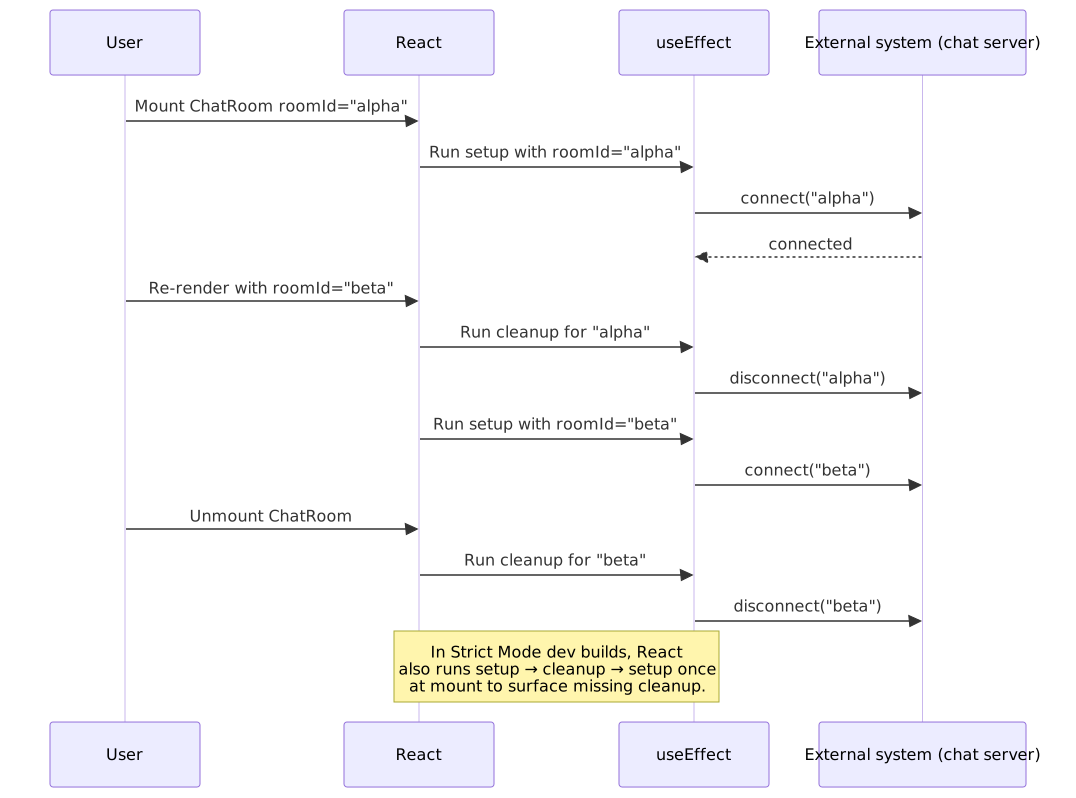
Mental model shift: Don’t think “run on mount/unmount.” Think “synchronize external system X with React state Y.”
// "Keep chat connection in sync with roomId"function ChatRoom({ roomId }) { useEffect(() => { const connection = createConnection(roomId) connection.connect() return () => connection.disconnect() // Cleanup before re-sync }, [roomId]) // Re-sync when roomId changes}When roomId changes: cleanup runs (disconnect old room) → setup runs (connect new room). This is synchronization, not lifecycle.
Dependency array behavior:
useEffect(() => { ... }) // Re-runs after every render (rare)useEffect(() => { ... }, []) // Runs once after initial renderuseEffect(() => { ... }, [a, b]) // Re-runs when a or b changes (Object.is)Common bugs:
| Bug | Cause | Fix |
|---|---|---|
| Stale closure | Missing dependency | Add to array or use functional update |
| Infinite loop | Object/function in deps recreated each render | useMemo/useCallback or move inside effect |
| Memory leak | No cleanup for subscription/timer | Return cleanup function |
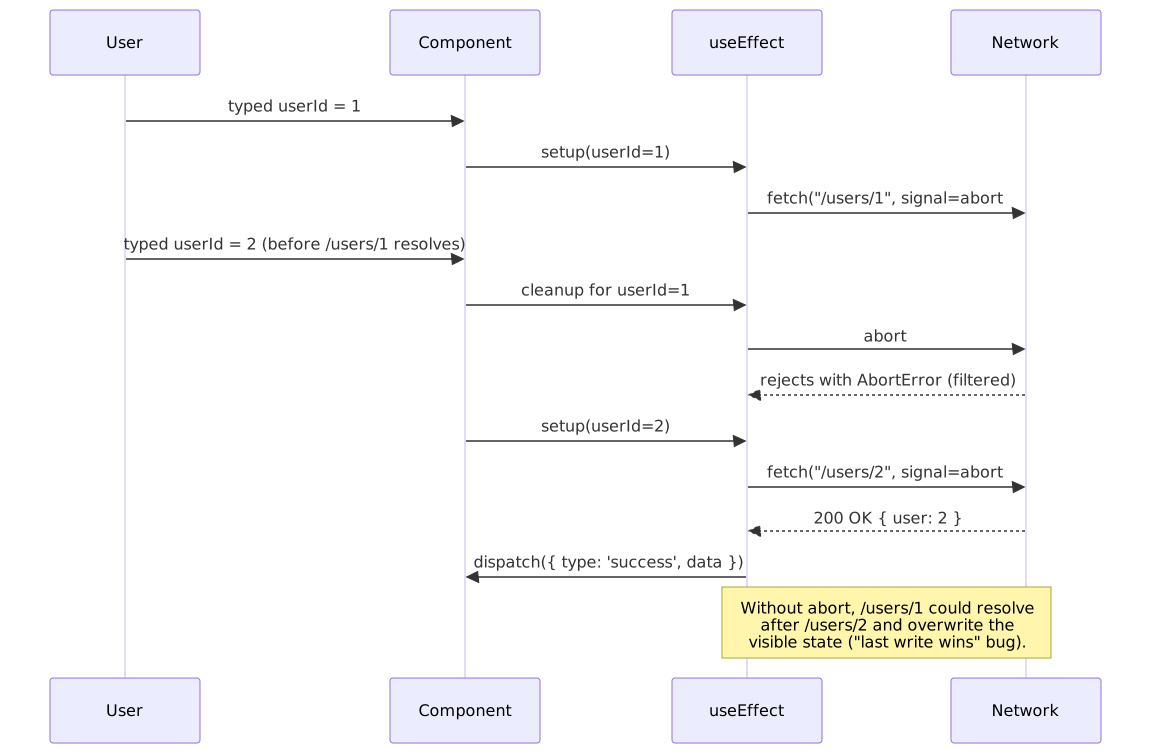
| Race condition | Async result applied after newer request | Use ignore flag pattern |
// Race condition fix: ignore stale responsesfunction Profile({ userId }) { const [user, setUser] = useState(null) useEffect(() => { let ignore = false fetchUser(userId).then((data) => { if (!ignore) setUser(data) // Only apply if still current }) return () => { ignore = true } }, [userId])}Strict Mode double-invocation: In development, <StrictMode> mounts, unmounts, then remounts components so every effect’s setup/cleanup pair runs at least once at mount. If your effect breaks on remount, it is missing cleanup — production builds skip this and your bug ships silently.
useRef: Mutable Values Outside the Render Cycle
useRef returns a mutable object { current: value } that persists across renders without triggering re-renders when mutated.
Two use cases:
- DOM access: Get a reference to a DOM node
- Instance variables: Store values that shouldn’t trigger re-renders (timers, previous values, flags)
// DOM reference for imperative focusfunction TextInput() { const inputRef = useRef<HTMLInputElement>(null) return ( <> <input ref={inputRef} /> <button onClick={() => inputRef.current?.focus()}>Focus</button> </> )}// Store interval ID without causing re-rendersfunction Timer() { const intervalRef = useRef<ReturnType<typeof setInterval> | null>(null) useEffect(() => { intervalRef.current = setInterval(() => console.log("tick"), 1000) return () => { if (intervalRef.current !== null) clearInterval(intervalRef.current) } }, [])}Note
React 19’s @types/react removed the no-argument useRef<T>() overload — every useRef call must pass an explicit initial value (typically null). The migration is documented in the React 19 upgrade guide.
Key distinction from state: Mutating ref.current doesn’t schedule a re-render. Use state when the UI should reflect the value; use refs for values that don’t affect rendering.
useContext: Read Context Without Prop Drilling
useContext reads the value of a context object created by createContext. It subscribes the calling component to the nearest matching <Context.Provider> ancestor; when that provider’s value prop changes (compared with Object.is), every consumer re-renders.
const ThemeContext = createContext<"light" | "dark">("light")function App() { return ( <ThemeContext.Provider value="dark"> <Toolbar /> </ThemeContext.Provider> )}function Toolbar() { const theme = useContext(ThemeContext) // "dark" return <div className={`toolbar toolbar-${theme}`} />}Two non-obvious behaviors that bite in production:
- All consumers re-render when
valuechanges, even if they only read one field of an object value. The fix is to split the context (one for state, one for setters) or memoize the provider’svalueso unrelated parents don’t recreate it on every render. The React docs on optimizing re-renders walk through both patterns. - Provider lookup is lexical, not by component identity. Two
<ThemeContext.Provider value="dark">ancestors in different subtrees produce different live values to their respective subtrees — context is not a singleton.
In React 19, the equivalent of useContext(MyContext) can also be written as use(MyContext), which is the only hook permitted inside conditionals and loops. useContext itself still follows the standard rules.
Performance Hooks: Memoization
The Referential Equality Problem
Objects and functions are recreated on every render. If passed to a memo()-wrapped child, the child re-renders because {} !== {}.
// Child re-renders on every parent render, even if props are "the same"function Parent() { const [count, setCount] = useState(0) const style = { color: "blue" } // New object each render const onClick = () => console.log("hi") // New function each render return <MemoizedChild style={style} onClick={onClick} />}useMemo: Cache Expensive Values
useMemo caches a computed value until dependencies change.
const filtered = useMemo(() => items.filter((item) => item.matches(query)), [items, query])When to use:
- Expensive calculations: Filter/map over large arrays, complex transformations (>1ms)
- Referential equality for props: Prevent re-renders of memoized children
- Dependencies of other hooks: Stable object reference for
useEffectdeps
When NOT to use: Simple calculations like a + b. The overhead of memoization exceeds the cost.
useCallback: Cache Functions
useCallback is useMemo for functions: useCallback(fn, deps) ≡ useMemo(() => fn, deps).
// Stable function reference for memoized childfunction Parent() { const [count, setCount] = useState(0) const handleClick = useCallback(() => { setCount((c) => c + 1) // Updater function avoids `count` dependency }, []) return <MemoizedButton onClick={handleClick} />}When to use: Functions passed to memo()-wrapped children or used as useEffect dependencies.
React Compiler (React 19+)
The React Compiler reached Release Candidate on 2025-04-21 and is considered safe for production. It is a build-time Babel plugin that statically analyses components, then inserts memoization for values, functions, and JSX trees so re-renders only recompute what actually depends on changed inputs. Compiler-aware diagnostics now ship inside eslint-plugin-react-hooks.
When the compiler is enabled, manual useMemo and useCallback calls become an escape hatch rather than a default. Keep reaching for them in code the compiler explicitly opts out of (via the "use no memo" directive), in performance-critical paths where you want guaranteed memoization independent of the compiler version, and in libraries that must work with consumers who do not run the compiler.
Custom Hooks
Custom hooks extract reusable stateful logic. A function starting with use that calls other hooks is a custom hook.
Design principles:
- Single responsibility: One hook, one concern
- Composition: Build complex hooks from simpler hooks
- Stable API: Consistent return shape across versions
// Compose focused hooks rather than building monolithsfunction useUserData(userId: string) { const { data, error, isLoading } = useFetch(`/api/users/${userId}`) const cached = useCache(data, `user-${userId}`) return { user: cached ?? data, error, isLoading }}Each hook call gets its own state slot—no conflicts even if two hooks internally use useState.
Production Custom Hooks
usePrevious: Track Previous Values
Returns the value from the previous render. Useful for comparisons, animations, and change detection.
import { useEffect, useRef } from "react"export function usePrevious<T>(value: T): T | undefined { const ref = useRef<T | undefined>(undefined) useEffect(() => { ref.current = value }, [value]) return ref.current // Returns previous value during render}How it works: useRef stores the value outside the render cycle. useEffect updates the ref after render, so during render we still see the old value.
Edge cases:
- First render: returns
undefined - Concurrent features: safe because refs are instance-specific
useDebounce: Delay Rapid Updates
Delays updating a value until input stops for a specified duration. Common for search inputs.
import { useState, useEffect } from "react"export function useDebounce<T>(value: T, delay = 500): T { const [debouncedValue, setDebouncedValue] = useState(value) useEffect(() => { const timer = setTimeout(() => setDebouncedValue(value), delay) return () => clearTimeout(timer) }, [value, delay]) return debouncedValue}Usage:
function Search() { const [query, setQuery] = useState("") const debouncedQuery = useDebounce(query, 300) useEffect(() => { if (debouncedQuery) fetchResults(debouncedQuery) }, [debouncedQuery])}Edge cases:
- Component unmount: cleanup clears pending timer
- Delay changes: timer resets with new duration
useFetch: Data Fetching with Cancellation
Handles loading states, errors, and request cancellation via AbortController.
import { useEffect, useReducer, useRef, useCallback } from "react"type State<T> = { data: T | null; error: Error | null; isLoading: boolean }type Action<T> = { type: "start" } | { type: "success"; data: T } | { type: "error"; error: Error }function reducer<T>(state: State<T>, action: Action<T>): State<T> { switch (action.type) { case "start": return { ...state, isLoading: true, error: null } case "success": return { data: action.data, isLoading: false, error: null } case "error": return { ...state, isLoading: false, error: action.error } }}export function useFetch<T>(url: string | null) { const [state, dispatch] = useReducer( reducer as (s: State<T>, a: Action<T>) => State<T>, { data: null, error: null, isLoading: false } as State<T>, ) const abortRef = useRef<AbortController | null>(null) useEffect(() => { if (!url) return abortRef.current?.abort() const controller = new AbortController() abortRef.current = controller dispatch({ type: "start" }) fetch(url, { signal: controller.signal }) .then((res) => (res.ok ? res.json() : Promise.reject(new Error(`HTTP ${res.status}`)))) .then((data: T) => dispatch({ type: "success", data })) .catch((err: Error) => { if (err.name !== "AbortError") dispatch({ type: "error", error: err }) }) return () => controller.abort() }, [url]) return state}Key behaviors:
- Cancels in-flight request when URL changes or component unmounts via
AbortController, the Fetch standard’s cancellation primitive. - Ignores
AbortErrorto avoid spurious error states. - Uses reducer for atomic state transitions.
useLocalStorage: Persistent State
Syncs state with localStorage, handling SSR (Server-Side Rendering), serialization errors, and cross-tab updates.
import { useState, useEffect, useCallback } from "react"export function useLocalStorage<T>(key: string, initialValue: T): [T, (v: T | ((p: T) => T)) => void] { const [value, setValue] = useState<T>(() => { if (typeof window === "undefined") return initialValue try { const item = localStorage.getItem(key) return item ? JSON.parse(item) : initialValue } catch { return initialValue } }) const setStoredValue = useCallback( (newValue: T | ((prev: T) => T)) => { setValue((prev) => { const resolved = newValue instanceof Function ? newValue(prev) : newValue try { localStorage.setItem(key, JSON.stringify(resolved)) } catch {} return resolved }) }, [key], ) // Sync across tabs useEffect(() => { const handler = (e: StorageEvent) => { if (e.key === key && e.newValue) { try { setValue(JSON.parse(e.newValue)) } catch {} } } window.addEventListener("storage", handler) return () => window.removeEventListener("storage", handler) }, [key]) return [value, setStoredValue]}Edge cases:
- SSR: Returns
initialValuewhenwindowis undefined - JSON errors: Falls back to initial value
- Cross-tab sync:
storageevent fires when other tabs modify the same key
useIntersectionObserver: Viewport Detection
Detects when elements enter/leave the viewport. Replaces inefficient scroll listeners.
import { useEffect, useState } from "react"interface Options { threshold?: number rootMargin?: string freezeOnceVisible?: boolean}export function useIntersectionObserver(options: Options = {}) { const { threshold = 0, rootMargin = "0px", freezeOnceVisible = false } = options const [isIntersecting, setIsIntersecting] = useState(false) const [node, setNode] = useState<Element | null>(null) useEffect(() => { if (!node) return if (freezeOnceVisible && isIntersecting) return const observer = new IntersectionObserver( ([entry]) => { setIsIntersecting(entry.isIntersecting) }, { threshold, rootMargin }, ) observer.observe(node) return () => observer.disconnect() }, [node, threshold, rootMargin, freezeOnceVisible, isIntersecting]) return [setNode, isIntersecting] as const}Usage: Lazy-load images when they enter viewport:
function LazyImage({ src }: { src: string }) { const [ref, isVisible] = useIntersectionObserver({ freezeOnceVisible: true }) return <img ref={ref} src={isVisible ? src : ""} />}React 19 Hooks
React 19 (December 2024) introduces hooks for form handling and optimistic updates:
| Hook | Purpose |
|---|---|
useActionState |
Manages form submission state, errors, and pending status |
useFormStatus |
Reads parent <form> status without prop drilling |
useOptimistic |
Shows optimistic UI while async request completes |
use |
Reads a promise or context during render; the only hook callable inside conditionals and loops |
// useActionState exampleimport { useActionState } from "react"function Form() { const [error, submitAction, isPending] = useActionState(async (prevState, formData) => { const result = await saveData(formData) if (result.error) return result.error return null }, null) return ( <form action={submitAction}> <button disabled={isPending}>Submit</button> {error && <p>{error}</p>} </form> )}The use API reads a promise or context value during render and is the only hook permitted inside conditionals and loops. When passed a promise, it suspends the component until the promise resolves — when combined with <Suspense>, this replaces most ad-hoc loading state.
import { use, Suspense } from "react"function Profile({ userPromise }: { userPromise: Promise<User> }) { const user = use(userPromise) // Suspends until resolved return <h1>{user.name}</h1>}function App({ userPromise }: { userPromise: Promise<User> }) { return ( <Suspense fallback={<Spinner />}> <Profile userPromise={userPromise} /> </Suspense> )}Conclusion
Hooks solve class component problems through a single mechanism: call-order-based state tracking. Master the core hooks (useState, useReducer, useEffect, useRef, useContext), understand their mental models (snapshots, synchronization, mutable refs, lexical providers), and compose custom hooks for reusable logic. The next part of the series — React Hooks Advanced Patterns — picks up where this leaves off and walks through the specialized hooks (useTransition, useDeferredValue, useLayoutEffect, useInsertionEffect, useSyncExternalStore, useId, and the React 19 use API) that exist to solve concurrent-rendering, paint-timing, external-store, and SSR problems the core hooks cannot.
Appendix
Prerequisites
- React functional components
- JavaScript closures and reference equality
- Basic TypeScript (for typed examples)
Terminology
| Term | Definition |
|---|---|
| Hook | Function starting with use that accesses React state or lifecycle |
| Memoization | Caching computed values to avoid recalculation |
| Referential equality | Two values are === (same reference in memory) |
| Stale closure | Closure capturing outdated variable values |
| HOC | Higher-Order Component—function that wraps a component to add behavior |
Summary
- Hooks use call-order to track state—never call conditionally
useStatereturns a snapshot; use functional updates for state-dependent changesuseEffectis synchronization, not lifecycle; always return cleanupuseMemo/useCallbackpreserve referential equality for memoized children- Custom hooks compose without collision because each call gets its own state slot
- React 19 adds
useActionState,useOptimistic, and theuseAPI for forms and async data
References
- React Documentation: Hooks Reference - Official API reference for all built-in hooks
- React Documentation: Rules of Hooks - Official rules and linting
- React RFC #68: React Hooks - Original design proposal and trade-off analysis
- React 18 working group: Automatic Batching - Behavior change for state updates outside React event handlers
- Dan Abramov: Why Do Hooks Rely on Call Order? - Long-form design rationale by a former React core team member
- React Documentation: Synchronizing with Effects - Mental model for useEffect
- React Documentation: Reusing Logic with Custom Hooks - Custom hooks patterns
- React 19 Release (2024-12-05) - Stable launch announcement and new hooks
- React Compiler RC (2025-04-21) - Build-time auto-memoization, ESLint integration
- React Compiler Documentation - Setup and adoption guidance
- Strict Mode reference - Mount/unmount/mount and re-running effects in development
- Fetch standard: abortable fetch - Spec for
AbortControllercancellation - React Hooks Advanced Patterns - Concurrent and specialized hooks