AWS Kinesis 2020 Outage: Thread Limits, Thundering Herds, and Hidden Dependencies
How a routine capacity addition to Amazon Kinesis Data Streams in US-EAST-1 exceeded an OS thread limit on every front-end server, triggering a 17-hour cascading failure that took down CloudWatch, Lambda, Cognito, and dozens of other AWS services on November 25, 2020—the day before Thanksgiving. Every timeline, root cause, and corrective action below is grounded in AWS’s official post-event summary; this article reconstructs the failure chain, draws out the structural patterns (O(N²) thread fan-out, untested failsafes, monitoring that shares fate with the services it monitors), and translates them into checks you can run against your own systems.
Abstract
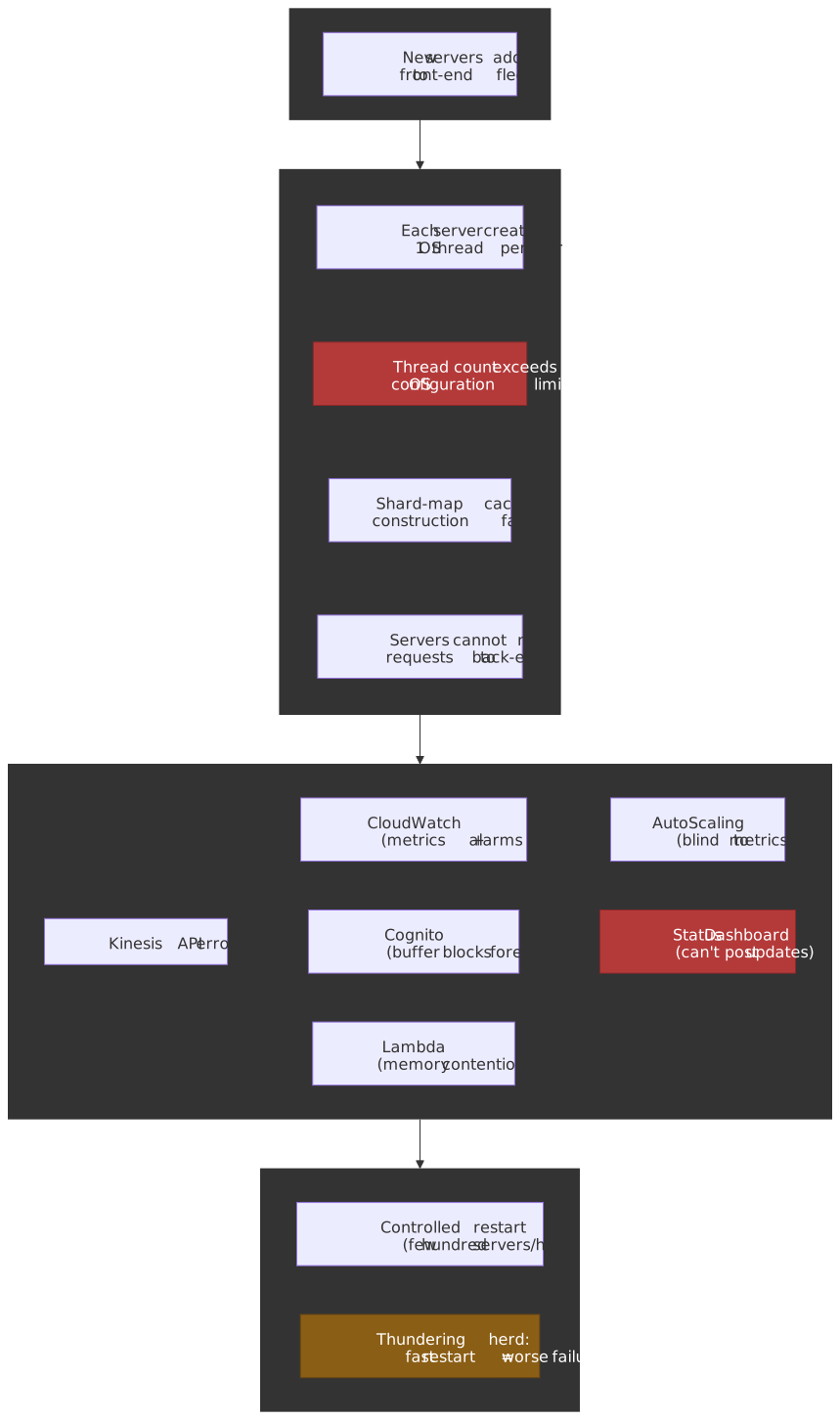
The core mental model for this incident is a three-stage failure amplification:
| Stage | What Happened | Why It Was Hard to Fix |
|---|---|---|
| Trigger | Adding servers to the front-end fleet pushed per-server OS thread count past the configured limit | Thread-per-peer gossip protocol scaled O(N) per server, O(N²) aggregate—the limit was latent until capacity growth crossed it |
| Cascade | Kinesis front-end servers could not build shard-map caches, killing request routing for the entire fleet | The front-end was monolithic (not cellularized)—every server depended on every other server, so the failure was fleet-wide |
| Recovery | Restarting servers competed for CPU/memory between shard-map construction and request processing | Restarting too fast triggered thundering herd: servers deemed unhealthy and removed, resetting progress. Only a few hundred servers per hour could safely rejoin |
The secondary failures are equally instructive: CloudWatch depended on Kinesis for metric ingestion, so monitoring went blind. Cognito’s “graceful degradation” buffer had a latent bug that caused webservers to block on backlogged buffers as the outage extended1. The Service Health Dashboard could not post updates because its publishing tool authenticated through Cognito. Each layer of supposed fault isolation turned out to share a common dependency.
Context
The System
Amazon Kinesis Data Streams is AWS’s managed service for real-time data streaming. The architecture relevant to this incident has two layers1:
- Front-end fleet: many thousands of servers responsible for authentication, throttling, and routing requests to the correct back-end cluster. Each front-end server maintains a shard-map cache — a routing table containing fleet membership, shard ownership, and back-end health data.
- Back-end clusters: a cell-based architecture where individual cell-clusters own subsets of shards. The back-end was already cellularized at the time of the incident, providing isolation between cells.
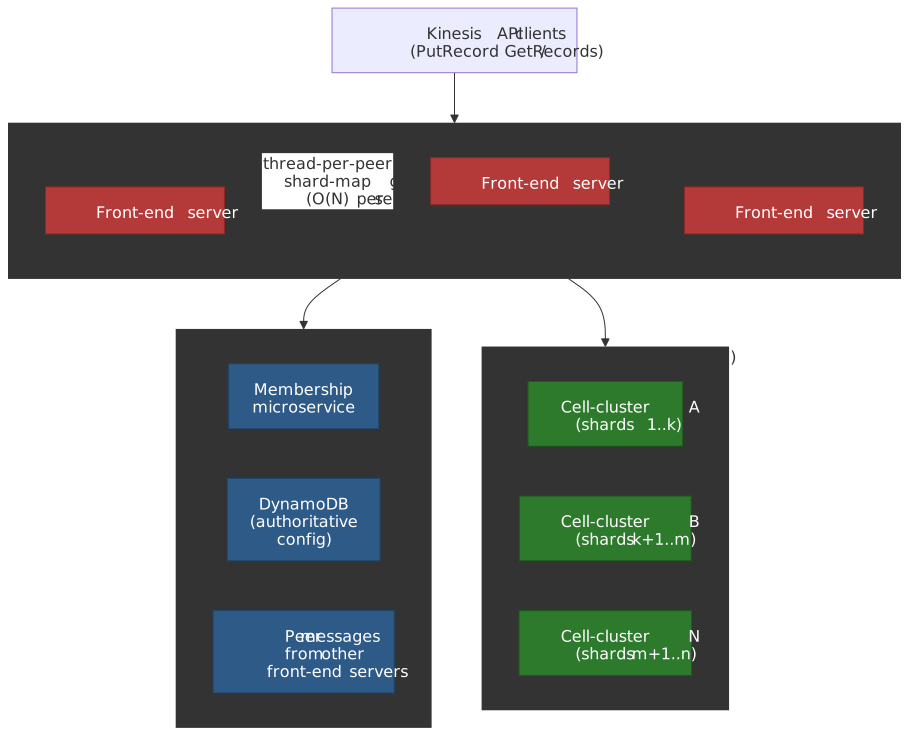
The shard-map cache on each front-end server is populated from three sources1:
- A microservice that vends fleet membership information
- DynamoDB for authoritative configuration
- Continuous processing of messages from other front-end servers (a gossip-like protocol)
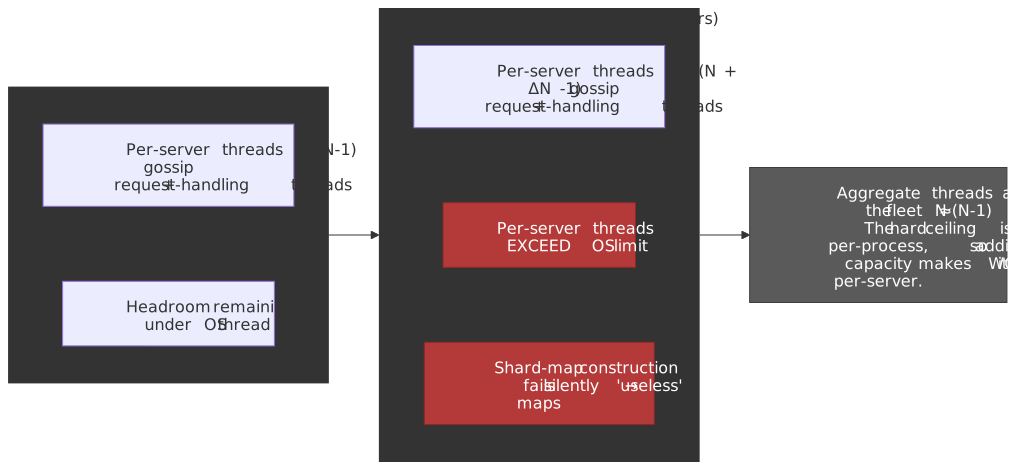
The critical architectural detail: each front-end server creates OS threads for each of the other servers in the front-end fleet1. This is used for the inter-server communication that propagates shard-map updates, cluster health information, and administrative changes. In a fleet of N servers, each server requires on the order of N-1 peer threads, plus threads for request processing and cache construction. AWS’s wording leaves the exact thread-per-peer count unspecified; what matters structurally is that per-server thread count grows with fleet size.
The Trigger
November 25, 2020, 2:44 AM PST: A “relatively small addition of capacity” to the Kinesis front-end fleet begins; the addition completes at 3:47 AM PST 1. AWS does not state the motivation; the day-before-Thanksgiving timing is suggestive but not confirmed. The capacity-addition mechanism itself is normal — what makes it the trigger (not the cause) is that existing front-end servers take “up to an hour” to learn of the new participants and start opening per-peer threads to them 1, so the thread pressure builds gradually after the new instances are online.
Constraints
- Fleet size: “Many thousands of servers” in the US-EAST-1 front-end fleet
- Thread scaling: Thread count per server scales linearly with fleet size (O(N) per server)
- Propagation time: New server discovery takes up to one hour to fully propagate
- Restart rate: Only “a few hundred servers per hour” can safely rejoin without triggering cascading failures
- Dependent services: CloudWatch, Lambda, Cognito, EventBridge, and dozens of others use Kinesis internally
The Problem
Symptoms
Between 3:47 AM and 5:15 AM PST, the newly added servers propagated through the fleet. As each existing server discovered new peers, it attempted to create additional OS threads. This pushed the total thread count on every front-end server past the maximum allowed by the operating system configuration.
When thread creation failed:
- Shard-map cache construction could not complete
- Front-end servers were left with incomplete (“useless”) shard-maps
- Servers could no longer route requests to the correct back-end clusters
- Kinesis put/get API calls began failing fleet-wide
At 5:15 AM PST, the first alarms fired for Kinesis read/write errors.
Incident Timeline
| Time (PST) | Event | Action |
|---|---|---|
| 2:44 AM | Capacity addition to front-end fleet begins | Automated routine operation |
| 3:47 AM | Capacity addition completes | — |
| ~3:47–5:15 AM | Thread limits exceeded; shard-map construction fails silently | Latent failure period—no alarms yet |
| 5:15 AM | First Kinesis error alarms fire; EventBridge begins experiencing API errors | Team paged |
| 6:15 AM | Lambda invocation errors begin (memory contention from CloudWatch metric buffering) | Investigation ongoing |
| 7:51 AM | Root cause narrowed to candidate set; full fleet restart determined necessary | Decision to restart |
| 9:39 AM | Root cause confirmed: OS thread limit exceeded on all front-end servers | ~4.5 hours after first alarm |
| 10:07 AM | First front-end servers successfully return to handling traffic | ~2 hours after restart decision |
| 10:15 AM | Cognito mitigation deployment begins | — |
| 10:36 AM | Lambda error rates resolved | — |
| 12:15 PM | Cognito shows significant improvement | — |
| 2:18 PM | Cognito returns to normal | ~9 hours after first alarm |
| 4:15 PM | Majority of ECS/EKS issues resolved | ~11 hours after first alarm |
| 5:47 PM | CloudWatch errors begin declining | — |
| 10:23 PM | Kinesis fully recovered | ~17 hours after first alarm |
| 10:31 PM | CloudWatch fully recovered; metric data backfill begins | — |
Root Cause Analysis
Investigation process:
- 5:15–7:51 AM: The team investigated multiple hypotheses. The shard-map construction failure was evident, but the underlying cause—thread exhaustion—was not immediately obvious because the symptoms (bad routing data) pointed to the cache layer, not the OS.
- 7:51 AM: The team narrowed the root cause to a set of candidates. Regardless of which candidate was correct, any likely cause would require a full restart of the front-end fleet. They made the decision to begin restarting.
- 9:39 AM: Root cause confirmed—the OS thread limit had been exceeded on every front-end server.
The actual root cause 1: the thread-per-peer inter-server messaging created O(N) thread usage per server. When N increased past a threshold where N-1 inter-server threads plus request-handling threads exceeded the OS-configured maximum, every server failed simultaneously. The failure was silent during the ~90-minute propagation window because shard-map construction degraded rather than crashing — servers ended up with “useless shard-maps” that left them unable to route requests, but processes themselves stayed alive 1.
Note
AWS uses the phrase “continuous processing of messages from other Kinesis front-end servers” rather than “gossip” in its post-event summary. The pattern is functionally gossip-like (every node communicates state with every other node, full mesh, O(N) per node), so this article uses gossip as the conventional term. The thread-per-peer detail is verbatim from AWS.
The Specific OS Thread Limit
AWS only described the cap as “the maximum number of threads allowed by an operating system configuration” without naming a value 1. On Linux, the relevant ceilings are:
/proc/sys/kernel/pid_max— caps the maximum PID value (and therefore the count of live tasks, since each thread consumes a PID). The kernel defaultPID_MAX_DEFAULTis 32,768; on 64-bit systems it can be raised up toPID_MAX_LIMIT(4,194,304) 2./proc/sys/kernel/threads-max— system-wide thread cap, derived from RAM at boot.ulimit -u(RLIMIT_NPROC) — per-user cap on processes/threads.- cgroup
pids.max— per-container cap if the fleet ran under cgroup v2 3.
The Downtime Project podcast and other community write-ups speculate the threshold was the default ~32K range; AWS has not confirmed which limit was hit. The precise number matters less than the structural property: any thread-per-peer design has a hard ceiling that grows closer as the fleet grows, and the ceiling is per-process, so adding capacity makes it worse per-server, not better.
Why It Wasn’t Obvious
- The capacity addition was small: This was not a dramatic change. The fleet was already near the thread limit; the addition simply crossed it.
- The failure was latent: Thread limits were exceeded during the ~90-minute gossip propagation window, not at the instant of the capacity change. The gap between cause and visible symptoms was ~2.5 hours.
- Shard-map failures were silent: Rather than crashing, servers produced incomplete routing data. This looked like a cache or metadata issue, not a thread exhaustion issue.
- The monitoring system was also affected: CloudWatch—the primary observability tool—depended on Kinesis, creating a partial blindness during investigation.
Detection Gap
Why it took ~2.5 hours to detect (2:44 AM trigger → 5:15 AM first alarm):
The capacity addition itself was a normal operation. The thread limit was exceeded gradually as gossip propagated. Shard-map construction degraded silently rather than failing loudly. The detection gap existed because:
- There was no alarm on per-server thread count approaching the OS limit
- Shard-map health monitoring did not alert on incomplete (but non-empty) maps
- The metric pipeline that would surface these signals was itself degrading
Detection improvements AWS committed to in the post-event summary 1:
- Fine-grained alarming on thread consumption inside the service
- Testing an increase in the OS thread limit configuration to add headroom
- Moving the front-end server cache to a dedicated fleet, and partitioning a few large internal customers (notably CloudWatch) onto their own front-end fleet so monitoring no longer shares fate with the rest of Kinesis
Recovery
Why Initial Recovery Was Difficult
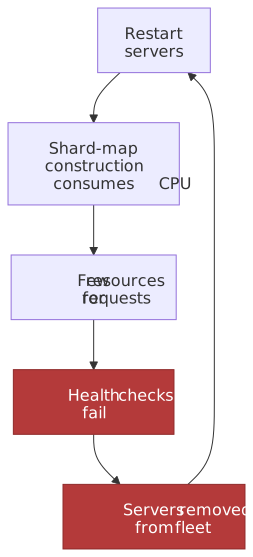
The recovery was constrained by a fundamental resource contention problem. On each front-end server, the resources used to construct the shard-map cache compete with the resources used to process incoming requests. When a server restarts:
- It must build a fresh shard-map by querying DynamoDB and communicating with peers
- While building the map, it must also handle incoming traffic
- If too many servers restart simultaneously, shard-map construction consumes most CPU and memory
- Servers that cannot process requests quickly enough are marked unhealthy by health checks
- Unhealthy servers are removed from the fleet
- This resets recovery progress—a classic thundering herd loop
Recovery Strategy
The team implemented a controlled, multi-step recovery 1:
- Rolled back the capacity addition — removing the new servers as a precaution well before root cause was confirmed, so that once restarts began, the fleet would already be back below the thread ceiling.
- Changed the metadata-fetching strategy — added a configuration so front-end servers fetched shard-map data directly from the authoritative metadata store during bootstrap, instead of relying on neighbor messages. This both speeds cold start and reduces inter-server thread pressure during the recovery window.
- Controlled rolling restart — brought servers back at “a few hundred per hour,” monitoring each batch so shard-map construction completed before adding more capacity. AWS does not publish the precise health-check thresholds, but the rate ceiling is what kept the recovery on a slow, monotonic path instead of a sawtooth.
- 10:07 AM PST: First servers successfully back on traffic (~2 hours 16 minutes after the 7:51 AM restart decision).
- Progressive improvement through the day: error rate “steadily dropping from noon onward.”
- 10:23 PM PST: Full Kinesis recovery — about 12.5 hours after restarts began.
The Instance Type Decision
In the post-event summary, AWS committed to “moving to larger CPU and memory servers, reducing the total number of servers and, hence, threads required by each server” 1. The mechanics of why this helps:
- Fewer total servers handle the same load → fewer peers to gossip with → fewer threads per server (linear win in N).
- Each server has more CPU/memory headroom → shard-map construction and request processing can coexist without contending for the same scarce resource.
- Combined effect: more headroom before hitting whichever OS thread ceiling was binding.
This is a useful short-term mitigation but it does not change the structural O(N²) aggregate property of the inter-server protocol — that requires cellularization, which AWS also committed to (see Corrective Actions in the lessons section).
Dependent Services Impact
The Kinesis outage revealed a hidden dependency graph across AWS. Services that used Kinesis internally — often for analytics, logging, or event routing — experienced cascading failures with distinct failure modes.
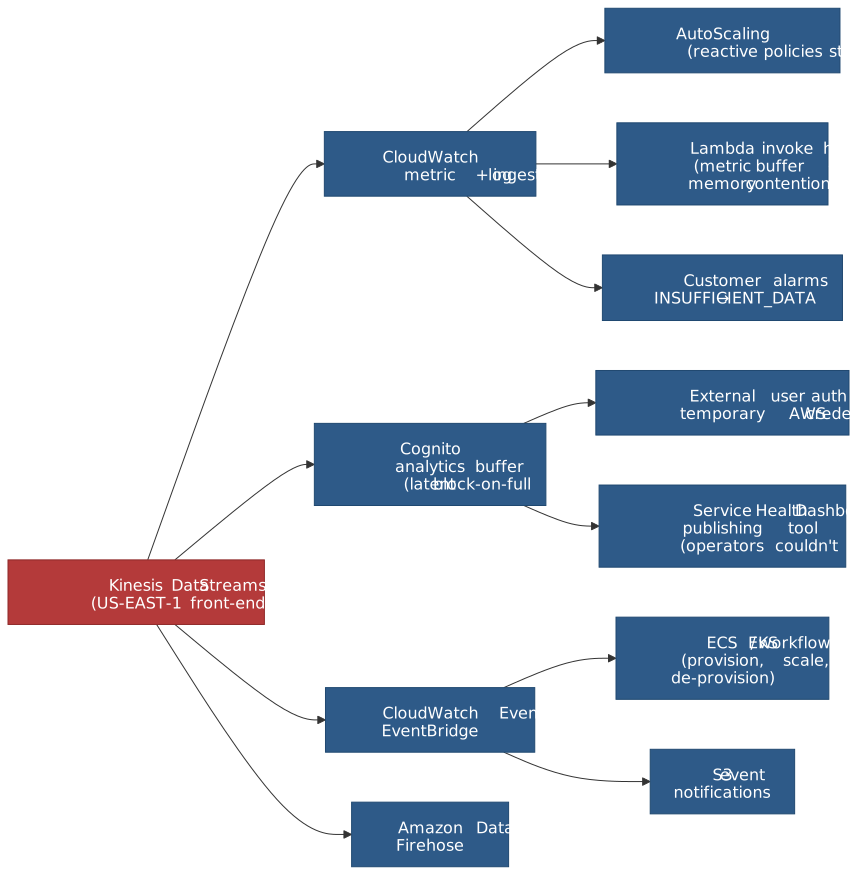
CloudWatch: The Monitoring System Goes Blind
How it depended on Kinesis: CloudWatch uses Kinesis Data Streams for “the processing of metric and log data” 1.
Impact 1:
PutMetricDataandPutLogEventsAPI calls returned elevated errors and latencies starting 5:15 AM PST.- CloudWatch Alarms transitioned to INSUFFICIENT_DATA because the vast majority of metrics could not be processed.
- Reactive AutoScaling policies that consumed CloudWatch metrics were delayed (they have nothing to react to until metrics resume flowing).
- “Internal and external clients were unable to persist all metric data” — visible to customers as gaps in their CloudWatch metrics for the duration.
The meta-irony: the system designed to detect failures was itself impaired by the failure. Operators had degraded ability to observe what was happening across their infrastructure during exactly the window when observability mattered most.
Recovery 1: early signs of recovery at 5:47 PM PST; full recovery (metrics + alarms) at 10:31 PM PST; delayed metric and log backfill completed in the subsequent hours.
Post-incident change 1: AWS deployed a 3-hour local metrics data store in US-EAST-1 (with global rollout planned at the time of the post-event summary) so CloudWatch users — and downstream consumers like AutoScaling — can read recent metric data directly from CloudWatch even when the Kinesis-backed pipeline is unavailable.
Cognito: The Latent Buffer Bug
How it depended on Kinesis: Amazon Cognito uses Kinesis Data Streams “to collect and analyze API access patterns” — explicitly framed as a best-effort, non-critical analytics path, with a local buffer designed to absorb latency or short outages of Kinesis 1.
The failure 1: a latent bug in that buffering code caused Cognito webservers to block on the backlogged buffers as the Kinesis outage extended. The result was elevated API failures and latencies on Cognito User Pools and Identity Pools, which prevented external users from authenticating or obtaining temporary AWS credentials. Initial Cognito mitigations (adding capacity to enlarge the buffer) helped briefly, but error rates increased significantly at 7:01 AM PST.
This is a textbook untested failsafe. The buffer was designed for Kinesis unavailability, but a prolonged, complete Kinesis failure had never been exercised. A simpler design that simply dropped analytics events on overflow would have kept authentication healthy.
Recovery 1: a Cognito-side change to reduce dependency on Kinesis began deploying at 10:15 AM PST; error rates significantly reduced by 12:15 PM PST; normal operations at 2:18 PM PST.
Post-incident change 1: Cognito webservers modified so they can sustain Kinesis API errors without exhausting their buffers.
Lambda: Memory Contention from Metric Buffering
How it depended on Kinesis: indirectly, through CloudWatch. Lambda function invocations require publishing metric data to CloudWatch as part of invocation. Lambda’s metric agents buffer that data locally if CloudWatch is unavailable 1.
The failure 1: as the Kinesis outage extended, that local buffering grew large enough to cause memory contention on the Lambda invocation hosts, crowding out function execution resources and producing elevated invocation errors starting at 6:15 AM PST.
Recovery 1: engineers mitigated the memory contention by 10:36 AM PST.
EventBridge: Event Processing Delays
How it depended on Kinesis 1: CloudWatch Events and EventBridge depend on Kinesis for the event-processing pipeline. Increased API errors and event delivery delays began at 5:15 AM PST. This cascaded into ECS and EKS, which use EventBridge to drive internal workflows for cluster provisioning, scaling, and task de-provisioning.
Recovery 1: the majority of ECS/EKS impact was resolved by 4:15 PM PST (~11 hours after the first errors).
The Service Health Dashboard: Can’t Report the Outage
How it depended on Kinesis: indirectly, through Cognito. The tool AWS operators use to post updates to the public Service Health Dashboard authenticates through Cognito 1. With Cognito impaired, operators could not post updates through the primary tool.
AWS already had a backup tool with minimal service dependencies, and it worked as expected — but it is “more manual and less familiar” to support operators, so updates through it were delayed 1. To bridge the gap, support used the Personal Health Dashboard to notify impacted customers directly and posted a global banner on the Service Health Dashboard.
Post-incident change 1: AWS changed support training so operators are regularly drilled on the backup Service Health Dashboard tool. The lesson here is not “build a backup tool” (one already existed) but “rehearse the backup tool so the team can use it under pressure.”
Other Affected Services
The following services reported degradation based on status page updates and third-party reporting:
| Service | Dependency Path |
|---|---|
| Amazon Data Firehose | Direct Kinesis dependency |
| AWS IoT Services | Reported to use Kinesis internally |
| Amazon S3 (event notifications) | EventBridge dependency |
| AWS CloudFormation | Multiple AWS API dependencies |
| Amazon Redshift | CloudWatch/logging dependencies |
| Amazon SageMaker | Multiple AWS service dependencies |
| AWS Glue | CloudWatch/logging dependencies |
| Amazon Workspaces | Cognito/authentication dependencies |
Lessons Learned
Technical Lessons
1. O(N²) Scaling Patterns Are Time Bombs
The insight: Any system where every node must connect to every other node creates O(N²) aggregate resource consumption. In Kinesis’s case, N servers each creating N-1 threads meant total thread count across the fleet was N×(N-1). This scales quadratically, but the limit is reached linearly on each individual server. As the fleet grows, the remaining headroom before hitting the per-server limit shrinks—and a “small” capacity addition can cross the threshold.
How it applies elsewhere:
- Service meshes with full-mesh connectivity between sidecar proxies
- Gossip protocols where every node communicates with every other node
- Coordination services (ZooKeeper, etcd) where leader election or consensus involves all participants
- Database connection pools where every application server holds a connection to every database node
Warning signs to watch for:
- Per-node resource consumption (threads, connections, file descriptors) that grows with cluster size
- Capacity additions that cause disproportionate resource growth on existing nodes
- Resource usage approaching OS or hardware limits that was “fine” at smaller scale
2. Untested Failsafes Are Worse Than No Failsafes
The insight: Cognito’s analytics buffer was explicitly designed for Kinesis unavailability. But because it was never tested against a prolonged, complete Kinesis failure, it contained a latent bug (blocking when full) that transformed a non-critical analytics dependency into a service-killing failure. A service without any buffer would have simply dropped analytics data and continued serving requests.
How it applies elsewhere:
- Circuit breakers that have never tripped in production
- Fallback code paths that have never been exercised under realistic conditions
- Graceful degradation logic that was code-reviewed but never chaos-tested
- Retry policies with backoff that have never been tested under sustained failure
Warning signs to watch for:
- Fallback paths that exist in code but have no production metrics (hit rate, latency, error rate)
- Dependencies classified as “non-critical” that have never actually been unavailable
- Buffer implementations without bounded capacity and non-blocking overflow behavior
3. Monitoring Must Not Depend on the Things It Monitors
The insight: CloudWatch’s dependency on Kinesis created a blindness loop—the system designed to detect failures was itself impaired by the failure. This delayed both detection and recovery for AWS internal teams and customers.
How it applies elsewhere:
- Application monitoring that routes through the same load balancers, networks, or services as production traffic
- Alerting systems that depend on the message queues they are supposed to monitor
- Health check infrastructure that shares fate with the services it checks
- Logging pipelines that fail silently when the services they log to are down
Warning signs to watch for:
- Your monitoring/alerting pipeline shares any infrastructure component with production services
- During past incidents, you noticed gaps in your observability data
- Your status page or incident communication tools authenticate through production services
4. Cell-Based Architecture Contains Blast Radius
The insight: Kinesis’s back-end was already cellularized and survived the incident. The front-end was monolithic—every server connected to every other server—so the failure was fleet-wide. Cellularization would have bounded the failure to a single cell, affecting only a fraction of traffic.
How it applies elsewhere:
- Any stateless fleet where every node must know about every other node
- Services where a configuration change or deployment rolls across the entire fleet simultaneously
- Systems where a single bad deployment or configuration can affect 100% of capacity
5. Control Plane Operations Must Not Take Down the Data Plane
The insight: A capacity change (control plane operation) brought down request processing (data plane). The control plane and data plane shared the same OS-level resources (threads). Strict separation—where control plane operations cannot exhaust data plane resources—would have prevented the outage.
How it applies elsewhere:
- Any service where administrative operations (scaling, configuration, deployment) run on the same instances as request processing
- Database systems where schema changes or replication can starve query processing
- Message queues where topic creation or partition rebalancing affects message delivery
Process Lessons
1. Know Your Recovery Rate Before You Need It
What happened: The Kinesis team knew that a full fleet restart was possible but slow. The actual rate—a few hundred servers per hour in a fleet of many thousands—meant recovery took 12+ hours from the point of decision.
What this means: For any large stateful fleet, calculate the worst-case recovery time. If it is unacceptable (as 12+ hours would be for most teams), invest in faster cold-start procedures, dedicated cache warming infrastructure, or smaller blast radius through cellularization before the incident occurs.
2. Status Communication Infrastructure Must Be Independent
What happened: The Service Health Dashboard could not be updated because its publishing tool depended on Cognito, which depended on Kinesis. The backup tool existed but was unfamiliar to operators.
What this means: Test your incident communication tools during gamedays. Ensure they have zero dependency on the services they report on. Drill operators on backup procedures regularly.
Applying This to Your System
When This Pattern Applies
You might face similar challenges if:
- Your service uses a full-mesh communication pattern (every node connects to every other node)
- Your per-node resource consumption (threads, connections, file descriptors) scales with cluster size
- Your monitoring depends on the same infrastructure as your production services
- You have fallback or degradation code paths that have never been tested under prolonged failure
- Your control plane and data plane share resources on the same instances
Checklist for Evaluation
- Map your service’s per-node resource usage and how it scales with cluster size
- Identify per-node resource limits (OS thread limits, file descriptor limits, connection pool maximums) and current headroom
- Trace your monitoring pipeline’s dependencies—does it share fate with production?
- Identify all “non-critical” dependencies and test what happens when each is unavailable for 1+ hours
- Calculate worst-case fleet restart time and whether it meets your Recovery Time Objective (RTO)
- Verify your incident communication tools work when your core services are down
- Test your circuit breakers and fallback paths under sustained (not transient) failure
Starting Points
If you want to evaluate your risk:
- Audit per-node scaling: For each service, plot per-node resource consumption (threads, connections, memory) against cluster size. If any resource grows linearly with cluster size, you have an O(N²) aggregate pattern.
- Test your failsafes: Run a gameday where a “non-critical” dependency is unavailable for 2+ hours. Observe whether graceful degradation actually works or whether it blocks, leaks, or crashes.
- Map monitoring dependencies: Draw the dependency graph for your monitoring and alerting pipeline. Any shared node with production is a blind-spot risk.
- Measure cold-start time: Restart a single instance of your service and measure time-to-healthy. Multiply by fleet size divided by safe restart batch size. That is your worst-case recovery time.
Conclusion
The 2020 Kinesis outage is a study in how latent architectural decisions compound into systemic failures. The thread-per-peer gossip protocol was a reasonable design at smaller fleet sizes. The monolithic front-end fleet was simpler to operate than a cellularized one. Cognito’s analytics buffer was a thoughtful attempt at graceful degradation. CloudWatch’s use of Kinesis for metric ingestion was an efficient architectural choice.
Each decision was defensible in isolation. Together, they created a system where a small capacity addition could exceed a thread limit, collapse an entire fleet, blind the monitoring system, block an authentication service, and prevent operators from even posting status updates—all in a single correlated failure.
The transferable insight is not about thread limits or gossip protocols specifically. It is about recognizing when independently reasonable design choices create hidden coupling: O(N²) resource patterns that approach hard limits, monitoring that shares fate with production, failsafes that have never been tested under realistic failure, and recovery procedures that take longer than anyone has planned for. These patterns exist in most large systems. The question is whether you find them before a capacity change does.
Appendix
Prerequisites
- Understanding of distributed systems concepts (gossip protocols, shard-based partitioning, fleet management)
- Familiarity with OS-level resource limits (thread limits, process limits, file descriptors)
- Knowledge of cascading failure patterns (thundering herd, resource contention, correlated failures)
- Basic understanding of AWS service architecture (Kinesis, CloudWatch, Lambda, Cognito)
Terminology
| Term | Definition |
|---|---|
| Shard-map cache | A per-server routing table in Kinesis front-end servers containing fleet membership, shard ownership, and back-end health data |
| Front-end fleet | The layer of Kinesis servers that handle authentication, throttling, and request routing to back-end clusters |
| Gossip protocol | A peer-to-peer communication pattern where each node exchanges state with other nodes to propagate updates across the fleet |
| Cell-based architecture | A pattern where infrastructure is divided into independent cells (sub-fleets), each serving a subset of traffic, to contain blast radius |
| Thundering herd | A failure pattern where many processes simultaneously attempt the same resource-intensive operation, causing contention that prevents any of them from succeeding |
| Control plane | The management layer responsible for configuration, scaling, and orchestration (as opposed to the data plane that handles actual requests) |
| Data plane | The layer that processes actual customer requests (as opposed to the control plane that manages the system) |
| O(N²) scaling | A growth pattern where aggregate resource consumption grows quadratically with the number of nodes—common in full-mesh communication topologies |
| RLIMIT_NPROC | A Linux resource limit that caps the maximum number of processes (and threads) a user can create |
| pid_max | A Linux kernel parameter (/proc/sys/kernel/pid_max) that sets the maximum PID value, effectively capping the total number of concurrent processes/threads |
Summary
- A routine capacity addition to the Kinesis front-end fleet pushed per-server OS thread counts past the configured limit, because the gossip protocol created one thread per peer (O(N) per server, O(N²) aggregate)
- Every front-end server failed simultaneously—the fleet was monolithic (not cellularized), so there was no blast radius containment
- Recovery took ~17 hours because restarting servers too quickly triggered thundering herd effects: shard-map construction starved request processing, health checks failed, and servers were removed faster than they could rejoin
- CloudWatch depended on Kinesis for metric ingestion, creating a monitoring blind spot during the incident; Cognito’s untested buffer bug blocked authentication; the Service Health Dashboard could not post updates because it authenticated through Cognito
- AWS committed to cellularizing the front-end fleet, moving to larger CPU/memory servers, adding fine-grained thread alarming, partitioning CloudWatch (and other large internal customers) onto a separate front-end fleet, and persisting 3 hours of CloudWatch metrics locally so monitoring no longer shares fate with Kinesis 1
References
- Summary of the Amazon Kinesis Event in the Northern Virginia (US-EAST-1) Region — AWS Official Post-Event Summary, November 2020. Primary source for all timeline, root cause, and corrective action details.
- AWS Post-Event Summaries — AWS index of all public post-event summaries.
- Guidance for Cell-Based Architecture on AWS — AWS architectural guidance directly influenced by lessons from this and similar incidents.
- Lessons from the AWS Kinesis Outage — Evan Jones. Analysis of O(N²) scaling, recovery constraints, and Cognito’s untested failsafe.
- AWS Kinesis Outage — LinuxCzar. Analysis of Linux kernel thread limits and symptom-based vs. cause-based alerting.
- Kinesis Hits the Thread Limit — The Downtime Project podcast. Detailed architectural reconstruction of the gossip protocol and thread model.
- AWS Kinesis Outage Analysis — Ryan Frantz. Analysis of dependency chains and the coupling of CloudWatch with EventBridge.
- AWS reveals it broke itself by exceeding OS thread limits — The Register. Reporting on the AWS postmortem with customer impact context.
- AWS admits to ‘severely impaired’ services in US-EAST-1 — The Register. Day-of reporting with affected service list and customer impact.
Footnotes
-
Summary of the Amazon Kinesis Event in the Northern Virginia (US-EAST-1) Region — AWS official post-event summary, November 2020. Authoritative source for every timestamp, root cause, and corrective action in this article. ↩ ↩2 ↩3 ↩4 ↩5 ↩6 ↩7 ↩8 ↩9 ↩10 ↩11 ↩12 ↩13 ↩14 ↩15 ↩16 ↩17 ↩18 ↩19 ↩20 ↩21 ↩22 ↩23 ↩24 ↩25 ↩26 ↩27 ↩28 ↩29
-
proc(5)—/proc/sys/kernel/pid_max, Linux man-pages. DocumentsPID_MAX_DEFAULT(32,768) and thePID_MAX_LIMITof 4,194,304 on 64-bit platforms. ↩ -
Linux kernel — Process Number Controller (
pids). Thepids.maxinterface caps the number of tasks (processes + threads) per cgroup. ↩