Design System Implementation and Scaling
Technical implementation patterns for building, migrating, and operating design systems at enterprise scale. This article assumes governance and strategic alignment are in place (see Design System Adoption: Foundations and Governance) and focuses on the engineering decisions that determine whether a design system thrives or becomes technical debt.
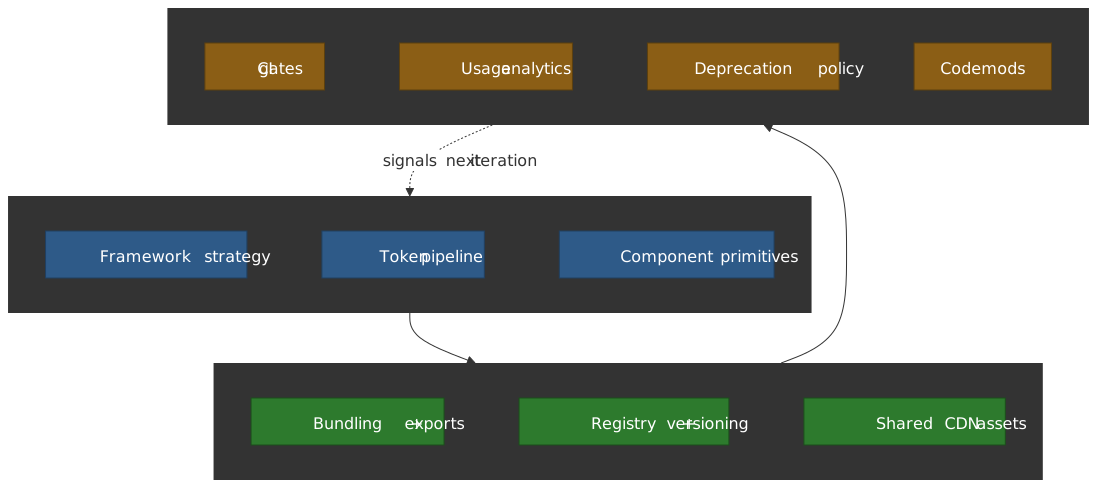
Abstract
Design system implementation succeeds when three forces align: architecture that anticipates change, distribution that minimizes friction, and operations that treat the system as a product.
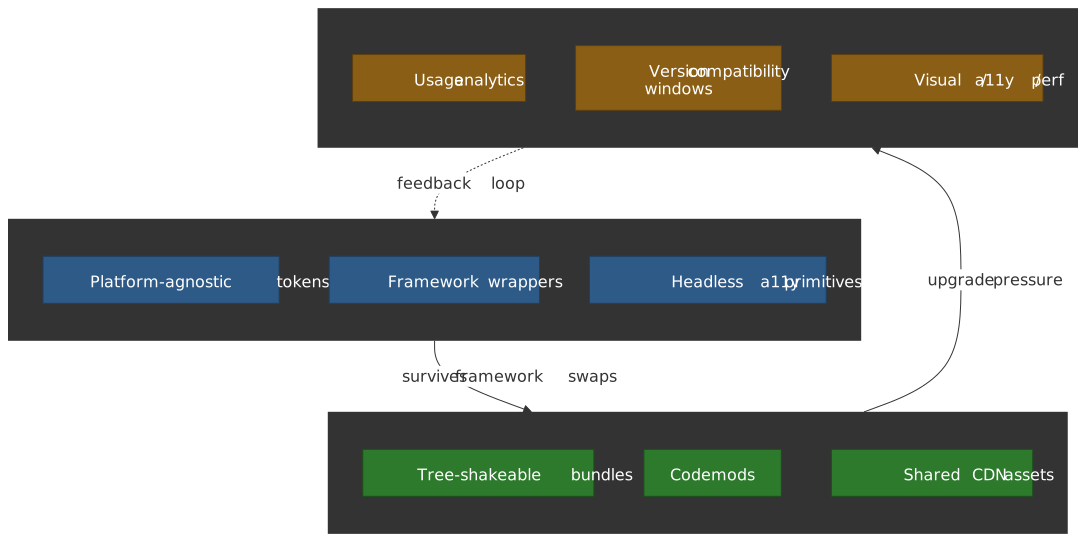
Architecture: The hybrid approach—platform-agnostic tokens with framework-specific component wrappers—survives technology shifts. React Server Components (RSC) compatibility, headless accessibility primitives (Radix, React Aria), and tree-shakeable bundles are table stakes for 2025+.
Distribution: Codemods transform major version upgrades from multi-sprint projects to single-command operations. Repository scanning reveals adoption patterns that documentation alone cannot surface. Shared CDN hosting eliminates duplicate asset downloads across applications.
Operations: Version compatibility windows (all apps within N minor versions) create upgrade pressure without breaking stability. Usage analytics—which components, which props, which overrides—drive prioritization better than feature requests.
Technical Architecture and Implementation
Making Architectural Decisions
The architectural foundation determines the long-term viability of your design system. You must decide whether to build framework-specific or framework-agnostic components, how to handle multiple frontend technologies across the organization, what migration strategy applies to existing applications, and how to ensure backward compatibility as the system evolves.
Architecture Strategy Comparison
| Approach | Pros | Cons |
|---|---|---|
| Framework-Specific (React, Angular, Vue) | Better developer experience, seamless integration | Vendor lock-in, maintenance overhead, framework dependency |
| Framework-Agnostic (Web Components) | Future-proof, technology-agnostic, single codebase | Steeper learning curve, limited ecosystem integration |
| Hybrid | Best of both worlds, flexibility | More complexity to manage |
The Hybrid Approach often provides the best balance for organizations with diverse technology stacks. Design tokens and principles remain platform-agnostic, serving as the single source of truth. Framework-specific component wrappers consume these tokens and implement interaction patterns optimized for each framework. This approach maintains a shared design language across platforms while delivering the developer experience teams expect.
Measuring Architecture Success
Integration Complexity measures the time required to integrate components into existing projects—high complexity indicates the architecture doesn’t match how teams actually work. Performance Impact tracks bundle size and runtime performance; a design system that bloats bundles or slows rendering will face adoption resistance. Browser Compatibility through cross-browser testing results ensures the system works across your supported browser matrix. Developer Experience measured as time to implement common patterns reveals whether the architecture accelerates or impedes development.
Architecture Decision Timeline
Make architectural decisions before any component development begins—changing architecture later requires extensive rework. Prototype both framework-specific and framework-agnostic approaches with a small team to understand the real trade-offs in your context. Validate decisions with 2-3 pilot projects before committing; theoretical advantages often don’t survive contact with production requirements.
Design Token Strategy
Design tokens encode design decisions as platform-agnostic data. For comprehensive coverage of token taxonomy, naming conventions, theming architecture, and governance, see Design Tokens and Theming Architecture. This section focuses on implementation decisions specific to scaling.
Industry Standard: DTCG Specification (2025.10)
The W3C Design Tokens Community Group (DTCG) reached its first stable version, 2025.10, on 28 October 2025, published as a Final Community Group Report. It is not a W3C Recommendation, but it is now stable enough that subsequent updates will arrive as superseding specifications rather than churn inside this version. Over 20 organizations—including Adobe, Amazon, Google, Microsoft, Meta, Figma, Salesforce, and Shopify—contributed to it.
Why DTCG matters for implementation: The specification standardizes the JSON format with $value, $type, and $description properties, plus modern color spaces (Oklch, Display P3) and richer relationships. Tools like Style Dictionary v4, Tokens Studio, and Terrazzo (formerly Cobalt UI) support DTCG natively, enabling interoperability between design tools and development pipelines without custom transformation logic.
The end-to-end theming pipeline
The pipeline that survives organizational scale has a single design source, a single interchange format, and a build engine per platform — not bespoke per-app conversions:
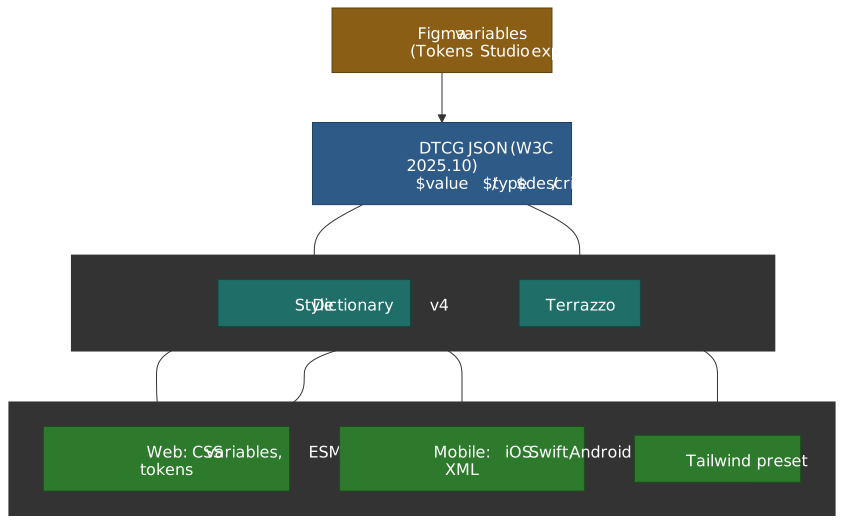
DTCG is the load-bearing edge — it lets the design source (Figma variables, Tokens Studio, hand-authored JSON) and the build engine (Style Dictionary, Terrazzo) evolve independently. Treat anything that doesn’t read or write DTCG as a temporary adapter, not a long-lived dependency.
Choosing a build engine
| Engine | Best for | Trade-off |
|---|---|---|
| Style Dictionary v4 | Multi-platform pipelines (iOS, Android, web) with mature transforms | DTCG support landed in v4; full 2025.10 parity tracked for v5 |
| Terrazzo | DTCG-native projects; Tailwind preset emission; web-first stacks | Smaller plugin ecosystem; no first-party iOS/Android targets yet — pair with Style Dictionary if you need both |
For most multi-platform organizations, Style Dictionary remains the default; bring in Terrazzo for the web side when you want a build that’s literally the spec rather than an adapter on top of it.
Token Transformation with Style Dictionary v4
Style Dictionary v4 is the industry-standard build system for design tokens. The v4 migration guide lists the breaking changes; the ones that matter for a multi-platform pipeline:
| Change | v3 Behavior | v4 Behavior | Why It Matters |
|---|---|---|---|
| Format | Custom value/type properties |
First-class DTCG $value/$type support |
Tool interoperability |
| CTI Coupling | Hard-coded Category-Type-Item structure | Driven by $type instead |
Flexible naming |
| Transforms | Limited chaining | Transitive transforms resolve alias chains | Multi-hop semantic aliases |
| Module shape | CommonJS, sync extend() API |
ESM rewrite, new StyleDictionary(cfg), async buildAllPlatforms() |
Browser-compatible builds |
| Hooks | Loose registration on the constructor | Grouped under hooks.{transforms,formats,actions} |
Strict typing, plugin DX |
// Style Dictionary v4 configuration with DTCG supportimport StyleDictionary from "style-dictionary"export default { source: ["tokens/**/*.json"], platforms: { css: { transformGroup: "css", buildPath: "dist/css/", files: [ { destination: "variables.css", format: "css/variables", options: { outputReferences: true }, // Preserve aliases: --color-action: var(--color-blue-500) }, ], }, js: { transformGroup: "js", buildPath: "dist/js/", files: [{ destination: "tokens.mjs", format: "javascript/esm" }], }, // iOS and Android configurations ios: { transformGroup: "ios-swift", buildPath: "dist/ios/", files: [{ destination: "Tokens.swift", format: "ios-swift/class.swift" }], }, android: { transformGroup: "android", buildPath: "dist/android/", files: [{ destination: "tokens.xml", format: "android/resources" }], }, },}Three-Tier Token Architecture:
| Tier | Purpose | Example | When to Add |
|---|---|---|---|
| Primitives | Raw values defining what styles exist | color-blue-500: #0070f3 |
Always (foundation) |
| Semantics | Intent-based mappings | color-action-primary: {color.blue.500} |
Always (enables theming) |
| Components | Element-specific bindings | button-background: {color.action.primary} |
Only for multi-brand/white-label |
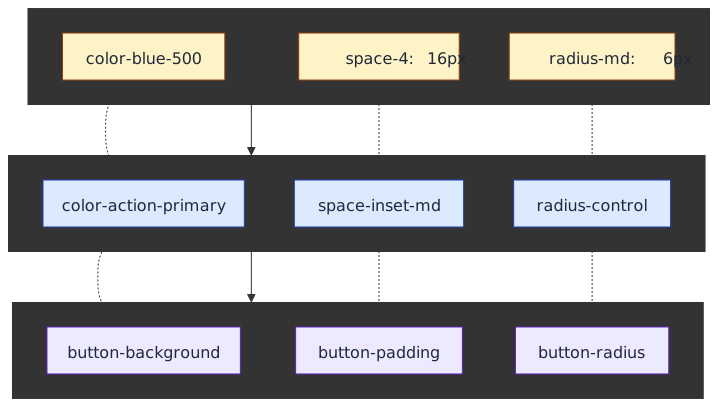
Design reasoning: Most systems operate well with primitives and semantic tokens alone. Component tokens multiply maintenance overhead—a 200-token semantic layer can balloon to 2000+ once every component variant gets its own bindings. Only introduce the third tier when multi-brand theming or white-labeling requires granular per-component customization.
Measuring Token Effectiveness
| Metric | Target | Why It Matters |
|---|---|---|
| Token Coverage | >90% of UI | Below 90% indicates adoption gaps or missing tokens |
| Theme Count | ≥2 functional themes | Validates the token architecture actually enables theming |
| Build Time | <10s for full rebuild | Slow builds discourage iteration and CI feedback |
Component Library Implementation
Building the component library is where architectural decisions meet production reality. For comprehensive coverage of API design patterns, versioning, and governance workflows, see Component Library Architecture and Governance. This section focuses on implementation decisions specific to scaling.
React-Based Component Architecture (2025+)
React remains the dominant choice for design system component libraries, with TypeScript as the expected baseline. Three architectural decisions dominate the 2025+ landscape:
1. Headless Accessibility Primitives
Building accessible components from scratch is expensive and error-prone. The pragmatic choice is standing on the shoulders of accessibility experts:
| Library | Approach | Best For |
|---|---|---|
| Radix UI | Unstyled primitives + optional Radix Themes | Teams wanting maximum styling control |
| React Aria | Hooks + opinionated components (react-aria-components) |
Complex ARIA patterns, internationalization, RTL |
| Headless UI | Tailwind-aligned components | Tailwind-native teams that want a small primitive surface |
All three are popular enough that adoption risk is low (Radix Primitives reports 130M+ monthly npm downloads and React Aria/Headless UI both sit in the millions per week per their npm pages). The interesting axis is not download count but accessibility coverage and API shape.
Design reasoning: These libraries handle focus management, keyboard navigation, and ARIA attributes correctly. Package surfaces and higher-level wrappers change over time (Radix has split into radix-ui plus the granular @radix-ui/react-* packages; React Aria added react-aria-components on top of the original hooks), so standardize on the accessibility contract you need and verify the current import guidance before locking tooling around a specific vendor package layout.
2. React Server Components Compatibility
RSC and the App Router became the default in Next.js 15 (stable, October 2024) and now ship on top of stable React 19. Design systems must consider the server/client boundary explicitly:
// Stateful wrappers live behind an explicit client boundary.// Keep the server-safe primitives and markup separate from interactive behavior."use client"import { useState } from "react"import { Button } from "@company/design-system/button"export function InteractiveButton({ children, ...props }) { const [loading, setLoading] = useState(false) return <Button {...props}>{loading ? "Loading..." : children}</Button>}Why RSC matters: RSC-compatible design systems can reduce client bundle size materially in content-heavy applications, but the payoff depends on how much logic stays in server components versus interactive client boundaries. Treat bundle savings as an application-specific measurement problem, not a guaranteed percentage.
Tip
2025+ trend: The shadcn/ui model — a CLI copies component source into your repo instead of installing a package — gives consumers maximum tree-shaking, minimal bundle size, and full control over the server/client split. The shadcn docs explicitly position it as a “code distribution platform, not a component library.” Consider offering both npm-distributed components for stable primitives and copy-paste recipes for higher-level patterns where consumers will want to fork.
3. Component API Design
Compound components solve the “prop explosion” problem. Export both the compound pattern and convenient presets:
// Compound pattern for flexibilityimport { Dialog as RadixDialog } from '@radix-ui/react-dialog';// Re-export with consistent namingexport const Dialog = { Root: RadixDialog.Root, Trigger: RadixDialog.Trigger, Portal: RadixDialog.Portal, Overlay: styled(RadixDialog.Overlay, overlayStyles), Content: styled(RadixDialog.Content, contentStyles), Title: RadixDialog.Title, Description: RadixDialog.Description, Close: RadixDialog.Close,};// Convenient preset for simple use casesexport function ConfirmDialog({ title, description, onConfirm, onCancel }) { return ( <Dialog.Root> {/* Pre-composed structure */} </Dialog.Root> );}Storybook 8+ for Documentation and Development
Storybook 8 (released March 2024, with 8.x updates through 2025) is the standard development environment for design systems. Key features for implementation:
| Feature | Benefit | Configuration |
|---|---|---|
| Visual Tests Addon | Storybook-native visual regression workflows | @chromatic-com/storybook |
| RSC Support | Framework-specific integration is improving | Next.js framework only |
| Autodocs | Faster API-page generation from component metadata | tags: ['autodocs'] |
| Test Builds | Faster CI on supported builders | SWC support for Webpack |
import type { StorybookConfig } from "@storybook/react-vite"const config: StorybookConfig = { stories: ["../src/**/*.stories.@(ts|tsx)"], addons: [ "@storybook/addon-essentials", "@storybook/addon-a11y", // Automated accessibility checks "@storybook/addon-interactions", // Interactive testing "@chromatic-com/storybook", // Visual regression (Storybook 8+) ], framework: "@storybook/react-vite", docs: { autodocs: "tag" },}export default configStory Organization for Scale
Organize stories by function (Forms, Navigation, Feedback) rather than implementation detail. Each component needs four story types:
- Default: Typical usage with sensible props
- Variants: All visual variants side-by-side
- Interactive: Controls for all props (auto-generated with autodocs)
- Edge Cases: Loading states, error states, boundary conditions
Visual Regression Testing Trade-offs
| Tool | Commercial Model | Key Differentiator |
|---|---|---|
| Chromatic | Usage-based commercial SaaS | Git-based baselines, Storybook-native |
| Percy | Usage-based commercial SaaS | Cross-browser screenshot comparison |
Design reasoning: Chromatic’s Git-based baseline management means baselines persist through branches and merges like code changes. Percy is strongest when you need broader page-level and browser-matrix coverage. Choose based on workflow shape, not a snapshot-price spreadsheet that will drift.
Real-World Example: SWAN’s Documentation Excellence
Vista’s SWAN documentation site demonstrates enterprise-grade practices:
- Versioned deployments: Every release (major, minor, patch) gets its own Storybook deployment
- React-Live integration: Editable code examples that users can modify and share—enabling live reproductions for support
- Accessibility documentation: Keyboard interactions, ARIA attributes, and screen reader behavior per component
Monorepo Tooling and Package Topology
Before talking bundle output, decide how the source repository is structured and what shape of package the consuming apps depend on. These two decisions interact: per-component packages don’t pay off without monorepo task graph caching, and a single package over a large surface punishes consumers who only need one button.
Picking a monorepo orchestrator
| Tool | Best fit | Caveats |
|---|---|---|
| Turborepo | Frontend-heavy monorepos (≤ ~50 packages) that want minimal config and fast onboarding; remote caching via Vercel | Less opinionated about generators, lint boundaries, and release; expect to glue Changesets in yourself |
| Nx | Larger JS/TS monorepos that need affected-graph CI, generators, ESLint module boundaries, and an integrated nx release flow |
Heavier learning curve and more conventions; the ecosystem assumes Nx-shaped layouts |
| Bazel / Pants | Polyglot monorepos already standardized on Bazel/Pants for backend; reproducible, hermetic builds at very large scale | Bazel JS support is via rules_js and still less ergonomic than Nx/Turborepo; only justified when you already pay this tax for other languages |
The non-obvious part: remote caching is the win, not the orchestrator brand. Without remote caching, CI re-runs every test for every package on every PR, and the design system becomes the slowest pipeline in the org. With remote cache, an unaffected Button package returns its previous result in seconds. Turborepo Remote Cache, Nx Cloud, and Bazel’s Remote Cache API all do the same job; pick the one that integrates with your existing CI provider.
Picking a package topology
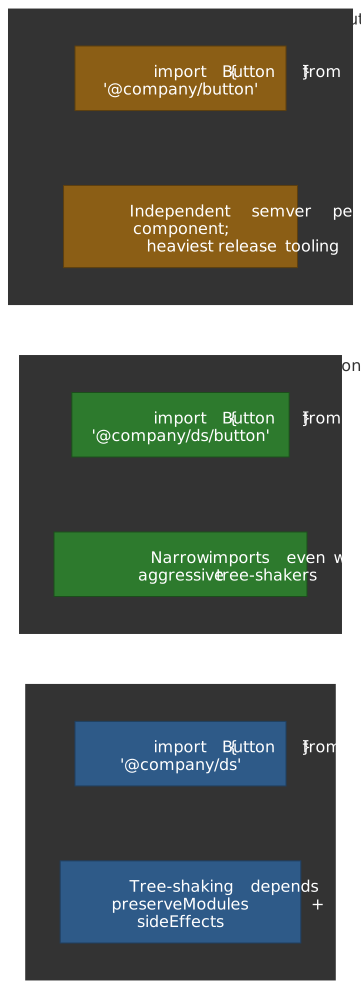
| Topology | Consumer import | Release tooling | When it fits |
|---|---|---|---|
| Single package | import { Button } from '@company/ds' |
One package.json, one version |
Small libraries (≲ 30 components) where every version bumps in lockstep is acceptable |
| Single package + subpath exports | import { Button } from '@company/ds/button' |
One package.json, one version, narrower entry points |
The pragmatic default — full tree-shaking even for consumers with naive bundlers, single SemVer line |
| Per-component packages | import { Button } from '@company/button' |
One package.json per component, independent versions, Changesets shines here |
Very large libraries, multi-team contribution, and consumers that pin individual components for regulatory or perf reasons |
Subpath exports are the sweet spot for most teams: you keep one version line (so Changesets and Storybook stay simple) but consumers only pay for what they import, and the public API surface is encoded in the exports map rather than in a build-time tree-shake heuristic. Reach for per-component packages only after you can justify the release-tooling tax — typically when you have 80+ components or independent contribution teams that want to ship at different cadences.
Bundling and Package Distribution
How you bundle and distribute your design system determines the consumption experience for every team in the organization. Poor bundling decisions create friction that compounds across dozens of consuming applications.
Build Tool Selection
For design system libraries, Rollup remains the gold standard for production builds due to its excellent tree-shaking and clean output. Vite, which uses Rollup internally for production builds, provides a superior development experience with near-instant hot module replacement. The recommended approach is Vite for development with Rollup for production via Vite’s library mode.
import { defineConfig } from "vite"import react from "@vitejs/plugin-react"import dts from "vite-plugin-dts"import { resolve } from "path"export default defineConfig({ plugins: [react(), dts({ rollupTypes: true })], build: { lib: { entry: resolve(__dirname, "src/index.ts"), formats: ["es", "cjs"], fileName: (format) => `index.${format === "es" ? "mjs" : "cjs"}`, }, rollupOptions: { external: ["react", "react-dom", "react/jsx-runtime"], output: { preserveModules: true, // Enable tree-shaking preserveModulesRoot: "src", }, }, },})Output Format Strategy
Publish both ESM (.mjs) and CommonJS (.cjs) formats for maximum compatibility. ESM enables tree-shaking in modern bundlers, while CommonJS supports legacy toolchains and Node.js scripts. Configure package.json exports to direct consumers to the appropriate format automatically:
{ "name": "@company/design-system", "type": "module", "main": "./dist/index.cjs", "module": "./dist/index.mjs", "types": "./dist/index.d.ts", "exports": { ".": { "import": "./dist/index.mjs", "require": "./dist/index.cjs", "types": "./dist/index.d.ts" }, "./styles.css": "./dist/styles.css" }, "sideEffects": ["*.css"]}CSS Strategy
For CSS, you have three viable approaches. Bundled CSS ships a single CSS file that consumers import; this is simple but prevents tree-shaking of unused styles. CSS-in-JS (styled-components, Emotion) bundles styles with components for automatic tree-shaking but adds runtime overhead. CSS Modules with build-time extraction (vanilla-extract, Linaria) provides tree-shaking without runtime cost but requires compatible build tooling in consuming apps.
For most organizations, bundled CSS with explicit CSS cascade layers (@layer reset, tokens, components, utilities) provides the best balance of simplicity and maintainability — consumers can predictably override your styles by writing into a higher layer instead of fighting specificity. Sophisticated teams with homogeneous build tooling can graduate to build-time CSS extraction once layer ordering alone stops scaling.
NPM Package Publishing
Publishing to npm (or a private registry) makes your design system a first-class dependency with versioning, changelogs, and predictable updates.
Versioning with Changesets
Changesets provides the workflow design systems need: contributors describe each change at PR time as a small markdown file, the bot batches accumulated changesets into a “Version Packages” PR, and merging that PR bumps versions, regenerates changelogs, and publishes. Unlike semantic-release (which publishes on every merge to the release branch), Changesets lets you hold changes until you’re ready to cut a coordinated release — valuable when several related component updates should land as one minor version.
# Developer runs this when making changesnpx changeset# CI creates a "Version Packages" PR when changesets accumulate# Merging that PR publishes to npmFollow semantic versioning strictly: major versions for breaking changes, minor for new features, patch for bug fixes. Design systems have many consumers, so breaking changes are expensive; invest in backward compatibility and migration codemods.
Registry and Access Control
For internal design systems, publish to a private npm registry (npm Enterprise, Artifactory, Verdaccio). This provides access control, audit logs, and independence from npm’s public infrastructure. Configure CI to publish automatically on release merges, requiring no manual steps.
Dependency Management
Mark React and other framework dependencies as peerDependencies so they aren’t installed twice and so the consuming app’s React is the one that actually runs. Be explicit about version ranges — too loose allows incompatible majors, too strict creates upgrade friction for consumers. Document the tested version matrix clearly, and use peerDependenciesMeta.optional for peers that aren’t strictly required (e.g., framer-motion for an animated subset).
Build, Test, and Release Pipeline
Treat the CI pipeline as part of the public contract. Consumers learn what your guarantees are by watching what your CI catches and what it lets through.
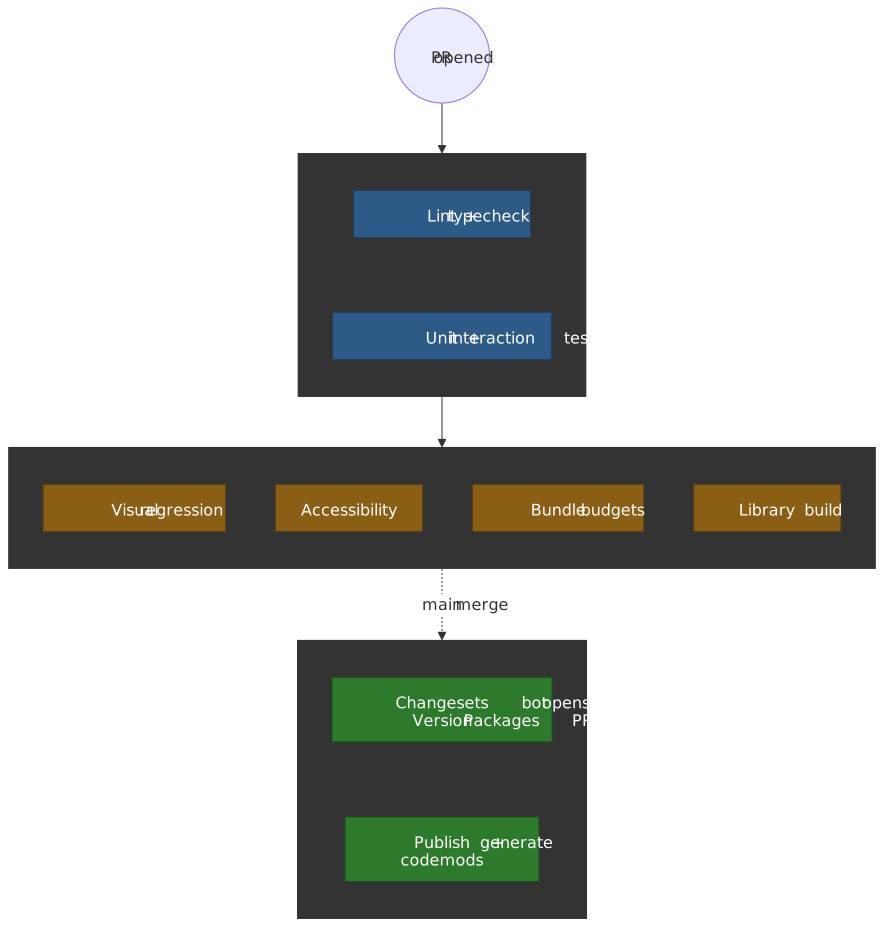
Pipeline shape that scales
- Fast feedback first. Lint, typecheck, and unit/interaction tests must finish in under two minutes for any reasonable design system. Slow first stages force contributors to context-switch and erode contribution rates.
- Quality gates run in parallel. Visual regression, accessibility, bundle budgets, and the actual library build don’t depend on each other; running them sequentially wastes wall-clock time the team already paid for in compute.
- Release is one path, not many. Changesets bot opens a single “Version Packages” PR; merging it is the only way to publish. No “manual hotfix release” backdoor — those become the norm if you let them exist.
- Cache aggressively. With Nx Cloud / Turborepo Remote Cache / Bazel remote cache, an unaffected package’s tests should restore from cache in seconds. Without that, your CI cost grows linearly with package count.
Visual Regression Testing
Storybook 8 introduced first-class visual testing via the @chromatic-com/storybook addon, and Playwright’s toHaveScreenshot matured into a credible self-hosted alternative. The choice is now mostly about who runs the renderer, not whether visual testing is worth it.
| Tool | Baselines | Flake handling | Best for |
|---|---|---|---|
| Chromatic | Cloud, branch-aware, Git-merged | Renders in a fixed cloud env; TurboSnap skips unaffected stories | Storybook-driven design systems — the expected default |
| Percy | Cloud, branch-aware | AI-assisted diff filtering for sub-pixel/anti-aliasing noise | Cross-browser/device matrices and full-page application flows |
Playwright toHaveScreenshot |
Local PNGs in the repo | You own flake mitigation: networkidle, mask dynamic regions, freeze animations |
Self-hosted budgets, tight pixel control, willingness to manage baselines as code |
Chromatic’s TurboSnap is the operational unlock at scale: it walks the Storybook dependency graph and only snapshots stories whose source (or token/style transitively) changed, which keeps snapshot bills bounded as the library grows. Disable it on pull_request event triggers — its docs explicitly warn that GitHub’s pull_request events break baseline tracking; use push instead.
Accessibility CI
Automated accessibility tooling catches roughly 30–57% of WCAG issues — the structural ones — but never substitutes for keyboard-and-screen-reader testing. The realistic stack for a design system:
| Layer | Catches | Doesn’t catch |
|---|---|---|
axe-core in unit tests / @storybook/addon-a11y |
Color contrast, missing labels, ARIA misuse, role/structure errors per story | Logical tab order, focus traps, screen-reader narrative quality |
| Pa11y CI | Same as axe-core but runs against deployed Storybook URLs in CI as a hard gate | Component-internal interaction states unless explicitly scripted |
| Lighthouse CI | Page-level a11y score, plus performance/SEO regressions on the docs site itself | Component-level granularity |
| Manual screen reader pass per major release | Everything above misses | — |
The pragmatic default: wire the Storybook a11y addon to fail the build on parameters.a11y.test = 'error' for every component, and run Pa11y CI against the deployed Storybook URL on every main merge. Lighthouse CI on the documentation site itself is bonus value but rarely the catching layer.
Important
Automated checks measure the floor, not the ceiling. A component that passes axe-core can still be unusable with NVDA. Document the manual a11y review step in the major-release checklist and hold the line on it.
Per-Component Performance Budgets
A 2 KB regression in a Button that renders 30 times per page is not a 2 KB regression. Per-component budgets surface these decisions before they ship.
The two-axis model:
- Size budget (build-time). Per-component gzipped bundle size, enforced in CI by
size-limitorbundlewatch. Block the PR when it exceeds the budget; require an explicit “raise the budget” change with sign-off when the regression is intentional. - Runtime budget (test-time). Render time in a React Profiler harness or interaction time in a Storybook play function. These catch costly re-renders, large initial mount work, or accidental layout thrash that bundle size won’t see.
[ { "name": "Button", "path": "dist/button/index.mjs", "limit": "3 kB", "ignore": ["react", "react-dom"] }, { "name": "Dialog", "path": "dist/dialog/index.mjs", "limit": "8 kB", "ignore": ["react", "react-dom"] }, { "name": "Table", "path": "dist/table/index.mjs", "limit": "20 kB", "ignore": ["react", "react-dom"] }, { "name": "Full bundle", "path": "dist/index.mjs", "limit": "60 kB", "ignore": ["react", "react-dom"] }]Two design choices that pay off: (1) measure with peers ignored — otherwise you’re charting React’s bundle, not yours; (2) version-control the budgets next to the code, so raising a budget shows up as a diff in code review rather than a quiet config drift.
Tip
A cheap way to catch runtime regressions without owning a benchmarking harness: instrument Storybook play functions with performance.now() around your most-used components and fail the build if any single interaction crosses a budget (e.g., 16 ms for a Button click handler chain). Not a substitute for real RUM, but it catches order-of-magnitude regressions before they reach an app.
Migration Strategy
Migration strategy determines how existing applications adopt the design system. You must answer which applications should migrate first, how to handle legacy code integration, what the rollback strategy looks like, and how to measure migration progress.
Migration Approaches
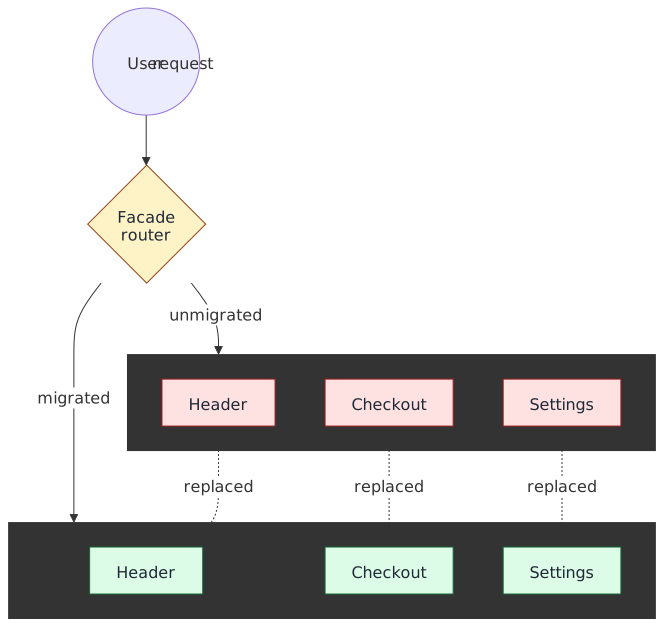
The Strangler Fig Pattern was coined by Martin Fowler in 2004 (originally “Strangler Application”, later renamed to make the metaphor explicit) after the strangler figs Fowler saw on a 2001 trip to Queensland, Australia. Those vines germinate in the canopy of a host tree, gradually root to the ground, and eventually replace the host. Applied to UI migration: new features are built with the design system while legacy UI remains functional, and a facade layer presents a unified interface that routes to either legacy or new components based on feature flags or URL paths.
| Aspect | Consideration |
|---|---|
| Mechanism | New features built with design system; facade routes between legacy and new |
| Risk | Low — legacy remains functional throughout migration |
| Resources | Higher — requires running two systems simultaneously |
| Timeline | Long — large systems can take years to fully migrate |
| State sync | Challenging — maintaining consistency between systems requires careful coordination |
The Strangler Fig pattern is inappropriate for small systems where wholesale replacement is simpler, when a facade layer isn’t architecturally feasible, or when the team cannot commit to the extended timeline large migrations require. Both AWS and Microsoft document the same shape from a backend-modernization angle; the UI version differs mostly in that the facade is a router/feature-flag layer instead of an API gateway.
Greenfield First starts adoption with new projects rather than migrating existing ones. This builds momentum and success stories with teams who are inherently more receptive—they’re not being asked to change working code. Use these successes to justify and inform legacy migrations.
Parallel Development maintains legacy systems during migration with gradual feature-by-feature replacement. Each migrated feature is validated in production before proceeding to the next. Full legacy decommissioning occurs only after the migration is complete and validated.
Measuring Migration Progress
Track Migration Progress as the percentage of UI surface area using the design system—this is the headline metric for executive reporting. Feature Parity ensures functionality is maintained during migration; any regression erodes trust in the design system. Performance Impact monitors load time and runtime performance; migration should not degrade user experience. User Experience measured through satisfaction scores during transition catches issues that technical metrics miss.
Migration Timeline
Start migration with 1-2 pilot applications selected for their combination of representative complexity and willing teams. Plan for a 6-12 month migration timeline for substantial applications; shorter estimates typically prove optimistic. Monitor progress weekly and adjust strategy monthly based on actual velocity and discovered obstacles.
Practical Challenges and Solutions
Enterprise design system adoption encounters recurring challenges that theoretical architecture discussions often overlook. This section addresses the real-world problems that emerge when multiple applications, teams, and deployment contexts consume a shared design system.
Shared Static Assets and Cross-Application Caching
When multiple applications on the same domain use the design system, duplicate downloads of fonts, icons, and base CSS waste bandwidth and degrade performance. The solution is centralizing static assets on a shared CDN path that all applications reference.
The Problem
Each application bundles its own copy of design system assets:
app-a.example.com/fonts/opensans.woff2(450KB)app-b.example.com/fonts/opensans.woff2(450KB duplicate)checkout.example.com/fonts/opensans.woff2(450KB duplicate)
Users navigating between applications still re-download these assets because the modern HTTP cache is partitioned. Chrome partitions the cache by a Network Isolation Key (top-level site + current frame site) starting in Chrome 86, and Safari and Firefox apply similar double-keyed caching to defend against cross-site cache probing. Same-origin assets still share a cache entry within a single top-level site, but a font loaded from app-a.example.com no longer satisfies the request from app-b.example.com even when both reference an identical URL.
The Solution: Centralized Asset Hosting
Host shared assets on a single subdomain or CDN path that every application references. With cache partitioning, you no longer get cross-site reuse “for free” by sharing a CDN — what you do get is consistent versioning, a single point of cache-control configuration, and one canonical URL per asset that’s easier to evict, audit, and CSP-allowlist:
https://assets.example.com/design-system/v3/├── fonts/│ ├── opensans-regular.woff2│ └── opensans-bold.woff2├── icons/│ └── sprite.svg└── base.cssAll applications import from this shared location:
/* In each application's CSS */@import url("https://assets.example.com/design-system/v3/base.css");@font-face { font-family: "Open Sans"; src: url("https://assets.example.com/design-system/v3/fonts/opensans-regular.woff2") format("woff2");}Implementation Considerations
Configure aggressive caching headers (Cache-Control: public, max-age=31536000, immutable) on versioned asset paths. The immutable directive is defined by RFC 8246 and tells browsers to skip revalidation entirely while the response is fresh, so a content-hashed URL never round-trips even on hard reload. When the design system cuts a new version, assets move to a new path (/v4/) while existing applications continue serving /v3/ until they upgrade. This prevents cache invalidation storms during rollouts and lets adoption proceed at each app’s own pace.
Browsers do not accept Access-Control-Allow-Origin: *.example.com — the Fetch standard requires either a single explicit origin or the literal *, with no glob/subdomain support. Return a single explicit origin per request when CORS is needed (and pair it with Vary: Origin so the cache stays correct), or use * only for truly public assets that don’t carry credentials. For multi-TLD orgs, run a dedicated asset domain with an allowlist or origin-reflection layer rather than trying to coerce the spec.
Version Mismatch Across Applications
In large organizations, different applications inevitably run different design system versions. This creates visual inconsistency when users navigate between applications and complicates support when bugs are reported against “the design system” without version context.
The Scenario
The main marketing website runs design system v3.2, the product application upgraded to v3.5, but the checkout flow (built as a separate application for mobile webview reuse) remains on v3.0 due to native app release cycles. Users experience jarring visual shifts—button styles change, spacing differs, and the brand feels inconsistent.
Mitigation Strategies
Semantic versioning discipline: Reserve major versions for breaking visual changes. Minor versions add components or fix bugs without altering existing component appearance. This allows applications to upgrade minors without visual regression testing.
Version compatibility windows: Establish a policy that all production applications must be within N minor versions of the latest release (e.g., within 3 minor versions). Applications outside this window receive no bug fixes for their version, creating pressure to upgrade.
Visual regression baselines per version: Maintain Chromatic or Percy baselines for each supported version. When a team reports a bug, the first question is “which version?” and the investigation uses that version’s baseline.
Shared component shell: For applications that must visually integrate (e.g., checkout embedded in the main app), consider a thin “shell” layer that provides navigation, header, and footer at a consistent version, while the inner application content can vary.
The Checkout/Webview Special Case
Checkout flows often serve double duty: web checkout and native app webview. Native app release cycles (app store review, user update lag) mean the webview might run for months after web has upgraded. Solutions include:
- Feature detection: The design system exports a version identifier; applications can conditionally render based on detected version
- Parallel deployment: Maintain the checkout at
/checkout(latest) and/checkout-legacy(pinned version) with native apps pointing to the legacy path until they update - Version negotiation: Native apps pass their expected design system version via URL parameter or header; the server renders accordingly
Microfrontend Integration Patterns
Microfrontend architectures introduce unique design system challenges: multiple independently deployed applications must present a unified visual experience while maintaining deployment independence. For comprehensive coverage of microfrontend architecture, see Micro-Frontends Architecture.
Module Federation (2025 State)
Module Federation has evolved well beyond its Webpack roots. The @module-federation/vite plugin is now the official Vite implementation maintained by the core team and is the safe default; the older @originjs/vite-plugin-federation remains popular but its maintainers have struggled to keep pace and TypeScript ergonomics suffer. For Angular shops, Native Federation ships the same mental model on top of standards — ESM modules and Import Maps — with no bundler-specific runtime.
Design reasoning: Microfrontends solve organizational problems, not technical ones. They’re worth the complexity when independent team deployment and release cycles are the primary constraint — typically large engineering orgs where coordinating a single shared deployment becomes the bottleneck. Smaller teams almost always pay more in coordination overhead than they save in deployment independence.
// webpack.config.js or vite.config.ts// Shared dependencies avoid bundle duplicationnew ModuleFederationPlugin({ name: "shell", shared: { react: { singleton: true, requiredVersion: "^18.0.0" }, "react-dom": { singleton: true, requiredVersion: "^18.0.0" }, "@company/design-system": { singleton: true, requiredVersion: "^3.0.0" }, },})This creates upgrade coupling: to upgrade the design system, all microfrontends must be compatible with the new version. If microfrontend A requires design system v4 but microfrontend B hasn’t been tested with v4, the upgrade blocks.
The Interdependency Cascade
Shared dependencies create transitive upgrade requirements. If your application uses two SDKs that both depend on the design system:
- SDK Alpha requires
@company/design-system@^3.0.0 - SDK Beta requires
@company/design-system@^3.2.0
Upgrading to design system v4.0.0 requires both SDK Alpha and SDK Beta to release compatible versions first. This cascade effect can delay upgrades by months as teams coordinate releases.
Isolation vs. Consistency Trade-off
The fundamental tension: shared dependencies enable visual consistency and reduce bundle size, but create coupling. Isolated dependencies (each microfrontend bundles its own design system) enable independent deployment but risk visual inconsistency and bundle bloat.
Recommended Architecture: Loosely Coupled Components
For organizations navigating this tension, several architectural patterns provide solutions. The key principles:
-
SDK Abstraction Layer: Components don’t directly depend on framework or shell APIs. Instead, they consume abstract interfaces (routing, analytics, state) that the shell implements. This allows components to be tested in isolation and deployed independently.
-
Boundary Control: Explicit rules about what each architectural layer can import, enforced through ESLint. The design system (primitives) has no dependencies on application code. Business components (blocks) consume primitives and SDKs. Page sections (widgets) compose blocks.
-
Provider-Based Dependency Injection: All external dependencies are injected via React Context providers. In production, the shell provides real implementations. In tests, mock providers enable isolated testing without framework setup.
This architecture enables design system upgrades without coordinated deployments: the shell upgrades the design system and re-exports it through the shared dependency configuration. Microfrontends automatically receive the new version on their next deployment, with no code changes required if the design system maintained backward compatibility.
When to Accept Duplication
In some cases, accepting design system duplication across microfrontends is the pragmatic choice:
- Versioned visual experiences: A/B tests that require different component versions
- Legacy integration: A legacy microfrontend that cannot upgrade but must continue operating
- Risk isolation: A high-risk microfrontend (payment processing) that requires independent deployment with pinned dependencies
The cost is larger bundles and potential visual drift. Mitigate by tracking which microfrontends diverge and establishing sunset timelines for duplicated versions.
Operational Considerations
Design System Versioning in Production
Every application should expose its design system version in a discoverable way:
<!-- In the HTML head --><meta name="design-system-version" content="3.5.2" />// In the JavaScript consolewindow.__DESIGN_SYSTEM_VERSION__ // "3.5.2"This enables support teams to immediately identify version context when investigating issues.
Monitoring Cross-Application Consistency
Implement automated visual regression testing that captures screenshots across all production applications and flags visual divergence. Tools like Percy or Chromatic can run against multiple applications and alert when the same component renders differently across properties.
Documentation as Code
The design system’s documentation site should itself be a consumer of the design system, guaranteeing that documented examples work.
Real-World Example: SWAN’s Complete Design System Artifact Suite
SWAN exemplifies a comprehensive design system that spans the full design-to-development workflow:
- Code library: 80+ React components with TypeScript definitions, ESLint plugin for code quality, and Stylelint plugin for CSS validation
- Figma UI Kit: A complete Figma library matching the code components 1:1, enabling designers to use the same components product teams implement—no translation layer required
- Codemods: Automated migration scripts shipped with major versions, reducing upgrade friction
- Live playground: React-Live integration for interactive, editable code examples
The Figma integration deserves emphasis: when designers use SWAN components in their designs, developers receive specs that map directly to available components. This eliminates the “designer handoff” problem where custom designs require new component development. Additional integrations (like product card data connections) were achieved through the champion model, with product teams building domain-specific extensions on the SWAN foundation.
Adoption and Change Management
Building Adoption Momentum
A design system succeeds or fails based on adoption—technical excellence without usage is expensive shelf-ware. You must strategically create early adopters, design incentives that encourage system usage, prepare to handle resistance and pushback constructively, and establish support mechanisms teams actually use.
Adoption Strategies
The Champion Program creates advocates within each product team who serve as local experts and feedback channels. Identify individuals who are naturally enthusiastic about consistency and quality—forcing reluctant participants into champion roles backfires. Provide champions with training and early access to upcoming features, empowering them to help their teams and collect feedback that shapes the system’s evolution.
The Pilot Program validates the design system with real projects before broad rollout. Start with 1-2 willing teams who understand they’re providing feedback on a maturing system, not receiving a finished product. Provide dedicated support and resources during the pilot—problems solved quickly during piloting become war stories, while unresolved issues become cautionary tales. Document and share success stories; concrete wins persuade skeptics more effectively than theoretical benefits.
Incentive Structure aligns individual and team motivations with design system adoption. Recognition for adoption milestones—shoutouts in engineering all-hands, badges in internal systems—provides social incentive. Reduced review cycles for pull requests using design system components creates practical benefit. Integration with team performance metrics (where appropriate for your culture) establishes organizational expectation. Avoid coercive mandates; they generate compliance without commitment.
Measuring Adoption Health
Adoption Rate tracks the percentage of teams actively using the design system—this is the primary indicator of organizational traction. Component Usage measures frequency across products, revealing which components provide value and which are ignored. User Satisfaction via Net Promoter Score from internal users indicates whether teams view the system as helpful or burdensome. Support Requests by number and type reveal friction points and documentation gaps.
Adoption Timeline
Launch the champion program before component release so advocates are prepared to support their teams. Start the pilot program within 2 weeks of initial release to capture momentum and gather feedback while the team is focused on adoption. Review adoption metrics weekly; adjust strategy monthly based on observed patterns rather than assumptions.
Training and Support
Adoption requires enablement. Teams need to understand what skills are required to use the system effectively, how to access ongoing support, which documentation and resources are essential, and how to surface questions and feedback. The quality of your support infrastructure often determines adoption velocity more than the quality of the components themselves.
Documentation Portal
The documentation portal is the front door to your design system. It should include a component library with interactive examples showing each component’s variants, states, and composition patterns. Integration guides for each supported framework walk teams through installation, configuration, and first component usage. Best practices and design principles explain the “why” behind design decisions, helping teams make consistent choices when the documentation doesn’t cover their specific case. Troubleshooting and FAQ sections address common issues; every support request should result in a documentation update.
Training Programs
Training accelerates adoption by reducing the cost of learning. Onboarding sessions for new teams provide structured introduction to the system’s philosophy, architecture, and workflows. Advanced workshops for power users cover contribution processes, customization patterns, and edge cases. Regular office hours provide real-time support and surface common questions. Video tutorials and interactive demos serve asynchronous learners and provide reference material teams can revisit.
Support Channels
Effective support requires clear channels with appropriate response expectations. A dedicated Slack or Discord channel provides fast, informal support and creates a searchable archive of solutions. Scheduled office hours offer guaranteed availability for complex questions requiring discussion. A clear escalation process ensures blockers reach the right people quickly. Feedback collection mechanisms (forms, surveys, embedded feedback widgets) capture suggestions and pain points systematically.
Real-World Example: SWAN’s Multi-Channel Support Structure
Vista’s SWAN design system implements a tiered support structure with purpose-specific channels:
- #swan-announcements: One-way channel for updates, releases, and deprecation notices
- #swan-help: Two-way support channel where teams can ask questions and get rapid responses
- Request form: Structured intake for improvements, new component requests, and bug reports—ensuring requests don’t get lost in chat history
- Looker dashboards: Self-service analytics showing adoption rates, component usage, and version distribution across applications
This separation prevents support requests from drowning out announcements while providing multiple engagement paths based on urgency and formality.
Measuring Support Effectiveness
Documentation Usage through page views and search queries reveals what teams need most and where they struggle to find answers. Training Completion as the percentage of team members trained indicates enablement coverage. Support Response Time measures how long teams wait for help—long waits create workarounds and frustration. Knowledge Retention through post-training assessments identifies whether training is effective or merely completed.
Support Infrastructure Timeline
Launch the documentation portal before component release—teams discovering components without documentation form negative first impressions. Schedule training sessions within the first month of adoption while teams are actively learning. Establish support channels before any team adoption begins; a team blocked without support becomes a vocal detractor.
Measurement and Continuous Improvement
Key Performance Indicators
Measurement transforms design system management from opinion-based to evidence-based. You must determine which metrics indicate design system success, how to track adoption and usage systematically, which quality metrics matter most for your context, and how to measure business impact in terms executives understand.
KPI Framework
Organize metrics into four categories that together provide a complete picture:
| Category | Metric | What It Measures |
|---|---|---|
| Adoption | Component Coverage | % of UI using design system |
| Adoption | Team Adoption | Number of active teams |
| Adoption | Usage Frequency | Components used per project |
| Adoption | Detachment Rate | % of components customized |
| Efficiency | Development Velocity | Time to implement features |
| Efficiency | Bug Reduction | UI-related bug count |
| Efficiency | Onboarding Time | Time for new team members |
| Efficiency | Maintenance Overhead | Time spent on UI consistency |
| Quality | Accessibility Score | WCAG compliance |
| Quality | Visual Consistency | Design audit scores |
| Quality | Performance Impact | Bundle size and load time |
| Quality | User Satisfaction | Internal and external feedback |
Adoption metrics tell you whether teams are using the system. Efficiency metrics demonstrate whether the system delivers promised productivity gains. Quality metrics verify that adoption doesn’t come at the cost of user experience. Track all four categories—optimizing one while ignoring others creates invisible debt.
Measurement Cadence
Different metrics require different review frequencies. Real-time metrics like component usage, error rates, and performance should be monitored continuously via dashboards and alerts. Weekly metrics covering adoption progress, support requests, and quality scores inform tactical decisions. Monthly metrics including ROI validation, team satisfaction, and business impact feed into leadership updates. Quarterly metrics on strategic alignment, governance effectiveness, and roadmap progress support planning cycles.
Measurement Timeline
Establish baseline metrics before launch—you cannot demonstrate improvement without a starting point. Review metrics weekly to catch issues early; adjust strategy monthly based on observed trends rather than assumptions. Present comprehensive reports quarterly to maintain executive engagement and secure continued investment.
Feedback Loops and Iteration
Design systems that don’t evolve become obstacles rather than enablers. Effective evolution requires systematic feedback collection, clear prioritization processes, mechanisms for handling conflicting requirements, and a release strategy that balances stability with progress.
Feedback Mechanisms
Continuous collection captures feedback as it occurs. In-app feedback widgets reduce friction for users reporting issues while they work. Regular user surveys provide structured input on satisfaction and priorities. Support channel monitoring surfaces pain points that users might not formally report. Usage analytics reveal patterns that complement qualitative feedback—what users do often matters more than what they say.
Structured reviews provide forums for deeper discussion. Quarterly user research sessions explore user needs and validate roadmap direction. Monthly stakeholder meetings align design system priorities with product and business needs. Weekly team retrospectives identify process improvements within the design system team. Annual strategic planning connects design system evolution to organizational direction.
Prioritization Framework
Use an Impact vs. Effort matrix to visualize trade-offs—high-impact, low-effort items are obvious wins, while low-impact, high-effort items should be deprioritized or rejected. Weight user request volume and frequency as a signal of pain point severity. Ensure business priority alignment so the design system supports rather than conflicts with organizational goals. Account for technical debt considerations to prevent accumulated shortcuts from blocking future progress.
Measuring Feedback Effectiveness
Feedback Volume indicates whether channels are functioning and users feel heard. Response Time measures how quickly feedback is acknowledged and addressed—slow response discourages future feedback. Implementation Rate as the percentage of feedback implemented demonstrates that input leads to action. User Satisfaction with feedback handling reveals whether the process feels productive or frustrating.
Feedback Cadence
Collect feedback continuously through low-friction channels. Review and prioritize weekly to maintain responsiveness. Implement high-impact changes within 2 weeks to demonstrate that feedback matters. Communicate roadmap updates monthly so users understand what’s coming and why.
Technical Enablement for Adoption
Driving adoption at scale requires more than documentation and training—it requires automation. This section covers the technical tooling that enables data-driven decision making and reduces the friction of migration and upgrades.
Codemods for Automated Migration
Codemods are scripts that programmatically transform code, enabling automated migration when the design system introduces breaking changes. Rather than documenting manual migration steps and hoping teams follow them, ship codemods that do the work automatically.
Why Codemods Matter
Major version upgrades are adoption killers. Teams delay upgrades because migration is manual, error-prone, and time-consuming. Codemods flip this dynamic: upgrades become a single command, reducing adoption friction to near zero for most changes.
jscodeshift: The Industry Standard
jscodeshift is Facebook’s toolkit for running codemods. It parses JavaScript/TypeScript into an AST (Abstract Syntax Tree), allows transformations, and writes the result back to files.
import { API, FileInfo, Options } from "jscodeshift"/** * Codemod: Rename Button 'type' prop to 'variant' * * Before: <Button type="primary" /> * After: <Button variant="primary" /> */export default function transformer(file: FileInfo, api: API, options: Options) { const j = api.jscodeshift const root = j(file.source) // Find all JSX elements named "Button" root .find(j.JSXOpeningElement, { name: { name: "Button" } }) .find(j.JSXAttribute, { name: { name: "type" } }) .forEach((path) => { // Rename 'type' to 'variant' path.node.name.name = "variant" }) return root.toSource({ quote: "single" })}Distributing Codemods
Package codemods alongside each major version release:
@company/design-system/├── dist/ # Compiled components├── codemods/│ ├── v2-to-v3/│ │ ├── index.ts│ │ └── transforms/│ └── v3-to-v4/│ ├── index.ts│ └── transforms/└── package.jsonExpose them via npx for easy execution:
# Run all v3→v4 codemods on the src directorynpx @company/design-system-codemods v3-to-v4 ./src# Run a specific transformnpx @company/design-system-codemods v3-to-v4 ./src --transform rename-button-variantCodemod Testing Strategy
Codemods must be tested as rigorously as components. Use snapshot testing with before/after fixtures:
import { defineTest } from "jscodeshift/src/testUtils"defineTest( __dirname, "rename-button-variant", null, "rename-button-variant/basic", // Uses __testfixtures__/rename-button-variant/basic.input.tsx { parser: "tsx" }, // And compares to basic.output.tsx)When to Write Codemods
Not every change warrants a codemod. Prioritize based on:
| Change Type | Codemod Priority | Rationale |
|---|---|---|
| Prop rename | High | Mechanical change, easy to automate, common pattern |
| Component rename | High | Find-and-replace at scale |
| Prop value changes | Medium | May require context the codemod lacks |
| API restructuring | Medium | Complex but high-value for major versions |
| Behavior changes | Low | Often requires human judgment |
| Removal of deprecated APIs | High | Teams have had warning; enforce the deadline |
Repository Scanning for Adoption Tracking
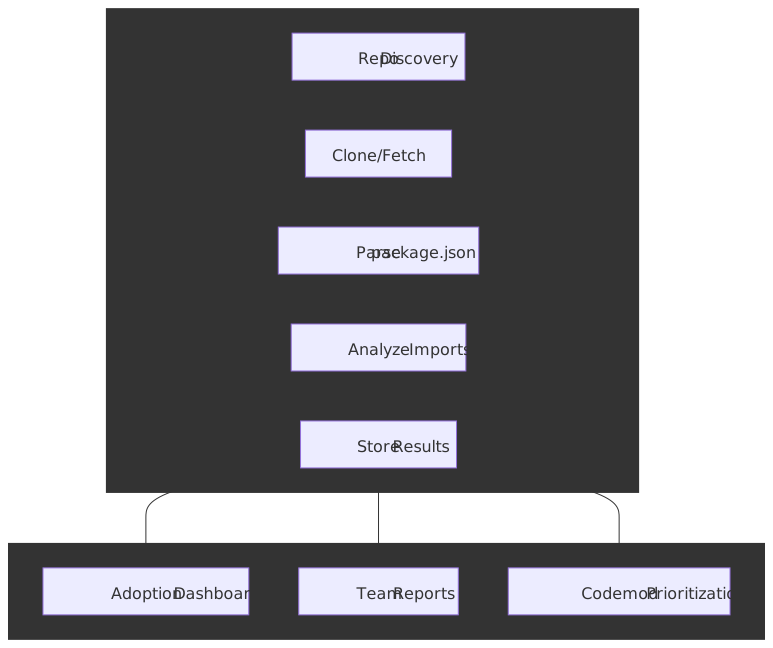
Understanding adoption across the organization requires systematic scanning of all repositories. This isn’t just about measuring adoption—it’s about identifying which teams need help and where to focus codemod development.
The Repository Scanner Architecture
Implementation Approach
interface RepoConfig { name: string url: string defaultBranch: string // 'main' for most, 'master' for legacy repos}interface ScanResult { repo: string designSystemVersion: string | null lastUpdated: Date components: ComponentUsage[]}async function scanRepository(config: RepoConfig): Promise<ScanResult> { // 1. Clone or fetch the latest from the configured branch await git.fetch(config.url, config.defaultBranch) // 2. Read package.json to get design system version const packageJson = await readFile(`${repoPath}/package.json`) const dsVersion = packageJson.dependencies?.["@company/design-system"] || packageJson.devDependencies?.["@company/design-system"] || null // 3. If design system is installed, analyze usage const components = dsVersion ? await analyzeComponentUsage(repoPath) : [] return { repo: config.name, designSystemVersion: dsVersion, lastUpdated: new Date(), components, }}Branch Configuration
Most repos use main as the default branch, but legacy repos may use master. Allow per-repo configuration:
defaults: branch: mainrepositories: - name: marketing-website url: git@github.com:company/marketing-website.git # Uses default branch: main - name: legacy-checkout url: git@github.com:company/legacy-checkout.git branch: master # Override for legacy repo - name: feature-experiment url: git@github.com:company/feature-experiment.git branch: experiment-v2 # Specific branch for active experimentScheduling and Automation
Run the scanner on a schedule (daily or weekly) via CI:
name: Design System Adoption Scanneron: schedule: - cron: "0 6 * * 1" # Every Monday at 6 AM workflow_dispatch: # Manual triggerjobs: scan: runs-on: ubuntu-latest steps: - uses: actions/checkout@v4 - name: Run scanner run: npx ts-node scripts/repo-scanner/index.ts env: GITHUB_TOKEN: ${{ secrets.REPO_SCANNER_TOKEN }} - name: Upload results to analytics run: npx ts-node scripts/upload-to-looker.tsUsage Analytics: Data-Driven Decision Making
Beyond knowing which repos use the design system, you need to understand how they use it. Which components are popular? Which props are used? Where do teams override or customize? This data drives prioritization for everything from documentation to deprecation.
What to Track
| Metric | Question It Answers | Actionable Insight |
|---|---|---|
| Component usage count | Which components are most used? | Focus documentation and stability efforts |
| Props frequency | Which props are commonly used? | Consider making rare props opt-in; simplify common cases |
| Override frequency | Which components get customized most? | Candidate for API expansion or variants |
| Version distribution | How many versions are in production? | Urgency for codemod development |
| Unused components | Which components have zero usage? | Candidates for deprecation |
Static Analysis Pipeline
Scrape production codebases to build a usage database:
interface ComponentUsage { component: string repo: string file: string props: Record<string, PropUsage> hasOverrides: boolean}interface PropUsage { prop: string valueType: "literal" | "expression" | "spread" literalValue?: string // e.g., variant="primary"}async function analyzeFile(filePath: string): Promise<ComponentUsage[]> { const ast = parse(await readFile(filePath), { plugins: ["jsx", "typescript"], }) const usages: ComponentUsage[] = [] traverse(ast, { JSXOpeningElement(path) { const componentName = getComponentName(path.node) if (!isDesignSystemComponent(componentName)) return const props = extractProps(path.node.attributes) const hasOverrides = detectOverrides(path) usages.push({ component: componentName, repo: currentRepo, file: filePath, props, hasOverrides, }) }, }) return usages}Detecting Overrides
Overrides indicate API gaps or component inflexibility. Track several patterns:
function detectOverrides(path: NodePath): boolean { // Pattern 1: className prop with non-token values const classNameAttr = path.node.attributes.find((attr) => attr.name?.name === "className") if (classNameAttr && !usesDesignTokenClasses(classNameAttr)) { return true } // Pattern 2: style prop with inline styles const styleAttr = path.node.attributes.find((attr) => attr.name?.name === "style") if (styleAttr) { return true } // Pattern 3: Wrapper div with styling const parent = path.parentPath if (parent.isJSXElement() && hasInlineStyling(parent)) { return true } return false}Looker/Dashboard Integration
Push analytics data to a BI tool for visualization and team access:
async function uploadToLooker(results: AnalysisResults) { const records = results.flatMap((repo) => repo.components.map((usage) => ({ timestamp: new Date().toISOString(), repo: repo.name, team: repo.team, component: usage.component, version: repo.designSystemVersion, props: JSON.stringify(usage.props), has_overrides: usage.hasOverrides, })), ) await lookerClient.insert("design_system_usage", records)}Dashboard Views
Build dashboards that answer strategic questions:
- Adoption Overview: Percentage of repos using design system, version distribution, trend over time
- Component Popularity: Top 20 components by usage count, components with zero usage
- Override Hotspots: Components with highest override rates, specific props being worked around
- Team Health: Per-team adoption rates, version currency, override frequency
- Codemod Impact: Before/after metrics showing migration automation effectiveness
Data-Driven Prioritization
Use analytics to drive roadmap decisions:
| Signal | Action |
|---|---|
| Component has 500+ usages, high override rate | Expand API, add variants to cover override cases |
| Component has 0 usages across all repos | Candidate for deprecation in next major version |
| Specific prop unused across 95% of usages | Make it optional, improve defaults |
| 40% of repos still on v2 | Invest in v2→v3 codemod, outreach to lagging teams |
| One team has 80% override rate | Investigate: API gaps or team needs custom training? |
Privacy and Sensitivity
Usage analytics can feel like surveillance. Mitigate concerns by:
- Aggregating data—report team-level, not individual-level metrics
- Sharing dashboards openly—teams should see their own data
- Framing as enablement—“How can we help you?” not “Why aren’t you compliant?”
- Using data to improve the system, not to criticize teams
Scaling and Evolution
Managing Growth
Success creates its own challenges. As adoption grows, you must plan how the system will scale with organizational growth, what happens when new teams or products join, how to maintain consistency across increasingly diverse needs, and what the long-term vision looks like as the system matures.
Organizational Scaling
Expand the core team based on adoption growth and workload, not preemptively. For large organizations, implement federated governance where product areas have representation in design system decisions. Create regional or product-specific champions who understand both the design system and their domain’s unique needs. Establish clear contribution guidelines that enable product teams to contribute components without creating bottlenecks.
Technical Scaling
Modular architecture becomes essential as the component library grows—monolithic packages create upgrade friction and bundle bloat. Automated testing and quality gates prevent regressions as more contributors touch the codebase. Performance monitoring and optimization ensure the design system doesn’t become a performance liability. Documentation and knowledge management systems must scale with the component count; undiscoverable components are unused components.
Process Scaling
Standardized onboarding for new teams reduces the cost of adoption and ensures consistent understanding. Automated compliance checking (linting, accessibility testing, visual regression) catches issues before they reach production. Self-service tools and resources reduce support burden on the core team. Clear escalation paths for complex issues prevent teams from getting stuck.
Measuring Scale Effectiveness
Scalability Metrics track system performance under load—both technical (build times, package size) and organizational (response times, queue depth). Maintenance Overhead measures time spent on system maintenance relative to feature development; growing overhead indicates technical debt. Team Efficiency ensures developer productivity with the system improves as the system matures, not degrades. Quality Consistency across all products verifies that scaling hasn’t compromised standards.
Scaling Timeline
Plan for scaling before reaching capacity limits—reactive scaling creates crises. Review scaling needs quarterly as part of strategic planning. Implement scaling improvements incrementally, validating each change before adding complexity.
Future-Proofing
The frontend landscape evolves rapidly—frameworks rise and fall, design trends shift, and browser capabilities expand. Future-proofing requires strategies for handling technology changes, mechanisms for design evolution, approaches to maintaining backward compatibility, and clear sunset policies for deprecated components.
Technology Evolution Strategy
A framework-agnostic core architecture (design tokens, design principles, accessibility guidelines) survives framework changes even when component implementations must be rewritten. A plugin system for framework-specific features allows adopting new frameworks without abandoning the existing ecosystem. Regular technology stack assessments (annually at minimum) identify emerging technologies worth adopting and deprecated technologies worth sunsetting. Clear migration paths for major changes reduce the cost of evolution for consuming teams.
Design Evolution Strategy
Design token versioning allows visual refresh without breaking changes—semantic tokens can map to new primitives while maintaining backward compatibility. Component deprecation policies with clear timelines give teams advance notice to migrate. Migration guides for design updates explain not just what changed but how to update existing implementations. A/B testing for significant design changes validates improvements with real users before full rollout.
Compatibility Management
Semantic versioning for all changes communicates the impact of updates—major versions signal breaking changes, minor versions indicate new features, patch versions contain bug fixes. Deprecation warnings and timelines (typically 6-12 months) provide adequate migration runway. Automated migration tools (codemods) reduce the cost of adopting new versions. Comprehensive testing across versions ensures changes don’t break existing integrations.
Deprecation Policy with an Explicit Timeline
A deprecation policy that lives only in a docs page is a deprecation policy people ignore. The policy that scales has lifecycle stages, runtime warnings, codemods, and a calendar.
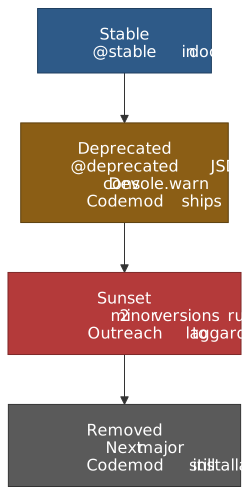
The shapes in the wild converge on three stages with explicit signals — see Shopify Polaris’s deprecation guidelines, GitHub Primer’s component status, and the USWDS component lifecycle. Synthesized:
| Stage | Code signal | Docs signal | Tooling signal |
|---|---|---|---|
| Stable | None | ”Recommended” or unmarked | Listed in main components nav |
| Deprecated | @deprecated JSDoc + dev-only console.warn |
”Avoid” badge with a one-line replacement | Codemod published the same release as the deprecation |
| Sunset | Same as deprecated; usage analytics watch | Linked from a dedicated “Deprecated” page | Outreach to teams with > 5% usage of the deprecated component |
| Removed | Source deleted | Moved to a “Removed in vX” archive | Codemod still installable for late upgraders; Figma component renamed [removed] |
Two non-negotiables: (1) ship the codemod with the deprecation, not later, or teams will defer the migration indefinitely; (2) make the sunset window concrete in versions, not vague “we’ll get to it” prose. Polaris uses “deprecate now, remove in the next major”; USWDS uses an explicit five-stage lifecycle. Either works — the wrong policy is the one that lets a “deprecated” component live for three years.
Component Discovery and Catalog Services
At enterprise scale the design system isn’t just an npm package — it’s also a finding problem. Component discovery typically grows out of three sources of truth that must agree:
- Storybook is the live, interactive surface. Treat it as the canonical “what does it look like and how do I use it” tool.
- The documentation site (often Storybook Autodocs or a custom Next.js/Astro site that consumes the package) handles long-form guidance, design rationale, and accessibility notes.
- The internal developer portal — typically Backstage — is where a developer who doesn’t yet know the design system exists finds it. The realistic Backstage pattern is to register the design system as a
Componentof kindlibrary, link to its Storybook in the entity page, and surface its TechDocs alongside the system’s owning team.
The integration pattern that works: keep Storybook as the source of truth, expose its URL on the Backstage entity, and use Backstage’s catalog graph to show which apps actually consume the design system (mirroring data from the repository scanner described above). This lets a platform team answer “who depends on us at v3?” without asking each consuming team.
Note
Backstage is not a design system documentation tool — it’s a service catalog that links to one. Resist building a custom Backstage plugin to render components; it duplicates Storybook with worse fidelity. The accepted pattern is “embed Storybook, link to TechDocs, surface ownership and version.”
Measuring Future-Readiness
Technology Relevance tracks framework usage across the organization; a design system tied to a framework nobody uses is obsolete. Design Currency assesses alignment with current design trends and accessibility standards. Migration Success measures the success rate of automated migrations; low rates indicate tooling gaps. User Impact evaluates how changes affect the end-user experience, ensuring evolution serves users rather than just developers.
Future-Proofing Timeline
Monitor technology trends continuously through industry news, conference talks, and community discussions. Plan for major changes 6-12 months in advance to allow adequate preparation. Communicate changes 3 months before implementation so teams can plan their migration work.
Failure Modes
The patterns above describe what works. The patterns below describe what consistently destroys design systems even when individual decisions look correct in isolation.
| Failure mode | What it looks like | Why it happens | How to detect early |
|---|---|---|---|
| The “frozen” system | Last release was eight months ago; consumers stop reporting bugs | No funded team; deprecation policy never invoked; codemod backlog grew unbounded | Track release cadence and codemod-shipped-with-deprecation rate as KPIs |
| Detachment cascade | Override rate climbs above ~25% across the org; teams treat the system as a starter kit | API gaps the team didn’t surface, or a tier-3 (component) token explosion that doesn’t match consumer needs | Monitor override-rate-by-component in the analytics pipeline; investigate when a single component crosses 30% |
| Version cliff | A major version sits below 50% adoption six months after release; bugs get filed against it indefinitely | Migration was manual; codemod shipped late or didn’t cover real cases | Per-version adoption dashboard; if v(N) < 50% by codemod release + 60 days, postmortem the codemod |
| CI as theater | All gates green, prod ships visual regressions and a11y bugs anyway | Visual gate is on a stale baseline; a11y gate runs on default story state only; bundle budget set above current actual size | Periodically diff CI results against production telemetry (RUM, customer reports) |
| The 80% override component | One team wraps the design-system Button in a styled wrapper everywhere | Either an API gap or an org-mismatch (e.g., a brand-specific surface) | Override hotspots dashboard; treat any single component-team pair > 50% override as a roadmap signal |
| Token-tier sprawl | The semantic layer balloons to 2,000+ tokens because every component variant got its own | Premature jump to component-tier tokens before multi-brand justified it | Cap semantic tokens; require a written justification for each component-tier token |
| Microfrontend version deadlock | A design system upgrade blocks for months because one microfrontend won’t bump | Singleton dependency in Module Federation with no escape hatch; no compatibility-window policy | Enforce a “must be within N minor versions” policy; allow controlled duplication for high-risk MFEs |
| Documentation rot | Docs show APIs that no longer exist; examples don’t compile | Documentation isn’t built from the same source as the components | Make the docs site a consumer of the published package, not a separate source |
The common thread: every one of these failures is measurable, but only if the analytics pipeline is in place from day one. The teams that survive are the ones that instrumented adoption, override rate, version distribution, and CI fidelity before they had a problem.
Conclusion
Design system implementation succeeds when architecture anticipates change, distribution minimizes friction, and operations treat the system as a product.
Architecture decisions that compound: The hybrid approach—platform-agnostic tokens with framework-specific wrappers—survives technology shifts. RSC compatibility, headless accessibility primitives, and tree-shakeable bundles are table stakes. These decisions in year one constrain what’s possible in year three.
Technical enablement as a multiplier: Codemods transform major version upgrades from multi-sprint projects to single-command operations. Repository scanning reveals adoption patterns. Shared CDN hosting eliminates duplicate downloads. These investments pay dividends with every consuming application.
Operations that sustain momentum: Version compatibility windows create upgrade pressure without breaking stability. Usage analytics drive prioritization better than feature requests. The design system team that measures what matters—which components, which props, which overrides—makes better decisions than the team that relies on intuition.
Appendix
Prerequisites
- Familiarity with React component patterns (hooks, context, composition)
- Understanding of npm package publishing and semantic versioning
- Experience with CI/CD pipelines (GitHub Actions or similar)
- Exposure to design systems as a consumer or contributor
- Basic knowledge of AST (Abstract Syntax Tree) concepts for codemod understanding
Terminology
| Term | Definition |
|---|---|
| DTCG | Design Tokens Community Group—W3C community group authoring the token specification (v2025.10 stable) |
| RSC | React Server Components—React architecture where components render on the server, reducing client bundle size |
| Headless Components | UI components providing behavior and accessibility without styling (Radix, React Aria, Headless UI) |
| Codemod | Programmatic code transformation using AST manipulation, typically via jscodeshift |
| Strangler Fig Pattern | Migration strategy where new functionality uses the new system while legacy is incrementally replaced |
| Module Federation | Webpack/Vite feature enabling runtime sharing of JavaScript modules across separately deployed applications |
| Changesets | Versioning tool for monorepos that tracks changes at PR time and automates version bumps and changelogs |
| Detachment Rate | Percentage of component instances where teams override or disconnect from the design system version |
| Subpath exports | package.json exports map that splits a single package into per-entry-point public APIs (import 'pkg/button') |
| TurboSnap | Chromatic feature that walks the Storybook dependency graph and only snapshots stories whose source changed |
| Remote cache | Shared task-graph cache (Nx Cloud, Turborepo Remote Cache, Bazel BES) that lets unaffected packages restore cached results |
| Backstage | Open-source internal developer portal used as a component-and-service catalog with TechDocs and ownership data |
Summary
- Architecture: Hybrid (platform-agnostic tokens + framework wrappers) survives technology shifts; RSC compatibility and headless primitives are table stakes for 2025+
- Token pipeline: DTCG v2025.10 is the stable interchange format; Style Dictionary v4 is the multi-platform default, Terrazzo is the DTCG-native web alternative
- Monorepo: Turborepo for small/frontend-only, Nx for larger JS/TS with affected-graph CI, Bazel/Pants only when polyglot scale already justifies it; remote caching is the actual win
- Package topology: Single package + subpath exports is the pragmatic default; per-component packages only when contribution and release cadence diverge
- Component implementation: Build on Radix / React Aria for accessibility; export compound patterns with convenient presets
- Distribution: Changesets for semantic versioning, ESM + CJS dual output,
preserveModulesfor tree-shaking, shared CDN for cross-app asset hosting - CI gates: Visual regression (Chromatic + TurboSnap or Playwright), accessibility (axe in Storybook + Pa11y CI on deployed Storybook), per-component bundle budgets (size-limit / bundlewatch), all running in parallel
- Lifecycle: Deprecation requires the codemod to ship with the deprecation, an explicit sunset window in versions, and removal in the next major
- Operations: Repository scanning + usage analytics (component, prop, override frequency) drive prioritization; component catalog lives in Backstage as a link to Storybook, not a duplicate
References
Specifications
- W3C Design Tokens Specification v2025.10 - First stable version of the DTCG specification
- Style Dictionary v4 - Industry-standard token transformation with DTCG support
- Semantic Versioning - MAJOR.MINOR.PATCH versioning standard
Tools and Libraries
- Radix UI Primitives - Unstyled, accessible component primitives
- React Aria - Adobe’s accessibility hooks and components
- Storybook 8 - Component development environment with visual + a11y testing
- Chromatic and TurboSnap - Visual regression with dependency-graph snapshotting
- Playwright
toHaveScreenshot- Self-hosted visual regression - Terrazzo - DTCG-native token build tool (formerly Cobalt UI)
- jscodeshift - Codemod toolkit
- Changesets - Monorepo versioning and changelog automation
- size-limit and bundlewatch - Per-component bundle-size budgets in CI
- axe-core, Pa11y CI, Lighthouse CI - Accessibility automation layers
- Turborepo and Nx - JS/TS monorepo orchestration with remote caching
- Backstage - Internal developer portal for component discovery and ownership
Core Maintainer Content
- Martin Fowler - Strangler Fig Application - Original pattern description
- Nathan Curtis - Team Models for Scaling - Centralized, federated, and hybrid models
Migration Patterns
- AWS Strangler Fig Pattern - Implementation guidance
- Azure Strangler Fig Pattern - Microsoft’s architectural perspective
Lifecycle and Deprecation
- Shopify Polaris deprecation guidelines - In-code warnings + automated migrations + remove-in-major
- GitHub Primer component status - Experimental / Ready / Deprecated lifecycle
- USWDS component lifecycle - Five-stage proposal-to-retired lifecycle
Enterprise Examples
- Vista SWAN Design System - 80+ components with ESLint/Stylelint plugins, codemods, Figma UI kit
- Shopify Polaris - Governance at scale across 100+ teams
Related Articles in This Series
- Design System Adoption: Foundations and Governance - ROI analysis, executive buy-in, team structures, governance models
- Design Tokens and Theming Architecture - Token taxonomy, naming conventions, theming, Style Dictionary pipeline
- Component Library Architecture and Governance - API design patterns, versioning, contribution workflows