Critical Rendering Path: Paint Stage
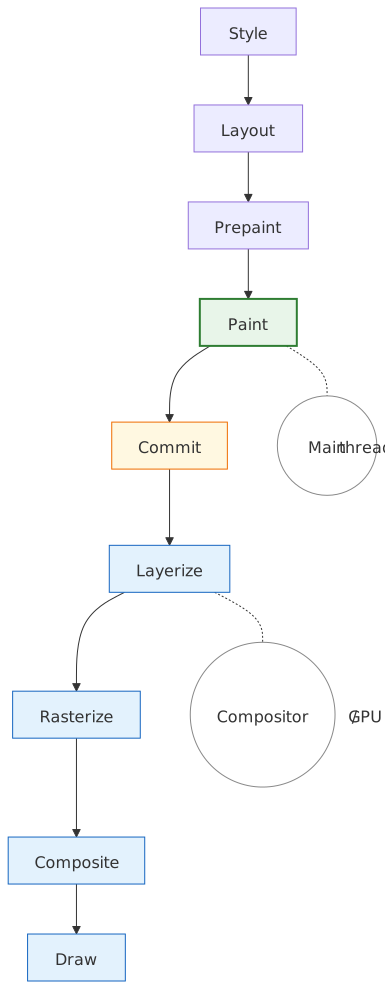
The Paint stage records drawing instructions into display lists — it does not produce pixels. Following Prepaint (property tree construction and invalidation), Paint walks the layout tree and emits a sequence of low-level graphics commands packed into a Paint Artifact. That artifact then travels through Commit into the compositor, where Layerize maps its paint chunks onto cc::Layer objects and Rasterize finally turns the recorded commands into pixels.
Mental model
Paint is a recording phase, not a drawing phase. The shape of the transformation is:
Fragment Tree + Property Trees → Paint → Paint Artifact (Display Items + Paint Chunks)Three concepts carry the rest of the article:
- Display items are atomic drawing commands (e.g.,
DrawingDisplayItem,ScrollbarDisplayItem) identified by a client pointer (whichLayoutObjectproduced them) and a type enum. ThePaintControllerkeys its cache on(client, type)to reuse them across frames.1 - Paint chunks are sequential runs of display items that share the same
PropertyTreeState— the 4-tuple(transform_id, clip_id, effect_id, scroll_id)from Prepaint. Chunks are the unit of compositor layer assignment.2 - Paint order follows the CSS stacking context algorithm in CSS 2.1 Appendix E. Stacking contexts are atomic — descendants of one context never interleave with descendants of another.
Important
Paint and raster are distinct stages on different threads. Paint runs on the main thread and emits Skia PaintRecord and PaintOp commands into display items — no pixels exist yet. Raster runs on compositor worker threads (or the GPU process) and replays those commands into bitmap tiles. The core/paint README is explicit: paint “translates the layout tree into a display list … this list is later replayed and rasterized into bitmaps”.1
Paint records instead of drawing for three structural reasons:
- Resolution independence. Display lists rasterize at any scale without quality loss (HiDPI, pinch-zoom, transformed layers).
- Off-main-thread rasterization. The artifact serializes to the compositor and GPU process without blocking JavaScript.
- Caching. Unchanged display items are reused; only invalidated items are re-recorded.
The current architecture is CompositeAfterPaint (CAP), enabled in Chromium M94 and refined since. Compositing decisions now happen after paint produces a clean artifact, eliminating the circular dependency that plagued the legacy compositor and removing roughly 22,000 lines of C++ along the way.3
Display items and the paint artifact
The paint artifact is the data structure Paint hands off to Commit. Everything downstream operates on it, so it is worth understanding its shape before chasing mechanism.
Display item types
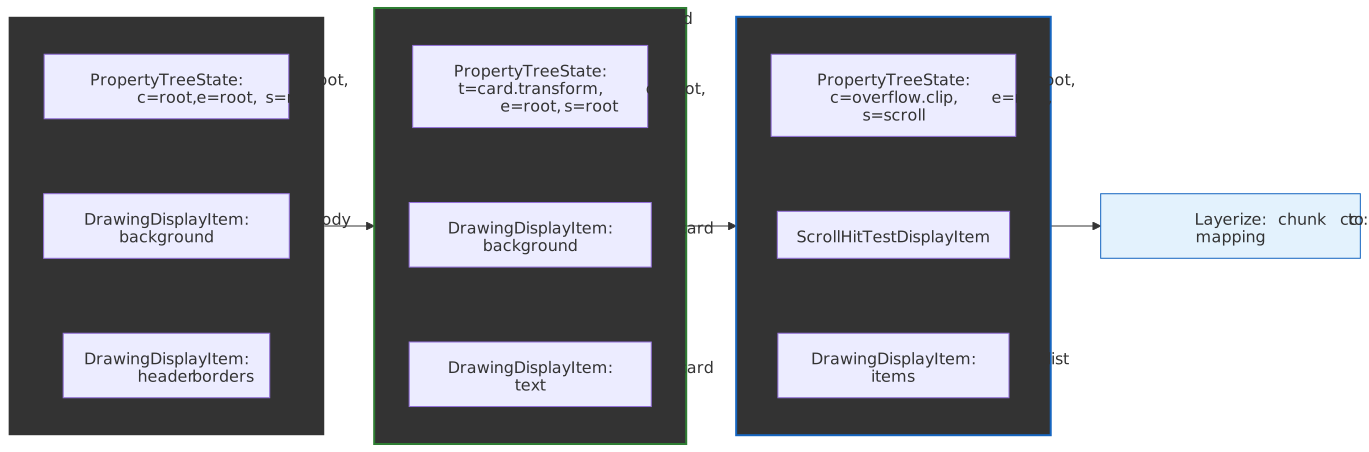
Display items are the atomic units of paint output. Each one is a small, immutable record describing a single drawing operation, attached to the LayoutObject that produced it.4
| Type | What it records | Typical source |
|---|---|---|
DrawingDisplayItem |
A PaintRecord of Skia paint operations |
Background colors, borders, text, images |
ForeignLayerDisplayItem |
A pre-existing cc::Layer from outside Blink |
Plugins, iframes, <video>, <canvas> |
ScrollbarDisplayItem |
Scrollbar metadata + drawing | Overlay and classic scrollbars |
ScrollHitTestDisplayItem |
A placeholder for a scroll-hit-test layer | Scroll containers (consumed by layerization) |
Note
A ForeignLayerDisplayItem always gets its own paint chunk and is never squashed with neighbors. Treat it as a hard boundary in the artifact.
PaintController and display item caching
The PaintController holds the previous frame’s paint result as a cache and consults it as the current frame is recorded:
“If some painter would generate results same as those of the previous painting, we’ll skip the painting and reuse the display items from cache.” — Chromium Blink Paint README
The flow is straightforward:
- Before painting, the
PaintControlleris seeded with the previous artifact. - During paint, each display item is matched against its cached predecessor by
(client, type). - On a match, the cached item is reused verbatim.
- On a miss, the new item is recorded and the old one is dropped.
Subsequence caching extends this to entire subtrees. When PaintLayerPainter decides a PaintLayer will produce identical output to the previous frame, a SubsequenceRecorder records the items as a named subsequence; on the next frame, PaintController::UseCachedSubsequenceIfPossible() copies the whole block back without re-walking the layout tree.5 Subsequence caching is what makes a static sidebar effectively free during scroll.
Paint chunks
Paint chunks partition the display item stream by PropertyTreeState. The state is a 4-tuple of property tree node ids:
PropertyTreeState = (transform_id, clip_id, effect_id, scroll_id)Property tree ids come from Prepaint, which walks the layout tree once and assigns each LayoutObject to a node in each of the four trees. A new chunk starts whenever any of those four ids changes between consecutive display items.
Chunks exist because layerization, which runs after Commit, needs to know which display items can share a cc::Layer without changing visual output. Two items with different transform nodes cannot be merged into the same layer without breaking transforms; chunks make that constraint explicit at the data-structure level.
Additional chunk-boundary triggers:
- A
ForeignLayerDisplayItem(always its own chunk). - An explicit hit-test region that needs its own scrolled cc::Layer.
- A pseudo-element (e.g.,
::view-transition-*) that participates in a different stacking context.
A typical real page might emit a few thousand display items grouped into a few dozen chunks. Layerization later consolidates compatible chunks into a much smaller number of cc::Layer objects.
Paint order and stacking contexts
Paint order is fully specified by CSS 2.1 Appendix E. Getting it wrong produces visual bugs where elements appear behind content they were supposed to overlap; understanding it makes z-index debugging mechanical instead of mystical.
The stacking context algorithm
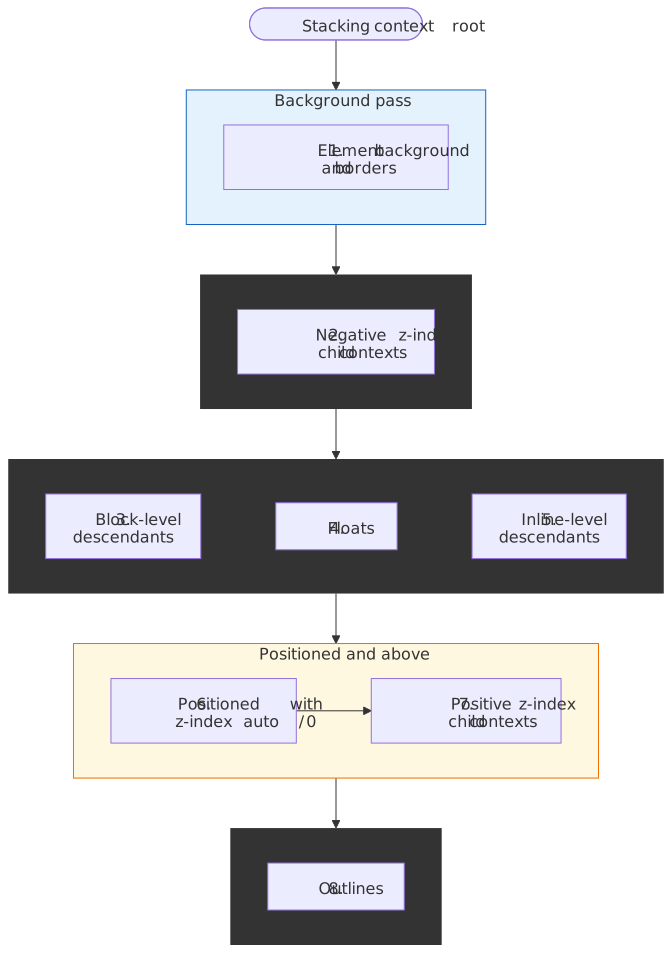
For each stacking context, descendants paint in this order:6
- Background and borders of the element forming the context.
- Child stacking contexts with negative z-index, most negative first.
- In-flow, non-positioned, block-level descendants, in tree order.
- Non-positioned floats.
- In-flow, non-positioned, inline-level descendants (text, images, inline-blocks).
- Positioned descendants and child stacking contexts with
z-index: autoorz-index: 0, in tree order. - Child stacking contexts with positive
z-index, lowest first. - Outlines of the element and its descendants.
The critical property is atomicity: no descendant of one stacking context can interleave with descendants of a sibling stacking context. This is exactly why a child’s z-index cannot escape its parent’s stacking context, no matter how large.
What creates a stacking context
The CSS 2.1 list is no longer complete. As of 2026 the practical list is:7
- The root element (
<html>). position: absolute | relativewithz-index≠auto.position: fixed | sticky(always).- A flex or grid item with
z-index≠auto. opacity<1.mix-blend-mode≠normal.transform,scale,rotate,translate,perspective,filter,backdrop-filter,clip-path,mask(and friends) ≠none.isolation: isolate.will-changeon a property whose used value would itself create a stacking context (e.g.,will-change: transform).contain: paint,contain: layout,contain: strict,contain: content.container-type: size | inline-size.- An element in the top layer (fullscreen elements, popovers, dialog
showModal()) and its::backdrop.
The unifying principle: each property listed above forces the subtree to be composed as a single unit before the effect (opacity, blend, transform, containment, top-layer promotion) is applied. That requirement is what produces a stacking context; the z-index rules are an editorial convention layered on top.
Implementation in Blink
Blink implements paint order in PaintLayerPainter and ObjectPainter. PaintLayerPainter::Paint() walks layers in stacking order and recursively visits, in this order: negative z-index children, the layer itself (backgrounds, non-positioned content, floats, inline content), then positive z-index children.1
Caution
CSS View Transitions introduce ::view-transition-* pseudo-elements that participate in the stacking context. During a transition, snapshots of old and new content paint in an order that does not always match the live DOM order — explicit z-index on transitioning elements can paint unexpectedly relative to the transition pseudo-elements. When debugging transition glitches, inspect the view-transition pseudo-element tree first.
The CompositeAfterPaint architecture
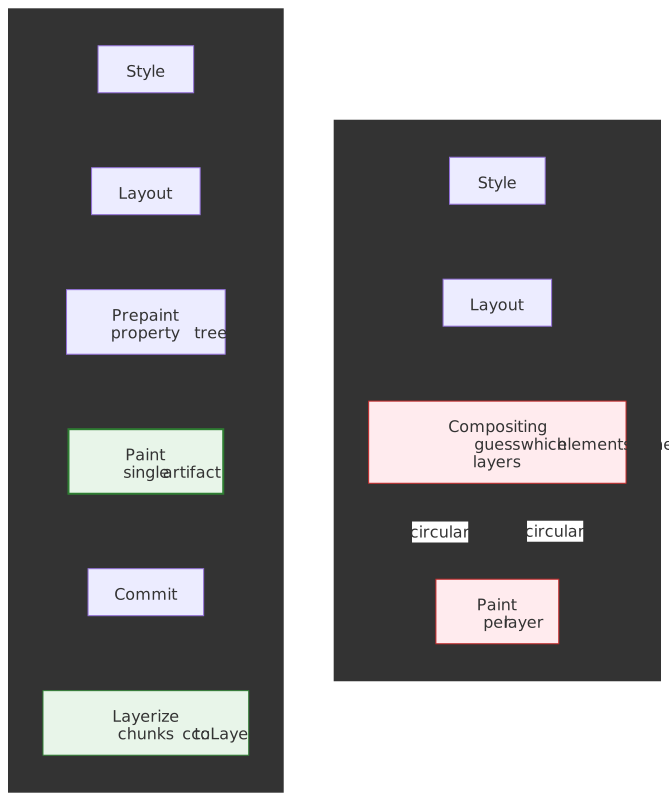
CompositeAfterPaint (CAP) is the structural shift that defines current Blink rendering. As of M94, paint runs before any compositing decision is made.
Why the change
In the legacy pipeline, compositing had to guess which elements needed their own layers before paint produced any output. That created a circular dependency:
- Compositing needed to know paint order to decide which elements overlapped.
- Paint order partially depended on which elements had been promoted to layers.
The result was years of accreted heuristics, fragile invariants, and code that was hard to reason about. CompositeAfterPaint inverts the order:
Style → Layout → Prepaint → Paint → Commit → Layerize → Raster → Composite → DrawPaint produces a clean artifact, Commit hands it to the compositor thread, and Layerize groups paint chunks into cc::Layer objects against an explicit set of compositing reasons.8
Measurable improvements
The CAP migration delivered:3 9
| Metric | Improvement |
|---|---|
| Code removed | ~22,000 lines of C++ |
| Chrome CPU usage | -1.3% overall |
| 99th percentile scroll latency | improved by 3.5%+ |
| 99th percentile input delay | improved by 2.2%+ |
These are aggregate field metrics across Chrome’s stable population, not microbenchmarks.
Paint chunk → compositor layer mapping
After paint, layerization maps chunks to cc::Layer objects:
- Each paint chunk carries its
PropertyTreeState. - Chunks with a direct compositing reason (
will-change: transform, video, canvas, fixed-position with overflow,position: stickyin some configurations) are guaranteed their own layer. - Adjacent chunks with compatible state may merge into one layer to keep layer count bounded.
- Each resulting layer references a contiguous range of paint chunks.
The separation lets the compositor optimise layer count independently of paint logic — a property the legacy architecture could not provide.
Paint invalidation
Paint invalidation determines which display items must be re-recorded on the next frame. Prepaint marks display item clients as dirty during its tree walk; the actual reuse-or-rerecord decision happens inside PaintController during paint.
Granularity
| Level | Triggered by | What happens |
|---|---|---|
| Chunk-level | PropertyTreeState change, display item order change |
The entire chunk’s display items are re-recorded. |
| Display-item-level | Chunk matches; individual (client, type) differs |
Only the changed items are re-recorded; siblings are reused. |
Raster invalidation
After paint produces new display items, the compositor’s raster invalidator computes which pixel regions must be re-rasterized:
| Invalidation type | Trigger | Behaviour |
|---|---|---|
| Full | Layout change, PropertyTreeState change |
Invalidates both the old and the new visual rect. |
| Incremental | Geometry change only | Invalidates only the delta between old and new rects. |
A blinking cursor in a text field is the textbook example: only the cursor’s DrawingDisplayItem is re-recorded, only its ~16 × 20 pixel rect is re-rasterized, and the surrounding text field’s display items are reused unchanged. That is why typing does not repaint the page.
Isolation boundaries (contain: paint)
contain: paint declares an isolation boundary that prevents paint effects inside the element from affecting anything outside it.10
.widget { contain: paint;}The CSS Containment specification defines four consequences for contain: paint:
- Descendants are clipped to the element’s padding edge.
- The box establishes a new stacking context.
- The box becomes a containing block for absolute and fixed-positioned descendants.
- The user agent may skip painting the contents entirely if the box is off-screen.
In a widget grid with 50 isolated panels, invalidating one panel’s contents triggers paint only for that panel — without contain: paint, invalidation can propagate to siblings or ancestors through transform/clip relationships.
Paint performance characteristics
Not all CSS properties paint at the same cost. The first question is which stages a property change forces the engine to re-run; only then does per-operation cost matter.
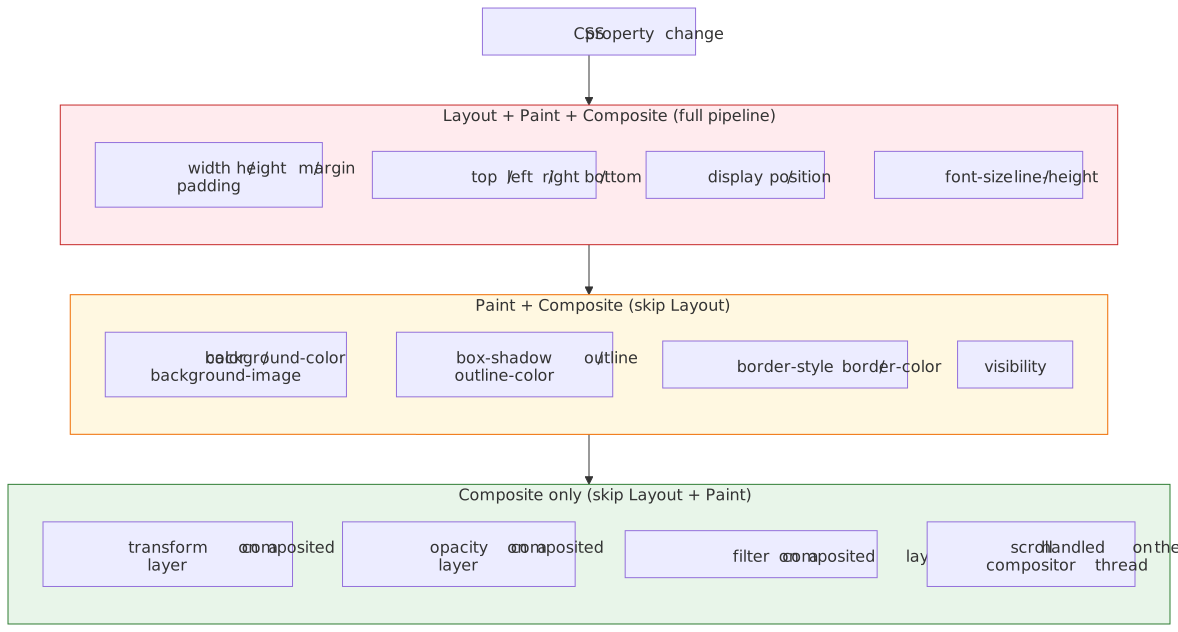
The matrix mirrors what CSSPropertyEquality and the style invalidation tables encode in Blink: each property carries the set of pipeline stages it dirties.11 background-color and box-shadow are paint-affecting because they only change the recorded drawing commands — geometry is already finalized in Layout and Prepaint. width is layout-affecting because the geometry of every box (and therefore every chunk’s visual rect) must be recomputed before paint can re-record.
Expensive paint operations
| Operation | Why expensive |
|---|---|
box-shadow with large blur |
Generates a blur shader; no hardware fast-path |
border-radius + box-shadow |
Non-rectangular; cannot use the nine-patch optimization |
filter: blur() |
Per-pixel convolution |
mix-blend-mode |
Requires reading backdrop pixels |
| Complex gradients | Multiple stops, radial patterns |
background-attachment: fixed |
Repainted every scroll frame (see below) |
Cheap paint operations
| Operation | Why cheap |
|---|---|
| Solid colors | Single fill primitive |
| Simple borders | Rectangle primitives |
| Plain text | Cached glyph atlas lookups |
Compositor-only properties
transform and opacity (and, in many configurations, filter) skip paint entirely when they animate on a layer that is already composited.11 The change updates the corresponding PropertyTreeState node directly during commit; no new display items are recorded.
.animate-position { animation: move 1s;}@keyframes move { to { left: 100px; }}.animate-transform { animation: slide 1s;}@keyframes slide { to { transform: translateX(100px); }}The first animation triggers the full pipeline — layout, prepaint, paint — every frame. The second animation only nudges a transform node on the compositor thread, which is why it stays smooth even when the main thread is busy.
DevTools paint profiling
Chrome DevTools surfaces three paint signals:
- Performance panel — “Paint” entries in the frame timeline expose per-frame paint cost.
- Rendering tab → Paint flashing — green overlays on regions that repainted during a frame.
- Layers panel — composited layers and the explicit “compositing reasons” Blink used to promote them.
Three patterns to look for:
- Large green flashes on scroll → main-thread paint, not compositor-only.
- Frequent paint events on static content → invalidation bug (often a CSS variable or class toggle on an ancestor).
- Per-frame paint > 10 ms → blowing the 16.67 ms frame budget.
Edge cases and failure modes
Hit-test data recording
Hit testing runs in paint order, and the paint system records hit-test information alongside visual data:
“Hit testing is done in paint-order, and to preserve this information the paint system is re-used to record hit test information when painting the background.” — Chromium Compositor Hit Testing
Non-rectangular opacity, filters, or clip-path can produce regions where the painted alpha is below the hit-test threshold. Pointer events fall through these “holes” to elements below, even though the pixel still looks solid to a user. Debugging this usually means turning on Layer borders + Hit-test borders in the Rendering tab.
will-change memory cost
will-change: transform promotes elements to compositor layers, and each layer occupies GPU memory roughly equal to width × height × 4 bytes (RGBA8) for its backing texture, ignoring tiling overhead.11
.list-item { will-change: transform;}.list-item.animating { will-change: transform;}The first rule is the anti-pattern: every .list-item is promoted at rest, even when nothing is animating. The second rule is the fix: toggle the .animating class only while the animation runs (animationstart / animationend, or for requestAnimationFrame-driven motion, immediately before and after the run) so the layer exists for exactly the frames that need it.
A 1920 × 1080 layer is ~8 MB. A hundred such layers are ~800 MB before tiling overhead. Symptoms of overuse:
- Checkerboarding (white rectangles) during scroll as the rasterizer falls behind.
- Browser sluggishness from GPU memory pressure.
- GPU process crashes on memory-constrained devices.
Promote on the .animating class (set when the animation starts, removed when it ends), not at rest.
Image lazy-painting and decode-on-raster
Image painting is deferred in two distinct ways. loading="lazy" defers the network fetch until the image is near the viewport, but inside Blink there is a second, lower-level deferral: DrawingDisplayItem records a cc::PaintImage whose pixel decode is performed lazily by cc::DecodingImageGenerator on raster worker threads, not during paint.12
Two consequences for performance work:
- Paint is cheap, raster can be expensive. A first-paint of a large JPEG records one display item (microseconds) but may schedule tens of milliseconds of decode on a raster worker. The DevTools Performance panel shows this as a
Decode Imagetask tied to the originating frame, not as paint cost. - Out-of-viewport images may never paint at all. When a paint chunk falls outside the recording bounds and the element has no compositing reason, Blink skips its display items entirely (a benefit of
contain: paintand of off-screen iframes). TheLargestContentfulPaintalgorithm waits for the candidate’s display item to actually be drawn, which is why above-the-fold images dominate LCP even when below-the-fold images decode later.
The actionable rule: if Decode Image time dominates a slow frame, the fix is image format/size, not paint logic — the paint stage already did its part in microseconds.
background-attachment: fixed
A fixed background repaints on every scroll frame because its position relative to scrolled content keeps changing.13
.hero { background-image: url(large-image.jpg); background-attachment: fixed;}This defeats compositor-thread scrolling. The standard fix is to render the background as a separate position: fixed element with transform: translateZ(0) to promote it to its own layer; the visual effect is identical and scrolling stays on the compositor thread.
Practical takeaways
Use this as the operating manual for paint cost on a real codebase:
- Paint records, rasterization draws. The artifact is data; pixels happen later, on a different thread.
- Stacking contexts are atomic. When
z-index“doesn’t work”, the answer is almost always that you crossed a stacking context boundary. - Compositor-only animations stay smooth under load. Animate
transformandopacity, nottop/left/width. contain: paintis cheap and high-leverage on widget-heavy pages. It scopes invalidation and lets the browser skip off-screen subtrees.- Promote with
will-changeonly while animating. Layer count is a budget; treat it like one. - Use Paint flashing first when investigating regressions. It tells you what repaints; the Performance panel tells you how long.
Appendix
Prerequisites
- CRP: Prepaint — property trees and paint invalidation marking.
- CRP: Layout — fragment tree construction.
- CSS 2.1: Appendix E — Stacking Contexts — paint order specification.
- Familiarity with the Chrome DevTools Performance and Rendering panels.
Series navigation
- Previous: CRP: Prepaint
- Next: CRP: Commit, then CRP: Layerize, CRP: Rasterize, CRP: Composite, CRP: Draw.
Terminology
| Term | Definition |
|---|---|
| Display Item | Atomic drawing command in a paint artifact (e.g., DrawingDisplayItem) |
| Paint Artifact | Output of paint stage: display items partitioned into paint chunks |
| Paint Chunk | Sequential display items sharing identical PropertyTreeState |
| PropertyTreeState | 4-tuple (transform_id, clip_id, effect_id, scroll_id) identifying visual effect context |
| PaintController | Component managing display item recording and caching |
| Stacking Context | Isolated 3D rendering context for z-ordering; created by various CSS properties |
| CompositeAfterPaint | Chromium M94+ architecture where paint precedes layerization |
| Isolation Boundary | Barrier (e.g., contain: paint) limiting paint invalidation propagation |
| Raster Invalidation | Determining which pixel regions need re-rasterization based on paint changes |
| Skia | Open-source 2D graphics library executing the recorded display item commands |
References
- CSS 2.1: Appendix E — Elaborate description of Stacking Contexts
- CSS Containment Module Level 1
- HTML Specification: Update the Rendering
- Chromium Blink Paint README
- Chromium Platform Paint README
- Chromium RenderingNG Architecture
- Chromium RenderingNG Data Structures
- Chromium BlinkNG
- Chromium Slimming Paint
- Chromium Compositor Hit Testing
- MDN: Stacking context
- web.dev: Stick to compositor-only properties and manage layer count
- Chrome DevTools: Analyze rendering performance
Footnotes
-
Chromium Blink Paint README — display item caching semantics and
PaintLayerPainterwalk order. ↩ ↩2 ↩3 -
Key data structures in RenderingNG — paint chunks, property tree state, layer assignment. ↩
-
Chromium Slimming Paint — 22,000 lines of C++ removed; CompositeAfterPaint background. ↩ ↩2
-
Chromium Platform Paint README — display item types and paint artifact layout. ↩
-
paint_controller.h —
SubsequenceMarkers,UseCachedSubsequenceIfPossible. ↩ -
CSS 2.1 Appendix E — normative paint order specification. ↩
-
MDN: Stacking context — current list of triggers. ↩
-
Chromium RenderingNG Architecture — pipeline ordering and thread boundaries. ↩
-
Chromium BlinkNG — CPU, scroll, and input-delay improvements. ↩
-
CSS Containment Module Level 1 — Paint Containment — clipping, stacking context, off-screen skip. ↩
-
web.dev: Stick to compositor-only properties and manage layer count —
transform/opacitysemantics and layer memory cost. ↩ ↩2 ↩3 -
cc/paint/paint_image.h and cc/paint/decoding_image_generator.h —
PaintImagerecords a lazy decode that runs on raster worker threads, not during paint. ↩ -
Chromium issue 40263175 (originally crbug 523175) —
background-attachment: fixedcausing constant repaint on scroll; see also web.dev: Stick to compositor-only properties. ↩