Service Workers and Cache API
A senior-engineer reference for offline-first web architecture: how the Service Worker API (W3C Candidate Recommendation Draft, 9 April 2026 publication) intercepts network requests and runs background work, how the Cache API stores Request → Response pairs durably, and how the lifecycle model lets you ship updates without two tabs running incompatible code. These APIs are the substrate of Progressive Web Apps (PWAs): the worker decides where each response comes from, the Cache API persists those responses across browser restarts, and the activation rules guarantee a single controlling version per scope at any moment.
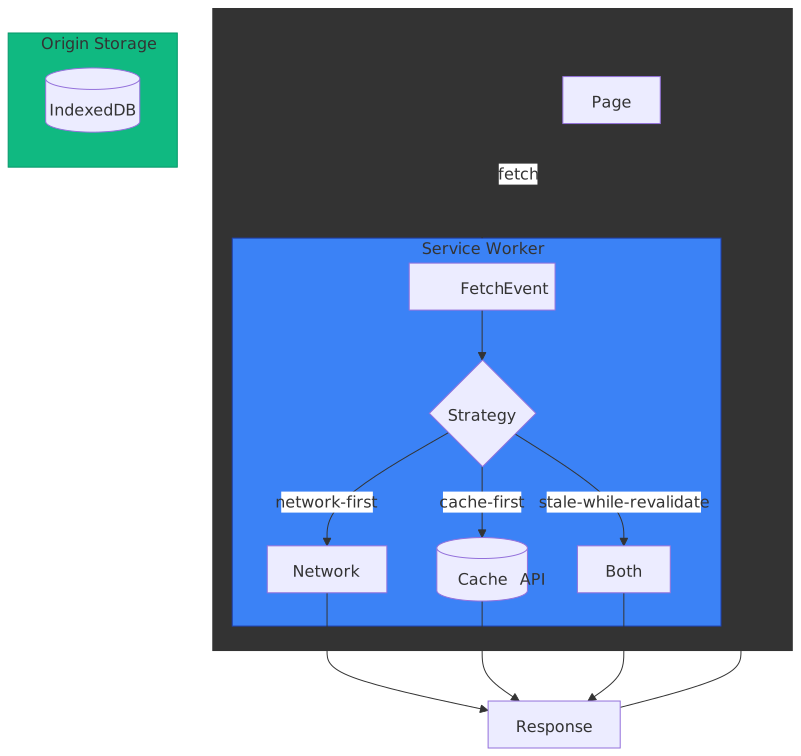
Abstract
Service workers represent a fundamental shift from traditional web architecture: instead of the browser directly fetching resources, an intermediary script can intercept every network request and programmatically decide how to respond.
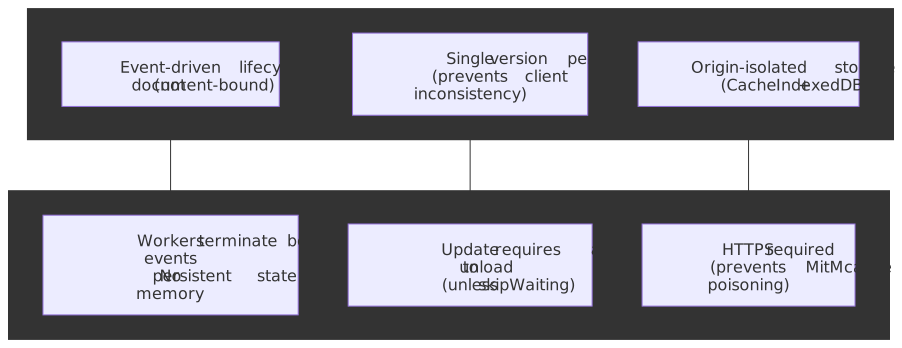
Mental model:
- Service Worker acts as a programmable network proxy scoped to a path prefix—it intercepts
fetchevents for matching URLs and can respond from cache, network, or synthesized responses - Cache API stores
Request→Responsemappings durably, surviving browser restarts—unlike HTTP cache, you control exactly what’s cached and for how long - Lifecycle ensures only one service worker version is active per scope at any time, preventing the “two tabs running different code” problem that plagued AppCache
Critical design decisions:
- Event-driven with termination: The spec is explicit that “the lifetime of a service worker is tied to the execution lifetime of events” and that workers “may be started and killed many times a second”1. In-memory globals don’t persist between events; use IndexedDB or Cache API for state.
- Waiting state by default: New workers wait until all clients using the old version close. This prevents mid-session version mismatches but means updates don’t apply immediately.
- Secure context required: Service workers can intercept any request in their scope, including credentials, so registration is restricted to secure contexts. HTTPS is required in production;
http://localhost(and127.0.0.1) is exempt for development.
Service Worker Lifecycle
The lifecycle is the most complex part of service workers—and the most important to understand. Unlike regular scripts that run when the page loads, service workers progress through distinct states independently of any document.
State Machine
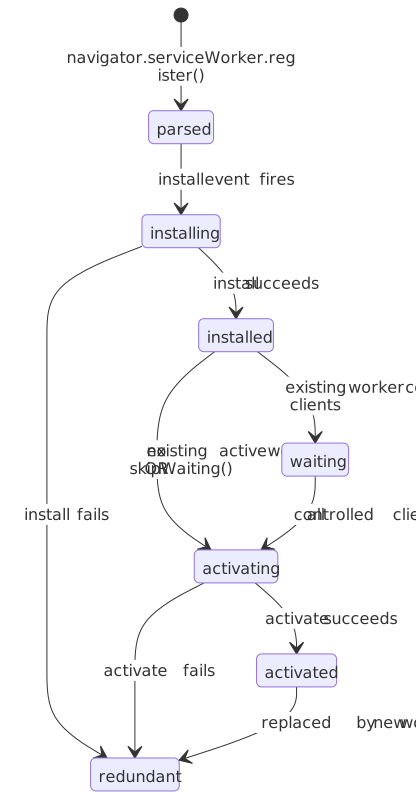
| State | Can Handle Fetches? | Trigger to Next State |
|---|---|---|
parsed |
No | Automatic after registration |
installing |
No | install event handler completes |
installed |
No | Automatic (to waiting) or skipWaiting() (to activating) |
waiting |
No | All clients using old worker unload |
activating |
No | activate event handler completes |
activated |
Yes | Remains until replaced or unregistered |
redundant |
No | Terminal state—worker is discarded |
Registration and Scope
Registration binds a worker script to a scope URL prefix:
// Feature detection (collapsed)if (!("serviceWorker" in navigator)) { console.log("Service workers not supported")}// Register with explicit scopeconst registration = await navigator.serviceWorker.register("/sw.js", { scope: "/app/", // Controls /app/* URLs})console.log("Scope:", registration.scope) // "https://example.com/app/"console.log("Active:", registration.active?.state) // "activated" if readyconsole.log("Waiting:", registration.waiting?.state) // Worker pending activationconsole.log("Installing:", registration.installing?.state) // Currently installing// Default scope: directory containing the worker script// /scripts/sw.js → scope defaults to /scripts/await navigator.serviceWorker.register("/scripts/sw.js")// Only controls /scripts/* URLs unless Service-Worker-Allowed header expands itScope rules:
- A worker at
/sw.jsdefaults to scope/(entire origin) - A worker at
/app/sw.jsdefaults to scope/app/ - Scope cannot exceed the worker’s directory unless the server sends
Service-Worker-Allowed: /header - Multiple registrations with different scopes can coexist; most-specific scope wins
Install Event: Precaching
The install event fires once per worker version. Use it to cache critical resources:
// Cache version constant (collapsed)const CACHE_NAME = "app-v1"self.addEventListener("install", (event) => { event.waitUntil( caches.open(CACHE_NAME).then((cache) => { // addAll is atomic—fails entirely if any resource fails return cache.addAll(["/", "/app.js", "/styles.css", "/offline.html"]) }), )})// ⚠️ addAll fetches with mode: 'cors' by default// Cross-origin resources need proper CORS headers or use:cache.add(new Request("https://cdn.example.com/lib.js", { mode: "no-cors" }))// Warning: no-cors responses are "opaque"—you can't inspect status or headerswaitUntil() is critical: The install event would complete immediately without it, potentially activating before caching finishes. If the promise rejects, the worker transitions to redundant and is discarded — so a single broken precache URL kills the entire install.
Activate Event: Cleanup
The activate event fires when the worker takes control. Use it to clean old caches:
// Expected cache names (collapsed)const CURRENT_CACHES = { app: "app-v2", images: "images-v1" }self.addEventListener("activate", (event) => { const expectedNames = new Set(Object.values(CURRENT_CACHES)) event.waitUntil( caches.keys().then((cacheNames) => { return Promise.all( cacheNames.map((name) => { if (!expectedNames.has(name)) { console.log("Deleting old cache:", name) return caches.delete(name) } }), ) }), )})Why clean on activate, not install? The old worker may still be serving requests. Deleting its caches during install would break active clients.
skipWaiting and clients.claim
Two methods bypass the default waiting behavior:
// In install event: skip waiting state entirelyself.addEventListener("install", (event) => { self.skipWaiting() // Activate immediately after install event.waitUntil(/* caching */)})// In activate event: take control of existing clientsself.addEventListener("activate", (event) => { event.waitUntil( clients.claim(), // Control pages that loaded before this worker )})When to use skipWaiting():
- Critical bug fixes that must deploy immediately
- The new version is backward-compatible with pages loaded under the old version
When to avoid it: The spec warns that with skipWaiting(), “new service worker is likely controlling pages that were loaded with an older version.” If your JavaScript expects cached assets that changed, you’ll get broken pages.
clients.claim() use case: First-time installations where pages loaded before registration should immediately get service worker control. Jake Archibald notes that he rarely uses it himself because “it only really matters on the very first load”2.
Update Mechanism
Service workers update when:
- Navigation to an in-scope page (if >24 hours since last check)
- Functional events (push, sync) fire while the worker has not been update-checked in the last 24 hours
registration.update()called explicitly- Worker script URL changes (rare; avoid this pattern — it strands the old registration)
The browser fetches the worker script and compares bytes. Any difference triggers a new install. The 24-hour cap is normative: the registration is “stale” once 86400 seconds have passed since the last check, and the browser then bypasses the HTTP cache regardless of Cache-Control.
Important
Since Chrome 68, the HTTP cache is bypassed for the top-level worker script on every update check by default. This is encoded in the registration option updateViaCache, which defaults to 'imports' (consult HTTP cache for importScripts(), ignore it for the worker script itself). Use 'none' to also bypass the cache for importScripts(); use 'all' only if you really want the legacy pre-Chrome-68 behavior.
// Trigger manual update checkconst registration = await navigator.serviceWorker.readyawait registration.update()// Monitor for updatesregistration.addEventListener("updatefound", () => { const newWorker = registration.installing newWorker?.addEventListener("statechange", () => { if (newWorker.state === "installed") { // New version ready, waiting to activate if (registration.active) { // Show "Update available" UI showUpdateNotification() } } })})Cache API
The Cache API provides a durable Request → Response storage mechanism. Unlike HTTP cache, you have explicit control over what’s stored, how matching works, and when entries expire.
CacheStorage Interface
caches (global CacheStorage) manages named caches:
| Method | Purpose | Returns |
|---|---|---|
caches.open(name) |
Open (or create) a named cache | Promise<Cache> |
caches.match(req) |
Search all caches for a matching response | Promise<Response | undefined> |
caches.has(name) |
Check if a cache exists | Promise<boolean> |
caches.delete(name) |
Delete a cache and all its entries | Promise<boolean> |
caches.keys() |
List all cache names | Promise<string[]> |
Cache Interface
Individual Cache objects store request/response pairs:
// Open or create cache (collapsed)const cache = await caches.open("api-v1")// Add single resource (fetches and stores)await cache.add("/api/config")// Add multiple resources (atomic—all or nothing)await cache.addAll(["/api/config", "/api/user"])// Put explicit request/response pairconst response = await fetch("/api/data")await cache.put("/api/data", response.clone()) // Must clone—body consumed// Match with optionsconst match = await cache.match(request, { ignoreSearch: true, // Ignore query string ignoreMethod: true, // Match regardless of HTTP method ignoreVary: true, // Ignore Vary header})// List all cached requestsconst keys = await cache.keys()// Delete specific entryconst deleted = await cache.delete("/api/old-endpoint")Critical: Response bodies are single-use. After cache.put(req, response), the response body is consumed. Always response.clone() if you need to return the response to the page.
Request Matching
Cache matching is exact by default—URL, method, and Vary headers must match:
// These are different cache entries:cache.put("/api?page=1", response1)cache.put("/api?page=2", response2)// Match with query stringawait cache.match("/api?page=1") // Returns response1await cache.match("/api?page=2") // Returns response2await cache.match("/api") // Returns undefined// Ignore query stringawait cache.match("/api?page=1", { ignoreSearch: true }) // Returns first matchVary header behavior: If a cached response has Vary: Accept-Language, the cache only returns it when the request’s Accept-Language matches the original request’s value. Use ignoreVary: true to bypass this.
Storage Limits and Quotas
Cache storage counts against the origin’s quota:
| Browser | Per-origin quota | Eviction / lifetime |
|---|---|---|
| Chrome | Up to 60% of total disk per origin; ~100 MiB per origin in incognito3 | LRU eviction when global storage is over budget; persistent storage exempt |
| Firefox | Best-effort: min(10% of total disk, 10 GiB) shared across an eTLD+1 group; persistent storage up to 50% / 8 TiB4 |
LRU eviction across best-effort origins under disk pressure |
| Safari | ~1 GB on desktop (prompts for more) | 7-day cap on script-writable storage wipes Cache API, IndexedDB, and SW registrations without user interaction5 |
Safari’s 7-day limit is the dominant operational concern for PWAs targeting iOS/macOS. The clock measures Safari browser use without a meaningful first-party interaction on your origin. Web apps added to the home screen run as standalone PWAs and are exempt; everything else loses its precache (and any IndexedDB-backed offline state) after a week.
Check quota with the Storage API:
const estimate = await navigator.storage.estimate()console.log(`Used: ${estimate.usage} bytes`)console.log(`Quota: ${estimate.quota} bytes`)console.log(`Available: ${((estimate.quota! - estimate.usage!) / 1024 / 1024).toFixed(1)} MB`)// Request persistent storage (immune to automatic eviction)const persistent = await navigator.storage.persist()if (persistent) { console.log("Storage will not be evicted under pressure")}Caching Strategies
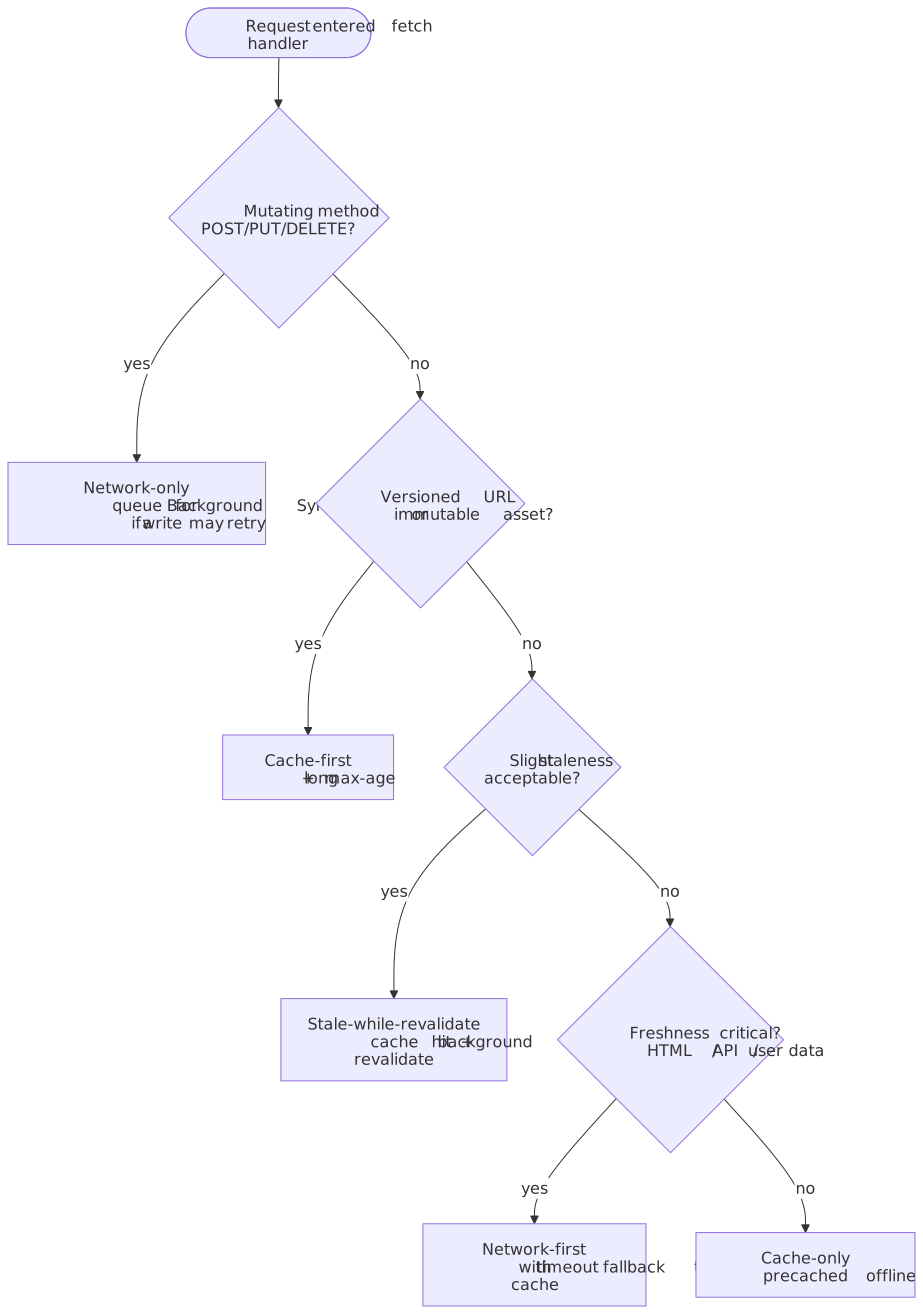
The fetch event is where caching strategies execute. Each strategy trades off freshness, speed, and offline capability. Pick one per resource class — not one per service worker:
Cache-First (Cache Falling Back to Network)
Return cached response immediately; fetch from network only if not cached:
self.addEventListener("fetch", (event) => { event.respondWith( caches.match(event.request).then((cached) => { if (cached) return cached return fetch(event.request).then((response) => { // Optionally cache the new response if (response.ok) { const clone = response.clone() caches.open("dynamic").then((cache) => cache.put(event.request, clone)) } return response }) }), )})Use for: Static assets (CSS, JS, images) with versioned URLs (app.v2.js). Immutable once deployed.
Trade-off: Fast and offline-capable, but stale until cache is explicitly invalidated.
Network-First (Network Falling Back to Cache)
Try network first; fall back to cache if offline or request fails:
self.addEventListener("fetch", (event) => { event.respondWith( fetch(event.request) .then((response) => { // Update cache with fresh response const clone = response.clone() caches.open("api").then((cache) => cache.put(event.request, clone)) return response }) .catch(() => { // Network failed—try cache return caches.match(event.request) }), )})Use for: API responses, user data, anything where freshness matters more than speed.
Trade-off: Always fresh when online, but slower (waits for network). Provides offline fallback.
Stale-While-Revalidate
Return cached response immediately, then fetch and update cache in background:
self.addEventListener("fetch", (event) => { event.respondWith( caches.open("swr").then((cache) => { return cache.match(event.request).then((cached) => { // Always fetch to update cache const fetchPromise = fetch(event.request).then((response) => { cache.put(event.request, response.clone()) return response }) // Return cached immediately, or wait for network if no cache return cached || fetchPromise }) }), )})Use for: Frequently-updated content where slight staleness is acceptable (avatars, news feeds, product listings).
Trade-off: Fast response from cache, eventual freshness. Uses more bandwidth (always fetches).
Network-Only
Pass through to network without caching:
self.addEventListener("fetch", (event) => { event.respondWith(fetch(event.request))})Use for: Non-cacheable requests (POST, real-time data, authenticated content with unique tokens).
Cache-Only
Only serve from cache; fail if not cached:
self.addEventListener("fetch", (event) => { event.respondWith(caches.match(event.request))})Use for: Offline-only apps after initial precaching. Rarely used alone.
Strategy Selection by Resource Type
| Resource Type | Strategy | Rationale |
|---|---|---|
| Versioned static assets | Cache-first | Immutable; version change = new URL |
| App shell (HTML) | Network-first | Structure may update; offline fallback useful |
| API data | Network-first or SWR | Freshness important; offline read useful |
| User-generated images | Cache-first + lazy load | Large; rarely changes once uploaded |
| Analytics/tracking | Network-only | Must reach server; no value in caching |
| Third-party scripts | Stale-while-revalidate | Updates occasionally; speed matters |
Navigation Preload
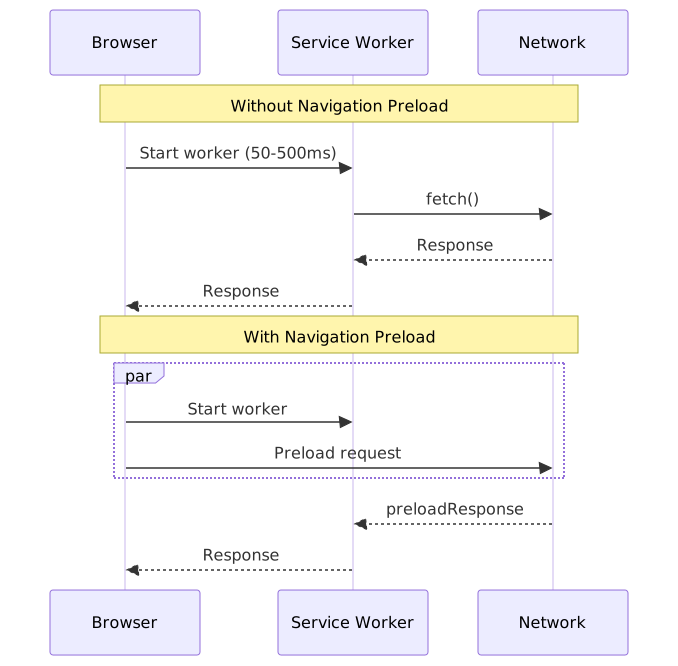
Navigation preload solves a performance problem: when a user navigates, the browser must start the service worker before dispatching the fetch event. This startup delay (50-500ms) adds latency to every page load.
Navigation preload starts the network request in parallel with worker startup:
Enabling Navigation Preload
self.addEventListener("activate", (event) => { event.waitUntil( (async () => { if (self.registration.navigationPreload) { await self.registration.navigationPreload.enable() } })(), )})Using the Preloaded Response
self.addEventListener("fetch", (event) => { if (event.request.mode === "navigate") { event.respondWith( (async () => { // Try cache first const cached = await caches.match(event.request) if (cached) return cached // Use preloaded response if available const preloaded = await event.preloadResponse if (preloaded) return preloaded // Fallback to regular fetch return fetch(event.request) })(), ) }})Server-Side Detection
Navigation preload requests include the Service-Worker-Navigation-Preload header (default value: true). Servers can customize responses:
// Set custom header valueawait registration.navigationPreload.setHeaderValue("v2")// Server receives: Service-Worker-Navigation-Preload: v2// Check current stateconst state = await registration.navigationPreload.getState()// { enabled: true, headerValue: "v2" }Server optimization: Return minimal content (header + footer) for preload, let the service worker merge with cached content.
Important: If your response differs based on this header, include Vary: Service-Worker-Navigation-Preload to prevent caching issues.
Update Flows and Client Coordination
Managing updates is where service workers get tricky. The default behavior—waiting until all clients close—is safest but frustrating for users who keep tabs open.
Approach 1: Let It Wait (Default)
The simplest approach: don’t use skipWaiting(). Users get the update on their next visit after all tabs close.
// No skipWaiting—new worker waitsself.addEventListener("install", (event) => { event.waitUntil( caches.open("v2").then((cache) => cache.addAll([ /* ... */ ]), ), ) // Worker enters "waiting" state after install})Pros: Safe—no version mismatches. Cons: Updates may never apply for users with persistent tabs.
Approach 2: Skip Waiting (Prompt User)
Use skipWaiting() only when user explicitly requests the update:
self.addEventListener("message", (event) => { if (event.data?.type === "SKIP_WAITING") { self.skipWaiting() }})// UI notification (collapsed)function showUpdateNotification(onUpdate: () => void) { /* ... */}const registration = await navigator.serviceWorker.readyregistration.addEventListener("updatefound", () => { const newWorker = registration.installing! newWorker.addEventListener("statechange", () => { if (newWorker.state === "installed" && registration.active) { // New version ready—show UI showUpdateNotification(() => { newWorker.postMessage({ type: "SKIP_WAITING" }) }) } })})// Reload when new worker takes controlnavigator.serviceWorker.addEventListener("controllerchange", () => { window.location.reload()})Pros: User controls when the update happens. Cons: Requires UI implementation; some users ignore update prompts.
Approach 3: Skip Waiting (Backward Compatible)
If new code can run with old-cached assets (or vice versa), skip immediately:
self.addEventListener("install", (event) => { self.skipWaiting() event.waitUntil(/* caching */)})self.addEventListener("activate", (event) => { event.waitUntil(clients.claim())})Pros: Updates apply immediately. Cons: Risk of version mismatches. Only works if your code handles this gracefully.
Version Mismatch Scenarios
When skipWaiting() activates a new worker while old pages are open:
| Scenario | Result |
|---|---|
| Page requests cached JS | Old worker’s cache may be deleted; request fails or returns new version |
| New worker returns new HTML | HTML expects new JS; cached old JS breaks |
| API response format changed | New worker parses differently than old page expects |
Mitigation strategies:
- Versioned URLs:
app.v2.jsnever conflicts withapp.v1.js - Keep old caches during activate: Don’t delete immediately
- Force reload on controller change:
location.reload()aftercontrollerchange
Offline Fallbacks and UX
A robust offline experience requires graceful degradation when resources aren’t available.
Generic Offline Page
const OFFLINE_PAGE = "/offline.html"self.addEventListener("install", (event) => { event.waitUntil(caches.open("offline").then((cache) => cache.add(OFFLINE_PAGE)))})self.addEventListener("fetch", (event) => { if (event.request.mode === "navigate") { event.respondWith(fetch(event.request).catch(() => caches.match(OFFLINE_PAGE))) }})Offline Image Placeholder
const OFFLINE_IMAGE = "/images/offline-placeholder.svg"self.addEventListener("fetch", (event) => { if (event.request.destination === "image") { event.respondWith( caches.match(event.request).then((cached) => { return cached || fetch(event.request).catch(() => caches.match(OFFLINE_IMAGE)) }), ) }})Background Sync for Offline Actions
Queue failed mutations for retry when online.
Warning
The Background Sync API is Chromium-only. As of 2026, Firefox and Safari do not implement it. Treat it as a progressive enhancement: feature-detect 'SyncManager' in self, and fall back to retry-on-next-load (e.g., on controllerchange or app start) for the rest of the audience.
// Queue the request for background syncasync function queueForSync(request: Request) { const queue = await getRequestQueue() // IndexedDB-backed await queue.push(request) await navigator.serviceWorker.ready.then((reg) => reg.sync.register("sync-requests"))}// Use when fetch failstry { await fetch("/api/submit", { method: "POST", body: data })} catch { await queueForSync(new Request("/api/submit", { method: "POST", body: data })) showToast("Saved offline—will sync when connected")}self.addEventListener("sync", (event) => { if (event.tag === "sync-requests") { event.waitUntil(processQueue()) }})async function processQueue() { const queue = await getRequestQueue() for (const request of await queue.getAll()) { try { await fetch(request) await queue.remove(request) } catch { // Still offline—will retry on next sync break } }}Debugging and Observability
Browser DevTools
Chrome DevTools (Application tab):
- Service Workers panel: View registered workers, state, and messages
- Update on reload: Forces new worker on every page load (development only)
- Bypass for network: Disables service worker for all fetches
- Offline checkbox: Simulates offline mode
- Cache Storage: Inspect cached request/response pairs
Firefox DevTools:
- Application > Service Workers: Similar to Chrome
- Enable Service Workers over HTTP: Testing without HTTPS (toolbox open only)
Logging Strategy
const DEBUG = truefunction log(context: string, ...args: unknown[]) { if (DEBUG) { console.log(`[SW:${context}]`, ...args) }}self.addEventListener("install", (event) => { log("install", "Starting install...") // ...})self.addEventListener("fetch", (event) => { log("fetch", event.request.method, event.request.url) // ...})Common Issues and Solutions
| Symptom | Cause | Solution |
|---|---|---|
| Changes not appearing | Old worker still active | Close all tabs or use Update on reload |
| Worker stuck in “waiting” | Clients still using old worker | Use skipWaiting or close tabs |
| Fetch handler not firing | Request outside scope or no-cors opaque | Check scope; ensure fetch listener returns |
| Cache match returns undefined | URL mismatch (query string, trailing slash) | Use ignoreSearch: true or normalize URLs |
| ”The service worker navigation preload request was cancelled” | Preload unused | Always consume event.preloadResponse when enabled |
| Storage quota exceeded | Too much cached data | Implement cache eviction; check storage.estimate() |
Error Handling in Fetch
self.addEventListener("fetch", (event) => { event.respondWith( handleFetch(event.request).catch((error) => { console.error("Fetch handler error:", error) // Return appropriate fallback based on request type if (event.request.destination === "document") { return caches.match("/offline.html") } if (event.request.destination === "image") { return caches.match("/offline-placeholder.svg") } // For other requests, let the error propagate return new Response("Service unavailable", { status: 503 }) }), )})Workbox: Production-Ready Abstractions
Workbox (Google) provides battle-tested implementations of caching patterns. Use it unless you have specific requirements that demand custom code.
Strategy Modules
import { registerRoute } from "workbox-routing"import { CacheFirst, NetworkFirst, StaleWhileRevalidate } from "workbox-strategies"import { ExpirationPlugin } from "workbox-expiration"// Static assets: cache-first with expirationregisterRoute( ({ request }) => request.destination === "style" || request.destination === "script", new CacheFirst({ cacheName: "static-v1", plugins: [new ExpirationPlugin({ maxEntries: 50, maxAgeSeconds: 30 * 24 * 60 * 60 })], }),)// API calls: network-first with 3-second timeoutregisterRoute( ({ url }) => url.pathname.startsWith("/api/"), new NetworkFirst({ cacheName: "api-v1", networkTimeoutSeconds: 3, }),)// Images: stale-while-revalidateregisterRoute(({ request }) => request.destination === "image", new StaleWhileRevalidate({ cacheName: "images-v1" }))Precaching with Versioning
import { precacheAndRoute } from "workbox-precaching"// Injected by build tool (Webpack, Vite, etc.)precacheAndRoute(self.__WB_MANIFEST)// Generates versioned URLs: [{ url: "/app.js", revision: "abc123" }, ...]When to Use Custom Code
- Complex routing logic not expressible with Workbox’s route matching
- Custom cache invalidation beyond time/count expiration
- Streaming responses that need transformation
- Tight bundle size constraints (Workbox adds ~10-20KB)
Conclusion
Service workers fundamentally change the browser’s network model: instead of direct fetches, an intermediary script decides response sources. The Cache API provides the durable storage that makes offline experiences possible. The lifecycle model—with its waiting states and update flows—ensures clients don’t run inconsistent code.
The key architectural insight is that service workers are event-driven and stateless between events. Global variables don’t persist. The worker may terminate after handling a fetch and restart fresh for the next one. Design accordingly: use Cache API and IndexedDB for persistence, not in-memory state.
Caching strategies represent trade-offs, not best practices. Cache-first sacrifices freshness for speed. Network-first sacrifices speed for freshness. Stale-while-revalidate trades bandwidth for both. Choose based on the specific resource’s characteristics and your users’ expectations.
Appendix
Prerequisites
- JavaScript Promises and async/await
- HTTP request/response model (methods, headers, caching headers)
- Familiarity with the Fetch API
Terminology
- Scope: URL path prefix that a service worker controls (e.g.,
/app/controls/app/*) - Client: A window, worker, or shared worker controlled by a service worker
- Registration: The binding of a service worker script to a scope
- Precaching: Caching resources during the install event before they’re needed
- Opaque response: Cross-origin response with
mode: 'no-cors'that hides status and headers - Navigation preload: Parallel network request during service worker startup
Summary
- Lifecycle states: parsed → installing → installed → waiting → activating → activated → redundant
- Only activated workers handle fetch events; waiting workers queue behind the current active worker
- Cache API stores Request/Response pairs durably; you control expiration and invalidation
- Caching strategies: cache-first (speed), network-first (freshness), stale-while-revalidate (both with bandwidth cost)
skipWaiting()bypasses waiting but risks version mismatches; use with versioned URLs or user prompts- Navigation preload eliminates worker startup delay by fetching in parallel
- Safari’s 7-day limit deletes storage without user interaction; PWAs on home screen are exempt
References
Specifications (Primary Sources)
- Service Workers — W3C Candidate Recommendation Draft (registration, lifecycle, fetch events, cache interface, navigation preload)
- Fetch Standard — WHATWG Living Standard (Request, Response, fetch algorithm, opaque responses)
- Storage Standard — WHATWG Living Standard (quota, persistence, storage buckets)
- Web Background Synchronization — W3C WICG Editor’s Draft (Chromium-only)
Official Documentation
- Service Worker API - MDN
- Cache - MDN
- CacheStorage - MDN
- NavigationPreloadManager - MDN
- StorageManager - MDN
Core Maintainer Content
- The Service Worker Lifecycle - web.dev - Jake Archibald’s definitive lifecycle guide
- The Offline Cookbook - web.dev - Caching strategy patterns
- Service Worker Caching and HTTP Caching - web.dev
- Speed up Service Worker with Navigation Preloads - web.dev
- Workbox - Production service worker library from Chrome team
Safari Storage Policy
- Full Third-Party Cookie Blocking and More - WebKit Blog - Safari’s 7-day storage cap details
Browser Support
Footnotes
-
Service Workers Nightly — § Service Worker concept, W3C Candidate Recommendation Draft. ↩
-
The service worker lifecycle —
clients.claim, web.dev (Jake Archibald). ↩ -
Chrome — Storage for the web (60% per-origin, total disk denominator) and Workbox — Understanding storage quota (~100 MiB incognito cap). ↩
-
MDN — Storage quotas and eviction criteria, Firefox section. ↩
-
WebKit blog — Full Third-Party Cookie Blocking and More (March 2020). Cache, IndexedDB, LocalStorage, SessionStorage, SW registrations, and JS-set cookies are all included. ↩