Core Web Vitals Measurement: Lab vs Field Data
How to measure, interpret, and debug Core Web Vitals using lab tools, field data (Real User Monitoring), and the web-vitals library. Covers metric-specific diagnostics for LCP, INP, and CLS with implementation patterns for production RUM pipelines.
Abstract
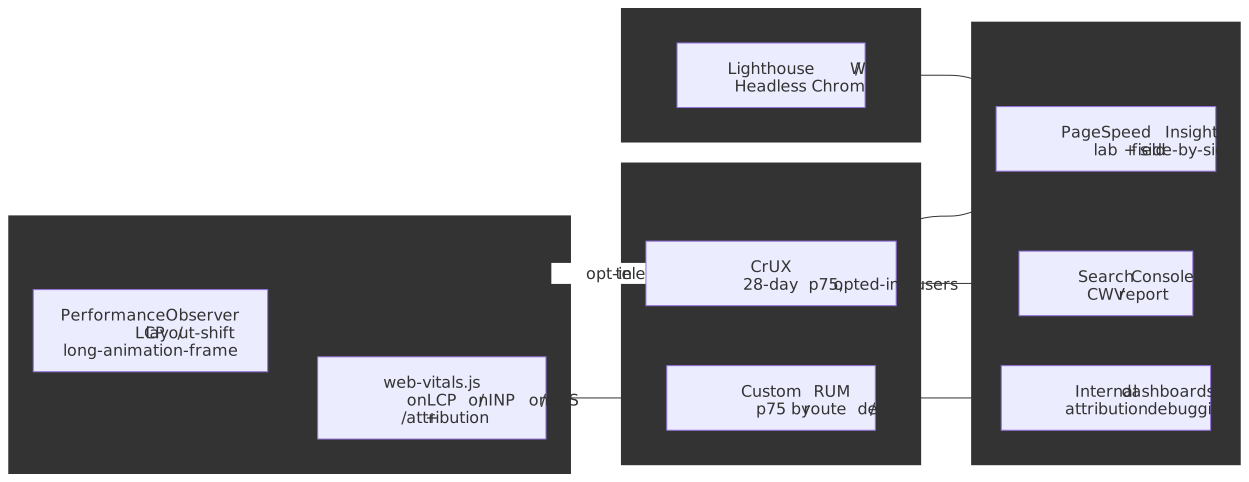
Core Web Vitals measurement splits into two fundamentally different contexts: lab data (synthetic, controlled) and field data (real users, variable conditions). Lab tools like Lighthouse provide reproducible diagnostics but cannot predict real-world performance — cache state, device diversity, and actual interaction patterns create systematic gaps. Field data from the Chrome User Experience Report (CrUX) or custom Real User Monitoring (RUM) captures the 75th-percentile experience that determines Google’s ranking signals.
Since March 12, 2024, the responsiveness vital is Interaction to Next Paint (INP), replacing First Input Delay (FID). Throughout this article, all three vitals are measured at p75 of page loads and assessed against the official thresholds: LCP good ≤ 2.5 s / poor > 4 s; INP good ≤ 200 ms / poor > 500 ms; CLS good ≤ 0.1 / poor > 0.25.
The mental model:
- Lab data answers “what’s the best this page can do?” and “what changed in this deploy?”
- Field data answers “what are real users experiencing?” and “are we meeting Core Web Vitals thresholds?”
- Attribution data answers “why is this metric slow?” with element-level and timing-breakdown diagnostics
Each metric has distinct measurement nuances:
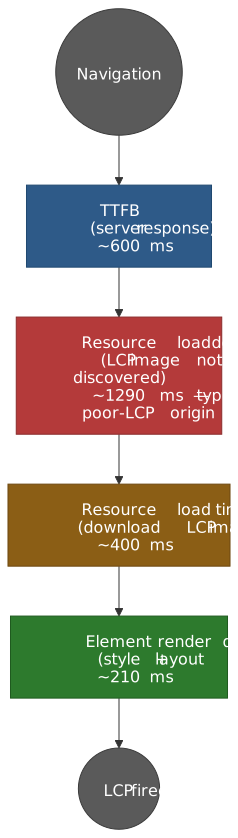
- LCP (Largest Contentful Paint): Four quantifiable subparts (Time to First Byte (TTFB), resource load delay, resource load time, element render delay) — the median origin with a poor LCP rating spends ≈ 1.29 s in resource load delay alone, >50 % of the 2.5 s budget consumed before the LCP resource even starts downloading
- INP (Interaction to Next Paint): Three-phase breakdown (input delay + processing time + presentation delay) with outlier filtering — one highest interaction is ignored per 50 interactions, approximating a high percentile (~p98) rather than the absolute worst
- CLS (Cumulative Layout Shift): Session windows (1 s gap, 5 s cap) with
hadRecentInputexclusion — shifts within 500 ms of a discrete user input are considered expected
The web-vitals library (v5.x) is the canonical implementation for RUM collection: ~ 2 KB brotli for the standard build, ~ 3.5 KB for the attribution build (~ 1.5 KB extra) which provides the root-cause data essential for debugging. For field data at scale, CrUX provides daily page- and origin-level aggregates via the CrUX API, weekly trend data via the CrUX History API, and monthly origin-only data via the BigQuery dataset.
Lab vs Field: Fundamental Differences
Lab and field data measure the same metrics but produce systematically different results. Understanding these differences is essential for interpreting measurements and prioritizing optimization work.
Lab Data Characteristics
Lab tools (Lighthouse, WebPageTest, Chrome DevTools) run in controlled environments with predefined conditions:
| Parameter | Typical Lab Setting | Real-World Reality |
|---|---|---|
| Network | 1.6 Mbps, 150ms RTT (simulated 4G) | Variable: 50 Mbps fiber to 100 Kbps 2G |
| CPU | 4x throttling on fast desktop | Low-end Android: actual 2-4 GFLOPS |
| Cache | Always cold (cleared before test) | Often warm for returning visitors |
| Viewport | Fixed 412×823 (mobile) or 1350×940 | Diverse: 320px to 4K displays |
| Interactions | None (or scripted clicks) | Real user patterns, scroll depth |
Lab data provides reproducible baselines and regression detection but cannot capture the diversity of real-world conditions. A Lighthouse score of 95 does not guarantee good field metrics.
Field Data Characteristics
Field data from CrUX or custom RUM aggregates real user experiences:
- 28-day rolling window: CrUX summarises 28 days of Chrome user data; new data lands daily but the full window only refreshes after 28 days, smoothing variance and lagging behind deploys
- 75th percentile: The reported value means 75 % of experiences were better — this is the threshold for “passing” Core Web Vitals
- Traffic-weighted: High-traffic pages dominate origin-level metrics
- Cache-aware: Returning visitors often have cached resources, improving LCP
Note
Design rationale for 75th percentile. Google chose p75 as a compromise between “most users” (median ignores the long tail) and “achievable” (p95 fails most sites on edge cases). p75 roughly corresponds to the experience of users on slower connections or devices and biases attention toward the population that struggles, not the median visitor.
When Lab and Field Diverge
Common scenarios where lab and field metrics differ significantly:
| Scenario | Lab Result | Field Result | Why |
|---|---|---|---|
| Cached resources | Always misses cache | Returning visitors hit cache | Field LCP can be much faster |
| Lazy-loaded images | Fixed viewport, limited scroll | Users scroll variably | Field CLS includes shifts from lazy content |
| Personalization | Static content | User-specific content | Different LCP elements per user segment |
| Third-party scripts | May load fully | May be blocked (ad blockers) | Field may show better or worse performance |
| Geographic distribution | Single origin location | Global user base | Latency varies dramatically by region |
Practical guidance: If you have both lab and field data for a page, prioritize field data for understanding user experience. Use lab data for debugging specific issues and validating fixes before deploy.
Measurement APIs and the web-vitals Library
PerformanceObserver Entry Types
The browser exposes Core Web Vitals through PerformanceObserver with specific entry types:
| Metric | Entry Type | Key Properties |
|---|---|---|
| LCP | largest-contentful-paint |
element, renderTime, loadTime, size, url |
| CLS | layout-shift |
value, hadRecentInput, sources[] |
| INP | event |
startTime, processingStart, processingEnd, duration, target |
Critical configuration details:
// Basic LCP observationconst lcpObserver = new PerformanceObserver((list) => { const entries = list.getEntries() const lastEntry = entries[entries.length - 1] console.log("LCP candidate:", lastEntry.startTime, lastEntry.element)})// IMPORTANT: Use `type` not `entryTypes` when using buffered or durationThresholdlcpObserver.observe({ type: "largest-contentful-paint", buffered: true, // Retrieve entries from before observer was created})// For event timing (INP), lower threshold captures more interactionsconst eventObserver = new PerformanceObserver((list) => { /* ... */})eventObserver.observe({ type: "event", durationThreshold: 16, // Default is 104ms; minimum is 16ms (one frame at 60fps) buffered: true,})Why type instead of entryTypes? The buffered and durationThreshold options only work with type (single entry type). Using entryTypes (array) silently ignores these options — a common source of bugs in RUM implementations.
durationThreshold design. The default 104 ms threshold is the first multiple of 8 ms above 100 ms; the API rounds duration to 8 ms granularity to mitigate cross-origin timing attacks, so 104 ms is the smallest pre-rounded value guaranteed ≥ 100 ms. The minimum allowed threshold is 16 ms (one frame at 60 Hz). For comprehensive measurement set durationThreshold: 16; the web-vitals library defaults onINP to 40 ms — lower than the platform default and a frequent source of “duration < 40 ms” surprises in custom code that mixes the library with raw observers.
The web-vitals Library
Google’s web-vitals library (v5.x, ~2KB brotli) provides the canonical implementation of metric collection:
import { onLCP, onINP, onCLS, onTTFB, onFCP } from "web-vitals"// Each callback receives a metric object with:// - name: 'LCP' | 'INP' | 'CLS' | etc.// - value: The metric value// - delta: Change since last report (important for CLS)// - id: Unique identifier for this page load// - rating: 'good' | 'needs-improvement' | 'poor'// - entries: Array of PerformanceEntry objectsonLCP((metric) => { sendToAnalytics({ name: metric.name, value: metric.value, rating: metric.rating })})onINP((metric) => { /* ... */})onCLS((metric) => { /* ... */})The delta property is critical for analytics: CLS accumulates over the session. If you send metric.value on every callback, your aggregate CLS will be inflated. Always use metric.delta for analytics systems that sum values.
Attribution Build for Debugging
The attribution build (~3.5KB brotli) adds diagnostic data essential for root-cause analysis:
import { onLCP, onINP, onCLS } from "web-vitals/attribution"onLCP((metric) => { const { attribution } = metric console.log("LCP Element:", attribution.element) console.log("LCP URL:", attribution.url) // Image/video source if applicable // LCP subpart breakdown (see next section) console.log("TTFB:", attribution.timeToFirstByte) console.log("Resource Load Delay:", attribution.resourceLoadDelay) console.log("Resource Load Time:", attribution.resourceLoadTime) console.log("Element Render Delay:", attribution.elementRenderDelay)})onINP((metric) => { const { attribution } = metric console.log("Interaction target:", attribution.interactionTarget) console.log("Input delay:", attribution.inputDelay) console.log("Processing time:", attribution.processingDuration) console.log("Presentation delay:", attribution.presentationDelay)})onCLS((metric) => { const { attribution } = metric console.log("Largest shift target:", attribution.largestShiftTarget) console.log("Largest shift value:", attribution.largestShiftValue) console.log("Largest shift time:", attribution.largestShiftTime)})LCP Measurement and Diagnostics
Qualifying Elements
The W3C Largest Contentful Paint specification and the web.dev LCP guide define which elements can be LCP candidates:
<img>elements (including<img>inside<picture>)<image>elements inside SVG<video>elements — poster image; from Chrome 116+, the first painted frame also qualifies when no poster is set- Elements with
background-imageloaded via CSSurl(...)(gradients are excluded) - Block-level elements containing text nodes or inline-level text children
Exclusions (elements that cannot be LCP):
- Elements with
opacity: 0 - Elements that cover (roughly) the full viewport — treated as background rather than content
- Low-entropy placeholders: images with less than 0.05 bits of image data per displayed pixel (Chrome 112+) — calculated as
encodedBodySize × 8 / (displayWidth × displayHeight)
Important
Two non-obvious LCP behaviours catch teams out:
- Removed elements still count. Once an element has been painted as the largest, removing it from the DOM does not retract the entry. A larger element rendered later replaces it; otherwise the original wins.
- Reporting stops at the first user interaction (scroll, click, or keypress). Code that tries to measure LCP after a click runs into a frozen value, not “live” tracking.
LCP Subparts Breakdown
LCP can be decomposed into four measurable subparts, each pointing to different optimization strategies:
| Subpart | What It Measures | Optimization Target |
|---|---|---|
| TTFB | Server response time | Origin speed, CDN, caching |
| Resource Load Delay | Time from TTFB to starting LCP resource fetch | Resource discoverability, preload hints |
| Resource Load Time | Download duration of LCP resource | Image optimization, CDN |
| Element Render Delay | Time from download complete to paint | Render-blocking JS/CSS, main thread |
Target distribution. Optimize LCP recommends keeping the two delay subparts below ~10 % each on a well-tuned page; that leaves roughly 80 % split between TTFB and Resource Load Time, with the exact split dictated by origin speed vs. payload size.
Real-world finding. The August 2024 Chrome team analysis of CrUX field data shows the median origin with a poor LCP rating spends ≈ 1,290 ms in Resource Load Delay alone — over half of the 2.5 s “good” budget — and ~ 4× longer waiting to start the fetch than actually downloading. The usual root cause is late discovery: the LCP image is referenced from JavaScript, CSS background-image, deep DOM, or a hydration-time mount that the preload scanner cannot see.
LCP Measurement Code with Subparts
import { onLCP } from "web-vitals/attribution"interface LCPDiagnostics { totalLCP: number ttfb: number resourceLoadDelay: number resourceLoadTime: number elementRenderDelay: number element: string url: string | null}onLCP((metric) => { const { attribution } = metric const diagnostics: LCPDiagnostics = { totalLCP: metric.value, ttfb: attribution.timeToFirstByte, resourceLoadDelay: attribution.resourceLoadDelay, resourceLoadTime: attribution.resourceLoadTime, elementRenderDelay: attribution.elementRenderDelay, element: attribution.element || "unknown", url: attribution.url || null, } // Identify which subpart is the bottleneck const subparts = [ { name: "TTFB", value: diagnostics.ttfb }, { name: "Resource Load Delay", value: diagnostics.resourceLoadDelay }, { name: "Resource Load Time", value: diagnostics.resourceLoadTime }, { name: "Element Render Delay", value: diagnostics.elementRenderDelay }, ] const bottleneck = subparts.reduce((max, curr) => (curr.value > max.value ? curr : max)) sendToAnalytics({ ...diagnostics, bottleneck: bottleneck.name, })})INP Measurement and Diagnostics
The INP Processing Model
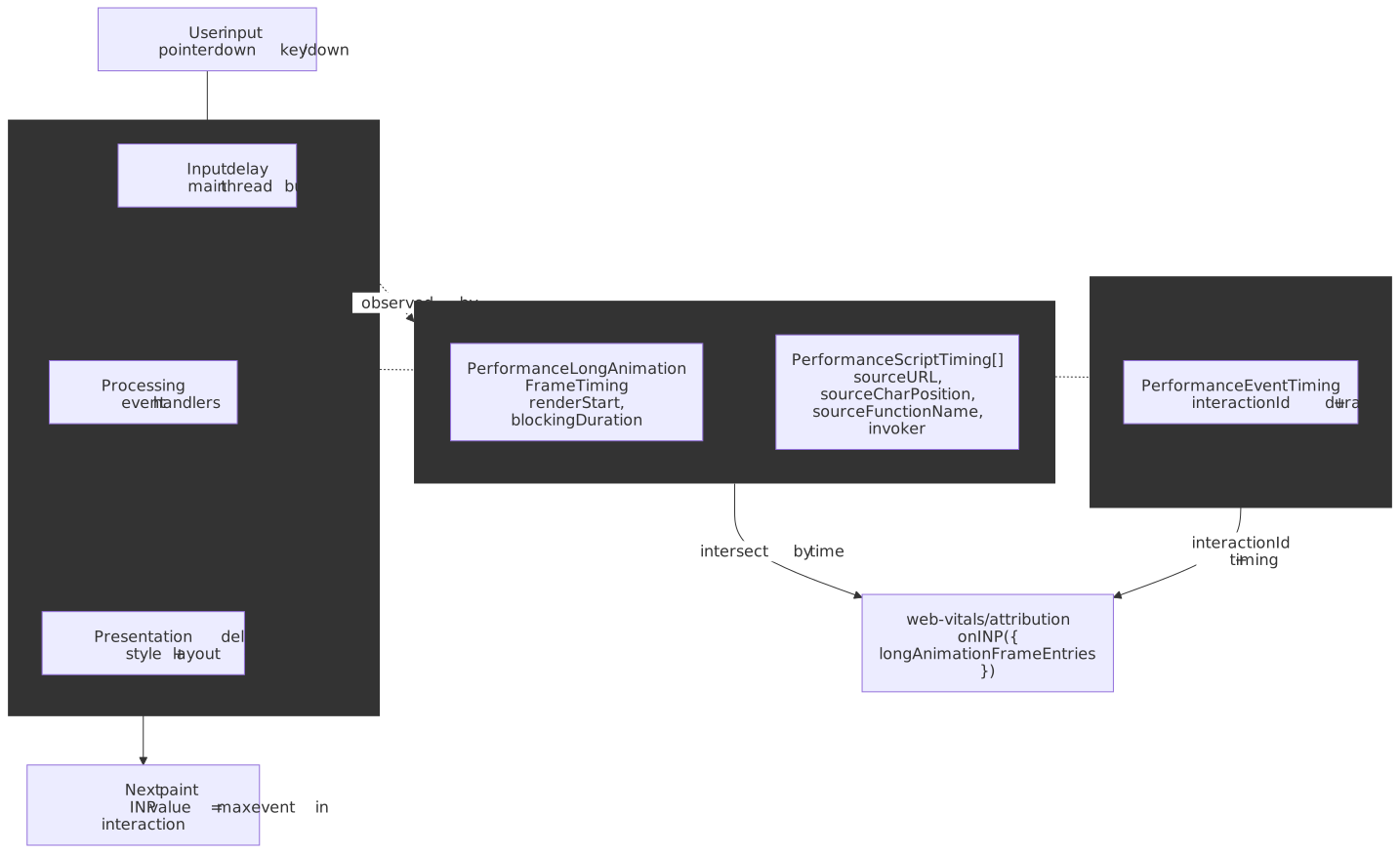
INP measures the latency of user interactions across the entire page session. Each interaction has three phases:
| Phase | What It Measures | Common Causes of Slowness |
|---|---|---|
| Input Delay | Time from user action to handler start | Main thread blocked by other tasks |
| Processing Time | Event handler execution duration | Expensive handler logic, forced reflows |
| Presentation Delay | Time from handler end to visual update | Large DOM updates, layout thrashing |
Interaction Grouping
Multiple events from a single user action (e.g., keydown, keyup for a keystroke; pointerdown, pointerup, click for a tap) are grouped into a single interaction. The interaction’s latency is the maximum duration among its events.
The Event Timing API exposes many event types, but only events that get an interactionId contribute to INP grouping:
- Pointer/tap/click:
pointerdown,pointerup,click - Keyboard:
keydown,keyup
Excluded (continuous events; no interactionId): mousemove, pointermove, pointerrawupdate, touchmove, wheel, drag, and scroll (scroll is decoupled from input events in Chromium and is explicitly out of scope for INP).
Worst Interaction Selection with Outlier Handling
INP doesn’t report the absolute worst interaction — it uses outlier filtering to prevent random hiccups from inflating the score:
- < 50 interactions: INP = worst interaction latency (effectively p100)
- ≥ 50 interactions: INP approximates a high percentile (~p98) — one highest interaction is ignored per 50 interactions
Design rationale. A generally responsive page with one 2-second interaction caused by a network glitch shouldn’t fail INP. The filter approximates “typical worst-case” rather than “absolute worst-case.”
Implementation efficiency. Browsers don’t store all interactions; they maintain a small fixed-size list (typically ~10) of the worst-N entries, sufficient for the p98 approximation without bounded-memory concerns on long sessions.
INP Diagnostics Code
import { onINP } from "web-vitals/attribution"interface INPDiagnostics { totalINP: number inputDelay: number processingTime: number presentationDelay: number interactionTarget: string interactionType: string}onINP((metric) => { const { attribution } = metric const diagnostics: INPDiagnostics = { totalINP: metric.value, inputDelay: attribution.inputDelay, processingTime: attribution.processingDuration, presentationDelay: attribution.presentationDelay, interactionTarget: attribution.interactionTarget || "unknown", interactionType: attribution.interactionType || "unknown", } // Identify the dominant phase const phases = [ { name: "inputDelay", value: diagnostics.inputDelay }, { name: "processingTime", value: diagnostics.processingTime }, { name: "presentationDelay", value: diagnostics.presentationDelay }, ] const dominant = phases.reduce((max, curr) => (curr.value > max.value ? curr : max)) // High input delay → main thread was blocked (long task) // High processing time → slow event handler // High presentation delay → expensive layout/paint after handler sendToAnalytics({ ...diagnostics, dominantPhase: dominant.name, recommendation: getRecommendation(dominant.name), })})function getRecommendation(phase: string): string { switch (phase) { case "inputDelay": return "Break up long tasks with scheduler.yield()" case "processingTime": return "Optimize event handler or defer work" case "presentationDelay": return "Reduce DOM mutations, avoid forced reflows" default: return "" }}Script-Level Attribution via Long Animation Frames
Phase-level breakdown tells you where in the frame to look; it doesn’t tell you which line of which bundle burned the time. The Long Animation Frames API (LoAF) — stable in Chrome since version 123 — fills that gap by exposing entire animation frames that took longer than 50 ms to render, with per-script attribution.
Each PerformanceLongAnimationFrameTiming entry exposes:
- Frame timing:
renderStart,styleAndLayoutStart,firstUIEventTimestamp,blockingDuration— distinguishing input delay, work, and rendering work inside one frame. - A
scripts[]array ofPerformanceScriptTimingentries, one per script that ran ≥ 5 ms during the frame, each with:sourceURL— the script file URL (also surfaced onPerformanceEventTimingentries when LoAF can be correlated).sourceCharPosition— character offset into that script for the slow function.sourceFunctionName— the named function (or""for anonymous closures).invoker— the call site, e.g.BUTTON#submit.onclickorWindow.requestAnimationFrame.invokerType—event-listener,user-callback,promise-resolve, etc.forcedStyleAndLayoutDuration— synchronous layout/style work the script forced (the canonical layout-thrashing signal).
The web-vitals attribution build (v4+) automatically intersects LoAF entries with each INP-qualifying interaction and exposes them as attribution.longAnimationFrameEntries:
import { onINP } from "web-vitals/attribution"onINP(({ attribution, value }) => { const loafs = attribution.longAnimationFrameEntries ?? [] const slowest = loafs .flatMap((f) => f.scripts) .toSorted((a, b) => b.duration - a.duration)[0] if (slowest) { sendToAnalytics({ inp: value, scriptUrl: slowest.sourceURL, scriptFn: slowest.sourceFunctionName || "(anonymous)", scriptChar: slowest.sourceCharPosition, invoker: slowest.invoker, forcedLayoutMs: slowest.forcedStyleAndLayoutDuration, }) }})Important
Script attribution is same-origin-only. Cross-origin scripts (third-party tags, ad SDKs) appear with sourceURL: "" and no character position unless they are served with crossorigin="anonymous" on the <script> tag and a permissive Timing-Allow-Origin header. Web workers and cross-origin iframes get no script-level attribution at all. In RUM, expect a non-trivial bucket of “unknown third-party” interactions and segment them separately.
The LoAF buffer is capped at 200 entries, so always observe with a PerformanceObserver rather than calling getEntriesByType('long-animation-frame') after the fact.
CLS Measurement and Diagnostics
Session Windows
CLS doesn’t sum all layout shifts — it uses session windows to group related shifts:
- A session window starts with a layout shift and includes all subsequent shifts that occur within 1 s of the previous one
- Each window has a maximum duration of 5 s
- CLS = maximum session window score (not the sum of all windows)
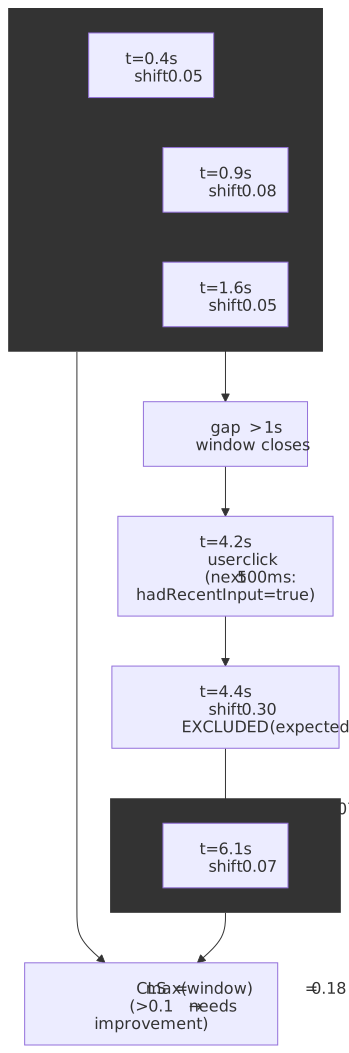
Design rationale. Long-lived single-page applications (SPAs) would accumulate unbounded CLS if all shifts were summed. Session windows capture “bursts” of instability while ignoring isolated, minor shifts spread across a long session. (Even with windowing, CLS in the standard web-vitals library is still attributed to the initial URL of an SPA — see SPAs and soft navigations below.)
Expected vs Unexpected Shifts
The Layout Instability API marks shifts as “expected” (via hadRecentInput: true) when they occur within 500 ms of a discrete user input:
new PerformanceObserver((list) => { for (const entry of list.getEntries()) { // Skip shifts caused by user interaction if (entry.hadRecentInput) continue // Only count unexpected shifts reportCLSShift(entry.value, entry.sources) }}).observe({ type: "layout-shift", buffered: true })Qualifying inputs for hadRecentInput: discrete inputs only — taps, clicks, and keypresses (the spec leaves the exact event list to the implementation; Chromium currently latches lastInputTime on input-driven events). Continuous gestures — scrolls, drags, pinch-zoom — do not flag the shift.
Why 500 ms? The window covers the typical UI lag between user action and the resulting layout change (clicking an accordion, expanding a row). Shifts outside this window are “unexpected” and count toward CLS.
Layout Shift Sources
Each layout-shift entry includes sources[] identifying which elements moved:
interface LayoutShiftSource { node: Node | null // The element that shifted (may be null if removed) previousRect: DOMRectReadOnly // Position before shift currentRect: DOMRectReadOnly // Position after shift}// The shift value is calculated from the impact region:// (intersection of viewport with union of previous and current rects)// divided by viewport area, weighted by distance fractionCLS Diagnostics Code
import { onCLS } from "web-vitals/attribution"interface CLSDiagnostics { totalCLS: number largestShiftTarget: string largestShiftValue: number largestShiftTime: number shiftCount: number}onCLS((metric) => { const { attribution } = metric const diagnostics: CLSDiagnostics = { totalCLS: metric.value, largestShiftTarget: attribution.largestShiftTarget || "unknown", largestShiftValue: attribution.largestShiftValue, largestShiftTime: attribution.largestShiftTime, shiftCount: metric.entries.length, } // Common CLS culprits by element type const target = diagnostics.largestShiftTarget let cause = "unknown" if (target.includes("img")) cause = "Image without dimensions" else if (target.includes("iframe")) cause = "Embedded content resize" else if (target.includes("ad") || target.includes("banner")) cause = "Ad injection" else if (target.includes("font") || /^(p|h[1-6]|span)$/i.test(target)) cause = "Font swap" sendToAnalytics({ ...diagnostics, likelyCause: cause })})Field Data: CrUX and RUM Pipelines
Chrome User Experience Report (CrUX)
CrUX aggregates 28-day rolling samples from opted-in Chrome users and is the source of field metrics for Google Search ranking:
| Data Source | Update Frequency | Data Granularity | Use Case |
|---|---|---|---|
| CrUX API | Daily | Origin or page URL | Real-time monitoring, CI/CD checks |
| CrUX History API | Weekly (Mondays) | Origin or page URL; default 25, max 40 collection periods (~10 mo) | Trend analysis, regression detection |
| BigQuery | Monthly (2nd Tuesday) | Origin only | Large-scale analysis, industry benchmarks |
| PageSpeed Insights | Daily (CrUX) + on-demand (Lighthouse) | Page URL | Combined lab + field, quick checks |
CrUX API Usage
interface CrUXResponse { record: { key: { url?: string; origin?: string } metrics: { largest_contentful_paint: MetricData interaction_to_next_paint: MetricData cumulative_layout_shift: MetricData } }}interface MetricData { histogram: Array<{ start: number; end?: number; density: number }> percentiles: { p75: number }}async function queryCrUX(urlOrOrigin: string): Promise<CrUXResponse> { const isOrigin = !urlOrOrigin.includes("/", urlOrOrigin.indexOf("//") + 2) const response = await fetch(`https://chromeuxreport.googleapis.com/v1/records:queryRecord?key=${API_KEY}`, { method: "POST", headers: { "Content-Type": "application/json" }, body: JSON.stringify({ [isOrigin ? "origin" : "url"]: urlOrOrigin, formFactor: "PHONE", // Or 'DESKTOP', 'TABLET', or omit for all }), }) return response.json()}// Rate limit: 150 queries/minute per Google Cloud project// Data coverage: Requires sufficient traffic (anonymity threshold)Building a RUM Pipeline
Production RUM requires handling edge cases the web-vitals library doesn’t solve:
import { onLCP, onINP, onCLS, onFCP, onTTFB } from "web-vitals/attribution"interface RUMPayload { sessionId: string pageUrl: string timestamp: number metrics: Record<string, number> attribution: Record<string, unknown> metadata: { deviceType: string connectionType: string viewport: { width: number; height: number } }}// Generate stable session IDconst sessionId = crypto.randomUUID()// Collect device/connection contextfunction getMetadata() { return { deviceType: /Mobi|Android/i.test(navigator.userAgent) ? "mobile" : "desktop", connectionType: (navigator as Navigator & { connection?: { effectiveType: string } }).connection?.effectiveType || "unknown", viewport: { width: window.innerWidth, height: window.innerHeight }, }}// Batch and send metricsconst metricQueue: RUMPayload[] = []function queueMetric(metric: { name: string; value: number; delta: number; attribution?: unknown }) { metricQueue.push({ sessionId, pageUrl: window.location.href, timestamp: Date.now(), metrics: { [metric.name]: metric.delta }, // Use delta for CLS attribution: (metric.attribution as Record<string, unknown>) || {}, metadata: getMetadata(), })}function flush() { if (metricQueue.length === 0) return navigator.sendBeacon("/analytics/rum", JSON.stringify(metricQueue)) metricQueue.length = 0}// Send on visibilitychange (hidden) for tab/app-switch finality,// and on pagehide for the bfcache-friendly terminal event.document.addEventListener("visibilitychange", () => { if (document.visibilityState === "hidden") flush()})addEventListener("pagehide", flush)onLCP(queueMetric)onINP(queueMetric)onCLS(queueMetric)onFCP(queueMetric)onTTFB(queueMetric)Critical implementation details:
- Use
deltafor CLS: The value accumulates; sending full value inflates aggregates. Theweb-vitalslibrary calls back on every change precisely so analytics can sum deltas safely. - Listen to both
visibilitychange(hidden) andpagehide:unloadandbeforeunloadare unreliable on mobile and disqualify the page from the back/forward cache (bfcache).pagehideis bfcache-friendly;visibilitychange→hiddencatches tab switches and app backgrounding. - Use
sendBeacon(orfetch(..., { keepalive: true })as a fallback): the request is queued by the browser and survives navigation, unlike a plainfetch. - Include session/page context: Enables segmentation by device, connection, page.
- Batch requests: Reduces beacon overhead, especially on mobile.
Aggregation and Alerting
For Core Web Vitals pass/fail determination, aggregate to the 75th percentile:
interface MetricSample { value: number timestamp: number}function calculateP75(samples: MetricSample[]): number { if (samples.length === 0) return 0 const sorted = [...samples].map((s) => s.value).sort((a, b) => a - b) const index = Math.ceil(sorted.length * 0.75) - 1 return sorted[index]}// Thresholds for alertingconst CWV_THRESHOLDS = { LCP: { good: 2500, poor: 4000 }, INP: { good: 200, poor: 500 }, CLS: { good: 0.1, poor: 0.25 },}function getRating(metric: string, p75: number): "good" | "needs-improvement" | "poor" { const threshold = CWV_THRESHOLDS[metric as keyof typeof CWV_THRESHOLDS] if (p75 <= threshold.good) return "good" if (p75 <= threshold.poor) return "needs-improvement" return "poor"}SPAs and Soft Navigations
Core Web Vitals are scoped to a hard navigation — the top-level page load. The standard web-vitals library and CrUX both attribute every metric to the URL that was loaded first; client-side route changes (“soft navigations”) do not reset CLS, do not start a new INP collection window, and do not produce a fresh LCP candidate. For SPAs that spend most of the user’s session on routes after the initial mount, this means:
- The CrUX-reported LCP for
/appmay reflect only the splash screen, not the route the user actually used. - CLS shifts caused by a soft route change are charged against the original URL.
- INP attribution surfaces the worst interaction across the whole session, not per route.
Chrome ships an experimental Soft Navigations API that detects user-initiated, History-API-driven navigations, emits a soft-navigation PerformanceEntry, and resets the LCP / INP / CLS collection windows for that route. As of April 2026, a fresh — and intended-final — origin trial began with Chrome 147; local testing is gated behind chrome://flags/#enable-experimental-web-platform-features or --enable-features=SoftNavigationHeuristics. The heuristic fires only when all three conditions are satisfied: a user-initiated event, a History API URL change, and a paint of a newly-modified DOM subtree. Programmatic history.pushState without an interaction is deliberately ignored.
The matching soft-navs branch of web-vitals accepts { reportSoftNavs: true } on each callback, emits per-navigation metrics, and exposes the originating soft navigation on attribution.softNavigation.
Warning
CrUX has not integrated soft navigations as of April 2026, and the Chrome team has explicitly deferred that decision until after this trial. Until then, ship both pipelines:
- Standard CWV per hard navigation — what Search Console and CrUX score.
- Soft-nav-sliced metrics in your own RUM — segmented by
navigationType(navigatevssoft-navigate) so you can see which routes are actually slow.
Do not silently replace the standard pipeline with soft-nav data; you will diverge from CrUX without noticing.
Debugging Workflow
Step 1: Identify the Failing Metric
Start with PageSpeed Insights or CrUX API to identify which metric fails at p75:
# Quick check via PSI APIcurl "https://www.googleapis.com/pagespeedonline/v5/runPagespeed?url=https://example.com&category=performance&key=YOUR_KEY"Step 2: Check Lab vs Field Gap
If lab passes but field fails, investigate:
| Symptom | Likely Cause | Investigation |
|---|---|---|
| LCP lab < field | Personalization, A/B tests, dynamic content | Check CrUX by device/connection segment |
| INP not in lab | Lab doesn’t capture real interactions | Add RUM with attribution build |
| CLS lab < field | Lazy-loaded content, ads, async widgets | Test with populated cache and scroll |
Step 3: Use Attribution Data
For the failing metric, deploy the attribution build to RUM and identify:
- LCP: Which subpart dominates? (TTFB, load delay, load time, render delay)
- INP: Which phase dominates? Then drill into
longAnimationFrameEntries[].scripts[]forsourceURL+sourceCharPositionof the slowest function. - CLS: Which element causes the largest shift? When in the page lifecycle?
Step 4: Target Optimizations
| Metric | Bottleneck | Optimization |
|---|---|---|
| LCP | TTFB > 800ms | CDN, edge caching, server optimization |
| LCP | Resource Load Delay > 500ms | Add <link rel="preload">, move image earlier in DOM |
| LCP | Resource Load Time > 1s | Image compression, responsive images, AVIF/WebP |
| LCP | Element Render Delay > 200ms | Reduce render-blocking JS/CSS |
| INP | Input Delay > 100ms | Break long tasks with scheduler.yield() |
| INP | Processing Time > 100ms | Optimize handler, defer non-critical work |
| INP | Presentation Delay > 100ms | Reduce DOM size, avoid layout thrashing |
| CLS | Font swap | Font metric overrides (size-adjust, ascent-override) |
| CLS | Images | Explicit width/height attributes, aspect-ratio |
| CLS | Ads/embeds | Reserve space with CSS min-height |
Conclusion
Core Web Vitals measurement requires understanding the fundamental difference between lab data (reproducible, diagnostic) and field data (real users, ranking signals). Lab tools cannot predict field performance due to cache state, device diversity, and actual user interaction patterns—but they’re essential for debugging and regression testing.
The web-vitals library with attribution build provides the diagnostic detail needed to identify root causes. LCP breaks down into four subparts (TTFB, resource load delay, resource load time, element render delay), INP into three phases (input delay, processing time, presentation delay), and CLS into individual shifts with source elements.
For production monitoring, combine CrUX data (authoritative 75th percentile) with custom RUM (granular attribution data). Use CrUX for pass/fail status and trend analysis; use RUM attribution for debugging specific bottlenecks. The workflow is: identify failing metric → check lab/field gap → analyze attribution data → apply targeted optimization.
Appendix
Prerequisites
- Understanding of browser rendering pipeline (critical rendering path, paint, composite)
- Familiarity with PerformanceObserver API
- Basic knowledge of analytics data pipelines
Terminology
- CrUX: Chrome User Experience Report—Google’s public dataset of real user metrics from Chrome
- RUM: Real User Monitoring—collecting performance data from actual users in production
- p75: 75th percentile—the value below which 75% of samples fall
- Attribution: Diagnostic data identifying the root cause of a metric value
Summary
- Lab vs field: Lab data answers “what’s possible?”; field data answers “what are users experiencing?” — prioritise field data for Core Web Vitals assessment.
- web-vitals library v5.x: Canonical implementation; standard build ~ 2 KB brotli, attribution build ~ 3.5 KB.
onINPdefaults to a 40 ms duration threshold (lower than the 104 ms platform default). - LCP subparts: TTFB, resource load delay, resource load time, element render delay — median origin with poor LCP burns ~ 1.29 s in resource load delay alone, before the LCP fetch even starts. LCP reporting freezes on first user interaction; removed elements still count.
- INP phases: Input delay (main thread blocked), processing time (handler execution), presentation delay (layout/paint) — outlier filter approximates p98 by ignoring 1 highest interaction per 50.
- INP script attribution: Long Animation Frames API (stable since Chrome 123) supplies
sourceURL,sourceCharPosition,sourceFunctionName,invoker, andforcedStyleAndLayoutDuration. The web-vitals attribution build joins it onto each INP entry aslongAnimationFrameEntries. Same-origin only — third-party scripts needcrossorigin="anonymous"+Timing-Allow-Origin. - CLS session windows: Max 5 s, group shifts within 1 s of each other;
hadRecentInputexcludes shifts within 500 ms of a discrete input. - CrUX data sources: API (daily, page or origin), History API (weekly, default 25 / max 40 collection periods), BigQuery (monthly, origin-only).
- SPAs: Standard pipeline attributes everything to the hard-navigation URL. The Soft Navigations API is in a fresh origin trial as of Chrome 147 (April 2026); CrUX has not adopted it. Ship soft-nav-sliced metrics in your own RUM in parallel with the standard pipeline, not as a replacement.
References
Specifications
- W3C Largest Contentful Paint — LCP definition, qualifying elements, timing
- WICG Layout Instability — CLS calculation, session windows,
hadRecentInput - W3C Event Timing — Event duration measurement, INP basis
- W3C Performance Timeline —
PerformanceObserverAPI - W3C Long Animation Frames — LoAF entries, script attribution properties
Official Documentation
- web.dev Core Web Vitals - Thresholds and measurement guidance
- web.dev INP - INP definition, interaction model, thresholds
- web.dev Lab vs Field Data - When and why measurements differ
- Chrome Developers CrUX API - API usage, rate limits, data structure
- Chrome Developers CrUX BigQuery - Dataset structure, query patterns
- Chrome Developers CrUX History API - Trend data access
Implementation References
- GoogleChrome/web-vitals — Official library, v5.x documentation
- web-vitals
onINPdurationThreshold issue #568 — Whyweb-vitalsdefaults to 40 ms, not 104 ms - Chromium speed changelog: low-entropy LCP filter (Chrome 112) — The 0.05 bpp threshold
- web.dev: common misconceptions about how to optimize LCP — Subpart breakdown for poor-LCP origins (CrUX field data)
- web.dev: evolving the CLS metric — Session-window design and rationale
- Chrome for Developers: experimenting with measuring soft navigations — Soft Navigations API for SPA reporting
- Chrome for Developers: final Soft Navigations origin trial (Chrome 147, April 2026) — current trial scope and CrUX status
- Chrome for Developers: Long Animation Frames API — INP attribution successor to Long Tasks, stable since Chrome 123
- MDN: PerformanceLongAnimationFrameTiming.scripts —
sourceURL,sourceCharPosition,sourceFunctionName,invoker - Chrome for Developers: Page Lifecycle API —
visibilitychange/pagehide/ bfcache guidance for analytics