DNS Records, TTL Strategy, and Cache Behavior
DNS records encode more than addresses—they define routing policies, ownership verification, security constraints, and service discovery. TTL (Time To Live) values control how long resolvers cache these records, creating a fundamental trade-off between propagation speed and query load. This article covers record types in depth, TTL design decisions for different operational scenarios, and the caching behaviors that determine how quickly DNS changes take effect. Resolution mechanics (stub → recursive → authoritative) live in the sibling DNS Resolution Path article; transport security (DoH, DoT, DNSSEC) lives in DNS Security: DoH, DoT, and DNSSEC.
Abstract
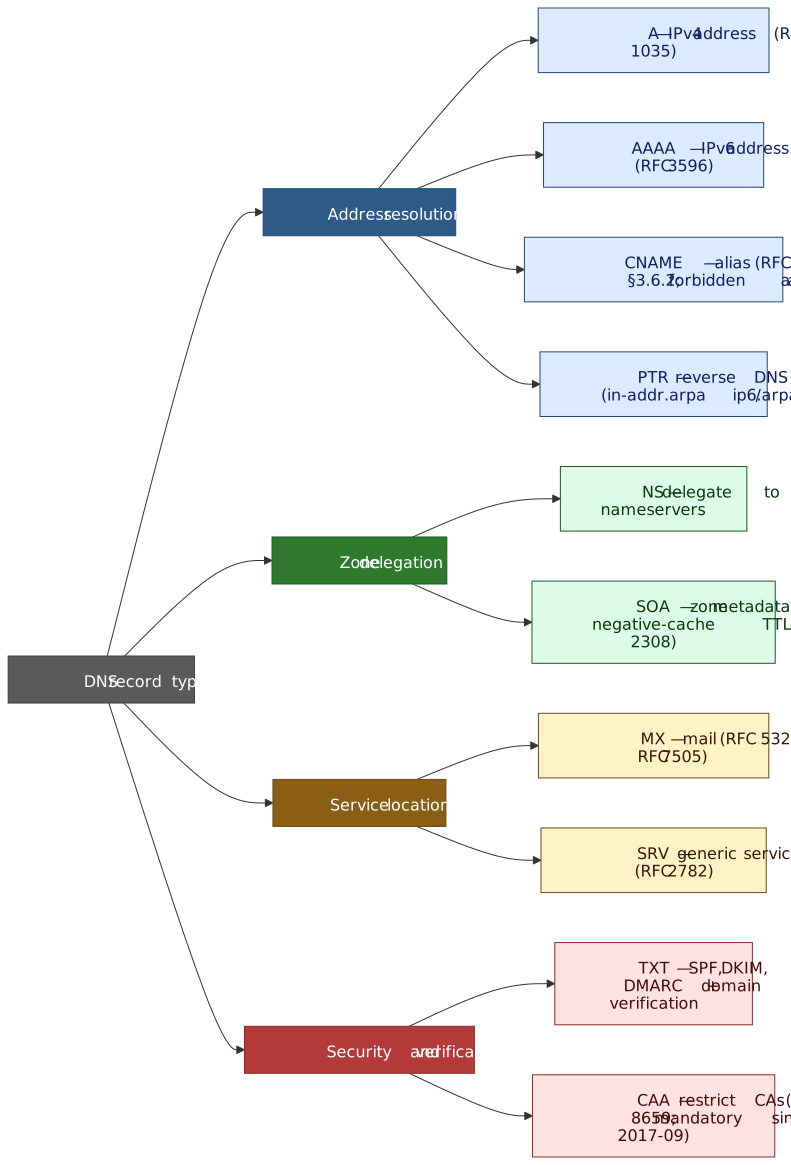
DNS records fall into four functional categories: address resolution (A, AAAA, CNAME), zone delegation (NS, SOA), service location (MX, SRV), and security/verification (TXT, CAA). Each type has specific constraints—CNAME cannot coexist with other records at the same name, MX targets must be A/AAAA records (never CNAMEs), and SOA’s MINIMUM field controls negative caching duration.
TTL strategy depends on the operational scenario:
- Static infrastructure: 3600-86400s (1-24 hours) reduces resolver load
- CDN/anycast: 300s or less enables rapid failover
- Migrations: Lower TTL 24-48 hours before the change, wait for old TTL to expire, then make the change
“DNS propagation” is a misnomer — there is no active push mechanism. Changes take effect as cached records expire across resolver layers. The effective propagation time equals the maximum of: the old record’s remaining TTL, the negative-cache TTL (SOA MINIMUM) when the name was queried before it existed, any resolver TTL floors that ignore authoritative values, and any RFC 8767 stale-cache window if the authoritative is unreachable during the cutover.
Address Resolution Records
A and AAAA Records
The A record (RFC 1035) maps a hostname to a 32-bit IPv4 address. The AAAA record (RFC 3596) maps to a 128-bit IPv6 address—the name “quad-A” reflects the fourfold size increase.
Key behaviors:
- Multiple A/AAAA records for the same name enable round-robin load distribution
- Records cannot point to other hostnames; they contain literal IP addresses
- The query transport protocol is independent of record type—you can query AAAA records over IPv4
Design decision—why separate record types? IPv6 addresses are four times larger than IPv4. Rather than overloading the A record with a variable-length format, RFC 3596 introduced a distinct type. This simplifies parsing and allows resolvers to query specifically for the address family they need.
api.example.com. 300 IN A 192.0.2.10api.example.com. 300 IN A 192.0.2.11api.example.com. 300 IN A 192.0.2.12Per RFC 2181 §5.2, all records in an RRSet (Resource Record Set) must have identical TTLs. The recovery rule is split: a resolver receiving differing TTLs from a non-authoritative source should ignore the entire RRSet and re-fetch from an authoritative source; from an authoritative source, it should treat all records as if their TTL equalled the lowest value present.
CNAME Records
A CNAME (Canonical Name) record declares that one name is an alias for another. Per RFC 1034 Section 3.6.2: “If a CNAME RR is present at a node, no other data should be present.”
The zone apex restriction: CNAME cannot exist at the zone apex (e.g., example.com) because:
- Every zone apex must have SOA and NS records (RFC 1034 Section 4.2.1)
- CNAME cannot coexist with any other record type
- Therefore, placing CNAME at apex violates the protocol
Why this constraint exists: When a resolver encounters a CNAME, it restarts the query using the target name. If other records existed at the same name, the resolver couldn’t determine whether to follow the CNAME or return the other records. The exclusivity rule eliminates this ambiguity.
Workarounds for apex aliasing:
| Solution | Mechanism | Trade-off |
|---|---|---|
| ALIAS/ANAME | Provider resolves CNAME server-side, returns synthesized A/AAAA | Geo-routing based on server location, not client |
| CNAME flattening | Same as ALIAS, Cloudflare terminology | Adds latency to authoritative responses |
| Multiple A records | Manually replicate target’s IPs | Must update when target changes |
Cloudflare’s CNAME flattening and Route 53’s Alias records work by resolving the CNAME chain at query time and returning the resulting A/AAAA records directly. The limitation: location-dependent responses (GeoDNS) will be based on the authoritative server’s location, not the end user’s resolver.
PTR Records
PTR (Pointer) records provide reverse DNS—mapping IP addresses to hostnames. The address is encoded in reverse order under a special domain:
- IPv4:
192.0.2.5→5.2.0.192.in-addr.arpa - IPv6: Uses
ip6.arpawith nibbles (4-bit values) reversed
Why reverse order? DNS is hierarchical from right to left (com → example → api). IP addresses are hierarchical from left to right (network → host). Reversing the IP aligns with DNS delegation—the /8 network owner controls 192.in-addr.arpa and can delegate /16 blocks.
Operational impact: Many mail servers reject connections from IPs without valid PTR records or where forward and reverse DNS don’t match. Cloud providers typically manage PTR records for their IP ranges; you must request updates through their interface.
Zone Delegation Records
NS Records
NS (Name Server) records identify the authoritative DNS servers for a zone. They serve two distinct purposes:
- At zone apex: Declare which servers are authoritative for this zone
- At delegation points: Direct resolvers to child zone nameservers
The delegation distinction: NS records in the parent zone (e.g., .com zone containing example.com NS) are not authoritative—they’re “delegation hints.” The authoritative NS records are those served by the zone’s own nameservers.
Glue records solve a circular dependency: if ns1.example.com is the nameserver for example.com, you’d need to resolve example.com to find ns1.example.com. Glue records—A/AAAA records embedded in the parent zone’s delegation—break this cycle.
Per RFC 9471 §3.1, an authoritative server must include all available glue for in-domain name servers (RFC 9471’s term for “in-bailiwick” — nameserver names within the delegated zone) in the additional section of a referral, and must set the TC (truncated) flag if message-size constraints prevent including all of them. Glue for sibling-domain name servers should be included but is not mandatory. The IP addresses in glue must match the authoritative A/AAAA records for those nameservers.
; In the .com zone (parent)example.com. 172800 IN NS ns1.example.com.example.com. 172800 IN NS ns2.example.com.ns1.example.com. 172800 IN A 192.0.2.1ns2.example.com. 172800 IN A 192.0.2.2SOA Records
Every DNS zone must have exactly one SOA (Start of Authority) record at the zone apex. It contains zone metadata critical for replication and caching:
| Field | Purpose | Recommended Value |
|---|---|---|
| MNAME | Primary nameserver hostname | Your primary NS |
| RNAME | Responsible person email (@ → .) |
hostmaster.example.com. |
| Serial | Zone version (must increment on change) | YYYYMMDDnn format |
| Refresh | Secondary check interval | 7200-86400s (2-24h) |
| Retry | Retry after failed refresh | 1800-3600s (30m-1h) |
| Expire | Stop serving if no refresh | 1209600-2419200s (14-28d) |
| Minimum | Negative caching TTL | 3600s (1h) |
The MINIMUM field evolution: Originally (RFC 1035), this specified the minimum TTL for all records in the zone. RFC 2308 redefined it exclusively for negative caching—the TTL for NXDOMAIN and NODATA responses. The field name is now misleading, but changing it would break compatibility.
example.com. 86400 IN SOA ns1.example.com. hostmaster.example.com. ( 2024011501 ; Serial 7200 ; Refresh (2 hours) 3600 ; Retry (1 hour) 1209600 ; Expire (14 days) 3600 ; Minimum (negative cache TTL) )Service Location Records
MX Records
MX (Mail Exchange) records direct email delivery. The format includes a preference value:
example.com. 300 IN MX 10 mail1.example.com.example.com. 300 IN MX 20 mail2.example.com.Priority semantics: Lower preference values indicate higher priority. When multiple servers share the same preference, RFC 5321 requires the sending server to randomize selection for load distribution.
Fallback behavior: If a domain has no MX records, RFC 5321 §5.1 specifies an implicit MX of preference 0 pointing to the domain itself (the A/AAAA records). However, if MX records exist, the domain’s A/AAAA records must not be used for mail delivery.
Critical constraint: MX targets must resolve to A/AAAA records, never CNAMEs. Per RFC 5321 §5.1 and RFC 2181 §10.3, an MX pointing to a CNAME is invalid. Some implementations follow the CNAME anyway, but this behavior is non-standard and unreliable.
Tip
If a domain accepts no email, publish a “null MX” per RFC 7505: a single MX 0 . record (preference 0, target is the root label .). Senders that honor RFC 7505 hard-fail with SMTP 556 instead of falling back to A/AAAA records, which prevents days of pointless retries against an HTTP-only host. A null MX must be the only MX record for the name.
SRV Records
SRV (Service) records generalize service discovery beyond email. RFC 2782 defines the format:
_sip._tcp.example.com. 300 IN SRV 10 60 5060 sipserver.example.com.; ^ ^ ^ ^; | | | +-- Target; | | +------- Port; | +---------- Weight; +------------- PriorityThe underscore prefix: Service and protocol labels start with _ to avoid collisions with natural DNS labels. This was a design choice to keep SRV in the same namespace as other records.
Weight-based load balancing: Among servers with equal priority, weight determines selection probability. A server with weight 60 receives three times the traffic of weight 20. Weight 0 indicates a backup server—use only when all higher-weight servers are unavailable.
Common uses:
- Microsoft Active Directory (domain controller discovery)
- SIP/VoIP (
_sip._tcp,_sip._udp) - XMPP/Jabber (
_xmpp-client._tcp) - CalDAV/CardDAV (
_caldavs._tcp,_carddavs._tcp)
Target constraint: Like MX, SRV targets must be A/AAAA records. A target of . (root) explicitly indicates the service is not available at this domain.
Security and Verification Records
TXT Records
TXT records store arbitrary text, originally intended for human-readable information. Today they’re primarily used for machine-readable verification and policy:
Size constraints:
- Each string within a TXT record: 255 bytes maximum (RFC 1035)
- Multiple strings are concatenated without separators
- Total record size limited by DNS message size (512 bytes UDP, ~65KB with EDNS0)
example.com. 300 IN TXT "v=spf1 include:_spf.google.com " "include:amazonses.com -all"The strings are concatenated to: v=spf1 include:_spf.google.com include:amazonses.com -all
Email authentication records:
| Record | Location | Purpose |
|---|---|---|
| SPF (RFC 7208) | example.com |
Authorized mail senders |
| DKIM (RFC 6376) | selector._domainkey.example.com |
Public key for signature verification |
| DMARC (RFC 7489) | _dmarc.example.com |
Policy for SPF/DKIM failures |
SPF lookup limit: SPF evaluation allows maximum 10 DNS lookups (including include:, a:, mx:, redirect=). Exceeding this limit causes a permanent error (permerror), potentially causing mail rejection. Flatten SPF records by replacing includes with direct IP ranges for high-volume domains.
Domain verification: Services like Google Workspace, Microsoft 365, and AWS SES use TXT records to verify domain ownership. The record typically contains a unique token: google-site-verification=abc123...
CAA Records
CAA (Certification Authority Authorization) records specify which Certificate Authorities may issue certificates for a domain. RFC 8659 defines the format:
example.com. 300 IN CAA 0 issue "letsencrypt.org"example.com. 300 IN CAA 0 issuewild "digicert.com"example.com. 300 IN CAA 0 iodef "mailto:security@example.com"Property tags:
issue: CAs authorized to issue non-wildcard certificatesissuewild: CAs authorized for wildcard certificates (if absent,issueapplies)iodef: URL or email for violation reports
CA/Browser Forum mandate: Per Ballot 187, publicly trusted CAs must check CAA records before issuance, effective 2017-09-08. If CAA records exist and don’t authorize the CA, issuance must fail. The check is repeated within the CAA TTL or 8 hours, whichever is greater. CAs must process the issue, issuewild, and iodef tags.
Inheritance: CAA records at example.com apply to all subdomains unless overridden. To allow any CA for a subdomain while restricting the parent:
example.com. 300 IN CAA 0 issue "letsencrypt.org"dev.example.com. 300 IN CAA 0 issue ";" ; Allow any CAThe value ";" explicitly permits any CA.
TTL Strategy and Design Decisions
TTL Mechanics
TTL is a 32-bit unsigned integer specifying how long a record may be cached, in seconds. Per RFC 1035: “TTL specifies the time interval that the resource record may be cached before the source of the information should again be consulted.”
Bounds:
- Minimum: 0 (use only for current transaction, do not cache)
- Maximum: 2147483647 (2³¹ − 1 seconds, ~68 years), per RFC 2181 §8. The most-significant bit of the 32-bit field must be zero; resolvers receiving a TTL with the top bit set must treat it as zero.
- Practical maximum: 604800 (7 days), per the recommendation in RFC 8767 §6 for caching resolvers.
Zero TTL behavior: The record may only be used for the transaction in progress and must not be cached. Use case: SOA records during zone transfers, or extremely volatile data like real-time load balancer targets.
TTL by Scenario
| Scenario | Recommended TTL | Rationale |
|---|---|---|
| Static infrastructure | 3600-86400s | Reduces query load; changes are rare |
| CDN/anycast endpoints | 60-300s | Enables health-check-driven failover |
| Active migrations | 60-300s | Minimizes stale cache during cutover |
| Development/testing | 60s | Rapid iteration without cache delays |
| NS records | 86400-172800s | Nameserver changes are rare, high TTL reduces root/TLD load |
CDN provider behavior: Cloudflare proxied records (orange cloud) have TTL Auto, which is fixed at 300 s and cannot be customized. This ensures their anycast routing changes propagate within 5 minutes regardless of the TTL the user typed in the dashboard.
Failover and health checks: AWS Route 53 recommends 60s or less for health-checked records. Lower TTL means faster failover but higher query volume—a 60s TTL generates 1440 queries per day per caching resolver versus 24 queries for 3600s.
Migration TTL Strategy
DNS migrations require careful TTL management to minimize both stale cache impact and query load:
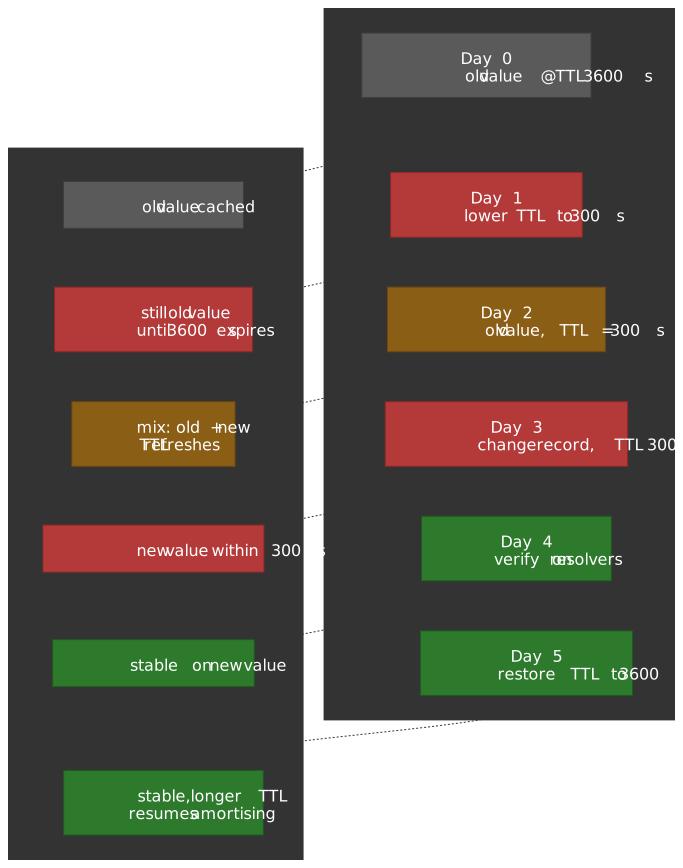
Pre-migration (24-48 hours before):
- Lower TTL to 300-600s on records that will change
- Wait for the old TTL to expire everywhere
- Verify TTL change propagated:
dig +norecurse @8.8.8.8 example.com
During migration:
- Make the DNS change
- Verify new records are served by authoritative servers
- Monitor for traffic shift (may take up to new TTL duration)
Post-migration (after verification):
- Restore higher TTL for normal operation
- Keep lower TTL for 24-48 hours if rollback might be needed
NS record migrations are special: NS records often have 172800s (48h) TTL. You must lower TTL at both old and new DNS providers. Plan for 2-3 days minimum migration window.
; Step 1: Lower TTL (wait 24h if original was 86400s)api.example.com. 300 IN A 192.0.2.10; Step 2: After old TTL expires, change the recordapi.example.com. 300 IN A 198.51.100.20; Step 3: After verification, restore normal TTLapi.example.com. 3600 IN A 198.51.100.20Caching Behavior and Propagation
Caching Layers
DNS responses pass through multiple caching layers, each with distinct behavior. Effective freshness is gated by the weakest layer in the chain.
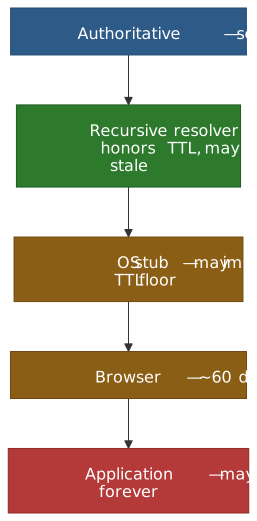
| Layer | Typical Cache Duration | Behavior |
|---|---|---|
| Authoritative | N/A (source of truth) | Sets TTL in responses |
| Recursive resolver | Honors TTL | Decrements cached TTL; prefetches popular records; may serve stale per RFC 8767 |
| OS stub resolver | Seconds to minutes | Platform-dependent (systemd-resolved, dnsmasq, mDNSResponder); may impose its own TTL floor |
| Browser | ~60 seconds | Chrome’s built-in HostCache uses a 60 s default TTL when the system resolver returns no TTL (host_resolver_system_task.h); Firefox’s network.dnsCacheExpiration defaults to 60 s plus a grace period; Safari is implementation-defined |
| Application | Varies | JVM (networkaddress.cache.ttl historically defaulted to “forever” with a SecurityManager), .NET (ServicePointManager.DnsRefreshTimeout), libc with nscd, and many HTTP clients keep their own caches |
Resolver TTL floors: Some recursive resolvers enforce minimum TTLs regardless of authoritative values; some ISP resolvers cache for longer than specified. Resolvers that implement RFC 8767 may also keep records past their TTL and serve them when the authoritative servers are unreachable — covered in Serving Stale Data (RFC 8767) below.
Negative Caching
When a name doesn’t exist (NXDOMAIN) or exists but has no records of the requested type (NODATA), resolvers cache this negative result. RFC 2308 §5 specifies:
Negative cache TTL = min(SOA.MINIMUM, SOA TTL)
Authoritative servers must include the SOA record in the Authority section of negative responses. Without SOA, the response should not be cached — this prevents infinite negative caching loops.
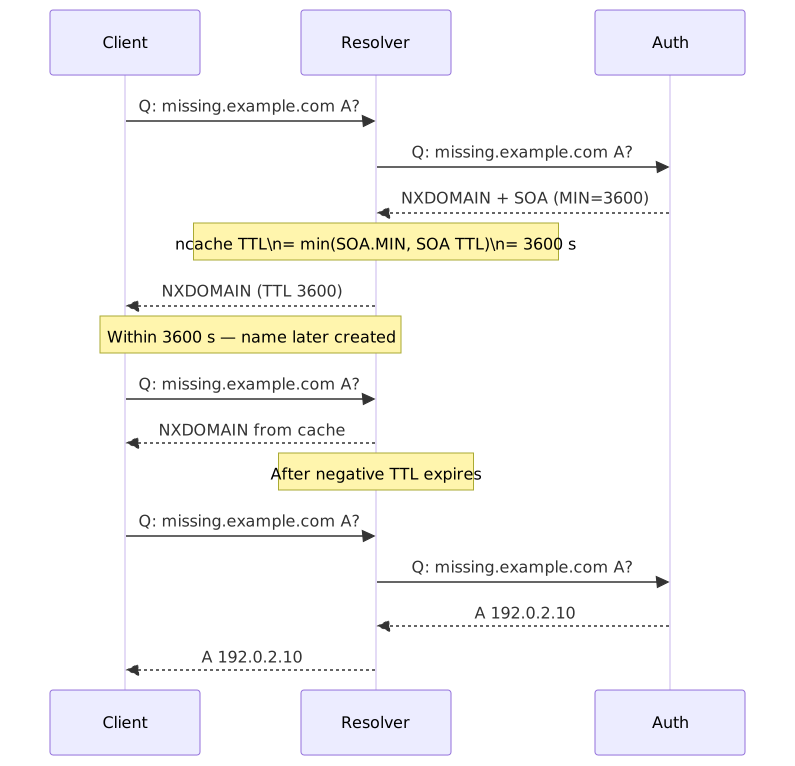
Operational impact: If you delete a DNS record — or query a name before you create it — resolvers may cache the NXDOMAIN response for up to the negative TTL. Before deleting, consider:
- Check your SOA.MINIMUM value (RFC 2308 §5 calls out values above 1 day as “problematic”; 1–3 hours is the recommended sensible default).
- Lower it temporarily if the default is high.
- Or change the record to point elsewhere rather than deleting it.
; If SOA.MINIMUM is 3600 (1 hour):; Deleting api.example.com means NXDOMAIN cached for up to 1 hour; Resolver won't re-query until negative cache expiresServing Stale Data (RFC 8767)
RFC 8767 lets a recursive resolver keep a record in cache past its TTL and serve it as a fallback when the authoritative servers cannot be reached — a DDoS, BGP outage, or registry hiccup. The original “active” TTL still controls the freshness contract; stale answers are an availability safety net, not a license to ignore the TTL.
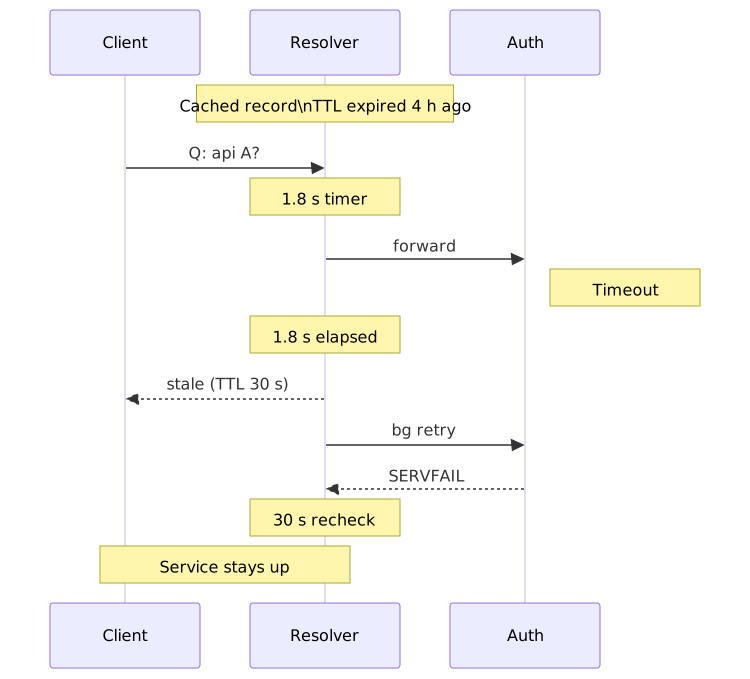
RFC 8767 §6 recommends:
| Knob | Recommended | Purpose |
|---|---|---|
Maximum stale TTL (max-stale) |
1–3 days | Cap how long expired records may live in cache. |
| Client-response timer | 1.8 s | Sit just below the typical 2 s client timeout before falling back to stale. |
| Stale-answer TTL | 30 s | TTL on the response so clients re-query soon after the outage ends. |
| Failure-recheck timer | 30 s | Throttle background refresh against a failing authoritative. |
Implementations: BIND 9 (stale-answer-enable, stale-answer-ttl, stale-answer-client-timeout), Unbound (serve-expired, serve-expired-client-timeout), Knot Resolver (serve_stale module), and PowerDNS Recursor (serve-stale-extensions). Cloudflare’s 1.1.1.1 and Google’s 8.8.8.8 ship serve-stale on by default — meaning a record can outlive its TTL by hours from the client’s point of view during an upstream outage. Plan migrations against the effective freshness window, not just the TTL you typed in the dashboard.
Important
Serve-stale is a resilience feature, not a propagation accelerator. It can lengthen the time a changed record takes to reach clients if the authoritative is unreachable during the cutover. For planned migrations, lower the TTL well in advance and verify the authoritative is healthy.
The “Propagation” Reality
“DNS propagation” suggests an active push mechanism—it doesn’t exist. DNS changes take effect passively as caches expire.
What people mean by “propagation time”:
- Maximum of all cache TTLs: The old record’s remaining TTL across all resolver caches
- Negative cache duration: If the name was queried before creation (NXDOMAIN cached)
- Resolver refresh behavior: Some resolvers batch updates or have minimum TTL floors
Why changes seem slow:
- You lowered TTL to 300s, but the old 86400s TTL hasn’t expired everywhere yet.
- An ISP resolver enforces its own minimum TTL floor and caches for hours regardless.
- A serve-stale-enabled resolver (RFC 8767) is still returning the previous answer because it cannot reach the new authoritative — see Serving Stale Data above.
- Browser DNS cache retains the old entry independent of the system resolver.
- Application-level DNS caching (Java, .NET, HTTP client connection pools) ignores the OS resolver entirely.
Verification approach:
# Query authoritative server directlydig @ns1.example.com api.example.com# Check what recursive resolver has cacheddig +norecurse @8.8.8.8 api.example.com# If +norecurse returns nothing, force a fresh lookupdig @8.8.8.8 api.example.comSplit-Horizon DNS
Split-horizon (split-brain) DNS returns different responses based on query source—typically internal vs. external networks.
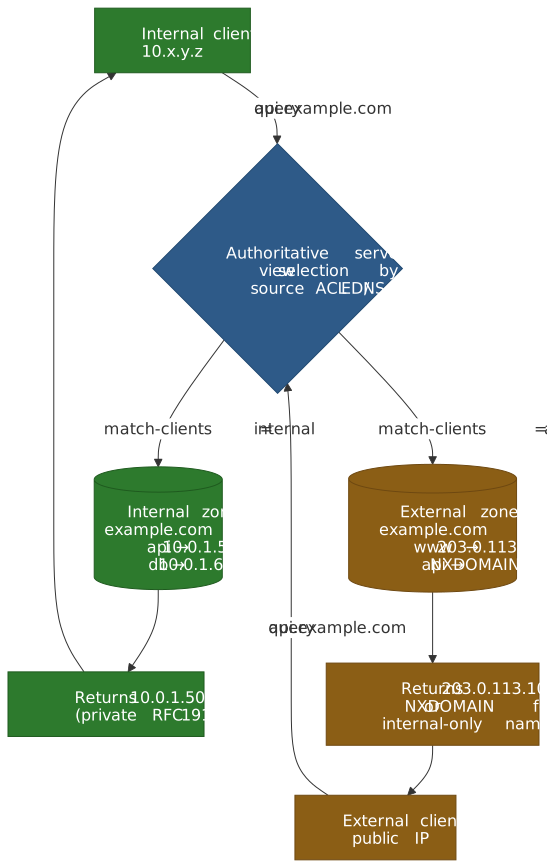
Use Cases
- Internal services:
api.internal.example.comresolves to10.0.1.50internally, NXDOMAIN externally - Security: Hide internal infrastructure from external reconnaissance
- Performance: Internal clients reach services via private network, not hairpinning through public IPs
- Compliance: Prevent internal DNS information from leaking externally
Implementation Approaches
There are two common shapes:
- Separate authoritative servers — one set on the internal network (e.g.
10.0.0.53) serving internal zone files, one set on a public IP (e.g.203.0.113.53) serving external zone files. Routing relies on which resolver each client is configured to use. - DNS views on a single server — BIND’s
viewblocks, NSD’s pattern matching, or a managed-DNS provider’s “private resolver” feature select the correct view from a source-IP ACL on every query.
DNS views (BIND):
acl "internal" { 10.0.0.0/8; 172.16.0.0/12; 192.168.0.0/16; };view "internal" { match-clients { internal; }; zone "example.com" { type master; file "zones/example.com.internal"; };};view "external" { match-clients { any; }; zone "example.com" { type master; file "zones/example.com.external"; };};Operational Pitfalls
Record drift: Internal and external zone files can diverge. Automate zone generation from a single source of truth, or use infrastructure-as-code (Terraform, Pulumi) to manage both.
VPN transitions: A laptop connecting to VPN may have cached external IPs. Symptoms: internal services unreachable until DNS cache expires. Mitigation: shorter TTLs (300s) for records that differ between views.
Debugging complexity: “It works on my machine” gains a new dimension when DNS responses vary by network. Document which records differ and include source IP in troubleshooting procedures.
DNSSEC challenges: Each view must maintain consistent signatures. Zone signing must happen separately for each view’s zone file, complicating key management.
EDNS Client Subnet leakage: Recursive resolvers may forward part of the client’s source subnet to authoritative servers via EDNS Client Subnet (RFC 7871). For an internal-only zone served via split-horizon, an internal recursive resolver can leak internal subnets to external authoritatives if it forwards untrimmed. Disable ECS forwarding on internal recursives, or scope the ECS source prefix to 0 for sensitive zones.
Operational Checklists
Record Change Checklist
- Verify current TTL:
dig +noall +answer example.com - If TTL > 300s and change is time-sensitive, lower TTL and wait
- Make change on authoritative servers
- Verify authoritative response:
dig @ns1.example.com example.com - Verify recursive resolver sees change:
dig @8.8.8.8 example.com - For critical changes, check multiple public resolvers (8.8.8.8, 1.1.1.1, 9.9.9.9)
- Restore normal TTL after verification period
New Domain Setup Checklist
- NS records delegated at registrar (match authoritative NS records)
- Glue records present if nameservers are in-bailiwick
- SOA record with appropriate MINIMUM for negative caching (typically 3600s)
- A/AAAA records for web traffic
- MX records pointing to A/AAAA targets (not CNAMEs), or a null MX (
MX 0 .) if the domain accepts no mail - SPF TXT record for email authentication
- DKIM TXT record(s) for each email provider
- DMARC TXT record with policy
- CAA records restricting certificate issuance
Migration Checklist
- Document current records:
dig +noall +answer example.com ANY - Lower TTL to 300s on changing records
- Wait for old TTL duration (check:
dig +norecurse @8.8.8.8) - For NS changes: lower TTL at both old and new providers
- Make DNS changes
- Verify from multiple locations/resolvers
- Monitor for traffic shift and errors
- Keep rollback option for 24-48 hours
- Restore normal TTLs after stabilization
Conclusion
DNS record types encode specific semantics—A/AAAA for addresses, CNAME for aliases (with zone apex restrictions), NS/SOA for delegation, MX/SRV for service discovery, and TXT/CAA for verification and security policy. Each type has constraints that reflect protocol design decisions: CNAME exclusivity prevents ambiguity, MX/SRV targets must be A/AAAA to avoid resolution loops, and SOA.MINIMUM controls negative caching duration.
TTL strategy is a trade-off between cache efficiency and change velocity. Static infrastructure benefits from high TTLs (3600-86400s) that reduce resolver load. Failover scenarios require low TTLs (60-300s) to enable rapid traffic shifts. Migrations demand TTL lowering before the change, waiting for old caches to expire, then executing the change.
“DNS propagation” is cache expiry, not active distribution. Changes take effect as cached records reach TTL zero across the resolver hierarchy. When changes seem stuck, check: authoritative servers are returning new data, recursive resolvers have refreshed their cache, and client-side caches (OS, browser, application) have expired.
Appendix
Prerequisites
- DNS resolution fundamentals (see DNS Resolution Path)
- Basic understanding of IP addressing (IPv4/IPv6)
- Familiarity with command-line DNS tools (
dig,nslookup)
Terminology
| Term | Definition |
|---|---|
| RRSet | Resource Record Set—all records of the same name and type |
| Zone apex | The root of a DNS zone (e.g., example.com for the example.com zone) |
| Glue record | A/AAAA record in parent zone for in-bailiwick nameservers |
| In-bailiwick | Nameserver hostname within or below the delegated zone |
| Negative caching | Caching of NXDOMAIN/NODATA responses per SOA.MINIMUM |
| Split-horizon | Returning different DNS responses based on query source |
| EDNS0 | Extension Mechanisms for DNS; enables larger UDP responses |
| EDNS Client Subnet (ECS) | RFC 7871 option that forwards part of a client’s source prefix to authoritatives for GeoDNS |
| Null MX | RFC 7505 sentinel MX 0 . declaring “this domain accepts no email” |
Summary
- A/AAAA map hostnames to IPv4/IPv6 addresses; multiple records enable round-robin
- CNAME creates aliases but cannot coexist with other records; forbidden at zone apex
- NS records delegate zones; glue records break circular dependencies for in-bailiwick nameservers
- SOA.MINIMUM controls negative caching duration—check before deleting records
- MX/SRV targets must be A/AAAA, never CNAMEs; lower preference = higher priority
- TXT records support SPF, DKIM, DMARC; SPF has 10-lookup limit
- CAA restricts certificate issuance; mandatory CA check since September 2017
- TTL strategy: High for static (3600-86400s), low for failover (60-300s), temporarily low for migrations
- Serve-stale (RFC 8767): keeps records alive past TTL during outages — improves availability, can stretch the effective propagation window
- Propagation = cache expiry; lower TTL before changes, wait for old TTL to expire
References
- RFC 1035 - Domain Names: Implementation and Specification - Core record types, TTL definition
- RFC 1034 - Domain Names: Concepts and Facilities - CNAME semantics, zone structure
- RFC 2181 - Clarifications to the DNS Specification - TTL bounds, RRSet consistency
- RFC 2308 - Negative Caching of DNS Queries - NXDOMAIN/NODATA caching, SOA.MINIMUM redefinition
- RFC 1912 - Common DNS Operational and Configuration Errors - Best practices, SOA values
- RFC 3596 - DNS Extensions to Support IP Version 6 - AAAA records
- RFC 2782 - A DNS RR for specifying the location of services (SRV) - SRV record format and semantics
- RFC 5321 - Simple Mail Transfer Protocol - MX record usage, implicit MX
- RFC 8659 - DNS Certification Authority Authorization (CAA) - CAA record specification
- RFC 9471 - DNS Glue Requirements in Referral Responses - Glue record requirements
- RFC 7208 - Sender Policy Framework (SPF) - SPF TXT record format
- RFC 6376 - DomainKeys Identified Mail (DKIM) - DKIM TXT record format
- RFC 7489 - Domain-based Message Authentication, Reporting, and Conformance (DMARC) - DMARC policy
- RFC 8767 - Serving Stale Data to Improve DNS Resiliency - Stale serving, TTL cap recommendation, max-stale / stale-answer-ttl knobs
- RFC 9499 - DNS Terminology - Current canonical DNS terminology (obsoletes RFC 8499)
- RFC 7505 - A “Null MX” No Service Resource Record for Domains That Accept No Mail - Null MX semantics
- RFC 7871 - Client Subnet in DNS Queries - EDNS Client Subnet (ECS), GeoDNS / split-horizon implications
- CA/Browser Forum Ballot 187 - Make CAA Checking Mandatory - 2017-09-08 mandate
- Cloudflare - CNAME Flattening - Zone apex CNAME workaround
- AWS Route 53 Best Practices - TTL recommendations for failover
- Julia Evans - DNS doesn’t propagate - Propagation misconceptions explained