Critical Rendering Path: Prepaint
Prepaint is the RenderingNG pipeline stage that performs an in-order traversal of Blink’s LayoutObject tree to build four property trees and compute paint invalidations1. It is the architectural seam between layout geometry and visual rendering: it factors visual effect state (transforms, clips, filters, scroll offsets) out of the layer tree so the compositor can update an element’s on-screen position by mutating a single property tree node — without re-walking layout or paint.
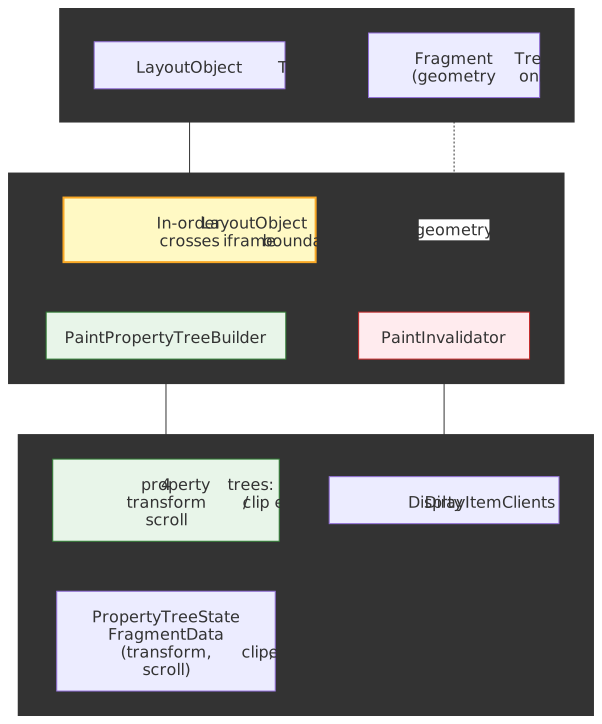
Mental model
Prepaint does two independent jobs in one tree walk1:
- Build property trees.
PaintPropertyTreeBuilderconstructs four sparse trees — transform, clip, effect, scroll — where each node represents a CSS property that creates a new coordinate space, clip region, or visual effect. EveryFragmentDataends up holding aPropertyTreeState: a 4-tuple(transform, clip, effect, scroll)of pointers to its nearest ancestor nodes in each tree2. - Compute paint invalidation.
PaintInvalidatorcompares each visited object’s current visual state against the cached state, marking anyDisplayItemClientthat needs to be re-recorded by the Paint stage1.
The Layout stage already produced a LayoutObject tree and an immutable Fragment Tree of resolved geometry. The Paint stage cannot start until property trees exist (because every paint chunk is grouped by PropertyTreeState) and until it knows which display items are stale. Prepaint sits in that gap.
| Stage | Reads | Writes | Does not do |
|---|---|---|---|
| Layout | LayoutObject tree, computed style |
Fragment Tree (immutable geometry) | No property trees, no display items. |
| Prepaint | LayoutObject tree, Fragment Tree, dirty bits |
Property trees, dirty DisplayItemClients |
No geometry computation, no display-item recording, no paint chunks. |
| Paint | LayoutObject tree, property trees, dirty clients |
Display item list, paint chunks (grouped by PropertyTreeState) |
No layerization decisions. |
Important
Prepaint walks the LayoutObject tree, not the Fragment Tree. Property tree topology depends on DOM containment relationships, not on the physical fragment positions produced by Layout. The Fragment Tree is read for geometry; the structural walk follows LayoutObject parent/child1.
Why this matters: from O(layers) to O(affected nodes)
In pre-RenderingNG Chromium, visual properties were baked into a monolithic Layer Tree: each composited layer stored its own transform matrix, clip rect, and effect values. Computing the on-screen state of any element required multiplying matrices through every ancestor layer — an O(layers) operation on every commit.
The Slimming Paint project (2015–2021) incrementally replaced that model with the four property trees, in five named milestones3:
| Phase | Chromium | Change |
|---|---|---|
| SlimmingPaintV1 | M45 | Paint via display items |
| SlimmingPaintInvalidation | M58 | Paint invalidation rewrite; property trees first introduced in Blink |
| SlimmingPaintV1.75 | M67 | Paint chunks; property trees drive painting; raster invalidation |
| BlinkGenPropertyTrees | M75 | Final property trees generated in Blink, sent to cc as a layer list |
| CompositeAfterPaint | M94 | Compositing decisions moved after paint |
The aggregate result, per the Chromium project page3:
- 22,000 lines of C++ removed.
- −1.3% total Chrome CPU usage.
- +3.5% improvement to 99th percentile scroll-update latency.
- +2.2% improvement to 95th percentile input delay.
These numbers compound across every Chromium-based browser. Prepaint is what makes them possible: by the time the compositor needs to scroll, animate, or hit-test, the only thing it has to mutate is a property tree node, not a slab of layer state.
Property tree architecture
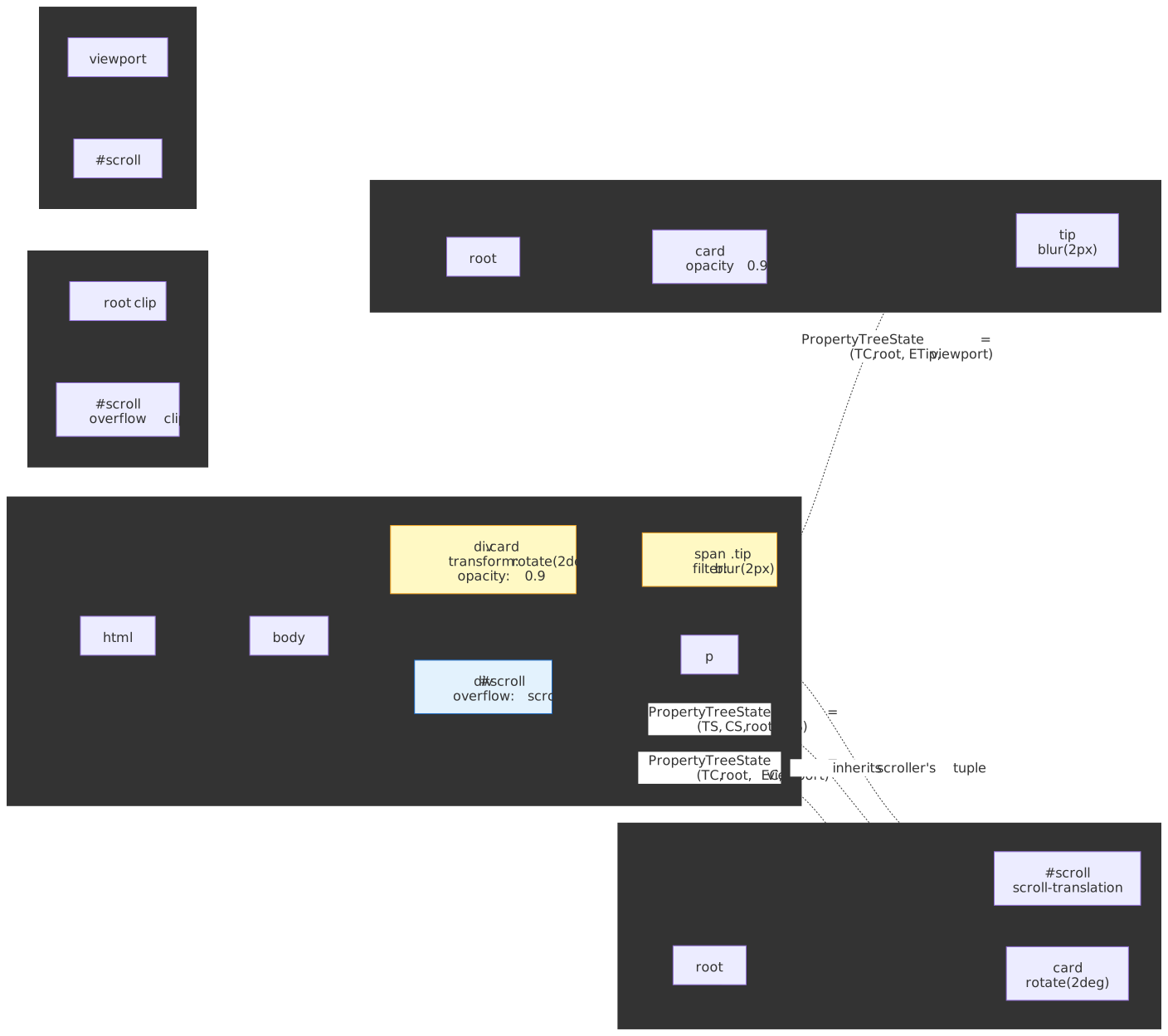
PaintPropertyTreeBuilder constructs four trees during the walk. Each tree is sparse — most elements share their parent’s nodes. A new node is created only when CSS forces one (a transform, an overflow clip, an opacity below 1, a scrollable container, etc.).
The tree topology mostly mirrors the DOM, but each tree has its own scoping rules. The split into four trees exists because scrolling and visual effects do not have the same containment semantics: position: fixed/absolute descendants escape ancestor scrollers but still inherit ancestor visual effects, so scroll containment cannot share a topology with effect containment2.
Transform tree
Stores the 4×4 transformation matrices that move and reshape coordinate spaces. A node is created for any non-none transform, translate, rotate, scale, perspective, scroll offset, or fixed-position adjustment. Each node records the local transform matrix, transform origin, whether the inherited transform is flattened to 2D or preserved in 3D, and which 3D rendering context it joins2.
Separating transforms into a dedicated tree is what makes off-main-thread compositor updates cheap: the compositor mutates a single node and re-multiplies lazily at draw time, instead of eagerly rebuilding inherited matrices on the main thread.
Warning
A non-none transform (including transform: translateZ(0)) creates a containing block for position: fixed and position: absolute descendants4. A fixed element nested inside a transformed ancestor is positioned relative to that ancestor, not the viewport. The same is true of perspective, filter, backdrop-filter, contain: layout|paint|strict|content, container-type ≠ normal, content-visibility: auto, and any will-change value that would itself create one4.
.transformed-parent { transform: translateZ(0); /* any transform, even identity */}.supposedly-fixed { position: fixed; /* positioned relative to .transformed-parent, not the viewport */ top: 0; left: 0;}Clip tree
Represents overflow clips — axis-aligned rectangles, optionally with rounded corners2. New nodes are created by overflow: hidden|scroll|auto|clip and by border-radius rounding on a clipping container.
Keeping clip nodes separate from transform nodes lets the compositor change a scroll offset (a transform mutation) without recomputing the clip rect that defines the visible viewport of the scroller.
Note
clip-path does not live in the clip tree. Because clip-path can be an arbitrary path or shape (not an axis-aligned rect with rounded corners), it is represented as a node in the effect tree, alongside masks and filters2.
Tip
overflow: clip and overflow: hidden both clip painted content to the box, but they differ in two important ways. hidden allows programmatic scrolling (element.scrollTo(...)) and establishes a Block Formatting Context; clip forbids all scrolling and does not establish a BFC5. Reach for clip when you need clipping without the side effects of BFC creation.
Effect tree
Represents every visual effect that is not a transform and not a simple overflow clip: opacity, CSS filter, backdrop-filter, blend modes, masks, and clip-path2. Each node carries the alpha, filter list, blend mode, and an optional mask reference.
The effect tree is what enables transparency groups: an opacity < 1 requires that the entire descendant subtree be composited together before the alpha is applied, so the compositor needs an explicit “begin/end transparency group” boundary. Without a dedicated effect tree, the compositor could not distinguish “apply opacity to this subtree” from “apply opacity to each element individually.”
Note
Per CSS Filter Effects 1, the rendering order inside the effect tree is fixed: filter → clipping → masking → opacity6. Custom rendering pipelines that reorder these get the visual wrong; Blink does it for you.
Caution
filter and backdrop-filter create both a stacking context and a containing block for fixed/absolute descendants4. opacity creates a stacking context but does not create a containing block. Keep this asymmetry in mind when debugging “my fixed tooltip suddenly anchors to the wrong element.”
Scroll tree
Encodes scrollable regions, their offsets, and how scrolls chain together. Each node records which axes scroll, the container size vs. content size (which determines scrollbar presence), and the parent in the scroll-chain hierarchy2.
Crucially, the scroll offset is not stored directly in the scroll node — it lives in a paired transform-tree node2. That indirection is the unification trick: the compositor’s general-purpose transform pipeline applies scroll position the same way it applies any other 2D translation, which is what makes off-main-thread scrolling work even while the main thread is blocked.
PropertyTreeState: the per-element 4-tuple
After Prepaint, every FragmentData carries a PropertyTreeState:
PropertyTreeState = (transform_node, clip_node, effect_node, scroll_node)Each entry points at the nearest ancestor node in the corresponding tree2. Because the trees are sparse, most elements share their parent’s tuple — a deeply nested <span> with no visual properties of its own simply inherits its block parent’s PropertyTreeState. Only elements whose CSS forces a node (transform, clip-path, opacity, filter, scroll, etc.) get a new entry in any tree.
Multi-column and paginated layouts complicate this slightly: a single LayoutObject can have multiple FragmentData instances (one per column), and each fragment gets its own PropertyTreeState1.
This tuple is also what the Paint stage uses to group display items into paint chunks — the unit at which the compositor decides what becomes a cc::Layer1.
PrePaintTreeWalk
PrePaintTreeWalk performs an in-order, depth-first traversal starting at the root FrameView and crossing iframe boundaries. The in-order ordering matters because property tree relationships depend on DOM ancestry — specifically, on the parent containing block — and that information is cheapest to compute as you descend1.
For each visited LayoutObject:
- Dirty bit gate. If
NeedsPaintPropertyUpdate,SubtreeNeedsPaintPropertyUpdate, orDescendantNeedsPaintPropertyUpdateis unset, the subtree is skipped entirely1. - Property tree update.
PaintPropertyTreeBuildercreates or refreshes the nodes that this object owns. New nodes are created only when CSS demands them (e.g.transform,clip-path,opacity < 1,overflow: scroll). - FragmentData population. Each fragment receives an
ObjectPaintPropertiespointing at its newly resolved property tree nodes. Multi-column layouts produce multiple fragments per object1. - Paint invalidation.
PaintInvalidatorcompares current vs. cached visual state and marks any staleDisplayItemClient1.
Dirty bits
Three flags on LayoutObject control how much of the tree the walk has to touch1:
| Flag | Scope | Meaning |
|---|---|---|
NeedsPaintPropertyUpdate |
Single node | This node’s properties changed |
SubtreeNeedsPaintPropertyUpdate |
Whole subtree | Force-update all descendants |
DescendantNeedsPaintPropertyUpdate |
Bookkeeping | Some descendant somewhere needs update |
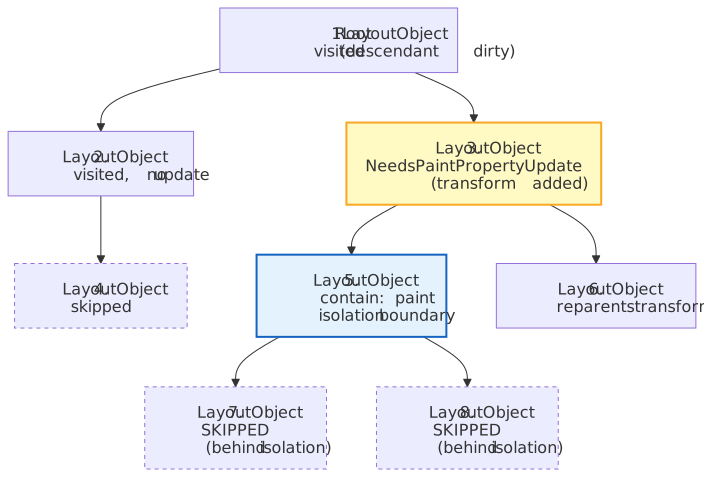
On a 10,000-element page where one element’s background colour changed, Prepaint only visits the dirty path from the root down to that element — the rest of the subtree is gated out by these flags. Topology-changing updates are more expensive: when a transform is added or removed, Prepaint sets SubtreeNeedsPaintPropertyUpdate, walks every descendant, and reparents their transform tuple to the new node1. The same is true for any property that introduces or removes a property-tree node — opacity crossing 1.0, overflow changing to/from visible, clip-path toggling, etc. This is exactly what contain: paint mitigates (next subsection).
Isolation boundaries
contain: paint establishes an isolation boundary in all three of the transform/clip/effect trees by inserting alias nodes that act as descendant roots1. The walk treats the boundary as a wall: changes outside the boundary cannot reparent nodes inside it, so a SubtreeNeedsPaintPropertyUpdate flag from above the boundary stops at the boundary. Large widget subtrees can be effectively excluded from most cross-document mutations this way.
The example below (adapted from the Blink paint README1) walks a tree where element 3 gets a new transform and element 5 carries contain: paint:
Quick update path
For a small but very common class of style changes — pure transform or opacity mutations with no layout consequences — Prepaint skips the full property tree builder entirely. During PaintLayer::StyleDidChange, qualifying changes are added to a pending list; later, in PrePaintTreeWalk::WalkTree, those updates are applied directly to the existing nodes without re-running the builder1.
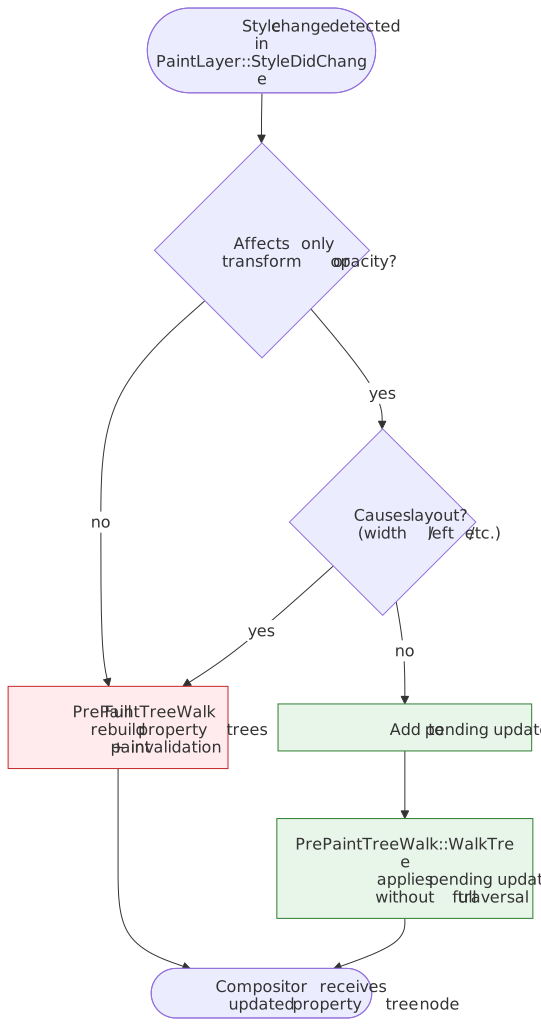
The shortcut is one half of why CSS animations on transform and opacity are smooth even on a busy main thread; the other half is that those same two properties are exactly the ones the compositor can mutate on its own thread (covered below).
Paint invalidation
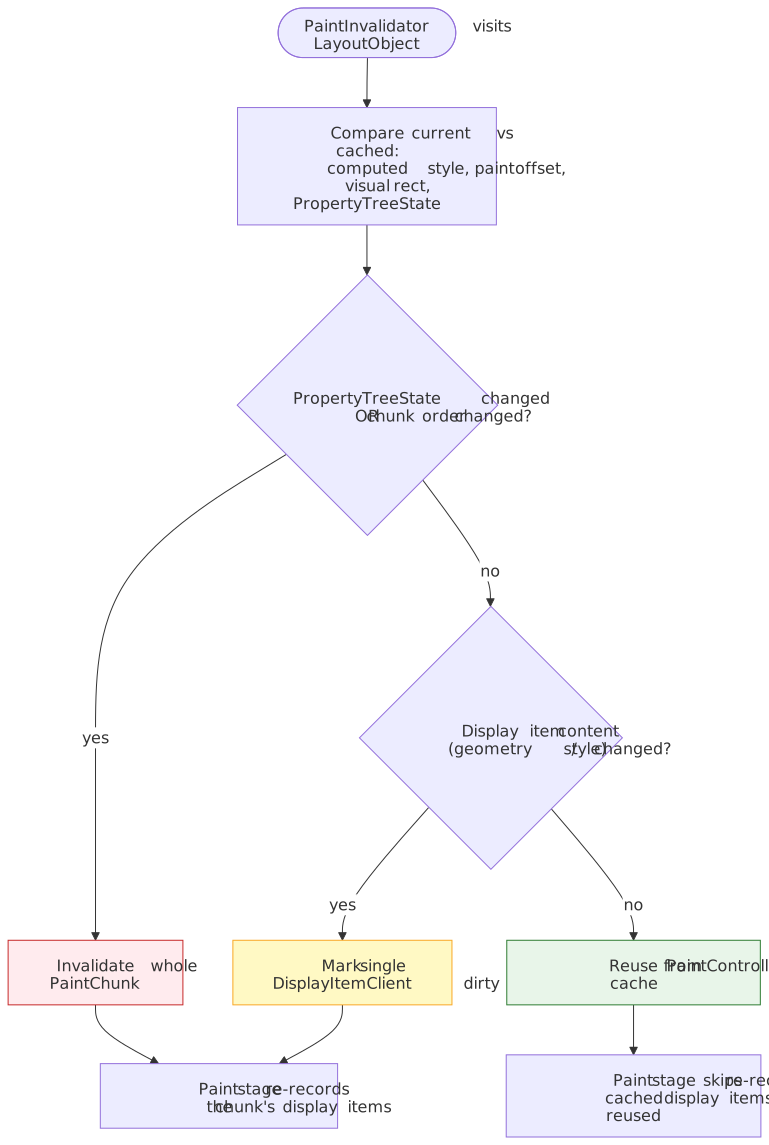
The second output of Prepaint is the set of dirty display item clients that the Paint stage will re-record. PaintInvalidator compares, for each visited LayoutObject, the current vs. cached versions of1:
- computed style,
- geometry (paint offset, visual rect),
- property tree state.
Where they differ, the corresponding DisplayItemClient is marked dirty. Paint only re-records dirty items; everything else is reused from the PaintController’s cache.
Invalidation operates at two granularities1:
- Paint chunk level. A paint chunk groups consecutive display items that share a
PropertyTreeState. If chunks no longer match in order, or the property tree state changed, the entire chunk is invalidated. - Display item level. When chunks still match in order and property trees are unchanged, individual display items are compared so background-only or text-only changes invalidate just the affected item.
A practical illustration: changing only an element’s background-color invalidates a single display item and reuses the rest of its chunk. Changing only its transform invalidates the chunk’s property tree state but typically allows the chunk’s display items themselves to be reused (the chunk simply moves under a different transform node).
Compositor-driven animations: bypassing the main thread
The architectural payoff of property trees is that animations affecting only transform or opacity can run entirely on the compositor thread, skipping layout, prepaint, and paint per frame7. The compositor’s AnimationHost produces output values from AnimationCurves and writes them directly into property tree nodes; the new transform/opacity is applied at draw time8.
Why only transform and opacity? Because they cannot affect layout geometry or paint order. Anything else (width, left, top, margin, …) requires re-running layout — and therefore the full main-thread pipeline — every frame.
/* Compositor-driven: stays smooth even when the main thread is blocked */.smooth { animation: slide 1s;}@keyframes slide { to { transform: translateX(100px); }}/* Main-thread animation: janks whenever the main thread is busy */.janky { animation: slide-left 1s;}@keyframes slide-left { to { left: 100px; }}Tip
The same restriction applies to scrolling. Off-main-thread scrolling works because the scroll tree gives the compositor everything it needs (scroll bounds, chaining, overflow direction) to update the scroller’s transform node without consulting the main thread. The moment a page registers a non-passive wheel/touchmove handler, the compositor must wait for the main thread before scrolling — which reintroduces jank.
Edge cases worth internalising
will-change is not free
will-change: transform (or any other compositor-promoting property) tells the engine to allocate a separate composited layer up-front, including texture memory and bookkeeping. Applying it to many elements simultaneously exhausts GPU memory and produces checkerboarding (white tiles during scroll)9.
/* Memory explosion — promotes every list item to its own layer */.list-item { will-change: transform;}/* Promote only while actually animating */.list-item.animating { will-change: transform;}The general rule: add will-change immediately before an animation begins, remove it as soon as the animation ends.
contain: paint confines position: fixed
contain: paint clips painted content to the box and prevents position: fixed descendants from escaping4:
.container { contain: paint;}.tooltip { position: fixed; /* still positioned relative to .container */}This is exactly the isolation-boundary behaviour described earlier — useful for widget isolation, surprising for “why won’t my modal escape?”.
filter: blur(0) still has side effects
A no-op filter value still creates a stacking context, a containing block, and an effect-tree node. Using filter: blur(0) as a “force GPU” trick has stopped helping years ago and now actively costs compositing memory and changes positioning semantics4.
Performance debugging
In Chrome DevTools’ Performance panel, Prepaint shows up as Pre-paint (older traces still call it “Update Layer Tree”). What to look for:
- Long pre-paint slices (>5 ms) — usually a deep dirty subtree, often caused by mutating a high-up element’s
transformor by togglingcontainon/off. - Repeated pre-paint every frame — typically a
requestAnimationFramecallback writing layout-affecting properties.
Practical levers:
- Apply
contain: layout paint(orcontain: strict/content) on widget roots. It both bounds dirty-bit propagation and creates an isolation boundary1. - Batch transform/opacity mutations inside
requestAnimationFrame; the quick-update path applies once per frame instead of once per write. - Avoid layout-triggering animation properties (
width,height,top,left,margin). Usetransform: translate()andopacityinstead. - Use the Layers panel in DevTools to inspect composited layers and their reasons; excessive layers usually means too aggressive
will-changeuse.
Practical takeaways
- Prepaint is the bridge from layout geometry to paint and compositing. It is structural (build property trees) and bookkeeping (compute paint invalidation) at the same time, in one walk.
- The four trees exist because scrolling and visual effects have different containment rules. Knowing which property goes in which tree predicts which compositor optimisations apply.
- The dirty-bit system plus isolation boundaries is what keeps Prepaint cheap on real-world pages.
contain: paintis your strongest lever for isolating widget subtrees. - The quick-update path makes
transformandopacitythe only animation properties that consistently stay on the compositor thread. Design animations around that. - Off-main-thread scrolling is a property of the scroll tree, not magic. Non-passive wheel/touch handlers throw it away.
Appendix
Prerequisites
- Critical Rendering Path: Overview — the full RenderingNG pipeline from HTML to pixels.
- Critical Rendering Path: Style Recalculation — how the LayoutObject tree and computed styles are produced.
- Critical Rendering Path: Layout — how the Fragment Tree is built.
- Familiarity with CSS visual effects:
transform,opacity,filter,overflow,contain.
Next in the series
- Critical Rendering Path: Paint — display-item recording and paint chunks (the consumer of Prepaint’s outputs).
- Critical Rendering Path: Compositing — how
ccmutates the property trees off the main thread to scroll and animate.
Terminology
| Term | Definition |
|---|---|
| Property Tree | One of four sparse trees (transform, clip, effect, scroll) storing visual-effect or scroll state independently of the DOM. |
| PropertyTreeState | A 4-tuple (transform, clip, effect, scroll) of pointers identifying a fragment’s nearest ancestor node in each property tree. |
| LayoutObject Tree | Mutable Blink tree of objects that generate boxes; the structural backbone of the Prepaint walk. |
| Fragment Tree | Immutable LayoutNG tree of PhysicalFragments with resolved geometry; the geometry source consulted during paint invalidation. |
| PrePaintTreeWalk | The Blink class that performs the in-order LayoutObject walk during Prepaint. |
| PaintPropertyTreeBuilder | The component that creates and updates property tree nodes. |
| PaintInvalidator | The component that decides which DisplayItemClients need re-recording. |
| Isolation Boundary | An alias node (created by contain: paint) that acts as a property-tree root for a subtree, blocking ancestor-driven walks. |
| Slimming Paint | The 2015–2021 Chromium project that introduced property trees and decoupled compositing from paint. |
| Compositor Thread | The browser thread (cc) that handles compositing, scrolling, and transform/opacity animations without main-thread involvement. |
Footnotes
Footnotes
-
Blink rendering team.
third_party/blink/renderer/core/paint/README.md. The authoritative source on PrePaintTreeWalk, paint property trees, isolation boundaries, the dirty-bit system, and the quick-update path. ↩ ↩2 ↩3 ↩4 ↩5 ↩6 ↩7 ↩8 ↩9 ↩10 ↩11 ↩12 ↩13 ↩14 ↩15 ↩16 ↩17 ↩18 -
Chris Harrelson and Stefan Zager. Key data structures in RenderingNG. Chrome for Developers. Defines the four property trees, the PropertyTreeState 4-tuple, the scope of each tree, and why scrolling uses a separate tree from visual effects. ↩ ↩2 ↩3 ↩4 ↩5 ↩6 ↩7 ↩8 ↩9
-
Chromium project. Slimming Paint (a.k.a. Redesigning Painting and Compositing). The phase table (V1 → CompositeAfterPaint), the 22,000-line code reduction, and the −1.3% CPU / +3.5% scroll-update / +2.2% input-delay numbers come from this page. ↩ ↩2
-
MDN Web Docs. Layout and the containing block. Lists every property that establishes a containing block for fixed and absolute descendants — including
transform,perspective,filter,backdrop-filter,contain,container-type,content-visibility: auto, and qualifyingwill-changevalues. Note thatopacityis not on this list. ↩ ↩2 ↩3 ↩4 ↩5 -
W3C. CSS Overflow Module Level 3 —
overflow. Specifies the difference betweenoverflow: hiddenandoverflow: clip, including BFC establishment and programmatic-scroll behaviour. ↩ -
W3C. Filter Effects Module Level 1 — Compositing model. Defines the rendering order: filter, then clipping, then masking, then opacity. ↩
-
web.dev. Animations and performance. Why
transformandopacityare the compositor-friendly animation properties. ↩ -
Chromium project. How
ccWorks. Compositor architecture, including how property trees flow from Blink toccand how theAnimationHostmutates them. ↩ -
MDN Web Docs.
will-change. Memory and compositing trade-offs of advance compositor promotion. ↩