Fetch, Streams, and AbortController
Three WHATWG standards — Fetch, Streams, and DOM §3.3 AbortController — were designed together. response.body is a ReadableStream by spec, not by accident; pipeTo accepts an AbortSignal; and a single signal can tear down the network socket, the response stream, and any downstream transform. Treating them as one system unlocks patterns — incremental parsing, NDJSON tailing, cancel-on-navigation — that take pages of boilerplate with XMLHttpRequest. This article unpacks the integration points, the non-obvious rules (body disturbance, single-reader locks, backpressure semantics, half-duplex uploads), and the browser support cliffs you actually hit in 2026.
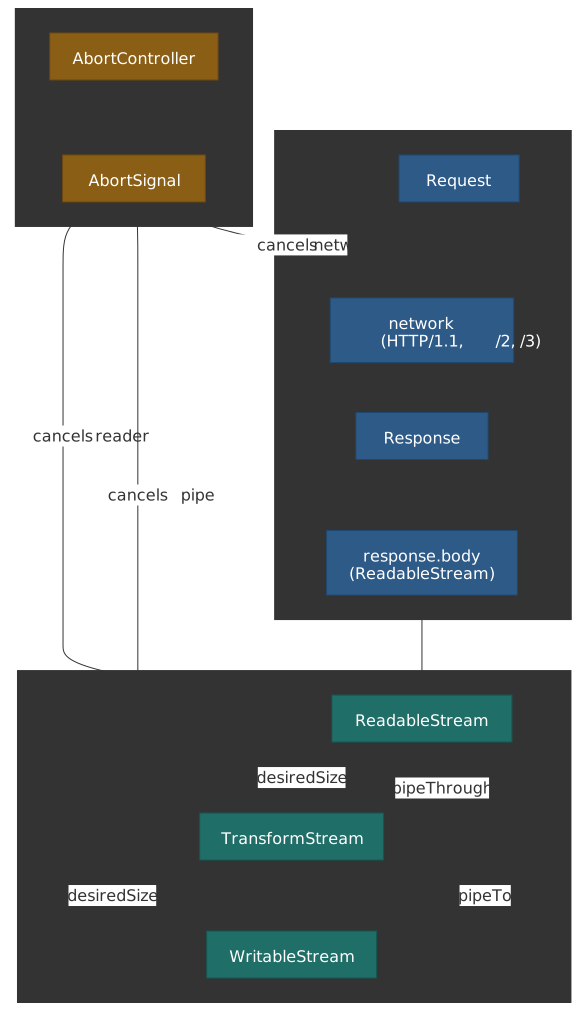
Mental model
Three primitives, three responsibilities, one pipeline:
| Primitive | Concrete artifact | Responsibility |
|---|---|---|
| Fetch | Request / Response |
One round trip; exposes the body as a ReadableStream1 |
| Streams | ReadableStream / WritableStream / TransformStream |
Move chunks with automatic, advisory backpressure2 |
| AbortController | AbortController / AbortSignal |
Composable cancellation; reason flows downstream3 |
Three rules a senior engineer should hold in their head:
- The body is the stream.
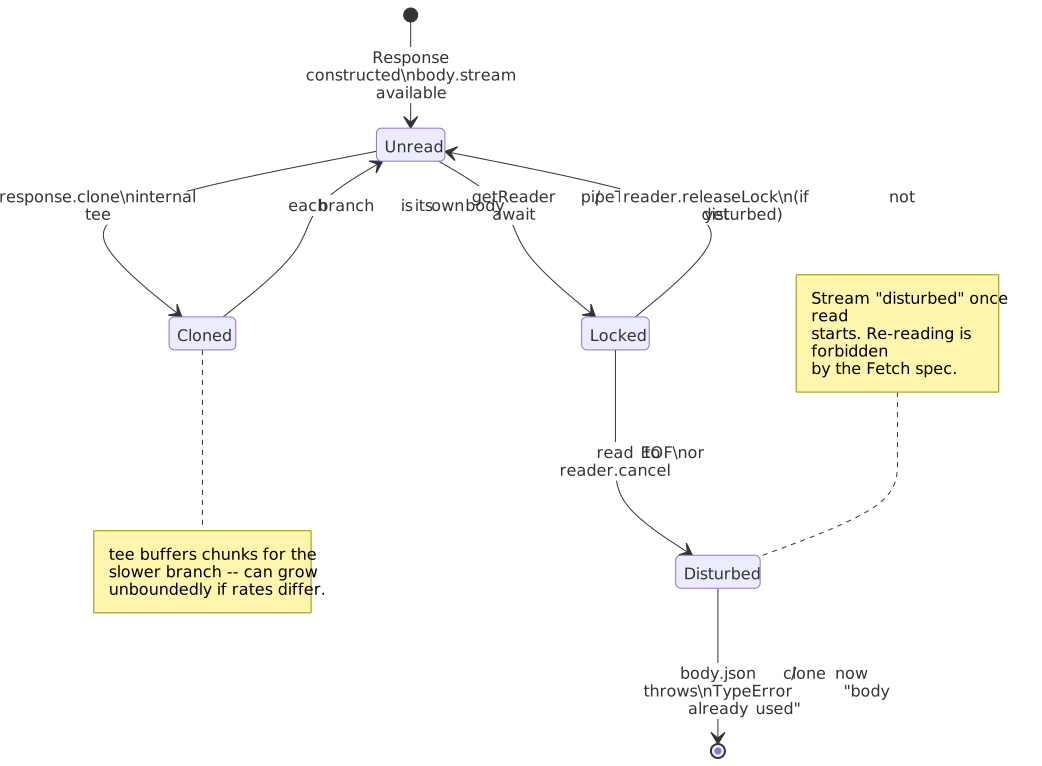
body.json(),body.text(), and friends are convenience wrappers that drain the sameReadableStream. Once it has been read or piped, the stream is “disturbed” andclone()/json()will throw.4 - Backpressure is advisory.
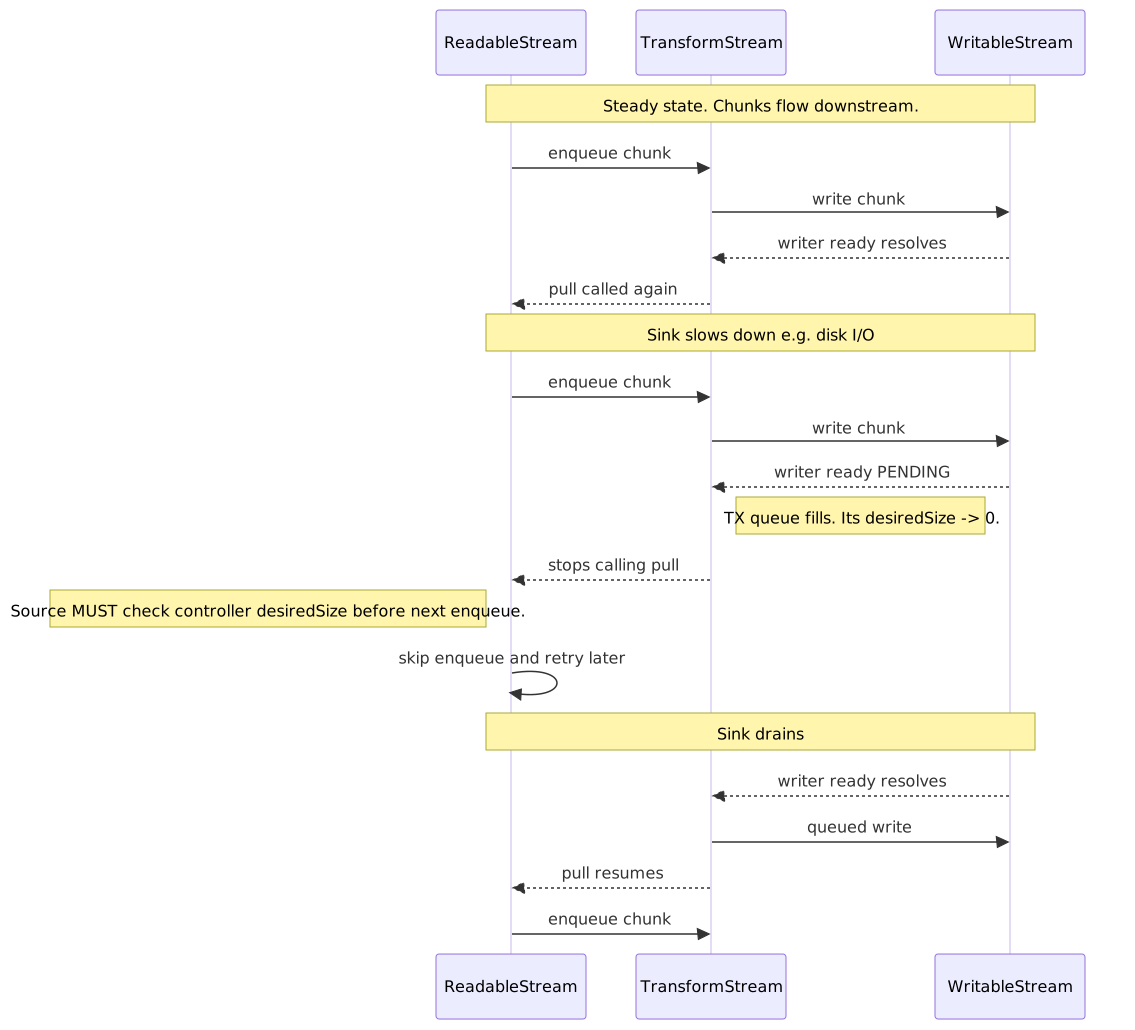
controller.desiredSizeis computed by the spec, but a misbehaved source that ignores it will happily blow memory; the runtime does not enforce throttling.5 - Cancellation propagates both ways. A
pipeTocancel on the destination cancels the source; a source error aborts the destination.signalonpipeToplussignalonfetch()is one switch for the whole pipeline.6
The Fetch API: request and response lifecycle
The Fetch Standard unifies network requests across the platform — <img> loading, navigation, Service Worker interception, and explicit fetch() calls all funnel through the same algorithm.7 That uniformity is the reason Fetch options that look ergonomic (e.g., cache: 'no-store') actually shape the browser’s HTTP cache decisions, not just JavaScript behavior.
Request configuration
Defaults for the options that bite most often in production:
| Option | Default | Why this default |
|---|---|---|
method |
GET |
Safe for retries, cached by intermediaries. |
mode |
cors |
Forces an explicit CORS check cross-origin; no-cors returns an opaque response that JS cannot inspect.8 |
credentials |
same-origin |
Privacy default; cross-origin cookies require opt-in. |
redirect |
follow |
Follows up to 20 redirects, then errors with a network error.9 |
cache |
default |
Honors HTTP cache semantics from RFC 9111; no-store, reload, etc. let you override. |
signal |
undefined |
Optional AbortSignal for cancellation/timeout. |
duplex |
half (required when body is a ReadableStream) |
Browsers cannot read response bytes until the request body finishes.10 |
Body source types. A request body may be a string, ArrayBuffer, typed array / DataView, Blob, File, URLSearchParams, FormData, or a ReadableStream.11 The browser sets Content-Type automatically (application/x-www-form-urlencoded for URLSearchParams, multipart/form-data with a generated boundary for FormData, the Blob’s own type for blobs).
const response = await fetch(`${API_BASE}/users`, { method: "POST", headers: { "Content-Type": "application/json" }, body: JSON.stringify({ name: "Alice", role: "admin" }), credentials: "include", // send cookies cross-origin signal: AbortSignal.timeout(5000),})if (!response.ok) { throw new Error(`HTTP ${response.status}: ${response.statusText}`)}const user = await response.json()Response tainting and CORS
The Response.type property surfaces the security context applied by the browser:
type |
When | What JS can see |
|---|---|---|
basic |
Same-origin | Full headers and body |
cors |
Cross-origin with valid CORS headers | CORS-safelisted response headers + body |
opaque |
Cross-origin with mode: 'no-cors' |
status === 0, headers empty, body null |
opaqueredirect |
Redirect captured with redirect: 'manual' |
Cannot inspect target |
The opaque response is, per spec, “indistinguishable from a network error” to JavaScript — by design, so no-cors cannot leak data through side channels.8
Body consumption: stream under the hood
In the spec, a body is a (stream, source, length) triple where stream is always a ReadableStream.4 Every consumption helper — json(), text(), blob(), arrayBuffer(), formData() — drains that stream to completion. Once drained, the body is disturbed and cannot be read again:
const response = await fetch("/api/data")const data1 = await response.json()const data2 = await response.json() // TypeError: body has already been usedresponse.clone() is the spec’s escape hatch: it teases the underlying stream into two independent branches via ReadableStream.tee() and returns a new Response over the second branch.12 The cost is real: tee buffers the chunk queue for the slower branch. In browsers the queue grows as fast as the faster consumer reads, so a parked clone can hold the whole body in memory.13
HTTP errors do not reject
A spec corner that costs juniors at least one outage: fetch() only rejects on network failure (DNS, TCP, TLS, CORS, abort).14 HTTP 4xx/5xx are valid responses — the server replied — so the promise resolves and response.ok is false.
const response = await fetch("/api/data")if (!response.ok) { // 4xx/5xx land here, not in the catch block throw new HTTPError(response.status, response.statusText)}const data = await response.json()The Streams API: incremental data with backpressure
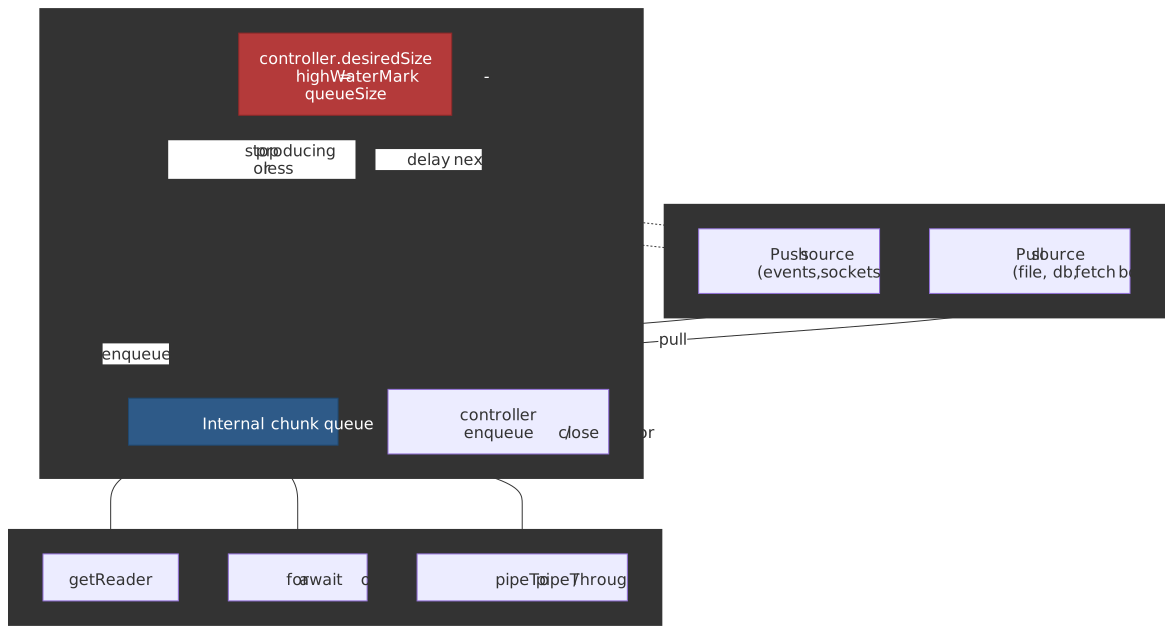
ReadableStream is the bridge between source-pacing (push or pull) and consumer-pacing.
Constructor anatomy
const stream = new ReadableStream<Uint8Array>( { start(controller) { // run-once setup; return a Promise to delay the first pull() }, pull(controller) { // called whenever the queue can accept more (desiredSize > 0) // controller.enqueue(chunk) | controller.close() | controller.error(e) }, cancel(reason) { // consumer aborted; release sockets, file handles, timers }, }, { highWaterMark: 3, size: (chunk) => 1 }, // queue 3 chunks before backpressure)Backpressure: desiredSize and pipe chains
desiredSize is defined by the spec as highWaterMark - (sum of queued chunk sizes). When zero or negative, the stream is at or over capacity; well-behaved sources stop enqueuing until pull() is called again.15 A pipeTo chain composes these signals end-to-end: WritableStream.writer.ready resolves when the sink’s queue drains, which lets the upstream TransformStream resume write() calls, which lets its upstream stream call pull() again.16
Important
Backpressure is advisory. The runtime computes desiredSize but cannot prevent a misbehaving source from calling controller.enqueue() past it; that is how stream-based code leaks memory in practice.5
A push source that respects backpressure looks like this:
const stream = new ReadableStream({ start(controller) { let offset = 0 const produceChunk = () => { if (offset >= TOTAL_SIZE) { controller.close() return } // Honor backpressure: bail out and try again later if (controller.desiredSize !== null && controller.desiredSize <= 0) { setTimeout(produceChunk, 50) return } controller.enqueue(generateChunk(offset, CHUNK_SIZE)) offset += CHUNK_SIZE queueMicrotask(produceChunk) } produceChunk() },})Reading: three patterns
// 1. Manual reader — most control, must release the lockconst reader = stream.getReader()try { while (true) { const { done, value } = await reader.read() if (done) break process(value) }} finally { reader.releaseLock()}// 2. Async iteration — cleanest; auto-cancels on `break` unless you opt outfor await (const chunk of stream) { process(chunk)}for await (const chunk of stream.values({ preventCancel: true })) { if (foundTarget) break // stream remains live for another consumer}// 3. pipeTo — one call handles read, backpressure, error and cleanupawait stream.pipeTo(writableStream, { signal })for await...of is the WHATWG-spec’d async iterator on ReadableStream and accepts { preventCancel: true } via stream.values().17 Browser support arrived late: Chrome 124, Firefox 110, Safari 26.4.18
Single-reader lock and tee()
getReader() locks the stream — calling it twice throws TypeError. The single-reader rule is what enables the runtime to optimize the queue without per-consumer buffering. When you genuinely need two consumers, call stream.tee() to get two independent branches, accepting the buffering cost for the slower branch.
WritableStream and the writer’s ready promise
WritableStream is the destination half of the pipeline. The most useful detail for production code is writer.ready: it’s a promise that resolves when the sink’s desiredSize > 0, i.e., when there is room for another write().19 Awaiting it before each write is the manual equivalent of pipeTo backpressure:
const writer = writableStream.getWriter()for (const chunk of chunks) { await writer.ready // wait until the sink has capacity await writer.write(chunk) // resolves when the chunk is accepted}await writer.close()TransformStream and built-in transforms
A TransformStream is a paired (writable, readable) whose transform(chunk, controller) runs between them. The built-ins cover most of what you would otherwise hand-roll:
| Transform | Purpose | Notes |
|---|---|---|
TextDecoderStream |
Uint8Array → string |
Buffers partial UTF-8 sequences across chunk boundaries.20 |
TextEncoderStream |
string → Uint8Array |
Required when piping a string source into an HTTP body stream. |
CompressionStream |
gzip / deflate / deflate-raw | new CompressionStream('gzip') — Compression Streams spec.21 |
DecompressionStream |
inverse of above | Same algorithms. |
pipeTo and pipeThrough accept an options object that controls error and close propagation:
await readableStream.pipeTo(writableStream, { preventClose: false, // default: close the sink when the source closes preventAbort: false, // default: abort the sink on source error preventCancel: false, // default: cancel the source on sink error signal, // tear the whole pipe down on abort})AbortController: composable cancellation
AbortController is the single cancellation primitive across fetch, streams, timers (via AbortSignal.timeout), and your own async code. Its design is intentionally small: a controller emits one signal; the signal fires 'abort' exactly once and exposes aborted, reason, and throwIfAborted().
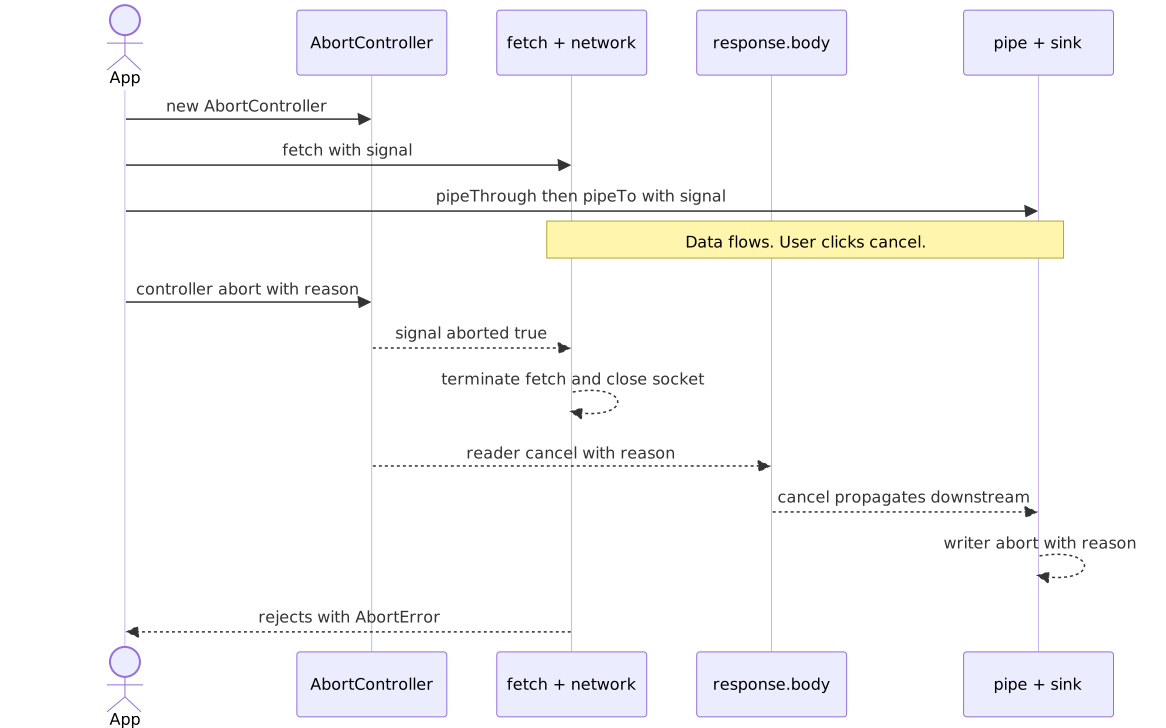
Static factories
AbortSignal.timeout(ms) returns a signal that auto-aborts after the given duration with a TimeoutError DOMException (distinct from the AbortError raised by manual controller.abort()).22 The timer is active time, not wall clock — it pauses while the document is in the back/forward cache or in a suspended worker, which prevents bfcache restores from firing stale timeouts.
try { const response = await fetch("/api/data", { signal: AbortSignal.timeout(5000) }) return await response.json()} catch (err) { if (err.name === "TimeoutError") /* exceeded 5 s */ ; else if (err.name === "AbortError") /* user-initiated */ ; else throw err}AbortSignal.any([...signals]) returns a signal that aborts as soon as any of its inputs aborts, propagating that input’s reason.23 It is the right tool for “cancel on user click or timeout”:
const userCancel = new AbortController()const response = await fetch("/api/data", { signal: AbortSignal.any([userCancel.signal, AbortSignal.timeout(10_000)]),})cancelButton.onclick = () => userCancel.abort()signal.throwIfAborted() throws signal.reason if the signal already aborted — useful at the top of long-running async work to bail out before doing the expensive thing.
One-shot rule
A signal can only abort once. Reusing an already-aborted signal causes the next fetch() to reject synchronously with AbortError, which is the most common cause of “why is my retry call failing instantly”:
const ctrl = new AbortController()ctrl.abort()await fetch("/a", { signal: ctrl.signal }) // rejects immediatelyawait fetch("/b", { signal: ctrl.signal }) // rejects immediately// Always create a fresh controller per logical operation.Custom abortable operations
Wire AbortSignal into your own code with addEventListener('abort', …, { once: true }) for long waits, signal.throwIfAborted() between unit-of-work iterations, or a polled signal.aborted inside tight loops:
function delay(ms: number, signal?: AbortSignal): Promise<void> { return new Promise((resolve, reject) => { if (signal?.aborted) return reject(signal.reason) const timer = setTimeout(resolve, ms) signal?.addEventListener("abort", () => { clearTimeout(timer) reject(signal.reason) }, { once: true }) })}Streaming downloads
Streaming with progress
The naive “loaded / Content-Length” progress UI has a sharp edge:
Warning
If the response is compressed (Content-Encoding: gzip/br/zstd), Content-Length is the encoded size while response.body chunks are decoded bytes. Your loaded will exceed total and your bar will jump past 100%. Disable compression for the endpoint or accept the imprecision.24
type ProgressCallback = (loaded: number, total: number | null) => voidasync function downloadWithProgress( url: string, onProgress: ProgressCallback, signal?: AbortSignal,): Promise<Uint8Array> { const response = await fetch(url, { signal }) if (!response.ok) throw new Error(`HTTP ${response.status}`) const total = response.headers.get("Content-Length") const totalBytes = total ? parseInt(total, 10) : null const reader = response.body!.getReader() const chunks: Uint8Array[] = [] let loaded = 0 while (true) { const { done, value } = await reader.read() if (done) break chunks.push(value) loaded += value.length onProgress(loaded, totalBytes) } const result = new Uint8Array(loaded) let offset = 0 for (const chunk of chunks) { result.set(chunk, offset); offset += chunk.length } return result}Line-delimited and NDJSON streaming
For NDJSON or any newline-framed protocol — distinct from SSE, which has its own grammar and framing rules covered below — pipe response.body through TextDecoderStream and split on \n. The decoder buffers partial UTF-8 sequences across chunk boundaries, but you must still buffer the trailing partial line yourself:
async function* streamNDJSON<T>(response: Response): AsyncGenerator<T> { const reader = response.body! .pipeThrough(new TextDecoderStream()) .getReader() let buffer = "" while (true) { const { done, value } = await reader.read() if (done) { if (buffer.trim()) yield JSON.parse(buffer) as T return } buffer += value const lines = buffer.split("\n") buffer = lines.pop()! // keep incomplete trailing line for (const line of lines) { if (line.trim()) yield JSON.parse(line) as T } }}for await (const record of streamNDJSON<UserRecord>(response)) { await processUser(record)}Range requests and resumable downloads
Range: bytes=N- is the spec-defined way to resume a broken download or grab a slice of a large object.25 Servers advertise support with Accept-Ranges: bytes; a successful partial returns 206 Partial Content with Content-Range: bytes N-M/Total. Three failure modes worth wiring into your retry path:
200 OK— the server ignored theRangeheader. Discard whatever you already have and start over.416 Range Not Satisfiable— the offset is past the end of the resource. Refetch metadata; the resource may have shrunk.If-Rangemismatch — pair theRangerequest withIf-Range: <ETag>(orLast-Modified). If the validator no longer matches, the server returns the full200instead of a stale partial, and the client knows to restart.26
async function resumableFetch(url: string, etag: string, offset: number, signal?: AbortSignal) { const response = await fetch(url, { signal, headers: { Range: `bytes=${offset}-`, "If-Range": etag, // server returns full 200 if the resource changed }, }) if (response.status === 200) return { mode: "restart", body: response.body! } if (response.status === 206) return { mode: "resume", body: response.body! } if (response.status === 416) throw new Error("Stored offset past EOF") throw new Error(`Unexpected ${response.status}`)}The Range header also enables parallel chunked downloads (request 0-N, N+1-2N, … in parallel) and on-demand seeks for HLS / DASH players, where the player asks for a few seconds of media at a time rather than the whole file.
Background Fetch (Chromium-only escape hatch)
The Background Fetch API lets a Service Worker hand a long download (AI model weights, podcast episode, large dataset) to the user agent so it survives tab close and connectivity blips:27
const reg = await navigator.serviceWorker.readyconst bgFetch = await reg.backgroundFetch.fetch( "ai-model-2026-04", ["/models/llama-7b.bin"], { title: "Downloading model", downloadTotal: 4_200_000_000 },)It is a WICG draft, not a W3C Recommendation, and ships in Chromium only as of 2026-04 (Chrome 74+, Edge 79+); Firefox and Safari have not implemented it. Use it as an opportunistic upgrade — fall back to plain fetch() when 'backgroundFetch' in registration is false.
Server-sent events vs streaming fetch
Server-Sent Events (EventSource) and streaming fetch() solve overlapping problems with very different ergonomics. Both ride on a single long-lived HTTP response; only one of them gives you reconnection for free.
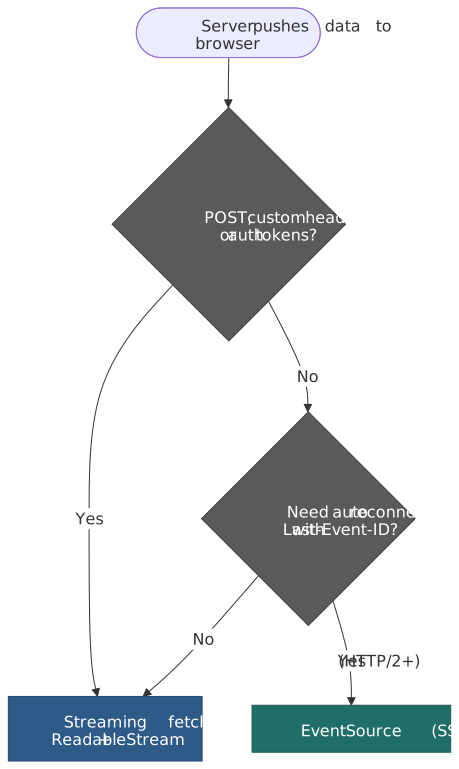
SSE wire format
The HTML Living Standard defines text/event-stream as a UTF-8 line-oriented format with five legal field names: event, data, id, retry, plus comments starting with :.28 An empty line dispatches the accumulated event:
retry: 5000id: 42event: tickdata: {"ts": 1714579200, "load": 0.42}: keepaliveReconnection semantics
EventSource is the only browser API with built-in reconnect. The processing model:
- On any disconnect that is not a fatal
error(non-200 status, wrongContent-Type,connection.close()), the user agent waits for the current reconnection time and re-opens the request.29 - The
retry: <ms>field updates that reconnection time for the lifetime of theEventSource. The default is user-agent defined — Chromium and Firefox ship 3000 ms — and the spec leaves room for exponential backoff. - If any received event has an
id:field, the user agent stores it as the last event ID. On every reconnection attempt, that value is sent back as theLast-Event-IDrequest header so the server can resume from the right offset.30 - An empty
id:resets the stored value; subsequent reconnects omitLast-Event-ID.
const es = new EventSource("/api/ticks", { withCredentials: true })es.addEventListener("tick", (e) => render(JSON.parse(e.data)))es.onerror = () => { // The browser will already reconnect; only intervene to give up. if (es.readyState === EventSource.CLOSED) showOfflineBanner()}Decision matrix
| Concern | EventSource (SSE) |
Streaming fetch() |
|---|---|---|
| HTTP method | GET only |
Any |
| Custom request headers | Not allowed (only Cookie via withCredentials) |
Full control |
Auth tokens (Authorization) |
Workaround via cookie or query string | Native |
| Reconnection | Built-in; retry: and Last-Event-ID resume |
Manual; you write the loop |
| Wire format | text/event-stream UTF-8 only |
Anything — JSON, NDJSON, protobuf, binary |
| Cancellation | EventSource.close() |
AbortController (composable with AbortSignal.any) |
| HTTP/1.1 connection budget | Each open EventSource burns one of the 6 per-origin sockets.31 An app with many tabs starves images and other XHRs. |
Same socket budget, but lifetimes are usually shorter. |
| HTTP/2 / HTTP/3 multiplexing | Lifts the 6-connection limit; all streams share one TCP/QUIC connection. | Same. |
| Server complexity | Trivial: write data: ...\n\n |
Trivial: write any framing you like |
Tip
If you reach for SSE only because you want auto-reconnect, ship it over HTTP/2 or HTTP/3 — the per-origin 6-connection HTTP/1.1 cap will otherwise lock up the rest of your page when users open multiple tabs.
Service Worker stream relay
A Service Worker’s FetchEvent.respondWith() can resolve to a Response whose body is any ReadableStream you assemble — including one composed from a TransformStream written to from multiple sources. This is how App Shell + dynamic content stitching achieves first-byte latency near the cache and rest-of-document latency near the network.32
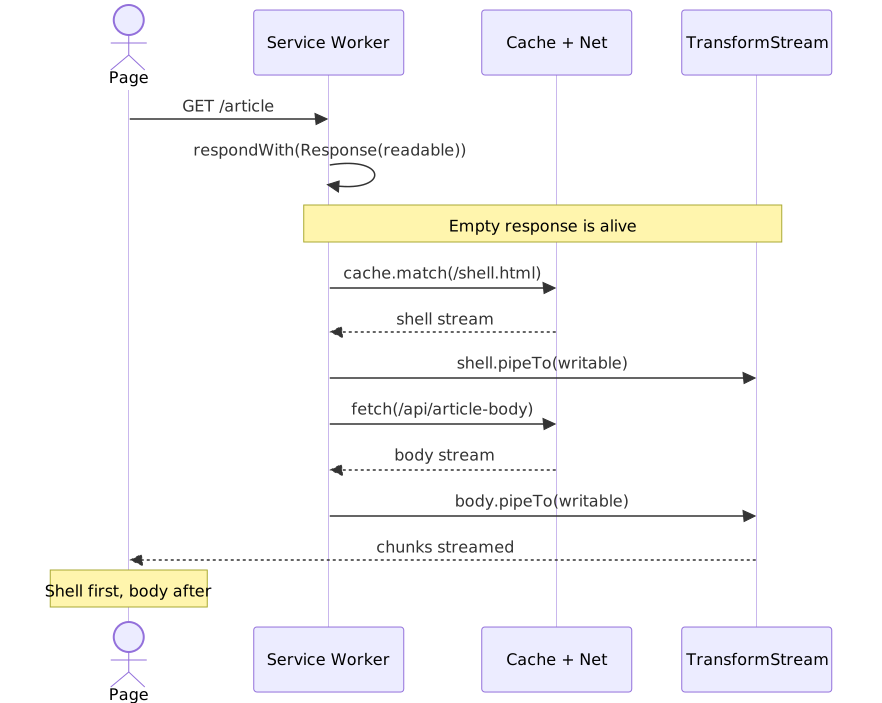
self.addEventListener("fetch", (event) => { const url = new URL(event.request.url) if (url.pathname !== "/article") return const { readable, writable } = new TransformStream() event.respondWith(new Response(readable, { headers: { "Content-Type": "text/html; charset=utf-8" }, })) event.waitUntil((async () => { const cache = await caches.open("shell-v1") const shell = await cache.match("/shell.html") if (shell?.body) { await shell.body.pipeTo(writable, { preventClose: true }) } const body = await fetch(`/api/articles${url.search}`) if (body.body) await body.body.pipeTo(writable) // closes writable on completion })())})Operational gotchas a senior engineer should hold:
- Lifetime. A Service Worker can be terminated when idle.
event.waitUntil(...)keeps it alive only as long as the controlled client is open and the worker has time budget; very long-running streams (multi-GB downloads) are precisely whatBackgroundFetchis for.33 - Bytes only. A
Responsebody coming from aReadableStreammust enqueueUint8Arraychunks. Strings needTextEncoder/TextEncoderStreamfirst. - Stream identity is not transferred. When a
ReadableStreamcrosses from a Service Worker to a controlled page viarespondWith, the runtime relays chunks — both sides get distinct stream objects, not the same instance.
Request metadata: Sec-Fetch-* and priority hints
Two newer Fetch ecosystem features change how your requests are labelled on the wire — one for security, one for performance.
Fetch Metadata headers (Sec-Fetch-*)
The W3C Fetch Metadata Request Headers spec asks the user agent to attach four forbidden request headers describing why a request was made. They are forbidden — JS cannot set or override them — which is exactly what makes them useful as a server-side trust signal:34
| Header | Values | What it tells the server |
|---|---|---|
Sec-Fetch-Site |
same-origin | same-site | cross-site | none |
Relationship between initiator and target. |
Sec-Fetch-Mode |
cors | navigate | no-cors | same-origin | websocket |
Request mode. Most XHR/Fetch requests are cors or same-origin. |
Sec-Fetch-Dest |
document, image, script, style, font, audio, … |
The Fetch destination — what the response will be used for. |
Sec-Fetch-User |
?1 (only sent when truthy) |
The navigation was triggered by an explicit user gesture. |
A “Resource Isolation Policy” pattern reduces a wide class of CSRF / XS-Leaks to a few lines:
function isAllowed(req: Request): boolean { const site = req.headers.get("Sec-Fetch-Site") ?? "none" const mode = req.headers.get("Sec-Fetch-Mode") ?? "navigate" const dest = req.headers.get("Sec-Fetch-Dest") ?? "document" if (site === "same-origin" || site === "none") return true // own pages, bookmarks, address bar if (mode === "navigate" && req.method === "GET" && dest === "document") return true return false // reject cross-site image/script/etc.}Always include the three discriminating headers in the response Vary so caches do not collapse a permitted same-origin response into a cached cross-origin one.
Priority Hints (fetchpriority and RequestInit.priority)
The Priority Hints spec (now folded into the Fetch Standard and HTML Standard as fetchpriority) lets you nudge the browser’s internal request-priority queue with three values: 'high', 'low', 'auto'. The hint is advisory — browsers reserve the right to override based on resource type and network conditions.35
<img src="/hero.jpg" fetchpriority="high" alt="…" />fetch("/api/critical", { priority: "high" }) // boost a critical XHR above siblingsfetch("/api/analytics", { priority: "low" }) // deprioritise so it never competes with LCPTwo patterns that pay off:
- Boost the LCP image / API call that paints above the fold. Browsers default
<img>to “low” until layout proves visibility —fetchpriority="high"lets you skip that round trip. - Deprioritise telemetry, prefetch warming, and cache hydration. Reserve scarce bandwidth for the requests that block paint and interactivity.
Browser support reached cross-engine interop in 2024 (Baseline 2024); use it freely in 2026.
Streaming uploads
Browsers gained ReadableStream request bodies, but the path is narrower than most articles suggest.
async function uploadStream( url: string, source: AsyncGenerator<Uint8Array>, signal?: AbortSignal,): Promise<Response> { const body = new ReadableStream({ async pull(controller) { const { done, value } = await source.next() if (done) controller.close() else controller.enqueue(value) }, }) return fetch(url, { method: "POST", body, duplex: "half", // mandatory when body is a ReadableStream signal, })}Caution
Streaming request bodies are Chrome- and Edge-only (≥ 105) as of 2026-04. Firefox tracks the work in Bugzilla 1387483 (open since 2017); Safari/iOS 26.x still report no support.36
Operational constraints to internalise before designing around it:
- HTTP/2 or HTTP/3 required. HTTP/1.1 needs
Content-Lengthor chunked encoding up front; streaming bodies provide neither, so the browser will not negotiate it.37 - Half-duplex only.
duplex: 'half'means the response is held until the request finishes — there is no bidirectional streaming viafetch()in browsers. WebTransport/WebSocket are the bidirectional escape hatches.37 - CORS preflight always. Streaming requests are never “simple”, so every cross-origin call costs a round trip.
- 303 is the only redirect honored. Non-303 redirects on a streaming body are rejected, because the body cannot be replayed to the new URL.37
- Server buffering negates the win. Many origins and proxies buffer the full request before invoking the handler — measure end-to-end before building a UX around streaming uploads.
For the long tail (Firefox, Safari, older Chromium), XMLHttpRequest remains the only way to stream uploads with progress events.
function uploadWithProgress( url: string, formData: FormData, onProgress: (loaded: number, total: number) => void, signal?: AbortSignal,): Promise<Response> { return new Promise((resolve, reject) => { const xhr = new XMLHttpRequest() xhr.upload.addEventListener("progress", (e) => { if (e.lengthComputable) onProgress(e.loaded, e.total) }) xhr.addEventListener("load", () => resolve(new Response(xhr.response, { status: xhr.status }))) xhr.addEventListener("error", () => reject(new Error("Upload failed"))) signal?.addEventListener("abort", () => { xhr.abort() reject(signal.reason) }) xhr.open("POST", url) xhr.send(formData) })}BYOB readers: zero-copy byte streams
A “Bring Your Own Buffer” reader fills a caller-provided ArrayBuffer instead of allocating a new one per chunk. It is only available on streams whose underlying source declares type: 'bytes' (a ReadableByteStreamController), or via autoAllocateChunkSize on the same source.38
async function readWithBYOB(stream: ReadableStream<Uint8Array>): Promise<Uint8Array[]> { const reader = stream.getReader({ mode: "byob" }) const chunks: Uint8Array[] = [] let buffer = new Uint8Array(64 * 1024) while (true) { const { done, value } = await reader.read(buffer) if (done) break // value is a view into the now-detached buffer; copy what was filled chunks.push(value.slice()) // The original buffer's ArrayBuffer was transferred; rebuild a view. buffer = new Uint8Array(value.buffer) } return chunks}When BYOB pays off:
- Long-running binary processing (media demuxing, archive extraction) where allocation pressure dominates.
- WebAssembly interop, where you pre-allocate memory inside the Wasm heap.
- Anything where you measured GC pressure from per-chunk
Uint8Arrayallocations.
For everyday use, the default reader is simpler, faster to write, and within a few percent of BYOB throughput.
Error handling
Three error sources, three strategies. Combine them in one wrapper:
class HTTPError extends Error { constructor(public status: number, public statusText: string) { super(`HTTP ${status}: ${statusText}`) this.name = "HTTPError" }}class NetworkError extends Error { name = "NetworkError" as const }async function robustFetch<T>(url: string, options: RequestInit = {}): Promise<T> { const { signal: userSignal, ...rest } = options const timeoutSignal = AbortSignal.timeout(30_000) const signal = userSignal ? AbortSignal.any([userSignal, timeoutSignal]) : timeoutSignal let response: Response try { response = await fetch(url, { ...rest, signal }) } catch (e) { if (e instanceof Error && e.name === "TimeoutError") { throw new NetworkError("Request timed out after 30 s") } if (e instanceof Error && e.name === "AbortError") throw e throw new NetworkError(`Network failure: ${e}`) } if (!response.ok) throw new HTTPError(response.status, response.statusText) const contentType = response.headers.get("Content-Type") if (!contentType?.includes("application/json")) { throw new Error(`Expected JSON, got ${contentType}`) } return (await response.json()) as T}For partial downloads, Range: bytes=N- lets you resume after a network blip — but only if the server returns 206 Partial Content. Anything else (200, 416) means fall back to a full retry.
Browser support, verified
All version numbers below are from caniuse and MDN browser-compat-data as of 2026-04-21. Where the article previously reported earlier versions, those were copied from older support tables that conflated “feature exists” with “feature behaves to spec”.
| Feature | Chrome | Firefox | Safari | Source |
|---|---|---|---|---|
fetch() |
42+ | 39+ | 10.1+ | caniuse |
ReadableStream (response body) |
43+ | 65+ | 10.1+ | caniuse |
WritableStream |
59+ | 100+ | 14.1+ | caniuse |
TransformStream |
67+ | 102+ | 14.1+ | MDN |
AbortController |
66+ | 57+ | 11.1+ | caniuse |
AbortSignal.timeout() (full) |
124+ | 100+ | 16.0+ | caniuse |
AbortSignal.any() |
116+ | 124+ | 17.4+ | caniuse |
for await...of on ReadableStream |
124+ | 110+ | 26.4+ | caniuse |
Request body ReadableStream |
105+ | — | — | caniuse |
Note
The async-iteration row deserves attention: many polyfills and older articles claimed Safari 14.1 / Firefox 65, conflating ReadableStream itself with the async iterator protocol on it. The real interop date is Safari 26.4 (April 2026).
Feature detection
const supportsUploadStreaming = (() => { let duplexAccessed = false try { new Request("data:,", { method: "POST", body: new ReadableStream(), get duplex() { duplexAccessed = true; return "half" }, }) } catch { return false } return duplexAccessed})()const supportsSignalAny = typeof AbortSignal.any === "function"const supportsSignalTimeout = typeof AbortSignal.timeout === "function"const supportsAsyncIteration = typeof (ReadableStream.prototype as any)[Symbol.asyncIterator] === "function"Practical takeaways
- Treat
response.bodyas the default way to consume large payloads; reach for.json()/.text()only when the response fits comfortably in memory. - Always pass an
AbortSignalfrom your call site, even if it’s justAbortSignal.timeout(...). Untimedfetch()calls are how tabs leak. - Compose with
AbortSignal.any([userSignal, AbortSignal.timeout(ms)])— one signal, two reasons to cancel, native cleanup. - Honour
controller.desiredSizein custom sources. The runtime will not save you. - Avoid
response.clone()on large bodies. If you need two consumers, design the second one to operate on parsed data. - Don’t ship “loaded / Content-Length” progress UI on compressed endpoints; either disable encoding or stop showing a percentage.
- Streaming uploads are still a Chromium-only optimisation in 2026. Plan the fallback path before you build the happy path.
- Reach for
EventSourcewhen reconnect-with-Last-Event-IDis the spec you would otherwise re-implement; reach for streamingfetch()when you need POST, custom headers, or non-text framing. - For App Shell + dynamic body, compose a
TransformStreaminsideFetchEvent.respondWith— it is the fastest way to ship cached HTML before the network responds. - Trust
Sec-Fetch-Site/Sec-Fetch-Modeserver-side as a cheap, unforgeable defense-in-depth check, and remember to add them toVary. - Use
fetchpriority="high"(orpriority: 'high') on the LCP-critical request and'low'on telemetry / prefetch — most apps mis-prioritize at least one of the two.
Appendix
Terminology
- Backpressure — flow-control mechanism where consumer pacing throttles producer output via
desiredSize. - Body source — the spec name for the original data backing a body (a byte sequence,
Blob,FormData, etc.) before it becomes a stream. - BYOB (Bring Your Own Buffer) — a reader mode that fills a caller-allocated
ArrayBufferinstead of allocating per-chunk; only available on byte streams. - Disturbed — a body whose stream has had
read()called on it; cannot be re-read or cloned. - Half-duplex — request must finish before the response can be read; full-duplex would allow interleaved reads and writes (browsers do not).
- High water mark — the queue-size threshold at which a stream signals backpressure (
desiredSize <= 0). - Locked — the state of a stream while a reader holds it; only one reader can be active at a time.
- Opaque response — cross-origin response with
mode: 'no-cors'; status0, headers empty, bodynull. Indistinguishable from a network error. - Tee — duplicating a stream into two independent branches; the slower branch causes the queue to grow.
References
Specifications
- Fetch Standard — WHATWG Living Standard (Request, Response, body, CORS, response tainting)
- Streams Standard — WHATWG Living Standard (
ReadableStream,WritableStream,TransformStream, pipe chains, backpressure) - Encoding Standard —
TextEncoderStream,TextDecoderStream - DOM Standard §3.3 Aborting ongoing activities —
AbortController,AbortSignal - HTML Standard §9.2 Server-sent events —
EventSource,text/event-stream, reconnection - Service Workers — W3C —
FetchEvent.respondWith,ExtendableEvent.waitUntil - Background Fetch — WICG —
BackgroundFetchManager - Fetch Metadata Request Headers — W3C —
Sec-Fetch-Site,Sec-Fetch-Mode,Sec-Fetch-Dest,Sec-Fetch-User - RFC 9110 — HTTP Semantics —
Rangerequests, conditional requests, response status codes - Compression Streams —
CompressionStream/DecompressionStream
Official documentation and engineering posts
- Using the Fetch API — MDN
ReadableStream— MDN- Using readable byte streams — MDN
AbortSignal.timeout()— MDNAbortSignal.any()— MDN- Streaming requests with the fetch API — Chrome for Developers
- Streams — the definitive guide — web.dev
- We deserve a better streams API — Cloudflare
- Fetch streams are great, but not for measuring upload/download progress — Jake Archibald, 2025
Footnotes
-
Fetch Standard §body: a body is a tuple of (
stream,source,length) wherestreamis aReadableStream. ↩ -
Streams Standard §1.1.4 Backpressure — pipe chains propagate backpressure from sink to source. ↩
-
DOM Standard §3.3 defines
AbortController,AbortSignal, and theabortalgorithm. ↩ -
Fetch Standard §6.2.5 Body mixin — once a body is “disturbed” it cannot be consumed again. ↩ ↩2
-
Cloudflare engineering: We deserve a better streams API — backpressure is advisory, not enforced. ↩ ↩2
-
Streams Standard §
pipeTo()—signal,preventAbort,preventCancel,preventClosesemantics. ↩ -
Fetch Standard §Introduction — Fetch is the unified network primitive across the platform. ↩
-
Fetch Standard §filtered response opaque — “indistinguishable from a network error”. ↩ ↩2
-
Fetch Standard §HTTP-redirect fetch — redirect count limit is 20. ↩
-
Fetch Standard §request
duplexand Chrome streaming requests docs. ↩ -
Fetch Standard §
BodyInitlists the supported source types. ↩ -
Response.clone()— MDN — implemented viaReadableStream.tee(). ↩ -
ReadableStream.tee()— MDN — chunks are buffered for the slower branch. ↩ -
fetch()error semantics — MDN — only network-level failures reject the promise. ↩ -
ReadableStreamDefaultController.desiredSize— Streams Standard: defined ashighWaterMark - chunk-size sum. ↩ -
Streams Standard §async iteration —
stream.values({ preventCancel }). ↩ -
TextDecoderStream— MDN — handles UTF-8 sequences split across chunk boundaries. ↩ -
Compression Streams defines
gzip,deflate, anddeflate-raw. ↩ -
AbortSignal.timeout()— MDN — aborts with aTimeoutErrorDOMException; uses active time. ↩ -
AbortSignal.any()— DOM Standard — composite signal aborts when any input aborts. ↩ -
Jake Archibald, Fetch streams are great, but not for measuring upload/download progress (2025-09). ↩
-
RFC 9110 §14 Range Requests —
Range,Accept-Ranges,Content-Range,206 Partial Content, and416 Range Not Satisfiablesemantics. ↩ -
RFC 9110 §13.1.5 If-Range — conditional ranges fall back to a full
200when the validator fails to match. ↩ -
Background Fetch — WICG draft and Background Fetch API — MDN. Chromium-only as of 2026-04. ↩
-
HTML Standard §9.2 Server-sent events defines the line-oriented
text/event-streamgrammar. ↩ -
HTML Standard §9.2.5 The
EventSourceinterface — reconnection algorithm, theretryfield, and fatal-error rules. ↩ -
HTML Standard §9.2.4 Processing model —
id:updates the last event ID; the user agent sends it asLast-Event-IDon reconnection. ↩ -
HTML Standard §9.2.5 EventSource constructor: per-origin connection limits apply; on HTTP/1.1 each
EventSourceconsumes one of the six allowed sockets. ↩ -
Stream your way to immediate responses — Chrome for Developers — composing cached shells with network-streamed bodies inside
FetchEvent.respondWith. ↩ -
ExtendableEvent.waitUntil()— MDN: the worker stays alive until the promise settles, but UAs may still terminate after long idle windows. ↩ -
Fetch Metadata Request Headers — W3C and Protect your resources from web attacks with Fetch Metadata — web.dev. ↩
-
Optimize resource loading with the Fetch Priority API — web.dev;
fetchpriority— MDN;RequestInit.priority— MDN. ↩ -
Send
ReadableStreamin request body — caniuse; Bugzilla 1387483 tracks Firefox status. ↩ -
Streaming requests with the fetch API — Chrome for Developers — HTTP/2 requirement, half-duplex constraint, redirect rules. ↩ ↩2 ↩3
-
Using readable byte streams — MDN — BYOB requires
type: 'bytes';autoAllocateChunkSizeenables BYOB-style behavior with a default reader. ↩