Critical Rendering Path: Layerize
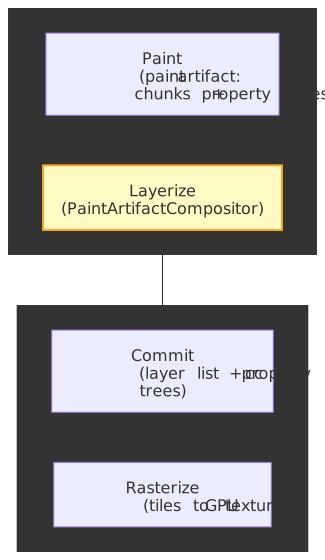
The Layerize stage walks the paint artifact and decides which paint chunks become independent compositor layers (cc::Layer objects) and which get baked into shared layers. It is the bookkeeping layer between Paint and Commit, and it is the single largest determinant of how much GPU memory a page consumes and which animations can run on the compositor thread without re-raster.
Note
Series — Critical Rendering Path. Previous: Paint. Next: Commit. Stage map: Pipeline overview.
Mental model
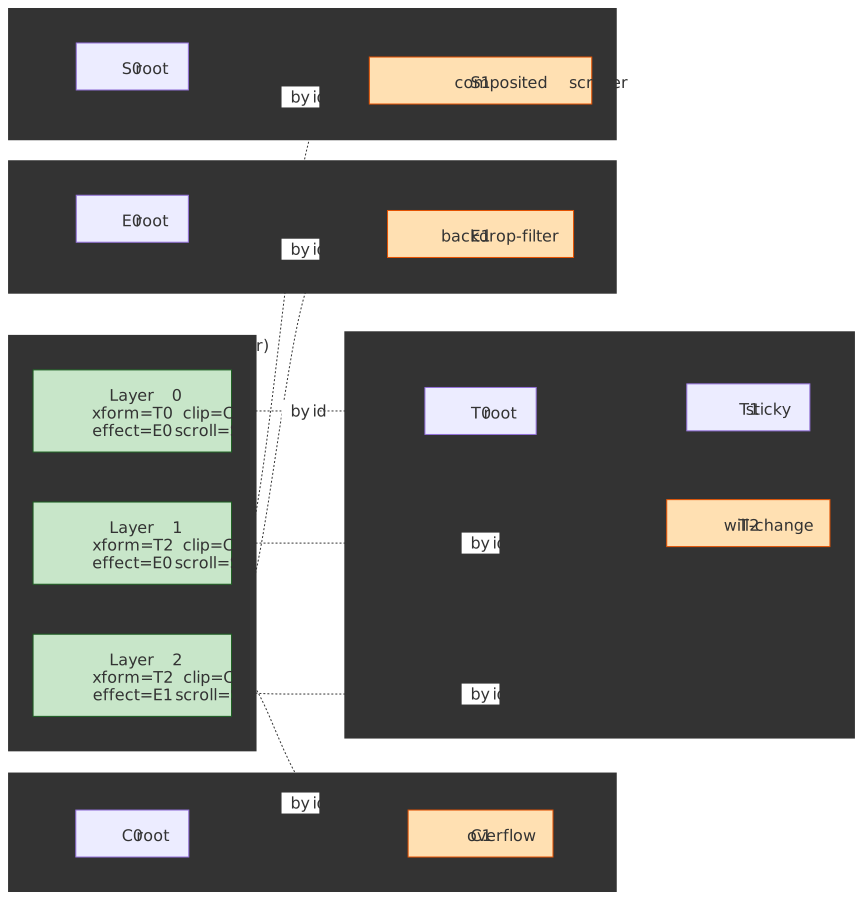
Layerization is a merge-by-default algorithm. It receives a flat, ordered list of paint chunks plus four parallel property trees (transform, clip, effect, scroll), and it emits a flat list of cc::Layer objects plus the compositor-side property trees consumed during Commit.
Paint Chunks → PendingLayers → cc::Layers + cc::PropertyTrees ↑ ↑ ↑ │ │ │ input intermediate output(per PropertyTreeState) (merged groups) (compositor-ready)Three forces decide whether two adjacent chunks share a layer or get split apart, and the algorithm balances all three on every chunk:
| Decision | Rationale | Trade-off |
|---|---|---|
| Merge by default | Fewer layers → less GPU memory | More display items per layer → larger raster surface |
| Separate on compositor-changeable properties | Transform/opacity animations need isolated layers | More layers for animatable content |
| Prevent merge on overlap | Maintain correct paint order (z-order) | Forces layer creation for overlapping content |
| Sparsity tolerance | Avoid wasting GPU memory on large empty areas | Algorithm complexity in bounds calculation |
These rules are documented end-to-end in the Blink compositing README and the platform paint README.
Note
“Layerize” is a Chromium-internal verb. The phase appears in chrome://tracing as part of PaintArtifactCompositor::Update, which usually nests inside the broader “Update Layer Tree” or “Commit” rows in DevTools’ performance flame chart — there is no separate “Layerize” event in the public DevTools UI.
Why separate from Paint?
CompositeAfterPaint (CAP), which shipped in Chromium M94 in late 2021, moved layerization after paint specifically so that:
- Paint produces immutable output. Layerization examines a finished paint artifact, eliminating the circular dependency that plagued the pre-CAP pipeline.1
- Runtime factors inform decisions. Memory pressure, overlap analysis, and direct compositing reasons can be evaluated against actual recorded content rather than guessed up front.
- The main thread completes paint recording before layerization begins, so the algorithm operates over a stable snapshot.
Why not on the compositor thread?
Layerization needs the paint artifact, which lives on the main thread. The compositor thread receives only the finalized cc::Layer list and cc::PropertyTree trees during Commit. Doing layerization on the compositor thread would either require shipping the entire paint artifact across the thread boundary every frame or duplicating it — both of which the architecture explicitly avoids.
Layer list, not layer tree
Pre-M75 (2019) Blink shipped a tree of GraphicsLayer objects, roughly one per “composited” RenderLayer (which itself was at most one per CSS stacking context). The compositor thread received a hierarchy that mirrored the DOM’s stacking topology, and every transform / clip / effect was inferred by walking ancestors of each layer. BlinkGenPropertyTrees (M75, 2019) inverted that contract: Blink started shipping a flat list of layers plus four flat property trees (transform, clip, effect, scroll), and the compositor began looking up visual context by node ID instead of tree walk. CompositeAfterPaint (M94, 2021) then moved the layerization decision itself to after paint, so the layer list is computed from paint chunks plus property tree state, not from DOM identity.2
The practical consequences of the layer-list model are worth internalising:
- Layers are not a 1:1 reflection of the DOM. Two DOM elements with the same
PropertyTreeStateand no overlap can share a singlecc::Layer; one DOM element can produce multiple layers (foreground + scrollbar + composited scroll content). - Property trees are global, deduplicated, and flat. Every
cc::Layerreferences nodes by integer id; lookup isO(1)and unaffected by DOM depth. - “Promoting an element” is a misnomer in CAP. What actually happens is that a paint chunk’s
PropertyTreeStatecarries a direct compositing reason that prevents merging into the surroundingPendingLayer. There is noRenderLayer.promotedbit any more. - Compositor mutations are property-tree edits. A scroll, a
transformanimation, or aDirectlyUpdate*call rewrites a single property-tree node value — the layer list is untouched.
The Layerization Algorithm
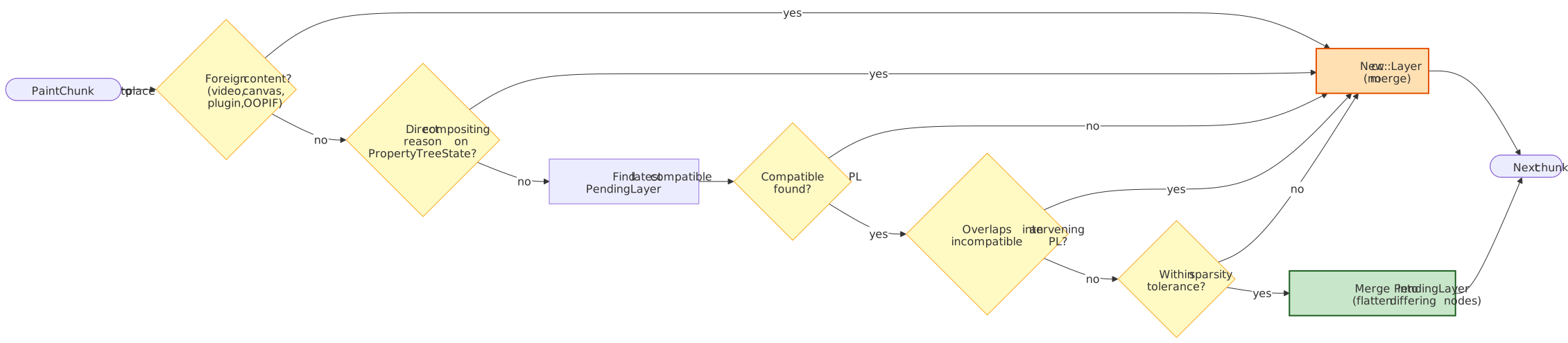
PaintArtifactCompositor::LayerizeGroup is the entry point. It walks the paint artifact’s chunks in paint order and produces a list of PendingLayer objects, which are then converted to cc::Layer objects by PaintChunksToCcLayer.3
The decision tree the algorithm runs for each incoming chunk is the heart of the stage:
Phase 1: Create PendingLayers
Each paint chunk initially becomes a PendingLayer — an intermediate representation that may later merge with others.
Paint Chunk A (transform_id=1, clip_id=1, effect_id=1) → PendingLayer APaint Chunk B (transform_id=1, clip_id=1, effect_id=1) → PendingLayer BPaint Chunk C (transform_id=2, clip_id=1, effect_id=1) → PendingLayer CWhat a PendingLayer holds:
| Field | Purpose |
|---|---|
chunks_ |
Paint chunk subset (display items + property tree state) |
bounds_ |
Bounding rectangle in property tree state space |
property_tree_state_ |
Transform, clip, effect node IDs |
compositing_type_ |
Classification (scroll hit test, foreign, scrollbar, overlap, other) |
rect_known_to_be_opaque_ |
Region guaranteed fully opaque (raster optimization) |
hit_test_opaqueness_ |
Whether hit testing can bypass the main thread |
Phase 2: Merge PendingLayers
The algorithm attempts to combine PendingLayers to reduce layer count. Per the compositing README, a chunk cannot merge into an existing layer when:
- The chunk requires a foreign layer (composited video, 2D/3D
<canvas>, plugins). - The chunk’s
PropertyTreeStatecarries an incompatible direct compositing reason (see below). - The chunk overlaps an earlier layer it cannot merge with, and there is no later-drawn layer that satisfies (1) and (2) — the classic “overlap testing” cascade.
A separate sparsity tolerance check (kMergeSparsityAreaTolerance) prevents otherwise-mergeable chunks from combining when the merged bounds would waste a large fraction of the resulting layer’s pixels.
When PropertyTreeStates differ but merging is still beneficial, the algorithm flattens the difference by emitting paired display items that adjust the chunk’s state to match the target layer. This is implemented in ConversionContext::Convert inside PaintChunksToCcLayer.cpp.
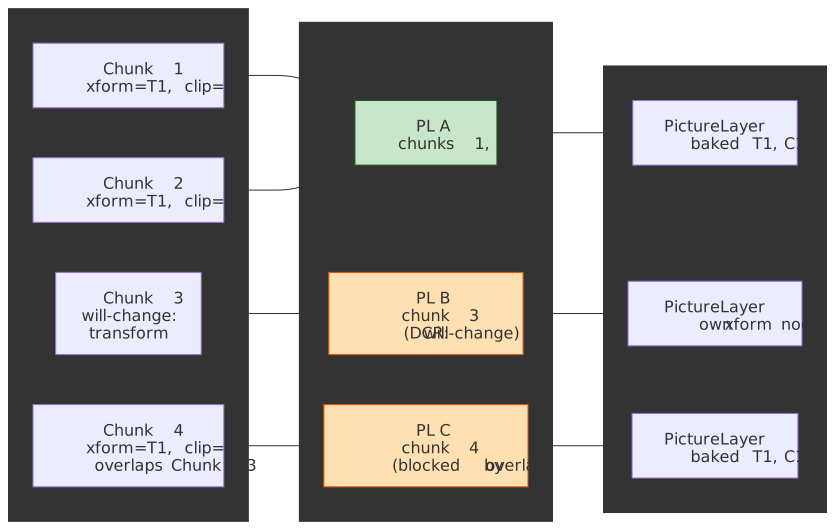
The end-to-end shape from chunks to layers — including chunks that merge cleanly and chunks that get peeled off into their own layer — looks like this:
Direct compositing reasons
Certain property nodes carry direct compositing reasons that prevent merging. Chromium’s GPU Accelerated Compositing in Chrome design doc enumerates the canonical set; the most commonly hit ones in production CSS:
| Reason | CSS / DOM trigger | Why a separate layer is required |
|---|---|---|
| 3D / perspective transform | transform: rotate3d(…), translate3d(…), perspective: … |
3D plane sorting; benefits from GPU isolation |
| Compositor animation | animation / transition on transform, opacity, filter, backdrop-filter |
Compositor mutates property-tree nodes per frame without re-raster |
will-change hint |
will-change: transform, opacity, filter, backdrop-filter, transform-style |
Author signals impending change; promote eagerly |
| Foreign layer | <video> (composited), <canvas> 2D-accel / WebGL / WebGPU, plugins |
External GPU surface or out-of-process producer |
| Cross-origin / OOPIF | <iframe> rendered in a different renderer process |
Surface embedded via cc::SurfaceLayer and viz::SurfaceId |
| Composited scroll | Scrollable content whose scroller is promoted | Compositor-thread scroll without main-thread paint |
| Accelerated CSS filter | filter: blur(…), drop-shadow(…), and similar GPU-implemented filters |
Filter executed against a separated render surface on the GPU |
backdrop-filter |
backdrop-filter: blur(…) etc. |
Sampling the backdrop requires an isolated render surface |
position: sticky |
position: sticky on a composited scroller |
Compositor adjusts the sticky transform node per scroll tick |
| Overlap with a promoted layer | Any element paint-ordered above a layer it cannot merge into | Maintains z-order without re-raster of the promoted layer |
Chunks whose property nodes flag any of these become their own PendingLayer regardless of merging opportunities. The full enumeration lives in compositing_reasons.cc; the human-readable reason strings surface in DevTools’ Layers panel and in chrome://tracing (category cc).
Note
Sticky and fixed positioning are increasingly subject to constraint-aware merging: the layerizer can collapse adjacent sticky/fixed chunks that share the same scroll container and constraint axes into one PendingLayer, undoing what would historically have been a per-element promotion.4
Overlap testing and layer squashing
When a paint chunk overlaps content already assigned to an incompatible layer (different paint order, incompatible PropertyTreeState), it cannot merge with that layer. Overlap testing maintains correct visual ordering at the cost of forcing extra layers:
Layer A: Element with will-change: transform (z-index: 1)Layer B: ???Paint Chunk X (z-index: 2, overlaps A) → Cannot merge with A (different PropertyTreeState — will-change) → Cannot merge with any earlier layer (would violate paint order) → Must become new Layer BThis cascade is the well-known layer explosion: one promoted element forces neighbors to promote, which forces their neighbors. Pre-CAP Chromium mitigated this with an explicit pass called layer squashing, which packed multiple overlapping promoted elements into a single backing store. Under CAP the same effect falls out of the merge algorithm itself: overlapping chunks that share a compositing context end up combined inside one PendingLayer rather than each becoming a separate cc::Layer.
Algorithm complexity
“In the worst case, this algorithm has an O(n²) running time, where n is the number of
PaintChunks.” — Chromium Blink compositing README
The quadratic worst case occurs when every chunk must be checked against every preceding layer for overlap. Typical pages have far fewer problematic interactions, making practical complexity closer to O(n × average_layer_count).
From PendingLayers to cc::Layers
Once the PendingLayer list is finalized, PaintChunksToCcLayer::Convert materializes the actual compositor layers.
Layer types created
The cc layer types in scope here are documented in How cc Works:
cc::Layer type |
Content source | Notes |
|---|---|---|
PictureLayer |
Painted content (cc::PaintRecord) |
Most common; holds display lists for raster on the compositor side |
SolidColorLayer |
Single-color regions | Optimization that avoids raster work entirely |
TextureLayer |
External GPU textures (canvas, WebGL) | Producer hands cc a ready-made texture mailbox |
SurfaceLayer |
Cross-process content | Embeds another compositor frame producer via viz::SurfaceId (OOPIFs, video) |
| Scrollbar layers | Scrollbar rendering | SolidColorScrollbarLayer, PaintedScrollbarLayer, PaintedOverlayScrollbarLayer5 |
Property tree conversion
Blink property tree nodes referenced by paint chunks are copied into equivalent compositor-side trees, as described in RenderingNG data structures:
Blink TransformNode → cc::TransformTree nodeBlink ClipNode → cc::ClipTree nodeBlink EffectNode → cc::EffectTree nodeBlink ScrollNode → cc::ScrollTree nodeEach cc::Layer stores node IDs pointing into these flat trees, not hierarchical transform chains. This is what makes property lookup during compositing constant-time.
Non-composited nodes (those merged into layers with different PropertyTreeStates) become meta display items inside the layer’s paint record, effectively baking the transform / clip / effect into the recorded drawing commands — this is the “flattening” the compositing README refers to.
Hit-test opaqueness accumulation
During layerization, hit-test opaqueness propagates from paint chunks to layers:
Paint Chunk: hit_test_opaqueness_ = OPAQUE ↓ accumulatecc::Layer: hit_test_opaqueness = OPAQUE (compositor-thread hit testing)This enables the compositor to handle hit testing for opaque regions without consulting the main thread — critical for responsive input during JavaScript execution. HitTestOpaqueness is one of the post-CAP projects explicitly enabled by the new architecture.
Layerization and Memory Trade-offs
Layer decisions directly affect GPU memory consumption and rasterization cost.
Memory cost per layer
Each composited layer reserves GPU memory proportional to its pixel area, assuming the standard uncompressed RGBA8 format:
Formula: width × height × 4 bytes (RGBA8)
| Layer size | Memory |
|---|---|
| 1920×1080 (Full HD) | ~8 MB |
| 2560×1440 (QHD) | ~14 MB |
| 3840×2160 (4K) | ~33 MB |
Mobile devices with shared GPU memory (2–4 GB total RAM) exhaust resources quickly. Aggressive layerization can cause:
- Checkerboarding during scroll, when the compositor draws unrastered tiles as a placeholder pattern.
- Fallback to software rasterization, which is far slower and uses CPU memory.
- Renderer crashes under sustained GPU OOM.
The merge vs separate trade-off
| Fewer layers (more merging) | More layers (less merging) |
|---|---|
| Lower GPU memory usage | Higher GPU memory usage |
| Larger rasterization surface per layer | Smaller, isolated rasterization surfaces |
| Property changes require re-raster | Property changes = compositor-only update |
| Coarser invalidation; one item dirties all | Parallelizable raster across worker threads |
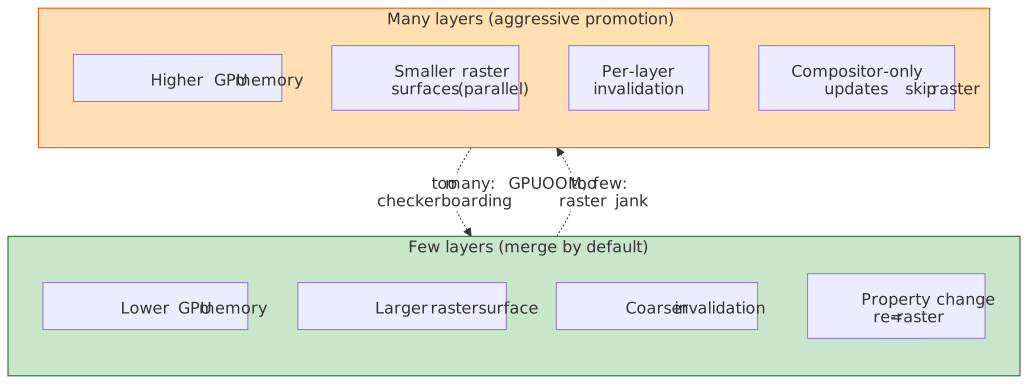
Example. A scrollable list with 100 items:
- Merged approach. One
PictureLayercontaining all items. Scrolling uses compositor offset; any content change re-rasters the whole layer. - Separated approach. 100
PictureLayerobjects. Each change re-rasters one layer, but uses roughly 100× the GPU memory.
The algorithm balances these by merging by default and separating only when content is expected to change independently.
Optimization: Avoiding Full Layerization
PaintArtifactCompositor::Update is expensive, so Chromium implements fast paths for common scenarios. The relevant entries on PaintArtifactCompositor are:
Repaint-only updates
When display items change but the layer structure is stable, UpdateRepaintedLayers updates existing cc::Layer paint records in-place and skips LayerizeGroup entirely. Triggers: color changes, text updates, background tweaks that don’t affect bounds or PropertyTreeState.
Direct property updates
For transform, scroll-offset transform, and opacity changes that don’t disturb layerization, PaintArtifactCompositor exposes three direct-update entry points:
| API | Updates |
|---|---|
DirectlyUpdateTransform |
A single TransformPaintPropertyNode value |
DirectlyUpdateScrollOffsetTransform |
The scroll-offset transform of a composited scroller |
DirectlyUpdateCompositedOpacityValue |
A single EffectPaintPropertyNode’s opacity |
Each modifies the matching cc::PropertyTree node and skips both layerization and the display-list update. Triggers: transform / opacity animations on already-promoted layers, scroll offset changes on composited scrollers.
Raster-inducing scroll
For composited scrollers without a dedicated scroll-offset transform layer, the recently shipped RasterInducingScroll feature exposes a kRasterInducingScroll value of PaintArtifactCompositor::UpdateType, fed by SetNeedsUpdateForRasterInducingScroll. Only the scroll offset on the affected property tree node is touched; raster runs against newly-visible tiles only.
Historical Evolution
Pre-CompositeAfterPaint (before M94)
Before CAP, layerization happened before paint:
Style → Layout → Compositing (layerization) → PaintThe drawbacks were significant:
- Circular dependency. Paint invalidation needed current layer decisions; layer decisions needed paint output.
- Heuristic complexity. The codebase carried tens of thousands of lines of C++ to guess which elements would need layers — much of it was deleted post-launch (~22,000 lines, per the Slimming Paint project page).
- Correctness bugs. A class of fundamental compositing correctness bugs (see crbug/40364303) were tied to making compositing decisions before knowing what would actually be painted.
The codebase relied on DisableCompositingQueryAsserts objects to suppress safety checks — a classic code smell signaling architectural problems.
CompositeAfterPaint (M94+)
The modern pipeline inverts the order:
Style → Layout → Prepaint → Paint → Layerize → Commit → Raster → Composit → DrawBenefits, per the Slimming Paint project page:
- Paint produces immutable output before layerization examines it.
- Layer decisions are made against actual content rather than predictions.
- The simpler algorithm enabled follow-on projects: HitTestOpaqueness, RasterInducingScroll, scroll-driven animations.
Slimming Paint timeline (2015–2021)
The broader architectural shift from a tree of cc::Layers (the old GraphicsLayer world in Blink terminology) to a global display list architecture, executed in phases:
| Phase | Milestone | What changed |
|---|---|---|
| SlimmingPaintV1 | M45 | Paint using display items |
| SlimmingPaintInvalidation | M58 | Display-list-based paint invalidation; property trees introduced in Blink |
| SlimmingPaintV175 | M67 | Paint chunks introduced; chunks drive raster invalidation |
| BlinkGenPropertyTrees | M75 | Blink generates property trees and ships a layer list, not a layer tree |
| CompositeAfterPaint | M94 | Compositing decisions made after paint |
Debugging Layerization
Chrome DevTools
Layers panel (“More tools → Layers”, or open the Command Menu and type “Layers”)6:
- View the (post-CAP) compositor layer list as a navigable tree-shaped UI.
- See the human-readable compositing reasons for each
cc::Layer. - Inspect memory consumption per layer.
- Paint counts and slow scroll rects.
Performance panel:
- Layer-tree updates appear inside “Update Layer Tree” / “Commit” rows; there is no first-class “Layerize” event in the public DevTools UI.
- The Layers tab inside a recorded performance trace shows the layer list at any selected frame — useful when the standalone Layers panel is unavailable.
- Layer count over time correlates with memory pressure.
Compositor debugging flags
# Show colored borders around composited layers (also available via# DevTools → Rendering → "Layer borders" or chrome://flags → "Composited# layer borders").chrome --show-composited-layer-bordersFor richer compositing-reason dumps, prefer chrome://tracing with the cc and viz categories — the older --log-compositing-reasons switch is unreliable across recent Chromium builds. chrome://flags exposes additional debug surfaces (#composited-layer-borders, #enable-gpu-service-logging).
Common issues
| Symptom | Likely cause | Investigation |
|---|---|---|
| High GPU memory | Too many layers or oversized layers | Layers panel → sort by memory |
| Unexpected layers | Overlap forcing promotion | Check z-index stacking; look for will-change on ancestors |
| Slow layerization | Many paint chunks with complex overlaps | Reduce DOM complexity; use contain: strict |
| Missing compositor animations | Element not promoted | Verify will-change or check for a direct compositing reason |
Conclusion
Layerization is the decision-making phase that transforms paint output into compositor-ready structures. The algorithm balances GPU memory conservation (merge layers) against animation flexibility (separate layers).
Key takeaways:
- PendingLayers are intermediate. Paint chunks first become PendingLayers, then merge into final
cc::Layerobjects. - Merging is the default. Fewer layers mean less GPU memory; separation requires an explicit reason.
- Direct compositing reasons prevent merging.
will-change, 3D transforms, accelerated animations, and foreign layers (video, canvas, OOPIFs) need isolated layers. - Overlap forces layer creation. Maintaining correct paint order can cascade into layer explosion; the merge phase contains it.
- CompositeAfterPaint (M94) moved layerization after paint, removed roughly 22,000 lines of pre-CAP code, and unlocked HitTestOpaqueness and RasterInducingScroll.
- Fast paths exist.
UpdateRepaintedLayers,DirectlyUpdateTransform,DirectlyUpdateScrollOffsetTransform, andDirectlyUpdateCompositedOpacityValueall skip full layerization.
Best-practice patterns for layerization
These reduce to a small number of rules; each one maps directly to a step in the layerization algorithm above.
| Pattern | Why it helps the layerizer |
|---|---|
Animate only transform and opacity (and filter when needed) |
These are the canonical compositor-only properties — they mutate property-tree nodes via the DirectlyUpdate* fast paths and skip raster entirely.7 |
Use will-change only on elements about to animate, then drop it |
will-change is a direct compositing reason — leaving it on idle elements wastes a backing store and risks layer explosion.7 |
Promote with transform: translateZ(0) only as a last resort |
Same effect as will-change: transform but harder to remove dynamically. |
Keep backdrop-filter regions small and few |
Each one forces an isolated render surface and a backdrop sample on every frame it intersects. |
Use contain: strict / content-visibility on independent widgets |
Caps the overlap cascade and shrinks the search window in LayerizeGroup. |
Avoid layout thrashing (read-then-write batching, rAF) |
Less layout / paint churn means fewer paint chunks invalidated and fewer layer-list rebuilds.8 |
Watch layer count in DevTools or chrome://tracing |
Layer count is the cheapest proxy for GPU memory pressure on mobile. |
Appendix
Series navigation
- Previous: Paint — how display items and paint chunks are produced before layerization sees them.
- Next: Commit — how the layer list and property trees cross to the compositor thread.
- Stage map: Critical Rendering Path overview.
Prerequisites and adjacent reading
- Paint — paint chunks and display items.
- Prepaint — where Blink builds the property trees that layerization keys off.
- Compositing — how layers assemble into a
viz::CompositorFrame.
Terminology
| Term | Definition |
|---|---|
| Paint Chunk | Contiguous display items sharing identical PropertyTreeState |
| PendingLayer | Intermediate representation during layerization; may merge with others |
cc::Layer |
Final compositor layer; input to rasterization |
| PaintArtifactCompositor | Class implementing the layerization algorithm |
| Direct compositing reason | Property requiring a dedicated compositor layer (3D transform, will-change, etc.) |
| Overlap testing | Checking whether a paint chunk interleaves with existing layers |
| Layer squashing | Pre-CAP pass that packed overlapping promoted elements into one backing store |
| PropertyTreeState | 4-tuple (transform_id, clip_id, effect_id, scroll_id) identifying visual context |
| CompositeAfterPaint (CAP) | Architecture (M94+) where layerization runs after paint |
| Hit-test opaqueness | Whether the compositor can handle hit testing without the main thread |
Summary
- Layerization converts paint chunks → PendingLayers →
cc::Layerobjects. - The algorithm merges by default to conserve GPU memory; only foreign layers, direct compositing reasons, overlap, and sparsity force separation.
- CompositeAfterPaint (M94, late 2021) eliminated circular dependencies by moving layerization after paint.
- O(n²) worst case complexity; practical performance is much better for typical pages.
- Fast paths —
UpdateRepaintedLayersplus the threeDirectlyUpdate*entry points — skip full layerization when possible. - GPU memory is the primary constraint: each layer costs roughly
width × height × 4 bytes.
References
- Chromium Blink compositing README — Layerization algorithm and PendingLayer mechanics.
- Chromium platform paint README — Paint chunks,
PaintArtifactCompositor, and the fast paths. - Chromium core paint README — Paint-to-compositing workflow.
- Chromium: How
ccWorks — Compositor architecture andcc::Layersubclasses. - Chromium: RenderingNG architecture — Pipeline overview and stage responsibilities.
- Chromium: RenderingNG data structures — Paint chunks, property trees, composited layers.
- Chromium: BlinkNG — CompositeAfterPaint rationale and pipeline phasing.
- Chromium: GPU Accelerated Compositing in Chrome — Compositing reasons and layer squashing.
- Chromium: Slimming Paint — Historical evolution and CAP launch metrics.
- Chrome DevTools: Layers panel — Inspecting cc::Layers in production.
Footnotes
-
Per the Slimming Paint project page, CAP launch removed roughly 22,000 lines of pre-CAP compositing C++ and produced measurable wins (~1.3% lower total Chrome CPU, ~3.5% better p99 scroll-update latency, ~2.2% better p95 input delay). ↩
-
See Key data structures in RenderingNG for the canonical description of paint chunks, property trees, and composited layers, and RenderingNG architecture for how the stages compose. ↩
-
See the Blink compositing README and the
LayerizeGroupdeclaration in paint_artifact_compositor.h. ↩ -
Tracked under the broader position:sticky / fixed compositing work; the merge happens inside
PaintArtifactCompositorrather than at style-resolution time. ↩ -
ScrollbarDisplayItemdecides which scrollbar layer subclass to instantiate at layerization time, per the platform paint README. ↩ -
See the Layers panel docs. Note that the panel currently displays a deprecation feedback banner — see crbug/328948996 — so treat it as a tool that may be removed; the same data is increasingly surfaced through the Performance panel’s Layers tab and through
chrome://tracing. ↩ -
web.dev — Stick to compositor-only properties and manage layer count. ↩ ↩2
-
web.dev — Avoid large, complex layouts and layout thrashing. ↩