Distributed Monitoring Systems
Observability infrastructure for metrics, logs, and traces is fundamentally a budgeting problem: every signal trades resolution against cost and queryability. This article gives a senior engineer the mental model and the load-bearing numbers — Gorilla compression, head-vs-tail sampling, multi-window burn-rate alerts, cardinality limits — needed to design a monitoring stack that survives a 100× growth in services.
Abstract
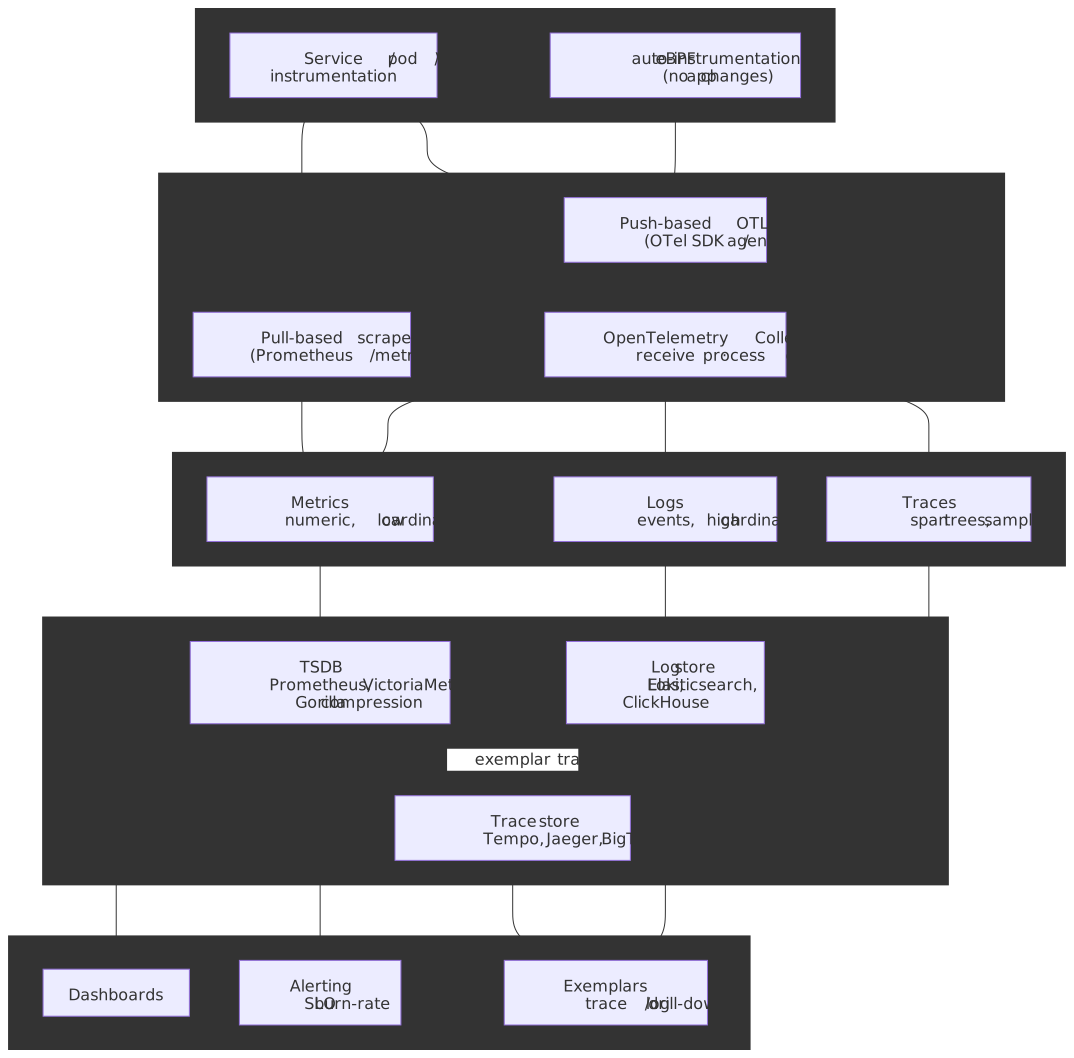
Distributed monitoring is governed by three tensions:
- Cardinality vs. cost. Every unique label combination materialises one time series, each consuming index entries, memory, and storage. A
user_idlabel across 1M users explodes a metric into 1M series. - Sampling vs. completeness. Google’s Dapper sampled 1 in 1,024 traces in production 1. You miss rare anomalies but stay within the CPU budget.
- Aggregation vs. detail. Metrics are cheap and fast but lose per-request context. Traces preserve the call tree but cost roughly three orders of magnitude more per event.
The signal mental model:
| Signal | Cardinality | Relative cost / event | Query speed | Best for |
|---|---|---|---|---|
| Metrics | Must be bounded (target < 10 K series/metric) | Lowest | Milliseconds | Dashboards, alerts, SLOs |
| Logs | Effectively unbounded | ~100× | Seconds | Debugging, audit trails |
| Traces | Unbounded (sample at scale) | ~1000× | Seconds | Request-flow analysis |
(Cost ratios are order-of-magnitude rules of thumb; absolute prices depend on storage tier, ingestion path, and retention.)
Modern observability links these signals: exemplars 2 connect metric samples to specific traces; trace IDs in structured logs enable correlation. The goal is to start from a metric alert, drill into the offending trace, and land on the specific log line — without pre-aggregating everything.
What to monitor: USE, RED, and the Four Golden Signals
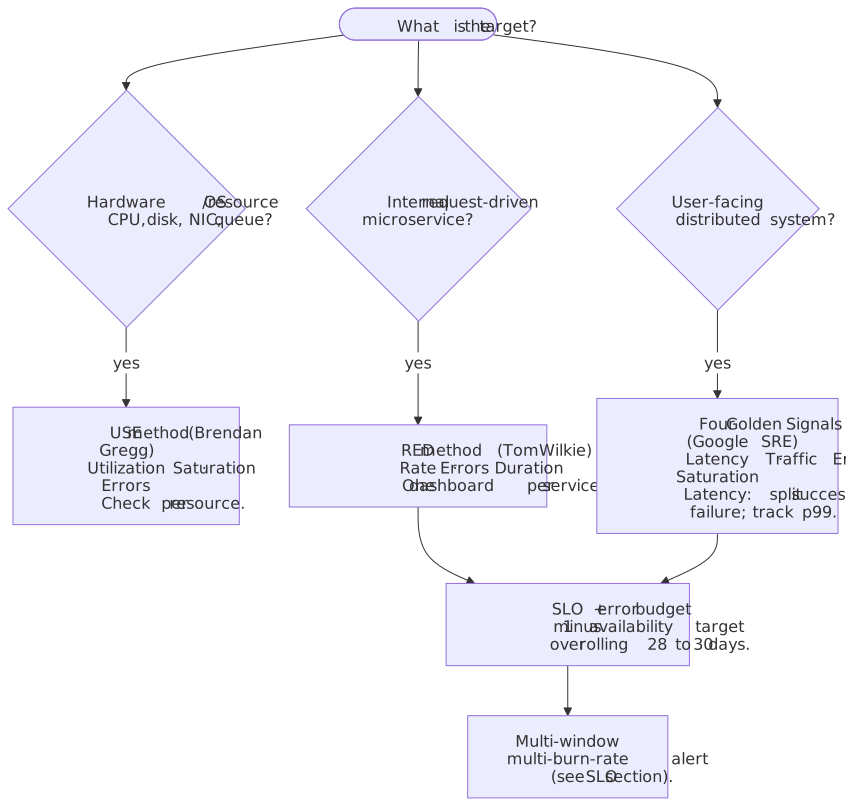
Before designing how to ingest, store, and query, decide what to instrument. Three established methodologies cover the surface, and the right one depends on whether the target is a resource, a service, or the user-facing system as a whole.
USE — Brendan Gregg
The USE method targets hardware and OS resources: CPUs, memory, disks, NICs, interconnects, queues. For every resource, check three numbers 3:
- Utilization — average fraction of time the resource was busy.
- Saturation — degree of extra work the resource cannot service (queue depth, runnable threads).
- Errors — count of error events.
Order: errors first (cheapest to interpret and almost always actionable), then utilization, then saturation. A 100% utilization is not always a bottleneck (a CPU pinned at 100% can still meet latency targets), but any non-zero saturation means latency has already been added — that is the signal to treat as urgent. The method’s value is its completeness: it forces a checklist over every resource and prevents the streetlight effect of “looking where the dashboard already is”.
RED — Tom Wilkie
The RED method (introduced by Tom Wilkie at Weaveworks in 2015) targets request-driven services 4:
- Rate — requests per second.
- Errors — failed requests per second.
- Duration — distribution of request latency (use a histogram, not a summary, so it aggregates across instances).
The point of RED is uniformity. Every service exports the same three signals with the same labels (service, route, status_class), and an on-call engineer can navigate any service’s dashboard without having written a line of its code. RED is the service-level counterpart to USE.
Four Golden Signals — Google SRE
The Four Golden Signals target user-facing distributed systems and add saturation to RED:
- Latency — split successful and failed requests; track p50, p95, p99 (averages hide tail behavior). Fast errors compress the average and look like good performance.
- Traffic — demand on the system in a domain-specific unit (HTTP req/s, transactions/s, MB/s).
- Errors — explicit (HTTP 5xx), implicit (200 with wrong content), and policy errors (response over the latency budget).
- Saturation — how full the system is, leading the cliff well before 100% utilization.
The golden signals are the canonical “what to alert on” set when budget for monitoring is limited.
| Method | Best for | Signals | Typical owner |
|---|---|---|---|
| USE | Hardware / OS resources | Utilization, Saturation, Errors | Platform / SRE |
| RED | Internal request-driven services | Rate, Errors, Duration | Service team |
| Golden | User-facing distributed system | Latency, Traffic, Errors, Saturation | Product SRE / on-call |
Tip
RED and Golden Signals overlap on three of four signals; in practice teams instrument the same RED histograms and read them through both lenses. The discipline is to keep the labels low-cardinality (service, route, status_class) so the same metric powers per-service dashboards and the global SLO panel.
Metrics: types and data models
Counter
A counter is a monotonically increasing value that resets to zero on restart. Use for request counts, bytes transferred, error counts.
Counters must be queried with rate() or increase(); raw values are meaningless. A counter showing 1,000,000 tells you nothing — rate(http_requests_total[5m]) = 500 is actionable. The monotonic constraint is what makes reset detection unambiguous: any decrease signals a process restart, and Prometheus’s counter-handling rules compensate accordingly.
# Bad: querying a raw counterhttp_requests_total{service="api"} # 847_293_847# Good: rate over timerate(http_requests_total{service="api"}[5m]) # 127.3 / sGauge
A gauge is a value that can move in either direction — temperature, queue depth, in-flight requests, resident memory.
A common mistake is to use a gauge for “requests since startup”. You then lose the ability to detect resets and to compute rates correctly. If the value should only ever go up between restarts, it is a counter.
Histogram
A histogram counts observations into configurable buckets. Use for latency and response-size distributions.
The classic Prometheus histogram is cumulative: le="0.1" includes every observation ≤ 100 ms. Cumulative encoding is what makes histogram_quantile() valid across instances — you can sum bucket counters across pods and compute a global p99 from the result.
# Latency histogram with 10ms / 50ms / 100ms / 500ms / 1s bucketshttp_request_duration_seconds_bucket{le="0.01"} 2451http_request_duration_seconds_bucket{le="0.05"} 8924http_request_duration_seconds_bucket{le="0.1"} 12847http_request_duration_seconds_bucket{le="0.5"} 15234http_request_duration_seconds_bucket{le="1"} 15401http_request_duration_seconds_bucket{le="+Inf"} 15523http_request_duration_seconds_sum 892.47http_request_duration_seconds_count 15523The trade-off is that bucket boundaries are fixed at instrumentation time. If your real distribution has a shoulder at 250 ms but your buckets jump from 100 ms straight to 500 ms, you cannot recover the percentile.
OpenTelemetry’s exponential histogram 5 solves this. Bucket boundaries are computed from a scale parameter: base = 2^(2^-scale). The default MaxSize is 160 buckets, which the OTel SDK spec shows covers 1 ms – 100 s with ~4.3% relative error at scale 3, and 1 ms – 4 ms with ~0.5% error at scale 6. Implementations downscale automatically when observations fall outside the current range.
The wire format is also dramatically smaller: an explicit histogram serialises N–1 boundary doubles; an exponential histogram serialises one scale and one offset.
Summary
A summary computes streaming quantiles inside the client. Use it only when the percentile must be exact for a single instance and you do not need to aggregate across instances.
The aggregation limitation is fundamental: there is no mathematically valid way to combine the p99 of three pods into a global p99. For multi-instance services you almost always want a histogram.
| Feature | Histogram | Summary |
|---|---|---|
| Cross-instance agg. | Yes (sum bucket counters) | No |
| Percentile accuracy | Approximate (bucket-dependent) | Exact within the configured window |
| Server cost | Low (counter increments) | Higher (streaming quantile state) |
| Configuration | Bucket boundaries / exponential scale | Quantile targets + decay window |
The cardinality problem
Cardinality = unique combinations of metric name × label values. A label-free metric is one series. Add labels and the count multiplies:
http_requests_total{method, status, endpoint, user_id}# 5 methods × 50 statuses × 100 endpoints × 1 M users# = 25 billion seriesThis will crash any time-series database. Three rules keep it bounded:
- Never use unbounded labels.
user_id,request_id,trace_id,email, IP address — none belong in a metric label set. - Target ≤ 10 distinct values per label. If a label can grow past ~100 values, redesign before instrumenting.
- Push high-cardinality detail to logs and traces. They are designed for it; the metric pipeline is not.
Symptoms of cardinality explosion in a Prometheus deployment:
- OOM crashes during compaction.
- Dashboard query timeouts.
- Scrape duration approaching scrape interval (the
upmetric flips to 0 intermittently). - Memory growth that outpaces ingest growth.
Caution
Cardinality explosion is the single most common production-incident pattern in self-hosted Prometheus. Treat any new label as a capacity decision, not a developer convenience.
Collection architecture: pull vs. push
Pull-based (Prometheus)
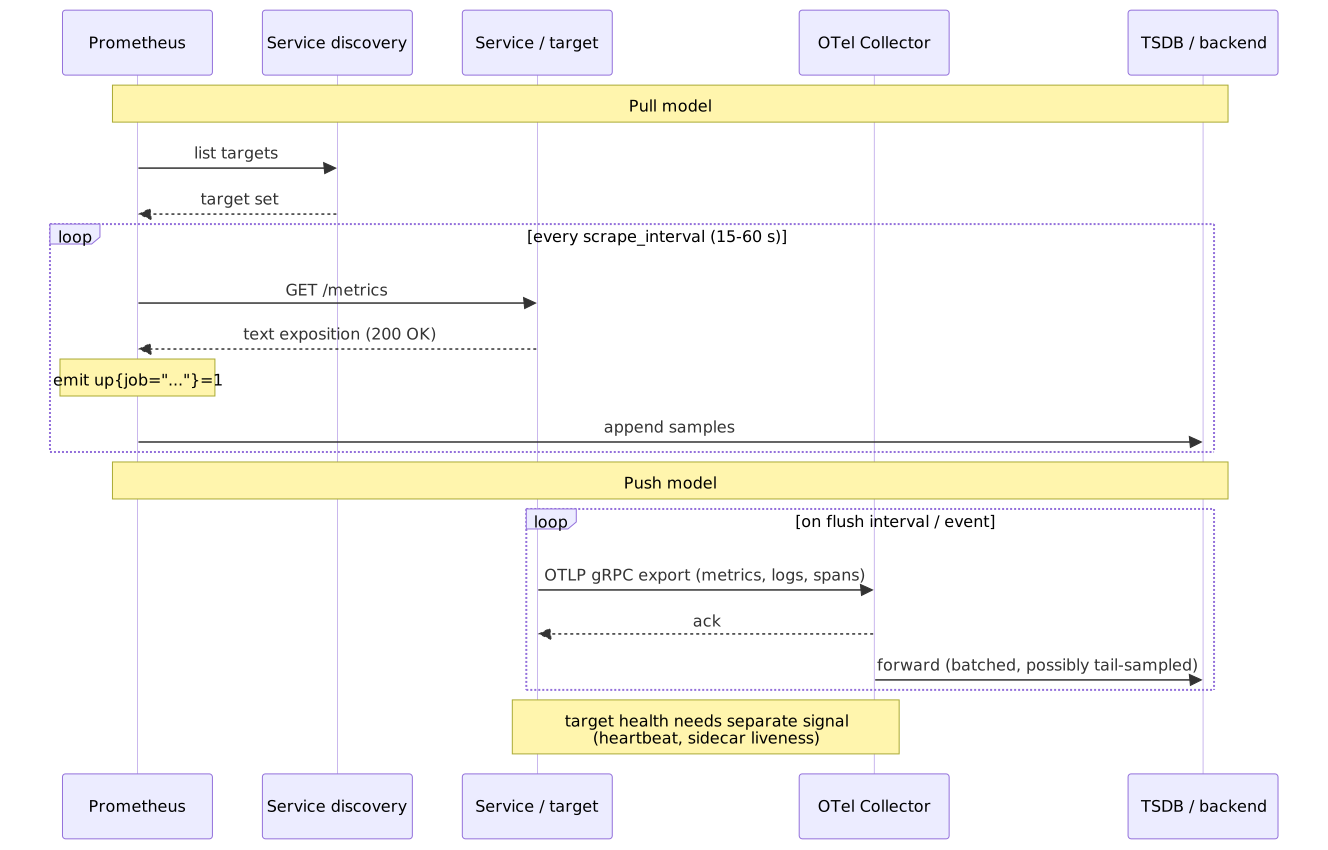
Prometheus polls HTTP endpoints at a configured interval (typical: 15–60 s). Each target exposes plain-text metrics at /metrics. The Prometheus team’s own design rationale lays out the case.
Strengths:
- Free target health. A failed scrape immediately surfaces as
up{job="..."} == 0. - Debuggable. Anyone can
curl http://target:9090/metrics. - Centralised control. Scrape interval changes without redeploying applications.
- Natural rate limiting. The Prometheus server controls load on targets, not the other way around.
Weaknesses:
- Network reachability. Prometheus must reach every target — painful through NAT, serverless platforms, or air-gapped environments.
- Short-lived jobs. A batch job that lives less than one scrape interval may never be observed.
- Service discovery is mandatory. You need a source of truth for “what targets exist”.
A single Prometheus server typically ingests in the hundreds of thousands of samples per second range; the actual ceiling depends primarily on cardinality, scrape interval, and disk throughput, and Prometheus’s own storage docs recommend planning capacity from bytes_per_sample × ingested_samples_per_second × retention_seconds.
Push-based (StatsD, InfluxDB, OTLP)
Applications send samples to a collector or backend. OTLP, the OpenTelemetry Protocol, is the modern standard for push.
Strengths:
- Outbound only. Works through restrictive firewalls.
- Suits ephemeral workloads. Lambda functions, batch jobs, sidecar workloads.
- Event-triggered. Significant events can push immediately rather than waiting for the next scrape window.
Weaknesses:
- Target health is a separate signal. You build heartbeats, sidecar liveness, or use the receiver-side ingest rate as a proxy.
- Backpressure surface. When the collector slows down, every application has to decide whether to drop, buffer, or block.
- Restart thundering herd. Naïve clients all flush on the same boundary.
Pushgateway: bridging the gap
For batch jobs that cannot be scraped, Prometheus ships a Pushgateway:
echo "batch_job_duration_seconds 47.3" | curl --data-binary @- \ http://pushgateway:9091/metrics/job/nightly_reportWarning
The Pushgateway never expires the metrics it has accepted. A job that ran once months ago still appears in scrapes until you DELETE it via the API. The official guidance is to use it only for service-level batch jobs and never as a general workaround for firewalls; long-running services hidden behind a firewall belong in a service mesh or a federation hierarchy.
OpenTelemetry Collector
The OpenTelemetry Collector is a vendor-neutral pipeline for receiving, processing, and exporting telemetry — the de facto glue layer between modern instrumentation and arbitrary backends.
receivers: # OTLP, Prometheus scrape, Jaeger, Kafka, ... otlp: { protocols: { grpc: {}, http: {} } }processors: # Batching, sampling, attribute editing, redaction batch: {} tail_sampling: { policies: [...] }exporters: # Prometheus remote write, Tempo, vendor backends otlp: { endpoint: tempo:4317 }| Deployment pattern | Use case | Trade-off |
|---|---|---|
| Sidecar | Per-pod in Kubernetes | Maximum isolation, highest resource overhead |
| DaemonSet | Per-node agent | Balanced; supports node-level enrichment |
| Gateway | Centralised cluster | Lowest overhead, single point of failure |
Tail sampling needs two collector tiers
To make a sampling decision after a trace has finished, every span for that trace must reach the same collector instance — otherwise no single instance has the complete picture. The conventional architecture uses two tiers:
- Load-balancing tier. Stateless. Hashes on
trace_idand forwards to a stable backend instance. - Sampling tier. Stateful. Buffers spans until either the trace closes or a deadline elapses, then runs policies.
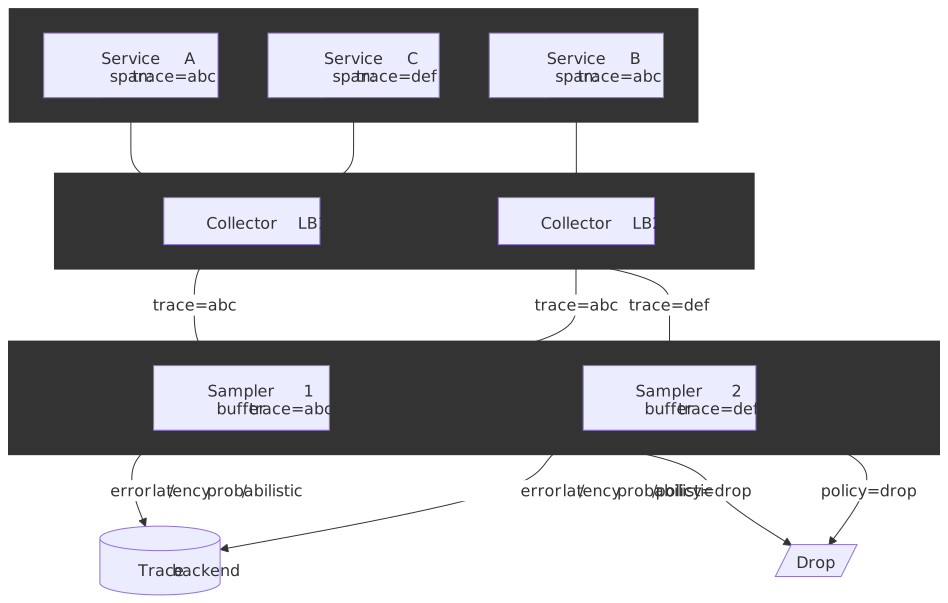
This is a non-trivial operational commitment: consistent hashing must be stable under sampler scaling events, and the buffer wait introduces latency and memory pressure proportional to your trace duration distribution.
Time-series database internals
Gorilla compression (Facebook, 2015)
The Gorilla paper 6 introduced two complementary compressors that together brought average sample size down to 1.37 bytes from a naïve 16 bytes (8 B timestamp + 8 B float) — roughly a 12× reduction.
Delta-of-delta timestamp compression. Most metrics arrive at fixed intervals. With a 15-second scrape interval the timestamp stream is 1000, 1015, 1030, 1045, ...; the deltas are 15, 15, 15; the second-order deltas are 0, 0. When the second-order delta is zero you store a single bit. The paper reports that 96% of timestamps compress to a single bit.
XOR float compression. Consecutive metric values often share most of their bits. XOR a value with the previous and the result has long runs of zero bits — store only the meaningful window. The paper reports that 51% of values compress to one bit (identical to the previous sample).
Value 1 0x4059000000000000 (100.0)Value 2 0x4059100000000000 (100.25)XOR 0x0000100000000000 ← one nibble of changed bitsPrometheus TSDB
Prometheus’s storage layer is a purpose-built TSDB that combines an in-memory head block, a write-ahead log, memory-mapped chunks, and time-bucketed persistent blocks.
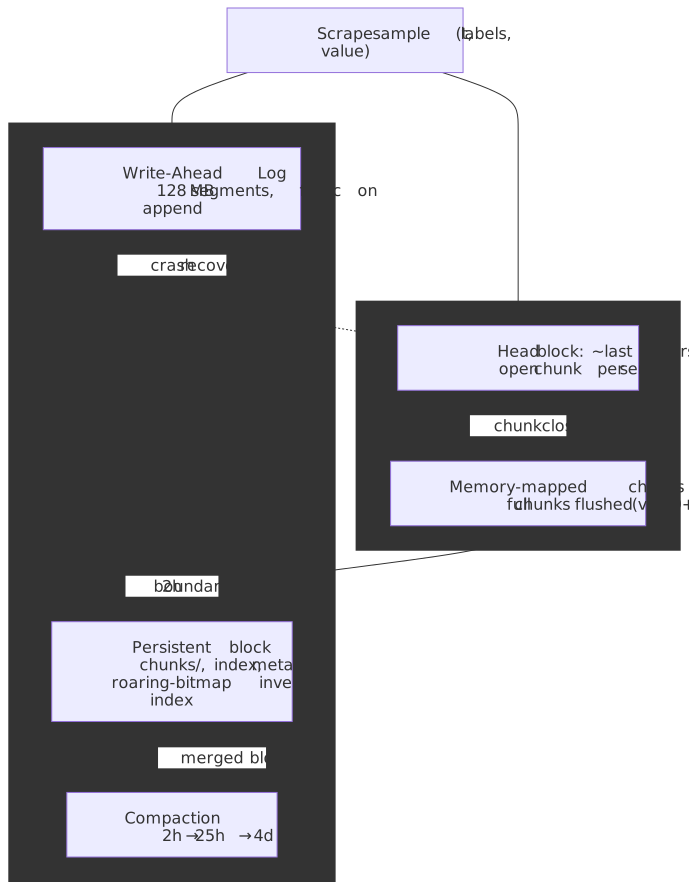
Key facts:
- Head block holds roughly the last two hours of data in memory.
- WAL segments are 128 MB and provide durability for the head block.
- Memory-mapped head chunks were introduced in Prometheus v2.19, reducing peak heap by ~20–40% by paging full chunks back from disk on demand.
- Compaction merges 2-hour blocks into wider blocks for better compression and faster queries — but burns CPU and RAM, which is where high-cardinality deployments tend to OOM.
A persistent block on disk:
01BKGTZQ1WNWHNJNAC82/ # ULID block directory├── meta.json # block metadata, time range├── index # postings list + label index (roaring bitmaps)├── chunks/ # compressed time-series data│ └── 000001└── tombstones # deletion markersThe index is an inverted index keyed by label-value pairs, encoded as roaring bitmaps 7. A query like {job="api", status="500"} resolves by intersecting the postings list for job=api with the postings list for status=500.
VictoriaMetrics
VictoriaMetrics is a Prometheus-compatible TSDB optimised for high cardinality. Its docs and benchmarks claim several-times-better storage density and lower RAM footprint than Prometheus or InfluxDB at the same workload, though the exact ratio swings with the cardinality and value distribution of the test set; treat the headline numbers as “right order of magnitude” rather than precise.
The cluster topology is shared-nothing 8:
- vminsert — stateless. Receives data, distributes to vmstorage nodes via consistent hashing on labels.
- vmstorage — stateful. Stores its shard, serves shard-local queries.
- vmselect — stateless. Fans queries out to every vmstorage node and merges results.
vmstorage nodes never communicate with each other. That simplifies operations enormously, but every query becomes a fan-out — capacity planning has to account for the slowest replica.
Netflix Atlas
Netflix’s Atlas is an in-memory, dimensional TSDB that grew with the platform: from 2 million distinct series in 2011 to over 1.2 billion by 2014, sustaining billions of data points per minute 9.
Three design choices make this work at that scale:
- In-memory hot path. Recent data lives in the JVM heap (and explicitly off-heap structures) so query latency is dominated by aggregation work, not disk seeks.
- Roaring-bitmap inverted index. The same data structure Prometheus uses for postings, deployed at much higher cardinality.
- Streaming alert evaluation. Alerts are computed as the data flows in, not by polling the query API. This is the design that makes per-alert query cost essentially free.
A typical Netflix service might multiply device type (~1000) by country (~50) to get 50K series per node × 100 nodes = 5M series for one metric. That is normal at Netflix’s scale and abnormal almost everywhere else; the Atlas architecture is the floor of “what it takes” to handle it.
Global view: federation, remote write, and downsampling tiers
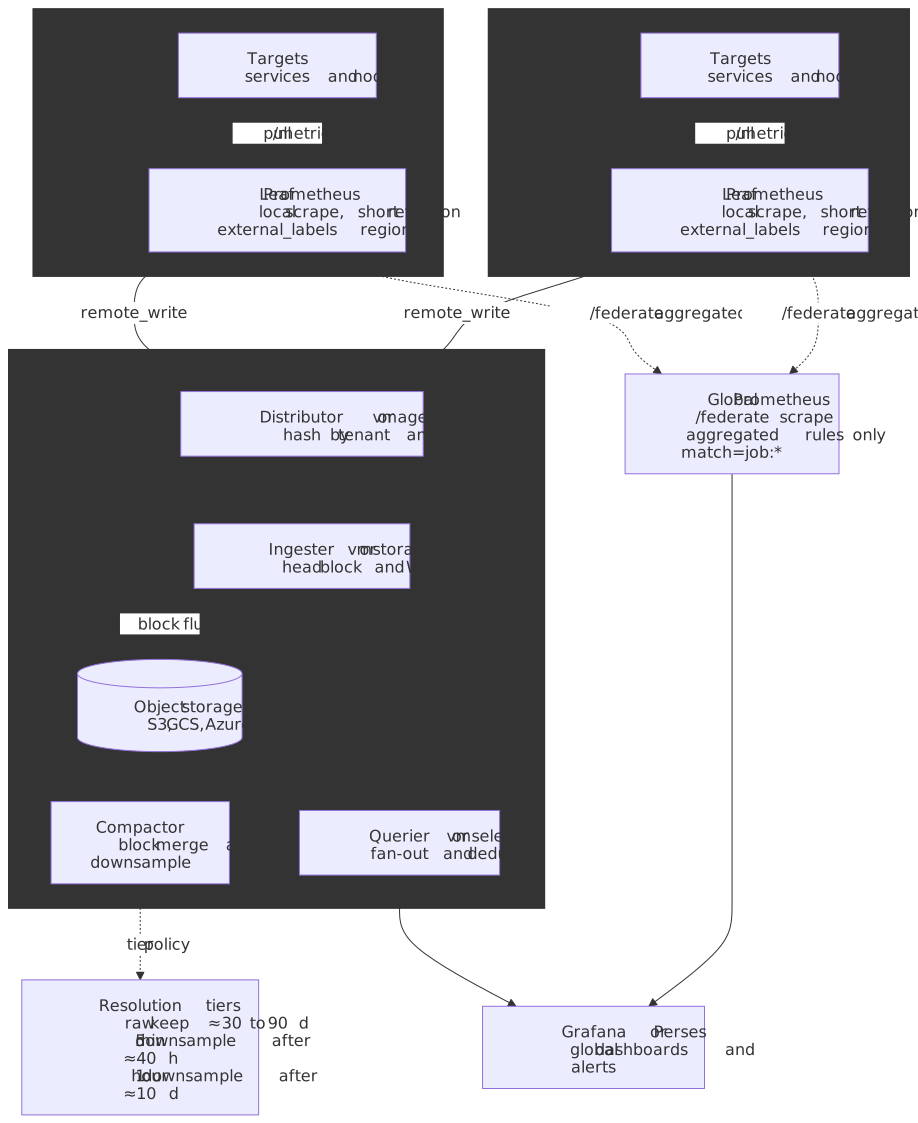
A single Prometheus tops out somewhere in the millions of active series and tens of GB of head block. Multi-region or multi-cluster deployments need a global view — one query surface, one alert pipeline, long retention — without reverting to one giant TSDB.
Hierarchical federation (/federate)
Prometheus’s /federate endpoint lets one Prometheus scrape selected series from another. The canonical pattern is hierarchical: leaf Prometheus servers per cluster scrape local targets at full resolution, and a regional or global Prometheus periodically pulls only the pre-aggregated recording rules (e.g. job:http_requests:rate5m) from each leaf.
Two non-negotiables:
honor_labels: trueso the leaf’sinstance,region, etc. survive the scrape.- A tight
match[]filter so the global server only pulls aggregations, not raw series. Pulling raw series via/federaterecreates the cardinality problem one level up and is the single most common mistake in federated deployments.
Federation is fine when the global view is small (alerting summaries, per-cluster SLO panels). It is the wrong tool for arbitrary ad-hoc queries against raw samples — for that, the modern answer is remote write into a horizontally scalable backend.
Remote write to Thanos / Cortex / Mimir / VictoriaMetrics
Prometheus’s remote_write ships every accepted sample to a downstream system. The downstream is typically an object-storage-backed TSDB designed for global query and long retention:
| System | Origin / steward | Distinguishing trait |
|---|---|---|
| Thanos | Originally Improbable | Sidecar uploads TSDB blocks to object storage; queriers fan out across sidecars and store gateways. |
| Cortex | CNCF (Tom Wilkie) | Microservices: distributor, ingester, querier, store-gateway, compactor; multi-tenant by header. |
| Grafana Mimir | Grafana Labs (Cortex fork) | Split-and-merge compactor; designed for very large per-tenant ingest and consistent long-range query. |
| VictoriaMetrics | VictoriaMetrics Inc. | Shared-nothing cluster (vminsert / vmstorage / vmselect); higher cardinality density. |
Mimir, Cortex, and Thanos all use the same write/read split: a stateless ingest tier accepts remote_write, a stateful tier flushes blocks to object storage, a compactor merges blocks and downsamples them, and queriers fan out across hot ingesters and cold object storage.
Downsampling tiers
Long-term retention without downsampling is unaffordable. The Thanos compactor’s downsampling pipeline is the reference design and Mimir/Cortex follow the same shape:
| Resolution | Created when block age exceeds | Typical retention | Use |
|---|---|---|---|
| Raw | (always written) | days to weeks | Recent debugging, alerting |
| 5 min | ~40 hours | months | Capacity dashboards |
| 1 hour | ~10 days | 1+ years | Trends, capacity planning, audits |
Two operational notes that bite teams later:
- Downsampling adds storage rather than replacing it — the compactor writes additional
AggrChunkblocks alongside the originals. Keeping all three resolutions roughly triples object-storage volume; the multiplier is acceptable because object storage is cheap, but plan for it. - Pick the resolution to query at based on the panel time range, not by default. Querying
1hresolution over a 5-minute range hides incidents; queryingrawover a 90-day range melts the querier.
Important
Once remote_write is enabled, the leaf Prometheus is no longer the source of truth for long-term data — the central backend is. Treat the leaf’s local retention as a short buffer (typically 6–24 hours) sized to survive central-tier outages, and run the central backend with at least 3-way replication on its ingest path so a single AZ outage does not lose samples.
Logs
Metrics live or die by cardinality bounds; logs work the opposite way — every event is unique by design. Three storage families dominate, with very different cost/query profiles:
| Backend | Index strategy | Strength | Trade-off |
|---|---|---|---|
| Elasticsearch / OpenSearch | Inverted index on every field | Sub-second full-text and aggregation | Storage and RAM cost grow with field cardinality |
| Grafana Loki | Index only on labels, content stored as compressed chunks | Cheap; uses object storage for hot+cold | Full-text search scans chunks, so latency grows with time range |
| ClickHouse / columnar stores | Columnar with sparse primary index | Scans hundreds of GB/s with SQL | Query author has to think about partitioning and sort keys |
The right pick depends on what you actually query. Free-text needle-in-a-haystack search wants Elasticsearch. Label-scoped grep — “all error lines from service=checkout in the last hour” — wants Loki. Aggregations and joins over weeks of data want ClickHouse.
Tip
For correlation, structure your logs as JSON and emit trace_id and span_id on every line. The cost is one object key per record; the payoff is one-click navigation from a trace to its log stream.
Distributed tracing
Spans and traces
A span is one operation: an HTTP handler, a SQL query, a queue publish. Every span carries:
- A trace ID shared by every span in the trace.
- A unique span ID.
- A parent span ID (forming the call tree).
- Start time and duration.
- Attributes (key-value metadata).
- Events (timestamped annotations).
A trace is the tree of spans for one logical request, possibly spanning many services.
W3C Trace Context
W3C Trace Context is the modern propagation standard, supported by every major tracing system. The traceparent header is fixed-width:
00-0af7651916cd43dd8448eb211c80319c-b9c7c989f97918e1-01│ │ │ ││ │ │ └─ Trace flags (here: sampled)│ │ └─ Parent span ID (8 bytes / 16 hex chars)│ └─ Trace ID (16 bytes / 32 hex chars)└─ Version (8 bits, currently 00)The optional tracestate header carries vendor-specific key-value pairs and may contain at most 32 list members:
tracestate: congo=t61rcWkgMzE,rojo=00f067aa0ba902b7The header names use no hyphens deliberately — trace context propagates beyond HTTP (message queues, database protocols, RPC frames), where hyphenated names cause portability headaches.
Sampling strategies
At scale, capturing every trace is impossible. Google’s Dapper used a default uniform sampling rate of 1 in 1024 in its first production deployment 1, with a median latency of ~15 seconds between span creation and the trace being queryable.
Head-based sampling. The decision is made at trace start.
- ✅ Stateless and trivially distributable.
- ✅ No buffering required.
- ❌ Likely to miss the rare interesting trace (the one error in a thousand).
Tail-based sampling. The decision is made after the trace completes.
- ✅ Can keep every error and every slow trace deterministically.
- ✅ Supports rich policies (latency thresholds, attribute matches, rate limits).
- ❌ Needs the two-tier collector topology shown above.
- ❌ Adds end-to-end latency proportional to trace duration.
The OpenTelemetry Collector’s tail-sampling processor bundles a dozen-plus policies — probabilistic, latency, status code, string-attribute match, rate limiting, composite, and so on.
A common hybrid pattern: head-sample at 10% to bound CPU and span budget, then tail-sample on that 10% to catch errors and slow traces precisely.
Dapper, in summary
Dapper’s three design constraints 1 still describe most production tracing systems:
- Ubiquitous deployment. The instrumentation lives in the RPC library; application code does not have to opt in.
- Low overhead. Sampling and lightweight in-process buffering keep the CPU and bandwidth cost bounded.
- Application transparency. Service authors see consistent traces without writing tracing code.
The data flow is span → local log → out-of-process daemon → BigTable, where each row is a trace and each column a span. The 1/1024 default sampling and the asynchronous collection pipeline are what keep that model affordable at Google’s request volume.
Tip
Modern alternatives — eBPF-based auto-instrumentation (e.g. Pixie, Beyla, Parca) and OpenTelemetry’s auto-instrumentation agents — let you achieve Dapper-style “no app changes” coverage without owning the RPC library. The trade-off is reduced semantic context: an eBPF agent sees the syscall and the wire format, not the business operation.
Alerting systems
Alertmanager architecture
Prometheus’s Alertmanager decouples alert evaluation (in Prometheus) from alert delivery. Its pipeline:
- Dispatcher — routes alerts based on label matchers.
- Inhibition — silences derived alerts when a parent alert is firing.
- Silencing — mutes alerts during maintenance windows.
- Grouping — batches related alerts into a single notification.
- Notification — sends to Slack, PagerDuty, email, webhooks.
Grouping is the difference between “100 pods in cluster-east are unreachable” as a single page and 100 separate pages.
route: group_by: ["alertname", "cluster"] group_wait: 30s # wait for more alerts before firing the first group_interval: 5m # gap between grouped notifications repeat_interval: 4h # re-page if still firingInhibition lets you suppress symptoms when the root cause is alerting:
inhibit_rules: - source_matchers: [severity="critical", alertname="ClusterDown"] target_matchers: [severity="warning"] equal: ["cluster"]Static thresholds vs. anomaly detection
Static thresholds. “Alert when error rate > 1%.”
- ✅ Predictable and explainable.
- ❌ Doesn’t adapt to traffic patterns or growth.
- ❌ Requires per-service tuning.
Anomaly detection. Alert when the value drifts from a learned baseline.
- ✅ Adapts to diurnal and weekly cycles.
- ❌ Black box: hard to explain why it alerted.
- ❌ Cold-start problem: needs weeks of representative history.
- ❌ Notoriously high false-positive rates in general use.
In practice, most teams stick with static thresholds and reserve anomaly detection for narrow use cases where the baseline is well-understood (capacity headroom, fraud detection).
SLO-based alerting
The Google SRE Workbook’s Alerting on SLOs chapter is the canonical reference. The argument against threshold alerts is direct: a 1% error rate for one minute is a non-event; a 1% error rate sustained for one hour is a major incident. A static threshold cannot distinguish them.
Error budget = 1 − SLO. For a 99.9% availability SLO that is 0.1% / 30 days ≈ 43 minutes of failure per month.
Burn rate is how fast you are consuming that budget. Burn rate 1 means you are exactly on pace; burn rate 10 means you will exhaust the budget in 3 days instead of 30.
Multi-window, multi-burn-rate alerts 10 are the recommended SRE pattern:
| Burn rate | Long window | Short window | Severity | Budget consumed |
|---|---|---|---|---|
| 14.4 | 1 hour | 5 min | Page | 2% in 1 hour |
| 6 | 6 hours | 30 min | Page | 5% in 6 hours |
| 1 | 3 days | 6 hours | Ticket | 10% in 3 days |
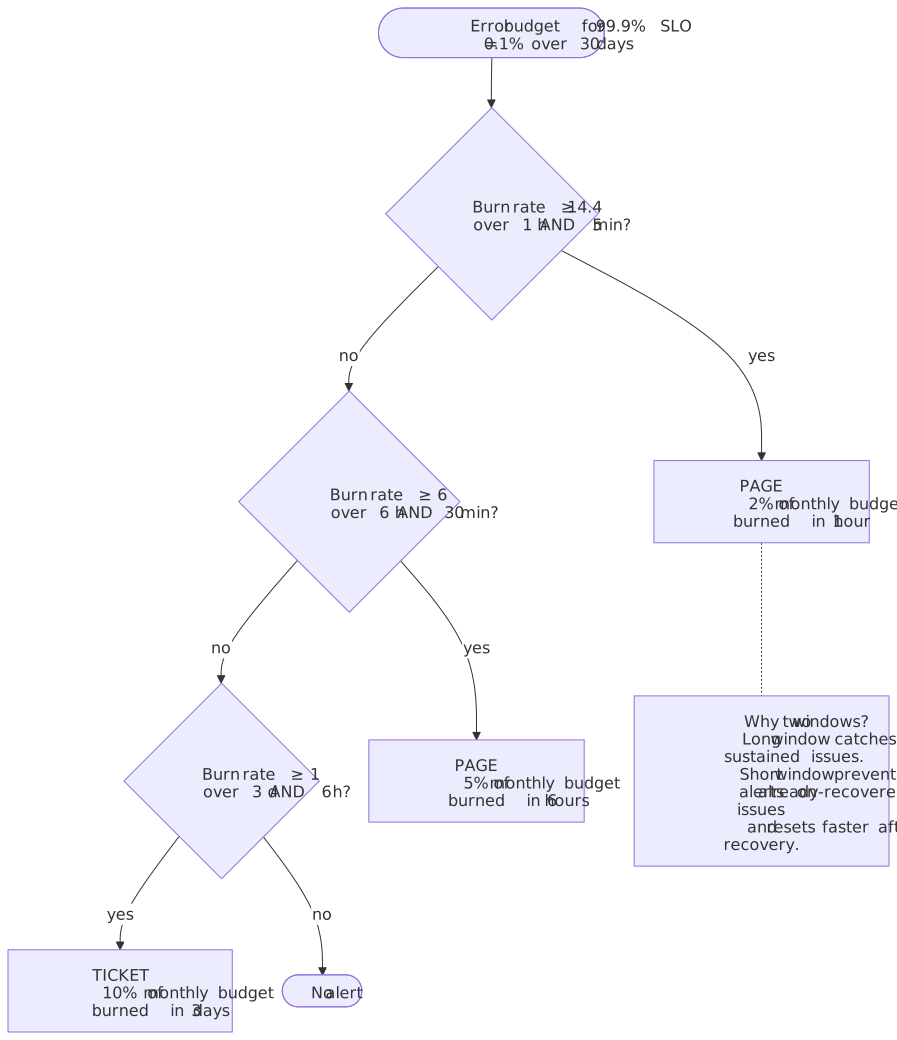
The two-window structure is what makes this work in practice. The long window catches sustained issues; the short window prevents alerts on incidents that have already self-resolved and lets the alert reset quickly once the burn rate drops.
Important
Low-traffic services break burn-rate math. If a service receives 10 requests/hour, one failure is a 10% error rate and a ~100× burn rate. Either lengthen the evaluation window, switch to count-based thresholds, or aggregate multiple low-traffic services into one SLO.
Observability vs monitoring
The terms “monitoring” and “observability” are routinely conflated; the distinction Charity Majors has argued for over the last several years is operationally meaningful 11:
- Monitoring answers known unknowns. You decide in advance which questions matter, instrument them as metrics or checks, and alert when a threshold is breached. The classic three-pillar stack (metrics + logs + traces) is mostly monitoring.
- Observability answers unknown unknowns. The bar is whether you can ask a new question about an arbitrary slice of production traffic — partitioned by
customer_id,build_sha,feature_flag, region — without shipping new instrumentation.
The two modes share signals but trade off differently. Metrics enforce bounded cardinality by construction; observability tooling (Honeycomb-style wide structured events, columnar log stores, trace search) accepts unbounded cardinality and indexes the dimensions you might want to slice by. You need both: low-cardinality metrics for cheap dashboards and SLO alerts, high-cardinality events for the next outage you have not predicted.
High-cardinality exploration: heatmaps and BubbleUp
Two interaction patterns turn high-cardinality data into actionable signals:
- Latency heatmaps. Each column is a time bucket, each row is a latency bucket, each cell is the count of requests in that latency bucket at that time. Bimodal latency distributions (“two clusters of users seeing different performance”), tail-only regressions, and noisy neighbours are visible at a glance — a percentile line is not.
- Outlier explanation (Honeycomb’s BubbleUp, Grafana’s “compare” panels). Select a region of the heatmap that looks anomalous; the system compares the dimensional makeup of that region against the baseline and surfaces which fields (
customer_id,region,build_sha, …) are over-represented. This is essentially a chi-squared / mutual-information lift across every label, computed lazily over the query window.
These are the techniques that make “trace and log everything, sample on output” — the modern OpenTelemetry pattern — repayable in debugging time.
Layered dashboards mirror the drill-down
A good dashboard set is a top-down stack that follows the on-call drill-down path: SLO at the top (is it bad?), Golden Signals next (which signal is bad?), RED per service (which service?), USE per resource (which resource?), then exemplars/traces, then logs.
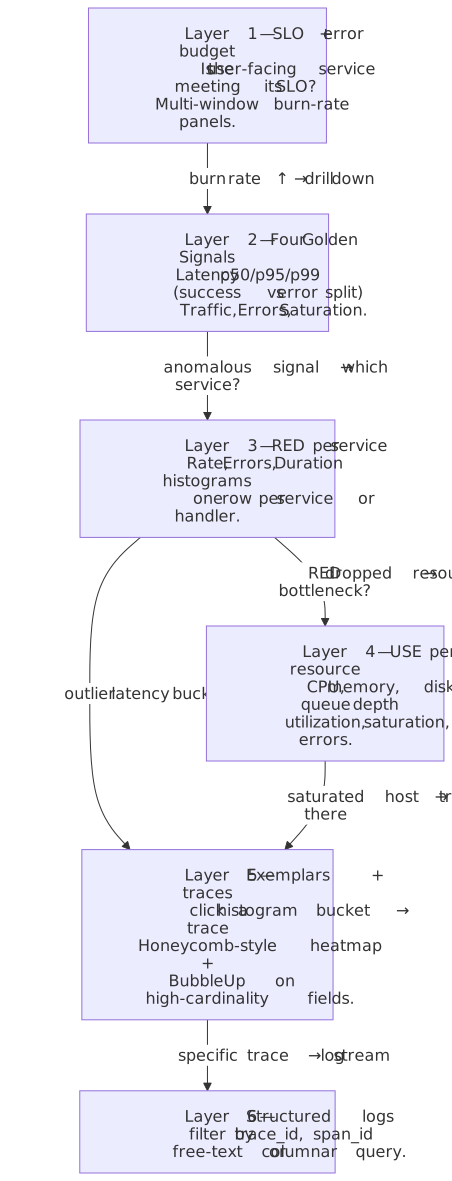
The point is not the layers themselves but the links between them: an exemplar takes you from a histogram bucket directly to a trace; a trace_id field on a log line takes you from the trace to the log stream; a service-name label on a USE panel takes you back to that service’s RED dashboard. Without those links each layer is a separate tool and the on-call is the integration layer.
Observability correlation
Exemplars: metrics → traces
An exemplar is a trace ID attached to a specific metric sample. When you look at a latency spike on a dashboard, you can click straight through to a real trace from that spike.
http_request_duration_seconds_bucket{le="0.5"} 24054 # {trace_id="abc123"} 0.47The histogram says “24,054 requests landed in the ≤500 ms bucket”; the exemplar says “here’s one specific request that took 470 ms — and here’s its trace ID”.
Requirements:
- The instrumentation library must support exemplars (OpenTelemetry does; the Prometheus client libraries gained support in the OpenMetrics text format).
- The TSDB must store them (Prometheus 2.25+).
- The visualisation layer must surface them (Grafana, Perses).
Trace–log correlation
Emit trace_id and span_id as structured-log fields:
{ "timestamp": "2026-01-15T10:23:45Z", "level": "error", "message": "Database connection timeout", "trace_id": "0af7651916cd43dd8448eb211c80319c", "span_id": "b9c7c989f97918e1", "service": "order-service"}A trace UI can now query “all logs where trace_id = ...” and reconstruct the per-span log stream without manual hunting.
Metrics from traces
Tools like Tempo, the OTel spanmetrics connector, and Datadog APM compute RED metrics (Rate, Errors, Duration) directly from spans. The benefit is uniform definitions across services and one-click drill-down from metric to trace. The cost is end-to-end latency (spans must be processed first) and accuracy that scales with your sampling rate.
Design choices summary
Collection method
| Factor | Pull (Prometheus) | Push (OTLP) | Hybrid (Collector) |
|---|---|---|---|
| Target health visibility | Built-in up metric |
Requires separate signal | Via receiver health metric |
| Works through firewalls | Needs network access | Outbound only | Configurable |
| Short-lived jobs | Often misses | Push before exit | Pushgateway or OTLP sidecar |
| Configuration location | Centralised | Per-application | Centralised |
Default recommendation. Pull for long-running services (simpler, health is free). Push via OpenTelemetry Collector for serverless or otherwise ephemeral workloads.
Time-series database
| Factor | Prometheus | VictoriaMetrics | Managed (Datadog, NR, etc.) |
|---|---|---|---|
| Cost | Infrastructure only | Infrastructure only | Per-metric pricing |
| Operational burden | Moderate | Low–moderate | None |
| High availability | Federation / Thanos / Mimir | Built-in clustering | Built-in |
| Cardinality limits | Practically ~10M series | Practically ~100M series | Soft limits + overage fees |
Approximate scale thresholds:
- < 1 M active series → single Prometheus.
- 1 – 10 M series → Prometheus + remote write to long-term storage (Thanos, Mimir, Cortex).
- 10 M+ series → VictoriaMetrics cluster, Mimir, or a managed service.
Tracing sampling
| Approach | Overhead | Capture rate | Operational complexity |
|---|---|---|---|
| Head 100% | Highest | All traces | Simple |
| Head 1% | Low | 1% random | Simple |
| Tail-based | Medium | All errors + sampled rest | High (needs LB tier) |
| Hybrid | Low | Best of both | Highest |
Default recommendation. Start head-based at 10–100% in dev/staging and a single low-volume service. Move to tail-based when error capture matters or volume forces sub-1% sampling.
Alerting approach
| Approach | False positives | Actionability | Setup effort |
|---|---|---|---|
| Static thresholds | Medium | High (clear trigger) | Low |
| Anomaly detection | High | Medium (why did it alert?) | Medium |
| SLO burn rate | Low | High (budget impact clear) | High |
Default recommendation. SLO-based alerting with multi-window burn rates for critical services. Static thresholds for utility metrics where SLO definition is fuzzy.
Common pitfalls
Cardinality explosion from dynamic labels
Mistake. Adding request_id, user_id, IP address, or session ID as a metric label.
Why it happens. Engineers want to filter metrics by these dimensions; it works in dev with 100 users.
Consequence. Production with a million users → a million series per metric → Prometheus OOMs, queries time out, alerts go silent.
Fix. Move high-cardinality dimensions to logs and traces. If you genuinely need per-user numeric metrics, route them through a columnar store (ClickHouse, BigQuery), not a TSDB.
Alerting on raw counter values
Mistake. alert: requests_total > 1_000_000.
Why it happens. The counter looks big; the threshold seems intuitive.
Consequence. The alert fires based on uptime, not request rate. A restart “fixes” it. A long-running healthy service pages.
Fix. Always wrap counters in rate() or increase():
- alert: HighRequestRate expr: rate(http_requests_total[5m]) > 1000 for: 10mSampling that loses every error trace
Mistake. Head-based 1% sampling on a service with 0.1% error rate.
Why it happens. Sampling is configured for cost; nobody computes the joint probability with error rate.
Consequence. You keep 0.001% of requests as error traces. When you need to debug, you have nothing.
Fix. Tail-based sampling with an explicit error policy, or a hybrid head-then-tail pipeline:
processors: tail_sampling: policies: - name: errors type: status_code status_code: { status_codes: [ERROR] } - name: probabilistic type: probabilistic probabilistic: { sampling_percentage: 1 }Alert fatigue from noisy alerts
Mistake. Alerting on every metric deviation without grouping or inhibition.
Why it happens. “Better to over-alert than miss something” feels safe.
Consequence. On-call ignores alerts. Real incidents drown in noise. The team burns out.
Fix.
- SLO-based alerts — only page when the error budget is meaningfully burning.
- Aggressive grouping in Alertmanager — one page per incident, not per pod.
- Inhibition rules so symptoms stay quiet when the root cause is firing.
- Track signal-to-noise: target ≥ 50% actionable alerts, audit weekly.
Conclusion
Distributed monitoring is not about collecting more data — it is about collecting the right data at the right resolution for the right cost.
Operating principles:
- Metrics for dashboards and alerts — bounded cardinality, high aggregation.
- Logs for debugging — high cardinality, full detail, structured payload.
- Traces for request flow — sampled, correlated, used as the third axis when the metric and the log do not agree.
- Correlation is the multiplier. Exemplars, trace IDs in logs, and metrics derived from spans are what turn three separate stores into one debugging experience.
A defensible starting stack:
- Pull-based metrics with Prometheus (or its drop-in replacements for higher cardinality).
- Head-based trace sampling at 10%, with a plan to migrate to tail-based once error capture becomes a problem.
- SLO-defined burn-rate alerts for the services that have meaningful traffic.
- Structured JSON logs with
trace_idon every line.
Scale moves the dial:
- Tail-based sampling once errors are too rare to catch.
- VictoriaMetrics, Mimir, or a managed TSDB once cardinality crosses ~10 M series.
- An OpenTelemetry Collector layer once you have more than two backends or need centralised processing.
The 1.37 bytes/sample compression from Gorilla and the 1/1024 sampling rate from Dapper are not arbitrary — they are battle-tested trade-offs from systems handling billions of data points per minute. Internalise the trade-offs and you can design a monitoring stack that scales with the system rather than fighting it.
Appendix
Prerequisites
- Comfort with distributed systems concepts: latency, throughput, consistency.
- Familiarity with basic statistics: percentiles, rates, distributions.
- Hands-on experience with at least one monitoring system (Prometheus, Datadog, or equivalent).
Terminology
- Cardinality — number of distinct time series (metric name × label-value combinations).
- Scrape — Prometheus pulling samples from a target’s
/metricsendpoint. - Span — a single operation in a distributed trace; carries trace ID, span ID, parent ID.
- Exemplar — a trace ID attached to a metric sample for drill-down.
- Burn rate — speed of error-budget consumption relative to the SLO; 1 = on pace.
- Head block — in-memory portion of the Prometheus TSDB containing recent samples.
- WAL (Write-Ahead Log) — durability mechanism that records writes before they are committed.
- OTLP (OpenTelemetry Protocol) — standard wire protocol for transmitting telemetry data.
Summary
- Pick the method by target. USE for resources, RED for services, Four Golden Signals for user-facing systems; SLO burn-rate sits on top.
- Cardinality is the primary scaling constraint for metrics — keep labels bounded (target ≤ 10 distinct values per label).
- Gorilla compression achieves 1.37 bytes/sample via delta-of-delta timestamps and XOR-encoded values.
- Pull-based collection gives free target-health visibility; push wins for ephemeral workloads.
- Global view = leaf Prometheus + remote write into Thanos / Cortex / Mimir / VictoriaMetrics with raw / 5 min / 1 h downsampling tiers.
- Tail-based sampling captures every error but requires consistent routing and trace-duration buffering.
- SLO burn-rate alerts with multi-window evaluation cut both false positives and false negatives.
- Exemplars, trace IDs in logs, latency heatmaps, and BubbleUp-style outlier explanation are what turn separate stores into one debugging surface.
References
Foundational papers
- Gorilla: A Fast, Scalable, In-Memory Time Series Database — Facebook, VLDB 2015.
- Dapper, a Large-Scale Distributed Systems Tracing Infrastructure — Google, 2010.
Specifications
- W3C Trace Context (Recommendation).
- OpenTelemetry Metrics Data Model — including exponential histograms and exemplars.
- OpenTelemetry SDK specification — exponential-histogram defaults.
- OpenTelemetry Sampling concepts — head-based and tail-based.
Official documentation
- Prometheus Storage — TSDB layout, WAL, compaction.
- Prometheus TSDB: The Head Block — deep dive by a Prometheus maintainer.
- Memory-mapping head chunks (Prometheus 2.19).
- Alertmanager configuration — routing, grouping, inhibition.
- VictoriaMetrics cluster architecture.
- OpenTelemetry Collector tail-sampling processor.
SRE practices and methodologies
- Google SRE Book: Monitoring Distributed Systems — origin of the Four Golden Signals.
- Google SRE Workbook: Alerting on SLOs — multi-window, multi-burn-rate methodology.
- Brendan Gregg: The USE Method — utilization, saturation, errors for resource analysis.
- Tom Wilkie: The RED Method — rate, errors, duration for services.
- Charity Majors: Observability is a Many-Splendored Definition — observability vs monitoring.
- Prometheus pull-vs-push rationale.
- When to use the Pushgateway.
Global view, federation, downsampling
- Prometheus federation.
- Prometheus remote_write.
- Thanos compactor and downsampling.
- Grafana Mimir architecture.
Production case studies and observability tooling
- Netflix Atlas: Primary Telemetry Platform.
- Grafana on observability correlation.
- Managing high cardinality in Prometheus and Kubernetes.
- Honeycomb: Identify Outliers with BubbleUp — high-cardinality outlier explanation.
Footnotes
-
B. H. Sigelman et al. “Dapper, a Large-Scale Distributed Systems Tracing Infrastructure”. Google Technical Report, 2010. https://research.google.com/archive/papers/dapper-2010-1.pdf. ↩ ↩2 ↩3
-
OpenTelemetry Metrics Data Model, Exemplars. opentelemetry.io. ↩
-
B. Gregg. “The USE Method”. brendangregg.com/usemethod.html; see also “Thinking Methodically About Performance”, Communications of the ACM. cacm.acm.org/practice/thinking-methodically-about-performance. ↩
-
T. Wilkie. “The RED Method: How to Instrument Your Services”. Grafana Labs blog, 2018. grafana.com/blog/the-red-method-how-to-instrument-your-services. ↩
-
OpenTelemetry SDK specification, Base2 Exponential Bucket Histogram Aggregation. opentelemetry-specification/specification/metrics/sdk.md. ↩
-
T. Pelkonen et al. “Gorilla: A Fast, Scalable, In-Memory Time Series Database”. Proc. VLDB Endowment 8(12), 2015. https://www.vldb.org/pvldb/vol8/p1816-teller.pdf. ↩
-
D. Lemire et al. “Consistently faster and smaller compressed bitmaps with Roaring”. Software: Practice and Experience, 2016. https://arxiv.org/abs/1603.06549. ↩
-
VictoriaMetrics, Cluster version. docs.victoriametrics.com. ↩
-
Netflix Open Source, Atlas Documentation – Introduction. netflix.github.io/atlas-docs. ↩
-
B. Beyer et al. The Site Reliability Workbook, “Alerting on SLOs”. O’Reilly / Google. sre.google/workbook/alerting-on-slos. ↩
-
C. Majors. “Observability — A 3-Year Retrospective” / “Observability is a Many-Splendored Definition”. charity.wtf/2020/03/03/observability-is-a-many-splendored-thing. ↩