Blob Storage Design
Designing scalable object storage systems requires understanding the fundamental trade-offs between storage efficiency, durability, and access performance. This article covers the core building blocks—chunking, deduplication, metadata management, redundancy, and tiered storage—with design reasoning for each architectural choice.

Abstract
Blob storage trades complexity for scale by treating large files as collections of immutable chunks. The core design decisions are:
- Chunking: Fixed-size (simple, fast) vs. content-defined (CDC, better deduplication)—determines deduplication effectiveness and CPU overhead
- Deduplication: File-level (low overhead, coarse) vs. block-level (high dedup ratio, memory-intensive)—determines storage efficiency and index memory requirements
- Metadata separation: Decoupling metadata from data enables independent scaling—metadata needs high IOPS, data needs high throughput
- Redundancy: 3-way replication (3× overhead, simple) vs. erasure coding (1.2-1.5× overhead, CPU cost)—determines storage cost and repair bandwidth
- Tiering: Hot/warm/cold/archive tiers optimize cost for access patterns—determines retrieval latency and storage cost
The fundamental trade-off: storage overhead vs. durability vs. access latency. Higher durability requires more redundancy (storage cost). Faster access requires keeping data on high-performance media (cost). Design for the access pattern—most data is write-once, read-rarely.
Object Storage Fundamentals
Object vs. Block vs. File Storage
| Characteristic | Object Storage | Block Storage | File Storage |
|---|---|---|---|
| Data model | Objects (key → binary data + metadata) | Fixed-size blocks with unique IDs | Hierarchical files and directories |
| Access | REST API (HTTP) | iSCSI / Fibre Channel | NFS / SMB |
| Namespace | Flat (bucket + key) | Volume + block address | Directory tree |
| Best for | Unstructured data, backups, media | Databases, VMs, transactional | Shared filesystems, content management |
| Latency | Milliseconds | Sub-millisecond | Milliseconds |
| Scalability | Exabytes | Petabytes | Petabytes |
| Modification | Replace entire object | In-place block update | In-place file update |
Design reasoning: Object storage chose a flat namespace and immutable objects specifically to simplify distribution. Without directory hierarchies, there’s no need to maintain tree consistency across nodes. Without in-place updates, writes are append-only—eliminating write conflicts and enabling aggressive caching.
The Object Model
An object consists of:
- Key: Unique identifier within a bucket (e.g.,
photos/2024/vacation.jpg) - Data: Binary content (bytes to terabytes)
- Metadata: System metadata (size, ETag, timestamps) + custom key-value pairs
- Version ID: Optional, for versioned buckets
Flat namespace illusion: Keys like photos/2024/vacation.jpg are not directory paths—they’re opaque strings. The / delimiter is a convention; listing operations with prefix=photos/ and delimiter=/ simulate directory listing, but no directory structure exists.
Bucket model: Buckets provide namespace isolation and policy boundaries (access control, lifecycle rules, versioning). A single storage system may support trillions of objects across millions of buckets.
Real-world scale: AWS S3 stores 500+ trillion objects across hundreds of exabytes, serving 200 million requests/second at peak.
Chunking Strategies
Design Choices
Fixed-Size Chunking
How it works: Split files into equal-sized chunks at fixed byte boundaries. Each chunk assigned a content hash (SHA-256) as its identifier.
Best when:
- Simple implementation required
- File modifications are rare (write-once workloads)
- CPU overhead must be minimized
- Sequential access patterns dominate
Trade-offs:
- ✅ Deterministic boundaries—identical files produce identical chunks
- ✅ Low CPU overhead (no content analysis)
- ✅ Predictable chunk counts for capacity planning
- ❌ Poor deduplication on modified files (insertion shifts all subsequent boundaries)
- ❌ Chunk size forces trade-off between metadata overhead and dedup granularity
Real-world example: GFS used 64 MB chunks. This large size reduces metadata overhead (64 bytes per 64 MB chunk) and client-master interactions. The trade-off: 64 MB is too large for small files, leading to internal fragmentation.
Chunk size trade-offs:
| Chunk Size | Metadata Overhead | Dedup Potential | Network Efficiency | Use Case |
|---|---|---|---|---|
| 4 KB | Very high | Maximum | Poor (high overhead per transfer) | Databases |
| 64 KB - 1 MB | Moderate | High | Good | General purpose |
| 4-8 MB | Low | Moderate | Optimal for large files | Backups, media |
| 64 MB | Very low | Low | Best throughput | Analytics, logs |
Content-Defined Chunking (CDC)
How it works: Use a rolling hash function to identify chunk boundaries based on content patterns. When the hash matches a predefined pattern (e.g., low N bits are zero), declare a chunk boundary.
Best when:
- Deduplication is critical (backup systems, versioned storage)
- Files are frequently modified
- Storage cost savings justify CPU overhead
- Similar files are stored (code repositories, documents)
Trade-offs:
- ✅ Insertions/deletions only affect neighboring chunks (boundaries shift minimally)
- ✅ 10× better deduplication than fixed-size on modified files
- ✅ Natural chunk size distribution matches content structure
- ❌ Higher CPU overhead (rolling hash computation)
- ❌ Variable chunk sizes complicate capacity planning
- ❌ More complex implementation
CDC Algorithms:
| Algorithm | Speed | Dedup Ratio | Implementation |
|---|---|---|---|
| Rabin Fingerprinting | Baseline | Best | Polynomial division, complex |
| Gear-based | 2× Rabin | Near-Rabin | Bit operations, simpler |
| FastCDC | 10× Rabin | Near-Rabin | Optimized hash judgment |
FastCDC innovations (USENIX ATC 2016):
- Simplified hash judgment: Faster pattern matching than Rabin
- Skip minimum chunk boundaries: Avoid tiny chunks (minimum size enforced)
- Normalized chunk distribution: Avoid extreme sizes (target average with bounds)
Result: 10× faster than Rabin-based CDC with near-identical deduplication ratios.
Real-world example: Dropbox evolved from 4 MB fixed chunks to CDC for better deduplication. When users edit a document, only changed sections create new chunks—reducing upload bandwidth and storage consumption.
Chunk Size Selection
Network considerations:
- TCP buffer sizes range 4 KB to 4 MB (Linux default: 85 KB)
- Below 4 KB: Minimal benefit from smaller chunks
- 4-8 MB: Optimal for keeping network buffers utilized
Storage considerations:
- IDE drives: Optimal bandwidth at 4 MB chunks
- SCSI/SAS drives: Optimal at 8 MB chunks
- NVMe: Smaller chunks viable (low random read penalty)
IOPS vs. throughput trade-off:
- Larger chunks: Higher throughput, fewer IOPS, higher per-operation latency
- Smaller chunks: Lower throughput, more IOPS, lower per-operation latency
Recommendation: 4-8 MB for general blob storage, 64-128 KB for dedup-heavy workloads, 64 MB for append-only analytics data.
Deduplication
Design Choices
File-Level Deduplication
How it works: Hash the entire file. If hash matches existing file, store only a reference. No new data written.
Best when:
- Identical file copies are common (email attachments, shared documents)
- Memory is constrained (index size = O(file count))
- Processing overhead must be minimal
Trade-offs:
- ✅ Low memory footprint (one entry per file)
- ✅ Simple implementation
- ✅ Fast (single hash per file)
- ❌ Cannot deduplicate within files
- ❌ Any modification creates a new file (no dedup benefit)
- ❌ Coarse granularity limits savings
Block-Level Deduplication
How it works: Hash each chunk. If chunk hash matches existing chunk, store only a reference. Different files can share common chunks.
Best when:
- Similar files are stored (VMs, containers, backups)
- Maximizing deduplication ratio is critical
- Memory/storage for dedup index is available
- Content-defined chunking is used
Trade-offs:
- ✅ Maximum deduplication (sub-file granularity)
- ✅ Handles partial file changes well
- ✅ Cross-file deduplication
- ❌ High memory requirements (one entry per chunk)
- ❌ More complex reference management
- ❌ Higher CPU overhead
Memory requirements comparison:
For 1 PB data with 8 KB average chunks:
- Block-level: ~125 billion chunks × 48 bytes/entry ≈ 6 TB index
- File-level (1 KB avg file): ~1 trillion files × 48 bytes/entry ≈ 48 TB index
- File-level (1 MB avg file): ~1 billion files × 48 bytes/entry ≈ 48 GB index
Block-level wins when chunk count < file count (large files), loses when files are small.
Inline vs. Post-Process Deduplication
Inline deduplication:
- Check for duplicates during write
- Prevents redundant data from ever being stored
- Higher write latency (hash + lookup on hot path)
- Immediate storage savings
Post-process deduplication:
- Write data immediately, deduplicate later
- Lower write latency
- Temporary storage overhead
- Background processing load
Design reasoning: High-throughput ingestion systems prefer post-process (minimize write latency). Storage-constrained systems prefer inline (maximize savings immediately).
Deduplication Index Design
Challenge: The dedup index must be fast (in-memory for inline) but stores billions of entries.
Bloom filter optimization:
Bloom filters are space-efficient probabilistic structures that answer “is this chunk possibly new?” with:
- False positives: May incorrectly indicate “exists” → unnecessary disk lookup
- False negatives: Never → guarantees new chunks are detected
Index tiering:
- Hot index (RAM): Recently accessed/written chunks
- Warm index (SSD): Less frequent chunks
- Cold index (HDD): Archival lookup
Bloom filter in RAM filters 99%+ of lookups before hitting disk.
Real-world: ZFS uses 256-bit cryptographic checksums as block signatures. The pool-wide Deduplication Table (DDT) maps checksums to block locations. When a block’s checksum matches an existing entry, ZFS increments the reference count and skips the write.
Metadata Management
Why Separate Metadata?
Data and metadata have fundamentally different access patterns:
| Characteristic | Metadata | Data |
|---|---|---|
| Access pattern | Random, high IOPS | Sequential, high throughput |
| Size per operation | Bytes to kilobytes | Kilobytes to megabytes |
| Consistency | Strong (must be correct) | Eventually consistent (okay) |
| Update frequency | High (listings, stats) | Low (write-once) |
| Scaling dimension | IOPS | Bandwidth |
Separating them enables independent optimization and scaling.
Architecture Patterns
Single Metadata Master (GFS Model)
How it works: One master node holds entire namespace in memory. Clients contact master for metadata, then access data nodes directly.
GFS specifications:
- Entire namespace in RAM (compact representation)
- 64 bytes metadata per 64 MB chunk → 4 GB RAM supports petabytes
- Two persistence files: FsImage (checkpoint) + EditLog (journal)
- On startup: merge FsImage + EditLog to reconstruct state
Trade-offs:
- ✅ Simple consistency (single source of truth)
- ✅ Fast lookups (in-memory)
- ✅ Low operational complexity
- ❌ Single point of failure (mitigated by shadow masters)
- ❌ Memory-bound scaling limit
- ❌ Master becomes bottleneck at extreme scale
Limitation discovered: GFS master couldn’t scale beyond ~100 million files. File count, not storage size, was the bottleneck.
Distributed Metadata (Colossus/Azure Model)
How it works: Metadata stored in a distributed database (e.g., BigTable, Azure partition layer). Multiple metadata servers handle requests.
Colossus (Google’s GFS successor):
- Metadata stored in BigTable (Google’s distributed database)
- Curators handle metadata operations
- Custodians manage data recovery
- Scales 100× beyond largest GFS clusters
- Powers YouTube, Gmail, BigQuery, Cloud Storage
Azure Storage architecture:
- Front-End Layer: API gateway, auth, routing
- Partition Layer: Semantic abstraction (Blobs, Tables, Queues), transaction ordering, strong consistency
- Stream Layer: Distributed file system, stores extents (large immutable chunks), 3-way replication
Trade-offs:
- ✅ Horizontal scaling (add metadata nodes)
- ✅ No single point of failure
- ✅ Scales to exabytes
- ❌ Higher operational complexity
- ❌ Distributed consistency challenges
- ❌ Higher latency per operation
Consistency Models
| System | Consistency Model | Guarantee |
|---|---|---|
| AWS S3 | Read-after-write (new objects), eventual (overwrites/deletes) | New object immediately visible; overwrites may show old value briefly |
| Azure Blob | Strong consistency | Write immediately visible to all subsequent reads |
| Google Cloud Storage | Strong consistency | Write immediately visible after success response |
Design reasoning: Strong consistency simplifies application logic (no retry loops checking if write succeeded). The cost is coordination overhead. S3’s weaker guarantee for overwrites enables higher throughput.
Replication and Durability
Design Choices
3-Way Replication
How it works: Store 3 identical copies of each chunk on different storage nodes.
Best when:
- Read latency is critical (read from any replica)
- Simplicity is valued over storage efficiency
- Repair must be fast (copy, not reconstruct)
- Dataset fits within 3× storage budget
Trade-offs:
- ✅ Simple implementation
- ✅ Fast reads (any replica)
- ✅ Fast repair (copy from surviving replica)
- ❌ 3× storage overhead (200% redundancy)
- ❌ High repair bandwidth (full chunk copy)
Placement strategy (HDFS/GFS model):
- Replica 1: Writer’s node (or random)
- Replica 2: Different node, same rack
- Replica 3: Different rack
Design reasoning:
- Same-rack replica: Low network cost (intra-rack bandwidth is cheap)
- Different-rack replica: Survive rack failure (power, switch)
- Max 1 replica per node: Survive node failure
- Max 2 replicas per rack: Survive rack failure
Why 3 replicas, not 2? With 2 replicas and thousands of disks, the probability of both replicas failing before repair completes is uncomfortably high. The window between first failure detection and completing re-replication is the danger zone. 3 replicas provide margin.
Erasure Coding
How it works: Split data into k data chunks, compute m parity chunks. Any k of the k+m chunks can reconstruct the original data.
Best when:
- Storage cost is critical
- Data is cold (infrequent reads)
- Read latency can tolerate reconstruction
- CPU for encoding/decoding is available
Reed-Solomon coding:
- Classic erasure code
- k data chunks + m parity chunks
- Tolerates loss of any m chunks
- Example: (10,4) = 10 data + 4 parity = 1.4× overhead (vs. 3×)
Trade-offs:
- ✅ 1.2-1.5× storage overhead (vs. 3×)
- ✅ Configurable durability (adjust m)
- ✅ Lower repair bandwidth per chunk
- ❌ Read requires reconstruction (CPU cost)
- ❌ Repair requires reading k chunks
- ❌ More complex implementation
Local Reconstruction Codes (LRC):
Azure innovation (USENIX ATC 2012) optimizing for common single-failure case.
Standard Reed-Solomon (12,4): Reconstruct 1 failed chunk → read 12 chunks.
LRC (12,4,2):
- 12 data + 4 parity = 16 total
- Data split into 2 local groups of 6
- Each group has 1 local parity
- 2 global parity chunks
Single-failure reconstruction: Read only 6 chunks (local group), not 12. 50% bandwidth reduction for common case.
Trade-off: Slightly higher storage overhead (1.33× vs 1.33×) for dramatically lower repair bandwidth.
Durability Guarantees
AWS S3: 11 nines (99.999999999%)
This means: 1 object lost per 10 billion objects over 10,000 years.
How achieved:
- Erasure coding: Data + parity distributed across many disks
- Multi-level distribution: Shards on different disks → different servers → different racks → different data centers
- Checksums: Every shard has embedded checksum; corruption detected on read
- Continuous verification: Background processes scan and verify data integrity
- Automatic repair: Corrupted/lost shards reconstructed from healthy shards
Probabilistic design: The probability of losing all k+m locations before repair completes is astronomically low when failures are independent and repair is fast.
Garbage Collection
The Challenge
When an object is deleted:
- Metadata reference removed immediately
- Physical chunks may be shared with other objects
- Must not delete chunks still referenced elsewhere
- Orphaned chunks accumulate, wasting storage
- In-flight operations may still hold chunk references
Design Choices
Reference Counting
How it works: Track reference count per chunk. On object delete, decrement counts. When count reaches 0, mark chunk for deletion.
Trade-offs:
- ✅ Immediate cleanup when last reference removed
- ✅ Incremental (no long pauses)
- ✅ Fine-grained control
- ❌ Circular references prevent count reaching 0 (less relevant for blob storage)
- ❌ Counter update on every reference change
- ❌ Counter must survive crashes (persistent, atomic)
Mark-and-Sweep
How it works:
- Mark phase: Traverse all object metadata, record referenced chunks
- Sweep phase: Scan all chunks, delete unreferenced ones
Trade-offs:
- ✅ Handles complex reference patterns
- ✅ No overhead on write path
- ✅ Can defer to off-peak hours
- ❌ Long pauses during GC (or complex incremental implementation)
- ❌ Must prevent modifications during sweep (or handle race)
- ❌ Full scan required (scales with total chunks)
Safety consideration: Only delete chunks older than threshold (e.g., 24 hours). Prevents deleting chunks from in-flight uploads not yet committed to metadata.
Real-World Approaches
Lazy deletion (common pattern):
- Object delete removes metadata immediately
- Chunk deletion deferred to background GC
- GC runs periodically (e.g., daily)
- Reclaims storage when no references remain
Lifecycle policies:
- Auto-delete objects after TTL (e.g., “delete objects older than 90 days”)
- Simpler than reference tracking
- Imprecise (all-or-nothing based on age)
Multipart upload cleanup:
Incomplete multipart uploads create orphaned parts. Lifecycle rule AbortIncompleteMultipartUpload auto-deletes after configurable inactivity period (e.g., 7 days).
Tiered Storage
Storage Tiers
| Tier | Access Frequency | Retrieval Time | Storage Cost | Retrieval Cost | Use Case |
|---|---|---|---|---|---|
| Hot | Frequent | Milliseconds | $$$ | Free | Active datasets |
| Warm | Monthly | Milliseconds | $$ | $ | Quarterly reports |
| Cold | Quarterly | Minutes | $ | $$ | Compliance archives |
| Archive | Yearly | Hours | ¢ | $$$ | Legal holds |
Automatic Tiering
S3 Intelligent-Tiering:
- Objects not accessed for 30 days → Infrequent Access tier (40% savings)
- Objects not accessed for 90 days → Archive Instant Access tier (68% savings)
- Optional: 90+ days → Archive Access, 180+ days → Deep Archive Access
How it works: Monitoring tracks object access patterns. Background process migrates objects between tiers. No application code changes required.
Constraints:
- Objects < 128 KB always stay in Frequent Access (overhead not worth it)
- Small monitoring fee per object
- Retrieval from archive tiers has latency
Manual Lifecycle Policies
Rule-based tiering:
Rule: Move to Glacier after 90 daysRule: Delete after 365 daysRule: Move non-current versions to Infrequent Access after 30 daysBest when: Access patterns are predictable (logs always cold after 30 days).
Design reasoning: Automatic tiering optimizes for unpredictable patterns at monitoring cost. Manual policies suit predictable patterns with zero monitoring overhead.
Multipart Uploads
Why Multipart?
Single-stream upload of large files (GBs+):
- Network hiccup → restart entire upload
- No parallelism → underutilizes bandwidth
- Long request → timeout risk
- High memory → buffer entire file
Multipart Upload Flow
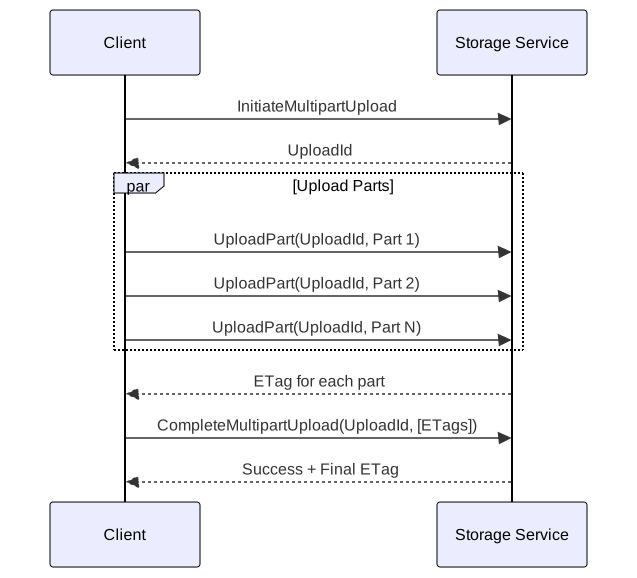
Design Decisions
Part size: 5 MB minimum, 5 GB maximum (S3). Larger parts = fewer requests, better throughput. Smaller parts = finer retry granularity.
Part limit: 10,000 parts maximum. For 5 TB max object size with 10,000 parts → ~500 MB minimum part size for largest files.
ETag tracking: Each part returns an ETag. CompleteMultipartUpload requires all ETags in order. Ensures integrity—client proves it received every part acknowledgment.
Failure handling:
- Individual part failure: Retry that part only
- Upload abandoned: Parts remain (consuming storage) until explicit AbortMultipartUpload or lifecycle cleanup
- Partial completion: ListParts shows which parts succeeded
Cleanup lifecycle: Configure AbortIncompleteMultipartUpload rule to auto-delete abandoned uploads after N days.
Real-World Architectures
AWS S3
Scale (2025): 500+ trillion objects, hundreds of exabytes, 200M+ requests/second peak.
Architecture (inferred from public information):
- Metadata: Distributed key-value store (likely Dynamo-derived), heavily cached
- Data: ShardStore (LSM-tree based), erasure-coded storage
- Consistency: Strong read-after-write for new objects
- Durability: 11 nines via erasure coding + multi-AZ distribution
Key design principles:
- Flat namespace (no directories to maintain)
- Metadata/data separation (independent scaling)
- Commodity hardware (fail-in-place design)
- Automatic sharding and rebalancing
Azure Blob Storage
Architecture: Three-layer design.
- Front-End: API gateway, auth, request routing
- Partition Layer: Object semantics, transaction ordering, strong consistency
- Stream Layer: Distributed storage, extents (large immutable chunks), LRC erasure coding (12,4,2)
Key innovations:
- Strong consistency (not eventual)—simplifies application logic
- LRC reduces repair bandwidth by 50% for single failures
- Stream layer provides durable append-only storage
Ceph RADOS
Architecture:
- OSDs (Object Storage Daemons): Store data, handle replication/recovery
- Monitors: Paxos cluster managing cluster state
- CRUSH algorithm: Deterministic placement (no central lookup)
Key design principle: Autonomous recovery. OSDs communicate peer-to-peer to detect failures and rebalance. Monitors coordinate but don’t participate in data path.
CRUSH placement: Hash-based algorithm computes object location from object ID + cluster map. No central metadata lookup for data path—clients compute placement directly.
MinIO
Philosophy: S3-compatible, erasure-coded, horizontally scalable.
Architecture:
- Minimum 4 nodes (production)
- Erasure sets: Fixed drive count (typically 8-16)
- Example: 12-drive setup = 6 data + 6 parity (50% overhead, 6-drive fault tolerance)
- Metadata stored alongside data (no separate metadata DB)
Use case: On-premises S3-compatible storage for Kubernetes, ML pipelines, backups.
Common Pitfalls
Pitfall 1: Under-Sizing Chunks for Deduplication
The mistake: Using tiny chunks (4-16 KB) assuming better deduplication.
Why it happens: “Smaller chunks = more dedup opportunities.”
The consequence: Metadata explosion. 1 PB with 8 KB chunks = 125 billion metadata entries. Index exceeds memory; lookups become I/O-bound; write throughput collapses.
The fix: Profile your workload. Measure actual dedup ratio at different chunk sizes. Often 256 KB-1 MB provides 90% of dedup benefit with 10× less metadata.
Pitfall 2: Ignoring Repair Bandwidth in Erasure Coding
The mistake: Choosing high-parity erasure coding (e.g., 10+6) for maximum fault tolerance.
Why it happens: “More parity = more durability.”
The consequence: When a drive fails, reconstruction reads from 10 drives to rebuild 1 shard. With 1000 drives and 5 failures/day, repair traffic saturates network. Cascading failures follow.
The fix: Consider LRC or lower parity ratios. Balance durability against repair bandwidth. Run failure simulations.
Pitfall 3: Synchronous Deduplication on Hot Path
The mistake: Inline deduplication with blocking index lookup on every write.
Why it happens: “Maximize storage savings immediately.”
The consequence: Write latency spikes when dedup index doesn’t fit in memory. P99 latency becomes unpredictable.
The fix: Hybrid approach—inline for hot index (memory), post-process for cold. Or accept higher storage temporarily for consistent latency.
Pitfall 4: Incomplete Multipart Upload Leaks
The mistake: Not configuring lifecycle rules for incomplete multipart uploads.
Why it happens: “Uploads always complete successfully” (they don’t).
The consequence: Failed uploads leave orphaned parts. Over months, orphaned parts consume significant storage (and cost).
The fix: Always configure AbortIncompleteMultipartUpload lifecycle rule (e.g., 7 days).
Pitfall 5: Single-Tier Storage for Mixed Workloads
The mistake: Storing all data on hot tier.
Why it happens: “Simplicity” or “we might need fast access.”
The consequence: 80%+ of data is rarely accessed but stored at hot-tier prices. Storage costs scale linearly with data volume.
The fix: Implement tiering (automatic or policy-based). Even simple “move to cold after 90 days” policies save 60%+ on storage costs for typical workloads.
Conclusion
Blob storage design balances storage efficiency, durability, and access performance through careful architectural choices:
- Choose chunking for your workload: Fixed-size for write-once analytics, CDC for backup/dedup-heavy workloads
- Separate metadata from data: They have fundamentally different scaling needs
- Match redundancy to access patterns: 3-way replication for hot data (fast reads), erasure coding for cold data (cost efficient)
- Design for failure: At scale, failures are constant. Repair bandwidth, GC overhead, and orphan cleanup are not edge cases—they’re steady-state operations
- Tier aggressively: Most data is write-once, read-rarely. Price it accordingly
The best blob storage system is invisible—until you look at the bill. Design for cost at scale from day one.
Appendix
Prerequisites
- Understanding of hash functions (SHA-256, CRC32)
- Familiarity with distributed systems concepts (replication, consistency)
- Basic knowledge of storage media characteristics (HDD vs SSD vs NVMe)
Summary
- Chunking strategies split files for parallel upload, deduplication, and redundancy. Fixed-size is simple; content-defined (CDC) enables better deduplication at higher CPU cost.
- Deduplication eliminates redundant data at file or block level. Block-level maximizes savings but requires significant index memory.
- Metadata separation enables independent scaling of metadata (IOPS-bound) and data (throughput-bound) layers.
- Redundancy via 3-way replication (simple, 3× overhead) or erasure coding (complex, 1.2-1.5× overhead) determines durability and cost.
- Tiered storage optimizes cost by matching storage media to access patterns—hot data on fast storage, cold data on cheap storage.
- Multipart uploads enable resilient, parallel uploads of large files with per-part retry.
References
- The Google File System (GFS) - SOSP 2003 - Original chunked distributed storage design
- Windows Azure Storage: A Highly Available Cloud Storage Service with Strong Consistency - SOSP 2011 - Three-layer architecture, strong consistency
- Erasure Coding in Windows Azure Storage - USENIX ATC 2012 - Local Reconstruction Codes (LRC)
- FastCDC: A Fast and Efficient Content-Defined Chunking Approach - USENIX ATC 2016 - Content-defined chunking optimization
- RADOS: A Scalable, Reliable Storage Service for Petabyte-scale Storage Clusters - Ceph object storage design
- A Fast, Minimal Memory, Consistent Hash Algorithm (Jump Consistent Hash) - Google’s O(1) memory consistent hashing
- HDFS Architecture Guide - Block placement, rack awareness
- How Amazon S3 Achieves 11 Nines Durability - Durability design principles
- Colossus: Successor to the Google File System - Distributed metadata evolution