SSG Performance Optimizations: Build, Cache, and Delivery
Production-grade Static Site Generation (SSG) architecture for AWS CloudFront delivery. Covers atomic deployments, pre-compression strategies, Lambda@Edge routing patterns, and Core Web Vitals optimization—with specific focus on design tradeoffs and operational failure modes that senior engineers encounter in production.

Abstract
SSG performance hinges on three architectural decisions that compound:
- Where computation happens: Build-time rendering eliminates request-time processing—Time to First Byte (TTFB) drops from 200-500ms (Server-Side Rendering) to <50ms (CDN edge)
- How deployments are structured: Atomic, versioned directories in S3 (
/build_001/,/build_002/) enable instant rollbacks via CloudFront origin path updates—no partial deployments, no corrupted states - Where intelligence lives: Lambda@Edge vs CloudFront Functions determines routing flexibility vs cost—CloudFront Functions at 0.60/1M for complex logic requiring network access
Critical tradeoffs:
| Decision | Optimizes For | Sacrifices |
|---|---|---|
| Pre-compression (Brotli Q11) | 15-20% smaller files vs Gzip | Build time (seconds vs milliseconds per file) |
| Lambda@Edge routing | Network access, body manipulation, 30s timeout | Cost (6x CloudFront Functions), cold starts |
| Atomic deployments | Instant rollback, no partial failures | S3 storage (retain N versions) |
| Origin Shield | Cache hit ratio, origin load reduction | Additional cost per request |
Core Web Vitals targets (75th percentile): CLS < 0.1, LCP (Largest Contentful Paint) < 2.5s, INP (Interaction to Next Paint) < 200ms
Static Site Generation Fundamentals
SSG shifts computation from request-time to build-time. The architectural implication: servers become stateless file delivery mechanisms, enabling CDN-first architectures where edge locations serve pre-built assets without origin round-trips.
Build-Time Rendering Model
SSG pre-renders all pages during a build phase, producing static HTML, CSS, and JavaScript files. This contrasts with database-driven systems (WordPress, Drupal) that generate HTML per-request.
Why build-time? Request-time rendering introduces latency per request (database queries, template rendering, API calls). Build-time amortizes this cost across all future requests—compute once, serve millions of times.
The process:
- Content ingestion: Markdown files, headless CMS APIs, or structured data
- Template application: React, Vue, Astro components, or templating languages (Liquid, Nunjucks)
- Asset generation: Optimized HTML, CSS, JS bundles
- Deployment: Upload to S3, configure CloudFront origin

Framework Comparison and Build Performance
Modern SSG frameworks evolved from simple generators (Jekyll) to sophisticated meta-frameworks supporting hybrid rendering. The key architectural differentiator: how much JavaScript ships to the client.
| Generator | Language/Framework | Key Architectural Feature | Build Performance | Ideal Use Case |
|---|---|---|---|---|
| Next.js 15 | JavaScript/React | Hybrid rendering (SSG, SSR, ISR) with per-page isrCacheTime revalidation | Moderate to Fast | Complex web applications, e-commerce sites, enterprise applications |
| Hugo | Go | Single-binary Go implementation; processes thousands of pages in seconds | Fastest | Large content-heavy sites, blogs, and documentation with thousands of pages |
| Astro 5.x | JavaScript/Astro | Islands Architecture—ships zero JS by default; up to 127 pages/second with optimization | Fast | Content-rich marketing sites, portfolios, and blogs focused on performance |
| Eleventy | JavaScript | Highly flexible; supports 10+ templating languages | Fast | Custom websites where developers want maximum control |
| Jekyll | Ruby | Mature, blog-aware, deeply integrated with GitHub Pages | Slower | Personal blogs, simple project websites, GitHub Pages deployments |
| Docusaurus | JavaScript/React | Documentation-optimized with versioning, search, and sidebar navigation | Fast | Technical documentation, knowledge bases, and open-source project sites |
Build performance insight: Astro 5.x benchmarks show optimization potential from 35 pages/second to 127 pages/second (3.6x improvement). Key bottleneck: API calls in child components cause per-page build slowdowns—solution is passing data as props from parent or marking components as client-only.
Why SSG: Architectural Tradeoffs
SSG adoption stems from specific tradeoffs that favor read-heavy, infrequently-updated content:
Performance: TTFB drops from 200-500ms (SSR with database queries) to <50ms (CDN edge). The 4-10x improvement compounds with geographic distribution—users in Sydney get the same latency as users in Virginia when assets are cached at edge locations.
Security: Attack surface reduction is structural, not configurational. No database connection at request time eliminates SQL injection. No server-side code execution eliminates RCE (Remote Code Execution) vectors. The security model becomes: “secure your build pipeline and S3 bucket permissions.”
Scalability: CDN cost model is per-request data transfer, not compute. A traffic spike from 1K to 1M requests doesn’t require provisioning servers—CloudFront handles distribution across 225+ edge locations automatically. Cost scales linearly with bandwidth, not exponentially with compute.
Developer experience: Git-based workflows enable PR previews, rollback via commit revert, and content versioning. The tradeoff: dynamic content requires either client-side fetching (slower perceived performance) or incremental static regeneration (ISR, increased complexity).
Rendering Strategy Selection
Rendering strategy is a per-page (or per-component) decision, not a global architecture choice. The deciding factors: data freshness requirements, SEO needs, and infrastructure cost tolerance.
Pattern Definitions
SSG: All pages generated at build time. Server delivers pre-built files. Ideal when content is identical for all users and changes infrequently (blogs, docs, marketing pages).
SSR: HTML generated per-request. Server fetches data, renders HTML, sends to client. Required when content must reflect current state (user dashboards, real-time data).
CSR (Client-Side Rendering): Server sends minimal HTML with JavaScript bundle. Browser fetches data and renders. Foundation of SPAs (Single Page Applications). Tradeoff: poor initial SEO, slower First Contentful Paint (FCP).
Comparative Analysis
| Metric | SSG | SSR | CSR |
|---|---|---|---|
| TTFB | <50ms (CDN edge) | 200-500ms (server processing) | Fast initial, slow meaningful content |
| First Contentful Paint | Fast (immediate HTML render) | Slower (wait for server HTML) | Slowest (blank until JS executes) |
| Time to Interactive | Fast (minimal hydration JS) | Slower (full-page hydration) | Slowest (full app render on client) |
| SEO | Excellent (crawlable HTML) | Excellent (crawlable HTML) | Poor without SSR fallback |
| Data Freshness | Stale (last build timestamp) | Real-time | Real-time |
| Infrastructure | S3 + CloudFront only | Node.js servers + scaling | Static hosting + API backend |
| Cost at Scale | Linear (bandwidth) | Exponential (compute) | Linear (bandwidth) + API costs |
Hybrid Rendering
Modern frameworks (Next.js 15, Astro 5.x) enable per-page rendering decisions:
- Marketing pages: SSG for performance
- User dashboards: SSR for real-time data
- Interactive widgets: CSR with client-side hydration (Islands Architecture in Astro)
Next.js 15 adds per-page isrCacheTime for fine-grained ISR (Incremental Static Regeneration) control—revalidate pricing pages every hour, blog posts every day.
AWS Deployment Architecture
Production SSG deployments require atomic releases, instant rollbacks, and cost-aware cache invalidation. The architecture decisions here determine your Mean Time to Recovery (MTTR) during incidents.
Atomic and Immutable Deployments
Why atomic? Partial deployments create inconsistent states—users might receive index.html from v2 but main.js from v1 if uploads are interrupted. Atomic deployments guarantee all-or-nothing transitions.
Implementation: Each build uploads to a unique, versioned directory:
s3://my-bucket/deployments/v1.2.0/s3://my-bucket/deployments/v1.2.1/s3://my-bucket/deployments/a8c3e5f/ # Git commit hashDesign rationale:
- Immutability: Once deployed, a version is never modified—debugging production issues means examining a frozen artifact
- Instant rollback: Change CloudFront origin path from
/v1.2.1/to/v1.2.0/—no re-upload, no rebuild - Parallel testing: QA can verify
/v1.2.1/while/v1.2.0/serves production traffic
Storage cost tradeoff: Retaining N versions costs N × build size. Implement lifecycle rules to delete versions older than 30-90 days, keeping the last 5-10 for rollback.
S3 Versioning: Anti-Pattern for Deployments
S3 Object Versioning tracks individual file history, not deployment snapshots. A deployment touching 500 files requires 500 individual restore operations for rollback—operationally infeasible during incidents.
When S3 versioning helps: Disaster recovery for accidental deletions, compliance requirements for audit trails.
When it fails: Application rollbacks requiring atomic state transitions across hundreds of files.
CloudFront Origin Path Rollbacks
The preferred strategy: single CloudFront distribution with origin path pointing to versioned S3 directories.
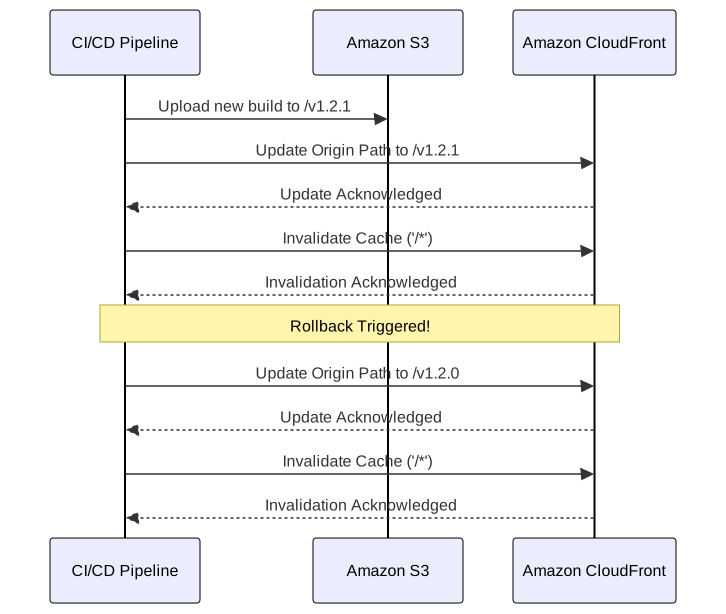
Deployment flow:
- CI/CD builds site, uploads to
s3://my-bucket/deployments/v1.2.1/ - Update CloudFront origin path to
/deployments/v1.2.1 - Invalidate cache (
/*) to purge old content
Rollback flow: Update origin path to /deployments/v1.2.0, invalidate cache. No rebuild required.
Cache invalidation cost: First 1,000 paths/month are free. Beyond: 0 (within free tier) to 0.05 average).
Propagation timing: Invalidations complete within seconds to minutes across 225+ edge locations. Not instant—plan for 1-2 minute visibility delay during deployments.
Lambda@Edge Build Version Routing
For sophisticated rollback and A/B testing scenarios, Lambda@Edge functions route requests based on headers, cookies, or percentage-based rules.
Why Lambda@Edge over CloudFront Functions? This pattern requires modifying the origin request after cache miss—CloudFront Functions can only modify viewer request/response and cannot change origin domain or path dynamically.
S3 Bucket Structure:
S3 Bucket├── build_001│ ├── index.html│ ├── assets/│ └── ...├── build_002│ ├── index.html│ ├── assets/│ └── ...├── build_003│ ├── index.html│ ├── assets/│ └── ...└── build_004 ├── index.html ├── assets/ └── ...CloudFront Configuration: Add a custom origin header in CloudFront’s origin configuration that is always updated with the new release post syncing all files to S3. This header contains the current build version.

Lambda@Edge Function:
5 collapsed lines
// Lambda@Edge function for build version routing// Reads x-build-version header set in CloudFront origin configuration// and routes requests to the appropriate versioned S3 directory
exports.handler = (event, context, callback) => { const request = event.Records[0].cf.request const headers = request.headers const buildVersion = headers["x-build-version"] ? headers["x-build-version"][0].value : "build_004"
// Add the build version prefix to the request URI if (request.uri === "/") { request.uri = `/${buildVersion}/index.html` } else { request.uri = `/${buildVersion}${request.uri}` }
callback(null, request)}Rollback Script:
6 collapsed lines
#!/bin/bash# Deployment script for updating CloudFront build version# Updates the origin custom header and invalidates cache# Usage: ./version-deployment.sh build_003 E1234567890ABCD
update_build_version() { local version=$1 local distribution_id=$2
# Update the origin custom header with new build version aws cloudfront update-distribution \ --id $distribution_id \ --distribution-config file://dist-config.json \ --if-match $(aws cloudfront get-distribution-config --id $distribution_id --query 'ETag' --output text)
# Invalidate cache to ensure new version is served aws cloudfront create-invalidation \ --distribution-id $distribution_id \ --paths "/*"}
update_build_version $1 $2Advantages:
- Instant rollbacks: Header update + cache invalidation
- A/B testing: Route users to different builds via cookies
- Gradual rollouts: Percentage-based traffic shifting
- Zero downtime: No service interruption
Cost tradeoff: Lambda@Edge at 0.10/1M. For 10M requests/month, the difference is $5/month—marginal for the flexibility gained.
CloudFront Functions vs Lambda@Edge Decision Matrix
This is a critical architectural decision affecting cost, latency, and capabilities:
| Capability | CloudFront Functions | Lambda@Edge |
|---|---|---|
| Execution locations | 225+ edge locations | 13 regional edge caches |
| Max execution time | <1ms | 5s (viewer), 30s (origin) |
| Scaling | 10M+ req/sec | 10K req/sec per region |
| Languages | JavaScript only | Node.js, Python |
| Network access | No | Yes |
| Body manipulation | No | Yes |
| Pricing | $0.10/1M invocations | $0.60/1M + execution time |
Use CloudFront Functions for: URL normalization, simple header manipulation, A/B test cookie reading, cache key manipulation.
Use Lambda@Edge for: Origin routing, third-party API calls, image transformation, request body manipulation, complex routing logic.
Origin Shield: Cache Hit Optimization
Origin Shield adds a centralized caching layer between edge locations and S3, collapsing simultaneous requests for the same object.
When to enable: Sites with global traffic where multiple edge locations request the same uncached object simultaneously. Origin Shield serves one request to S3, caches the response, and serves all waiting edges.
Cost tradeoff: Additional per-request charge. Justified when S3 request costs exceed Origin Shield costs—typically at high traffic volumes with cache miss rates >10%.
Core Web Vitals Optimization
Raw speed (TTFB, FCP) is necessary but insufficient. Visual stability—measured by CLS—determines perceived quality. A page that loads fast but shifts content during load frustrates users more than a slightly slower, stable page.
Current thresholds (75th percentile, as of 2025):
- CLS: <0.1 (Good), 0.1-0.25 (Needs Improvement), >0.25 (Poor)
- LCP: <2.5s (Good), 2.5-4.0s (Needs Improvement), >4.0s (Poor)
- INP: <200ms (Good), 200-500ms (Needs Improvement), >500ms (Poor)
Diagnosing CLS
Common CLS causes on static sites:
Images without dimensions: Browser reserves zero space initially. Image download triggers reflow, shifting all subsequent content.
Asynchronous embeds: Third-party ads, YouTube iframes, social widgets arrive after initial render. No reserved space = layout shift.
Web fonts: Fallback font renders first, web font swap causes text reflow due to different character metrics.
Client-side injections: Announcement banners, cookie consent dialogs injected after initial paint push content down.
Layout Shift Attribution API: Debug CLS by accessing LayoutShift.sources—returns up to 5 DOM elements causing shifts, sorted by impact area. sources[0] is the largest contributor.
CLS Mitigation Patterns
Image dimension reservation:
Always include width and height attributes. Modern browsers calculate aspect ratio and reserve space before download.
<img src="puppy.jpg" width="1280" height="720" style="width: 100%; height: auto;" alt="A cute puppy playing." />Async content placeholders:
Reserve space for embeds with explicit dimensions. Variable-height content: use min-height matching the most common size.
<div style="width: 300px; height: 250px; background-color: #f0f0f0;"> <!-- Ad unit injected here --></div>Font optimization:
Preload critical fonts and match fallback metrics to minimize swap shift.
<head> <link rel="preload" href="/fonts/my-critical-font.woff2" as="font" type="font/woff2" crossorigin /> <style> @font-face { font-family: "My Critical Font"; src: url("/fonts/my-critical-font.woff2") format("woff2"); font-display: swap; /* Show fallback immediately, swap when loaded */ } body { font-family: "My Critical Font", Arial, sans-serif; /* Match fallback metrics */ } </style></head>Font-display tradeoff: swap shows content immediately (better FCP) but risks CLS. optional avoids CLS but may show fallback font if web font loads slowly. Choose based on font metric similarity to fallback.
Dual Build Strategy for Responsive CLS
Problem: Mobile and desktop layouts have different component dimensions. Static generation at build time must choose one—rendering both causes CLS on one device type; rendering neither requires client-side hydration (slow).
Solution: Generate separate builds for mobile and desktop, route via user agent detection.
S3 structure:
s3://my-bucket/├── mobile/│ ├── index.html│ └── ...└── desktop/ ├── index.html └── ...Implementation with Lambda@Edge:
4 collapsed lines
// Lambda@Edge function for device-based routing// Routes to mobile/ or desktop/ prefixed paths based on user agent// Configure CloudFront cache key to include CloudFront-Is-Mobile-Viewer header
exports.handler = (event, context, callback) => { const request = event.Records[0].cf.request const headers = request.headers const userAgent = headers["user-agent"] ? headers["user-agent"][0].value : "" const isMobile = /Mobile|Android|iPhone|iPad/.test(userAgent) const devicePrefix = isMobile ? "/mobile" : "/desktop"
if (request.uri === "/") { request.uri = `${devicePrefix}/index.html` } else { request.uri = `${devicePrefix}${request.uri}` }
callback(null, request)}CloudFront cache key configuration:
- Include
CloudFront-Is-Mobile-Viewerheader in cache key - Mobile and desktop versions cache separately
- Lambda@Edge triggers on origin request (after cache miss)
Tradeoff: Build time doubles (2 builds), storage doubles. Justified when mobile/desktop layouts differ significantly and CLS impact is measurable.
Pre-Compression Architecture
Compression determines bandwidth and load time. The architectural decision: compress at build time (maximum compression, zero runtime cost) or at edge (simpler, lower compression ratio).
Edge vs Build-Time Compression
CloudFront edge compression:
- Enable via cache policy:
EnableAcceptEncodingGzip,EnableAcceptEncodingBrotli - CloudFront compresses on first request, caches result
- Uses lower compression levels to minimize latency
- Size limits: Only compresses objects 1KB–10MB
Build-time pre-compression:
- Compress during CI/CD with maximum quality (Brotli Q11, Gzip -9)
- Upload
.brand.gzvariants to S3 - Content negotiation via Lambda@Edge or CloudFront Functions
- Zero runtime compression cost
Compression ratio comparison:
| Content Type | Brotli Q11 vs Gzip -9 |
|---|---|
| JavaScript | 15% smaller |
| HTML | 20% smaller |
| CSS | 16% smaller |
Build time tradeoff: Brotli Q11 encoding takes ~1.8s for a 1.6MB JavaScript file vs ~0.05s for Gzip. Amortized across deployments, this is negligible. Decompression speed is identical—clients see no penalty.
CloudFront Compression Limitations
Edge compression constraints (CloudFront docs):
- Size range: Only compresses objects 1KB–10MB
- Cache race condition: If uncompressed copy is cached first, CloudFront serves uncompressed until TTL expires
- Best-effort: CloudFront may skip compression under load
- HTTPS requirement for Brotli: Browsers only request
brencoding over HTTPS (95.9% browser support as of 2025) - TTL dependency: Cache policy TTL must be >0 for compression to apply
Pre-Compression Implementation
Coordinates build process, S3 metadata, edge function content negotiation, and cache policy configuration.

Build step: After bundling, generate Gzip and Brotli variants:
# Brotli (quality 11, maximum compression)brotli -q 11 -o main.js.br main.js
# Gzip (level 9, maximum compression)gzip -9 -k main.js
S3 upload with metadata: Critical—set Content-Encoding header on compressed files:
aws s3 cp main.js.br s3://bucket/assets/main.js \ --content-encoding br \ --content-type application/javascriptContent negotiation function: Inspects Accept-Encoding header, rewrites URI to serve optimal variant.
4 collapsed lines
// Lambda@Edge content negotiation function// Inspects Accept-Encoding header and rewrites URI to serve pre-compressed files// Requires pre-compressed .br and .gz files in S3 with correct Content-Encoding metadata
exports.handler = (event, context, callback) => { const request = event.Records[0].cf.request const headers = request.headers const acceptEncoding = headers["accept-encoding"] ? headers["accept-encoding"][0].value.toLowerCase() : ""
// Determine the best compression format (prefer Brotli over Gzip) let compressionSuffix = "" if (acceptEncoding.includes("br")) { compressionSuffix = ".br" } else if (acceptEncoding.includes("gzip")) { compressionSuffix = ".gz" }
// Rewrite the request URI to include the compression suffix if (compressionSuffix && request.uri.match(/\.(js|css|html|svg)$/)) { request.uri = request.uri + compressionSuffix }
callback(null, request)}CloudFront configuration:
- Cache policy: Include
Accept-Encodingheader in cache key (ensures separate cache entries per encoding) - Disable automatic compression: Set “Compress Objects Automatically” to No
- Origin request policy: Forward
Accept-Encodingto S3
Production Impact
E-commerce site benchmark (production deployment):
- Uncompressed size: 3.7MB
- Brotli Q11: ~247KB (15:1 ratio)
- Gzip -9: ~463KB (8:1 ratio)
- Bandwidth savings: 85-90%
- Load time improvement: 40-60% faster
The pattern shifts content negotiation from web server to CDN edge—serverless architecture serving optimal assets per-client capability.
Edge Redirect Strategies
URL redirects preserve SEO equity, fix broken links, and enable site restructuring. The architectural decision: where does redirect logic execute?
Client-Side Redirects (Meta Refresh)
Suitable for simple cases but incurs full page download before redirect.
<!doctype html><html> <head> <title>Redirecting to https://path/to/redirect</title> <meta http-equiv="refresh" content="0;url=https://path/to/redirect" /> <meta name="robots" content="noindex" /> <link rel="canonical" href="https://path/to/redirect" /> </head> <body> <a href="https://path/to/redirect">Redirect to https://path/to/redirect</a> </body></html>SEO consideration: Search engines follow meta refresh but prefer server-side 301 redirects for link equity transfer.
S3 Routing Rules
Critical limitation: S3 routing rules only work with public website endpoints, not private buckets with Origin Access Control (OAC). For production SSG architectures using private S3 + CloudFront, this method is unavailable.
Additionally:
- Limited to 50 rules per bucket
- Redirect executes at origin, not edge (full round-trip: Browser → CloudFront → S3 → redirect)
- No programmatic logic—pattern matching only
{ "RoutingRules": [ { "Condition": { "KeyPrefixEquals": "docs/" }, "Redirect": { "ReplaceKeyPrefixWith": "documents/" } } ]}Recommendation: Use CloudFront Functions or Lambda@Edge instead—faster, more flexible, works with private buckets.
Lambda@Edge Edge Redirects
Redirects execute at edge location before cache lookup—minimal latency (Browser → CloudFront → Browser).
10 collapsed lines
// A Lambda@Edge function for managing redirects at the edge."use strict"
// Redirect rules can be managed within the function or loaded from an external sourceconst redirectMap = { "/old-product-page": { destination: "/new-product-page", httpStatus: 301 }, "/promo": { destination: "/current-sale", httpStatus: 302 }, "/legacy-docs": { destination: "https://docs.example.com", httpStatus: 301 },}
exports.handler = (event, context, callback) => { const request = event.Records[0].cf.request const uri = request.uri
if (redirectMap[uri]) { const redirect = redirectMap[uri] const response = { status: redirect.httpStatus.toString(), statusDescription: redirect.httpStatus === 301 ? "Moved Permanently" : "Found", headers: { location: [ { key: "Location", value: redirect.destination, }, ], "cache-control": [ { key: "Cache-Control", value: "max-age=3600", // Cache the redirect response for 1 hour }, ], }, } // Return the redirect response immediately callback(null, response) } else { // No redirect rule matched, allow the request to proceed callback(null, request) }}Advantages over S3 routing:
- Latency: Single hop vs origin round-trip
- Scalability: Redirect map in DynamoDB supports thousands of rules, updated without function redeployment
- Flexibility: Programmatic logic (geo-redirects, device detection, A/B routing)
- Private bucket compatible: Works with OAC-protected S3 origins
Alternative: CloudFront Functions: For simple redirect maps (no network access needed), CloudFront Functions at 0.60/1M. Use Lambda@Edge only when you need DynamoDB lookups or complex logic.
Advanced Deployment Patterns
For business-critical applications requiring gradual rollouts and instant rollback capabilities.
Blue-Green Deployments
Maintain two parallel production environments (Blue, Green). Traffic switches atomically between them.
Why Lambda@Edge for blue-green? Cookie-based routing requires reading request headers and modifying origin—capabilities only available in Lambda@Edge, not CloudFront Functions.
Architecture: Single CloudFront distribution, Lambda@Edge routes based on cookie or header:
5 collapsed lines
// This function routes traffic to a 'blue' or 'green' S3 origin// based on a cookie. This allows for targeted testing and instant switching.const blueOriginDomain = "my-site-blue.s3.amazonaws.com"const greenOriginDomain = "my-site-green.s3.amazonaws.com"
exports.handler = async (event) => { const request = event.Records[0].cf.request const headers = request.headers
// Default to the stable 'blue' origin let targetOriginDomain = blueOriginDomain
// Check for a routing cookie to direct traffic to 'green' if (headers.cookie) { for (const cookie of headers.cookie) { // A cookie 'routing=green' will switch the user to the green environment if (cookie.value.includes("routing=green")) { targetOriginDomain = greenOriginDomain break } } }
// Update the origin domain in the request that CloudFront will send to S3 request.origin.s3.domainName = targetOriginDomain
// Also update the Host header to match the S3 origin domain headers["host"] = [ { key: "Host", value: targetOriginDomain, }, ]
return request}Canary Releases
Shift traffic gradually (1% → 5% → 25% → 100%) while monitoring error rates and performance metrics.
IP-based consistent routing: Hash client IP to ensure same user sees same version across requests (session stability):
4 collapsed lines
// Lambda@Edge canary release router// Routes a percentage of traffic to canary origin based on IP hash// Provides consistent routing per user for session stability
exports.handler = async (event) => { const request = event.Records[0].cf.request const headers = request.headers
// Get user identifier (IP, user agent hash, etc.) const userIP = headers["x-forwarded-for"] ? headers["x-forwarded-for"][0].value : "unknown"
// Simple hash function to determine canary percentage const hash = userIP.split(".").reduce((a, b) => a + parseInt(b), 0) const canaryPercentage = 10 // 10% of traffic
// Route to canary if user falls within the percentage const shouldUseCanary = hash % 100 < canaryPercentage
const targetOrigin = shouldUseCanary ? "canary-bucket.s3.amazonaws.com" : "production-bucket.s3.amazonaws.com"
request.origin.s3.domainName = targetOrigin
return request}Monitoring during canary: Track error rates, latency percentiles, and Core Web Vitals for canary cohort vs production. Automated rollback triggers when metrics degrade beyond threshold.
Conclusion
SSG performance optimization is an exercise in shifting complexity: from request-time to build-time (pre-rendering, pre-compression), from origin to edge (Lambda@Edge routing, CloudFront caching), from runtime to deploy-time (atomic deployments, versioned rollbacks).
Key architectural principles:
-
Build-time is free, request-time is expensive: Pre-render, pre-compress, pre-compute. Every millisecond saved at build time compounds across millions of requests.
-
Atomic deployments enable instant rollback: Versioned S3 directories + CloudFront origin path updates. No partial failures, no corrupted states.
-
Edge intelligence reduces latency: Lambda@Edge for complex routing, CloudFront Functions for simple transformations. Choose based on capability requirements, not defaults.
-
Core Web Vitals are architectural constraints: CLS <0.1, LCP <2.5s, INP <200ms aren’t just metrics—they’re design requirements that influence dual-build strategies, font loading, and image dimension handling.
-
Cost awareness at scale: CloudFront Functions at 0.60/1M. Origin Shield adds cost but reduces S3 requests. Cache invalidations free for first 1,000/month.
The future of high-performance delivery isn’t choosing between static and dynamic—it’s per-component rendering decisions orchestrated at the edge.
Appendix
Prerequisites
- AWS fundamentals: S3, CloudFront, Lambda
- CDN caching concepts: TTL, cache keys, invalidation
- HTTP compression: Gzip, Brotli, Accept-Encoding header
- Core Web Vitals metrics and measurement
Terminology
- TTFB (Time to First Byte): Time from request initiation to first byte of response
- FCP (First Contentful Paint): Time until first content renders on screen
- LCP (Largest Contentful Paint): Time until largest content element renders
- CLS (Cumulative Layout Shift): Sum of unexpected layout shifts during page lifecycle
- INP (Interaction to Next Paint): Latency of user interactions (replaces FID)
- ISR (Incremental Static Regeneration): Re-generating static pages on-demand after initial build
- OAC (Origin Access Control): CloudFront mechanism to restrict S3 access
- Origin Shield: CloudFront caching layer between edge locations and origin
Summary
- SSG shifts computation from request-time to build-time, reducing TTFB from 200-500ms to <50ms
- Atomic deployments via versioned S3 directories enable instant rollback
- Lambda@Edge (0.10/1M) for simple transformations
- Pre-compression with Brotli Q11 achieves 15-20% smaller files than Gzip
- Core Web Vitals targets: CLS <0.1, LCP <2.5s, INP <200ms
- Cache invalidation: 1,000 paths/month free, $0.005/path beyond
References
AWS Documentation (Primary)
- CloudFront Serving Compressed Files - Compression limits, Brotli requirements
- CloudFront Functions vs Lambda@Edge - Capability comparison, pricing
- CloudFront Origin Shield - Architecture, benefits
- CloudFront Cache Policy Best Practices - Cache key configuration
- S3 Website Routing Rules - 50 rule limit, limitations
- CloudFront Invalidation Pricing - Free tier, cost structure
- Zero-downtime Deployments with CloudFront - Blue-green architecture
Web Vitals (Google)
- Core Web Vitals Thresholds - CLS, LCP, INP thresholds
- Cumulative Layout Shift (CLS) - Measurement, optimization
- CLS Optimization Guide - Mitigation patterns
Compression
- Brotli Browser Support - 95.9% as of 2025
- Brotli Compression Research (Cloudflare) - Compression ratio benchmarks
- Squash Compression Benchmark - Algorithm comparison
Framework Documentation
- Next.js Static Export - SSG, ISR configuration
- Astro Performance - Islands architecture, build optimization
Web Standards
- LayoutShiftAttribution API (MDN) - CLS debugging
- HTTP Redirections (MDN) - 301 vs 302 semantics