Statsig Experimentation Platform: Architecture and Rollouts
Statsig is a unified experimentation platform that combines feature flags, A/B testing, and product analytics into a single, cohesive system. This post explores the internal architecture, SDK integration patterns, and implementation strategies for both browser and server-side environments.

TLDR
• Unified Platform: Statsig integrates feature flags, experimentation, and analytics through a single data pipeline, eliminating data silos and ensuring statistical integrity
• Dual SDK Architecture: Server SDKs download full config specs and evaluate locally (sub-1ms), while client SDKs receive pre-evaluated results during initialization
• Deterministic Assignment: SHA-256 hashing with unique salts ensures consistent user bucketing across platforms and sessions
• High-Performance Design: Global CDN distribution for configs, multi-stage event pipeline for durability, and hybrid data processing (Spark + BigQuery)
• Flexible Deployment: Supports cloud-hosted, warehouse-native, and hybrid models for different compliance and data sovereignty requirements
• Advanced Caching: Sophisticated caching strategies including bootstrap initialization, local storage, and edge integration patterns
• Override System: Multi-layered override capabilities for development, testing, and debugging workflows
Core Architecture Principles
Statsig’s architecture is built on several fundamental principles that enable its high-performance, scalable feature flagging and experimentation platform:
• Deterministic Evaluation: Every evaluation produces consistent results across different platforms and SDK implementations. Given the same user object and experiment state, Statsig always returns identical results whether evaluated on client or server SDKs.
• Stateless SDK Model: SDKs don’t maintain user assignment state or remember previous evaluations. Instead, they rely on deterministic algorithms to compute assignments in real-time, eliminating the need for distributed state management.
• Local Evaluation: After initialization, virtually all SDK operations execute without network requests, typically completing in under 1ms. Server SDKs maintain complete rulesets in memory, while client SDKs receive pre-computed evaluations during initialization.
• Unified Data Pipeline: Feature flags, experimentation, and analytics share a single data pipeline, ensuring data consistency and eliminating silos.
• High-Performance Design: Optimized for sub-millisecond evaluation latencies with global CDN distribution and sophisticated caching strategies.

Unified Platform Philosophy
Statsig’s most fundamental design tenet is its “unified system” approach where feature flags, experimentation, product analytics, and session replay all share a single, common data pipeline. This directly addresses the prevalent industry problem of “tool sprawl” where organizations employ disparate services for different functions.

Data Consistency Guarantees
When a feature flag exposure and a subsequent conversion event are processed through the same pipeline, using the same user identity model and metric definitions, the causal link between them becomes inherently trustworthy. This architectural choice fundamentally increases the statistical integrity and reliability of experiment results.
Core Service Components
The platform is composed of distinct, decoupled microservices:
- Assignment Service: Determines user assignments to experiment variations and feature rollouts
- Feature Flag/Configuration Service: Manages rule definitions and config specs
- Metrics Pipeline: High-throughput system for event ingestion, processing, and analysis
- Analysis Service: Statistical engine computing experiment results using methods like CUPED and sequential testing
SDK Architecture Deep Dive
Server vs. Client SDK Dichotomy
Statsig employs two fundamentally different models for configuration synchronization and evaluation:
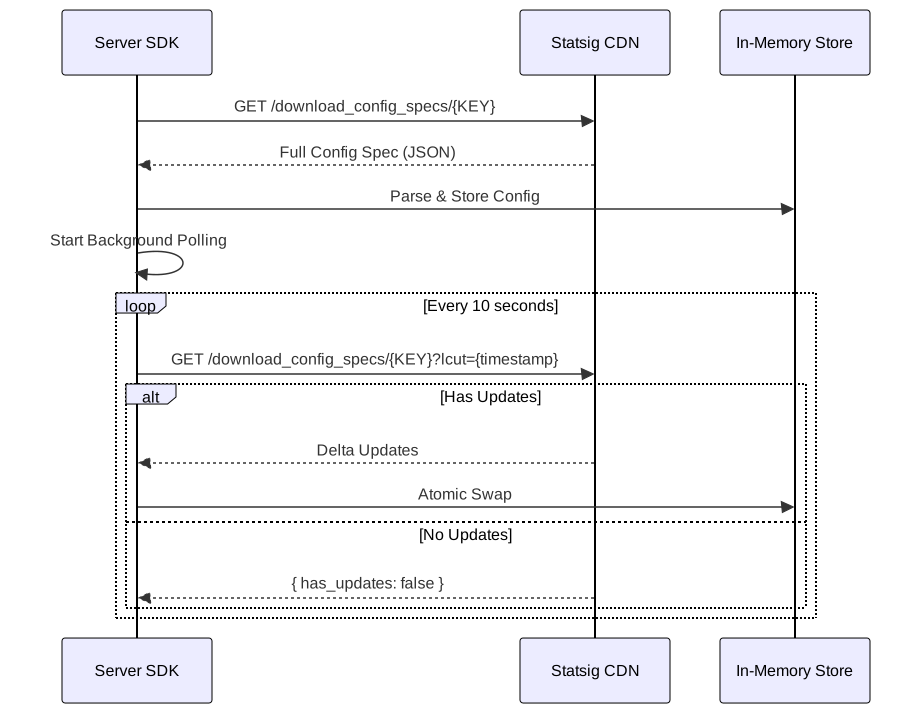
Server SDK Architecture

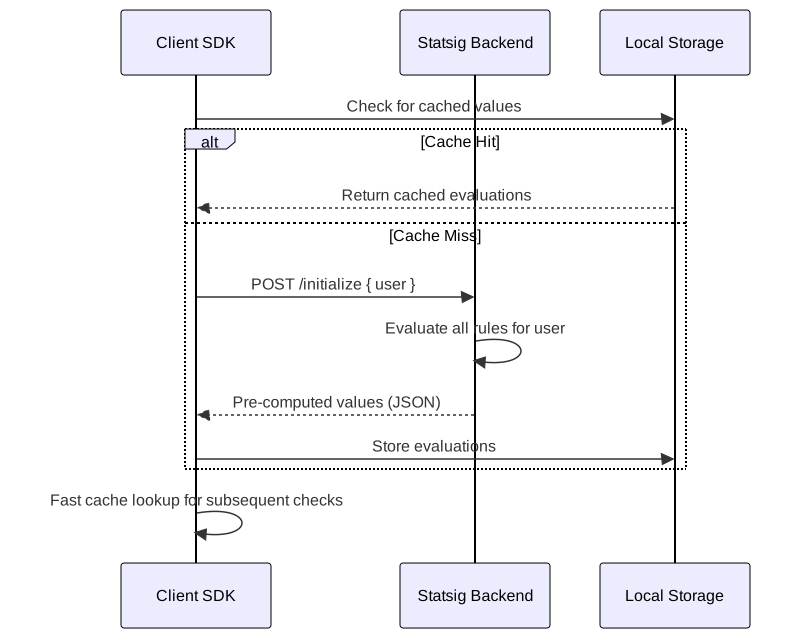
Client SDK Architecture

Server SDKs (Node.js, Python, Go, Java)
2 collapsed lines
// Download & Evaluate Locally Modelimport { Statsig } from "@statsig/statsig-node-core"
// Initialize with full config downloadconst statsig = await Statsig.initialize("secret-key", { environment: { tier: "production" }, rulesetsSyncIntervalMs: 10000,})
// Synchronous, in-memory evaluation - the key patternfunction evaluateUserFeatures(user: StatsigUser) { const isFeatureEnabled = statsig.checkGate(user, "new_ui_feature") const config = statsig.getConfig(user, "pricing_tier") const experiment = statsig.getExperiment(user, "recommendation_algorithm")
return { newUI: isFeatureEnabled, pricing: config.value, experiment: experiment.value, }6 collapsed lines
}
// Sub-1ms evaluation, no network callsconst result = evaluateUserFeatures({ userID: "user123", email: "user@example.com", custom: { plan: "premium" },})Characteristics:
- Downloads entire config spec during initialization
- Performs evaluation logic locally, in-memory
- Synchronous, sub-millisecond operations
- No network calls for individual checks
Client SDKs (JavaScript, React, iOS, Android)
2 collapsed lines
// Pre-evaluated on Initialize Modelimport { StatsigClient } from "@statsig/js-client"
// Initialize with user context - triggers network requestconst client = new StatsigClient("client-key")await client.initializeAsync({ userID: "user123", email: "user@example.com", custom: { plan: "premium" },})
// Synchronous cache lookup - the key patternfunction getFeatureFlags() { const isFeatureEnabled = client.checkGate("new_ui_feature") const config = client.getConfig("pricing_tier") const experiment = client.getExperiment("recommendation_algorithm")
return { newUI: isFeatureEnabled, pricing: config.value, experiment: experiment.value, }}
const result = getFeatureFlags() // Fast cache lookup, no network callsCharacteristics:
- Sends user object to
/initializeendpoint during startup - Receives pre-computed, tailored JSON payload
- Subsequent checks are fast, synchronous cache lookups
- No exposure of business logic to client
Configuration Synchronization
Server-Side Configuration Management
Server SDKs maintain authoritative configuration state by downloading complete rule definitions:
interface ConfigSpecs { feature_gates: Record<string, FeatureGateSpec> dynamic_configs: Record<string, DynamicConfigSpec> layer_configs: Record<string, LayerSpec> id_lists: Record<string, string[]> has_updates: boolean time: number}Synchronization Process:
- Initial download from CDN endpoint:
https://api.statsigcdn.com/v1/download_config_specs/{SDK_KEY}.json - Background polling every 10 seconds (configurable)
- Delta updates when possible using
company_lcuttimestamp - Atomic swaps of in-memory store for consistency
Client-Side Evaluation Caching
Client SDKs receive pre-evaluated results rather than raw configuration rules:
{ "feature_gates": { "gate_name": { "name": "gate_name", "value": true, "rule_id": "rule_123", "secondary_exposures": [...] } }, "dynamic_configs": { "config_name": { "name": "config_name", "value": {"param1": "value1"}, "rule_id": "rule_456", "group": "treatment" } }}Deterministic Assignment Algorithm
Hashing Implementation
Statsig’s bucket assignment algorithm ensures consistent, deterministic user allocation:

8 collapsed lines
// Statsig's deterministic assignment algorithm (simplified)import { createHash } from "crypto"
interface AssignmentResult { bucket: number assigned: boolean group?: string}
function assignUser(userId: string, salt: string, allocation: number = 10000): AssignmentResult { // 1. Concatenate salt with user ID const input = salt + userId
// 2. SHA-256 hash for uniform distribution const hash = createHash("sha256").update(input).digest("hex")
// 3. Extract first 8 hex chars (32 bits) and convert to integer const first8Bytes = hash.substring(0, 8) const hashInt = parseInt(first8Bytes, 16)
// 4. Modulo 10,000 for experiments (1,000 for layers) const bucket = hashInt % allocation
// 5. Compare bucket to threshold for assignment const assigned = bucket < allocation * 0.1 // 10% allocation example
return { bucket, assigned, group: assigned ? "treatment" : "control" }}
3 collapsed lines
// Usageconst result = assignUser("user123", "experiment_salt_abc123", 10000)console.log(`Bucket ${result.bucket}, group: ${result.group}`)Process:
- Salt Creation: Each rule generates a unique, stable salt
- Input Concatenation: Salt + user identifier (userID, stableID, or customID)
- Hashing: SHA-256 hashing for cryptographic security and uniform distribution
- Bucket Assignment: First 8 bytes converted to integer, then modulo 10,000 (experiments) or 1,000 (layers)
Assignment Consistency Guarantees
- Cross-platform consistency: Identical assignments across client/server SDKs
- Temporal consistency: Maintains assignments across rule modifications
- User attribute independence: Assignment depends only on user identifier and salt
Browser SDK Implementation
Multi-Strategy Initialization Framework
The browser SDK implements four distinct initialization strategies:

1. Asynchronous Awaited Initialization
const client = new StatsigClient("client-key")await client.initializeAsync(user) // Blocks rendering until completeUse Case: When data freshness is critical and some rendering delay is acceptable.
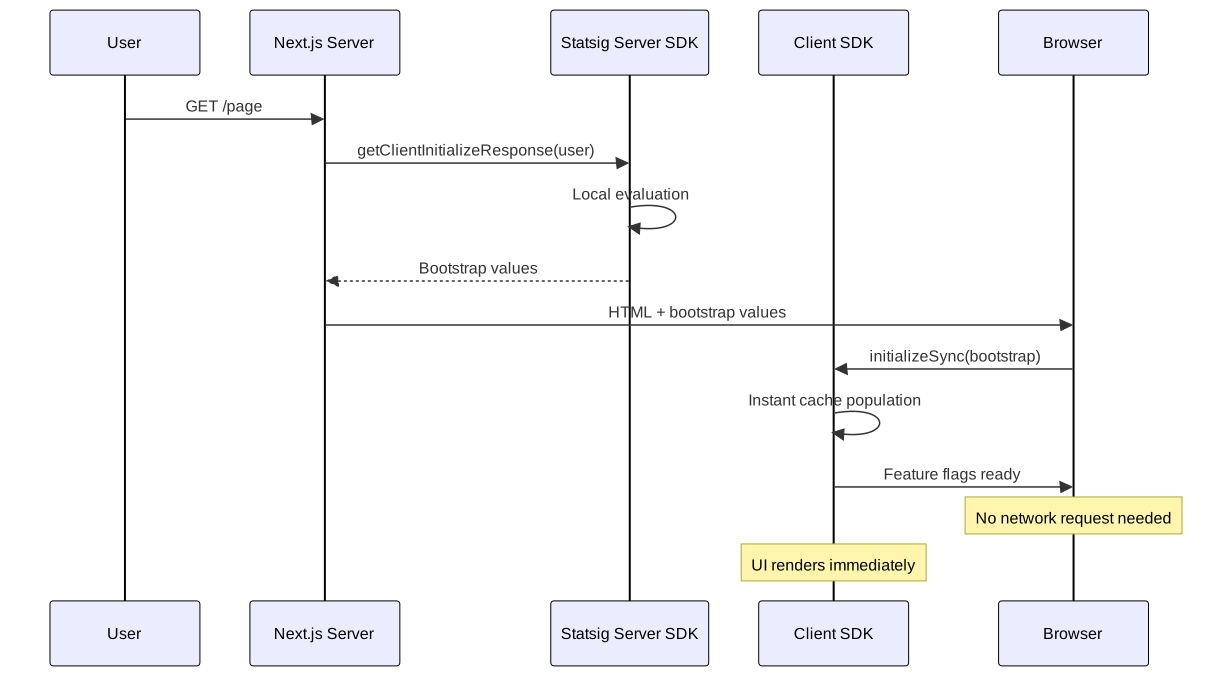
2. Bootstrap Initialization (Recommended)
// Server-side (Node.js/Next.js)const serverStatsig = await Statsig.initialize("secret-key")const bootstrapValues = serverStatsig.getClientInitializeResponse(user)
// Client-sideconst client = new StatsigClient("client-key")client.initializeSync({ initializeValues: bootstrapValues })Use Case: Optimal balance between performance and freshness, eliminates UI flicker.
3. Synchronous Initialization
const client = new StatsigClient("client-key")client.initializeSync(user) // Uses cache, fetches updates in backgroundUse Case: Progressive web applications where some staleness is acceptable.
Cache Management and Storage
The browser SDK employs sophisticated caching mechanisms:
interface CachedEvaluations { feature_gates: Record<string, FeatureGateResult> dynamic_configs: Record<string, DynamicConfigResult> layer_configs: Record<string, LayerResult> time: number company_lcut: number hash_used: string evaluated_keys: EvaluatedKeys}Cache Invalidation: Occurs when company_lcut timestamp changes, indicating configuration updates.
Node.js Server SDK Integration
Server-Side Architecture Patterns

7 collapsed lines
import { Statsig } from "@statsig/statsig-node-core"
// Initialize once at startupconst statsig = await Statsig.initialize("secret-key", { environment: { tier: "production" }, rulesetsSyncIntervalMs: 10000,})
// Request handler - evaluations are synchronous, sub-1msfunction handleRequest(req: Request, res: Response) { const user = { userID: req.user.id, email: req.user.email, custom: { plan: req.user.plan }, }
const isFeatureEnabled = statsig.checkGate(user, "new_feature") const config = statsig.getConfig(user, "pricing_config")
res.json({ feature: isFeatureEnabled, pricing: config.value })}Background Synchronization
Server SDKs implement continuous background synchronization:
// Configurable polling intervalconst statsig = await Statsig.initialize("secret-key", { rulesetsSyncIntervalMs: 30000, // 30 seconds for less critical updates})
// Delta updates when possible// Atomic swaps ensure consistencyData Adapter Ecosystem
For enhanced resilience, Statsig supports pluggable data adapters via a generic interface. You implement the DataAdapter interface to integrate your storage solution:
2 collapsed lines
// Custom DataAdapter implementation for Redisimport { createClient, RedisClientType } from "redis"
interface DataAdapter { initialize(): Promise<void> get(key: string): Promise<string | null> set(key: string, value: string): Promise<void> shutdown(): Promise<void>}
class RedisDataAdapter implements DataAdapter { private client: RedisClientType
constructor(private config: { host: string; port: number; password?: string }) { this.client = createClient({ url: `redis://${config.host}:${config.port}` }) }
async initialize() { await this.client.connect() }
// Cache keys follow: statsig|{path}|{format}|{hashedSDKKey} async get(key: string) { return this.client.get(key) }
async set(key: string, value: string) { await this.client.set(key, value) }
async shutdown() { await this.client.quit() }}Best practice: Separate read and write responsibilities—webservers should only read from the cache, while a dedicated service or cron job handles writing updates to reduce contention.
Performance Optimization Strategies
Bootstrap Initialization for Next.js
4 collapsed lines
import { Statsig } from "@statsig/statsig-node-core"
const statsig = await Statsig.initialize("secret-key")
// Returns pre-computed evaluations for client SDK bootstrapexport default async function handler(req: NextApiRequest, res: NextApiResponse) { const user = { userID: req.headers["x-user-id"] as string, email: req.headers["x-user-email"] as string, }
const bootstrapValues = statsig.getClientInitializeResponse(user) res.json(bootstrapValues)}2 collapsed lines
import { StatsigClient } from '@statsig/js-client';
function MyApp({ Component, pageProps, bootstrapValues }) { const [statsig, setStatsig] = useState(null);
useEffect(() => { const client = new StatsigClient('client-key'); // Synchronous init with server-provided values - no network request client.initializeSync({ initializeValues: bootstrapValues }); setStatsig(client); }, []);
return <Component {...pageProps} statsig={statsig} />;}Edge Integration Patterns
// Vercel Edge Config integration (official adapter)import { EdgeConfigDataStore } from "@statsig/vercel-server"
const statsig = await Statsig.initialize("secret-key", { dataStore: new EdgeConfigDataStore(process.env.EDGE_CONFIG_ID),})Override System Architecture
Feature Gate Overrides

// Console-based overrides (highest precedence)// Configured in Statsig console for specific userIDs
// Local SDK overrides (for testing)statsig.overrideGate("my_gate", true, "user123")statsig.overrideGate("my_gate", false) // Global overrideExperiment Overrides
// Layer-level overrides for experimentsstatsig.overrideExperiment("my_experiment", "treatment", "user123")
// Local mode for testingconst statsig = await Statsig.initialize("secret-key", { localMode: true, // Disables network requests})Advanced Integration Patterns
Microservices Integration

// All services share the same Redis instance for config cachingconst redisAdapter = new RedisDataAdapter({ host: process.env.REDIS_HOST, port: parseInt(process.env.REDIS_PORT),})
const statsig = await Statsig.initialize("secret-key", { dataStore: redisAdapter, // Implements DataAdapter interface})Serverless Architecture Considerations

15 collapsed lines
// Cold start optimization: reuse SDK across invocationslet statsigInstance: Statsig | null = null
async function initStatsig() { if (!statsigInstance) { statsigInstance = await Statsig.initialize("secret-key", { dataStore: new RedisDataAdapter({ host: process.env.REDIS_HOST, port: parseInt(process.env.REDIS_PORT), }), }) } return statsigInstance}
// Key pattern: SDK instance persists across Lambda invocationsexport async function handler(event: APIGatewayEvent) { const statsig = await initStatsig() // Reuses existing instance const user = { userID: event.requestContext.authorizer.userId } const result = statsig.checkGate(user, "feature_flag")
return { statusCode: 200, body: JSON.stringify({ feature: result }) }}Practical Implementation Examples
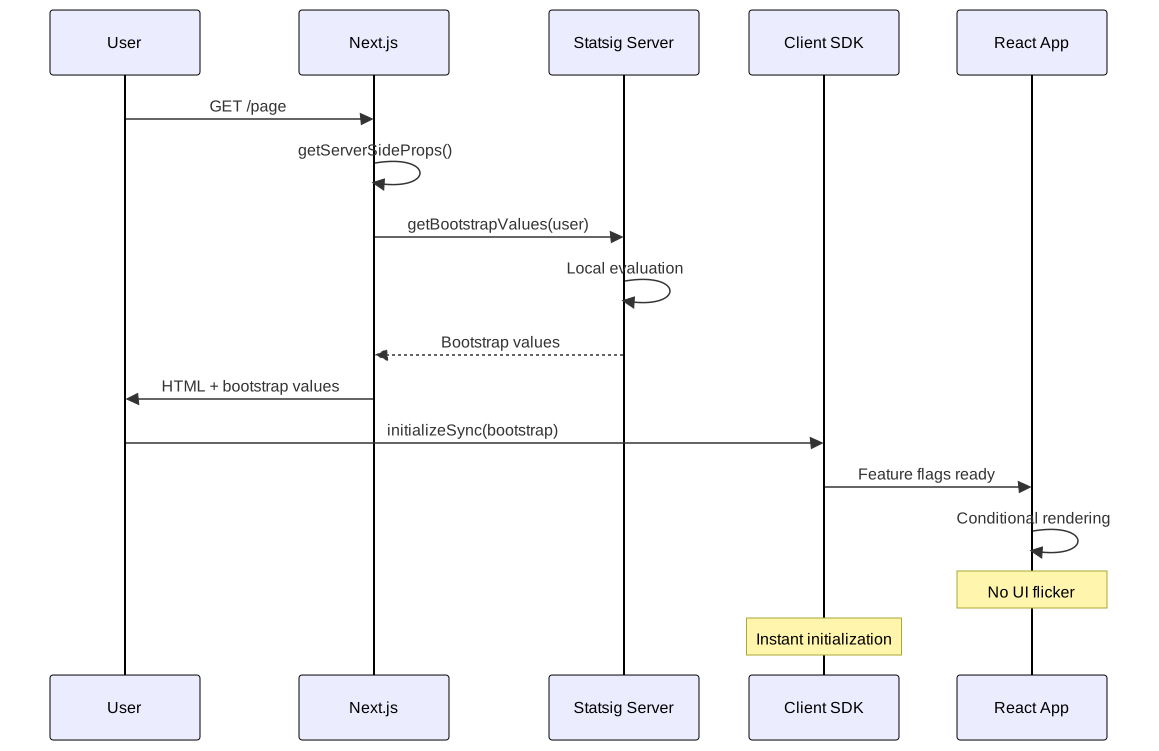
Next.js with Bootstrap Initialization
2 collapsed lines
import { Statsig } from "@statsig/statsig-node-core"
let statsigInstance: Statsig | null = null
// Singleton pattern for Next.js server-side usageexport async function getStatsig() { if (!statsigInstance) { statsigInstance = await Statsig.initialize(process.env.STATSIG_SECRET_KEY!) } return statsigInstance}
export async function getBootstrapValues(user: StatsigUser) { const statsig = await getStatsig() return statsig.getClientInitializeResponse(user)}4 collapsed lines
import { GetServerSideProps } from 'next';import { StatsigClient } from '@statsig/js-client';import { getBootstrapValues } from '../lib/statsig';
// Server-side: pre-compute evaluations for this userexport const getServerSideProps: GetServerSideProps = async (context) => { const user = { userID: context.req.headers['x-user-id'] as string || 'anonymous', custom: { source: 'web' } };
const bootstrapValues = await getBootstrapValues(user); return { props: { bootstrapValues, user } };};
// Client-side: instant initialization with no network requestexport default function Home({ bootstrapValues, user }) {6 collapsed lines
const [statsig, setStatsig] = useState<StatsigClient | null>(null);
useEffect(() => { const client = new StatsigClient(process.env.NEXT_PUBLIC_STATSIG_CLIENT_KEY!); client.initializeSync({ initializeValues: bootstrapValues }); setStatsig(client); }, [bootstrapValues]);
const isFeatureEnabled = statsig?.checkGate('new_feature') || false;
return ( <div> {isFeatureEnabled && <NewFeatureComponent />} <ExistingComponent /> </div> );}Node.js BFF (Backend for Frontend) Pattern
2 collapsed lines
import { Statsig } from "@statsig/statsig-node-core"
export class FeatureService { private statsig: Statsig
async initialize() { this.statsig = await Statsig.initialize(process.env.STATSIG_SECRET_KEY!) }
// Sub-1ms synchronous evaluations evaluateFeatures(user: StatsigUser) { return { newUI: this.statsig.checkGate(user, "new_ui"), pricing: this.statsig.getConfig(user, "pricing_tier"), experiment: this.statsig.getExperiment(user, "recommendation_algorithm"), } }
getBootstrapValues(user: StatsigUser) { return this.statsig.getClientInitializeResponse(user) }}4 collapsed lines
import { FeatureService } from "../services/feature-service"
const featureService = new FeatureService()
router.get("/features/:userId", async (req, res) => { const user = { userID: req.params.userId, email: req.headers["x-user-email"] as string, custom: { plan: req.headers["x-user-plan"] as string }, }
const features = featureService.evaluateFeatures(user) // Synchronous res.json(features)})
router.get("/bootstrap/:userId", async (req, res) => { const user = { userID: req.params.userId } const bootstrapValues = featureService.getBootstrapValues(user) res.json(bootstrapValues)})Error Handling and Resilience
Network Failure Scenarios
Statsig SDKs are designed to handle various network failure scenarios gracefully:

2 collapsed lines
// Client SDK: graceful degradation on network failureconst client = new StatsigClient("client-key")
try { await client.initializeAsync(user)} catch (error) { // Fallback hierarchy: cached values → defaults → graceful degradation console.warn("Statsig initialization failed:", error) client.initializeSync(user) // Uses localStorage cache if available}
// All subsequent checks use cached values or return defaultsconst isEnabled = client.checkGate("feature") // Never throws
// Server SDK: data store fallback for cold startsconst statsig = await Statsig.initialize("secret-key", {6 collapsed lines
dataStore: new RedisDataAdapter({ host: process.env.REDIS_HOST, port: parseInt(process.env.REDIS_PORT), }), rulesetsSyncIntervalMs: 10000,})Fallback Mechanisms
Client SDK Fallbacks:
- Cached Values: Uses previously cached evaluations from localStorage
- Default Values: Falls back to code-defined defaults
- Graceful Degradation: Continues operation with stale data
Server SDK Fallbacks:
- Data Store: Loads configurations from Redis/other data stores
- In-Memory Cache: Uses last successfully downloaded config
- Health Checks: Monitors SDK health and reports issues
Monitoring and Observability
SDK Health Monitoring

6 collapsed lines
const statsig = await Statsig.initialize("secret-key", { environment: { tier: "production" },})
const metrics = new MetricsClient() // Your monitoring system
// Track evaluation latency (should be <1ms for server SDK)function checkGateWithMetrics(user: StatsigUser, gateName: string) { const startTime = performance.now() const result = statsig.checkGate(user, gateName) const latency = performance.now() - startTime
metrics.histogram("statsig.evaluation.latency_ms", latency) metrics.increment("statsig.evaluation.count", { gate: gateName })
return result}
// Key metrics to monitor:// - Evaluation latency: <1ms for server SDK// - Cache hit rate: percentage using cached configs// - Sync success rate: config download success// - Error rates: network failures, parsing errorsPerformance Metrics
Key Metrics to Monitor:
- Evaluation Latency: Should be <1ms for server SDKs
- Cache Hit Rate: Percentage of evaluations using cached configs
- Sync Success Rate: Percentage of successful config downloads
- Error Rates: Network failures, parsing errors, evaluation errors
Security Considerations
API Key Management

// Environment-specific keys - never commit secretsconst statsigKey = process.env.NODE_ENV === "production" ? process.env.STATSIG_SECRET_KEY : process.env.STATSIG_DEV_KEY
const statsig = await Statsig.initialize(statsigKey)Data Privacy
User Data Handling:
- PII Protection: Never log sensitive user data
- Data Minimization: Only send necessary user attributes
- Encryption: All data transmitted over HTTPS/TLS
// Minimize PII sent to Statsig - only include attributes needed for targetingconst sanitizedUser = { userID: user.id, // Required for assignment custom: { plan: user.plan, // Needed for plan-based targeting region: user.region, // Needed for geo-targeting // Never include: SSN, credit card, passwords, full addresses },}Performance Benchmarks
Evaluation Performance
Server SDK Benchmarks:
- Cold Start: ~50-100ms (first evaluation after initialization)
- Warm Evaluation: <1ms (subsequent evaluations)
- Memory Usage: ~10-50MB (depending on config size)
- Throughput: 10,000+ evaluations/second per instance
Client SDK Benchmarks:
- Bootstrap Initialization: <5ms (with pre-computed values)
- Async Initialization: 100-500ms (network dependent)
- Cache Lookup: <0.1ms
- Bundle Size: ~50-100KB (gzipped)
Scalability Considerations
// Shared config cache ensures consistent evaluation across instancesconst redisAdapter = new RedisDataAdapter({ host: process.env.REDIS_HOST, port: parseInt(process.env.REDIS_PORT),})
const statsig = await Statsig.initialize("secret-key", { dataStore: redisAdapter, rulesetsSyncIntervalMs: 5000, // More frequent sync for consistency})Best Practices and Recommendations
1. Initialization Strategy Selection
Choose Bootstrap Initialization When:
- UI flicker is unacceptable
- Server-side rendering is available
- Performance is critical
Choose Async Initialization When:
- Real-time updates are required
- Server-side rendering isn’t available
- Some rendering delay is acceptable
2. Configuration Management
7 collapsed lines
// Singleton pattern for centralized configurationclass StatsigConfig { private static instance: StatsigConfig private statsig: Statsig | null = null
static async getInstance(): Promise<StatsigConfig> { if (!StatsigConfig.instance) { StatsigConfig.instance = new StatsigConfig() await StatsigConfig.instance.initialize() } return StatsigConfig.instance }
private async initialize() { this.statsig = await Statsig.initialize(process.env.STATSIG_SECRET_KEY!, { environment: { tier: process.env.NODE_ENV }, }) }
getStatsig(): Statsig { if (!this.statsig) throw new Error("Statsig not initialized") return this.statsig }}3. Testing Strategies
9 collapsed lines
// Unit testing with local mode - no network requestsdescribe("Feature Flag Tests", () => { let statsig: Statsig
beforeEach(async () => { statsig = await Statsig.initialize("secret-key", { localMode: true, // Disables all network calls }) })
test("should enable feature for specific user", () => { // Override returns specified value for this user statsig.overrideGate("new_feature", true, "test-user")
const result = statsig.checkGate({ userID: "test-user" }, "new_feature") expect(result).toBe(true) })})4. Production Deployment
Pre-deployment Checklist:
- Configure appropriate data stores (Redis, etc.)
- Set up monitoring and alerting
- Implement proper error handling
- Test override systems
- Validate configuration synchronization
- Performance testing under load
Rollout Strategy:
- Development: Use local mode and overrides
- Staging: Connect to staging Statsig project
- Production: Gradual rollout with monitoring
- Monitoring: Watch error rates and performance metrics
Conclusion
Statsig’s architecture reflects deliberate trade-offs for high-scale experimentation:
Server SDK: Downloads complete config specs and evaluates locally in <1ms. Best for latency-sensitive backends where you control the environment.
Client SDK: Receives pre-computed evaluations to avoid exposing business logic. Best for browsers/mobile where you can’t trust the client.
Bootstrap pattern: Server pre-computes evaluations and embeds them in HTML. Eliminates client network requests and UI flicker—the recommended approach for SSR frameworks like Next.js.
Data adapters: Implement the DataAdapter interface (get/set/initialize/shutdown) to add Redis or other caching layers for cold start resilience in serverless environments.
The deterministic SHA-256 hashing with experiment-specific salts ensures consistent user bucketing across platforms. Given the same user ID and experiment state, all SDKs return identical results—critical for cross-platform consistency in mobile/web applications.
References
- Statsig Documentation - Official Statsig documentation
- Statsig JavaScript Client SDK - Browser SDK documentation
- Statsig Node.js Server SDK - Node.js SDK documentation
- How SDK Evaluation Works - SHA-256 hashing and bucket assignment algorithm
- Data Stores / Data Adapter - Custom DataAdapter interface implementation
- Feature Gates Documentation - Feature flag implementation guide
- Experiments Documentation - A/B testing and experimentation guide
- Bootstrap Initialization - Server-side rendering integration patterns