macOS System Setup
This is what I run on every new Mac. One curl command bootstraps the toolchain, an Ansible playbook installs packages and lays down configs, and a cleanup loop keeps the repository and the system from drifting apart. The full source lives at github.com/sujeet-pro/dot-files.
The post is opinionated. It is also the only setup I am still happy with after a few years of iteration, so the choices here have all survived at least one rewrite.
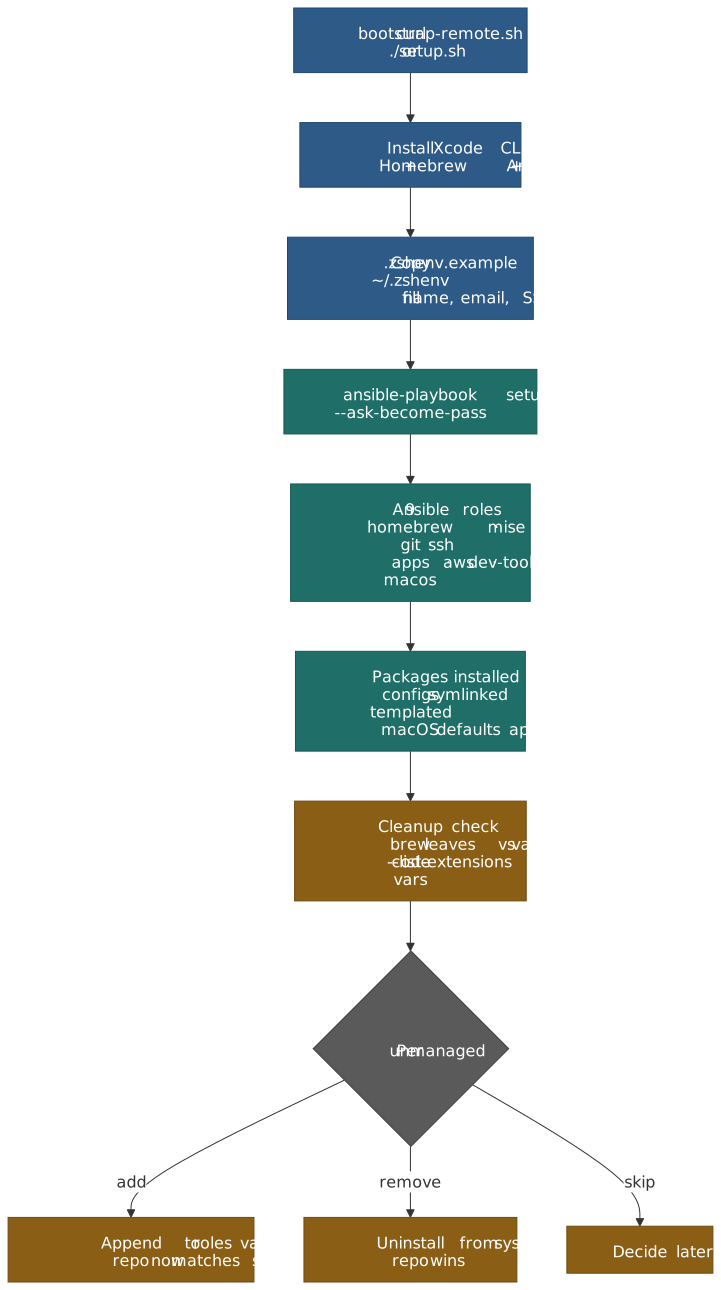
Three rules that shape everything
- Reproducibility is not optional. A fresh Mac should reach full productivity from one command, with no manual install steps interleaved between Ansible runs. That keeps the repo honest — anything I had to do “by hand” gets added back to the playbook.
- Work and personal stay separated at the identity layer. Different git emails, different SSH keys, different commit-signing keys, all selected automatically by repo path or remote URL. I should never be able to push to a work repo with my personal identity, even by accident.
- The repo is the source of truth. Configs are symlinked, not copied. Identities are templated from environment variables, not committed. A cleanup check flags anything I installed by hand so I can either adopt it or remove it.
One-line bootstrap
bash -c "$(curl -fsSL https://raw.githubusercontent.com/sujeet-pro/dot-files/main/bootstrap-remote.sh)"That script clones the repo to ~/personal/dot-files and runs ./setup.sh, which:
- Installs Xcode CLI tools, Homebrew, Ansible, and the
community.generalcollection if any are missing. - Copies
configs/shell/.zshenv.exampleto~/.zshenvand stops if I have not filled in the required variables (GIT_USER_NAME,GIT_PERSONAL_EMAIL,GIT_WORK_EMAIL,SSH_PERSONAL_KEY,SSH_WORK_KEY). - Runs
ansible-playbook setup.yml --ask-become-pass. - Runs the cleanup check (more on that below).
After that, every day-to-day operation is a Make target:
make update # brew update + re-run the playbookmake check # ansible --check --diff (dry run)make cleanup # only the cleanup checkmake validate # tools, symlinks, env vars, defaultsmake test-vm # full end-to-end run inside a Tart macOS VMmake test-vm is the one I use whenever I refactor the playbook. Tart spins up a clean macOS Sequoia VM and runs the full bootstrap end to end. It takes ~30 minutes the first time (the base image is around 15 GB) and a few minutes after, but it is the only way I trust the “fresh Mac” claim.
Why Ansible (and not a shell script)
Setup scripts that just shell out to brew install work right up until they do not. The first time you re-run them on a partially set-up machine, you find out which steps were idempotent and which ones were just “lucky on a clean Mac”.
Ansible buys three things that matter here:
- Idempotent modules for the things shell scripts get wrong:
community.general.homebrew,community.general.osx_defaults,ansible.builtin.filewithstate: link, and thetemplatemodule for Jinja2-rendered configs. - A real role/task model, so the playbook reads as nine focused roles (
homebrew,mise,shell,git,ssh,apps,aws,dev-tools,macos) instead of one ever-growing script. --check --difffor free, which is whatmake checkruns before any non-trivial change.
The cost is one extra Homebrew dependency. That is a trade I will take every time over a 600-line shell script that “mostly” handles re-runs.
What gets installed
The full lists live in roles/homebrew/vars/main.yml and roles/apps/vars/main.yml. The shape:
| Layer | How it is installed | Examples |
|---|---|---|
| CLI tools | Homebrew formulae | bat, eza, ripgrep, fzf, zoxide, starship, lazygit, git-delta, difftastic, atuin, btop, jq |
| Language runtimes | mise (managed inside the mise role) |
node@lts, bun, python@3.12, java@temurin-17, uv, yarn@1 |
| GUI apps | Homebrew casks | cursor, visual-studio-code, zed, ghostty, cmux, claude, claude-code, raycast, bruno |
| VS Code extensions | code --install-extension from apps role |
anthropic.claude-code, astro-build.astro-vscode, biomejs.biome, eamodio.gitlens |
| macOS defaults | community.general.osx_defaults |
screenshot location and format, Finder, Dock, keyboard repeat, Mission Control |
| Raycast scripts | Symlinked into ~/.config/raycast |
Kill port, open Ghostty here, toggle dark mode, flush DNS, pretty JSON, etc. |
A few choices in there are worth calling out.
One runtime manager: mise
Older versions of this setup used goenv, pyenv, SDKMAN, and fnm — one tool per language. That worked, but each one shelled out at startup, each one had its own way of pinning versions, and each one had its own quirks for activating environments.
mise collapses all of that into one tool that handles every runtime, plus arbitrary CLI tools, plus per-project environment variables. The whole runtime list is six lines:
[tools]bun = "latest"java = "temurin-17"node = "lts"python = "3.12"uv = "latest"yarn = "1"In .zshrc it is one activation line:
if command -v mise &>/dev/null; then eval "$(mise activate zsh)"fidirenv also dropped out — mise reads [env] blocks from .mise.toml natively, and the ~/.zshenv PATH entry for ~/.local/share/mise/shims makes the runtimes available to GUI apps too.
Note
Volta is officially marked as unmaintained — the pinned tracking issue went up in late 2025 and recommends migrating to mise. If you are still on Volta, this is a good moment to switch. The Node.js download page now lists fnm alongside nvm as a first-class install option, and mise is the path with the lowest long-term maintenance for anyone juggling more than one runtime.
Modern CLI defaults
I do not type the legacy commands any more, so the aliases reflect that:
| Default | Replacement | Why |
|---|---|---|
ls |
eza |
Icons, git status, tree view, sane colors |
cat |
bat |
Syntax highlighting and line numbers; aliased with --paging=never |
grep |
ripgrep |
Respects .gitignore, parallel, ~5–10× faster on real repos |
cd |
zoxide |
Frecency-ranked jumps via cd <pattern>; replaces cd directly with --cmd=cd |
Ctrl+R |
atuin |
Full-text fuzzy history with timestamps, per-directory filters, optional sync |
git diff |
git-delta |
Configured as the pager and interactive.diffFilter |
git diff |
difftastic |
Available as git dft for AST-aware diffs that ignore formatting |
git ui |
lazygit |
Aliased as lg for stage-by-hunk, rebase-by-keystroke workflows |
Two of these earn the swap on their own:
atuinkeeps a SQLite history per machine, optionally syncs across machines, and turnsCtrl+Rinto a full-screen fuzzy search with command duration, exit code, and the working directory it ran in. After a few weeks I stopped reaching forhistory | grepentirely.difftasticis the only diff that has ever made a noisy PR review feel quiet.git dftshows what actually changed when most of the diff is whitespace or reformatting.
The shell, in dependency order
.zshrc is structured as numbered sections so the load order is obvious. The condensed shape:
# 0. Detect Homebrew prefix once, cache as $BREW_PREFIX# 1. PATH (user bin → Homebrew → rest)# 2. mise activation# 3. History (1M entries, EXTENDED_HISTORY, dedupe)# 4. compinit + completion styling# 5. fzf integration (--zsh, fd-aware FZF_DEFAULT_COMMAND, bat preview)# 6. atuin init# 8. Aliases (eza, bat, git, kubectl, docker, AWS, jq)# 9. zsh-autosuggestions → starship → zsh-syntax-highlighting (last)# 10. Antigravity, bun, vite-plus# 11. zoxide init (must be the last chpwd hook)Two non-obvious choices in there:
kubectlandhelmare lazy-loaded. Their completion files are slow to source (~200 ms combined) and I rarely use them in a fresh shell. Wrapping them in functions that source completions on first call moves that cost off cold start.zoxideinitializes last, afterstarship. Both registerchpwdhooks; ifzoxideis initialized first, anything that re-registerschpwdlater silently breaks frecency tracking.
The full list of features and shortcuts lives in configs/shell/SHELL-GUIDE.md inside the dot-files repo.
Identity separation: git and SSH
This is the part that took the most iteration. The constraints:
- Personal commits must use my personal email and SSH signing key.
- Work commits must use my work email and SSH signing key.
- The wrong identity should never be possible, even on a freshly cloned repo I have not touched yet.
- Commit signing must be on by default.
The shape that finally stuck uses three layers — a base config, a per-context overlay selected by includeIf, and a per-host SSH IdentityFile.
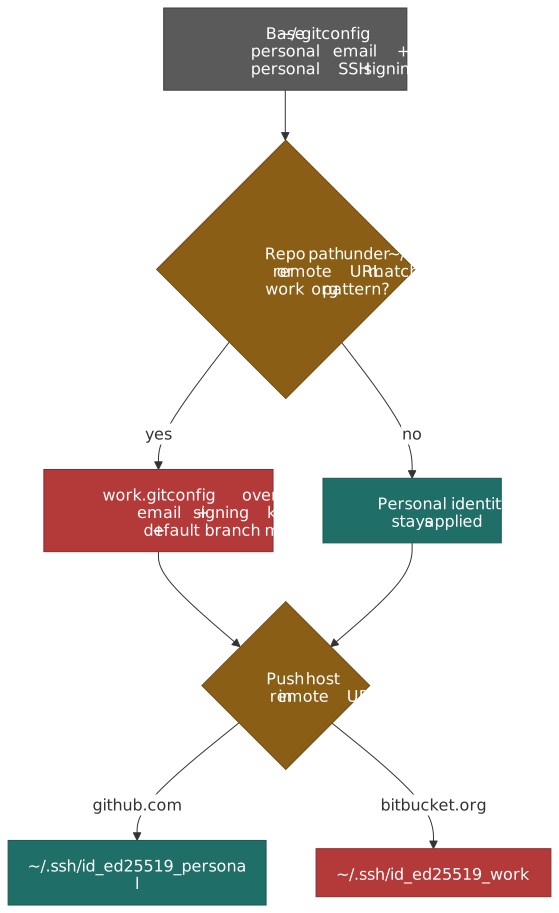
Layer 1: a base ~/.gitconfig
The base config is generated from a Jinja2 template (roles/git/templates/gitconfig.j2). It sets the personal identity as the default, enables SSH commit signing, configures the modern delta + difftastic diff stack, and ends with conditional includes:
[user] name = Sujeet email = contact@sujeet.pro[gpg] format = ssh[gpg "ssh"] allowedSignersFile = ~/.config/git-configs/allowed_signers[user] signingkey = ~/.ssh/id_ed25519_personal.pub[commit] gpgsign = true[tag] gpgsign = true[core] pager = delta hooksPath = ~/.git-hooks[interactive] diffFilter = delta --color-only[merge] conflictstyle = zdiff3A couple of those defaults deserve a mention:
gpg.format = sshuses the existing SSH key as the commit signing key. No GPG, no separate keyring, no passphrase wrangling — and GitHub and GitLab both accept SSH-signed commits as verified.merge.conflictstyle = zdiff3shows the original common ancestor block alongside the conflicting versions. It makes 3-way merges much easier to reason about than the defaultmergestyle. Available since Git 2.35.
Layer 2: conditional includes, two ways
The base config ends with includeIf blocks generated from the env vars in ~/.zshenv:
# Directory-based: any repo under ~/work/ or ~/workspace/[includeIf "gitdir:~/work/"] path = ~/.config/git-configs/work.gitconfig# Remote-URL-based: any repo whose remote points at our work GitHub org[includeIf "hasconfig:remote.*.url:git@github.com:Quince-Engineering/**"] path = ~/.config/git-configs/work.gitconfig[includeIf "hasconfig:remote.*.url:https://github.com/Quince-Engineering/**"] path = ~/.config/git-configs/work.gitconfiggitdir: covers the normal case where work repos live under ~/work/. hasconfig:remote.*.url: (Git 2.36+) covers the case I missed for years — cloning a work repo into ~/personal/something and then accidentally signing commits with the wrong identity.
The work overlay is small:
[user] email = sujeet@company-name.com signingkey = ~/.ssh/id_ed25519_work.pub[core] excludesFile = ~/.gitignore-work[init] defaultBranch = master[pull] rebase = true~/.gitignore-work is shared with the team’s expectations (no .mise.toml in committed work). The personal side keeps mise configs in repos because that is the source of truth for local environments.
Layer 3: SSH per-host identity
The SSH config is a tiny template that maps each host to the right key:
Include ~/.colima/ssh_confi?Host github.com HostName github.com User git IdentityFile ~/.ssh/id_ed25519_personalHost bitbucket.org HostName bitbucket.org User git IdentityFile ~/.ssh/id_ed25519_workInclude ~/.ssh/config.local~/.ssh/config.local is for personal hosts that have no business in a public dotfiles repo (EC2 boxes, home lab IPs, etc.). The Colima Include is glob-tolerant — it silently skips when the file does not exist on machines without container work.
Tip
Generate Ed25519 keys with ssh-keygen -t ed25519 -C "your_email@example.com". They are smaller, faster, and the recommended default from both GitHub and the OpenSSH project. RSA only matters for legacy systems.
Editor and terminal
I use Zed as the daily editor (and as $EDITOR), Cursor for AI-heavy refactors, and VS Code when I need an extension that nothing else has. All three live as Homebrew casks and have their settings symlinked from the repo:
~/.config/zed/settings.json → configs/zed/settings.json~/Library/Application Support/Code/User/settings.json → configs/vscode/settings.jsonThe terminal is Ghostty (with cmux as a libghostty-based macOS terminal with vertical tabs, native split panes, and workspace restore — useful when juggling several AI agents at once). One Ghostty config powers both:
font-family = JetBrainsMono Nerd Fontfont-size = 15theme = dark:Atom One Dark,light:Atom One Lightwindow-padding-x = 4window-padding-y = 4cursor-style = blockcursor-style-blink = falsemouse-hide-while-typing = truecopy-on-select = clipboardconfirm-close-surface = falseA Nerd Font is a hard requirement here — eza, starship, and the language indicators in the prompt all assume the icon range is available. I use font-jetbrains-mono-nerd-font and never set the non-nerd variant; that way the editor and terminal share one font family.
The VS Code extensions list lives in roles/apps/vars/main.yml and gets installed (and uninstalled) by the playbook. The cleanup check uses code --list-extensions to detect anything I added by hand and prompts me to either add it to the repo or uninstall it.
macOS defaults via Ansible
The macos role is the part I missed in earlier iterations of this setup. macOS has dozens of preferences that I always set on a fresh machine, and the ones I forget become small, daily annoyances.
The whole role is community.general.osx_defaults calls fed from roles/macos/vars/main.yml:
# Screenshotsscreenshot_location: "{{ home_dir }}/screen-captures"screenshot_format: pngscreenshot_disable_shadow: true# Finderfinder_show_hidden_files: truefinder_search_scope: SCcf # Search current folder by defaultfinder_disable_extension_warning: true# Dockdock_autohide: truedock_tilesize: 36dock_mineffect: scaledock_show_recents: falsedock_autohide_delay: 0# Keyboardkeyboard_key_repeat: 2keyboard_initial_repeat: 15keyboard_disable_press_and_hold: true# Mission Controlmissioncontrol_mru_spaces: false# General UIui_save_to_disk: trueui_disable_quarantine: trueTwo of those are worth singling out:
ApplePressAndHoldEnabled = falseturns off the accent-character popup so holding down a key actually repeats. WithKeyRepeat = 2andInitialKeyRepeat = 15, key repeat in editors is suddenly fast enough to use.DSDontWriteNetworkStores = truestops macOS from sprinkling.DS_Storefiles across network shares and USB volumes. Future me, working with a colleague on a shared drive, says thank you.
The role finishes by killall Dock Finder SystemUIServer so the changes apply without a logout.
The cleanup check
This is the feature I underestimated when I added it.
After every setup.sh (or make cleanup), the script compares what is actually installed against what the repo declares:
brew leaves(only explicitly installed formulae) vshomebrew_formulaeandhomebrew_formulae_absentbrew list --caskvshomebrew_casksandhomebrew_casks_absentcode --list-extensionsvsvscode_extensions
For every unmanaged item, it offers four choices:
What would you like to do? [a] Add all to dotfiles config (homebrew_formulae) [r] Remove all from system [i] Review individually [s] SkipThe “absent” lists are the other half of the trick — when I deliberately remove a tool (say, tree after I started using eza --tree), it goes into homebrew_formulae_absent so the next brew install does not silently put it back, and so the cleanup check stops nagging me about it.
The result is that the repo and the system never quietly diverge. Either I declare a tool, or I uninstall it.
What I deliberately left out
A few things that look like they should be in here, and are not:
oh-my-zsh/prezto. I tried both for years. They are heavy, they hide the actual zsh config behind plugin abstractions, and the bits I actually use (autosuggestions, syntax highlighting, fzf integration, a fast prompt) are all standalone packages that load in well under 100 ms. The zshrc is now ~280 lines I can read top to bottom.- Per-language version managers. As covered above,
misedoes it all. - A separate clipboard manager. Raycast already includes one, plus the script commands and window management I would otherwise install separately. One launcher is enough.
- A custom
~/.gitconfigper repo. The conditional-include pattern handles every case I have ever needed without a single per-repo config file.
What is still manual
Things settings-manual.md tracks because no amount of Ansible will fix them:
- Apps not in Homebrew or behind MDM (App Store apps, Perplexity, work-managed installs).
- Raycast extensions and hotkey assignments — Raycast does not expose a CLI for these.
- Atuin login (interactive; needs an account if you want sync).
- SSH key generation and uploading the public keys to GitHub / Bitbucket.
- Browser sign-ins and extensions.
The list is short on purpose. Anything that lands on it stays there until either upstream ships a CLI or I find a reasonable workaround.
Summary
- One
curlline bootstraps a fresh Mac end to end; everything after ismake update. - Ansible roles isolate concerns: Homebrew, mise, shell, git, ssh, apps, AWS, dev-tools, macOS defaults.
misereplaces every per-language version manager and everydirenvuse case I had.- Git identity is layered: base config +
gitdir:andhasconfig:remote.*.url:includes + per-host SSHIdentityFile. Commits are SSH-signed by default. - Modern CLI defaults —
eza,bat,ripgrep,fzf,zoxide,atuin,git-delta,difftastic,lazygit— replace the legacy UNIX equivalents and stay opinionated about the swap. - macOS defaults are set via
community.general.osx_defaultsso a fresh machine does not feel like a fresh machine for very long. - The cleanup check stops the repo and the system from drifting apart, by forcing every install to be a deliberate “add to dotfiles” or “remove from system” decision.
References
sujeet-pro/dot-files— the repository this post describes- Git conditional includes —
gitdir,gitdir/i,onbranch,hasconfig:remote.*.url: - SSH commit signing on GitHub
misedocumentation — runtime and tool manageratuin— magical shell historygit-deltaanddifftasticstarshipconfigurationzoxidealgorithm — frecency ranking- Volta deprecation notice — context for the
misemigration - Ghostty configuration
- Ansible
community.general.osx_defaultsmodule